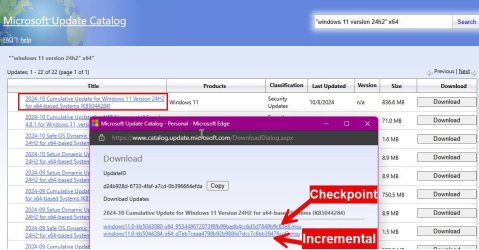
To set the stage, I'm sure that everyone is aware by now that starting with 24H2 the updates are no longer just cumulative updates. There will now be "Checkpoint" updates and then incremental updates. The idea is that you first need to install the Checkpoint update and then the incremental.
With the update to build 26100.2152 today we now have 2 incremental updates like this:
1 - KB5043080 - Checkpoint Update [26100.1742] - 509MB
2 - KB5044284 - Incremental Update [26100.2033] - 327MB
3 - KB5044384 - Incremental Update [26100.2152] - 356MB
This allowed me to do some testing.
It turns that, while Microsoft uses the term "Incremental update", these are actually differential updates. In other words, if you were upgrading from 26100.172, if these updates were truly incremental then you would need to install both KB5044284 and KB5044384. It turns out that you can install ONLY KB5044384 to get from 1742 to 2152.
So, if you are on a build prior to 1742 you would install item 1 above (the checkpoint update) and then item #3 (the latest incremental (differential) update.
If you are already on 1742, you need only apply the latest incremental (differential) update - KB5044384.
Just thought that this might help for anyone applying updates manually and not through Windows update.
EDIT: Ok, there was actually at least one more of these incremental updates:
KB5043178 - Incremental Update [26100.1882] - 241MB
With the update to build 26100.2152 today we now have 2 incremental updates like this:
1 - KB5043080 - Checkpoint Update [26100.1742] - 509MB
2 - KB5044284 - Incremental Update [26100.2033] - 327MB
3 - KB5044384 - Incremental Update [26100.2152] - 356MB
This allowed me to do some testing.
It turns that, while Microsoft uses the term "Incremental update", these are actually differential updates. In other words, if you were upgrading from 26100.172, if these updates were truly incremental then you would need to install both KB5044284 and KB5044384. It turns out that you can install ONLY KB5044384 to get from 1742 to 2152.
So, if you are on a build prior to 1742 you would install item 1 above (the checkpoint update) and then item #3 (the latest incremental (differential) update.
If you are already on 1742, you need only apply the latest incremental (differential) update - KB5044384.
Just thought that this might help for anyone applying updates manually and not through Windows update.
EDIT: Ok, there was actually at least one more of these incremental updates:
KB5043178 - Incremental Update [26100.1882] - 241MB
Last edited:
My Computers
-
At a glance
Win11 Pro 25H2 (RTM+)Intel i7-14650HX32 GBNo GPU - Built-in Intel Graphics- OS
- Win11 Pro 25H2 (RTM+)
- Computer type
- PC/Desktop
- Manufacturer/Model
- Acemagic
- CPU
- Intel i7-14650HX
- Memory
- 32 GB
- Graphics Card(s)
- No GPU - Built-in Intel Graphics
- Sound Card
- Integrated
- Monitor(s) Displays
- Varies as machine will often be moved to locations with different monitors
- Screen Resolution
- Varies
- Hard Drives
- 1 x 1TB Gen 4 NVMe SSD
- PSU
- 120W Power Brick
- Keyboard
- Corsair K70 Max RGB Magnetic Keyboard
- Mouse
- Logitech MX Master 3
- Internet Speed
- 1Gb Up / 1 Gb Down
- Browser
- Edge
- Antivirus
- Windows Defender
-
At a glance
Win11 Pro 25H2 (RTM+)Intel i7-1255U16 GBIntel Iris Xe Graphics- Operating System
- Win11 Pro 25H2 (RTM+)
- Computer type
- Laptop
- Manufacturer/Model
- Lenovo ThinkBook 13x Gen 2
- CPU
- Intel i7-1255U
- Memory
- 16 GB
- Graphics card(s)
- Intel Iris Xe Graphics
- Sound Card
- Realtek® ALC3306-CG codec
- Monitor(s) Displays
- 13.3-inch IPS Display
- Screen Resolution
- WQXGA (2560 x 1600)
- Hard Drives
- 2 TB 4 x 4 NVMe SSD
- PSU
- USB-C / Thunderbolt 4 Power / Charging
- Keyboard
- Backlit, spill resistant keyboard
- Mouse
- Buttonless Glass Precision Touchpad
- Internet Speed
- 1Gb Up / 1Gb Down
- Browser
- Edge
- Antivirus
- Windows Defender
- Other Info
- WiFi 6e / Bluetooth 5.1 / Facial Recognition / Fingerprint Sensor / ToF (Time of Flight) Human Presence Sensor