Mouse and Keyboard freeze


levitmic

Member
Local time
3:13 PM
Posts
22
OS
Windows 11
Greetings,

I have a problem with Mouse, that start freezing (no responding).
The malfunction begins to occur after 6-7 minutes of work, after Windows Login.
Also, I noticed that a keyboard also does not respond in time. All this doesn't start immediately after boot, but rather slowly.
After a while, freezing become more frequent - every 2-3 seconds (for keyboard it's implemented as "double clicks" or some delay after button press)
What I did:
1. Checked mouse and keyboard on another PC
2. Swap USB ports
3. Scan for viruses( ESET + Malwarebytes)
4. SFC, CHKDSK, DSIM
5. After all this, windows repair(reinstall)
6. Uninstall NVIDIA drivers, Install Intel LAN driver instead Microsoft

Windows 11, 22H2, build 22621.2506

The problem still persist.


V2 log collector after windows repair

V2 log collection after section 6

Tuneup-log after windows repair
 

My Computer My Computer

At a glance

Windows 11I7 6700K32gb1660 super
OS
Windows 11
Computer type
PC/Desktop
CPU
I7 6700K
Motherboard
Z170 Pro Gaming
Memory
32gb
Graphics Card(s)
1660 super
Could be related to the age and CPU of your PC?
The CPU in 'My Computer' is from 2015 and 6th Gen so you are running Win 11 on an unsupported PC.
After 8 years have you checked that the inside of the machine is clean? If there is too much dust then components can overheat and cause issues.
 

My Computers My Computers

  • At a glance

    Windows 11 ProAMD Ryzen 9 8945HS32GB DDR5 SO-DIMMIntegrated AMD Radeon 780M (4.00 GHz)
    OS
    Windows 11 Pro
    Computer type
    PC/Desktop
    Manufacturer/Model
    GMKtec K11
    CPU
    AMD Ryzen 9 8945HS
    Memory
    32GB DDR5 SO-DIMM
    Graphics Card(s)
    Integrated AMD Radeon 780M (4.00 GHz)
    Monitor(s) Displays
    Benq 2250HM
    Screen Resolution
    1920 x 1080
    Hard Drives
    1 TB PCIe 4.0 NVMe M.2 SSD
  • At a glance

    Windows 11 HomeIntel® Core™ Ultra 7 - 255H processor16 GB LPDDR5 SDRAMIntel Arc 140T onboard graphics
    Operating System
    Windows 11 Home
    Computer type
    Laptop
    Manufacturer/Model
    ASUS Zenbook 14 OLED 14" Laptop - UX3405CA-QL192W
    CPU
    Intel® Core™ Ultra 7 - 255H processor
    Memory
    16 GB LPDDR5 SDRAM
    Graphics card(s)
    Intel Arc 140T onboard graphics
    Screen Resolution
    1920 x 1200 (16:10 WUXGA resolution) OLED Touchscreen
    Hard Drives
    1TB SSD
Could be related to the age and CPU of your PC?
The CPU in 'My Computer' is from 2015 and 6th Gen so you are running Win 11 on an unsupported PC.
After 8 years have you checked that the inside of the machine is clean? If there is too much dust then components can overheat and cause issues.
I've check it. pretty clean inside (case with dust filters), found minor dust behind CPU cooler Noctua U12S
 

My Computer My Computer

At a glance

Windows 11I7 6700K32gb1660 super
OS
Windows 11
Computer type
PC/Desktop
CPU
I7 6700K
Motherboard
Z170 Pro Gaming
Memory
32gb
Graphics Card(s)
1660 super
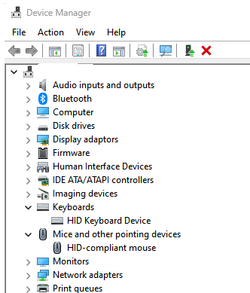
Have you checked in Device Manager that you have HID drivers installed for mouse and keyboard and that there is no yellow warning triangles showing on them? See photo.

Also are the mouse and KB wired or wireless?

DM.png
 

My Computers My Computers

  • At a glance

    Windows 11 ProAMD Ryzen 9 8945HS32GB DDR5 SO-DIMMIntegrated AMD Radeon 780M (4.00 GHz)
    OS
    Windows 11 Pro
    Computer type
    PC/Desktop
    Manufacturer/Model
    GMKtec K11
    CPU
    AMD Ryzen 9 8945HS
    Memory
    32GB DDR5 SO-DIMM
    Graphics Card(s)
    Integrated AMD Radeon 780M (4.00 GHz)
    Monitor(s) Displays
    Benq 2250HM
    Screen Resolution
    1920 x 1080
    Hard Drives
    1 TB PCIe 4.0 NVMe M.2 SSD
  • At a glance

    Windows 11 HomeIntel® Core™ Ultra 7 - 255H processor16 GB LPDDR5 SDRAMIntel Arc 140T onboard graphics
    Operating System
    Windows 11 Home
    Computer type
    Laptop
    Manufacturer/Model
    ASUS Zenbook 14 OLED 14" Laptop - UX3405CA-QL192W
    CPU
    Intel® Core™ Ultra 7 - 255H processor
    Memory
    16 GB LPDDR5 SDRAM
    Graphics card(s)
    Intel Arc 140T onboard graphics
    Screen Resolution
    1920 x 1200 (16:10 WUXGA resolution) OLED Touchscreen
    Hard Drives
    1TB SSD
Screenshot 2023-11-12 192402.png

Wired Logitech G610 keyboard + wired Logitech Pro Gaming mouse
I have only 1 keyboard , but in device manager 3. All 3 keyboards Reinstalls after deleting
 

My Computer My Computer

At a glance

Windows 11I7 6700K32gb1660 super
OS
Windows 11
Computer type
PC/Desktop
CPU
I7 6700K
Motherboard
Z170 Pro Gaming
Memory
32gb
Graphics Card(s)
1660 super
Post a photo of the devices in Device Manager (Like I did). Whoops, our posts crossed.

Seems that the three keyboard drivers may be competing for the same resource. Either that or the USB drivers are corrupt.

To clarify - You have uninstalled all three keyboards and all three get automatically reinstalled after a restart? Or is it that you have uninstalled two leaving one remaining and the two get reinstalled?

This may be a registry entry issue but I am unable to advise on editing the registry due the complexity and risks involved. Maybe someone else with more knowledge can help.
 
Last edited:

My Computers My Computers

  • At a glance

    Windows 11 ProAMD Ryzen 9 8945HS32GB DDR5 SO-DIMMIntegrated AMD Radeon 780M (4.00 GHz)
    OS
    Windows 11 Pro
    Computer type
    PC/Desktop
    Manufacturer/Model
    GMKtec K11
    CPU
    AMD Ryzen 9 8945HS
    Memory
    32GB DDR5 SO-DIMM
    Graphics Card(s)
    Integrated AMD Radeon 780M (4.00 GHz)
    Monitor(s) Displays
    Benq 2250HM
    Screen Resolution
    1920 x 1080
    Hard Drives
    1 TB PCIe 4.0 NVMe M.2 SSD
  • At a glance

    Windows 11 HomeIntel® Core™ Ultra 7 - 255H processor16 GB LPDDR5 SDRAMIntel Arc 140T onboard graphics
    Operating System
    Windows 11 Home
    Computer type
    Laptop
    Manufacturer/Model
    ASUS Zenbook 14 OLED 14" Laptop - UX3405CA-QL192W
    CPU
    Intel® Core™ Ultra 7 - 255H processor
    Memory
    16 GB LPDDR5 SDRAM
    Graphics card(s)
    Intel Arc 140T onboard graphics
    Screen Resolution
    1920 x 1200 (16:10 WUXGA resolution) OLED Touchscreen
    Hard Drives
    1TB SSD

Attachments

  • Screenshot 2023-11-12 192449.png
    Screenshot 2023-11-12 192449.png
    14.8 KB · Views: 2

My Computer My Computer

At a glance

Windows 11I7 6700K32gb1660 super
OS
Windows 11
Computer type
PC/Desktop
CPU
I7 6700K
Motherboard
Z170 Pro Gaming
Memory
32gb
Graphics Card(s)
1660 super
To clarify - You have uninstalled all three keyboards and all three get automatically reinstalled after a restart?
Correct. Even they reinstallaed after pressing SCAN FOR HARDWARE CHANGES
 

My Computer My Computer

At a glance

Windows 11I7 6700K32gb1660 super
OS
Windows 11
Computer type
PC/Desktop
CPU
I7 6700K
Motherboard
Z170 Pro Gaming
Memory
32gb
Graphics Card(s)
1660 super
Hope someone else can help you.
 

My Computers My Computers

  • At a glance

    Windows 11 ProAMD Ryzen 9 8945HS32GB DDR5 SO-DIMMIntegrated AMD Radeon 780M (4.00 GHz)
    OS
    Windows 11 Pro
    Computer type
    PC/Desktop
    Manufacturer/Model
    GMKtec K11
    CPU
    AMD Ryzen 9 8945HS
    Memory
    32GB DDR5 SO-DIMM
    Graphics Card(s)
    Integrated AMD Radeon 780M (4.00 GHz)
    Monitor(s) Displays
    Benq 2250HM
    Screen Resolution
    1920 x 1080
    Hard Drives
    1 TB PCIe 4.0 NVMe M.2 SSD
  • At a glance

    Windows 11 HomeIntel® Core™ Ultra 7 - 255H processor16 GB LPDDR5 SDRAMIntel Arc 140T onboard graphics
    Operating System
    Windows 11 Home
    Computer type
    Laptop
    Manufacturer/Model
    ASUS Zenbook 14 OLED 14" Laptop - UX3405CA-QL192W
    CPU
    Intel® Core™ Ultra 7 - 255H processor
    Memory
    16 GB LPDDR5 SDRAM
    Graphics card(s)
    Intel Arc 140T onboard graphics
    Screen Resolution
    1920 x 1200 (16:10 WUXGA resolution) OLED Touchscreen
    Hard Drives
    1TB SSD
P.S: only one HID Keyboard Device remains in Device Manager after disconnecting the original
 

My Computer My Computer

At a glance

Windows 11I7 6700K32gb1660 super
OS
Windows 11
Computer type
PC/Desktop
CPU
I7 6700K
Motherboard
Z170 Pro Gaming
Memory
32gb
Graphics Card(s)
1660 super
@levitmic - Now there is only one HID keyboard device showing in DM has this fixed the problem?
 

My Computers My Computers

  • At a glance

    Windows 11 ProAMD Ryzen 9 8945HS32GB DDR5 SO-DIMMIntegrated AMD Radeon 780M (4.00 GHz)
    OS
    Windows 11 Pro
    Computer type
    PC/Desktop
    Manufacturer/Model
    GMKtec K11
    CPU
    AMD Ryzen 9 8945HS
    Memory
    32GB DDR5 SO-DIMM
    Graphics Card(s)
    Integrated AMD Radeon 780M (4.00 GHz)
    Monitor(s) Displays
    Benq 2250HM
    Screen Resolution
    1920 x 1080
    Hard Drives
    1 TB PCIe 4.0 NVMe M.2 SSD
  • At a glance

    Windows 11 HomeIntel® Core™ Ultra 7 - 255H processor16 GB LPDDR5 SDRAMIntel Arc 140T onboard graphics
    Operating System
    Windows 11 Home
    Computer type
    Laptop
    Manufacturer/Model
    ASUS Zenbook 14 OLED 14" Laptop - UX3405CA-QL192W
    CPU
    Intel® Core™ Ultra 7 - 255H processor
    Memory
    16 GB LPDDR5 SDRAM
    Graphics card(s)
    Intel Arc 140T onboard graphics
    Screen Resolution
    1920 x 1200 (16:10 WUXGA resolution) OLED Touchscreen
    Hard Drives
    1TB SSD
@levitmic - Now there is only one HID keyboard device showing in DM has this fixed the problem?
No, still remains 3. One hid only when no phisical keyboard connected to the PC.

P.S: In some forums (Microsoft...), I found that multiple HID not affect the mouse or keyboard performance.

No mater what I did, even replacing keyboard or mouse, the problem still exist. What is strange, that freezes comes after a while.
 

My Computer My Computer

At a glance

Windows 11I7 6700K32gb1660 super
OS
Windows 11
Computer type
PC/Desktop
CPU
I7 6700K
Motherboard
Z170 Pro Gaming
Memory
32gb
Graphics Card(s)
1660 super
(y)
 

My Computers My Computers

  • At a glance

    Windows 11 ProAMD Ryzen 9 8945HS32GB DDR5 SO-DIMMIntegrated AMD Radeon 780M (4.00 GHz)
    OS
    Windows 11 Pro
    Computer type
    PC/Desktop
    Manufacturer/Model
    GMKtec K11
    CPU
    AMD Ryzen 9 8945HS
    Memory
    32GB DDR5 SO-DIMM
    Graphics Card(s)
    Integrated AMD Radeon 780M (4.00 GHz)
    Monitor(s) Displays
    Benq 2250HM
    Screen Resolution
    1920 x 1080
    Hard Drives
    1 TB PCIe 4.0 NVMe M.2 SSD
  • At a glance

    Windows 11 HomeIntel® Core™ Ultra 7 - 255H processor16 GB LPDDR5 SDRAMIntel Arc 140T onboard graphics
    Operating System
    Windows 11 Home
    Computer type
    Laptop
    Manufacturer/Model
    ASUS Zenbook 14 OLED 14" Laptop - UX3405CA-QL192W
    CPU
    Intel® Core™ Ultra 7 - 255H processor
    Memory
    16 GB LPDDR5 SDRAM
    Graphics card(s)
    Intel Arc 140T onboard graphics
    Screen Resolution
    1920 x 1200 (16:10 WUXGA resolution) OLED Touchscreen
    Hard Drives
    1TB SSD

Latest Support Threads

Back
Top Bottom