JavaScript is disabled. For a better experience, please enable JavaScript in your browser before proceeding.
You are using an out of date browser. It may not display this or other websites correctly.
You should upgrade or use an
alternative browser .
Mouse Pointer Option, “Enhance pointer precision” Keeps Getting Reset
“Enhance pointer precision” keeps getting reset. I don’t even have to reboot for it to happen.
Windows 11 Intel 7-10700 16gb Windows 11 PC/Desktop Del XPS 8940 Intel 7-10700 Dell 0KV3RP 16gb Microsoft Natural Ergonomic Keyboard 4000 Kensington Expert Mouse KB64325
Well-known member
Power User
VIP
“Enhance pointer precision” keeps getting reset
Do you mean reset from 'ticked' to 'unticked' or other way around? Whichever it is I wonder if it is a corrupt mouse driver? Try uninstalling and reinstalling the driver perhaps?
Also it is a wired or wireless mouse?
Windows 11 Pro AMD Ryzen 9 8945HS 32GB DDR5 SO-DIMM Integrated AMD Radeon 780M (4.00 GHz) Windows 11 Pro PC/Desktop GMKtec K11 AMD Ryzen 9 8945HS 32GB DDR5 SO-DIMM Integrated AMD Radeon 780M (4.00 GHz) Benq 2250HM 1920 x 1080 1 TB PCIe 4.0 NVMe M.2 SSD Bit Defender Total Security
Windows 11 Home Intel® Core™ Ultra 7 - 255H processor 16 GB LPDDR5 SDRAM Intel Arc 140T onboard graphics Windows 11 Home Laptop ASUS Zenbook 14 OLED 14" Laptop - UX3405CA-QL192W Intel® Core™ Ultra 7 - 255H processor 16 GB LPDDR5 SDRAM Intel Arc 140T onboard graphics 1920 x 1200 (16:10 WUXGA resolution) OLED Touchscreen 1TB SSD Bit Defender Total Security
Well-known member
Member
Thread Starter
“Enhance pointer precision” does not remain checked.
Windows 11 Intel 7-10700 16gb Windows 11 PC/Desktop Del XPS 8940 Intel 7-10700 Dell 0KV3RP 16gb Microsoft Natural Ergonomic Keyboard 4000 Kensington Expert Mouse KB64325
Well-known member
Member
Thread Starter
I rebooted my computer today. . . and now Enhance pointer precision is off.
I re-checked it.
Windows 11 Intel 7-10700 16gb Windows 11 PC/Desktop Del XPS 8940 Intel 7-10700 Dell 0KV3RP 16gb Microsoft Natural Ergonomic Keyboard 4000 Kensington Expert Mouse KB64325
Well-known member
Power User
VIP
Try running this batch file. It runs windows command line functions SFC, DISM and CHKDSK in order to check for and fix windows problems.
Windows 11 Pro AMD Ryzen 9 8945HS 32GB DDR5 SO-DIMM Integrated AMD Radeon 780M (4.00 GHz) Windows 11 Pro PC/Desktop GMKtec K11 AMD Ryzen 9 8945HS 32GB DDR5 SO-DIMM Integrated AMD Radeon 780M (4.00 GHz) Benq 2250HM 1920 x 1080 1 TB PCIe 4.0 NVMe M.2 SSD Bit Defender Total Security
Windows 11 Home Intel® Core™ Ultra 7 - 255H processor 16 GB LPDDR5 SDRAM Intel Arc 140T onboard graphics Windows 11 Home Laptop ASUS Zenbook 14 OLED 14" Laptop - UX3405CA-QL192W Intel® Core™ Ultra 7 - 255H processor 16 GB LPDDR5 SDRAM Intel Arc 140T onboard graphics 1920 x 1200 (16:10 WUXGA resolution) OLED Touchscreen 1TB SSD Bit Defender Total Security
Well-known member
Power User
VIP
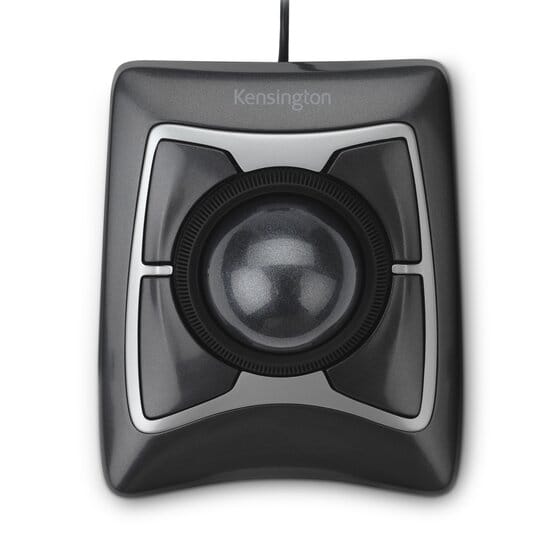
I use a Kensington trackball. There is no Kensington software installed.
Also install correct Kensington drivers. See: -
www.kensington.com
Windows 11 Pro AMD Ryzen 9 8945HS 32GB DDR5 SO-DIMM Integrated AMD Radeon 780M (4.00 GHz) Windows 11 Pro PC/Desktop GMKtec K11 AMD Ryzen 9 8945HS 32GB DDR5 SO-DIMM Integrated AMD Radeon 780M (4.00 GHz) Benq 2250HM 1920 x 1080 1 TB PCIe 4.0 NVMe M.2 SSD Bit Defender Total Security
Windows 11 Home Intel® Core™ Ultra 7 - 255H processor 16 GB LPDDR5 SDRAM Intel Arc 140T onboard graphics Windows 11 Home Laptop ASUS Zenbook 14 OLED 14" Laptop - UX3405CA-QL192W Intel® Core™ Ultra 7 - 255H processor 16 GB LPDDR5 SDRAM Intel Arc 140T onboard graphics 1920 x 1200 (16:10 WUXGA resolution) OLED Touchscreen 1TB SSD Bit Defender Total Security
Well-known member
Member
Thread Starter
There is no special driver for the Kensington ExpertMouse trackball.
Windows 11 Intel 7-10700 16gb Windows 11 PC/Desktop Del XPS 8940 Intel 7-10700 Dell 0KV3RP 16gb Microsoft Natural Ergonomic Keyboard 4000 Kensington Expert Mouse KB64325
Well-known member
Power User
VIP
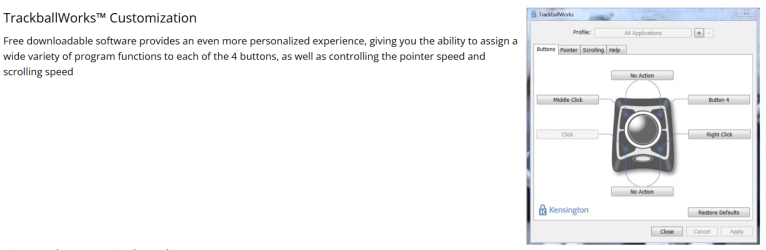
This website suggests that there is software for customising your mouse and the photo implies that pointer options are available.
www.kensington.com
Windows 11 Pro AMD Ryzen 9 8945HS 32GB DDR5 SO-DIMM Integrated AMD Radeon 780M (4.00 GHz) Windows 11 Pro PC/Desktop GMKtec K11 AMD Ryzen 9 8945HS 32GB DDR5 SO-DIMM Integrated AMD Radeon 780M (4.00 GHz) Benq 2250HM 1920 x 1080 1 TB PCIe 4.0 NVMe M.2 SSD Bit Defender Total Security
Windows 11 Home Intel® Core™ Ultra 7 - 255H processor 16 GB LPDDR5 SDRAM Intel Arc 140T onboard graphics Windows 11 Home Laptop ASUS Zenbook 14 OLED 14" Laptop - UX3405CA-QL192W Intel® Core™ Ultra 7 - 255H processor 16 GB LPDDR5 SDRAM Intel Arc 140T onboard graphics 1920 x 1200 (16:10 WUXGA resolution) OLED Touchscreen 1TB SSD Bit Defender Total Security
Well-known member
Power User
VIP
If you can't resolve the issue to your satisfaction then maybe try another type of mouse? It may cost you some £ but may lead to a less frustrating computer experience.
Windows 11 Pro AMD Ryzen 9 8945HS 32GB DDR5 SO-DIMM Integrated AMD Radeon 780M (4.00 GHz) Windows 11 Pro PC/Desktop GMKtec K11 AMD Ryzen 9 8945HS 32GB DDR5 SO-DIMM Integrated AMD Radeon 780M (4.00 GHz) Benq 2250HM 1920 x 1080 1 TB PCIe 4.0 NVMe M.2 SSD Bit Defender Total Security
Windows 11 Home Intel® Core™ Ultra 7 - 255H processor 16 GB LPDDR5 SDRAM Intel Arc 140T onboard graphics Windows 11 Home Laptop ASUS Zenbook 14 OLED 14" Laptop - UX3405CA-QL192W Intel® Core™ Ultra 7 - 255H processor 16 GB LPDDR5 SDRAM Intel Arc 140T onboard graphics 1920 x 1200 (16:10 WUXGA resolution) OLED Touchscreen 1TB SSD Bit Defender Total Security
Well-known member
Member
Thread Starter
This website suggests that there is software for customising your mouse and the photo implies that pointer options are available.
View attachment 87961
www.kensington.com
That is the KensingtonWorks software that I don't like.
Windows 11 Intel 7-10700 16gb Windows 11 PC/Desktop Del XPS 8940 Intel 7-10700 Dell 0KV3RP 16gb Microsoft Natural Ergonomic Keyboard 4000 Kensington Expert Mouse KB64325
Well-known member
Power User
VIP
Okay then change your mouse as per my post #9. I think you can get these quite cheap so not much of a gamble. Good luck.
Windows 11 Pro AMD Ryzen 9 8945HS 32GB DDR5 SO-DIMM Integrated AMD Radeon 780M (4.00 GHz) Windows 11 Pro PC/Desktop GMKtec K11 AMD Ryzen 9 8945HS 32GB DDR5 SO-DIMM Integrated AMD Radeon 780M (4.00 GHz) Benq 2250HM 1920 x 1080 1 TB PCIe 4.0 NVMe M.2 SSD Bit Defender Total Security
Windows 11 Home Intel® Core™ Ultra 7 - 255H processor 16 GB LPDDR5 SDRAM Intel Arc 140T onboard graphics Windows 11 Home Laptop ASUS Zenbook 14 OLED 14" Laptop - UX3405CA-QL192W Intel® Core™ Ultra 7 - 255H processor 16 GB LPDDR5 SDRAM Intel Arc 140T onboard graphics 1920 x 1200 (16:10 WUXGA resolution) OLED Touchscreen 1TB SSD Bit Defender Total Security
Well-known member
Member
Thread Starter
The problem was solved by doing a Windows Reset.
Windows 11 Intel 7-10700 16gb Windows 11 PC/Desktop Del XPS 8940 Intel 7-10700 Dell 0KV3RP 16gb Microsoft Natural Ergonomic Keyboard 4000 Kensington Expert Mouse KB64325