Mouse stutters a lot after updating from Windows 10 to 11


jimhoyle

Active member
Local time
11:34 PM
Posts
7
OS
Windows 10 (on 10/2021)
Before updating from Windows 10 to 11 (22H2 / 22621.2715), I basically never experienced mouse cursor stutter/slowdown. Now it happens many times in hour. I don't know how to reproduce reliably, but it possibly has to do with memory handling or the paging file (virtual memory). It probably worsens if I have lots of Chrome pages/tabs open at once. But this exact same situation did not slow down Windows 10. I have 64 GB of physical memory. Apparently in System / About / Advanced system settings (System Properties) / Advanced / Performance / Settings / Advanced / Virtual memory I have Total paging file size for all drives = 36864 MB by default. I haven't touched this setting.

When the mouse cursor slows down (bad stuttering for a few seconds), I can't see anything special happening in the task manager, but I'm not sure about the memory handling etc. What could be the culprit?

I have ExplorerPatcher 22621.2506.60.1 (Windows 10 taskbar modification) installed, probably nothing else should be special. I think the random stuttering started right after updating to Windows 11, even before installing that ExplorerPatcher.
 

My Computer

System One

  • OS
    Windows 10 (on 10/2021)
Make sure all (mouse) drivers are up-to-date. Current drivers may be corrupt. Also try running this batch file, which contains Command window tasks sfc, DISM and CHKDSK in sequence. May take 10 minutes to complete.
 

Attachments

My Computers

System One System Two

  • OS
    Windows 11 Pro
    Computer type
    PC/Desktop
    Manufacturer/Model
    GMKtec K11
    CPU
    AMD Ryzen 9 8945HS
    Memory
    32GB DDR5 SO-DIMM
    Graphics Card(s)
    Integrated AMD Radeon 780M (4.00 GHz)
    Monitor(s) Displays
    Benq 2250HM
    Screen Resolution
    1920 x 1080
    Hard Drives
    1 TB PCIe 4.0 NVMe M.2 SSD
  • Operating System
    Windows 11 Home
    Computer type
    Laptop
    Manufacturer/Model
    ASUS Zenbook 14 OLED 14" Laptop - UX3405CA-QL192W
    CPU
    Intel® Core™ Ultra 7 - 255H processor
    Memory
    16 GB LPDDR5 SDRAM
    Graphics card(s)
    Intel Arc 140T onboard graphics
    Screen Resolution
    1920 x 1200 (16:10 WUXGA resolution) OLED Touchscreen
    Hard Drives
    1TB SSD
Actually, I don't think the problem is restricted to mouse action. I can also see that Explorer in general is much slower than before. New Explorer windows draw slower than before. Also sometimes I even get the Windows system beep when just scrolling Explorer contents (files and folders). Previously I had witnessed that only with slow computers with low RAM, never with my main system with 64 GB of RAM.

I probably should've not focused on the mouse movement in my initial post, but in much slower Explorer and general response in the whole Windows in general. Initially I thought maybe the Memory integrity functionality (in Windows Security / Device security) is slowing down everything. But that particular switch is Off, as there are some driver conflicts and I can't turn Memory integrity On. Something has changed after upgrading to Win11. Thanks for the Tuneup.bat, but that didn't help. Also I think I have all relevant drivers up to date.

What can I do to try to pinpoint the culprit?
 

My Computer

System One

  • OS
    Windows 10 (on 10/2021)
Also sometimes I even get the Windows system beep when just scrolling Explorer contents
Sounds like a serious problem in development. How old is the computer? Could it be dirty inside? Dust buildup can cause overheating and reduction in performance. Maybe use an air duster to blast out the dust?
 

My Computers

System One System Two

  • OS
    Windows 11 Pro
    Computer type
    PC/Desktop
    Manufacturer/Model
    GMKtec K11
    CPU
    AMD Ryzen 9 8945HS
    Memory
    32GB DDR5 SO-DIMM
    Graphics Card(s)
    Integrated AMD Radeon 780M (4.00 GHz)
    Monitor(s) Displays
    Benq 2250HM
    Screen Resolution
    1920 x 1080
    Hard Drives
    1 TB PCIe 4.0 NVMe M.2 SSD
  • Operating System
    Windows 11 Home
    Computer type
    Laptop
    Manufacturer/Model
    ASUS Zenbook 14 OLED 14" Laptop - UX3405CA-QL192W
    CPU
    Intel® Core™ Ultra 7 - 255H processor
    Memory
    16 GB LPDDR5 SDRAM
    Graphics card(s)
    Intel Arc 140T onboard graphics
    Screen Resolution
    1920 x 1200 (16:10 WUXGA resolution) OLED Touchscreen
    Hard Drives
    1TB SSD
What are the full specs of your system?

It's not the Virtual Memory. On a system with 64 gb physical ram - most people can even disable paging file (no paging file). Unless you actually use some app (or more) that can fill that much. Would even make a Ram disk - and use it for browser cache (don't know about Chrome - but Firefox can do that) - just to lower the SSD wear.

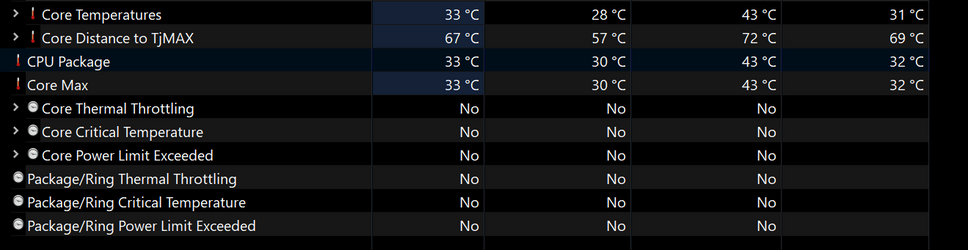
Download HWiNFO64

Start it as "Sensor only" - and use the system for a hour or two - then check CPU: whatever your CPU is DTS. Check the following values:

2023-12-16_142049.png

... to see if it's Thermal/Heat or Power/Energy Throttling.
 

My Computer

System One

  • OS
    WinDOS 25H2
    Computer type
    Laptop
    CPU
    Intel & AMD
    Memory
    SO-DIMM SK Hynix 15.8 GB Dual-Channel DDR4-2666 (2 x 8 GB) 1329MHz (19-19-19-43)
    Graphics Card(s)
    nVidia RTX 2060 6GB Mobile GPU (TU106M)
    Sound Card
    Onbord Realtek ALC1220
    Screen Resolution
    1920 x 1080
    Hard Drives
    1x Samsung PM981 NVMe PCIe M.2 512GB / 1x Seagate Expansion ST1000LM035 1TB
Back
Top Bottom