Move WindowsImagBackup


Tomo53

Well-known member
Local time
4:38 AM
Posts
42
OS
Windows 11 Home
Hi, I have WindowsImagBackup in Windows 11 on one drive which is filling up the space. Now I have another drive with much moore space and I would like to move the backup files to that drive. I have been searching on the net but can not find any way to do it right.
If I just move it I suppose windows wont find it if and when I need to use it.
So how do I do it? From drive E: to drive H: in my case.
 

My Computer My Computer

At a glance

Windows 11 HomeAMD Ryzen 7 9800 X3D 4.7 GHz32 GBPower Color Radeon RX 9070 XT 16 GB Reaper
OS
Windows 11 Home
Computer type
PC/Desktop
Manufacturer/Model
Taurus Hardcore Gaming
CPU
AMD Ryzen 7 9800 X3D 4.7 GHz
Motherboard
Asus TUF Gaming B650-E Wifi
Memory
32 GB
Graphics Card(s)
Power Color Radeon RX 9070 XT 16 GB Reaper
Sound Card
Realtek
Monitor(s) Displays
Dell 4K
Screen Resolution
3840 x 2160
Hard Drives
2 x Kingston NV3 M.2 NVMe Gen 4 2TB
PSU
Corsair 850W
Case
Taurus Gaming Case RGB
Cooling
Cooler Master Hyper 212 Black Edition
Keyboard
Logitech MX
Mouse
Logitech Master MX
Internet Speed
100/100 Gbit
Browser
Chrome
Antivirus
MS Defender

My Computers My Computers

  • At a glance

    All Branches but ReleaseAMD Ryzen 7 7735HS 3200-4500 Mhz 8 cores x 232 GB DDR5Radeon Graphic / NVIDIA GeForce RTX 4060 8 GB...
    OS
    All Branches but Release
    Computer type
    Laptop
    Manufacturer/Model
    Acer Nitro ANV15-51
    CPU
    AMD Ryzen 7 7735HS 3200-4500 Mhz 8 cores x 2
    Motherboard
    Sportage_RBH
    Memory
    32 GB DDR5
    Graphics Card(s)
    Radeon Graphic / NVIDIA GeForce RTX 4060 8 GB GDDR6
    Sound Card
    AMD/Realtek(R) Audio
    Monitor(s) Displays
    Integrated Monitor (15.3"vis)
    Screen Resolution
    FHD 1920X1080 16:9 144Hz
    Hard Drives
    KINGSTON OM8SEP4512Q-AA 1TB
    Western Digital 256GB
    PSU
    19V DC 6.32 A 120 W
    Cooling
    Dual Fans
    Mouse
    MS Bluetooth
    Internet Speed
    Fiber 1GB Cox -us & 1GB Orange-fr
    Browser
    Edge Canary- Firefox Nightly-Chrome Dev-Chrome Dev
    Antivirus
    Windows Defender
  • At a glance

    Windows 11 BetaAMD A9-94208 GB of DDR4AMD Radeon R5
    Operating System
    Windows 11 Beta
    Computer type
    Laptop
    Manufacturer/Model
    Asus X751BP
    CPU
    AMD A9-9420
    Memory
    8 GB of DDR4
    Graphics card(s)
    AMD Radeon R5
    Screen Resolution
    1600x900
    Hard Drives
    Seagate 1 TB
I know this is not an answer to your question but I feel it's important enough to relay it to you anyway. Relying on SIB is very risky. Not only was it very undependable in the first place but SystemImageBackup has been deprecated since Windows 10 Fall Creators back in 2017. Microsoft themselves suggests use of a third party backup solution. Features removed or Deprecated in Windows 10 Fall Creators Update
 

My Computers My Computers

  • At a glance

    Windows 11 Pro 25H2 26200.8655i9-10900 10 core 20 threads32 gbnone-Intel UHD Graphics 630
    OS
    Windows 11 Pro 25H2 26200.8655
    Computer type
    PC/Desktop
    Manufacturer/Model
    Dell Optiplex 7080
    CPU
    i9-10900 10 core 20 threads
    Motherboard
    DELL 0J37VM
    Memory
    32 gb
    Graphics Card(s)
    none-Intel UHD Graphics 630
    Sound Card
    Integrated Realtek
    Monitor(s) Displays
    Benq 27
    Screen Resolution
    2560x1440
    Hard Drives
    2x1tb Solidigm m.2 nvme /External drives 512gb Samsung m.2 sata+2tb Kingston m2.nvme
    PSU
    500w
    Case
    MT
    Cooling
    Dell Premium
    Keyboard
    Logitech wired
    Mouse
    Logitech wireless
    Internet Speed
    so slow I'm too embarrassed to tell
    Browser
    #1 Edge #2 Firefox
    Antivirus
    Defender+MWB Premium
  • At a glance

    Windows 11 Pro 24H2 26200.8457AMD Ryzen 7 6800U32 gbintegrated
    Operating System
    Windows 11 Pro 24H2 26200.8457
    Computer type
    PC/Desktop
    Manufacturer/Model
    Beelink Mini PC SER5
    CPU
    AMD Ryzen 7 6800U
    Memory
    32 gb
    Graphics card(s)
    integrated
    Sound Card
    integrated
    Monitor(s) Displays
    Benq 27
    Screen Resolution
    2560x1440
    Hard Drives
    1TB Crucial nvme
    Keyboard
    Logitech wired
    Mouse
    Logitech wireless
    Internet Speed
    still too embarrassed to tell
    Browser
    Firefox
    Antivirus
    Defender
    Other Info
    System 3 is non compliant Dell 9020 i7-4770/24gb ram Win11 PRO 26200.8457

My Computer My Computer

At a glance

Windows 11 HomeAMD Ryzen 7 9800 X3D 4.7 GHz32 GBPower Color Radeon RX 9070 XT 16 GB Reaper
OS
Windows 11 Home
Computer type
PC/Desktop
Manufacturer/Model
Taurus Hardcore Gaming
CPU
AMD Ryzen 7 9800 X3D 4.7 GHz
Motherboard
Asus TUF Gaming B650-E Wifi
Memory
32 GB
Graphics Card(s)
Power Color Radeon RX 9070 XT 16 GB Reaper
Sound Card
Realtek
Monitor(s) Displays
Dell 4K
Screen Resolution
3840 x 2160
Hard Drives
2 x Kingston NV3 M.2 NVMe Gen 4 2TB
PSU
Corsair 850W
Case
Taurus Gaming Case RGB
Cooling
Cooler Master Hyper 212 Black Edition
Keyboard
Logitech MX
Mouse
Logitech Master MX
Internet Speed
100/100 Gbit
Browser
Chrome
Antivirus
MS Defender
Hi, I have WindowsImagBackup in Windows 11 on one drive which is filling up the space. Now I have another drive with much moore space and I would like to move the backup files to that drive. I have been searching on the net but can not find any way to do it right.
If I just move it I suppose windows wont find it if and when I need to use it.
So how do I do it? From drive E: to drive H: in my case.
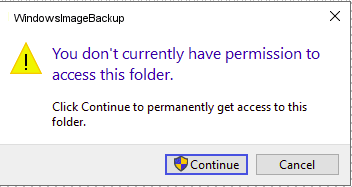
Thw WindowsImageBackup folder is used by 'Backup & Restore (Windows 7)' to store its system images. By default you do not have access to this folder or any of its subfolders. If you try to view it in File Explorer you can gain permission. Do this for WindowsImageBackup and every one of the folders it contains before you try to copy it.

1679586796199.png

System Image Backup has been deprecated, and for good reason. It can be very temperamental about recognising images that could be restored. In my experience just moving WindowsImageBackup is usually safe, but any renaming of folders may break Restore's ability to find the images.

Microsoft said:
The features in this article are no longer being actively developed, and might be removed in a future update....

FeatureDetails and mitigationDeprecation announced
System Image Backup (SIB) SolutionThis feature is also known as the Backup and Restore (Windows 7) legacy control panel. For full-disk backup solutions, look for a third-party product from another software vendor. You can also use OneDrive to sync data files with Microsoft 365.1709

I stopped using SIB a long time ago and switched to using Macrium Reflect.
 

My Computers My Computers

  • At a glance

    Windows 11 HomeAMD Athlon Silver 3050U8GBRadeon Graphics
    OS
    Windows 11 Home
    Computer type
    Laptop
    Manufacturer/Model
    Acer Aspire 3 A315-23-R9VY
    CPU
    AMD Athlon Silver 3050U
    Memory
    8GB
    Graphics Card(s)
    Radeon Graphics
    Monitor(s) Displays
    laptop screen
    Screen Resolution
    1366x768 native resolution, up to 2560x1440 with Radeon Virtual Super Resolution
    Hard Drives
    1TB Samsung EVO 870 SSD (from April 2026: 250GB EVO 850)
    Internet Speed
    150 Mbps
    Browser
    Edge, Firefox
    Antivirus
    Defender
    Other Info
    fully 'Windows 11 ready' laptop. Windows 10 C: partition migrated from my old unsupported 'main machine' then upgraded to 11. A test migration ran Insider builds for 2 months. When 11 was released on 5th October 2021 it was re-imaged back to 10 and was offered the upgrade in Windows Update on 20th October. Windows Update offered the 22H2 Feature Update on 20th September 2022. It got the 23H2 Feature Update on 4th November 2023 through Windows Update, 24H2 on 3rd October 2024 through Windows Update by setting the Target Release Version for 24H2, and 25H2 on 30th September 2025 through Windows Update by setting the Target Release Version for 25H2.

    UPDATE - 11 April 2026: due to mechanical deterioration this PC has been retired from active duty. The OS with all software and files has been migrated to my System Seven in 'Other systems' to carry on as my general purpose 'main machine'.
  • At a glance

    Windows 11 ProIntel® Core™ i5-520M8GB(integrated graphics) Intel HD Graphics
    Operating System
    Windows 11 Pro
    Computer type
    Laptop
    Manufacturer/Model
    Dell Latitude E4310
    CPU
    Intel® Core™ i5-520M
    Motherboard
    0T6M8G
    Memory
    8GB
    Graphics card(s)
    (integrated graphics) Intel HD Graphics
    Screen Resolution
    1366x768
    Hard Drives
    500GB Crucial MX500 SSD
    Browser
    Firefox, Edge
    Antivirus
    Defender
    Other Info
    unsupported machine: Legacy bios, MBR, TPM 1.2, upgraded from W10 to W11 using W10/W11 hybrid install media workaround.

    In-place upgrade to 22H2 using ISO and a workaround.
    Feature Update to 23H2 by manually installing the Enablement Package.
    In-place upgrade to 24H2 using hybrid 23H2/24H2 install media.
    Upgraded to 25H2 by Enablement Package.

    Also running Insider Dev, and Canary builds and Windows 10 as native boot .vhdx.
  • My SYSTEM THREE is a Dell Latitude 5410, i7-10610U, 32GB RAM, 512GB NVMe ssd, supported device running Windows 11 Pro.

    My SYSTEM FOUR is a 2-in-1 convertible Lenovo Yoga 11e 20DA, Celeron N2930, 8GB RAM, 256GB ssd. Unsupported device: currently running Win10 Pro, plus Win11 Pro RTM and Insider Dev, Beta, and RP 24H2 as native boot vhdx.

    My SYSTEM FIVE is a Dell Latitude 3190 2-in-1, Pentium Silver N5030, 8GB RAM, 1TB NVMe ssd, supported device running Windows 11 Pro, plus Insider Beta, Dev, and Canary builds (and a few others) as a native boot .vhdx.

    My SYSTEM SIX is a Dell Latitude 5550, Core Ultra 7 165H, 64GB RAM, 1TB NVMe SSD, supported device, Windows 11 Pro 24H2, Hyper-V host machine. Updated to 25H2 on 30th September 2025.

    My SYSTEM SEVEN is a Lenovo Thinkpad T580, Intel Core i7-8650U, 16GB RAM, 512GB NVMe SSD + 2nd 512GB NVMe SSD, a supported device for Windows 11. This is my current general purpose 'main machine'. The installed Windows 11 Home from my System One has been migrated to this machine.
I used to quite like Windows own backup utility and as far as I recall you can just move the complete folder to wherever you want. I used to juggle these often.

You can rename it as well so long as you rename it back again to the default name used by Windows should you wish to use it in future.

When restoring you can look in other locations for the backup folder so that is not a problem as long as you remember that only a folder with the default name will be found and recognised.
 

My Computer My Computer

At a glance

W11 Pro x64 ongoing Canary 29500 latest buildsIntel i58GbIntel HD Graphics
OS
W11 Pro x64 ongoing Canary 29500 latest builds
Computer type
Laptop
Manufacturer/Model
Dell 7760 Mobile Precision 17"
CPU
Intel i5
Motherboard
Unknown
Memory
8Gb
Graphics Card(s)
Intel HD Graphics
Sound Card
Realtek
Monitor(s) Displays
Internal
Hard Drives
2 x 256Gb SSD
PSU
Dell 240 watt
Mouse
Dell Premier Bluetooth
Internet Speed
50Mbps
Browser
Edge
Antivirus
Default Microsoft Security
Back
Top Bottom