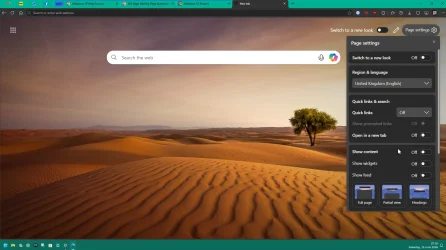
Generally, as late as this morning, Microsoft Edge opened to a new tab, showing a refresh icon, a home icon, a large search window (almost all the way across the top), and a favorites icon just to the right of the search window.
The remainder of the page showed a scenic backdrop (a standard Windows backdrop that occasionally changed), and a smaller search window (about 8") containing the standard magnifier icon and the words "search the web", as well as a copilot icon I (could never get rid of that!).
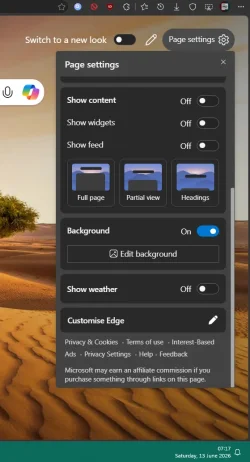
During the day, as I used my computer, I must have inadvertently changed the Edge settings, because now my opening page no longer has the scenic background, but instead has an endless number of advertising windows on a white background, as far down as I can scroll.
Please help me get back to the basic scenic background, hopefully permanent when I find one I like, rather than randomly changing. I would also like to get rid of the copilot icon in the small search window, if possible.
Any help would be appreciated.
The remainder of the page showed a scenic backdrop (a standard Windows backdrop that occasionally changed), and a smaller search window (about 8") containing the standard magnifier icon and the words "search the web", as well as a copilot icon I (could never get rid of that!).
During the day, as I used my computer, I must have inadvertently changed the Edge settings, because now my opening page no longer has the scenic background, but instead has an endless number of advertising windows on a white background, as far down as I can scroll.
Please help me get back to the basic scenic background, hopefully permanent when I find one I like, rather than randomly changing. I would also like to get rid of the copilot icon in the small search window, if possible.
Any help would be appreciated.
My Computer
System One
-
- OS
- Window 11 Pro, v.10.0.26200
- Computer type
- PC/Desktop
- Manufacturer/Model
- Custom Built,
- CPU
- AMD64
- Motherboard
- Gigabyte Technology/B650 GAMING X AX V2
- Memory
- 31,862 MB