MS Office 2003 Word & Excel


rgh43

Well-known member
Member
Local time
5:36 AM
Posts
14
OS
Windows 11
I have MS Office Pro 2003 which I only use the Word & Excel portion & have used for years and I really like the simplicity of it & it is all I need. Just Wood & Excel to meet my needs. Now Windows latest update 25H2 took care of that as it no longer supports 2003. I have rolled the update back but Office still does not completely work as it did. So what Office should I get to use my old Word & Excel files ongoing?
 

My Computer

System One

  • OS
    Windows 11
    Computer type
    PC/Desktop
    Manufacturer/Model
    Lenovo
    CPU
    Intel Core i5 CPU A 2.90GHz
    Motherboard
    Intel B460
    Memory
    16 GB UDIMM DDR4-2933
    Graphics Card(s)
    AMD Radeon RX 5500 4GB GDDR6
    Sound Card
    O/B
    Monitor(s) Displays
    HP 27W
    Screen Resolution
    1910X1080
    Hard Drives
    256GB SSD M.2 2280 NVMe + 1TB HDD 7200rpm 3.5
    Mouse
    Logitech M720
    Internet Speed
    5oo Mbps
    Antivirus
    AVG
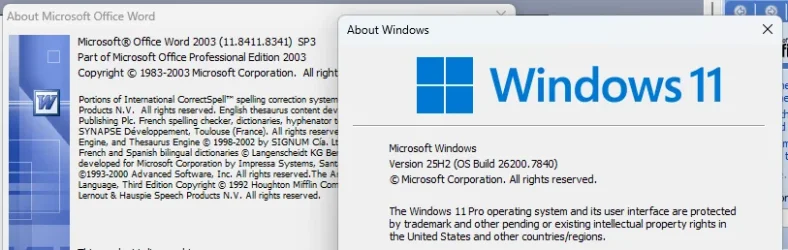
In what way doesn't Office work in 25H2? Mine does....

1771986006393.webp

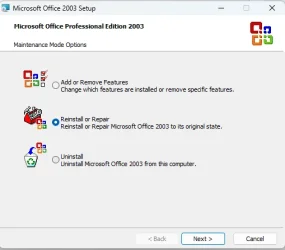
Have you tried repairing it? Go to Settings > Apps > Installed apps, find Office 2003, click the three dots ... and select Modify.

1771986267416.webp

1771986368670.webp

If you really can't get Office to work, then LibreOffice is a good (and free) alternative. There's a Portable version that doesn't require installing, if you'd like to try. It can even be run from a USB stick.

 
Last edited:

My Computers

System One System Two

  • OS
    Windows 11 Home
    Computer type
    Laptop
    Manufacturer/Model
    Acer Aspire 3 A315-23-R9VY
    CPU
    AMD Athlon Silver 3050U
    Memory
    8GB
    Graphics Card(s)
    Radeon Graphics
    Monitor(s) Displays
    laptop screen
    Screen Resolution
    1366x768 native resolution, up to 2560x1440 with Radeon Virtual Super Resolution
    Hard Drives
    1TB Samsung EVO 870 SSD (from April 2026: 250GB EVO 850)
    Internet Speed
    150 Mbps
    Browser
    Edge, Firefox
    Antivirus
    Defender
    Other Info
    fully 'Windows 11 ready' laptop. Windows 10 C: partition migrated from my old unsupported 'main machine' then upgraded to 11. A test migration ran Insider builds for 2 months. When 11 was released on 5th October 2021 it was re-imaged back to 10 and was offered the upgrade in Windows Update on 20th October. Windows Update offered the 22H2 Feature Update on 20th September 2022. It got the 23H2 Feature Update on 4th November 2023 through Windows Update, 24H2 on 3rd October 2024 through Windows Update by setting the Target Release Version for 24H2, and 25H2 on 30th September 2025 through Windows Update by setting the Target Release Version for 25H2.

    UPDATE - 11 April 2026: due to mechanical deterioration this PC has been retired from active duty. The OS with all software and files has been migrated to my System Seven below to carry on as my general purpose 'main machine'.

    My SYSTEM THREE is a Dell Latitude 5410, i7-10610U, 32GB RAM, 512GB NVMe ssd, supported device running Windows 11 Pro.

    My SYSTEM FOUR is a 2-in-1 convertible Lenovo Yoga 11e 20DA, Celeron N2930, 8GB RAM, 256GB ssd. Unsupported device: currently running Win10 Pro, plus Win11 Pro RTM and Insider Dev, Beta, and RP 24H2 as native boot vhdx.

    My SYSTEM FIVE is a Dell Latitude 3190 2-in-1, Pentium Silver N5030, 8GB RAM, 1TB NVMe ssd, supported device running Windows 11 Pro, plus Insider Beta, Dev, and Canary builds (and a few others) as a native boot .vhdx.

    My SYSTEM SIX is a Dell Latitude 5550, Core Ultra 7 165H, 64GB RAM, 1TB NVMe SSD, supported device, Windows 11 Pro 24H2, Hyper-V host machine. Updated to 25H2 on 30th September 2025.

    My SYSTEM SEVEN is a Lenovo Thinkpad T580, Intel Core i7-8650U, 16GB RAM, 512GB NVMe SSD + 2nd 512GB NVMe SSD, a supported device for Windows 11. This is my current general purpose 'main machine'. The installed Windows 11 Home from my System One has been migrated to this machine.
  • Operating System
    Windows 11 Pro
    Computer type
    Laptop
    Manufacturer/Model
    Dell Latitude E4310
    CPU
    Intel® Core™ i5-520M
    Motherboard
    0T6M8G
    Memory
    8GB
    Graphics card(s)
    (integrated graphics) Intel HD Graphics
    Screen Resolution
    1366x768
    Hard Drives
    500GB Crucial MX500 SSD
    Browser
    Firefox, Edge
    Antivirus
    Defender
    Other Info
    unsupported machine: Legacy bios, MBR, TPM 1.2, upgraded from W10 to W11 using W10/W11 hybrid install media workaround. In-place upgrade to 22H2 using ISO and a workaround. Feature Update to 23H2 by manually installing the Enablement Package. In-place upgrade to 24H2 using hybrid 23H2/24H2 install media. Upgraded to 25H2 by Enablement Package. Also running Insider Dev, and Canary builds and Windows 10 as native boot .vhdx.

    My SYSTEM THREE is a Dell Latitude 5410, i7-10610U, 32GB RAM, 512GB NVMe ssd, supported device running Windows 11 Pro.

    My SYSTEM FOUR is a 2-in-1 convertible Lenovo Yoga 11e 20DA, Celeron N2930, 8GB RAM, 256GB ssd. Unsupported device: currently running Win10 Pro, plus Win11 Pro RTM and Insider Dev, Beta, and RP 24H2 as native boot vhdx.

    My SYSTEM FIVE is a Dell Latitude 3190 2-in-1, Pentium Silver N5030, 8GB RAM, 1TB NVMe ssd, supported device running Windows 11 Pro, plus Insider Beta, Dev, and Canary builds (and a few others) as a native boot .vhdx.

    My SYSTEM SIX is a Dell Latitude 5550, Core Ultra 7 165H, 64GB RAM, 1TB NVMe SSD, supported device, Windows 11 Pro 24H2, Hyper-V host machine. Updated to 25H2 on 30th September 2025.

    My SYSTEM SEVEN is a Lenovo Thinkpad T580, Intel Core i7-8650U, 16GB RAM, 512GB NVMe SSD + 2nd 512GB NVMe SSD, a supported device for Windows 11. This is my current general purpose 'main machine'. The installed Windows 11 Home from my System One has been migrated to this machine.
It did work OK for few days after it updated 25H2 but then suddenly stopped working correctly, like it would not "save" a Word doc to any folder etc that I wanted it to, I have got it to save to users one drive only but have to move it to where I actually want it to be in my "D" Drive under the files that I have made many years ago when I had WIn 7 &, then Win 10. Office 2003 worked in both with no issue. I actually think I had Office 2003 when I had Win 5 as my OS.. I can type a Word doc & print it out but that is it. I was told because MS stopped support of MS Office 2003 with 25H2 was my problem & it seems to be as it does kind of work with the roll back. Yes have reloaded just Word & Excel, repaired it all, removed it all & reinstalled it several times & the same result.. My choices are to get a new version of office or try Libre Office. To fix it I need to roll back the update which is what I did but it will try to y update again in 7 days so that will be a pain as I will have to roll back often which prevents any needed updates for the future. So besides Libre which I hear has some issues I will need to get a new version of at least Office 10 or higher. Which I'm asking what version would suit my needs as I don't do spread sheets just use Excel for some self created forms & Word to cut and paste info from the Web or make a letter to email or just send US mail. I'm now still on 23H2 currently.
 

My Computer

System One

  • OS
    Windows 11
    Computer type
    PC/Desktop
    Manufacturer/Model
    Lenovo
    CPU
    Intel Core i5 CPU A 2.90GHz
    Motherboard
    Intel B460
    Memory
    16 GB UDIMM DDR4-2933
    Graphics Card(s)
    AMD Radeon RX 5500 4GB GDDR6
    Sound Card
    O/B
    Monitor(s) Displays
    HP 27W
    Screen Resolution
    1910X1080
    Hard Drives
    256GB SSD M.2 2280 NVMe + 1TB HDD 7200rpm 3.5
    Mouse
    Logitech M720
    Internet Speed
    5oo Mbps
    Antivirus
    AVG
have you tried setting word.exe file and excel.exe file to compatibility mode for Windows 7.
find the .exe files right click them, on that menu properties
then the compatibility tab. you then set each one to Windows 7 compatibility mode.

best of luck Steve ..
 

My Computers

System One System Two

  • OS
    Windows 11 Home
    Computer type
    PC/Desktop
    Manufacturer/Model
    HP 24" AiO
    CPU
    Ryzen 7 5825u
    Motherboard
    HP
    Memory
    64GB DDR4 3200
    Graphics Card(s)
    Ryzen 7 5825u
    Sound Card
    RealTek
    Monitor(s) Displays
    24" HP AiO
    Screen Resolution
    1920 x 1080 @60 Hz
    Hard Drives
    1TB WD Blue SN580 M2 SSD Partitioned.
    2x 1TB USB HDD External Backup/Storage.
    PSU
    90W external power brick
    Case
    24" All in One
    Cooling
    Default Air Cooling
    Keyboard
    HP WiFi UK extended
    Mouse
    HP WiFi 3 Button
    Internet Speed
    1GB full fibre
    Browser
    Edge & Firefox
    Antivirus
    AVG Internet Security/Windows Defender
    Other Info
    Mainly Open Source Software
  • Operating System
    Ubuntu 22.04.5 LTS
    Computer type
    Laptop
    Manufacturer/Model
    Dell 13" Latitude 2017
    CPU
    i5 7200u
    Motherboard
    Dell
    Memory
    16GB DDR4
    Graphics card(s)
    Intel
    Sound Card
    Intel
    Monitor(s) Displays
    13" Dell Laptop
    Hard Drives
    250GB Crucial 2.5" SSD
    Mouse
    Generic WiFi 3 button
    Internet Speed
    WiFi only
    Browser
    Firefox
    Antivirus
    ClamAV TK
    Other Info
    Mainly Open Source Software
have you tried setting word.exe file and excel.exe file to compatibility mode for Windows 7.
find the .exe files right click them, on that menu properties
then the compatibility tab. you then set each one to Windows 7 compatibility mode.

best of luck Steve ..
It's WINWORD.EXE actually (yes, all in capitals). Mine was a clean install of 25H2, followed by a fresh install of Office 2003.
I've just had a look at the compatibility settings Windows had chosen for it, it used Windows 8.
 

My Computers

System One System Two

  • OS
    Windows 11 Home
    Computer type
    Laptop
    Manufacturer/Model
    Acer Aspire 3 A315-23-R9VY
    CPU
    AMD Athlon Silver 3050U
    Memory
    8GB
    Graphics Card(s)
    Radeon Graphics
    Monitor(s) Displays
    laptop screen
    Screen Resolution
    1366x768 native resolution, up to 2560x1440 with Radeon Virtual Super Resolution
    Hard Drives
    1TB Samsung EVO 870 SSD (from April 2026: 250GB EVO 850)
    Internet Speed
    150 Mbps
    Browser
    Edge, Firefox
    Antivirus
    Defender
    Other Info
    fully 'Windows 11 ready' laptop. Windows 10 C: partition migrated from my old unsupported 'main machine' then upgraded to 11. A test migration ran Insider builds for 2 months. When 11 was released on 5th October 2021 it was re-imaged back to 10 and was offered the upgrade in Windows Update on 20th October. Windows Update offered the 22H2 Feature Update on 20th September 2022. It got the 23H2 Feature Update on 4th November 2023 through Windows Update, 24H2 on 3rd October 2024 through Windows Update by setting the Target Release Version for 24H2, and 25H2 on 30th September 2025 through Windows Update by setting the Target Release Version for 25H2.

    UPDATE - 11 April 2026: due to mechanical deterioration this PC has been retired from active duty. The OS with all software and files has been migrated to my System Seven below to carry on as my general purpose 'main machine'.

    My SYSTEM THREE is a Dell Latitude 5410, i7-10610U, 32GB RAM, 512GB NVMe ssd, supported device running Windows 11 Pro.

    My SYSTEM FOUR is a 2-in-1 convertible Lenovo Yoga 11e 20DA, Celeron N2930, 8GB RAM, 256GB ssd. Unsupported device: currently running Win10 Pro, plus Win11 Pro RTM and Insider Dev, Beta, and RP 24H2 as native boot vhdx.

    My SYSTEM FIVE is a Dell Latitude 3190 2-in-1, Pentium Silver N5030, 8GB RAM, 1TB NVMe ssd, supported device running Windows 11 Pro, plus Insider Beta, Dev, and Canary builds (and a few others) as a native boot .vhdx.

    My SYSTEM SIX is a Dell Latitude 5550, Core Ultra 7 165H, 64GB RAM, 1TB NVMe SSD, supported device, Windows 11 Pro 24H2, Hyper-V host machine. Updated to 25H2 on 30th September 2025.

    My SYSTEM SEVEN is a Lenovo Thinkpad T580, Intel Core i7-8650U, 16GB RAM, 512GB NVMe SSD + 2nd 512GB NVMe SSD, a supported device for Windows 11. This is my current general purpose 'main machine'. The installed Windows 11 Home from my System One has been migrated to this machine.
  • Operating System
    Windows 11 Pro
    Computer type
    Laptop
    Manufacturer/Model
    Dell Latitude E4310
    CPU
    Intel® Core™ i5-520M
    Motherboard
    0T6M8G
    Memory
    8GB
    Graphics card(s)
    (integrated graphics) Intel HD Graphics
    Screen Resolution
    1366x768
    Hard Drives
    500GB Crucial MX500 SSD
    Browser
    Firefox, Edge
    Antivirus
    Defender
    Other Info
    unsupported machine: Legacy bios, MBR, TPM 1.2, upgraded from W10 to W11 using W10/W11 hybrid install media workaround. In-place upgrade to 22H2 using ISO and a workaround. Feature Update to 23H2 by manually installing the Enablement Package. In-place upgrade to 24H2 using hybrid 23H2/24H2 install media. Upgraded to 25H2 by Enablement Package. Also running Insider Dev, and Canary builds and Windows 10 as native boot .vhdx.

    My SYSTEM THREE is a Dell Latitude 5410, i7-10610U, 32GB RAM, 512GB NVMe ssd, supported device running Windows 11 Pro.

    My SYSTEM FOUR is a 2-in-1 convertible Lenovo Yoga 11e 20DA, Celeron N2930, 8GB RAM, 256GB ssd. Unsupported device: currently running Win10 Pro, plus Win11 Pro RTM and Insider Dev, Beta, and RP 24H2 as native boot vhdx.

    My SYSTEM FIVE is a Dell Latitude 3190 2-in-1, Pentium Silver N5030, 8GB RAM, 1TB NVMe ssd, supported device running Windows 11 Pro, plus Insider Beta, Dev, and Canary builds (and a few others) as a native boot .vhdx.

    My SYSTEM SIX is a Dell Latitude 5550, Core Ultra 7 165H, 64GB RAM, 1TB NVMe SSD, supported device, Windows 11 Pro 24H2, Hyper-V host machine. Updated to 25H2 on 30th September 2025.

    My SYSTEM SEVEN is a Lenovo Thinkpad T580, Intel Core i7-8650U, 16GB RAM, 512GB NVMe SSD + 2nd 512GB NVMe SSD, a supported device for Windows 11. This is my current general purpose 'main machine'. The installed Windows 11 Home from my System One has been migrated to this machine.
It's WINWORD.EXE actually (yes, all in capitals). Mine was a clean install of 25H2, followed by a fresh install of Office 2003.
I've just had a look at the compatibility settings Windows had chosen for it, it used Windows 8.

yes WINWORD.exe i normally install word 2003 in compatibility mode for Windows 7
along with Microsoft works 9 also in Windows 7 compatibility mode.

on my wifes system, Windows 11 25H2, they are both running just fine in Windows 7 compatibility mode.

best of luck Steve ..
 

My Computers

System One System Two

  • OS
    Windows 11 Home
    Computer type
    PC/Desktop
    Manufacturer/Model
    HP 24" AiO
    CPU
    Ryzen 7 5825u
    Motherboard
    HP
    Memory
    64GB DDR4 3200
    Graphics Card(s)
    Ryzen 7 5825u
    Sound Card
    RealTek
    Monitor(s) Displays
    24" HP AiO
    Screen Resolution
    1920 x 1080 @60 Hz
    Hard Drives
    1TB WD Blue SN580 M2 SSD Partitioned.
    2x 1TB USB HDD External Backup/Storage.
    PSU
    90W external power brick
    Case
    24" All in One
    Cooling
    Default Air Cooling
    Keyboard
    HP WiFi UK extended
    Mouse
    HP WiFi 3 Button
    Internet Speed
    1GB full fibre
    Browser
    Edge & Firefox
    Antivirus
    AVG Internet Security/Windows Defender
    Other Info
    Mainly Open Source Software
  • Operating System
    Ubuntu 22.04.5 LTS
    Computer type
    Laptop
    Manufacturer/Model
    Dell 13" Latitude 2017
    CPU
    i5 7200u
    Motherboard
    Dell
    Memory
    16GB DDR4
    Graphics card(s)
    Intel
    Sound Card
    Intel
    Monitor(s) Displays
    13" Dell Laptop
    Hard Drives
    250GB Crucial 2.5" SSD
    Mouse
    Generic WiFi 3 button
    Internet Speed
    WiFi only
    Browser
    Firefox
    Antivirus
    ClamAV TK
    Other Info
    Mainly Open Source Software
2007 works well with Windows 11 but Microsoft Office Professional Plus 2019 is only 19.97 on StackSocialwhich which I also have.

I got my Office 2007 on eBay with 5 installs for 20.00 and I've installed it on three PC's
 
Last edited:

My Computers

System One System Two

  • OS
    Windows 11 (up to date)
    Computer type
    PC/Desktop
    Manufacturer/Model
    Custom
    CPU
    Intel i5 12400
    Motherboard
    Gigabyte Z690 UA
    Memory
    Corsair Vengeance LPX 16GB
    Graphics Card(s)
    On Board the Z690
    Sound Card
    On Board
    Monitor(s) Displays
    43" Samsung tu7000
    Screen Resolution
    2560 x 1440
    Hard Drives
    SAMSUNG SSD 1TB NVMe M.2
    PSU
    Thermaltake smart 500w 80+
    Case
    LIAN LANCOOL_205M
    Cooling
    Bunch of fans . . . :o) (lights dont work)
    Keyboard
    Unicomp: Ultra Classic White Buckling Spring USB
    Mouse
    M510
    Internet Speed
    50mbps on Ethernet
    Browser
    Fire Fox
    Antivirus
    Windows
    Other Info
    Love this computer but I still prefer Win-7 like I love my old Lazy Boy Recliner . . . it just feels better.
  • Operating System
    WIN-7-64BIT and Win-11 pro for testing on unsupported hardware
    Computer type
    PC/Desktop
    Manufacturer/Model
    Home built
    CPU
    i5-3570K CPU @ 3.40GHz, 3801 Mhz, 4 Core(s), 4 Logical Processor(s)
    Motherboard
    GA-Z77-HD3
    Memory
    16 GB - Crucial Ballistick 4GB PC3-14900 DDR3-1333 MHz
    Graphics card(s)
    NVIDIA GeForce GTX 1050
    Sound Card
    On Board
    Monitor(s) Displays
    ASUS VP278
    Screen Resolution
    1920 x 1080
    Hard Drives
    4 - internal Samsung 2.5" SSD, 1 WD HDD 7200 and some external drives
    PSU
    EVGA 550w
    Case
    Old Gygabyte Tower
    Cooling
    Yes
    Keyboard
    Unicomp - UNIOP4A USB (like the old IBM Model H that I started with)
    Mouse
    M510
    Internet Speed
    50mbps
    Browser
    Firefox
    Antivirus
    Windows
    Other Info
    The only thing it lack is USB-3.2 on the front face but it has 3.0 on the back
In what way doesn't Office work in 25H2? Mine does....
Ditto here, 2 devices (desktop and laptop) I still use mine because it's the oldest but latest that I can still open old format MS Access databases (avec les macros)

It did work OK for few days after it updated 25H2 but then suddenly stopped working correctly, like it would not "save" a Word doc to any folder etc that I wanted it to, I have got it to save to users one drive only
That sounds like a settings issue, especially when MS periodically re-invokes the dreaded OneDrive requiring the user to reset Save settings in Word and Excel. Uninstalling OneDrive (using RevoUninstaller, and changing the Save options path(s). Note there are settings will also need to be changed as well as the save path.

Note OneDrive also is an integral part of the Windows OS, not just MS Office. Consequently updates of Windows, not just MS Office, can include the re-activation of OneDrive

I was told because MS stopped support of MS Office 2003
Shouldn't stop it from working

with 25H2 was my problem
Who told you it was 25H2 that was specifically the problem?
 
Last edited:

My Computers

System One System Two

  • OS
    Windows 11 2xH2 (latest update ... forever anal)
    Computer type
    PC/Desktop
    Manufacturer/Model
    HP Slim S01
    CPU
    Intel i5-12400
    Memory
    8GB
    Graphics Card(s)
    NVIDIA GeForce GT730
    Sound Card
    OOBE
    Monitor(s) Displays
    Acer 32"
    Screen Resolution
    1920x1080
    Hard Drives
    512GB KIOXIA NVMe
    1TB SATA SSD
    PSU
    OOBE
    Case
    OOBE
    Cooling
    OOBE
    Keyboard
    BT
    Mouse
    BT
    Browser
    Brave FFox Chrome Opera
    Antivirus
    KIS
  • Operating System
    Windows 11 Pro 2xH2 (latest update ... 4ever anal)
    Computer type
    Laptop
    Manufacturer/Model
    HP Pavillion 15
    CPU
    i7-1165G7 @ 2.80GHz
    Graphics card(s)
    Intel Iris Xe Graphics
    Hard Drives
    Samsung NVMe 512GB
    + numerous/multiple SSD Type C USB enclosures
    Internet Speed
    NBN FTTN 50
    Browser
    Brave
    Antivirus
    KIS
or try Libre Office.
Depending on the complexity of your documents and/or spreadsheets, a viable option
So besides Libre which I hear has some issues
I'm not sure who you're listening to with all these tales of doom and gloom .... What issues? It's not perfect or ideal at the high end of doc/sheet creation, but most issues, for home use, I've heard of relate to user use and/or settings ....

If that doesn't suit, Google Docs is an alternative, as is OpenOffice, WPS Office
 

My Computers

System One System Two

  • OS
    Windows 11 2xH2 (latest update ... forever anal)
    Computer type
    PC/Desktop
    Manufacturer/Model
    HP Slim S01
    CPU
    Intel i5-12400
    Memory
    8GB
    Graphics Card(s)
    NVIDIA GeForce GT730
    Sound Card
    OOBE
    Monitor(s) Displays
    Acer 32"
    Screen Resolution
    1920x1080
    Hard Drives
    512GB KIOXIA NVMe
    1TB SATA SSD
    PSU
    OOBE
    Case
    OOBE
    Cooling
    OOBE
    Keyboard
    BT
    Mouse
    BT
    Browser
    Brave FFox Chrome Opera
    Antivirus
    KIS
  • Operating System
    Windows 11 Pro 2xH2 (latest update ... 4ever anal)
    Computer type
    Laptop
    Manufacturer/Model
    HP Pavillion 15
    CPU
    i7-1165G7 @ 2.80GHz
    Graphics card(s)
    Intel Iris Xe Graphics
    Hard Drives
    Samsung NVMe 512GB
    + numerous/multiple SSD Type C USB enclosures
    Internet Speed
    NBN FTTN 50
    Browser
    Brave
    Antivirus
    KIS
Issues with Word, wont spell check correctly, sometimes typing a word doc I go back a sentence or so to correct a misspell it will type in the letter & take out the next letter & keeps doing that so I have to do a manual spell check. There are others thing also.
The Answer I got about the issue I feel is correct unless their is some problem with update installed. I did reinstall Win11 to see but the issue continued. Got the update & accidently installed it as I had delayed for some time. Surprisingly it worked fine until 25H2 updated everything.
I said before about a few other things that made it a nightmare. Now let me be clear after the original update from Win 10 to Win 11 it Still worked just as it had with Win10. Until the update then it all went to hell. Now I’m not a PC genius but was a Network Tech long ago & when something is working perfectly then suddenly goes up in smoke you look for the most recent prior change.
I did not suspect the 25H2 update to do it but the info I was given on this forum nailed it. So I went back to 23H2 & it started working OK. Now on 4/7 my pause ends so it will try to update again & if I can I will squash that so I can keep Word & Excel working until I figure out should I buy a newer version of office or go to LibreOffice.
I'm going to give this PC to my spouse to replace her 10yr old HP that MS says can't be updated to Win 11 so I will reformat the SSD & install Win 11 clean. Then try MS Office 2003 again to see what happens.
 

My Computer

System One

  • OS
    Windows 11
    Computer type
    PC/Desktop
    Manufacturer/Model
    Lenovo
    CPU
    Intel Core i5 CPU A 2.90GHz
    Motherboard
    Intel B460
    Memory
    16 GB UDIMM DDR4-2933
    Graphics Card(s)
    AMD Radeon RX 5500 4GB GDDR6
    Sound Card
    O/B
    Monitor(s) Displays
    HP 27W
    Screen Resolution
    1910X1080
    Hard Drives
    256GB SSD M.2 2280 NVMe + 1TB HDD 7200rpm 3.5
    Mouse
    Logitech M720
    Internet Speed
    5oo Mbps
    Antivirus
    AVG

XxXxX in reply to your comments:​

How do I get into an the WINWORDexe file, trying search in various places for it, also I can't see the update for Windows 7 compatibility mode in Control Panel 'Programs" it seems I remember it long ago that I downloaded it for a Win 7 PC I had. How do I get it now to see if taht will help.
 

My Computer

System One

  • OS
    Windows 11
    Computer type
    PC/Desktop
    Manufacturer/Model
    Lenovo
    CPU
    Intel Core i5 CPU A 2.90GHz
    Motherboard
    Intel B460
    Memory
    16 GB UDIMM DDR4-2933
    Graphics Card(s)
    AMD Radeon RX 5500 4GB GDDR6
    Sound Card
    O/B
    Monitor(s) Displays
    HP 27W
    Screen Resolution
    1910X1080
    Hard Drives
    256GB SSD M.2 2280 NVMe + 1TB HDD 7200rpm 3.5
    Mouse
    Logitech M720
    Internet Speed
    5oo Mbps
    Antivirus
    AVG
its in the C:\Program Files\Microsoft Office\Office11\ folder

right click the winword.exe file
then on that menu click properties

then at the top click the compatibility tab
tick the box then on the drop down menu
click windows 7. save settings and close the file.

best of luck Steve ..
 

My Computers

System One System Two

  • OS
    Windows 11 Home
    Computer type
    PC/Desktop
    Manufacturer/Model
    HP 24" AiO
    CPU
    Ryzen 7 5825u
    Motherboard
    HP
    Memory
    64GB DDR4 3200
    Graphics Card(s)
    Ryzen 7 5825u
    Sound Card
    RealTek
    Monitor(s) Displays
    24" HP AiO
    Screen Resolution
    1920 x 1080 @60 Hz
    Hard Drives
    1TB WD Blue SN580 M2 SSD Partitioned.
    2x 1TB USB HDD External Backup/Storage.
    PSU
    90W external power brick
    Case
    24" All in One
    Cooling
    Default Air Cooling
    Keyboard
    HP WiFi UK extended
    Mouse
    HP WiFi 3 Button
    Internet Speed
    1GB full fibre
    Browser
    Edge & Firefox
    Antivirus
    AVG Internet Security/Windows Defender
    Other Info
    Mainly Open Source Software
  • Operating System
    Ubuntu 22.04.5 LTS
    Computer type
    Laptop
    Manufacturer/Model
    Dell 13" Latitude 2017
    CPU
    i5 7200u
    Motherboard
    Dell
    Memory
    16GB DDR4
    Graphics card(s)
    Intel
    Sound Card
    Intel
    Monitor(s) Displays
    13" Dell Laptop
    Hard Drives
    250GB Crucial 2.5" SSD
    Mouse
    Generic WiFi 3 button
    Internet Speed
    WiFi only
    Browser
    Firefox
    Antivirus
    ClamAV TK
    Other Info
    Mainly Open Source Software
Depending on the complexity of your documents and/or spreadsheets, a viable option

I'm not sure who you're listening to with all these tales of doom and gloom .... What issues? It's not perfect or ideal at the high end of doc/sheet creation, but most issues, for home use, I've heard of relate to user use and/or settings ....

If that doesn't suit, Google Docs is an alternative, as is OpenOffice, WPS Office
I 100% agree with this. Not perfect, but very powerful and not very far behind latest Office365 functionality. If compared to O2003 Libre is miles ahead already. I use it daily on my Linux Machine and is very compatible with all my O365 docs, even more complex ones.
 

My Computers

System One System Two

  • OS
    Win 11 Pro 25H2 26200.8457 / Linux Mint 22.3
    Computer type
    Laptop
    Manufacturer/Model
    Lenovo A485
    CPU
    Ryzen 7 2700U Pro
    Motherboard
    Lenovo (WiFi/BT module upgraded to Intel Wireless-AC-9260)
    Memory
    32GB
    Graphics Card(s)
    iGPU Vega 10
    Sound Card
    Realtek
    Monitor(s) Displays
    14" FHD (built-in) + 14" Lenovo Thinkvision M14t (touch+pen) + 32" Asus PB328
    Screen Resolution
    FHD + FHD + 1440p
    Hard Drives
    Intel 660p m.2 nVME PCIe3.0 x2 512GB
    PSU
    125W(Dock)/65W(Travel Adapter)
    Keyboard
    Thinkpad / Logitech MX Keys
    Mouse
    Logitech MX Master 2S
    Internet Speed
    1/1Gbit
    Browser
    Firefox
    Antivirus
    Windows Defender
    Other Info
    SecureBoot: Enabled
    TPM2.0: Enabled
    AMD-V: Enabled
  • Operating System
    Win 11 Pro 25H2 26200.8521(RP)
    Computer type
    PC/Desktop
    Manufacturer/Model
    Custom
    CPU
    i7-7700k @4.8GHz
    Motherboard
    Asus PRIME Z270-A
    Memory
    32GB 2x16GB 2133MHz CL15
    Graphics card(s)
    EVGA GTX1080Ti FTW 11GB
    Sound Card
    Integrated
    Monitor(s) Displays
    32" 10-bit Asus PB328Q
    Screen Resolution
    WQHD 2560x1440
    Hard Drives
    512GB ADATA SX8000NP NVMe PCIe Gen 3 x4
    PSU
    850W
    Case
    Fractal Design Define 7
    Cooling
    Noctua NH-D15 chromax.black
    Keyboard
    Logitech MX Keys
    Mouse
    Logitech MX Master 2S
    Internet Speed
    1/1Gbit
    Browser
    Firefox
    Antivirus
    Windows Defender
    Other Info
    AC WiFi Card
Back
Top Bottom