multi monitor problem.


Imperius_LXXVII

Well-known member
Local time
12:03 AM
Posts
7
OS
Windows 11
Hi guys i have a question..

Ive been using multi monitors for a long time on this computer. The only thing i changed is a new video card and reformatted since then. (well in fact i changed the case + ram + AIO + SSDs + etc.. it has nothing to do with it tho)

#1 main monitor: Samsung Odyssey G7 is connected with RTX 3070TI through --> 1.4DP (240hz)
#2 second monitor: Sharp TV is connected with UDP 630 (intel discrete) through --> HDMI (60hz)

Worked perfectly in the past minus the 3070TI (was a GTX 1070 before)

The thing i dont understand.. when the Windows login pops up my 2 monitors are detected and working (extended)... after i enter my password my TV turns off and i cant get it detected again.

i tried to set the same HZ (60hz) on both.. changed nothing.

Anyone has an idea ?
Thanks already
 

My Computers My Computers

  • At a glance

    Windows 11Intel i5 9600k OC @5.2Ghz all core (stable)32GB Corsair Vengeance Pro 3600mhzGigabytes RTX 3070 Ti
    OS
    Windows 11
    Computer type
    PC/Desktop
    Manufacturer/Model
    IBM clone
    CPU
    Intel i5 9600k OC @5.2Ghz all core (stable)
    Motherboard
    Asus Z370-P
    Memory
    32GB Corsair Vengeance Pro 3600mhz
    Graphics Card(s)
    Gigabytes RTX 3070 Ti
    Sound Card
    on board audio
    Monitor(s) Displays
    Samsung Odyssey G7 32"
    Screen Resolution
    1440
    Hard Drives
    26TB
    PSU
    EVGA 1000W
    Case
    Corsair 4000X
    Cooling
    Corsair H150i LCD AIO
    Keyboard
    Corsair K100 MX Speed
    Mouse
    Corsair Harpoon RGB
    Internet Speed
    1.5 gigabit Fibe
    Browser
    Edge
    Antivirus
    Bitdefender
  • At a glance

    Windows 10Intel Core 2 Duo E8400 OC@4Ghz8GB KingstonRadeon HD7850 X2
    Operating System
    Windows 10
    Computer type
    PC/Desktop
    Manufacturer/Model
    IBM clone
    CPU
    Intel Core 2 Duo E8400 OC@4Ghz
    Motherboard
    Asus P5Q Pro
    Memory
    8GB Kingston
    Graphics card(s)
    Radeon HD7850 X2
    Sound Card
    on board audio
    Monitor(s) Displays
    Samsung 27" Curved
    Screen Resolution
    1080p
    Hard Drives
    3TB
    PSU
    Antec 850W
    Case
    Cooler Master HAF932
    Cooling
    Thermalright
    Keyboard
    G15
    Internet Speed
    1.5GB Fibe
    Browser
    Edge
    Antivirus
    BitDefender
What does device manager show, expand the display adapters & monitors sections.
I assume you have installed the Intel graphics drivers and set up the monitor under Windows display settings?
My setup is pretty much the same, RTX 2060 for main monitor (over DP) and Dell 24" secondary connected by HDMI to CPU, works fine on boot and after login regardless of second monitor being turned on or off throughout.
Second display is detected if turned on in Windows later as well, so the setup you are using should work.
 

My Computer My Computer

At a glance

Windows 11 Pro 22H2, build: 22621.521Intel i7-12700K 3.6GHz Base (5.0GHz Turbo)64GB DDR 3600MhzAsus Tuff RTX 3080 10GB OC
OS
Windows 11 Pro 22H2, build: 22621.521
Computer type
PC/Desktop
Manufacturer/Model
Scan 3XS Custom 1700
CPU
Intel i7-12700K 3.6GHz Base (5.0GHz Turbo)
Motherboard
Asus ProArt Creator B660 D4
Memory
64GB DDR 3600Mhz
Graphics Card(s)
Asus Tuff RTX 3080 10GB OC
Sound Card
Onboard Realtek
Monitor(s) Displays
Gigabyte G32QC 32inch 16:9 curved @2560 x 1440p 165Hz Freesync Premium Pro/ Dell SE2422H 24inch 16:9 1920 x 1080p 75Hz Freesync
Screen Resolution
2560 x 1440p & 1920 x 1080p
Hard Drives
WD SN570 1TB NVME (Boot), Samsung 870QVO 1TB (SSD), SanDisk 3D Ultra 500Gb (SSD) x2, Seagate 3Tb Expansion Desk (Ext HDD), 2x Toshiba 1Tb P300 (Ext HDD)
PSU
Corsair RM1000X Modular
Case
Corsair 4000D Airflow Desktop
Cooling
Corsair Hydro H150i RGB Pro XT 360mm Liquid Cooler, 3 x 120mm fans, 1x Exhaust
Keyboard
Microsoft Ergonomic
Mouse
Logitech G402
Internet Speed
800Mbs
Browser
Edge Chromium
Antivirus
Defender, Malwarebytes
Hi guys i have a question..

Ive been using multi monitors for a long time on this computer. The only thing i changed is a new video card and reformatted since then. (well in fact i changed the case + ram + AIO + SSDs + etc.. it has nothing to do with it tho)

#1 main monitor: Samsung Odyssey G7 is connected with RTX 3070TI through --> 1.4DP (240hz)
#2 second monitor: Sharp TV is connected with UDP 630 (intel discrete) through --> HDMI (60hz)

Worked perfectly in the past minus the 3070TI (was a GTX 1070 before)

The thing i dont understand.. when the Windows login pops up my 2 monitors are detected and working (extended)... after i enter my password my TV turns off and i cant get it detected again.

i tried to set the same HZ (60hz) on both.. changed nothing.

Anyone has an idea ?
Thanks already


I had a problem similar to that when I first got my RTX 2070.
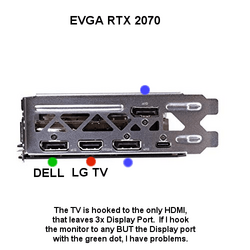
The card had 3x DP and 1x HDMI

I had the HDMI hooked to the TV, and the DP hooked to my monitor.
To make a long story short, there was only one of the display port connectors I could use to have things come out normally.
The DELL is my monitor.


000000 VID Card.png

If I hooked the monitor to either of the Display Ports marked with the BLUE dots... things behaved very strangely.
And the strangeness would occur at the login screen.

My problem was that I couldn't get the BIOS splash screen and the Windows desktop (after login) to appear on the same screen (the DELL). Only by using the display port connector marked with the GREEN dot, could I get the screens before and after login, to both appear on the DELL monitor.

I would try hooking the Samsung to different DP connectors on the video card, and seeing if that doesn't help.
 
Last edited:

My Computers My Computers

  • At a glance

    Win 11 Home ♦♦♦26200.8737 ♦♦♦♦♦♦♦25H2AMD Ryzen 7 3700XG.Skill (F4-3200C14D-16GTZKW)EVGA RTX 2070 (08G-P4-2171-KR)
    OS
    Win 11 Home ♦♦♦26200.8737 ♦♦♦♦♦♦♦25H2
    Computer type
    PC/Desktop
    Manufacturer/Model
    Built by Ghot® [May 2020]
    CPU
    AMD Ryzen 7 3700X
    Motherboard
    Asus Pro WS X570-ACE (BIOS 5302)
    Memory
    G.Skill (F4-3200C14D-16GTZKW)
    Graphics Card(s)
    EVGA RTX 2070 (08G-P4-2171-KR)
    Sound Card
    Realtek ALC1220P / ALC S1220A
    Monitor(s) Displays
    Dell U3011 30"
    Screen Resolution
    2560 x 1600
    Hard Drives
    2x Samsung 860 EVO 500GB,
    WD 4TB Black FZBX - SATA III,
    WD 8TB Black FZBX - SATA III,
    DRW-24B1ST CD/DVD Burner
    PSU
    PC Power & Cooling 750W Quad EPS12V
    Case
    Cooler Master ATCS 840 Tower
    Cooling
    CM Hyper 212 EVO (push/pull)
    Keyboard
    Ducky DK9008 Shine II Blue LED
    Mouse
    Logitech Optical M-100
    Internet Speed
    300/300
    Browser
    Firefox (latest)
    Antivirus
    Bitdefender Total Security
    Other Info
    Speakers: Klipsch Pro Media 2.1
  • At a glance

    Windows XP Pro 32bit w/SP3AMD Athlon 64 X2 5000+ (OC'd @ 3.2Ghz)TWIN2X2048-6400C4DHX (2 x 1GB, DDR2 800)EVGA 256-P2-N758-TR GeForce 8600GT SSC
    Operating System
    Windows XP Pro 32bit w/SP3
    Computer type
    PC/Desktop
    Manufacturer/Model
    Built by Ghot® (not in use)
    CPU
    AMD Athlon 64 X2 5000+ (OC'd @ 3.2Ghz)
    Motherboard
    ASUS M2N32-SLI Deluxe Wireless Edition
    Memory
    TWIN2X2048-6400C4DHX (2 x 1GB, DDR2 800)
    Graphics card(s)
    EVGA 256-P2-N758-TR GeForce 8600GT SSC
    Sound Card
    Onboard
    Monitor(s) Displays
    ViewSonic G90FB Black 19" Professional (CRT)
    Screen Resolution
    up to 2048 x 1536
    Hard Drives
    WD 36GB 10,000rpm Raptor SATA
    Seagate 80GB 7200rpm SATA
    Lite-On LTR-52246S CD/RW
    Lite-On LH-18A1P CD/DVD Burner
    PSU
    PC Power & Cooling Silencer 750 Quad EPS12V
    Case
    Generic Beige case, 80mm fans
    Cooling
    ZALMAN 9500A 92mm CPU Cooler
    Keyboard
    Logitech Classic Keybooard 200
    Mouse
    Logitech Optical M-BT96a
    Internet Speed
    300/300
    Browser
    Firefox 3.x ??
    Antivirus
    Symantec (Norton)
    Other Info
    Still assembled, still runs. Haven't turned it on for 15 years?
Worked perfectly in the past minus the 3070TI (was a GTX 1070 before)

The thing i dont understand.. when the Windows login pops up my 2 monitors are detected and working (extended)... after i enter my password my TV turns off and i cant get it detected again.

i tried to set the same HZ (60hz) on both.. changed nothing.
It is interesting is that you get 2 monitors detected with the windows login screen.
You could try booting in Safe Mode. Windows uses the same Basic Display Driver for booting and for Safe Mode. So you might like to try see if the second monitor is detected in Safe Mode. If that works, it is more likely a device driver issue.
However, Microsoft state that Multiple-monitor support is provided by the Operating System, not the display driver. That would point your issue to an Operating System Configuration somewhere. Maybe upgrading the discrete card has reset some of your Multi-display settings. You can always go back and check everything.
 

My Computers My Computers

  • At a glance

    Windows 11AMD Ryzen 5 560016 GBSapphire Radeon RX 6500XT (8 GB version)
    OS
    Windows 11
    Computer type
    PC/Desktop
    CPU
    AMD Ryzen 5 5600
    Motherboard
    MSI B550-A Pro
    Memory
    16 GB
    Graphics Card(s)
    Sapphire Radeon RX 6500XT (8 GB version)
    Monitor(s) Displays
    BenQ Mobuiz EX2710Q QHD, Iiyama ProLite X23377HDS
    Hard Drives
    MSI Spatium M461 4TB
  • At a glance

    Windows 11Intel Celeron N4020
    Operating System
    Windows 11
    Computer type
    Laptop
    Manufacturer/Model
    Acer A114
    CPU
    Intel Celeron N4020
Back
Top Bottom