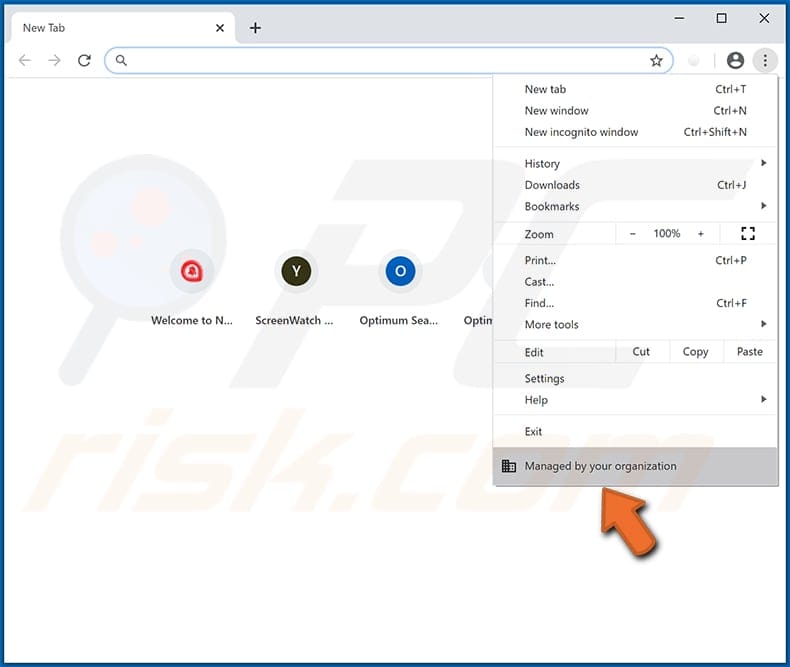
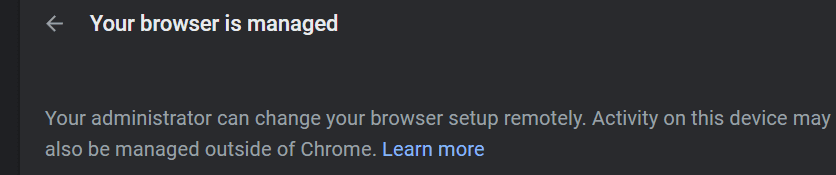
My Chrome browser is managed remotely?


infinity

Well-known member
VIP
Local time
11:15 PM
Posts
110
OS
Win 11
Just to be clear, this is my personal PC and I am the only user of this PC. However, I noticed this prompt in Chrome. Have tried reinstalling, as well as running these commands to try to reverse this situation, but to no avail. Any suggestions?
Code:
@echo off

IF NOT EXIST %WINDIR%\System32\GroupPolicy goto next

echo Deleting GroupPolicy folder...
RD /S /Q "%WINDIR%\System32\GroupPolicy" || goto error
echo.

:next
IF NOT EXIST %WINDIR%\System32\GroupPolicyUsers goto next2

echo Deleting GroupPolicyUsers folder...
RD /S /Q "%WINDIR%\System32\GroupPolicyUsers" || goto error
echo.

:next2
gpupdate /force

pause
exit

:error
echo.
echo An unexpected error has occurred. ¨Have opened the program as an administrator (right click, run as administrator)?
echo.
pause
exit


1649333965582.png
 

My Computer My Computer

At a glance

Win 11Ryzen 3600GSkill RipJawz 16Gbx2GTX960
OS
Win 11
Computer type
PC/Desktop
CPU
Ryzen 3600
Motherboard
MSI B450 Tomahawk Max
Memory
GSkill RipJawz 16Gbx2
Graphics Card(s)
GTX960
Screen Resolution
2560x1440
Hard Drives
WD750 SSD 1TB
PSU
650w FSP
Have you any 3rd party tweaks installed? or extensions, I would guess that would be the first thing to check out
may be worth looking at these
 

My Computers My Computers

  • At a glance

    Windows 11 Pro13th Gen Core i9 13900HX32GB DDR5 @4800MHz 2x16GBGeforce RTX 4090HX 16GB
    OS
    Windows 11 Pro
    Computer type
    Laptop
    Manufacturer/Model
    Alienware M18 R1
    CPU
    13th Gen Core i9 13900HX
    Memory
    32GB DDR5 @4800MHz 2x16GB
    Graphics Card(s)
    Geforce RTX 4090HX 16GB
    Sound Card
    Nvidia HD / Realtek ALC3254
    Monitor(s) Displays
    18" QHD+
    Screen Resolution
    25660 X 1600
    Hard Drives
    C: KIOXIA (Toshiba) 2TB KXG80ZNV2T04 NVMe PCIe M.2 SSD
    D: KIOXIA (Toshiba) 2TB KXG80ZNV2T04 NVMe PCIe M.2 SSD
    Case
    Dark Metallic Moon
    Keyboard
    Alienware M Series per-key AlienFX RGB
    Mouse
    Alienware AW610M
    Browser
    Chrome and Firefox
    Antivirus
    Norton
    Other Info
    Killer E3000 Ethernet Controller
    Killer Killer AX1690 Wi-Fi Network Adaptor Wi-Fi 6E
    Bluetooth 5.2
    Alienware Z01G Graphic Amplifier
  • At a glance

    Windows 11 Pro10th Gen i-9 10900 K32Gb Dual Channel DDR4 @ 8843MHzNvidia RTX 2080 Super
    Operating System
    Windows 11 Pro
    Computer type
    Laptop
    Manufacturer/Model
    Alienware Area 51m R2
    CPU
    10th Gen i-9 10900 K
    Memory
    32Gb Dual Channel DDR4 @ 8843MHz
    Graphics card(s)
    Nvidia RTX 2080 Super
    Sound Card
    Nvidia
    Screen Resolution
    1920 x 1080
    Hard Drives
    Hard Drive C: Samsung 2TB SSD PM981a NVMe
    Hard Drive D:Samsung 2TB SSD 970 EVO Plus
    Mouse
    Alienware 610M
    Browser
    Chrome
    Antivirus
    Norton
Have you any 3rd party tweaks installed? or extensions, I would guess that would be the first thing to check out
may be worth looking at these
I have plenty of extensions, so it's really difficult to isolate which extension is causing it. I'm looking for a tool that can force-remove this "remote management" of my browser, for security purposes.
 

My Computer My Computer

At a glance

Win 11Ryzen 3600GSkill RipJawz 16Gbx2GTX960
OS
Win 11
Computer type
PC/Desktop
CPU
Ryzen 3600
Motherboard
MSI B450 Tomahawk Max
Memory
GSkill RipJawz 16Gbx2
Graphics Card(s)
GTX960
Screen Resolution
2560x1440
Hard Drives
WD750 SSD 1TB
PSU
650w FSP
I have plenty of extensions, so it's really difficult to isolate which extension is causing it. I'm looking for a tool that can force-remove this "remote management" of my browser, for security purposes.


1. Export your bookmarks.
2. Completely uninstall Chrome (use Revo Uninstaller and it's... scan for leftovers function).
3. Do a clean install of Chrome. Import your bookmarks.
4. Then do your Chrome settings.
5. Then start adding extensions, one or two at a time, till you find the one that's causing the problem.
 

My Computers My Computers

  • At a glance

    Win 11 Home ♦♦♦26200.8655 ♦♦♦♦♦♦♦25H2AMD Ryzen 7 3700XG.Skill (F4-3200C14D-16GTZKW)EVGA RTX 2070 (08G-P4-2171-KR)
    OS
    Win 11 Home ♦♦♦26200.8655 ♦♦♦♦♦♦♦25H2
    Computer type
    PC/Desktop
    Manufacturer/Model
    Built by Ghot® [May 2020]
    CPU
    AMD Ryzen 7 3700X
    Motherboard
    Asus Pro WS X570-ACE (BIOS 5302)
    Memory
    G.Skill (F4-3200C14D-16GTZKW)
    Graphics Card(s)
    EVGA RTX 2070 (08G-P4-2171-KR)
    Sound Card
    Realtek ALC1220P / ALC S1220A
    Monitor(s) Displays
    Dell U3011 30"
    Screen Resolution
    2560 x 1600
    Hard Drives
    2x Samsung 860 EVO 500GB,
    WD 4TB Black FZBX - SATA III,
    WD 8TB Black FZBX - SATA III,
    DRW-24B1ST CD/DVD Burner
    PSU
    PC Power & Cooling 750W Quad EPS12V
    Case
    Cooler Master ATCS 840 Tower
    Cooling
    CM Hyper 212 EVO (push/pull)
    Keyboard
    Ducky DK9008 Shine II Blue LED
    Mouse
    Logitech Optical M-100
    Internet Speed
    300/300
    Browser
    Firefox (latest)
    Antivirus
    Bitdefender Total Security
    Other Info
    Speakers: Klipsch Pro Media 2.1
  • At a glance

    Windows XP Pro 32bit w/SP3AMD Athlon 64 X2 5000+ (OC'd @ 3.2Ghz)TWIN2X2048-6400C4DHX (2 x 1GB, DDR2 800)EVGA 256-P2-N758-TR GeForce 8600GT SSC
    Operating System
    Windows XP Pro 32bit w/SP3
    Computer type
    PC/Desktop
    Manufacturer/Model
    Built by Ghot® (not in use)
    CPU
    AMD Athlon 64 X2 5000+ (OC'd @ 3.2Ghz)
    Motherboard
    ASUS M2N32-SLI Deluxe Wireless Edition
    Memory
    TWIN2X2048-6400C4DHX (2 x 1GB, DDR2 800)
    Graphics card(s)
    EVGA 256-P2-N758-TR GeForce 8600GT SSC
    Sound Card
    Onboard
    Monitor(s) Displays
    ViewSonic G90FB Black 19" Professional (CRT)
    Screen Resolution
    up to 2048 x 1536
    Hard Drives
    WD 36GB 10,000rpm Raptor SATA
    Seagate 80GB 7200rpm SATA
    Lite-On LTR-52246S CD/RW
    Lite-On LH-18A1P CD/DVD Burner
    PSU
    PC Power & Cooling Silencer 750 Quad EPS12V
    Case
    Generic Beige case, 80mm fans
    Cooling
    ZALMAN 9500A 92mm CPU Cooler
    Keyboard
    Logitech Classic Keybooard 200
    Mouse
    Logitech Optical M-BT96a
    Internet Speed
    300/300
    Browser
    Firefox 3.x ??
    Antivirus
    Symantec (Norton)
    Other Info
    Still assembled, still runs. Haven't turned it on for 15 years?
as mentioned, I can't do that. I have way too many extensions AND custom search engines which cannot be archived/exported once they are cleared by Revo.
 

My Computer My Computer

At a glance

Win 11Ryzen 3600GSkill RipJawz 16Gbx2GTX960
OS
Win 11
Computer type
PC/Desktop
CPU
Ryzen 3600
Motherboard
MSI B450 Tomahawk Max
Memory
GSkill RipJawz 16Gbx2
Graphics Card(s)
GTX960
Screen Resolution
2560x1440
Hard Drives
WD750 SSD 1TB
PSU
650w FSP
as mentioned, I can't do that. I have way too many extensions AND custom search engines which cannot be archived/exported once they are cleared by Revo.


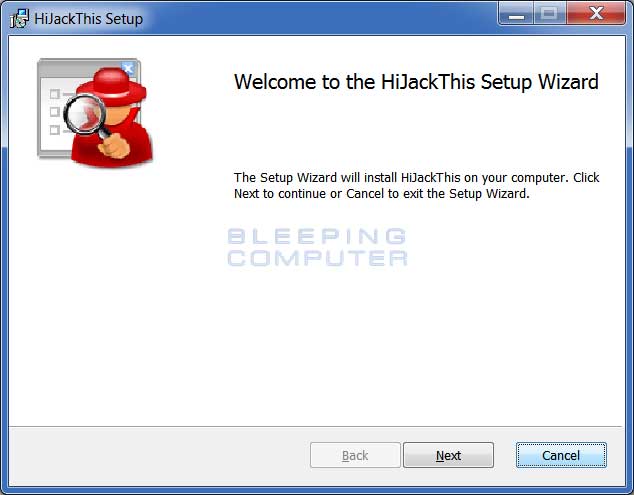
There's a program called HijackTHIS. The website used to interpret HijackTHIS' scans is no longer functional.
The program itself still works, but it's hard to interpret the results.


Make sure to read: How to use HijackThis to remove Browser Hijackers & Spyware ...at the bottom.

You can also post your problem on Bleeping Computer, and get someone to "take your case" and walk you through, finding the culprit.


The program itself is portable, and easy to run. Just don't start check marking things without a LOT of research.

The first time you run the program, click on: "None of the above, just run the program"
Then click on "Scan" (lower left). That's it. Now comes the hard part... interpreting the results.

As mentioned above, their tutorial explains a lot, but BE CAREFUL with this program.
Scanning is fine. No harm will come from that.

Most important sentence on the download page...
Since there is no filter on what it reports, you should research each entry before you remove anything using this tool.


For example... here's a scan from my Windows 10 computer. I use only Firefox and run NO extensions.
I also have all the Windows Apps... removed.
I'm 99% sure, all these results are... "safe" and valid...


Image1.png


As I mentioned... you can also post your problem at Bleeping Computer.
They've been around forever, and are like "detectives" for finding the bad things...


I don't think you have an infection, per se, but that is where you'd want to post about Chrome being... "managed" by someone other than you. :-)
 
Last edited:

My Computers My Computers

  • At a glance

    Win 11 Home ♦♦♦26200.8655 ♦♦♦♦♦♦♦25H2AMD Ryzen 7 3700XG.Skill (F4-3200C14D-16GTZKW)EVGA RTX 2070 (08G-P4-2171-KR)
    OS
    Win 11 Home ♦♦♦26200.8655 ♦♦♦♦♦♦♦25H2
    Computer type
    PC/Desktop
    Manufacturer/Model
    Built by Ghot® [May 2020]
    CPU
    AMD Ryzen 7 3700X
    Motherboard
    Asus Pro WS X570-ACE (BIOS 5302)
    Memory
    G.Skill (F4-3200C14D-16GTZKW)
    Graphics Card(s)
    EVGA RTX 2070 (08G-P4-2171-KR)
    Sound Card
    Realtek ALC1220P / ALC S1220A
    Monitor(s) Displays
    Dell U3011 30"
    Screen Resolution
    2560 x 1600
    Hard Drives
    2x Samsung 860 EVO 500GB,
    WD 4TB Black FZBX - SATA III,
    WD 8TB Black FZBX - SATA III,
    DRW-24B1ST CD/DVD Burner
    PSU
    PC Power & Cooling 750W Quad EPS12V
    Case
    Cooler Master ATCS 840 Tower
    Cooling
    CM Hyper 212 EVO (push/pull)
    Keyboard
    Ducky DK9008 Shine II Blue LED
    Mouse
    Logitech Optical M-100
    Internet Speed
    300/300
    Browser
    Firefox (latest)
    Antivirus
    Bitdefender Total Security
    Other Info
    Speakers: Klipsch Pro Media 2.1
  • At a glance

    Windows XP Pro 32bit w/SP3AMD Athlon 64 X2 5000+ (OC'd @ 3.2Ghz)TWIN2X2048-6400C4DHX (2 x 1GB, DDR2 800)EVGA 256-P2-N758-TR GeForce 8600GT SSC
    Operating System
    Windows XP Pro 32bit w/SP3
    Computer type
    PC/Desktop
    Manufacturer/Model
    Built by Ghot® (not in use)
    CPU
    AMD Athlon 64 X2 5000+ (OC'd @ 3.2Ghz)
    Motherboard
    ASUS M2N32-SLI Deluxe Wireless Edition
    Memory
    TWIN2X2048-6400C4DHX (2 x 1GB, DDR2 800)
    Graphics card(s)
    EVGA 256-P2-N758-TR GeForce 8600GT SSC
    Sound Card
    Onboard
    Monitor(s) Displays
    ViewSonic G90FB Black 19" Professional (CRT)
    Screen Resolution
    up to 2048 x 1536
    Hard Drives
    WD 36GB 10,000rpm Raptor SATA
    Seagate 80GB 7200rpm SATA
    Lite-On LTR-52246S CD/RW
    Lite-On LH-18A1P CD/DVD Burner
    PSU
    PC Power & Cooling Silencer 750 Quad EPS12V
    Case
    Generic Beige case, 80mm fans
    Cooling
    ZALMAN 9500A 92mm CPU Cooler
    Keyboard
    Logitech Classic Keybooard 200
    Mouse
    Logitech Optical M-BT96a
    Internet Speed
    300/300
    Browser
    Firefox 3.x ??
    Antivirus
    Symantec (Norton)
    Other Info
    Still assembled, still runs. Haven't turned it on for 15 years?

Latest Support Threads

Back
Top Bottom