

This thread has been marked as solved as I've got the PC up and running again after this serious component failure. This was the most catastrophic series of issues I've had in over 30 years of using computers.
I'll try to keep this relatively short and will add some revealing photos at the end of the post.
1. Early this week late at night the computer which had been having no serious issues suddenly without warning instantly shut down. I rebooted and was before Windows started to boot presented with a black screen in a blood red font with a message saying that the wrong version of Secure Boot was being used. This wasn't Windows generated and was as far as I can tell from the UEFI Bios.
2. After checking the bios settings, I decided the best thing to do was to clear CMOS. This was successful in getting rid of the dreaded black screen already described. But much worse was to come.
3. I tried several times to reboot into Windows but kept on getting a series of boot load errors like cannot find winload.efi coupled with more freezes.
4. Then the beginning of the end was nigh. While checking the bios settings the fans in the computer started going psycho and aio pump started getting more and more noisier to the point it was making disturbing loud screaming and squealing noises. The PC thankfully shut itself down immediately.
The end result of all this was there had been corruption of the Secure Boot settings in the bios and Windows was fatally corrupted. And the AIO was dead.
I subsequently found out since that the Corsair H150i Elite Capellix XT AIO's like mine have a long history of exactly the types of failure I experienced. Apparently, these failures happen over a long period. I did have the AIO cooler installed correctly with the radiator tubes ABOVE the AIO pump. There had been though significant evaporation of the cooling fluid.
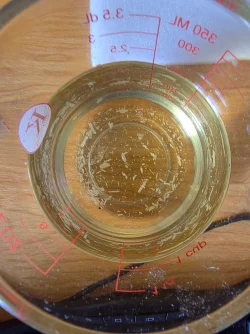
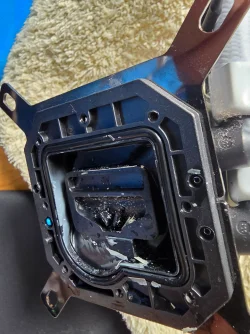
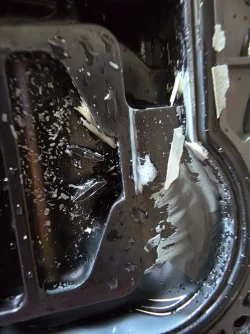
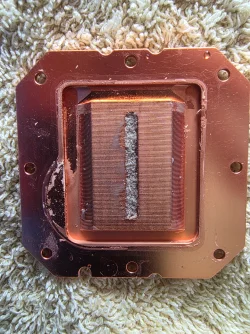
These photos show the oxidised coolant liquid with the large amounts of white particles in the fluid and inside the bottom of the pump.
I replaced the dead AIO with a Corsair Nautlilus 360 RS. I've clean installed Windows and the computer is currently stable.
I'll try to keep this relatively short and will add some revealing photos at the end of the post.
1. Early this week late at night the computer which had been having no serious issues suddenly without warning instantly shut down. I rebooted and was before Windows started to boot presented with a black screen in a blood red font with a message saying that the wrong version of Secure Boot was being used. This wasn't Windows generated and was as far as I can tell from the UEFI Bios.
2. After checking the bios settings, I decided the best thing to do was to clear CMOS. This was successful in getting rid of the dreaded black screen already described. But much worse was to come.
3. I tried several times to reboot into Windows but kept on getting a series of boot load errors like cannot find winload.efi coupled with more freezes.
4. Then the beginning of the end was nigh. While checking the bios settings the fans in the computer started going psycho and aio pump started getting more and more noisier to the point it was making disturbing loud screaming and squealing noises. The PC thankfully shut itself down immediately.
The end result of all this was there had been corruption of the Secure Boot settings in the bios and Windows was fatally corrupted. And the AIO was dead.
I subsequently found out since that the Corsair H150i Elite Capellix XT AIO's like mine have a long history of exactly the types of failure I experienced. Apparently, these failures happen over a long period. I did have the AIO cooler installed correctly with the radiator tubes ABOVE the AIO pump. There had been though significant evaporation of the cooling fluid.
These photos show the oxidised coolant liquid with the large amounts of white particles in the fluid and inside the bottom of the pump.
I replaced the dead AIO with a Corsair Nautlilus 360 RS. I've clean installed Windows and the computer is currently stable.
Last edited:
My Computers
-
At a glance
Windows 11 Pro 26H2Intel Core i9 13900KCorsair Dominator Platinum 64gb 5600MT/s DDR5...Sapphire NITRO+ AMD Radeon RX 7900 XTX Vapor-...- OS
- Windows 11 Pro 26H2
- Computer type
- PC/Desktop
- Manufacturer/Model
- Homebuilt
- CPU
- Intel Core i9 13900K
- Motherboard
- Asus ProArt Z790 Creator WiFi - Bios 3202
- Memory
- Corsair Dominator Platinum 64gb 5600MT/s DDR5 Dual Channel
- Graphics Card(s)
- Sapphire NITRO+ AMD Radeon RX 7900 XTX Vapor-X 24GB
- Sound Card
- External DAC: Cambridge Audio DACMagic200M - Headphone Amps: Topping L70 & SMSL H400
- Monitor(s) Displays
- Samsung S95F OLED 55" TV
- Screen Resolution
- 3840 x 2160 120hz
- Hard Drives
- Samsung 980 Pro 2TB (OS)
Samsung 980 Pro 1TB (Files)
Lexar NZ790 4TB
LaCie d2 Professional 6TB external - USB 3.1
Seagate Expansion 16TB external - USB 3.2
Seagate One Touch 18TB external HD - USB 3.0
- PSU
- Corsair RM1200x Shift
- Case
- Corsair RGB Smart Case 5000x (white)
- Cooling
- NAUTILUS 360 RS Liquid CPU Cooler
- Keyboard
- Incase Ergonomic USB (Microsoft clone)
- Mouse
- Logitech MX Master 3S
- Internet Speed
- Fibre 900/500 Mbps
- Browser
- Microsoft Edge Chromium
- Antivirus
- Bitdefender Total Security
- Other Info
- AMD Radeon Software & Drivers
Hasleo Backup Suite
Dashlane password manager
Kensington Verimark fingerprint reader
Logitech Brio 4K webcam
Orico 10-port powered USB 3.0 hub
-
At a glance
Windows 11 Pro 25H2Intel® Core™ i9-13900H32GB DDR4-3200 Dual channel*Intel Iris Xᵉ Graphics G7- Operating System
- Windows 11 Pro 25H2
- Computer type
- Laptop
- Manufacturer/Model
- Asus Vivobook X1605VA
- CPU
- Intel® Core™ i9-13900H
- Motherboard
- Asus X1605VA bios 309
- Memory
- 32GB DDR4-3200 Dual channel
- Graphics card(s)
- *Intel Iris Xᵉ Graphics G7
- Sound Card
- Realtek | Intel SST Bluetooth & USB
- Monitor(s) Displays
- 16.0-inch, WUXGA 16:10 aspect ratio, IPS-level Panel
- Screen Resolution
- 1920 x 1200 60hz
- Hard Drives
- 512GB M.2 NVMe™ PCIe® 3.0 SSD
- Mouse
- Logitech MX Ergo Trackball
- Antivirus
- Bitdefender Total Security
- Other Info
- 720p Webcam
WiFi & USB to ethernet

 In the BIOS, I have the system set to shut down if the processor temp exceeds 90C. I rarely top 70C under load.





 Apple 13" Macbook Pro 2020






