My first Macrium backup on Windows 11 failed


perkinwarbeck

Member
Local time
11:56 PM
Posts
33
OS
Windows 11
I ran my first Macrium backup on a new Windows 11 PC today. It failed with the message "Backup aborted! - Volume Bitmap is NULL." The full backup log is attached. Can you help me understand this message?

Macrium Reflect Home v8.1.7544
Microsoft Windows 11 Pro version 10.0.22621 Build 22621
 

Attachments

My Computer My Computer

At a glance

Windows 1112th Gen Intel® Core™ i7- 1270032 GB, 2 x 16 GB, DDR5, 4400 MHzNvidia RTX A2000, 6GB, 4mDP to DP adapter (Pr...
OS
Windows 11
Computer type
PC/Desktop
Manufacturer/Model
Dell Precision 3660 Tower Workstation
CPU
12th Gen Intel® Core™ i7- 12700
Motherboard
yes
Memory
32 GB, 2 x 16 GB, DDR5, 4400 MHz
Graphics Card(s)
Nvidia RTX A2000, 6GB, 4mDP to DP adapter (Precision 3660T)
Monitor(s) Displays
BenQ SW2700PT
Screen Resolution
2560x1440
Hard Drives
Two 1TB PCIe NVME™ Class 40 M.2 SSD drives in RAID 1 configuration
PSU
500W (80 Plus Platinum) PSU, RPL and ADL Compatible
Cooling
Liquid cooler
Keyboard
not sure yet
Mouse
not sure yet
Browser
not sure yet
Antivirus
MalwareBytes
bitlocker perhaps
 

My Computers My Computers

  • At a glance

    Win7,Win11i7-97002x16gb 3600mhz
    OS
    Win7,Win11
    Computer type
    PC/Desktop
    CPU
    i7-9700
    Motherboard
    gigabyte b365m ds3h
    Memory
    2x16gb 3600mhz
    Monitor(s) Displays
    benq gw2480
    PSU
    bequiet pure power 11 400CM
    Cooling
    cryorig m9i
  • At a glance

    win7,win11i5-84002x8gb 3200
    Operating System
    win7,win11
    Computer type
    PC/Desktop
    CPU
    i5-8400
    Motherboard
    gigabyte b365m ds3h
    Memory
    2x8gb 3200
    PSU
    xfx pro 450
I assume the error message refers to the Samsung_T5 (E:). I had been using this drive on a Mac, where it was formatted exFAT. When I brought the drive over to the Windows 11 PC, I did a Quick format to NTFS to delete any data left over from the Mac. I have already successfully written a lot of data to it on the Windows 11 PC, and that's why I want to include it in the backup.

Just now, I ran chkdsk /f e: from the command line. It said "The type of the file system is RAW. Chkdsk is not available for RAW drives." What's going on?
 

My Computer My Computer

At a glance

Windows 1112th Gen Intel® Core™ i7- 1270032 GB, 2 x 16 GB, DDR5, 4400 MHzNvidia RTX A2000, 6GB, 4mDP to DP adapter (Pr...
OS
Windows 11
Computer type
PC/Desktop
Manufacturer/Model
Dell Precision 3660 Tower Workstation
CPU
12th Gen Intel® Core™ i7- 12700
Motherboard
yes
Memory
32 GB, 2 x 16 GB, DDR5, 4400 MHz
Graphics Card(s)
Nvidia RTX A2000, 6GB, 4mDP to DP adapter (Precision 3660T)
Monitor(s) Displays
BenQ SW2700PT
Screen Resolution
2560x1440
Hard Drives
Two 1TB PCIe NVME™ Class 40 M.2 SSD drives in RAID 1 configuration
PSU
500W (80 Plus Platinum) PSU, RPL and ADL Compatible
Cooling
Liquid cooler
Keyboard
not sure yet
Mouse
not sure yet
Browser
not sure yet
Antivirus
MalwareBytes
Macrium knows how to handle BitLocker, so that's not the problem.

If you have valuable information on the T5, make a new folder called T5 on your PC and copy the files there. Then do a low level format on the T5 SSD with your W11 system and that should solve your problem.
 

My Computers My Computers

  • At a glance

    Windows 11 ProIntel Series 3 Core Ultra X9 388H64GB LPDDR5x 9600 MT/sIntel Arc graphics B390 Panther Lake
    OS
    Windows 11 Pro
    Computer type
    Laptop
    Manufacturer/Model
    Dell XPS 16 DA16260
    CPU
    Intel Series 3 Core Ultra X9 388H
    Memory
    64GB LPDDR5x 9600 MT/s
    Graphics Card(s)
    Intel Arc graphics B390 Panther Lake
    Monitor(s) Displays
    16" 3.2K Tandem OLED Infinity Edge
    Screen Resolution
    3200 x 2000 16:10 236 PPI
    Hard Drives
    1 Terabyte M.2 PCIe NVMe SSD
    Case
    Black Anodized Aluminum
    Cooling
    Vapor Chamber Cooling
    Mouse
    None
    Internet Speed
    942 Mbps Netgear Mesh + 2 Satellites
    Browser
    Microsoft Edge (Chromium)
    Antivirus
    Windows Security (Defender)
    Other Info
    NPU delivering 67 TOPS
    Microsoft 365 subscription
    Microsoft Office 365
    Microsoft OneDrive 1TB Cloud
    Microsoft Visual Studio
    Microsoft Visual Studio Code
    Microsoft Sysinternals Suite
    Microsoft BitLocker
    Microsoft Copilot
    Dell Support Assist
    Dell Command | Update
    Macrium Reflect X subscription
    1Password Password Manager
    Amazon Kindle for PC
    Lightroom/Photoshop subscription
    Interactive Brokers Trader Workstation
  • At a glance

    Windows 11 ProSnapdragon® X Elite (12 Core) with Hexagon NP...32GB LPDDR5x 8448 MT/sIntegrated Adreno GPU
    Operating System
    Windows 11 Pro
    Computer type
    Laptop
    Manufacturer/Model
    Microsoft Surface Laptop 7
    CPU
    Snapdragon® X Elite (12 Core) with Hexagon NPU delivering 45 TOPS
    Memory
    32GB LPDDR5x 8448 MT/s
    Graphics card(s)
    Integrated Adreno GPU
    Sound Card
    Omnisonic speakers with Dolby Atmos spatial sound
    Monitor(s) Displays
    13.8″ PixelSense Flow touchscreen 120 Hz 600 NIT
    Screen Resolution
    2304 × 1536 (201 PPI), 3:2 aspect ratio
    Hard Drives
    1 TB PCIe NVMe Gen 4 SSD
    Case
    Black Anodized Aluminum
    Cooling
    Vapor Chamber Cooling
    Mouse
    None
    Internet Speed
    942 Mbps Netgear Mesh + 2 Satellites
    Browser
    Microsoft Edge (Chromium)
    Antivirus
    Windows Security (Defender)
    Other Info
    Microsoft 365 subscription (Office)
    Microsoft Office 365
    Microsoft OneDrive 1TB Cloud
    Microsoft Visual Studio 2026
    Microsoft Visual Studio Code
    Interactive Brokers Trader Workstation
    Lightroom/Photoshop subscription
    1Password Password Manager
    Microsoft Sysinternals
    Amazon Kindle for PC
    Microsoft BitLocker
    Microsoft Copilot
 

My Computers My Computers

  • At a glance

    Win7,Win11i7-97002x16gb 3600mhz
    OS
    Win7,Win11
    Computer type
    PC/Desktop
    CPU
    i7-9700
    Motherboard
    gigabyte b365m ds3h
    Memory
    2x16gb 3600mhz
    Monitor(s) Displays
    benq gw2480
    PSU
    bequiet pure power 11 400CM
    Cooling
    cryorig m9i
  • At a glance

    win7,win11i5-84002x8gb 3200
    Operating System
    win7,win11
    Computer type
    PC/Desktop
    CPU
    i5-8400
    Motherboard
    gigabyte b365m ds3h
    Memory
    2x8gb 3200
    PSU
    xfx pro 450
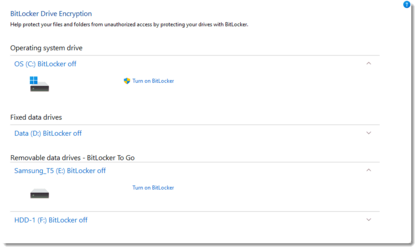
@SIW2 Here is what I see in
Control Panel\System and Security\BitLocker Drive Encryption.

Bit Locker.png
Does this mean that BitLocker is activated, but turned off for the Samsung_T5?
 

My Computer My Computer

At a glance

Windows 1112th Gen Intel® Core™ i7- 1270032 GB, 2 x 16 GB, DDR5, 4400 MHzNvidia RTX A2000, 6GB, 4mDP to DP adapter (Pr...
OS
Windows 11
Computer type
PC/Desktop
Manufacturer/Model
Dell Precision 3660 Tower Workstation
CPU
12th Gen Intel® Core™ i7- 12700
Motherboard
yes
Memory
32 GB, 2 x 16 GB, DDR5, 4400 MHz
Graphics Card(s)
Nvidia RTX A2000, 6GB, 4mDP to DP adapter (Precision 3660T)
Monitor(s) Displays
BenQ SW2700PT
Screen Resolution
2560x1440
Hard Drives
Two 1TB PCIe NVME™ Class 40 M.2 SSD drives in RAID 1 configuration
PSU
500W (80 Plus Platinum) PSU, RPL and ADL Compatible
Cooling
Liquid cooler
Keyboard
not sure yet
Mouse
not sure yet
Browser
not sure yet
Antivirus
MalwareBytes
Macrium knows how to handle BitLocker, so that's not the problem.

If you have valuable information on the T5, make a new folder called T5 on your PC and copy the files there. Then do a low level format on the T5 SSD with your W11 system and that should solve your problem.
It looks like that's what I'll have to do. Thanks.
 

My Computer My Computer

At a glance

Windows 1112th Gen Intel® Core™ i7- 1270032 GB, 2 x 16 GB, DDR5, 4400 MHzNvidia RTX A2000, 6GB, 4mDP to DP adapter (Pr...
OS
Windows 11
Computer type
PC/Desktop
Manufacturer/Model
Dell Precision 3660 Tower Workstation
CPU
12th Gen Intel® Core™ i7- 12700
Motherboard
yes
Memory
32 GB, 2 x 16 GB, DDR5, 4400 MHz
Graphics Card(s)
Nvidia RTX A2000, 6GB, 4mDP to DP adapter (Precision 3660T)
Monitor(s) Displays
BenQ SW2700PT
Screen Resolution
2560x1440
Hard Drives
Two 1TB PCIe NVME™ Class 40 M.2 SSD drives in RAID 1 configuration
PSU
500W (80 Plus Platinum) PSU, RPL and ADL Compatible
Cooling
Liquid cooler
Keyboard
not sure yet
Mouse
not sure yet
Browser
not sure yet
Antivirus
MalwareBytes
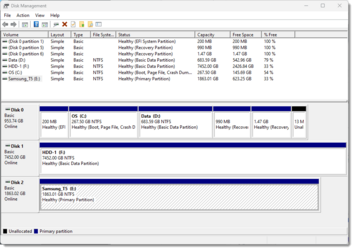
Post an image of your disk management. If the drive is showing as raw it needs to be formatted again.
 

My Computers My Computers

  • At a glance

    Win 11 ProAMD Ryzen™ 7 7730U24GB Dual-Channel DDR4 @ 1596MHz (22-22-22-52)512MB ATI AMD Radeon Graphics (ASUStek Comput...
    OS
    Win 11 Pro
    Computer type
    Laptop
    Manufacturer/Model
    ASUS Vivobook
    CPU
    AMD Ryzen™ 7 7730U
    Motherboard
    M1605YA
    Memory
    24GB Dual-Channel DDR4 @ 1596MHz (22-22-22-52)
    Graphics Card(s)
    512MB ATI AMD Radeon Graphics (ASUStek Computer Inc)
    Monitor(s) Displays
    Generic PnP Monitor (1920x1200@60Hz) - P1 PLUS (1920x1080@59Hz)
    Screen Resolution
    1920 X 1200
    Hard Drives
    953GB Western Digital WD
    PSU
    45 Watts
    Mouse
    Lenovo Bluetooth.
    Internet Speed
    500 Mbps
    Browser
    Edge
    Antivirus
    Defender
  • At a glance

    Windows 11AMD Ryzen 7 5800H / 3.2 GHz32 GB DDR4 SDRAM 3200 MHzNVIDIA GeForce RTX 3060 6 GB GDDR6 SDRAM
    Operating System
    Windows 11
    Computer type
    Laptop
    Manufacturer/Model
    ACER NITRO
    CPU
    AMD Ryzen 7 5800H / 3.2 GHz
    Motherboard
    CZ Scala_CAS (FP6)
    Memory
    32 GB DDR4 SDRAM 3200 MHz
    Graphics card(s)
    NVIDIA GeForce RTX 3060 6 GB GDDR6 SDRAM
    Sound Card
    Realtek Audio. NVIDIA High Definition Audio
    Monitor(s) Displays
    15.6" LED backlight 1920 x 1080 (Full HD) 144 Hz
    Screen Resolution
    1920 x 1080 (Full HD)
    Hard Drives
    Samsung 970 Evo Plus 2TB NVMe M.2
    PSU
    180 Watt, 19.5 V
    Mouse
    Lenovo Bluetooth
    Internet Speed
    500 Mbps
    Browser
    Edge
    Antivirus
    Defender

Attachments

  • Disk Management.png
    Disk Management.png
    17.6 KB · Views: 3

My Computer My Computer

At a glance

Windows 1112th Gen Intel® Core™ i7- 1270032 GB, 2 x 16 GB, DDR5, 4400 MHzNvidia RTX A2000, 6GB, 4mDP to DP adapter (Pr...
OS
Windows 11
Computer type
PC/Desktop
Manufacturer/Model
Dell Precision 3660 Tower Workstation
CPU
12th Gen Intel® Core™ i7- 12700
Motherboard
yes
Memory
32 GB, 2 x 16 GB, DDR5, 4400 MHz
Graphics Card(s)
Nvidia RTX A2000, 6GB, 4mDP to DP adapter (Precision 3660T)
Monitor(s) Displays
BenQ SW2700PT
Screen Resolution
2560x1440
Hard Drives
Two 1TB PCIe NVME™ Class 40 M.2 SSD drives in RAID 1 configuration
PSU
500W (80 Plus Platinum) PSU, RPL and ADL Compatible
Cooling
Liquid cooler
Keyboard
not sure yet
Mouse
not sure yet
Browser
not sure yet
Antivirus
MalwareBytes
@SIW2 Here is what I see in
Control Panel\System and Security\BitLocker Drive Encryption.

View attachment 63824
Does this mean that BitLocker is activated, but turned off for the Samsung_T5?
I have read there are often problems with oem machines and bitlocker. I avoid oem machines wherever possible. At one point DELL was blaming MS for the mess.
 

My Computers My Computers

  • At a glance

    Win7,Win11i7-97002x16gb 3600mhz
    OS
    Win7,Win11
    Computer type
    PC/Desktop
    CPU
    i7-9700
    Motherboard
    gigabyte b365m ds3h
    Memory
    2x16gb 3600mhz
    Monitor(s) Displays
    benq gw2480
    PSU
    bequiet pure power 11 400CM
    Cooling
    cryorig m9i
  • At a glance

    win7,win11i5-84002x8gb 3200
    Operating System
    win7,win11
    Computer type
    PC/Desktop
    CPU
    i5-8400
    Motherboard
    gigabyte b365m ds3h
    Memory
    2x8gb 3200
    PSU
    xfx pro 450
I have read there are often problems with oem machines and bitlocker. I avoid oem machines wherever possible. At one point DELL was blaming MS for the mess.
My current Dell XPS 9510, specs below, came with an activated BitLocker drive, and it has worked perfectly for the past year and a half. I then tried "BitLocker To Go" on my two Samsung T7 Shield SSD's. "BitLocker To Go" also works perfectly.

What I think is cool about my BitLocker to Go SSDs is that, when attached to my own BitLocker computer, they act just like a non BitLocker drive. They don't require a password to connect. If I connect one of my BitLocker To Go SSD drives to my wife's computer, it then asks for a password.
 

My Computers My Computers

  • At a glance

    Windows 11 ProIntel Series 3 Core Ultra X9 388H64GB LPDDR5x 9600 MT/sIntel Arc graphics B390 Panther Lake
    OS
    Windows 11 Pro
    Computer type
    Laptop
    Manufacturer/Model
    Dell XPS 16 DA16260
    CPU
    Intel Series 3 Core Ultra X9 388H
    Memory
    64GB LPDDR5x 9600 MT/s
    Graphics Card(s)
    Intel Arc graphics B390 Panther Lake
    Monitor(s) Displays
    16" 3.2K Tandem OLED Infinity Edge
    Screen Resolution
    3200 x 2000 16:10 236 PPI
    Hard Drives
    1 Terabyte M.2 PCIe NVMe SSD
    Case
    Black Anodized Aluminum
    Cooling
    Vapor Chamber Cooling
    Mouse
    None
    Internet Speed
    942 Mbps Netgear Mesh + 2 Satellites
    Browser
    Microsoft Edge (Chromium)
    Antivirus
    Windows Security (Defender)
    Other Info
    NPU delivering 67 TOPS
    Microsoft 365 subscription
    Microsoft Office 365
    Microsoft OneDrive 1TB Cloud
    Microsoft Visual Studio
    Microsoft Visual Studio Code
    Microsoft Sysinternals Suite
    Microsoft BitLocker
    Microsoft Copilot
    Dell Support Assist
    Dell Command | Update
    Macrium Reflect X subscription
    1Password Password Manager
    Amazon Kindle for PC
    Lightroom/Photoshop subscription
    Interactive Brokers Trader Workstation
  • At a glance

    Windows 11 ProSnapdragon® X Elite (12 Core) with Hexagon NP...32GB LPDDR5x 8448 MT/sIntegrated Adreno GPU
    Operating System
    Windows 11 Pro
    Computer type
    Laptop
    Manufacturer/Model
    Microsoft Surface Laptop 7
    CPU
    Snapdragon® X Elite (12 Core) with Hexagon NPU delivering 45 TOPS
    Memory
    32GB LPDDR5x 8448 MT/s
    Graphics card(s)
    Integrated Adreno GPU
    Sound Card
    Omnisonic speakers with Dolby Atmos spatial sound
    Monitor(s) Displays
    13.8″ PixelSense Flow touchscreen 120 Hz 600 NIT
    Screen Resolution
    2304 × 1536 (201 PPI), 3:2 aspect ratio
    Hard Drives
    1 TB PCIe NVMe Gen 4 SSD
    Case
    Black Anodized Aluminum
    Cooling
    Vapor Chamber Cooling
    Mouse
    None
    Internet Speed
    942 Mbps Netgear Mesh + 2 Satellites
    Browser
    Microsoft Edge (Chromium)
    Antivirus
    Windows Security (Defender)
    Other Info
    Microsoft 365 subscription (Office)
    Microsoft Office 365
    Microsoft OneDrive 1TB Cloud
    Microsoft Visual Studio 2026
    Microsoft Visual Studio Code
    Interactive Brokers Trader Workstation
    Lightroom/Photoshop subscription
    1Password Password Manager
    Microsoft Sysinternals
    Amazon Kindle for PC
    Microsoft BitLocker
    Microsoft Copilot
I ran my first Macrium backup on a new Windows 11 PC today. It failed with the message "Backup aborted! - Volume Bitmap is NULL." The full backup log is attached. Can you help me understand this message?

Macrium Reflect Home v8.1.7544
Microsoft Windows 11 Pro version 10.0.22621 Build 22621

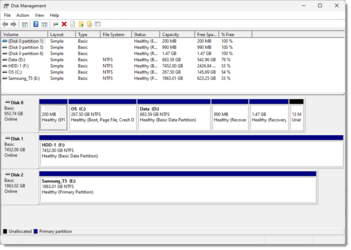
This is strange. I did nothing to fix the problem. For three days in a row, my daily backup failed. But on day four...

day four image success.png
 

My Computer My Computer

At a glance

Windows 1112th Gen Intel® Core™ i7- 1270032 GB, 2 x 16 GB, DDR5, 4400 MHzNvidia RTX A2000, 6GB, 4mDP to DP adapter (Pr...
OS
Windows 11
Computer type
PC/Desktop
Manufacturer/Model
Dell Precision 3660 Tower Workstation
CPU
12th Gen Intel® Core™ i7- 12700
Motherboard
yes
Memory
32 GB, 2 x 16 GB, DDR5, 4400 MHz
Graphics Card(s)
Nvidia RTX A2000, 6GB, 4mDP to DP adapter (Precision 3660T)
Monitor(s) Displays
BenQ SW2700PT
Screen Resolution
2560x1440
Hard Drives
Two 1TB PCIe NVME™ Class 40 M.2 SSD drives in RAID 1 configuration
PSU
500W (80 Plus Platinum) PSU, RPL and ADL Compatible
Cooling
Liquid cooler
Keyboard
not sure yet
Mouse
not sure yet
Browser
not sure yet
Antivirus
MalwareBytes

Latest Support Threads

Back
Top Bottom