My HDD shows in Device Manager but not in Disk Management!


supersonic

Member
Local time
12:28 PM
Posts
21
OS
Windows 11 Pro
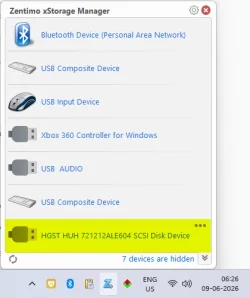
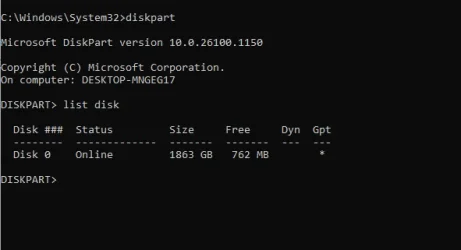
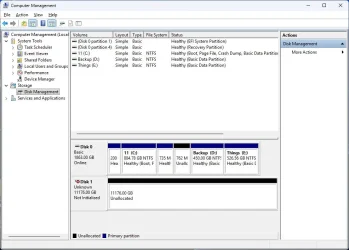
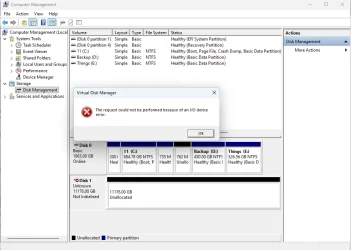
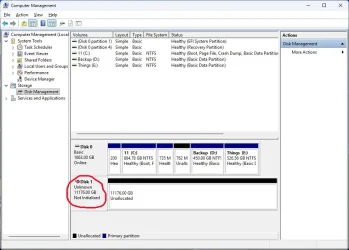
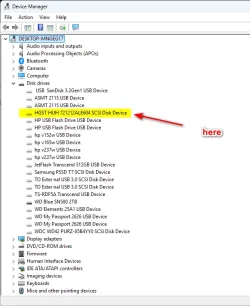
i just received my new HDD after warranty replacement. But the disk is not recognized in Disk Management but visible in Device Manager by the name
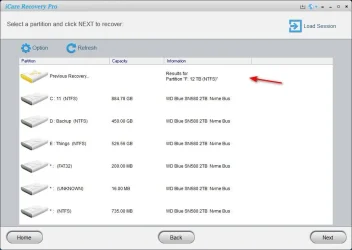
HGST HUH 721212ALE604 SCSI Disk Device. It is slightly visible in icaredata, Zentimo xstorage Manager n Device manager.
I can't initialize bcoz its not visible in the Disk Management. Tried to uninstall driver and scan for hardware change doesn't do anything. In fact the name is gone.
icaredata does show as F: 12 TB.
But i feel the present drive is spinning according to like it should be. Could anyone suggest me something.
Awaiting reply.

Plz see the pics:
 

Attachments
  • 2026-06-09_061237.webp
    2026-06-09_061237.webp
    46.3 KB · Views: 1
  • 2026-06-09_062700.webp
    2026-06-09_062700.webp
    17.7 KB · Views: 1
  • Clipboard01.webp
    Clipboard01.webp
    34.5 KB · Views: 1

My Computer

System One

  • OS
    Windows 11 Pro
    Computer type
    PC/Desktop
    Manufacturer/Model
    GIGABYTE B450M K-CF
    CPU
    AMD Ryzen 5 5600GT
    Motherboard
    GIGABYTE B450M K-CF
    Memory
    32GB
    Graphics Card(s)
    AMD Radeon RX 6500 XT
    Monitor(s) Displays
    BenQ GW2480
    Screen Resolution
    1600 x 900 60 Hz
    Hard Drives
    2TB
    Keyboard
    Logitech
    Mouse
    Dell
    Internet Speed
    2MB
    Browser
    Firefox
try formatting the HDD by the command line

if that does not see the drive please try a live Linux bootable USB
and see if that can see and format the HDD

best of luck Steve ..
 

My Computers

System One System Two

  • OS
    Debian Trixie KDE Windows 11 Home
    Computer type
    PC/Desktop
    Manufacturer/Model
    HP 24" AiO
    CPU
    Ryzen 7 5825u
    Motherboard
    HP
    Memory
    64GB DDR4 3200
    Graphics Card(s)
    Ryzen 7 5825u
    Sound Card
    RealTek
    Monitor(s) Displays
    24" HP AiO
    Screen Resolution
    1920 x 1080 @60 Hz
    Hard Drives
    1TB WD Blue SN580 M2 SSD Partitioned.
    2x 1TB USB HDD External Backup/Storage.
    PSU
    90W external power brick
    Case
    24" All in One
    Cooling
    Default Air Cooling
    Keyboard
    HP WiFi UK extended
    Mouse
    HP WiFi 3 Button
    Internet Speed
    1GB full fibre
    Browser
    Edge & Firefox
    Antivirus
    AVG Internet Security/Windows Defender
    Other Info
    Mainly Open Source Software
  • Operating System
    Ubuntu 22.04.5 LTS
    Computer type
    Laptop
    Manufacturer/Model
    Dell 13" Latitude 2017
    CPU
    i5 7200u
    Motherboard
    Dell
    Memory
    16GB DDR4
    Graphics card(s)
    Intel
    Sound Card
    Intel
    Monitor(s) Displays
    13" Dell Laptop
    Hard Drives
    250GB Crucial 2.5" SSD
    Mouse
    Generic WiFi 3 button
    Internet Speed
    WiFi only
    Browser
    Firefox
    Antivirus
    ClamAV TK
    Other Info
    Mainly Open Source Software
i cannot do that unless the disk is initialize which if not done, the VOL LABEL and a DRIVE LETTER will not be assigned.
So even from command line, there is no volume name or drive letter to perform such things like format.
But hey, i could try that from ubuntu or kali.
Will report back soon, god hope it works.
 

My Computer

System One

  • OS
    Windows 11 Pro
    Computer type
    PC/Desktop
    Manufacturer/Model
    GIGABYTE B450M K-CF
    CPU
    AMD Ryzen 5 5600GT
    Motherboard
    GIGABYTE B450M K-CF
    Memory
    32GB
    Graphics Card(s)
    AMD Radeon RX 6500 XT
    Monitor(s) Displays
    BenQ GW2480
    Screen Resolution
    1600 x 900 60 Hz
    Hard Drives
    2TB
    Keyboard
    Logitech
    Mouse
    Dell
    Internet Speed
    2MB
    Browser
    Firefox
If your bios recognizes the disk (even if disk management does not) you can use Minitool Partition Wizard to initialize the new disk. However, if bios does not see the drive, you have a hardware failure.
 

My Computers

System One System Two

  • OS
    Windows 11 Pro 25H2
    Computer type
    PC/Desktop
    Manufacturer/Model
    Dell Optiplex 7080
    CPU
    i9-10900 10 core 20 threads
    Motherboard
    DELL 0J37VM
    Memory
    32 gb
    Graphics Card(s)
    none-Intel UHD Graphics 630
    Sound Card
    Integrated Realtek
    Monitor(s) Displays
    Benq 27
    Screen Resolution
    2560x1440
    Hard Drives
    2x1tb Solidigm m.2 nvme /External drives 512gb Samsung m.2 sata+2tb Kingston m2.nvme
    PSU
    500w
    Case
    MT
    Cooling
    Dell Premium
    Keyboard
    Logitech wired
    Mouse
    Logitech wireless
    Internet Speed
    so slow I'm too embarrassed to tell
    Browser
    #1 Edge #2 Firefox
    Antivirus
    Defender+MWB Premium
  • Operating System
    Windows 11 Pro 24H2 26200.8457
    Computer type
    PC/Desktop
    Manufacturer/Model
    Beelink Mini PC SER5
    CPU
    AMD Ryzen 7 6800U
    Memory
    32 gb
    Graphics card(s)
    integrated
    Sound Card
    integrated
    Monitor(s) Displays
    Benq 27
    Screen Resolution
    2560x1440
    Hard Drives
    1TB Crucial nvme
    Keyboard
    Logitech wired
    Mouse
    Logitech wireless
    Internet Speed
    still too embarrassed to tell
    Browser
    Firefox
    Antivirus
    Defender
    Other Info
    System 3 is non compliant Dell 9020 i7-4770/24gb ram Win11 PRO 26200.8457
i cannot do that unless the disk is initialize which if not done, the VOL LABEL and a DRIVE LETTER will not be assigned.
So even from command line, there is no volume name or drive letter to perform such things like format.
But hey, i could try that from ubuntu or kali.
Will report back soon, god hope it works.
initialize it via diskpart…

list disk
select disk (#)
online disk
convert gpt (or convert mbr)
assign letter
 

My Computer

System One

  • OS
    Windows 11 Pro
Back
Top Bottom