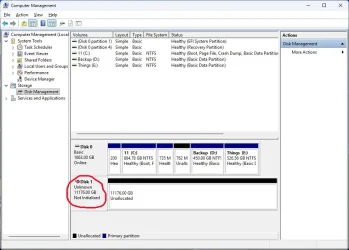
My HDD shows in Device Manager but not in Disk Management!


supersonic

Member
Local time
2:06 AM
Posts
24
OS
Windows 11 Pro
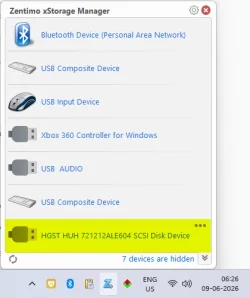
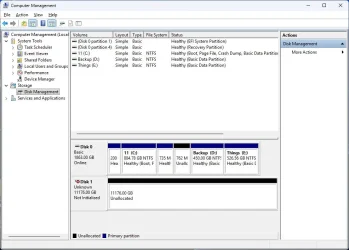
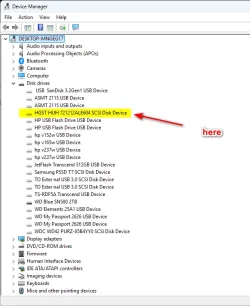
i just received my new HDD after warranty replacement. But the disk is not recognized in Disk Management but visible in Device Manager by the name
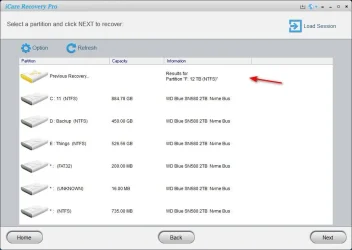
HGST HUH 721212ALE604 SCSI Disk Device. It is slightly visible in icaredata, Zentimo xstorage Manager n Device manager.
I can't initialize bcoz its not visible in the Disk Management. Tried to uninstall driver and scan for hardware change doesn't do anything. In fact the name is gone.
icaredata does show as F: 12 TB.
But i feel the present drive is spinning according to like it should be. Could anyone suggest me something.
Awaiting reply.

Plz see the pics:
 

Attachments
  • 2026-06-09_061237.webp
    2026-06-09_061237.webp
    46.3 KB · Views: 1
  • 2026-06-09_062700.webp
    2026-06-09_062700.webp
    17.7 KB · Views: 1
  • Clipboard01.webp
    Clipboard01.webp
    34.5 KB · Views: 1

My Computer

System One

  • OS
    Windows 11 Pro
    Computer type
    PC/Desktop
    Manufacturer/Model
    GIGABYTE B450M K-CF
    CPU
    AMD Ryzen 5 5600GT
    Motherboard
    GIGABYTE B450M K-CF
    Memory
    32GB
    Graphics Card(s)
    AMD Radeon RX 6500 XT
    Monitor(s) Displays
    BenQ GW2480
    Screen Resolution
    1600 x 900 60 Hz
    Hard Drives
    2TB
    Keyboard
    Logitech
    Mouse
    Dell
    Internet Speed
    2MB
    Browser
    Firefox
try formatting the HDD by the command line

if that does not see the drive please try a live Linux bootable USB
and see if that can see and format the HDD

best of luck Steve ..
 

My Computers

System One System Two

  • OS
    Debian Trixie KDE Windows 11 Home
    Computer type
    PC/Desktop
    Manufacturer/Model
    HP 24" AiO
    CPU
    Ryzen 7 5825u
    Motherboard
    HP
    Memory
    64GB DDR4 3200
    Graphics Card(s)
    Ryzen 7 5825u
    Sound Card
    RealTek
    Monitor(s) Displays
    24" HP AiO
    Screen Resolution
    1920 x 1080 @60 Hz
    Hard Drives
    1TB WD Blue SN580 M2 SSD Partitioned.
    2x 1TB USB HDD External Backup/Storage.
    PSU
    90W external power brick
    Case
    24" All in One
    Cooling
    Default Air Cooling
    Keyboard
    HP WiFi UK extended
    Mouse
    HP WiFi 3 Button
    Internet Speed
    1GB full fibre
    Browser
    Edge & Firefox
    Antivirus
    AVG Internet Security/Windows Defender
    Other Info
    Mainly Open Source Software
  • Operating System
    Ubuntu 22.04.5 LTS
    Computer type
    Laptop
    Manufacturer/Model
    Dell 13" Latitude 2017
    CPU
    i5 7200u
    Motherboard
    Dell
    Memory
    16GB DDR4
    Graphics card(s)
    Intel
    Sound Card
    Intel
    Monitor(s) Displays
    13" Dell Laptop
    Hard Drives
    250GB Crucial 2.5" SSD
    Mouse
    Generic WiFi 3 button
    Internet Speed
    WiFi only
    Browser
    Firefox
    Antivirus
    ClamAV TK
    Other Info
    Mainly Open Source Software
i cannot do that unless the disk is initialize which if not done, the VOL LABEL and a DRIVE LETTER will not be assigned.
So even from command line, there is no volume name or drive letter to perform such things like format.
But hey, i could try that from ubuntu or kali.
Will report back soon, god hope it works.
 

My Computer

System One

  • OS
    Windows 11 Pro
    Computer type
    PC/Desktop
    Manufacturer/Model
    GIGABYTE B450M K-CF
    CPU
    AMD Ryzen 5 5600GT
    Motherboard
    GIGABYTE B450M K-CF
    Memory
    32GB
    Graphics Card(s)
    AMD Radeon RX 6500 XT
    Monitor(s) Displays
    BenQ GW2480
    Screen Resolution
    1600 x 900 60 Hz
    Hard Drives
    2TB
    Keyboard
    Logitech
    Mouse
    Dell
    Internet Speed
    2MB
    Browser
    Firefox
If your bios recognizes the disk (even if disk management does not) you can use Minitool Partition Wizard to initialize the new disk. However, if bios does not see the drive, you have a hardware failure.
 

My Computers

System One System Two

  • OS
    Windows 11 Pro 25H2
    Computer type
    PC/Desktop
    Manufacturer/Model
    Dell Optiplex 7080
    CPU
    i9-10900 10 core 20 threads
    Motherboard
    DELL 0J37VM
    Memory
    32 gb
    Graphics Card(s)
    none-Intel UHD Graphics 630
    Sound Card
    Integrated Realtek
    Monitor(s) Displays
    Benq 27
    Screen Resolution
    2560x1440
    Hard Drives
    2x1tb Solidigm m.2 nvme /External drives 512gb Samsung m.2 sata+2tb Kingston m2.nvme
    PSU
    500w
    Case
    MT
    Cooling
    Dell Premium
    Keyboard
    Logitech wired
    Mouse
    Logitech wireless
    Internet Speed
    so slow I'm too embarrassed to tell
    Browser
    #1 Edge #2 Firefox
    Antivirus
    Defender+MWB Premium
  • Operating System
    Windows 11 Pro 24H2 26200.8457
    Computer type
    PC/Desktop
    Manufacturer/Model
    Beelink Mini PC SER5
    CPU
    AMD Ryzen 7 6800U
    Memory
    32 gb
    Graphics card(s)
    integrated
    Sound Card
    integrated
    Monitor(s) Displays
    Benq 27
    Screen Resolution
    2560x1440
    Hard Drives
    1TB Crucial nvme
    Keyboard
    Logitech wired
    Mouse
    Logitech wireless
    Internet Speed
    still too embarrassed to tell
    Browser
    Firefox
    Antivirus
    Defender
    Other Info
    System 3 is non compliant Dell 9020 i7-4770/24gb ram Win11 PRO 26200.8457
i cannot do that unless the disk is initialize which if not done, the VOL LABEL and a DRIVE LETTER will not be assigned.
So even from command line, there is no volume name or drive letter to perform such things like format.
But hey, i could try that from ubuntu or kali.
Will report back soon, god hope it works.
initialize it via diskpart…

list disk
select disk (#)
online disk
convert gpt (or convert mbr)
assign letter
 

My Computer

System One

  • OS
    Windows 11 Pro
Actually the drive is not really being shown in DM. It is showing previously detected, that is why it is grayed out. The only drive connected to pc is the WD blue.
 

My Computer

System One

  • OS
    Windows 11 Pro
    Computer type
    PC/Desktop
    CPU
    Ryzen 9 5950X
    Motherboard
    Asus TUF GAMING X570-PLUS
    Memory
    128GB G Skill Trident Z RGB F4-3600C18-32GTZR
    Graphics Card(s)
    XFX Speedster MERC310 Radeon RX 7900XT
    Sound Card
    HDMI
    Monitor(s) Displays
    SAMSUNG C27F390 X2, Samsung 55" 4k
    Screen Resolution
    1920x1080
    Hard Drives
    SAMSUNG 990PRO W/heatsink (PCI-E 4.0 x4) 1TB and a 2TB
    8 Seagate ST6000NM0034 6TB in Raid 6
    PSU
    Corsair RM1000x
    Case
    Phanteks Enthoo Prime
    Cooling
    15 Enermax Squa Rgb fans Enermax Auquafusion 360 AIO
    Keyboard
    Microsoft wireless keyboard 5050
    Mouse
    Microsoft wireless mouse 5000
    Internet Speed
    Gigabit
    Browser
    Edge
    Antivirus
    Norton 360
    Other Info
    4 LG WH16NS60 Blu-Ray burners flashed for 4k ripping.
    Hauppauge dual tuner tv card
    Silverstone internal flash card reader
    Dell Perc H700 Raid controller
@glasskuter i tried Minitool Partition Wizard demo and even there is no option to distinguish the hidden 12 TB.
So far i h' tried several things and nothing is leading nowhere.
Could any one share there opinion.
yeah i tried Kali, Parted Magic and even the installer CD for Win11 (i mean a bootable USB) and still no go.
 

My Computer

System One

  • OS
    Windows 11 Pro
    Computer type
    PC/Desktop
    Manufacturer/Model
    GIGABYTE B450M K-CF
    CPU
    AMD Ryzen 5 5600GT
    Motherboard
    GIGABYTE B450M K-CF
    Memory
    32GB
    Graphics Card(s)
    AMD Radeon RX 6500 XT
    Monitor(s) Displays
    BenQ GW2480
    Screen Resolution
    1600 x 900 60 Hz
    Hard Drives
    2TB
    Keyboard
    Logitech
    Mouse
    Dell
    Internet Speed
    2MB
    Browser
    Firefox

My Computers

System One System Two

  • OS
    Windows 11 Pro Version:25H2 OS Build: 26200.8524
    Computer type
    PC/Desktop
    Manufacturer/Model
    Beelink Mini PC Model: SEi12
    CPU
    12th Gen Intel core i5-1235U(Alder
    Motherboard
    SEi (manufactured by AZW)
    Memory
    16*2 (32 GB) DDR 4-3200(1600MHz) Crucial Technology
    Graphics Card(s)
    Intel Iris Xe Graphics (Internal)
    Sound Card
    Internal
    Monitor(s) Displays
    BenQ GW2283
    Screen Resolution
    1920*1080
    Hard Drives
    500GB NVME (Kingston SNV2S500G)
    1TB (Crucial CT1000BX500SSD1)
    PSU
    Power Brick 19V-6.32A , 120.08W
    Keyboard
    Dell KB3322Wi (Wireless)
    Mouse
    Dell WM118t (Wireless)
    Internet Speed
    4G/5G
    Browser
    MS Edge, Chrome
    Antivirus
    Malwarebytes Premium - Subscription
  • Operating System
    Windows 11 Home Version 25H2 Build 26200.8524
    Computer type
    PC/Desktop
    Manufacturer/Model
    Dell Inspiron 3280 AIO 22"
    CPU
    Intel Core i3 8145U
    Motherboard
    Dell inc. 027W48
    Memory
    Intel Optane 16GB module + DDR 4 16GB (Optane disabled.)
    Graphics card(s)
    Intel UHD Graphics 620
    Sound Card
    Internal
    Monitor(s) Displays
    Dell Monitor 22"
    Screen Resolution
    1920x1080
    Hard Drives
    Crucial CT1000BX500SSD1 ; 1000,2 GB
    PSU
    Power Brick
    Case
    All-in one
    Keyboard
    Dell Wireless KM636
    Mouse
    Dell Wireless KM 636
    Internet Speed
    4G
    Browser
    Edge, Chrome
    Antivirus
    Malwarebytes
    Other Info
    Upgraded from Windows 10 Home to Windows 11 Home on 28 Oct 2023
initialize it via diskpart…

list disk
select disk (#)
online disk
convert gpt (or convert mbr)
assign letter
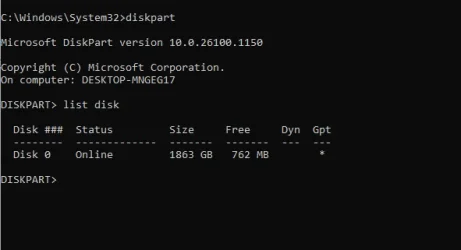
It simply doesn't show even from command prompt and then running
diskpart -
list disk -
I had tried it way back, still no go.
Now i m thinking if its really the Device that is flawed. I received it yesterday and the package was torn and just a Dsk was seen. Someone opened and may
be banged it somewhere. So any magical solution, i m eagerly waiting.
 

Attachments

  • 2026-06-09_141706.webp
    2026-06-09_141706.webp
    12.5 KB · Views: 1

My Computer

System One

  • OS
    Windows 11 Pro
    Computer type
    PC/Desktop
    Manufacturer/Model
    GIGABYTE B450M K-CF
    CPU
    AMD Ryzen 5 5600GT
    Motherboard
    GIGABYTE B450M K-CF
    Memory
    32GB
    Graphics Card(s)
    AMD Radeon RX 6500 XT
    Monitor(s) Displays
    BenQ GW2480
    Screen Resolution
    1600 x 900 60 Hz
    Hard Drives
    2TB
    Keyboard
    Logitech
    Mouse
    Dell
    Internet Speed
    2MB
    Browser
    Firefox
Your device is grey in Device Manager, which means that driver presents but is not currently active. You can uninstall all such devices, most of them are USB as I see, because they all will be detected again upon connection. If you connect a device and nothing happens, it may be because this devices no longer supports PnP because of poor connection, problem with cable or electrical failure. What exactly happened, you can see if connect it to another PC. If it will be defected as PnP and new device driver installed after a few seconds, it works and you should see it in Disk Management (with or without partitions, is another question). But if it will not be detected, most probably it's an electrical failure.
 

My Computer

System One

  • OS
    Windows 11 Pro 25H2
    Computer type
    Laptop
    Manufacturer/Model
    Lenovo Legion 5-15ARH05
    CPU
    AMD Rysen 5 4600H
    Memory
    32 GB (2 x 16 GB Samsung SO-DIMM DDR4-3200)
    Graphics Card(s)
    GeForce GTX 1650 Ti, 4 GB GDDR6
    Screen Resolution
    1920x1080
    Hard Drives
    SSD M.2 512 GB SAMSUNG MZALQ512; SSD M.2 1 TB Seagate FireCuda 530
    Mouse
    Logitech M650L in Bluetooth mode
Your device is grey in Device Manager, which means that driver presents but is not currently active. You can uninstall all such devices, most of them are USB as I see, because they all will be detected again upon connection. If you connect a device and nothing happens, it may be because this devices no longer supports PnP because of poor connection, problem with cable or electrical failure. What exactly happened, you can see if connect it to another PC. If it will be defected as PnP and new device driver installed after a few seconds, it works and you should see it in Disk Management (with or without partitions, is another question). But if it will not be detected, most probably it's an electrical failure.
Well spotted!
 

My Computers

System One System Two

  • OS
    Windows 11 Pro 25H2 26200.8524
    Computer type
    Laptop
    Manufacturer/Model
    Acemagic LX15PRO
    CPU
    AMD Ryzen 7 5825U with Radeon Graphics
    Memory
    16GB
    Screen Resolution
    1920 x 1080
    Hard Drives
    SSD 2TB
    Internet Speed
    30 Mbps
    Browser
    Brave
    Antivirus
    Webroot Secure Anywhere
    Other Info
    System 3

    Acer Swift SF114-34 laptop
    OS Windows 11 Pro 26200.8524
    CPU Pentium Silver N6000
    RAM 4GB
    SSD Samsung 970 EVO Plus SSD 2TB (an upgrade)
  • Operating System
    Windows 11 Pro 23H2 22631.2506
    Computer type
    Laptop
    Manufacturer/Model
    HP Mini 210-1090NR PC (bought in late 2009!)
    CPU
    Atom N450 1.66GHz
    Memory
    2GB
    Browser
    Brave
    Antivirus
    Webroot
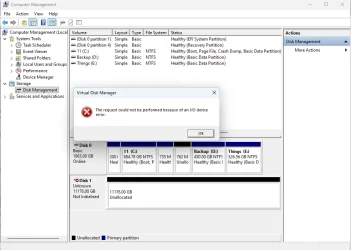
@jumanji i tried ur method, that particular post was little confusing. I had read it before but just went above my head.
However that kind a does the trick. But when i initialize, almost waiting for 15 min, it shows an error. Please see the snapshot.
@Slavic i don't think its an electric problem in my case. But thank u for ur concern.

Disabling and Enabling the drive from Device Manager did the trick but doing that means i h' to wait for another 15-20 min.
I h' attached the disk in a docking station and then i did the Disabling. Please see the snap shot. However i m trying to use
cmd line now, which also shows the same problem.
It was almost complete, after waiting some minutes, right clicked the DISK 1 and went ahead, almost at the end it showed this error.
"The request could not be performed because of an I/O device error".
I dont understand that, how should i approach this.
 

Attachments

  • Not Initialized 1.webp
    Not Initialized 1.webp
    50.2 KB · Views: 1
  • Get this error.webp
    Get this error.webp
    54.3 KB · Views: 1

My Computer

System One

  • OS
    Windows 11 Pro
    Computer type
    PC/Desktop
    Manufacturer/Model
    GIGABYTE B450M K-CF
    CPU
    AMD Ryzen 5 5600GT
    Motherboard
    GIGABYTE B450M K-CF
    Memory
    32GB
    Graphics Card(s)
    AMD Radeon RX 6500 XT
    Monitor(s) Displays
    BenQ GW2480
    Screen Resolution
    1600 x 900 60 Hz
    Hard Drives
    2TB
    Keyboard
    Logitech
    Mouse
    Dell
    Internet Speed
    2MB
    Browser
    Firefox
Please plug in the disk directly to a USB port at the back of your PC and check. ( When you plug it in into a dock's slot. the specifications of the dock come into play- like the maximum capacity it can handle and the per slot capacity of a slot in it., how many disks are there in the slots and the total capcity it is handling etc. etc.. When we are troubleshooting it is better to get off from that interface and connect the drive directly to the PC's USB port)

If you still get the error , In Device Manager uninstall the disk and then restart the PC. That will install the nececessary drivers.

Not going good? Plug in your external disk into another working PC and check. In fact this is the first thing one should have done.

Since I will be retiring for the day in a shortwhile, I shall leave it to other experts here to continue. Will see you my tomorrow morning.
 

My Computers

System One System Two

  • OS
    Windows 11 Pro Version:25H2 OS Build: 26200.8524
    Computer type
    PC/Desktop
    Manufacturer/Model
    Beelink Mini PC Model: SEi12
    CPU
    12th Gen Intel core i5-1235U(Alder
    Motherboard
    SEi (manufactured by AZW)
    Memory
    16*2 (32 GB) DDR 4-3200(1600MHz) Crucial Technology
    Graphics Card(s)
    Intel Iris Xe Graphics (Internal)
    Sound Card
    Internal
    Monitor(s) Displays
    BenQ GW2283
    Screen Resolution
    1920*1080
    Hard Drives
    500GB NVME (Kingston SNV2S500G)
    1TB (Crucial CT1000BX500SSD1)
    PSU
    Power Brick 19V-6.32A , 120.08W
    Keyboard
    Dell KB3322Wi (Wireless)
    Mouse
    Dell WM118t (Wireless)
    Internet Speed
    4G/5G
    Browser
    MS Edge, Chrome
    Antivirus
    Malwarebytes Premium - Subscription
  • Operating System
    Windows 11 Home Version 25H2 Build 26200.8524
    Computer type
    PC/Desktop
    Manufacturer/Model
    Dell Inspiron 3280 AIO 22"
    CPU
    Intel Core i3 8145U
    Motherboard
    Dell inc. 027W48
    Memory
    Intel Optane 16GB module + DDR 4 16GB (Optane disabled.)
    Graphics card(s)
    Intel UHD Graphics 620
    Sound Card
    Internal
    Monitor(s) Displays
    Dell Monitor 22"
    Screen Resolution
    1920x1080
    Hard Drives
    Crucial CT1000BX500SSD1 ; 1000,2 GB
    PSU
    Power Brick
    Case
    All-in one
    Keyboard
    Dell Wireless KM636
    Mouse
    Dell Wireless KM 636
    Internet Speed
    4G
    Browser
    Edge, Chrome
    Antivirus
    Malwarebytes
    Other Info
    Upgraded from Windows 10 Home to Windows 11 Home on 28 Oct 2023
The disk is not initialised!

1781021582735.webp

Right-click where I have circled and select initialise. Now it will appear with a drive letter. You can format it in Disk Management or in File Explorer.


My Computers

System One System Two

  • OS
    Windows 11 Pro 25H2 26200.8524
    Computer type
    Laptop
    Manufacturer/Model
    Acemagic LX15PRO
    CPU
    AMD Ryzen 7 5825U with Radeon Graphics
    Memory
    16GB
    Screen Resolution
    1920 x 1080
    Hard Drives
    SSD 2TB
    Internet Speed
    30 Mbps
    Browser
    Brave
    Antivirus
    Webroot Secure Anywhere
    Other Info
    System 3

    Acer Swift SF114-34 laptop
    OS Windows 11 Pro 26200.8524
    CPU Pentium Silver N6000
    RAM 4GB
    SSD Samsung 970 EVO Plus SSD 2TB (an upgrade)
  • Operating System
    Windows 11 Pro 23H2 22631.2506
    Computer type
    Laptop
    Manufacturer/Model
    HP Mini 210-1090NR PC (bought in late 2009!)
    CPU
    Atom N450 1.66GHz
    Memory
    2GB
    Browser
    Brave
    Antivirus
    Webroot
What He Said!.webp
 

My Computers

System One System Two

  • OS
    Win 11 Pro 25H2, Build 26200.8524
    Computer type
    PC/Desktop
    Manufacturer/Model
    Home Brew
    CPU
    Intel Core i5 14500
    Motherboard
    Gigabyte B760M G P WIFI
    Memory
    64GB DDR4
    Graphics Card(s)
    GeForce RTX 4060
    Sound Card
    Chipset Realtek
    Monitor(s) Displays
    LG 45" Ultragear, Acer 24" 1080p
    Screen Resolution
    5120x1440, 1920x1080
    Hard Drives
    Crucial P310 2TB 2280 PCIe Gen4 3D NAND NVMe M.2 SSD (O/S)
    Silicon Power 2TB US75 NVMe PCIe Gen4 M.2 2280 SSD (backup)
    Crucial BX500 2TB 3D NAND (2nd backup)
    Seagate 4TB Ironwolf, rotating HDD archive files
    External off-line backup Drives: 2 NVMe 4TB drives in external enclosures
    PSU
    Thermaltake Toughpower GF3 750W
    Case
    LIAN LI LANCOOL 216 E-ATX PC Case
    Cooling
    Lots of fans!
    Keyboard
    Microsoft Comfort Curve 2000
    Mouse
    Logitech G305
    Internet Speed
    Verizon FiOS 1GB
    Browser
    Firefox
    Antivirus
    Malware Bytes & Windows Defender Security
  • Operating System
    Win 11 Pro 25H2, Build 26200.8524
    Computer type
    PC/Desktop
    Manufacturer/Model
    Home Brew
    CPU
    Intel Core i5 14400
    Motherboard
    Gigabyte B760M DS3H AX
    Memory
    32GB DDR5
    Graphics card(s)
    Intel 700 Embedded GPU
    Sound Card
    Realtek Embedded
    Monitor(s) Displays
    27" HP 1080p
    Screen Resolution
    1920x1080
    Hard Drives
    Crucial P310 2TB 2280 PCIe Gen4 eD NAND PCIe SSD
    Samsung EVO 990 2TB NVMe Gen4 SSD
    Samsung 2TB SATA SSD
    PSU
    Thermaltake Smart BM3 650W
    Case
    Okinos Micro ATX Case
    Cooling
    Fans
    Keyboard
    Microsoft Comfort Curve 2000
    Mouse
    Logitech G305
    Internet Speed
    Verizon FiOS 1GB
    Browser
    Firefox
    Antivirus
    Malware Bytes & Windows Defender Security
I don't know how that tutorial appeared in my post! I didn't add it.
 

My Computers

System One System Two

  • OS
    Windows 11 Pro 25H2 26200.8524
    Computer type
    Laptop
    Manufacturer/Model
    Acemagic LX15PRO
    CPU
    AMD Ryzen 7 5825U with Radeon Graphics
    Memory
    16GB
    Screen Resolution
    1920 x 1080
    Hard Drives
    SSD 2TB
    Internet Speed
    30 Mbps
    Browser
    Brave
    Antivirus
    Webroot Secure Anywhere
    Other Info
    System 3

    Acer Swift SF114-34 laptop
    OS Windows 11 Pro 26200.8524
    CPU Pentium Silver N6000
    RAM 4GB
    SSD Samsung 970 EVO Plus SSD 2TB (an upgrade)
  • Operating System
    Windows 11 Pro 23H2 22631.2506
    Computer type
    Laptop
    Manufacturer/Model
    HP Mini 210-1090NR PC (bought in late 2009!)
    CPU
    Atom N450 1.66GHz
    Memory
    2GB
    Browser
    Brave
    Antivirus
    Webroot
The request could not be performed because of an I/O device error
This is a symptom of controller malfunction. More exactly, it may be a problem with port on your PC (I highly recommend to use another PC for test), the problem with connecting cable (it can be easily replaced) and problem with controller on the device.

The last is more severe. Sometimes it may be a result of poor connection of internal circuit or overheating. First, check that all visible screws on the device are not loose and tight if you notice some. Then (it may or may not help) try to cool the device. For example, place it to a tight plastic bag to prevent condensation of water vapours and keep for 5-10 min in refrigerator (not in a freezer!) at the temperature about +5C. Then connect the device back. If you are lucky, you will have some time to copy the most important files to another disk.
 

My Computer

System One

  • OS
    Windows 11 Pro 25H2
    Computer type
    Laptop
    Manufacturer/Model
    Lenovo Legion 5-15ARH05
    CPU
    AMD Rysen 5 4600H
    Memory
    32 GB (2 x 16 GB Samsung SO-DIMM DDR4-3200)
    Graphics Card(s)
    GeForce GTX 1650 Ti, 4 GB GDDR6
    Screen Resolution
    1920x1080
    Hard Drives
    SSD M.2 512 GB SAMSUNG MZALQ512; SSD M.2 1 TB Seagate FireCuda 530
    Mouse
    Logitech M650L in Bluetooth mode
This is a symptom of controller malfunction. More exactly, it may be a problem with port on your PC (I highly recommend to use another PC for test), the problem with connecting cable (it can be easily replaced) and problem with controller on the device.

The last is more severe. Sometimes it may be a result of poor connection of internal circuit or overheating. First, check that all visible screws on the device are not loose and tight if you notice some. Then (it may or may not help) try to cool the device. For example, place it to a tight plastic bag to prevent condensation of water vapours and keep for 5-10 min in refrigerator (not in a freezer!) at the temperature about +5C. Then connect the device back. If you are lucky, you will have some time to copy the most important files to another disk.
This is a new HDD and your advice is totally inappropriate. Please read the thread from the beginning.
 

My Computers

System One System Two

  • OS
    Windows 11 Pro 25H2 26200.8524
    Computer type
    Laptop
    Manufacturer/Model
    Acemagic LX15PRO
    CPU
    AMD Ryzen 7 5825U with Radeon Graphics
    Memory
    16GB
    Screen Resolution
    1920 x 1080
    Hard Drives
    SSD 2TB
    Internet Speed
    30 Mbps
    Browser
    Brave
    Antivirus
    Webroot Secure Anywhere
    Other Info
    System 3

    Acer Swift SF114-34 laptop
    OS Windows 11 Pro 26200.8524
    CPU Pentium Silver N6000
    RAM 4GB
    SSD Samsung 970 EVO Plus SSD 2TB (an upgrade)
  • Operating System
    Windows 11 Pro 23H2 22631.2506
    Computer type
    Laptop
    Manufacturer/Model
    HP Mini 210-1090NR PC (bought in late 2009!)
    CPU
    Atom N450 1.66GHz
    Memory
    2GB
    Browser
    Brave
    Antivirus
    Webroot
This is a new HDD and your advice is totally inappropriate. Please read the thread from the beginning.
It's nice when new HDD doesn't have any defects after manufacturing. Unfortunately, sometimes new devices may fail and need to be replaced by warranty.
 

My Computer

System One

  • OS
    Windows 11 Pro 25H2
    Computer type
    Laptop
    Manufacturer/Model
    Lenovo Legion 5-15ARH05
    CPU
    AMD Rysen 5 4600H
    Memory
    32 GB (2 x 16 GB Samsung SO-DIMM DDR4-3200)
    Graphics Card(s)
    GeForce GTX 1650 Ti, 4 GB GDDR6
    Screen Resolution
    1920x1080
    Hard Drives
    SSD M.2 512 GB SAMSUNG MZALQ512; SSD M.2 1 TB Seagate FireCuda 530
    Mouse
    Logitech M650L in Bluetooth mode
If they replaced it and doesn't work, they should replace it again. If the disk was OK but the courier dropped it and damaged it, you should have taken a photo of the damaged package so you can prove you didn't drop it yourself.

Assuming the disk is not faulty, but doesn't receive enough power to properly power on and detected, you can buy a powered USB 3.0 hub.

I had a similar issue when I replaced my old USB 3.0 PCIe card for a new combo USB 3.0 and SATA III PCIe card. I then connected one of my external USB 3.0 hard disks to take a backup and it wouldn't be detected! I was terrified at first, but I then connected another USB 3.0 disk and also it wasn't detected. And my third disk wasn't detected as well! OK, I thought, What is the possibility of all my three disks to go bad at the same time? Close to zero! So I ordered a powered USB 3.0 hub and when I connected them to it they all worked properly. In fact because they received adequate power they worked faster than when connected directly to my old USB 3.0 PCIe card!

So before returning the disk try it on another computer or on a powered USB 3.0 hub.

PS: I just show your screenshot, the disk is referred as SCSI disk. What type it is? Internal or external? If it is SATA try another SATA cable and another power cable. If it is M.2 try cleaning the contacts with a pencil eraser and connect it again. Check your BIOS if you need to enable the controller.
 

My Computers

System One System Two

  • OS
    Windows 11 Pro 23H2 (5699), 25H2 (8457)
    Computer type
    Laptop
    Manufacturer/Model
    Acer Extensa 5630EZ
    CPU
    Mobile DualCore Intel Core 2 Duo T7250, 2000 MHz
    Motherboard
    Acer Extensa 5630
    Memory
    4GB
    Graphics Card(s)
    Mobile Intel(R) GMA 4500M (Mobile 4 series)
    Sound Card
    Realtek ALC268 @ Intel 82801IB ICH9 - High Definition Audio Controller
    Monitor(s) Displays
    1
    Screen Resolution
    1280x800
    Hard Drives
    Samsung SSD 850 EVO 250GB SATA Device (250 GB, SATA-III)
    Internet Speed
    VDSL 50 Mbps
    Browser
    MICROSOFT EDGE
    Antivirus
    WINDOWS DEFENDER
    Other Info
    Legacy MBR installation, no TPM, no Secure Boot, no WDDM 2.0 graphics drivers, no SSE4.2, cannot get more unsupported ;) This is only my test laptop. I had installed Windows 11 here before upgrading my main PC. For my main PC I use everyday see my 2nd system specs.
  • Operating System
    Windows 11 Pro v25H2 (build 26200.8457)
    Computer type
    PC/Desktop
    Manufacturer/Model
    Custom-built PC
    CPU
    Intel Core-i7 3770 3.40GHz s1155 (3rd generation)
    Motherboard
    Asus P8H61 s1155 ATX
    Memory
    2x Kingston Hyper-X Blu 8GB DDR3-1600
    Graphics card(s)
    GIGABYTE GeForce RTX 3050 WINDFORCE OC V2 6GB (GV-N3050WF2OCV2-6GD)
    Sound Card
    Realtek HD audio (ALC887)
    Monitor(s) Displays
    Sony Bravia KDL-19L4000 19" LCD TV via VGA
    Screen Resolution
    1440x900 32-bit 60Hz
    Hard Drives
    WD Blue SA510 2.5 1000GB SSD as system disk, Western Digital Caviar Purple 4TB SATA III (WD40PURZ) as second
    PSU
    Thermaltake Litepower RGB 550W Full Wired
    Case
    SUPERCASE MIDI-TOWER
    Cooling
    Deepcool Gamma Archer CPU cooler, 1x 8cm fan at the back
    Keyboard
    Mitsumi 101-key PS/2
    Mouse
    Sunnyline OptiEye PS/2
    Internet Speed
    100Mbps
    Browser
    Microsoft Edge, Mozilla Firefox
    Antivirus
    Microsoft Windows Defender
    Other Info
    Legacy BIOS (MBR) installation, no TPM, no Secure Boot, WDDM 3.0 graphics drivers, WEI score 7.4

Latest Support Threads

Back
Top Bottom