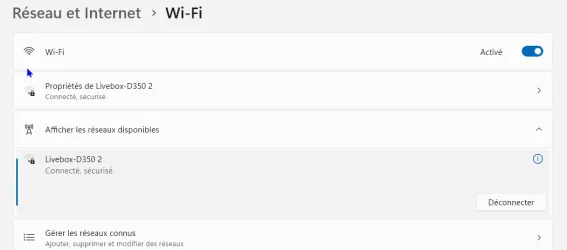
My new Internet box appears twice .....


sfleury

Well-known member
Member
Local time
9:05 AM
Posts
45
OS
Windows 11 Professional
Hello
Yesterday, my ISP installed a new box (to support optical fiber)
Everything works fine, but when look at the WiFi section of Windows 11 parameters, it seems the box appears twice : one time as Livebox-D350 and one time as Livebox-D350 2
Is that normal ?
My wife's computer seems to use one and my computer uses the other but both work correctly,

Should I leave this as is or would it e better to remove one of them ?

Thanks for your help Have a good day
 

My Computer My Computer

At a glance

Windows 11 ProfessionalIntel Core i5-8600K CPU @ 3.60GHz FamilleDDR4 32768 MoNVIDIA GeForce GTX 1050 Ti
OS
Windows 11 Professional
Computer type
PC/Desktop
Manufacturer/Model
Custom built
CPU
Intel Core i5-8600K CPU @ 3.60GHz Famille
Motherboard
ASUSTeK COMPUTER INC. ROG STRIX Z370-E GAMING (LGA1151)
Memory
DDR4 32768 Mo
Graphics Card(s)
NVIDIA GeForce GTX 1050 Ti
Sound Card
None
Monitor(s) Displays
NEC X223HQ on NVIDIA GeForce GTX 1050 Ti and ACER EA243WM on NVIDIA GeForce GTX 1050 Ti
Screen Resolution
1920x1080
Hard Drives
System on EMTEC X150 960GB (SSD) and additional HDD
when look at the WiFi section of Windows 11 parameters, it seems the box appears twice : one time as Livebox-D350 and one time as Livebox-D350 2
Is that normal ?
Your router's WiFi supports two bands, 2.4GHz and 5GHz. Depending on how the router is configured these may have different SSID names, or they may both use the same SSID name. If you use your browser to sign in to the admin page of your router there should be a page for advanced WiFi settings where you can change this, either setting it to use the same name for both, or to choose your own names for each.

There is another possibility. Did your ISP (Orange?) also install a Wi-Fi booster? If so, that would be the 2nd name.


My wife's computer seems to use one and my computer uses the other but both work correctly
It doesn't matter which SSID you are connected to, you will both be on the same network and be able to see each other's PCs.
 

My Computers My Computers

  • At a glance

    Windows 11 HomeAMD Athlon Silver 3050U8GBRadeon Graphics
    OS
    Windows 11 Home
    Computer type
    Laptop
    Manufacturer/Model
    Acer Aspire 3 A315-23-R9VY
    CPU
    AMD Athlon Silver 3050U
    Memory
    8GB
    Graphics Card(s)
    Radeon Graphics
    Monitor(s) Displays
    laptop screen
    Screen Resolution
    1366x768 native resolution, up to 2560x1440 with Radeon Virtual Super Resolution
    Hard Drives
    1TB Samsung EVO 870 SSD (from April 2026: 250GB EVO 850)
    Internet Speed
    150 Mbps
    Browser
    Edge, Firefox
    Antivirus
    Defender
    Other Info
    fully 'Windows 11 ready' laptop. Windows 10 C: partition migrated from my old unsupported 'main machine' then upgraded to 11. A test migration ran Insider builds for 2 months. When 11 was released on 5th October 2021 it was re-imaged back to 10 and was offered the upgrade in Windows Update on 20th October. Windows Update offered the 22H2 Feature Update on 20th September 2022. It got the 23H2 Feature Update on 4th November 2023 through Windows Update, 24H2 on 3rd October 2024 through Windows Update by setting the Target Release Version for 24H2, and 25H2 on 30th September 2025 through Windows Update by setting the Target Release Version for 25H2.

    UPDATE - 11 April 2026: due to mechanical deterioration this PC has been retired from active duty. The OS with all software and files has been migrated to my System Seven in 'Other systems' to carry on as my general purpose 'main machine'.

    I've now clean installed 25H2 and used Garlin's scripts to update Secure Boot to CA 2023 and revoke the PCA 2011 certificates. It's new role is to test secure boot issues.
  • At a glance

    Windows 11 ProIntel® Core™ i5-520M8GB(integrated graphics) Intel HD Graphics
    Operating System
    Windows 11 Pro
    Computer type
    Laptop
    Manufacturer/Model
    Dell Latitude E4310
    CPU
    Intel® Core™ i5-520M
    Motherboard
    0T6M8G
    Memory
    8GB
    Graphics card(s)
    (integrated graphics) Intel HD Graphics
    Screen Resolution
    1366x768
    Hard Drives
    500GB Crucial MX500 SSD
    Browser
    Firefox, Edge
    Antivirus
    Defender
    Other Info
    unsupported machine: Legacy bios, MBR, TPM 1.2, upgraded from W10 to W11 using W10/W11 hybrid install media workaround.

    In-place upgrade to 22H2 using ISO and a workaround.
    Feature Update to 23H2 by manually installing the Enablement Package.
    In-place upgrade to 24H2 using hybrid 23H2/24H2 install media.
    Upgraded to 25H2 by Enablement Package.

    Also running Insider Dev, and Canary builds and Windows 10 as native boot .vhdx.
  • My SYSTEM THREE is a Dell Latitude 5410, i7-10610U, 32GB RAM, 512GB NVMe ssd, supported device running Windows 11 Pro.

    My SYSTEM FOUR is a 2-in-1 convertible Lenovo Yoga 11e 20DA, Celeron N2930, 8GB RAM, 256GB ssd. Unsupported device: currently running Win10 Pro, plus Win11 Pro RTM and Insider Dev, Beta, and RP 24H2 as native boot vhdx.

    My SYSTEM FIVE is a Dell Latitude 3190 2-in-1, Pentium Silver N5030, 8GB RAM, 1TB NVMe ssd, supported device running Windows 11 Pro, plus Insider Beta, Dev, and Canary builds (and a few others) as a native boot .vhdx.

    My SYSTEM SIX is a Dell Latitude 5550, Core Ultra 7 165H, 64GB RAM, 1TB NVMe SSD, supported device, Windows 11 Pro 24H2, Hyper-V host machine. Updated to 25H2 on 30th September 2025.

    My SYSTEM SEVEN is a Lenovo Thinkpad T580, Intel Core i7-8650U, 16GB RAM, 512GB NVMe SSD + 2nd 512GB NVMe SSD, a supported device for Windows 11. This is my current general purpose 'main machine'. The installed Windows 11 Home from my System One has been migrated to this machine.
Thank you very much for you answer and your explanation !
Yes, my ISP is Orange
Do you think I can safely remove the "Livebox-D350 2" entry (or "forget it" as they say in french) from the WiFi section in the Windows 11 parameters ?
Thanks again Have a good sunday !
 

My Computer My Computer

At a glance

Windows 11 ProfessionalIntel Core i5-8600K CPU @ 3.60GHz FamilleDDR4 32768 MoNVIDIA GeForce GTX 1050 Ti
OS
Windows 11 Professional
Computer type
PC/Desktop
Manufacturer/Model
Custom built
CPU
Intel Core i5-8600K CPU @ 3.60GHz Famille
Motherboard
ASUSTeK COMPUTER INC. ROG STRIX Z370-E GAMING (LGA1151)
Memory
DDR4 32768 Mo
Graphics Card(s)
NVIDIA GeForce GTX 1050 Ti
Sound Card
None
Monitor(s) Displays
NEC X223HQ on NVIDIA GeForce GTX 1050 Ti and ACER EA243WM on NVIDIA GeForce GTX 1050 Ti
Screen Resolution
1920x1080
Hard Drives
System on EMTEC X150 960GB (SSD) and additional HDD

Do you think I can safely remove the "Livebox-D350 2" entry (or "forget it" as they say in french) from the WiFi section in the Windows 11 parameters ?
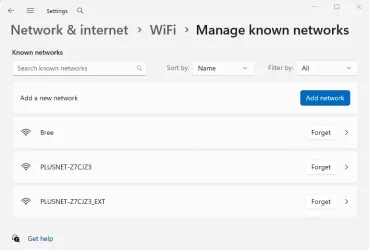
Do you mean here?

1784411283277.webp

If so, it's probably best to keep both.

This is a list of WiFi networks that you have successfully connected to previously. The WiFi password has been remembered and you can connect automatically to any known network when you are in range. You can 'forget' a known network if you like, but next time you wish to connect to it you'd have to give the password again.

We haven't yet determined if you are seeing two names because your router has a different name for each band, or if the second name is for a separate WiFi booster (to extend the coverage through the house). Either way, you probably don't want to forget your second entry.

The way WiFi connects is that it will choose to connect to the strongest signal of any 'known network' for which it already knows the password. If you move around the house you may be out of range for the WiFi network it first connected to and the other network is now the stronger signal. The WiFi will automatically switch to the stronger signal (as long as it's a known network) without you having to do anything. You shouldn't even notice the switch over.

The screenshot above is a laptop I use in two places, at my own home and when I visit my daughter.

I've set the SSID name of my router to 'Bree'. It uses the same name for both bands.

At my daughter's house they use a WiFi extender (booster) to provide WFi coverage in the hard to reach places. The extender's SSID is the SSID of the router with _EXT added to it. I have set up both as 'known networks'.

The result is that I am always connected to the WiFi wherever I am, and my laptop will switch seamlessly between my daughter's router and extender as I move around their house.
 

My Computers My Computers

  • At a glance

    Windows 11 HomeAMD Athlon Silver 3050U8GBRadeon Graphics
    OS
    Windows 11 Home
    Computer type
    Laptop
    Manufacturer/Model
    Acer Aspire 3 A315-23-R9VY
    CPU
    AMD Athlon Silver 3050U
    Memory
    8GB
    Graphics Card(s)
    Radeon Graphics
    Monitor(s) Displays
    laptop screen
    Screen Resolution
    1366x768 native resolution, up to 2560x1440 with Radeon Virtual Super Resolution
    Hard Drives
    1TB Samsung EVO 870 SSD (from April 2026: 250GB EVO 850)
    Internet Speed
    150 Mbps
    Browser
    Edge, Firefox
    Antivirus
    Defender
    Other Info
    fully 'Windows 11 ready' laptop. Windows 10 C: partition migrated from my old unsupported 'main machine' then upgraded to 11. A test migration ran Insider builds for 2 months. When 11 was released on 5th October 2021 it was re-imaged back to 10 and was offered the upgrade in Windows Update on 20th October. Windows Update offered the 22H2 Feature Update on 20th September 2022. It got the 23H2 Feature Update on 4th November 2023 through Windows Update, 24H2 on 3rd October 2024 through Windows Update by setting the Target Release Version for 24H2, and 25H2 on 30th September 2025 through Windows Update by setting the Target Release Version for 25H2.

    UPDATE - 11 April 2026: due to mechanical deterioration this PC has been retired from active duty. The OS with all software and files has been migrated to my System Seven in 'Other systems' to carry on as my general purpose 'main machine'.

    I've now clean installed 25H2 and used Garlin's scripts to update Secure Boot to CA 2023 and revoke the PCA 2011 certificates. It's new role is to test secure boot issues.
  • At a glance

    Windows 11 ProIntel® Core™ i5-520M8GB(integrated graphics) Intel HD Graphics
    Operating System
    Windows 11 Pro
    Computer type
    Laptop
    Manufacturer/Model
    Dell Latitude E4310
    CPU
    Intel® Core™ i5-520M
    Motherboard
    0T6M8G
    Memory
    8GB
    Graphics card(s)
    (integrated graphics) Intel HD Graphics
    Screen Resolution
    1366x768
    Hard Drives
    500GB Crucial MX500 SSD
    Browser
    Firefox, Edge
    Antivirus
    Defender
    Other Info
    unsupported machine: Legacy bios, MBR, TPM 1.2, upgraded from W10 to W11 using W10/W11 hybrid install media workaround.

    In-place upgrade to 22H2 using ISO and a workaround.
    Feature Update to 23H2 by manually installing the Enablement Package.
    In-place upgrade to 24H2 using hybrid 23H2/24H2 install media.
    Upgraded to 25H2 by Enablement Package.

    Also running Insider Dev, and Canary builds and Windows 10 as native boot .vhdx.
  • My SYSTEM THREE is a Dell Latitude 5410, i7-10610U, 32GB RAM, 512GB NVMe ssd, supported device running Windows 11 Pro.

    My SYSTEM FOUR is a 2-in-1 convertible Lenovo Yoga 11e 20DA, Celeron N2930, 8GB RAM, 256GB ssd. Unsupported device: currently running Win10 Pro, plus Win11 Pro RTM and Insider Dev, Beta, and RP 24H2 as native boot vhdx.

    My SYSTEM FIVE is a Dell Latitude 3190 2-in-1, Pentium Silver N5030, 8GB RAM, 1TB NVMe ssd, supported device running Windows 11 Pro, plus Insider Beta, Dev, and Canary builds (and a few others) as a native boot .vhdx.

    My SYSTEM SIX is a Dell Latitude 5550, Core Ultra 7 165H, 64GB RAM, 1TB NVMe SSD, supported device, Windows 11 Pro 24H2, Hyper-V host machine. Updated to 25H2 on 30th September 2025.

    My SYSTEM SEVEN is a Lenovo Thinkpad T580, Intel Core i7-8650U, 16GB RAM, 512GB NVMe SSD + 2nd 512GB NVMe SSD, a supported device for Windows 11. This is my current general purpose 'main machine'. The installed Windows 11 Home from my System One has been migrated to this machine.
Thank you for your explanation - I am late to respond ... because I had some Wi-Fi connexion problems !!!!
Yes that's the place where I "could" remove some network
My wife's computer uses Livebox - D350 and get full benefits from the optical fibers : Internet "speed" in the 150 !!!!!
My computer uses Livebox - D350 2 and does not get advantage of the fiber : speed in the 15 area !!!

But may be I have some idea :
My wife's computer was built in 2024 and we add a Wi-Fi dongle
My computer was buit in 2018 and has a built-in Wi-Fi adapter on the motherboard - So I suspect this adapter is not compatible with Wi-Fi 6
I ordered a Wi-Fi 6 USB adapter to do some test

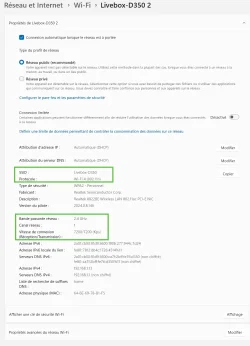
I also took a capture of the Wi-Fi section of the Windows 11 parameters and hightlighted some parts that raise questions - I attach this capture to the present message

Thanks for your time and your patience Have a good day
 

Attachments

  • Livebox D350-2.webp
    Livebox D350-2.webp
    82.5 KB · Views: 1

My Computer My Computer

At a glance

Windows 11 ProfessionalIntel Core i5-8600K CPU @ 3.60GHz FamilleDDR4 32768 MoNVIDIA GeForce GTX 1050 Ti
OS
Windows 11 Professional
Computer type
PC/Desktop
Manufacturer/Model
Custom built
CPU
Intel Core i5-8600K CPU @ 3.60GHz Famille
Motherboard
ASUSTeK COMPUTER INC. ROG STRIX Z370-E GAMING (LGA1151)
Memory
DDR4 32768 Mo
Graphics Card(s)
NVIDIA GeForce GTX 1050 Ti
Sound Card
None
Monitor(s) Displays
NEC X223HQ on NVIDIA GeForce GTX 1050 Ti and ACER EA243WM on NVIDIA GeForce GTX 1050 Ti
Screen Resolution
1920x1080
Hard Drives
System on EMTEC X150 960GB (SSD) and additional HDD
I also took a capture of the Wi-Fi section of the Windows 11 parameters and hightlighted some parts that raise questions
Your Realtek 8822BE Wireless LAN 802.11ac is capable of connecting with anything up to 802.11ac, which is WiFi 5.
https://www.realtek.com/Product/Index?id=583

Even connecting with 802.11n (Wi-Fi 4) it should be capable of speeds of up to 600 Mbps.

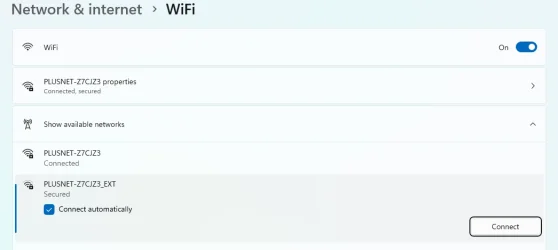
Have you tried manually switching your computer from 'Livebox - D350 2' to 'Livebox - D350' in Network & internet > WiFi > Show available networks?

1784556853527.webp
 

My Computers My Computers

  • At a glance

    Windows 11 HomeAMD Athlon Silver 3050U8GBRadeon Graphics
    OS
    Windows 11 Home
    Computer type
    Laptop
    Manufacturer/Model
    Acer Aspire 3 A315-23-R9VY
    CPU
    AMD Athlon Silver 3050U
    Memory
    8GB
    Graphics Card(s)
    Radeon Graphics
    Monitor(s) Displays
    laptop screen
    Screen Resolution
    1366x768 native resolution, up to 2560x1440 with Radeon Virtual Super Resolution
    Hard Drives
    1TB Samsung EVO 870 SSD (from April 2026: 250GB EVO 850)
    Internet Speed
    150 Mbps
    Browser
    Edge, Firefox
    Antivirus
    Defender
    Other Info
    fully 'Windows 11 ready' laptop. Windows 10 C: partition migrated from my old unsupported 'main machine' then upgraded to 11. A test migration ran Insider builds for 2 months. When 11 was released on 5th October 2021 it was re-imaged back to 10 and was offered the upgrade in Windows Update on 20th October. Windows Update offered the 22H2 Feature Update on 20th September 2022. It got the 23H2 Feature Update on 4th November 2023 through Windows Update, 24H2 on 3rd October 2024 through Windows Update by setting the Target Release Version for 24H2, and 25H2 on 30th September 2025 through Windows Update by setting the Target Release Version for 25H2.

    UPDATE - 11 April 2026: due to mechanical deterioration this PC has been retired from active duty. The OS with all software and files has been migrated to my System Seven in 'Other systems' to carry on as my general purpose 'main machine'.

    I've now clean installed 25H2 and used Garlin's scripts to update Secure Boot to CA 2023 and revoke the PCA 2011 certificates. It's new role is to test secure boot issues.
  • At a glance

    Windows 11 ProIntel® Core™ i5-520M8GB(integrated graphics) Intel HD Graphics
    Operating System
    Windows 11 Pro
    Computer type
    Laptop
    Manufacturer/Model
    Dell Latitude E4310
    CPU
    Intel® Core™ i5-520M
    Motherboard
    0T6M8G
    Memory
    8GB
    Graphics card(s)
    (integrated graphics) Intel HD Graphics
    Screen Resolution
    1366x768
    Hard Drives
    500GB Crucial MX500 SSD
    Browser
    Firefox, Edge
    Antivirus
    Defender
    Other Info
    unsupported machine: Legacy bios, MBR, TPM 1.2, upgraded from W10 to W11 using W10/W11 hybrid install media workaround.

    In-place upgrade to 22H2 using ISO and a workaround.
    Feature Update to 23H2 by manually installing the Enablement Package.
    In-place upgrade to 24H2 using hybrid 23H2/24H2 install media.
    Upgraded to 25H2 by Enablement Package.

    Also running Insider Dev, and Canary builds and Windows 10 as native boot .vhdx.
  • My SYSTEM THREE is a Dell Latitude 5410, i7-10610U, 32GB RAM, 512GB NVMe ssd, supported device running Windows 11 Pro.

    My SYSTEM FOUR is a 2-in-1 convertible Lenovo Yoga 11e 20DA, Celeron N2930, 8GB RAM, 256GB ssd. Unsupported device: currently running Win10 Pro, plus Win11 Pro RTM and Insider Dev, Beta, and RP 24H2 as native boot vhdx.

    My SYSTEM FIVE is a Dell Latitude 3190 2-in-1, Pentium Silver N5030, 8GB RAM, 1TB NVMe ssd, supported device running Windows 11 Pro, plus Insider Beta, Dev, and Canary builds (and a few others) as a native boot .vhdx.

    My SYSTEM SIX is a Dell Latitude 5550, Core Ultra 7 165H, 64GB RAM, 1TB NVMe SSD, supported device, Windows 11 Pro 24H2, Hyper-V host machine. Updated to 25H2 on 30th September 2025.

    My SYSTEM SEVEN is a Lenovo Thinkpad T580, Intel Core i7-8650U, 16GB RAM, 512GB NVMe SSD + 2nd 512GB NVMe SSD, a supported device for Windows 11. This is my current general purpose 'main machine'. The installed Windows 11 Home from my System One has been migrated to this machine.
Thank you again !
It seems I don't have the same exact layout you show - Especially, the "Connect automatically" is not at the same place
I'll try to disconnect from Livebox - D350 2 then "forget it" and then try to reconnect hoping I will only get the choice for Livebox - D350

Do you think it's safe to preceed this way ?
 

Attachments

  • WiFi 03.webp
    WiFi 03.webp
    10.5 KB · Views: 1
  • WiFi 02.webp
    WiFi 02.webp
    15.4 KB · Views: 1
  • WiFi  01.webp
    WiFi 01.webp
    15 KB · Views: 1

My Computer My Computer

At a glance

Windows 11 ProfessionalIntel Core i5-8600K CPU @ 3.60GHz FamilleDDR4 32768 MoNVIDIA GeForce GTX 1050 Ti
OS
Windows 11 Professional
Computer type
PC/Desktop
Manufacturer/Model
Custom built
CPU
Intel Core i5-8600K CPU @ 3.60GHz Famille
Motherboard
ASUSTeK COMPUTER INC. ROG STRIX Z370-E GAMING (LGA1151)
Memory
DDR4 32768 Mo
Graphics Card(s)
NVIDIA GeForce GTX 1050 Ti
Sound Card
None
Monitor(s) Displays
NEC X223HQ on NVIDIA GeForce GTX 1050 Ti and ACER EA243WM on NVIDIA GeForce GTX 1050 Ti
Screen Resolution
1920x1080
Hard Drives
System on EMTEC X150 960GB (SSD) and additional HDD
I forgot to tell you : the Livebox they provided is a Livebox 5, supporting WiFi 6 ... so it should be even better ;-
My son with an even older computer and connected to Livebox - D350 gets speeds around 45
 

My Computer My Computer

At a glance

Windows 11 ProfessionalIntel Core i5-8600K CPU @ 3.60GHz FamilleDDR4 32768 MoNVIDIA GeForce GTX 1050 Ti
OS
Windows 11 Professional
Computer type
PC/Desktop
Manufacturer/Model
Custom built
CPU
Intel Core i5-8600K CPU @ 3.60GHz Famille
Motherboard
ASUSTeK COMPUTER INC. ROG STRIX Z370-E GAMING (LGA1151)
Memory
DDR4 32768 Mo
Graphics Card(s)
NVIDIA GeForce GTX 1050 Ti
Sound Card
None
Monitor(s) Displays
NEC X223HQ on NVIDIA GeForce GTX 1050 Ti and ACER EA243WM on NVIDIA GeForce GTX 1050 Ti
Screen Resolution
1920x1080
Hard Drives
System on EMTEC X150 960GB (SSD) and additional HDD
I had a rather cheap Wi-Fi USB dongle which supposedly was 802.11n and had very low connection speed at 2.4GHz band. I replaced it with a much better 802.11ac which gets speed close to 260Mbps at 5GHz band (theoretical maximum is 300Mbps of our home speed). So I strongly recommend to buy a 802.11ac dongle or faster.
 

My Computers My Computers

  • At a glance

    Windows 11 Pro 23H2 (5699), 25H2 (8875)Mobile DualCore Intel Core 2 Duo T7250, 2000 MHz4GBMobile Intel(R) GMA 4500M (Mobile 4 series)
    OS
    Windows 11 Pro 23H2 (5699), 25H2 (8875)
    Computer type
    Laptop
    Manufacturer/Model
    Acer Extensa 5630EZ
    CPU
    Mobile DualCore Intel Core 2 Duo T7250, 2000 MHz
    Motherboard
    Acer Extensa 5630
    Memory
    4GB
    Graphics Card(s)
    Mobile Intel(R) GMA 4500M (Mobile 4 series)
    Sound Card
    Realtek ALC268 @ Intel 82801IB ICH9 - High Definition Audio Controller
    Monitor(s) Displays
    1
    Screen Resolution
    1280x800
    Hard Drives
    Samsung SSD 850 EVO 250GB SATA Device (250 GB, SATA-III)
    Internet Speed
    VDSL 50 Mbps
    Browser
    MICROSOFT EDGE
    Antivirus
    WINDOWS DEFENDER
    Other Info
    Legacy MBR installation, no TPM, no Secure Boot, no WDDM 2.0 graphics drivers, no SSE4.2, cannot get more unsupported ;) This is only my test laptop. I had installed Windows 11 here before upgrading my main PC. For my main PC I use everyday see my 2nd system specs.
  • At a glance

    Windows 11 Pro v25H2 (build 26200.8875)Intel Core-i7 3770 3.40GHz s1155 (3rd generat...2x Kingston Hyper-X Blu 8GB DDR3-1600GIGABYTE GeForce RTX 3050 WINDFORCE OC V2 6GB...
    Operating System
    Windows 11 Pro v25H2 (build 26200.8875)
    Computer type
    PC/Desktop
    Manufacturer/Model
    Custom-built PC
    CPU
    Intel Core-i7 3770 3.40GHz s1155 (3rd generation)
    Motherboard
    Asus P8H61 s1155 ATX
    Memory
    2x Kingston Hyper-X Blu 8GB DDR3-1600
    Graphics card(s)
    GIGABYTE GeForce RTX 3050 WINDFORCE OC V2 6GB (GV-N3050WF2OCV2-6GD)
    Sound Card
    Realtek HD audio (ALC887)
    Monitor(s) Displays
    Sony Bravia KDL-19L4000 19" LCD TV via VGA
    Screen Resolution
    1440x900 32-bit 60Hz
    Hard Drives
    WD Blue SA510 2.5 1000GB SSD as system disk, Western Digital Caviar Purple 4TB SATA III (WD40PURZ) as second
    PSU
    Thermaltake Litepower RGB 550W Full Wired
    Case
    SUPERCASE MIDI-TOWER
    Cooling
    Deepcool Gamma Archer CPU cooler, 1x 8cm fan at the back
    Keyboard
    Mitsumi 101-key PS/2
    Mouse
    Sunnyline OptiEye PS/2
    Internet Speed
    100Mbps
    Browser
    Microsoft Edge, Mozilla Firefox
    Antivirus
    Microsoft Windows Defender
    Other Info
    Legacy BIOS (MBR) installation, no TPM, no Secure Boot, WDDM 3.0 graphics drivers, WEI score 7.4
I ordered 2 USB keys (one for myself, one for me)
Characteristics are :

Wi-Fi USB key for PC with maximum speed up to 900 Mbps, 600 Mbit/s on 5 GHz frequency and 286 Mbit/s on 2,4 GHz.
Compatible with Windows 11/10/8.1/8/7. Supports all WiFi standards IEEE 802.11 a/b/g/n/ac/ax

Should cover all situations !

Can I safely remove the Livebox - D350 2 and try to connect to Livebox - D 350 ?

I already saved my Windows 11 system SSD on another one !

Thanks again I appreciate tour patience ! Have a god evening
 

My Computer My Computer

At a glance

Windows 11 ProfessionalIntel Core i5-8600K CPU @ 3.60GHz FamilleDDR4 32768 MoNVIDIA GeForce GTX 1050 Ti
OS
Windows 11 Professional
Computer type
PC/Desktop
Manufacturer/Model
Custom built
CPU
Intel Core i5-8600K CPU @ 3.60GHz Famille
Motherboard
ASUSTeK COMPUTER INC. ROG STRIX Z370-E GAMING (LGA1151)
Memory
DDR4 32768 Mo
Graphics Card(s)
NVIDIA GeForce GTX 1050 Ti
Sound Card
None
Monitor(s) Displays
NEC X223HQ on NVIDIA GeForce GTX 1050 Ti and ACER EA243WM on NVIDIA GeForce GTX 1050 Ti
Screen Resolution
1920x1080
Hard Drives
System on EMTEC X150 960GB (SSD) and additional HDD
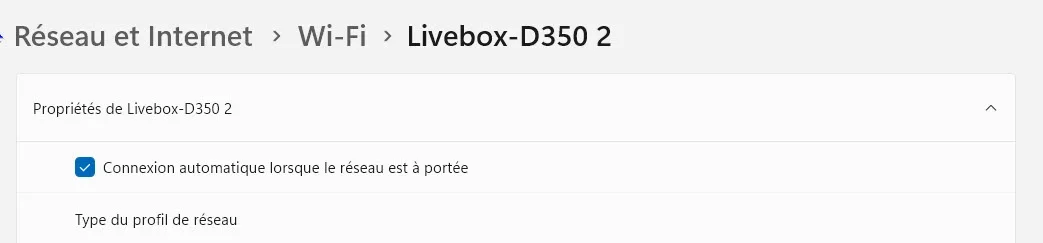
Why remove it? I mostly connect to our 5GHz network at home but I left the 2.4GHz as backup in case something happens and I cannot connect to the 5GHZ band.
 

My Computers My Computers

  • At a glance

    Windows 11 Pro 23H2 (5699), 25H2 (8875)Mobile DualCore Intel Core 2 Duo T7250, 2000 MHz4GBMobile Intel(R) GMA 4500M (Mobile 4 series)
    OS
    Windows 11 Pro 23H2 (5699), 25H2 (8875)
    Computer type
    Laptop
    Manufacturer/Model
    Acer Extensa 5630EZ
    CPU
    Mobile DualCore Intel Core 2 Duo T7250, 2000 MHz
    Motherboard
    Acer Extensa 5630
    Memory
    4GB
    Graphics Card(s)
    Mobile Intel(R) GMA 4500M (Mobile 4 series)
    Sound Card
    Realtek ALC268 @ Intel 82801IB ICH9 - High Definition Audio Controller
    Monitor(s) Displays
    1
    Screen Resolution
    1280x800
    Hard Drives
    Samsung SSD 850 EVO 250GB SATA Device (250 GB, SATA-III)
    Internet Speed
    VDSL 50 Mbps
    Browser
    MICROSOFT EDGE
    Antivirus
    WINDOWS DEFENDER
    Other Info
    Legacy MBR installation, no TPM, no Secure Boot, no WDDM 2.0 graphics drivers, no SSE4.2, cannot get more unsupported ;) This is only my test laptop. I had installed Windows 11 here before upgrading my main PC. For my main PC I use everyday see my 2nd system specs.
  • At a glance

    Windows 11 Pro v25H2 (build 26200.8875)Intel Core-i7 3770 3.40GHz s1155 (3rd generat...2x Kingston Hyper-X Blu 8GB DDR3-1600GIGABYTE GeForce RTX 3050 WINDFORCE OC V2 6GB...
    Operating System
    Windows 11 Pro v25H2 (build 26200.8875)
    Computer type
    PC/Desktop
    Manufacturer/Model
    Custom-built PC
    CPU
    Intel Core-i7 3770 3.40GHz s1155 (3rd generation)
    Motherboard
    Asus P8H61 s1155 ATX
    Memory
    2x Kingston Hyper-X Blu 8GB DDR3-1600
    Graphics card(s)
    GIGABYTE GeForce RTX 3050 WINDFORCE OC V2 6GB (GV-N3050WF2OCV2-6GD)
    Sound Card
    Realtek HD audio (ALC887)
    Monitor(s) Displays
    Sony Bravia KDL-19L4000 19" LCD TV via VGA
    Screen Resolution
    1440x900 32-bit 60Hz
    Hard Drives
    WD Blue SA510 2.5 1000GB SSD as system disk, Western Digital Caviar Purple 4TB SATA III (WD40PURZ) as second
    PSU
    Thermaltake Litepower RGB 550W Full Wired
    Case
    SUPERCASE MIDI-TOWER
    Cooling
    Deepcool Gamma Archer CPU cooler, 1x 8cm fan at the back
    Keyboard
    Mitsumi 101-key PS/2
    Mouse
    Sunnyline OptiEye PS/2
    Internet Speed
    100Mbps
    Browser
    Microsoft Edge, Mozilla Firefox
    Antivirus
    Microsoft Windows Defender
    Other Info
    Legacy BIOS (MBR) installation, no TPM, no Secure Boot, WDDM 3.0 graphics drivers, WEI score 7.4
I would like to be able to access to Livebox - D 350 but when I click on the WiFi icon in the toolbar, only Livebox - D350 2 appears and I have no choice to connect to Livebox - D350 How could I get it ?

Thanks Have a god evening
 

My Computer My Computer

At a glance

Windows 11 ProfessionalIntel Core i5-8600K CPU @ 3.60GHz FamilleDDR4 32768 MoNVIDIA GeForce GTX 1050 Ti
OS
Windows 11 Professional
Computer type
PC/Desktop
Manufacturer/Model
Custom built
CPU
Intel Core i5-8600K CPU @ 3.60GHz Famille
Motherboard
ASUSTeK COMPUTER INC. ROG STRIX Z370-E GAMING (LGA1151)
Memory
DDR4 32768 Mo
Graphics Card(s)
NVIDIA GeForce GTX 1050 Ti
Sound Card
None
Monitor(s) Displays
NEC X223HQ on NVIDIA GeForce GTX 1050 Ti and ACER EA243WM on NVIDIA GeForce GTX 1050 Ti
Screen Resolution
1920x1080
Hard Drives
System on EMTEC X150 960GB (SSD) and additional HDD
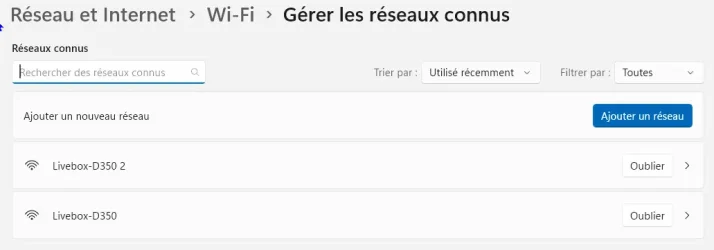
You might have two copies of the same wireless network in the known networks list. You can forget them both and then connect to the one you want. Then see if the other appears or was indeed a duplicate.
 

My Computers My Computers

  • At a glance

    Windows 11 Pro 23H2 (5699), 25H2 (8875)Mobile DualCore Intel Core 2 Duo T7250, 2000 MHz4GBMobile Intel(R) GMA 4500M (Mobile 4 series)
    OS
    Windows 11 Pro 23H2 (5699), 25H2 (8875)
    Computer type
    Laptop
    Manufacturer/Model
    Acer Extensa 5630EZ
    CPU
    Mobile DualCore Intel Core 2 Duo T7250, 2000 MHz
    Motherboard
    Acer Extensa 5630
    Memory
    4GB
    Graphics Card(s)
    Mobile Intel(R) GMA 4500M (Mobile 4 series)
    Sound Card
    Realtek ALC268 @ Intel 82801IB ICH9 - High Definition Audio Controller
    Monitor(s) Displays
    1
    Screen Resolution
    1280x800
    Hard Drives
    Samsung SSD 850 EVO 250GB SATA Device (250 GB, SATA-III)
    Internet Speed
    VDSL 50 Mbps
    Browser
    MICROSOFT EDGE
    Antivirus
    WINDOWS DEFENDER
    Other Info
    Legacy MBR installation, no TPM, no Secure Boot, no WDDM 2.0 graphics drivers, no SSE4.2, cannot get more unsupported ;) This is only my test laptop. I had installed Windows 11 here before upgrading my main PC. For my main PC I use everyday see my 2nd system specs.
  • At a glance

    Windows 11 Pro v25H2 (build 26200.8875)Intel Core-i7 3770 3.40GHz s1155 (3rd generat...2x Kingston Hyper-X Blu 8GB DDR3-1600GIGABYTE GeForce RTX 3050 WINDFORCE OC V2 6GB...
    Operating System
    Windows 11 Pro v25H2 (build 26200.8875)
    Computer type
    PC/Desktop
    Manufacturer/Model
    Custom-built PC
    CPU
    Intel Core-i7 3770 3.40GHz s1155 (3rd generation)
    Motherboard
    Asus P8H61 s1155 ATX
    Memory
    2x Kingston Hyper-X Blu 8GB DDR3-1600
    Graphics card(s)
    GIGABYTE GeForce RTX 3050 WINDFORCE OC V2 6GB (GV-N3050WF2OCV2-6GD)
    Sound Card
    Realtek HD audio (ALC887)
    Monitor(s) Displays
    Sony Bravia KDL-19L4000 19" LCD TV via VGA
    Screen Resolution
    1440x900 32-bit 60Hz
    Hard Drives
    WD Blue SA510 2.5 1000GB SSD as system disk, Western Digital Caviar Purple 4TB SATA III (WD40PURZ) as second
    PSU
    Thermaltake Litepower RGB 550W Full Wired
    Case
    SUPERCASE MIDI-TOWER
    Cooling
    Deepcool Gamma Archer CPU cooler, 1x 8cm fan at the back
    Keyboard
    Mitsumi 101-key PS/2
    Mouse
    Sunnyline OptiEye PS/2
    Internet Speed
    100Mbps
    Browser
    Microsoft Edge, Mozilla Firefox
    Antivirus
    Microsoft Windows Defender
    Other Info
    Legacy BIOS (MBR) installation, no TPM, no Secure Boot, WDDM 3.0 graphics drivers, WEI score 7.4
Back
Top Bottom