JavaScript is disabled. For a better experience, please enable JavaScript in your browser before proceeding.
You are using an out of date browser. It may not display this or other websites correctly.
You should upgrade or use an
alternative browser .
MyAsus AiSense camera option is greyed out in the latest Dev channel build
After upgrading to the latest Dev channel build and when going to the Asus AiSense camera option in MyASUS, I noticed that the settings are greyed out. I cannot change anything. It should give me options like here
https://km-ap.asus.com/uploads/Phot...fab9c9/20240109164046595_aisensecamera_EN.png . I went up to the Canary channel to check and no such issue in the Canary channel. Reverted back to the Dev channel. Please advice what I should do with this issue. Anyone with the issue? I checked the privacy settings in Windows and everything is turned on. Is this a bug in the Dev channel of Windows 11?
Windows Build/Version
Windows 11 Insider 26200.5733
Windows 11 Intel core i5-11-1135G7 16GB LPPDR4x Intel iRIS xe Windows 11 Laptop Asus Intel core i5-11-1135G7 AsusTek Computer, Inc. 16GB LPPDR4x Intel iRIS xe
Well-known member
Guru
VIP
Are you using the same drive in both Dev and Canary versions? I would try to install the official Asus driver first before anything else. If you use the same driver, then something has changed in the media handling in Dev channel that is incompatible with the camera and hence you don't have access to all the features.
Windows 11 Pro 23H2 (7582), 25H2 (9457) Mobile DualCore Intel Core 2 Duo T7250, 2000 MHz 4GB Mobile Intel(R) GMA 4500M (Mobile 4 series) Windows 11 Pro 23H2 (7582), 25H2 (9457) Laptop Acer Extensa 5630EZ Mobile DualCore Intel Core 2 Duo T7250, 2000 MHz Acer Extensa 5630 4GB Mobile Intel(R) GMA 4500M (Mobile 4 series) Realtek ALC268 @ Intel 82801IB ICH9 - High Definition Audio Controller 1 1280x800 Samsung SSD 850 EVO 250GB SATA Device (250 GB, SATA-III) 802.11g wireless 54 Mbps MICROSOFT EDGE WINDOWS DEFENDER Legacy MBR installation, no TPM, no Secure Boot, no WDDM 2.0 graphics drivers, no SSE4.2, cannot get more unsupported ;) This is only my test laptop. I had installed Windows 11 here before upgrading my main PC. For my main PC I use everyday see my 2nd system specs.
Windows 11 Pro 25H2 (build 26200.9457) Intel Core-i7 3770 3.40GHz s1155 (3rd generat... 2x Kingston Hyper-X Blu 8GB DDR3-1600 GIGABYTE GeForce RTX 3050 WINDFORCE OC V2 6GB... Windows 11 Pro 25H2 (build 26200.9457) PC/Desktop Custom-built PC Intel Core-i7 3770 3.40GHz s1155 (3rd generation) Asus P8H61 s1155 ATX 2x Kingston Hyper-X Blu 8GB DDR3-1600 GIGABYTE GeForce RTX 3050 WINDFORCE OC V2 6GB (GV-N3050WF2OCV2-6GD) Realtek HD audio (ALC887) Sony Bravia KDL-19L4000 19" LCD TV via VGA 1440x900 32-bit 60Hz WD Blue SA510 2.5 1000GB SSD as system disk, Western Digital Caviar Purple 4TB SATA III (WD40PURZ) as second Thermaltake Litepower RGB 550W Full Wired SUPERCASE MIDI-TOWER Deepcool Gamma Archer CPU cooler, 1x 8cm fan at the back Mitsumi 101-key PS/2 Microsoft Compact Optical Mouse 802.11ac 5GHz wireless 260Mpbs Microsoft Edge, Mozilla Firefox Microsoft Windows Defender Legacy BIOS (MBR) installation, no TPM, no Secure Boot, WDDM 3.0 graphics drivers, WEI score 7.4
Well-known member
Member
Thread Starter
What do you mean by drive? No issue in the Canary channel? What driver should I install?
Windows 11 Intel core i5-11-1135G7 16GB LPPDR4x Intel iRIS xe Windows 11 Laptop Asus Intel core i5-11-1135G7 AsusTek Computer, Inc. 16GB LPPDR4x Intel iRIS xe
Well-known member
Guru
VIP
I meant driver. Is there an official Asus driver to install or only from Windows Update? Try installing the official driver, if any or download the driver from Microsoft Update Catalog and install it in Dev to see if it has all features.
Windows 11 Pro 23H2 (7582), 25H2 (9457) Mobile DualCore Intel Core 2 Duo T7250, 2000 MHz 4GB Mobile Intel(R) GMA 4500M (Mobile 4 series) Windows 11 Pro 23H2 (7582), 25H2 (9457) Laptop Acer Extensa 5630EZ Mobile DualCore Intel Core 2 Duo T7250, 2000 MHz Acer Extensa 5630 4GB Mobile Intel(R) GMA 4500M (Mobile 4 series) Realtek ALC268 @ Intel 82801IB ICH9 - High Definition Audio Controller 1 1280x800 Samsung SSD 850 EVO 250GB SATA Device (250 GB, SATA-III) 802.11g wireless 54 Mbps MICROSOFT EDGE WINDOWS DEFENDER Legacy MBR installation, no TPM, no Secure Boot, no WDDM 2.0 graphics drivers, no SSE4.2, cannot get more unsupported ;) This is only my test laptop. I had installed Windows 11 here before upgrading my main PC. For my main PC I use everyday see my 2nd system specs.
Windows 11 Pro 25H2 (build 26200.9457) Intel Core-i7 3770 3.40GHz s1155 (3rd generat... 2x Kingston Hyper-X Blu 8GB DDR3-1600 GIGABYTE GeForce RTX 3050 WINDFORCE OC V2 6GB... Windows 11 Pro 25H2 (build 26200.9457) PC/Desktop Custom-built PC Intel Core-i7 3770 3.40GHz s1155 (3rd generation) Asus P8H61 s1155 ATX 2x Kingston Hyper-X Blu 8GB DDR3-1600 GIGABYTE GeForce RTX 3050 WINDFORCE OC V2 6GB (GV-N3050WF2OCV2-6GD) Realtek HD audio (ALC887) Sony Bravia KDL-19L4000 19" LCD TV via VGA 1440x900 32-bit 60Hz WD Blue SA510 2.5 1000GB SSD as system disk, Western Digital Caviar Purple 4TB SATA III (WD40PURZ) as second Thermaltake Litepower RGB 550W Full Wired SUPERCASE MIDI-TOWER Deepcool Gamma Archer CPU cooler, 1x 8cm fan at the back Mitsumi 101-key PS/2 Microsoft Compact Optical Mouse 802.11ac 5GHz wireless 260Mpbs Microsoft Edge, Mozilla Firefox Microsoft Windows Defender Legacy BIOS (MBR) installation, no TPM, no Secure Boot, WDDM 3.0 graphics drivers, WEI score 7.4
Well-known member
Member
Thread Starter
I am guessing you are referring to the camera driver. I don't know if it is an issue with the driver.
Windows 11 Intel core i5-11-1135G7 16GB LPPDR4x Intel iRIS xe Windows 11 Laptop Asus Intel core i5-11-1135G7 AsusTek Computer, Inc. 16GB LPPDR4x Intel iRIS xe
Well-known member
Guru
VIP
I am guessing you are referring to the camera driver. I don't know if it is an issue with the driver.
Usually when features are missing from a device it is due to the driver not giving access to them. For example a simple printer driver from Windows Update will make the printer work but limit you to B/W and Color and plain paper. The official printer driver from manufacturer will give you a lot more quality control and special papers plus duplex printing etc.
Windows 11 Pro 23H2 (7582), 25H2 (9457) Mobile DualCore Intel Core 2 Duo T7250, 2000 MHz 4GB Mobile Intel(R) GMA 4500M (Mobile 4 series) Windows 11 Pro 23H2 (7582), 25H2 (9457) Laptop Acer Extensa 5630EZ Mobile DualCore Intel Core 2 Duo T7250, 2000 MHz Acer Extensa 5630 4GB Mobile Intel(R) GMA 4500M (Mobile 4 series) Realtek ALC268 @ Intel 82801IB ICH9 - High Definition Audio Controller 1 1280x800 Samsung SSD 850 EVO 250GB SATA Device (250 GB, SATA-III) 802.11g wireless 54 Mbps MICROSOFT EDGE WINDOWS DEFENDER Legacy MBR installation, no TPM, no Secure Boot, no WDDM 2.0 graphics drivers, no SSE4.2, cannot get more unsupported ;) This is only my test laptop. I had installed Windows 11 here before upgrading my main PC. For my main PC I use everyday see my 2nd system specs.
Windows 11 Pro 25H2 (build 26200.9457) Intel Core-i7 3770 3.40GHz s1155 (3rd generat... 2x Kingston Hyper-X Blu 8GB DDR3-1600 GIGABYTE GeForce RTX 3050 WINDFORCE OC V2 6GB... Windows 11 Pro 25H2 (build 26200.9457) PC/Desktop Custom-built PC Intel Core-i7 3770 3.40GHz s1155 (3rd generation) Asus P8H61 s1155 ATX 2x Kingston Hyper-X Blu 8GB DDR3-1600 GIGABYTE GeForce RTX 3050 WINDFORCE OC V2 6GB (GV-N3050WF2OCV2-6GD) Realtek HD audio (ALC887) Sony Bravia KDL-19L4000 19" LCD TV via VGA 1440x900 32-bit 60Hz WD Blue SA510 2.5 1000GB SSD as system disk, Western Digital Caviar Purple 4TB SATA III (WD40PURZ) as second Thermaltake Litepower RGB 550W Full Wired SUPERCASE MIDI-TOWER Deepcool Gamma Archer CPU cooler, 1x 8cm fan at the back Mitsumi 101-key PS/2 Microsoft Compact Optical Mouse 802.11ac 5GHz wireless 260Mpbs Microsoft Edge, Mozilla Firefox Microsoft Windows Defender Legacy BIOS (MBR) installation, no TPM, no Secure Boot, WDDM 3.0 graphics drivers, WEI score 7.4
Well-known member
Member
Thread Starter
I tried it but it doesn't work. I am assuming that this is a bug. Do you know or have other fixes? The message states: This function is not available now. Make sure that your camera is working properly and has allowed MyASUS access to it.
Windows 11 Intel core i5-11-1135G7 16GB LPPDR4x Intel iRIS xe Windows 11 Laptop Asus Intel core i5-11-1135G7 AsusTek Computer, Inc. 16GB LPPDR4x Intel iRIS xe
Well-known member
Guru
VIP
check the MYASUS driver. if MyASUS is not propetly setup, camera does not work. Took me ages to work this out.
Windows 11 Pro + Win11 Canary VM. I9 13th gen i9-13900H 2.60 GHZ 16 GB soldered Integrated Intel Iris XE Windows 11 Pro + Win11 Canary VM. Laptop ASUS Zenbook 14 I9 13th gen i9-13900H 2.60 GHZ Yep, Laptop has one. 16 GB soldered Integrated Intel Iris XE Realtek built in laptop OLED screen 2880x1800 touchscreen 1 TB NVME SSD (only weakness is only one slot) Internal + 65W thunderbolt USB4 charger Yep, got one Stella Artois (UK pint cans - 568 ml) - extra cost. Built in UK keybd Bluetooth , wireless dongled, wired 900 mbs (ethernet), wifi 6 typical 350-450 mb/s both up and down Edge Defender TPM 2.0, 2xUSB4 thunderbolt, 1xUsb3 (usb a), 1xUsb-c, hdmi out, 3.5 mm audio out/in combo, ASUS backlit trackpad (inc. switchable number pad)
Well-known member
Member
Thread Starter
You had the issue before? How did you fix it? How do I check for that driver?
Windows 11 Intel core i5-11-1135G7 16GB LPPDR4x Intel iRIS xe Windows 11 Laptop Asus Intel core i5-11-1135G7 AsusTek Computer, Inc. 16GB LPPDR4x Intel iRIS xe
Well-known member
Member
Thread Starter
Any help will be appreciated
Windows 11 Intel core i5-11-1135G7 16GB LPPDR4x Intel iRIS xe Windows 11 Laptop Asus Intel core i5-11-1135G7 AsusTek Computer, Inc. 16GB LPPDR4x Intel iRIS xe
Well-known member
Guru
VIP
I didn't find any software at Asus support site. Probably your have to search with the serial number.
Windows 11 Pro 23H2 (7582), 25H2 (9457) Mobile DualCore Intel Core 2 Duo T7250, 2000 MHz 4GB Mobile Intel(R) GMA 4500M (Mobile 4 series) Windows 11 Pro 23H2 (7582), 25H2 (9457) Laptop Acer Extensa 5630EZ Mobile DualCore Intel Core 2 Duo T7250, 2000 MHz Acer Extensa 5630 4GB Mobile Intel(R) GMA 4500M (Mobile 4 series) Realtek ALC268 @ Intel 82801IB ICH9 - High Definition Audio Controller 1 1280x800 Samsung SSD 850 EVO 250GB SATA Device (250 GB, SATA-III) 802.11g wireless 54 Mbps MICROSOFT EDGE WINDOWS DEFENDER Legacy MBR installation, no TPM, no Secure Boot, no WDDM 2.0 graphics drivers, no SSE4.2, cannot get more unsupported ;) This is only my test laptop. I had installed Windows 11 here before upgrading my main PC. For my main PC I use everyday see my 2nd system specs.
Windows 11 Pro 25H2 (build 26200.9457) Intel Core-i7 3770 3.40GHz s1155 (3rd generat... 2x Kingston Hyper-X Blu 8GB DDR3-1600 GIGABYTE GeForce RTX 3050 WINDFORCE OC V2 6GB... Windows 11 Pro 25H2 (build 26200.9457) PC/Desktop Custom-built PC Intel Core-i7 3770 3.40GHz s1155 (3rd generation) Asus P8H61 s1155 ATX 2x Kingston Hyper-X Blu 8GB DDR3-1600 GIGABYTE GeForce RTX 3050 WINDFORCE OC V2 6GB (GV-N3050WF2OCV2-6GD) Realtek HD audio (ALC887) Sony Bravia KDL-19L4000 19" LCD TV via VGA 1440x900 32-bit 60Hz WD Blue SA510 2.5 1000GB SSD as system disk, Western Digital Caviar Purple 4TB SATA III (WD40PURZ) as second Thermaltake Litepower RGB 550W Full Wired SUPERCASE MIDI-TOWER Deepcool Gamma Archer CPU cooler, 1x 8cm fan at the back Mitsumi 101-key PS/2 Microsoft Compact Optical Mouse 802.11ac 5GHz wireless 260Mpbs Microsoft Edge, Mozilla Firefox Microsoft Windows Defender Legacy BIOS (MBR) installation, no TPM, no Secure Boot, WDDM 3.0 graphics drivers, WEI score 7.4
Well-known member
Member
Thread Starter
How did you fix it? Updated the driver? I forgot to mention that the camera works with no issues. I can press F10 to turn on and off the camera.
Windows 11 Intel core i5-11-1135G7 16GB LPPDR4x Intel iRIS xe Windows 11 Laptop Asus Intel core i5-11-1135G7 AsusTek Computer, Inc. 16GB LPPDR4x Intel iRIS xe
Well-known member
Guru
VIP
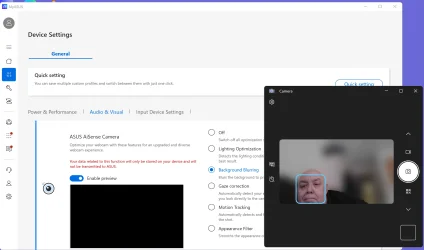
Have you got Myasus installed properly?
This is what mine looks like (including the exceptionally handsome guy
).
Last edited: Aug 5, 2025
Windows 11 Pro + Win11 Canary VM. I9 13th gen i9-13900H 2.60 GHZ 16 GB soldered Integrated Intel Iris XE Windows 11 Pro + Win11 Canary VM. Laptop ASUS Zenbook 14 I9 13th gen i9-13900H 2.60 GHZ Yep, Laptop has one. 16 GB soldered Integrated Intel Iris XE Realtek built in laptop OLED screen 2880x1800 touchscreen 1 TB NVME SSD (only weakness is only one slot) Internal + 65W thunderbolt USB4 charger Yep, got one Stella Artois (UK pint cans - 568 ml) - extra cost. Built in UK keybd Bluetooth , wireless dongled, wired 900 mbs (ethernet), wifi 6 typical 350-450 mb/s both up and down Edge Defender TPM 2.0, 2xUSB4 thunderbolt, 1xUsb3 (usb a), 1xUsb-c, hdmi out, 3.5 mm audio out/in combo, ASUS backlit trackpad (inc. switchable number pad)
Well-known member
Member
Thread Starter
I think I did. What does installing it properly look like? Mine is greyed out. Trying to figure out what I did wrong.
Windows 11 Intel core i5-11-1135G7 16GB LPPDR4x Intel iRIS xe Windows 11 Laptop Asus Intel core i5-11-1135G7 AsusTek Computer, Inc. 16GB LPPDR4x Intel iRIS xe
Well-known member
Member
Thread Starter
I think it is a bug in the Dev channel. Checked with the Canary channel but the issue is not there.
Windows 11 Intel core i5-11-1135G7 16GB LPPDR4x Intel iRIS xe Windows 11 Laptop Asus Intel core i5-11-1135G7 AsusTek Computer, Inc. 16GB LPPDR4x Intel iRIS xe
Well-known member
Guru
VIP
I think I did. What does installing it properly look like? Mine is greyed out. Trying to figure out what I did wrong.
Probably incomplete installation. Uninstall, restart and reinstall. Make sure you install everything, not only the driver.
Windows 11 Pro 23H2 (7582), 25H2 (9457) Mobile DualCore Intel Core 2 Duo T7250, 2000 MHz 4GB Mobile Intel(R) GMA 4500M (Mobile 4 series) Windows 11 Pro 23H2 (7582), 25H2 (9457) Laptop Acer Extensa 5630EZ Mobile DualCore Intel Core 2 Duo T7250, 2000 MHz Acer Extensa 5630 4GB Mobile Intel(R) GMA 4500M (Mobile 4 series) Realtek ALC268 @ Intel 82801IB ICH9 - High Definition Audio Controller 1 1280x800 Samsung SSD 850 EVO 250GB SATA Device (250 GB, SATA-III) 802.11g wireless 54 Mbps MICROSOFT EDGE WINDOWS DEFENDER Legacy MBR installation, no TPM, no Secure Boot, no WDDM 2.0 graphics drivers, no SSE4.2, cannot get more unsupported ;) This is only my test laptop. I had installed Windows 11 here before upgrading my main PC. For my main PC I use everyday see my 2nd system specs.
Windows 11 Pro 25H2 (build 26200.9457) Intel Core-i7 3770 3.40GHz s1155 (3rd generat... 2x Kingston Hyper-X Blu 8GB DDR3-1600 GIGABYTE GeForce RTX 3050 WINDFORCE OC V2 6GB... Windows 11 Pro 25H2 (build 26200.9457) PC/Desktop Custom-built PC Intel Core-i7 3770 3.40GHz s1155 (3rd generation) Asus P8H61 s1155 ATX 2x Kingston Hyper-X Blu 8GB DDR3-1600 GIGABYTE GeForce RTX 3050 WINDFORCE OC V2 6GB (GV-N3050WF2OCV2-6GD) Realtek HD audio (ALC887) Sony Bravia KDL-19L4000 19" LCD TV via VGA 1440x900 32-bit 60Hz WD Blue SA510 2.5 1000GB SSD as system disk, Western Digital Caviar Purple 4TB SATA III (WD40PURZ) as second Thermaltake Litepower RGB 550W Full Wired SUPERCASE MIDI-TOWER Deepcool Gamma Archer CPU cooler, 1x 8cm fan at the back Mitsumi 101-key PS/2 Microsoft Compact Optical Mouse 802.11ac 5GHz wireless 260Mpbs Microsoft Edge, Mozilla Firefox Microsoft Windows Defender Legacy BIOS (MBR) installation, no TPM, no Secure Boot, WDDM 3.0 graphics drivers, WEI score 7.4
Well-known member
Member
Thread Starter
Please attach a screenshot of your settings. I want to see what yours look like. What channel are you at?
Windows 11 Intel core i5-11-1135G7 16GB LPPDR4x Intel iRIS xe Windows 11 Laptop Asus Intel core i5-11-1135G7 AsusTek Computer, Inc. 16GB LPPDR4x Intel iRIS xe
Well-known member
Member
Thread Starter
Reinstall Windows fixed the issue
Windows 11 Intel core i5-11-1135G7 16GB LPPDR4x Intel iRIS xe Windows 11 Laptop Asus Intel core i5-11-1135G7 AsusTek Computer, Inc. 16GB LPPDR4x Intel iRIS xe



 ).
).