
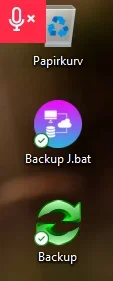
On my computer screen, a red icon has suddenly appeared right above the trash can, at the very top left.
I can't delete the icon and if I move the mouse over the icon, the trash can is activated and not the red microphone icon.
How do I get rid of the square red icon at the very top corner?
NB: I used the Google translation tool!
Many thanks in advance!
Kind regards
René
I can't delete the icon and if I move the mouse over the icon, the trash can is activated and not the red microphone icon.
How do I get rid of the square red icon at the very top corner?
NB: I used the Google translation tool!
Many thanks in advance!
Kind regards
René
- Windows Build/Version
- Windows 11
Attachments
My Computer
At a glance
Windows 11 ProIntel Core Ultra 7 265K 2700 MHz (27100)32104 MbnVIDIA GeForce RTX 5070
- OS
- Windows 11 Pro
- Computer type
- PC/Desktop
- Manufacturer/Model
- Home made
- CPU
- Intel Core Ultra 7 265K 2700 MHz (27100)
- Motherboard
- Asus Prime Z890M-plus
- Memory
- 32104 Mb
- Graphics Card(s)
- nVIDIA GeForce RTX 5070
- Sound Card
- nVidia GB205 HDMI/DP + Realtek ALC897
- Monitor(s) Displays
- MSI Optix MAG322CQRV, 31,5” 16:9
- Screen Resolution
- 2560x1440
- Hard Drives
- C:, G:, H:, I:, M: + Ekstern J:
- Keyboard
- LogiK950
- Mouse
- Logitech M185
- Internet Speed
- 1000 Mbps
- Browser
- Google - Microsoft Edge
- Antivirus
- ESET






