
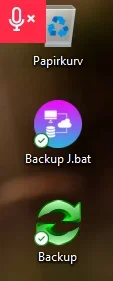
On my computer screen, a red icon has suddenly appeared right above the trash can, at the very top left.
I can't delete the icon and if I move the mouse over the icon, the trash can is activated and not the red microphone icon.
How do I get rid of the square red icon at the very top corner?
NB: I used the Google translation tool!
Many thanks in advance!
Kind regards
René
I can't delete the icon and if I move the mouse over the icon, the trash can is activated and not the red microphone icon.
How do I get rid of the square red icon at the very top corner?
NB: I used the Google translation tool!
Many thanks in advance!
Kind regards
René
- Windows Build/Version
- Windows 11
Attachments
My Computer
At a glance
Windows 11
- OS
- Windows 11
- Computer type
- PC/Desktop






