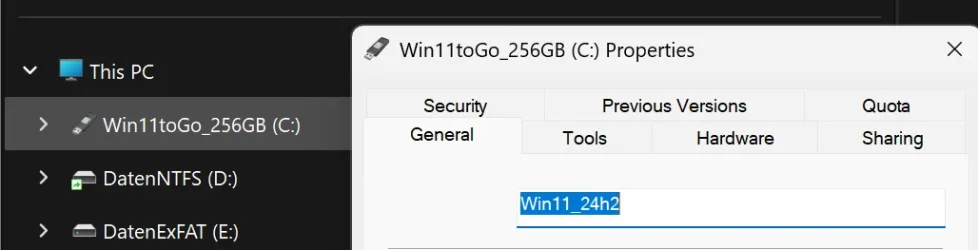
Name of the C system drive.


RIN67630

Member
Local time
9:21 AM
Posts
9
OS
Windows 11 (to Go on USB drive).
1764955223558.webp

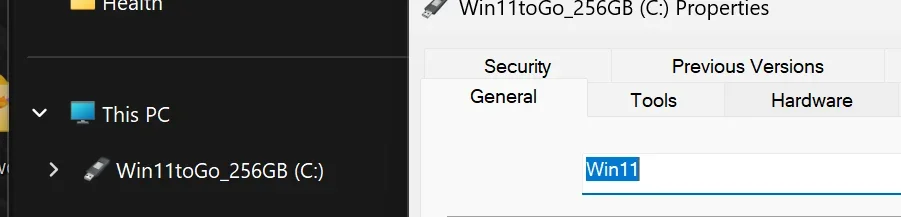
On my Windows 11 to go system the name displayed by Explorer for the drive C is another than the drive name that I can change in the properties.
Where does that name come from and can it be modified?
Thank you for your advice.
Laszlo
 
Windows Build/Version
Windows 11 24H2

My Computer

System One

  • OS
    Windows 11 (to Go on USB drive).
    Computer type
    PC/Desktop
    Manufacturer/Model
    iMac 2017
    CPU
    i5
    Motherboard
    Apple
    Memory
    8GB
    Graphics Card(s)
    Radeon Pro 555
    Monitor(s) Displays
    Built-in
    Screen Resolution
    4K
    Hard Drives
    1TB HDD internal (user data), 256GB USB3.1 SSD external (system)
    Other Info
    Dual boot with macOS

windows to go? did you clone your ssd/hdd from a usb drive? or is your system drive just a different letter?

you should be able to just right-click the drive and select Rename in the context menu
 

My Computer

System One

  • OS
    Windows 11 Pro
windows to go? did you clone your ssd/hdd from a usb drive? or is your system drive just a different letter?
I have no internal SSD drive on my iMac, only an inadequately slow hard drive, which is my user-data drive
Windows 11 does not let you install on an external drive. So the easiest way was to make a Windows to Go drive with Rufus.
It works well with USB3.1 SSDs, without need to cut into the sealed iMac.
You should be able to just right-click the drive and select Rename in the context menu
No, I am not. That is precisely my question.
 

My Computer

System One

  • OS
    Windows 11 (to Go on USB drive).
    Computer type
    PC/Desktop
    Manufacturer/Model
    iMac 2017
    CPU
    i5
    Motherboard
    Apple
    Memory
    8GB
    Graphics Card(s)
    Radeon Pro 555
    Monitor(s) Displays
    Built-in
    Screen Resolution
    4K
    Hard Drives
    1TB HDD internal (user data), 256GB USB3.1 SSD external (system)
    Other Info
    Dual boot with macOS

try Command Prompt as Admin and run
Code:
label C: YOUR_LABEL_HERE


EDIT:
if all normal methods fail, download the portable partition magic 64bit (step 2 in link)

run the partitionwizard.exe portable
right click the C: partition > label > change the label name > apply changes
 

My Computer

System One

  • OS
    Windows 11 Pro

My Computer

System One

  • OS
    Windows 11 (to Go on USB drive).
    Computer type
    PC/Desktop
    Manufacturer/Model
    iMac 2017
    CPU
    i5
    Motherboard
    Apple
    Memory
    8GB
    Graphics Card(s)
    Radeon Pro 555
    Monitor(s) Displays
    Built-in
    Screen Resolution
    4K
    Hard Drives
    1TB HDD internal (user data), 256GB USB3.1 SSD external (system)
    Other Info
    Dual boot with macOS

try Command Prompt as Admin and run
Code:
label C: YOUR_LABEL_HERE
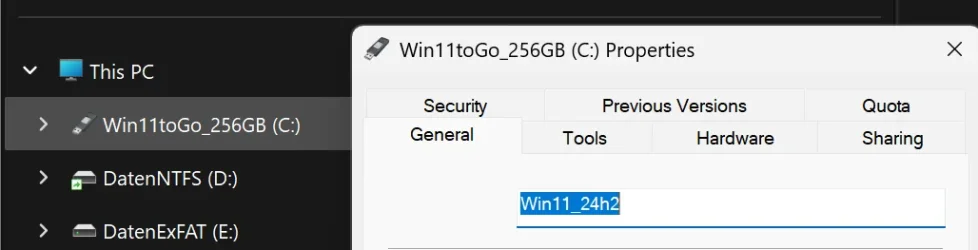
idem: It renames the drive in the Properties, but not the name displayed in Explorer.
EDIT:
if all normal methods fail, download the portable partition magic 64bit (step 2 in link)

run the partitionwizard.exe portable
right click the C: partition > label > change the label name > apply changes
Same thing: It renames the drive in the Properties, but not the name displayed in Explorer.
1764960524398.webp
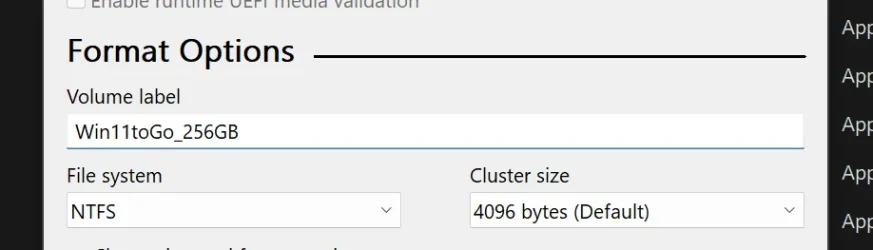
The Info displayed by Explorer when using Win to Go seem to be fetched from elsewhere.
 

My Computer

System One

  • OS
    Windows 11 (to Go on USB drive).
    Computer type
    PC/Desktop
    Manufacturer/Model
    iMac 2017
    CPU
    i5
    Motherboard
    Apple
    Memory
    8GB
    Graphics Card(s)
    Radeon Pro 555
    Monitor(s) Displays
    Built-in
    Screen Resolution
    4K
    Hard Drives
    1TB HDD internal (user data), 256GB USB3.1 SSD external (system)
    Other Info
    Dual boot with macOS
I've seen that before for some USB sticks.
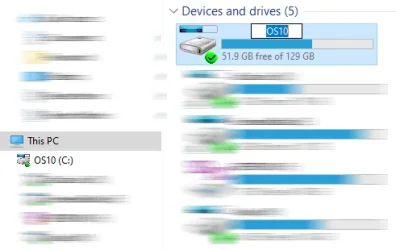
I just change the name in the File explorer window [not in Properties] by selecting it, clicking in the name and overwriting it just as I might a filename.
Changing system drive label.webp
It might insist on your using your Admin authority to do the change.


Denis
 

My Computer

System One

  • OS
    Windows 11 Home x64 Version 25H2 Build 26200.8037
have you checked to see if there is a hidden .inf or .ini file on the external drive? if so that will most likely contain a label inside of it as well
 

My Computer

System One

  • OS
    Windows 11 Pro
The Info displayed by Explorer when using Win to Go seem to be fetched from elsewhere.
I finally found the info in the registry:
Computer\HKEY_USERS\S-1-5-21-1903901123-73870334-687094388-1003\Software\Microsoft\Windows\CurrentVersion\Explorer\MountPoints2\{136c73ce-a036-4174-8901-ff0ca6c66c16}\_Autorun\DefaultLabel
 

Attachments

  • 1764960885945.webp
    1764960885945.webp
    16.3 KB · Views: 1
  • 1764960909661.webp
    1764960909661.webp
    16.3 KB · Views: 1

My Computer

System One

  • OS
    Windows 11 (to Go on USB drive).
    Computer type
    PC/Desktop
    Manufacturer/Model
    iMac 2017
    CPU
    i5
    Motherboard
    Apple
    Memory
    8GB
    Graphics Card(s)
    Radeon Pro 555
    Monitor(s) Displays
    Built-in
    Screen Resolution
    4K
    Hard Drives
    1TB HDD internal (user data), 256GB USB3.1 SSD external (system)
    Other Info
    Dual boot with macOS
I just change the name in the File explorer window [not in Properties] by selecting it, clicking in the name and overwriting it just as I might a filename.
I can change the name as an admin, but it is ignored.
I could try to change it in the registry, but it is like sawing the branch on which you sit...
Need to do a full backup before....
 

My Computer

System One

  • OS
    Windows 11 (to Go on USB drive).
    Computer type
    PC/Desktop
    Manufacturer/Model
    iMac 2017
    CPU
    i5
    Motherboard
    Apple
    Memory
    8GB
    Graphics Card(s)
    Radeon Pro 555
    Monitor(s) Displays
    Built-in
    Screen Resolution
    4K
    Hard Drives
    1TB HDD internal (user data), 256GB USB3.1 SSD external (system)
    Other Info
    Dual boot with macOS
have you checked to see if there is a hidden .inf or .ini file on the external drive? if so that will most likely contain a label inside of it as well
That disk has no such hidden files on it (I always set my explorer to show hidden an system files)
 
Last edited:

My Computer

System One

  • OS
    Windows 11 (to Go on USB drive).
    Computer type
    PC/Desktop
    Manufacturer/Model
    iMac 2017
    CPU
    i5
    Motherboard
    Apple
    Memory
    8GB
    Graphics Card(s)
    Radeon Pro 555
    Monitor(s) Displays
    Built-in
    Screen Resolution
    4K
    Hard Drives
    1TB HDD internal (user data), 256GB USB3.1 SSD external (system)
    Other Info
    Dual boot with macOS
Thar disk has no such hidden files on it (I always set my explorer to show hidden an system files)
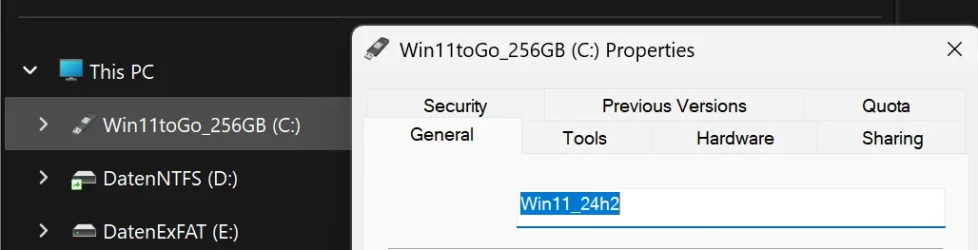
P.S. the names displayed is inherited from Rufus.
1764962404933.webp
 

My Computer

System One

  • OS
    Windows 11 (to Go on USB drive).
    Computer type
    PC/Desktop
    Manufacturer/Model
    iMac 2017
    CPU
    i5
    Motherboard
    Apple
    Memory
    8GB
    Graphics Card(s)
    Radeon Pro 555
    Monitor(s) Displays
    Built-in
    Screen Resolution
    4K
    Hard Drives
    1TB HDD internal (user data), 256GB USB3.1 SSD external (system)
    Other Info
    Dual boot with macOS
yeah i assumed it was due to the formatting tool.

try this powershell (as admin):

Code:
$Drive = Get-CimInstance -ClassName Win32_Volume -Filter "DriveLetter = 'C:'"
Code:
$Drive | Set-CimInstance -Property @{Label='YOUR_LABEL_HERE'}
 

My Computer

System One

  • OS
    Windows 11 Pro
Then you might try booting from an installation disk or similar and using its command prompt to use the Label C: Whatever cmd suggested by someone earlier on.

I've only once used WindowsToGo.
I would expect that if you cannot change the label when booted from a USB then your only solution would involve recreating your WindowsToGo and seeing if Rufus will let you give it a different label right from the start.


Denis
 

My Computer

System One

  • OS
    Windows 11 Home x64 Version 25H2 Build 26200.8037
I've only once used WindowsToGo.
I would expect that if you cannot change the label when booted from a USB then your only solution would involve recreating your WindowsToGo and seeing if Rufus will let you give it a different label right from the start.
Sure, but that would mean restarting a completely vanilla Windows...
Changing the name for C: is not that critical, I just wanted to understand why there are two names in Explorer...

Maybe someone knows how to get an almost normal Windows installation on an external USB-SSD disk without "to Go"?
The limitation is a bit unjustified: you have today USB-4/Thunderbolt drives that are as fast if they were internal.
 

My Computer

System One

  • OS
    Windows 11 (to Go on USB drive).
    Computer type
    PC/Desktop
    Manufacturer/Model
    iMac 2017
    CPU
    i5
    Motherboard
    Apple
    Memory
    8GB
    Graphics Card(s)
    Radeon Pro 555
    Monitor(s) Displays
    Built-in
    Screen Resolution
    4K
    Hard Drives
    1TB HDD internal (user data), 256GB USB3.1 SSD external (system)
    Other Info
    Dual boot with macOS

Latest Support Threads

Back
Top Bottom