Need Advice on dual Boot Win 11 Pro and Win 10 Pro Computer


RIBob

Member
Local time
1:09 AM
Posts
7
OS
Win 7 Pro, Win 10 Pro, Win 11 Pro
About ready to take the plunge. Dell XPS 8930 tower computer has retrofitted I-9 9th Gen K-series CPU which is max available for existing socket/MoBo, so computer "should" also have TPM2--I hope. All other physical specs are consonant with Win 11 Pro. I understand that it's best to adjust BIOS settings (UEFI, AHCI, etc.) identically for both Win 10 Pro and Win 11 Pro OS. From reading, it appears that installing Win 11 Pro first is mandatory. Please advise if I'm wrong about anything.

In order to save money and some hassle, is it possible to D/L trusted and free versions of both Win 11 Pro and Win 10 Pro, from trusted sites? Please, which specific D/L sites are GTG? I understand I'll need an Activation Code (correct terminology?) for each OS. Where are trusted places to obtain both codes? Obviously, I'd prefer above-board sites like Amazon or even Ebay for obvious reasons.

Due to personal time constraints, and my personal ignorance, I'll be having a trusted computer Pro wipe and partition existing 2TB SSD, I/2 for each OS. Instructions on accessing a given (Win 11/Win 10) OS will be appreciated. Hopefully such a dual boot system will automatically give me a choice on start-up.

TYVM for comments.
 

My Computer My Computer

At a glance

Win 7 Pro, Win 10 Pro, Win 11 ProVariousVariousVarious
OS
Win 7 Pro, Win 10 Pro, Win 11 Pro
Computer type
PC/Desktop
Manufacturer/Model
Dell
CPU
Various
Motherboard
Various
Memory
Various
Graphics Card(s)
Various
Sound Card
Various
Monitor(s) Displays
Various
Screen Resolution
Various
Hard Drives
Various capacity SSDs
PSU
Various
Case
Various
Cooling
Various
Keyboard
Various
Mouse
Track ball and mouse pad
Internet Speed
Unknown
Browser
Firefox, Brave, Edge
Antivirus
MSE
Other Info
Regret vagueness, will post details when pertinent.
Before doing anything CREATE A SYSTEM IMAGE.
There are many step by step guides and videos available as well as several ways to set up dual boot.
One such is here

Rather than dual booting, my personal preference is to use a virtual machine for the second OS.

Many folks here download their isos from UUP UUP dump
 

My Computers My Computers

  • At a glance

    Windows 11 Pro 26H2 26300.9457i9-10900 10 core 20 threads32 gbnone-Intel UHD Graphics 630
    OS
    Windows 11 Pro 26H2 26300.9457
    Computer type
    PC/Desktop
    Manufacturer/Model
    Dell Optiplex 7080
    CPU
    i9-10900 10 core 20 threads
    Motherboard
    DELL 0J37VM
    Memory
    32 gb
    Graphics Card(s)
    none-Intel UHD Graphics 630
    Sound Card
    Integrated Realtek
    Monitor(s) Displays
    Benq 27
    Screen Resolution
    2560x1440
    Hard Drives
    2x1tb Solidigm m.2 nvme /External drives 512gb Samsung m.2 sata+2tb Kingston m2.nvme
    PSU
    500w
    Case
    MT
    Cooling
    Dell Premium
    Keyboard
    Logitech wired
    Mouse
    Logitech wireless
    Internet Speed
    so slow I'm too embarrassed to tell
    Browser
    #1 Edge #2 Firefox
    Antivirus
    Defender+MWB Premium
  • At a glance

    Windows 11 Pro 24H2 26200.9457AMD Ryzen 7 6800U32 gbintegrated
    Operating System
    Windows 11 Pro 24H2 26200.9457
    Computer type
    PC/Desktop
    Manufacturer/Model
    Beelink Mini PC SER5
    CPU
    AMD Ryzen 7 6800U
    Memory
    32 gb
    Graphics card(s)
    integrated
    Sound Card
    integrated
    Monitor(s) Displays
    Benq 27
    Screen Resolution
    2560x1440
    Hard Drives
    1TB Crucial nvme
    Keyboard
    Logitech wired
    Mouse
    Logitech wireless
    Internet Speed
    still too embarrassed to tell
    Browser
    Firefox
    Antivirus
    Defender
  • System 3 is non compliant Dell 9020 i7-4770/24gb ram Win11 PRO 26200.9457
Why waste money? Just shrink your current partition, then install windows 11 on the unallocated space. Will keep your current OS intact and make your pc dual boot with 10/11.
 

My Computer My Computer

At a glance

Windows 11 Pro
OS
Windows 11 Pro
VHD boot is pretty handy for this kind of thing. No partition jiggering, no hypervisor.


My Computer My Computer

At a glance

Win11 Ent. 25H2
OS
Win11 Ent. 25H2
Usually when you dual boot, you install the old OS first, although Windows 10 64-bit and Windows 11 behave similarly and share the same Windows bootloader, so it shouldn't matter. However, since you already run Windows 10 64-bit you can either install Windows 11 on a spare disk or shrink the partition and install Windows 11 on the unallocated space as suggested. Windows 10 64-bit and Windows 11 share the same digital licence on Microsoft servers per computer, so you don't need a new key, even if you reinstall Windows 10 64-bit. Once connected to the internet both versions should activate automatically as long as they are both Home or both Pro, depending on what digital licence you have.
 

My Computers My Computers

  • At a glance

    Windows 11 Pro 23H2 (7584), 26H2 (9550)Mobile DualCore Intel Core 2 Duo T7250, 2000 MHz4GBMobile Intel(R) GMA 4500M (Mobile 4 series)
    OS
    Windows 11 Pro 23H2 (7584), 26H2 (9550)
    Computer type
    Laptop
    Manufacturer/Model
    Acer Extensa 5630EZ
    CPU
    Mobile DualCore Intel Core 2 Duo T7250, 2000 MHz
    Motherboard
    Acer Extensa 5630
    Memory
    4GB
    Graphics Card(s)
    Mobile Intel(R) GMA 4500M (Mobile 4 series)
    Sound Card
    Realtek ALC268 @ Intel 82801IB ICH9 - High Definition Audio Controller
    Monitor(s) Displays
    1
    Screen Resolution
    1280x800
    Hard Drives
    Samsung SSD 850 EVO 250GB SATA Device (250 GB, SATA-III)
    Internet Speed
    802.11g wireless 54 Mbps
    Browser
    MICROSOFT EDGE
    Antivirus
    WINDOWS DEFENDER
    Other Info
    Legacy MBR installation, no TPM, no Secure Boot, no WDDM 2.0 graphics drivers, no SSE4.2, cannot get more unsupported ;) This is only my test laptop. I had installed Windows 11 here before upgrading my main PC. For my main PC I use everyday see my 2nd system specs.
  • At a glance

    Windows 11 Pro 26H2 (build 26300.9550)Intel Core-i7 3770 3.40GHz s1155 (3rd generat...2x Kingston Hyper-X Blu 8GB DDR3-1600GIGABYTE GeForce RTX 3050 WINDFORCE OC V2 6GB...
    Operating System
    Windows 11 Pro 26H2 (build 26300.9550)
    Computer type
    PC/Desktop
    Manufacturer/Model
    Custom-built PC
    CPU
    Intel Core-i7 3770 3.40GHz s1155 (3rd generation)
    Motherboard
    Asus P8H61 s1155 ATX
    Memory
    2x Kingston Hyper-X Blu 8GB DDR3-1600
    Graphics card(s)
    GIGABYTE GeForce RTX 3050 WINDFORCE OC V2 6GB (GV-N3050WF2OCV2-6GD)
    Sound Card
    Realtek HD audio (ALC887)
    Monitor(s) Displays
    Sony Bravia KDL-19L4000 19" LCD TV via VGA
    Screen Resolution
    1440x900 32-bit 60Hz
    Hard Drives
    WD Blue SA510 2.5 1000GB SSD as system disk, Western Digital Caviar Purple 4TB SATA III (WD40PURZ) as second
    PSU
    Thermaltake Litepower RGB 550W Full Wired
    Case
    SUPERCASE MIDI-TOWER
    Cooling
    Deepcool Gamma Archer CPU cooler, 1x 8cm fan at the back
    Keyboard
    Mitsumi 101-key PS/2
    Mouse
    Microsoft Compact Optical Mouse
    Internet Speed
    802.11ac 5GHz wireless 260Mpbs
    Browser
    Microsoft Edge, Mozilla Firefox
    Antivirus
    Microsoft Windows Defender
    Other Info
    Legacy BIOS (MBR) installation, no TPM, no Secure Boot, WDDM 3.0 graphics drivers, WEI score 7.4
Current Win 10 Pro OS and its current BIOS settings appear to be incompatible with Win 11 Pro requirements. As it is, existing Win 10 Pro BIOS settings prevent me from activating TPM2. I'm told that Intel 9th gen I-9 CPUS have TPM2 feature built-in. So, it appears existing Win 10 OS must be deleted/uninstalled, and new Win 11 and Win 10 OSs both with identical BIOS settings which allow activation of TPM2 feature will be required. Am I somehow mistaken?
 
Last edited:

My Computer My Computer

At a glance

Win 7 Pro, Win 10 Pro, Win 11 ProVariousVariousVarious
OS
Win 7 Pro, Win 10 Pro, Win 11 Pro
Computer type
PC/Desktop
Manufacturer/Model
Dell
CPU
Various
Motherboard
Various
Memory
Various
Graphics Card(s)
Various
Sound Card
Various
Monitor(s) Displays
Various
Screen Resolution
Various
Hard Drives
Various capacity SSDs
PSU
Various
Case
Various
Cooling
Various
Keyboard
Various
Mouse
Track ball and mouse pad
Internet Speed
Unknown
Browser
Firefox, Brave, Edge
Antivirus
MSE
Other Info
Regret vagueness, will post details when pertinent.
Your statement that the "Intel 9th Gen K-series CPU has TPM 2.0 built in" is slightly misleading. On this Intel platform, TPM functionality can be provided by Intel Platform Trust Technology (PTT), a firmware TPM exposed through the motherboard firmware.

Windows 11 requires UEFI firmware with Secure Boot capability and TPM 2.0.

If Windows 10 was originally installed on a Dell XPS 8930 in Legacy BIOS boot mode, the system disk uses the MBR partition style. Simply switching the firmware from Legacy BIOS to UEFI afterward can make the existing Windows installation unbootable until the system disk and boot configuration are converted (for example, using the MBR2GPT tool).

Could you post a screenshot of Disk Management? It can help determine whether the Windows system disk is MBR or GPT.

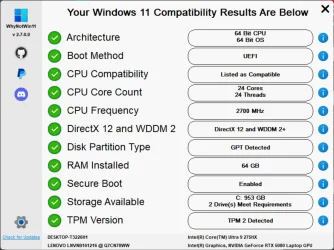
Also, run WhyNotWin11 and post a screenshot of the results. WhyNotWin11 is a third-party utility. It's useful here because it can identify which particular Windows 11 requirement is failing.


The screenshot shows my Lenovo laptop meeting all of the Windows 11 system requirements checked by WhyNotWin11.

WhyNotWin11.webp

Edit:

You mentioned that your existing Windows 10/BIOS configuration prevents you from activating TPM 2.0. Could you clarify exactly what happens when you try?

The XPS 8930 BIOS has a Firmware TPM setting. Is that option present but disabled or grayed out, or can you enable it but Windows then fails to boot or reports some other problem?

If possible, please post a photo of the relevant BIOS screen.

Firmware TPMEnable or disable the firmware TPM.
Default: Enabled.

 
Last edited:

My Computers My Computers

  • At a glance

    Windows 11 ProAMD Ryzen 9 9950X3DKingston FURY Beast 64GB (2x32GB) DDR5 6000MT/sASUS TUF Gaming Radeon RX 9070 OC Edition 16G...
    OS
    Windows 11 Pro
    Computer type
    PC/Desktop
    CPU
    AMD Ryzen 9 9950X3D
    Motherboard
    ASRock B650E Taichi Lite
    Memory
    Kingston FURY Beast 64GB (2x32GB) DDR5 6000MT/s
    Graphics Card(s)
    ASUS TUF Gaming Radeon RX 9070 OC Edition 16GB GDDR6
    Hard Drives
    Solidigm P44 Pro 2TB M.2 NVMe SSD
  • At a glance

    Windows 11 HomeIntel Core Ultra 9 275HX64GB (2x 32GB) DDR5-6400NVIDIA GeForce RTX 5080 16GB GDDR7 Laptop GPU
    Operating System
    Windows 11 Home
    Computer type
    Laptop
    Manufacturer/Model
    Lenovo Legion Pro 7i Gen 10 16"
    CPU
    Intel Core Ultra 9 275HX
    Memory
    64GB (2x 32GB) DDR5-6400
    Graphics card(s)
    NVIDIA GeForce RTX 5080 16GB GDDR7 Laptop GPU
    Hard Drives
    2x 1TB M.2 NVMe SSD (SK Hynix)
The TPM 2.0 feature is on the motherboard. It is either a hardware module which might be disabled and you must enable it, or a software module like Intel PTT or AMD fTPM and also must be enabled. Load your UEFI firmware (aka BIOS) and look at the Security settings. If enabling TPM 2.0 is not enough to make your PC Windows 11 compliant, I would just bypass compatibility check and upgrade Windows 10 to 11. Why do all that trouble installing Windows 11 from scratch? If Windows 10 runs perfectly without issues I think it is best to upgrade. Within a couple of hours or less you have a ready to use system while reinstalling everything from scratch and reconfiguring will take much more than a couple of hours. Let alone the time required to backup all your data and restore them afterwards.
 

My Computers My Computers

  • At a glance

    Windows 11 Pro 23H2 (7584), 26H2 (9550)Mobile DualCore Intel Core 2 Duo T7250, 2000 MHz4GBMobile Intel(R) GMA 4500M (Mobile 4 series)
    OS
    Windows 11 Pro 23H2 (7584), 26H2 (9550)
    Computer type
    Laptop
    Manufacturer/Model
    Acer Extensa 5630EZ
    CPU
    Mobile DualCore Intel Core 2 Duo T7250, 2000 MHz
    Motherboard
    Acer Extensa 5630
    Memory
    4GB
    Graphics Card(s)
    Mobile Intel(R) GMA 4500M (Mobile 4 series)
    Sound Card
    Realtek ALC268 @ Intel 82801IB ICH9 - High Definition Audio Controller
    Monitor(s) Displays
    1
    Screen Resolution
    1280x800
    Hard Drives
    Samsung SSD 850 EVO 250GB SATA Device (250 GB, SATA-III)
    Internet Speed
    802.11g wireless 54 Mbps
    Browser
    MICROSOFT EDGE
    Antivirus
    WINDOWS DEFENDER
    Other Info
    Legacy MBR installation, no TPM, no Secure Boot, no WDDM 2.0 graphics drivers, no SSE4.2, cannot get more unsupported ;) This is only my test laptop. I had installed Windows 11 here before upgrading my main PC. For my main PC I use everyday see my 2nd system specs.
  • At a glance

    Windows 11 Pro 26H2 (build 26300.9550)Intel Core-i7 3770 3.40GHz s1155 (3rd generat...2x Kingston Hyper-X Blu 8GB DDR3-1600GIGABYTE GeForce RTX 3050 WINDFORCE OC V2 6GB...
    Operating System
    Windows 11 Pro 26H2 (build 26300.9550)
    Computer type
    PC/Desktop
    Manufacturer/Model
    Custom-built PC
    CPU
    Intel Core-i7 3770 3.40GHz s1155 (3rd generation)
    Motherboard
    Asus P8H61 s1155 ATX
    Memory
    2x Kingston Hyper-X Blu 8GB DDR3-1600
    Graphics card(s)
    GIGABYTE GeForce RTX 3050 WINDFORCE OC V2 6GB (GV-N3050WF2OCV2-6GD)
    Sound Card
    Realtek HD audio (ALC887)
    Monitor(s) Displays
    Sony Bravia KDL-19L4000 19" LCD TV via VGA
    Screen Resolution
    1440x900 32-bit 60Hz
    Hard Drives
    WD Blue SA510 2.5 1000GB SSD as system disk, Western Digital Caviar Purple 4TB SATA III (WD40PURZ) as second
    PSU
    Thermaltake Litepower RGB 550W Full Wired
    Case
    SUPERCASE MIDI-TOWER
    Cooling
    Deepcool Gamma Archer CPU cooler, 1x 8cm fan at the back
    Keyboard
    Mitsumi 101-key PS/2
    Mouse
    Microsoft Compact Optical Mouse
    Internet Speed
    802.11ac 5GHz wireless 260Mpbs
    Browser
    Microsoft Edge, Mozilla Firefox
    Antivirus
    Microsoft Windows Defender
    Other Info
    Legacy BIOS (MBR) installation, no TPM, no Secure Boot, WDDM 3.0 graphics drivers, WEI score 7.4
Concur with above post. I tried to re-set existing BIOS to Win 11 compatibility, and Win 10 OS (having different BIOS settings) refused to boot. So, it's a fresh install of Win 10 and Win 11 OSs (both Pro variant) set up in dual boot mode, each in 1/2 of the 2 TB SSD. Is it preferable to install one OS first, then the other? Which one first?
 

My Computer My Computer

At a glance

Win 7 Pro, Win 10 Pro, Win 11 ProVariousVariousVarious
OS
Win 7 Pro, Win 10 Pro, Win 11 Pro
Computer type
PC/Desktop
Manufacturer/Model
Dell
CPU
Various
Motherboard
Various
Memory
Various
Graphics Card(s)
Various
Sound Card
Various
Monitor(s) Displays
Various
Screen Resolution
Various
Hard Drives
Various capacity SSDs
PSU
Various
Case
Various
Cooling
Various
Keyboard
Various
Mouse
Track ball and mouse pad
Internet Speed
Unknown
Browser
Firefox, Brave, Edge
Antivirus
MSE
Other Info
Regret vagueness, will post details when pertinent.

Which one first?
From way back in XP days, the rule has been to install oldest OS first. If you are starting from scratch I'd still install 10 first, then 11, to adhere to the rules of a cleaner boot manager. If 11 is already installed, then installing Windows 10 might require a rebuild of the boot manager. Both systems should be installed as GPT.

Regarding the license, if your PC already has a genuine activated Windows 10 digital license, you usually do not need to buy another license to install Windows 11 on the same computer in a dual-boot setup as long as the edition is the same (ie: Pro to Pro)..

You do not enter a product key when installing 11 as both installations use the same underlying hardware-based entitlement. During installation, choose "I don't have a product key" and let activation occur after installation.
  • ​
 

My Computers My Computers

  • At a glance

    Windows 11 Pro 26H2 26300.9457i9-10900 10 core 20 threads32 gbnone-Intel UHD Graphics 630
    OS
    Windows 11 Pro 26H2 26300.9457
    Computer type
    PC/Desktop
    Manufacturer/Model
    Dell Optiplex 7080
    CPU
    i9-10900 10 core 20 threads
    Motherboard
    DELL 0J37VM
    Memory
    32 gb
    Graphics Card(s)
    none-Intel UHD Graphics 630
    Sound Card
    Integrated Realtek
    Monitor(s) Displays
    Benq 27
    Screen Resolution
    2560x1440
    Hard Drives
    2x1tb Solidigm m.2 nvme /External drives 512gb Samsung m.2 sata+2tb Kingston m2.nvme
    PSU
    500w
    Case
    MT
    Cooling
    Dell Premium
    Keyboard
    Logitech wired
    Mouse
    Logitech wireless
    Internet Speed
    so slow I'm too embarrassed to tell
    Browser
    #1 Edge #2 Firefox
    Antivirus
    Defender+MWB Premium
  • At a glance

    Windows 11 Pro 24H2 26200.9457AMD Ryzen 7 6800U32 gbintegrated
    Operating System
    Windows 11 Pro 24H2 26200.9457
    Computer type
    PC/Desktop
    Manufacturer/Model
    Beelink Mini PC SER5
    CPU
    AMD Ryzen 7 6800U
    Memory
    32 gb
    Graphics card(s)
    integrated
    Sound Card
    integrated
    Monitor(s) Displays
    Benq 27
    Screen Resolution
    2560x1440
    Hard Drives
    1TB Crucial nvme
    Keyboard
    Logitech wired
    Mouse
    Logitech wireless
    Internet Speed
    still too embarrassed to tell
    Browser
    Firefox
    Antivirus
    Defender
  • System 3 is non compliant Dell 9020 i7-4770/24gb ram Win11 PRO 26200.9457
You mentioned changing the BIOS settings to make the computer compatible with Windows 11, after which Windows 10 would no longer boot.

Which BIOS settings did you change, exactly?

Also, run WhyNotWin11 and post a screenshot of the results. It can identify which specific Windows 11 requirement is failing.


My Computers My Computers

  • At a glance

    Windows 11 ProAMD Ryzen 9 9950X3DKingston FURY Beast 64GB (2x32GB) DDR5 6000MT/sASUS TUF Gaming Radeon RX 9070 OC Edition 16G...
    OS
    Windows 11 Pro
    Computer type
    PC/Desktop
    CPU
    AMD Ryzen 9 9950X3D
    Motherboard
    ASRock B650E Taichi Lite
    Memory
    Kingston FURY Beast 64GB (2x32GB) DDR5 6000MT/s
    Graphics Card(s)
    ASUS TUF Gaming Radeon RX 9070 OC Edition 16GB GDDR6
    Hard Drives
    Solidigm P44 Pro 2TB M.2 NVMe SSD
  • At a glance

    Windows 11 HomeIntel Core Ultra 9 275HX64GB (2x 32GB) DDR5-6400NVIDIA GeForce RTX 5080 16GB GDDR7 Laptop GPU
    Operating System
    Windows 11 Home
    Computer type
    Laptop
    Manufacturer/Model
    Lenovo Legion Pro 7i Gen 10 16"
    CPU
    Intel Core Ultra 9 275HX
    Memory
    64GB (2x 32GB) DDR5-6400
    Graphics card(s)
    NVIDIA GeForce RTX 5080 16GB GDDR7 Laptop GPU
    Hard Drives
    2x 1TB M.2 NVMe SSD (SK Hynix)
If Windows 10 was running OK, I would not go back to the original BIOS settings and bypass compatibility check to install Windows 11. It's not worth all that trouble and time required to reinstall both versions from scratch. But it's your time, so you decide.
 

My Computers My Computers

  • At a glance

    Windows 11 Pro 23H2 (7584), 26H2 (9550)Mobile DualCore Intel Core 2 Duo T7250, 2000 MHz4GBMobile Intel(R) GMA 4500M (Mobile 4 series)
    OS
    Windows 11 Pro 23H2 (7584), 26H2 (9550)
    Computer type
    Laptop
    Manufacturer/Model
    Acer Extensa 5630EZ
    CPU
    Mobile DualCore Intel Core 2 Duo T7250, 2000 MHz
    Motherboard
    Acer Extensa 5630
    Memory
    4GB
    Graphics Card(s)
    Mobile Intel(R) GMA 4500M (Mobile 4 series)
    Sound Card
    Realtek ALC268 @ Intel 82801IB ICH9 - High Definition Audio Controller
    Monitor(s) Displays
    1
    Screen Resolution
    1280x800
    Hard Drives
    Samsung SSD 850 EVO 250GB SATA Device (250 GB, SATA-III)
    Internet Speed
    802.11g wireless 54 Mbps
    Browser
    MICROSOFT EDGE
    Antivirus
    WINDOWS DEFENDER
    Other Info
    Legacy MBR installation, no TPM, no Secure Boot, no WDDM 2.0 graphics drivers, no SSE4.2, cannot get more unsupported ;) This is only my test laptop. I had installed Windows 11 here before upgrading my main PC. For my main PC I use everyday see my 2nd system specs.
  • At a glance

    Windows 11 Pro 26H2 (build 26300.9550)Intel Core-i7 3770 3.40GHz s1155 (3rd generat...2x Kingston Hyper-X Blu 8GB DDR3-1600GIGABYTE GeForce RTX 3050 WINDFORCE OC V2 6GB...
    Operating System
    Windows 11 Pro 26H2 (build 26300.9550)
    Computer type
    PC/Desktop
    Manufacturer/Model
    Custom-built PC
    CPU
    Intel Core-i7 3770 3.40GHz s1155 (3rd generation)
    Motherboard
    Asus P8H61 s1155 ATX
    Memory
    2x Kingston Hyper-X Blu 8GB DDR3-1600
    Graphics card(s)
    GIGABYTE GeForce RTX 3050 WINDFORCE OC V2 6GB (GV-N3050WF2OCV2-6GD)
    Sound Card
    Realtek HD audio (ALC887)
    Monitor(s) Displays
    Sony Bravia KDL-19L4000 19" LCD TV via VGA
    Screen Resolution
    1440x900 32-bit 60Hz
    Hard Drives
    WD Blue SA510 2.5 1000GB SSD as system disk, Western Digital Caviar Purple 4TB SATA III (WD40PURZ) as second
    PSU
    Thermaltake Litepower RGB 550W Full Wired
    Case
    SUPERCASE MIDI-TOWER
    Cooling
    Deepcool Gamma Archer CPU cooler, 1x 8cm fan at the back
    Keyboard
    Mitsumi 101-key PS/2
    Mouse
    Microsoft Compact Optical Mouse
    Internet Speed
    802.11ac 5GHz wireless 260Mpbs
    Browser
    Microsoft Edge, Mozilla Firefox
    Antivirus
    Microsoft Windows Defender
    Other Info
    Legacy BIOS (MBR) installation, no TPM, no Secure Boot, WDDM 3.0 graphics drivers, WEI score 7.4
IIRC, original (win 10 Pro) BIOS settings were Legacy boot and RAID. Changed both at once, and Win 10 refused to boot. Couldn't even access Safe mode. Computer guy tinkered with it a bit and it starts up now. I'm resigned to losing most of the progs and at least some of the data on existing Win 10 drive. I can reload and reinstall all of the progs there at present.

Don't recall if I ever tinkered with Safe boot/Secure boot options prior to "locking it up" so to speak.
 

My Computer My Computer

At a glance

Win 7 Pro, Win 10 Pro, Win 11 ProVariousVariousVarious
OS
Win 7 Pro, Win 10 Pro, Win 11 Pro
Computer type
PC/Desktop
Manufacturer/Model
Dell
CPU
Various
Motherboard
Various
Memory
Various
Graphics Card(s)
Various
Sound Card
Various
Monitor(s) Displays
Various
Screen Resolution
Various
Hard Drives
Various capacity SSDs
PSU
Various
Case
Various
Cooling
Various
Keyboard
Various
Mouse
Track ball and mouse pad
Internet Speed
Unknown
Browser
Firefox, Brave, Edge
Antivirus
MSE
Other Info
Regret vagueness, will post details when pertinent.
You should be able to change the disk to gpt using something like microsoft mbr2gpt


My Computers My Computers

  • At a glance

    Win7,Win11i7-97002x16gb 3600mhz
    OS
    Win7,Win11
    Computer type
    PC/Desktop
    CPU
    i7-9700
    Motherboard
    gigabyte b365m ds3h
    Memory
    2x16gb 3600mhz
    Monitor(s) Displays
    benq gw2480
    PSU
    bequiet pure power 11 400CM
    Cooling
    cryorig m9i
  • At a glance

    win7,win11i5-84002x8gb 3200
    Operating System
    win7,win11
    Computer type
    PC/Desktop
    CPU
    i5-8400
    Motherboard
    gigabyte b365m ds3h
    Memory
    2x8gb 3200
    PSU
    xfx pro 450
Could you post a screenshot of Disk Management?

Also, open Command Prompt or PowerShell as administrator and run:

mbr2gpt /validate /allowFullOS

This only checks whether the system disk meets the requirements for conversion from MBR to GPT. It does not make any changes. If validation succeeds, it will display "Validation completed successfully."

Please post a screenshot of the result.
 
Last edited:

My Computers My Computers

  • At a glance

    Windows 11 ProAMD Ryzen 9 9950X3DKingston FURY Beast 64GB (2x32GB) DDR5 6000MT/sASUS TUF Gaming Radeon RX 9070 OC Edition 16G...
    OS
    Windows 11 Pro
    Computer type
    PC/Desktop
    CPU
    AMD Ryzen 9 9950X3D
    Motherboard
    ASRock B650E Taichi Lite
    Memory
    Kingston FURY Beast 64GB (2x32GB) DDR5 6000MT/s
    Graphics Card(s)
    ASUS TUF Gaming Radeon RX 9070 OC Edition 16GB GDDR6
    Hard Drives
    Solidigm P44 Pro 2TB M.2 NVMe SSD
  • At a glance

    Windows 11 HomeIntel Core Ultra 9 275HX64GB (2x 32GB) DDR5-6400NVIDIA GeForce RTX 5080 16GB GDDR7 Laptop GPU
    Operating System
    Windows 11 Home
    Computer type
    Laptop
    Manufacturer/Model
    Lenovo Legion Pro 7i Gen 10 16"
    CPU
    Intel Core Ultra 9 275HX
    Memory
    64GB (2x 32GB) DDR5-6400
    Graphics card(s)
    NVIDIA GeForce RTX 5080 16GB GDDR7 Laptop GPU
    Hard Drives
    2x 1TB M.2 NVMe SSD (SK Hynix)
In a couple of days, I'll be able to go on the computer and verify BIOS settings and the other stuff requested.

Thanks for your patience!
 
Last edited:

My Computer My Computer

At a glance

Win 7 Pro, Win 10 Pro, Win 11 ProVariousVariousVarious
OS
Win 7 Pro, Win 10 Pro, Win 11 Pro
Computer type
PC/Desktop
Manufacturer/Model
Dell
CPU
Various
Motherboard
Various
Memory
Various
Graphics Card(s)
Various
Sound Card
Various
Monitor(s) Displays
Various
Screen Resolution
Various
Hard Drives
Various capacity SSDs
PSU
Various
Case
Various
Cooling
Various
Keyboard
Various
Mouse
Track ball and mouse pad
Internet Speed
Unknown
Browser
Firefox, Brave, Edge
Antivirus
MSE
Other Info
Regret vagueness, will post details when pertinent.
If mbr2gpt /validate /allowFullOS reports "Validation completed successfully", the next step would normally be:

mbr2gpt /convert /allowFullOS

Before running that command, make sure you have a current backup of any important data.

Also, after a successful conversion, the BIOS/firmware must be set to UEFI boot mode before Windows will boot from the converted GPT disk.
 

My Computers My Computers

  • At a glance

    Windows 11 ProAMD Ryzen 9 9950X3DKingston FURY Beast 64GB (2x32GB) DDR5 6000MT/sASUS TUF Gaming Radeon RX 9070 OC Edition 16G...
    OS
    Windows 11 Pro
    Computer type
    PC/Desktop
    CPU
    AMD Ryzen 9 9950X3D
    Motherboard
    ASRock B650E Taichi Lite
    Memory
    Kingston FURY Beast 64GB (2x32GB) DDR5 6000MT/s
    Graphics Card(s)
    ASUS TUF Gaming Radeon RX 9070 OC Edition 16GB GDDR6
    Hard Drives
    Solidigm P44 Pro 2TB M.2 NVMe SSD
  • At a glance

    Windows 11 HomeIntel Core Ultra 9 275HX64GB (2x 32GB) DDR5-6400NVIDIA GeForce RTX 5080 16GB GDDR7 Laptop GPU
    Operating System
    Windows 11 Home
    Computer type
    Laptop
    Manufacturer/Model
    Lenovo Legion Pro 7i Gen 10 16"
    CPU
    Intel Core Ultra 9 275HX
    Memory
    64GB (2x 32GB) DDR5-6400
    Graphics card(s)
    NVIDIA GeForce RTX 5080 16GB GDDR7 Laptop GPU
    Hard Drives
    2x 1TB M.2 NVMe SSD (SK Hynix)
I have seen both UEFI mode boot and Legacy BIOS mode boot in Windows 11. There is no perceptible difference in performance or compatibility between the two. So if you want to be Windows 11 compliant fine, but don't except any higher performance as by magic when using UEFI mode boot. A little higher security probably if you enable Secure Boot and also encrypt the disk with Bitlocker. However make sure you have upgraded your UEFI firmware (aka BIOS) to the new version of security certificates 2023, or Windows might not boot when Secure Boot is enabled. You risk affecting compatibility and even being locked out of your own computer (if you enable Bitlocker and forget the password) just to make it Windows 11 compliant. I wouldn't do it. It's not worth the effort or the risk.

PS: You also have to upgrade Windows 10 to the new version of the certificates or it might not boot with Secure Boot enabled if the old certificates are revoked.
 

My Computers My Computers

  • At a glance

    Windows 11 Pro 23H2 (7584), 26H2 (9550)Mobile DualCore Intel Core 2 Duo T7250, 2000 MHz4GBMobile Intel(R) GMA 4500M (Mobile 4 series)
    OS
    Windows 11 Pro 23H2 (7584), 26H2 (9550)
    Computer type
    Laptop
    Manufacturer/Model
    Acer Extensa 5630EZ
    CPU
    Mobile DualCore Intel Core 2 Duo T7250, 2000 MHz
    Motherboard
    Acer Extensa 5630
    Memory
    4GB
    Graphics Card(s)
    Mobile Intel(R) GMA 4500M (Mobile 4 series)
    Sound Card
    Realtek ALC268 @ Intel 82801IB ICH9 - High Definition Audio Controller
    Monitor(s) Displays
    1
    Screen Resolution
    1280x800
    Hard Drives
    Samsung SSD 850 EVO 250GB SATA Device (250 GB, SATA-III)
    Internet Speed
    802.11g wireless 54 Mbps
    Browser
    MICROSOFT EDGE
    Antivirus
    WINDOWS DEFENDER
    Other Info
    Legacy MBR installation, no TPM, no Secure Boot, no WDDM 2.0 graphics drivers, no SSE4.2, cannot get more unsupported ;) This is only my test laptop. I had installed Windows 11 here before upgrading my main PC. For my main PC I use everyday see my 2nd system specs.
  • At a glance

    Windows 11 Pro 26H2 (build 26300.9550)Intel Core-i7 3770 3.40GHz s1155 (3rd generat...2x Kingston Hyper-X Blu 8GB DDR3-1600GIGABYTE GeForce RTX 3050 WINDFORCE OC V2 6GB...
    Operating System
    Windows 11 Pro 26H2 (build 26300.9550)
    Computer type
    PC/Desktop
    Manufacturer/Model
    Custom-built PC
    CPU
    Intel Core-i7 3770 3.40GHz s1155 (3rd generation)
    Motherboard
    Asus P8H61 s1155 ATX
    Memory
    2x Kingston Hyper-X Blu 8GB DDR3-1600
    Graphics card(s)
    GIGABYTE GeForce RTX 3050 WINDFORCE OC V2 6GB (GV-N3050WF2OCV2-6GD)
    Sound Card
    Realtek HD audio (ALC887)
    Monitor(s) Displays
    Sony Bravia KDL-19L4000 19" LCD TV via VGA
    Screen Resolution
    1440x900 32-bit 60Hz
    Hard Drives
    WD Blue SA510 2.5 1000GB SSD as system disk, Western Digital Caviar Purple 4TB SATA III (WD40PURZ) as second
    PSU
    Thermaltake Litepower RGB 550W Full Wired
    Case
    SUPERCASE MIDI-TOWER
    Cooling
    Deepcool Gamma Archer CPU cooler, 1x 8cm fan at the back
    Keyboard
    Mitsumi 101-key PS/2
    Mouse
    Microsoft Compact Optical Mouse
    Internet Speed
    802.11ac 5GHz wireless 260Mpbs
    Browser
    Microsoft Edge, Mozilla Firefox
    Antivirus
    Microsoft Windows Defender
    Other Info
    Legacy BIOS (MBR) installation, no TPM, no Secure Boot, WDDM 3.0 graphics drivers, WEI score 7.4

Latest Support Threads

Back
Top Bottom