Solved Need HD getting full alert


GerryPeters

Well-known member
Member
Local time
10:53 PM
Posts
169
OS
WIN 11 PRO
I have a 14TB backup USB HD, I want to get an alert when it's only has about 200 GIGS of space left so I can delete some files. I got Space Patrol and so far it's not giving me the notice At 500 GIGS free space left. Has anyone used this PRG or has another recommendation?
 

My Computers

System One System Two

  • OS
    WIN 11 PRO
    Computer type
    PC/Desktop
    Manufacturer/Model
    Custom built - WIN 11 PRO 64-bit ,
    CPU
    Intel(R) Core(TM) i5-14400 2.50 Ghz,
    Motherboard
    ACER Z790 motherboard
    Memory
    32 Gigs
    Hard Drives
    256 gig M2 SSD boot HD, 3 internal HD's, 2 USB
  • Operating System
    Win 10 PRO
    Computer type
    PC/Desktop
    Manufacturer/Model
    CUSTOM
    CPU
    Haswell CPU 4790k @ 4.4GHz,
    Motherboard
    AsRock Z97 motherboard,
    Memory
    16 Gigs
    Hard Drives
    OS drive 250GB SSD,
I have a 14TB backup USB HD, I want to get an alert when it's only has about 200 GIGS of space left so I can delete some files. I got Space Patrol and so far it's not giving me the notice At 500 GIGS free space left. Has anyone used this PRG or has another recommendation?


Is there some reason you can't just look at it in Disk Management?
When it says 1.5% free space (a bit over 200GB), or less... it's time to delete some files.
 
Last edited:

My Computers

System One System Two

  • OS
    Win 11 Home ♦♦♦26200.8457 ♦♦♦♦♦♦♦25H2
    Computer type
    PC/Desktop
    Manufacturer/Model
    Built by Ghot® [May 2020]
    CPU
    AMD Ryzen 7 3700X
    Motherboard
    Asus Pro WS X570-ACE (BIOS 5302)
    Memory
    G.Skill (F4-3200C14D-16GTZKW)
    Graphics Card(s)
    EVGA RTX 2070 (08G-P4-2171-KR)
    Sound Card
    Realtek ALC1220P / ALC S1220A
    Monitor(s) Displays
    Dell U3011 30"
    Screen Resolution
    2560 x 1600
    Hard Drives
    2x Samsung 860 EVO 500GB,
    WD 4TB Black FZBX - SATA III,
    WD 8TB Black FZBX - SATA III,
    DRW-24B1ST CD/DVD Burner
    PSU
    PC Power & Cooling 750W Quad EPS12V
    Case
    Cooler Master ATCS 840 Tower
    Cooling
    CM Hyper 212 EVO (push/pull)
    Keyboard
    Ducky DK9008 Shine II Blue LED
    Mouse
    Logitech Optical M-100
    Internet Speed
    300/300
    Browser
    Firefox (latest)
    Antivirus
    Bitdefender Total Security
    Other Info
    Speakers: Klipsch Pro Media 2.1
  • Operating System
    Windows XP Pro 32bit w/SP3
    Computer type
    PC/Desktop
    Manufacturer/Model
    Built by Ghot® (not in use)
    CPU
    AMD Athlon 64 X2 5000+ (OC'd @ 3.2Ghz)
    Motherboard
    ASUS M2N32-SLI Deluxe Wireless Edition
    Memory
    TWIN2X2048-6400C4DHX (2 x 1GB, DDR2 800)
    Graphics card(s)
    EVGA 256-P2-N758-TR GeForce 8600GT SSC
    Sound Card
    Onboard
    Monitor(s) Displays
    ViewSonic G90FB Black 19" Professional (CRT)
    Screen Resolution
    up to 2048 x 1536
    Hard Drives
    WD 36GB 10,000rpm Raptor SATA
    Seagate 80GB 7200rpm SATA
    Lite-On LTR-52246S CD/RW
    Lite-On LH-18A1P CD/DVD Burner
    PSU
    PC Power & Cooling Silencer 750 Quad EPS12V
    Case
    Generic Beige case, 80mm fans
    Cooling
    ZALMAN 9500A 92mm CPU Cooler
    Keyboard
    Logitech Classic Keybooard 200
    Mouse
    Logitech Optical M-BT96a
    Internet Speed
    300/300
    Browser
    Firefox 3.x ??
    Antivirus
    Symantec (Norton)
    Other Info
    Still assembled, still runs. Haven't turned it on for 15 years?
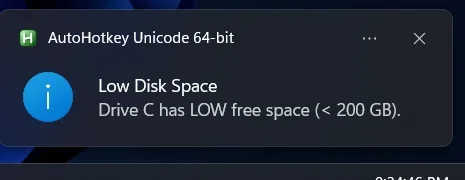
I can make an ahk script that runs in the tray and can produce a toast notification. What drive letter do you want monitored?
I’ll polish it up with options to choose the drives later this week but can code one up for a specific drive real quick tonight


**DID TEST MY SCRIPT AND DEFENDER DOES FLAG IT** - HAVE TO ALLOW IT TO EXCEPTIONS FOR DEFENDER, JUST FYI
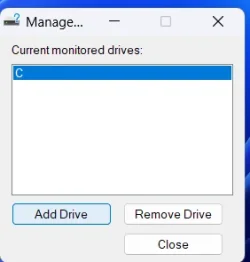
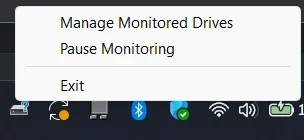
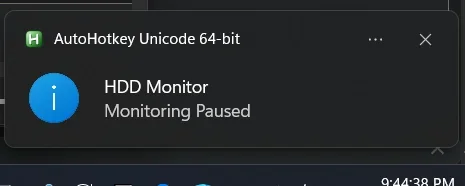
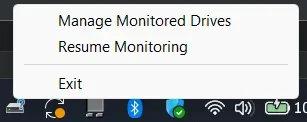
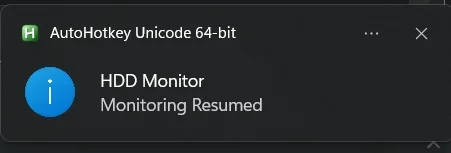
done. attached is the exe. the below code is whats in the ahk that i compiled, just so you know its nothing nefarious. checks every 5 mins and will notify you when below 200gb for whatever drives you choose to monitor. right click tray icon to change monitored drive letters (add/remove). saves config to ini in %appdata%\HDD_Monitor_AHK folder. right click tray menu allows you to pause/resume hdd monitoring too.

i'll polish it up and make the drive stuff dropdowns that show the labels too so you know which drive (in case you dont know the assigned letters offhand), but this will work for your basic need for now.

1780368195973.webp
1780368210239.webp
1780368337470.webp1780368370874.webp
1780368407897.webp1780368443938.webp

*SCRIPT UPDATED*:
 
Last edited:

My Computer

System One

  • OS
    Windows 11 Pro
Thanks dacrone, I downloaded the attachment and ran it. Defender came up and I chose to run it anyway. I'm on my internet computer right now and set it for my F drive which has 86 gigs currently. i didn't get an alert for less than 200 gig. I didn't find anything under settings security Defender that is disabling it. How does this Code fit into this?
 

My Computers

System One System Two

  • OS
    WIN 11 PRO
    Computer type
    PC/Desktop
    Manufacturer/Model
    Custom built - WIN 11 PRO 64-bit ,
    CPU
    Intel(R) Core(TM) i5-14400 2.50 Ghz,
    Motherboard
    ACER Z790 motherboard
    Memory
    32 Gigs
    Hard Drives
    256 gig M2 SSD boot HD, 3 internal HD's, 2 USB
  • Operating System
    Win 10 PRO
    Computer type
    PC/Desktop
    Manufacturer/Model
    CUSTOM
    CPU
    Haswell CPU 4790k @ 4.4GHz,
    Motherboard
    AsRock Z97 motherboard,
    Memory
    16 Gigs
    Hard Drives
    OS drive 250GB SSD,
That’s odd I tested several times on C and D and got the alert after 5 minutes (I set to check every 5 minutes).
1) Did you exit out of it immediately when you did not get an alert immediately?
2) do you have notifications disabled or dnd on?
 

My Computer

System One

  • OS
    Windows 11 Pro
i tried it on my Win 10 computer and my Win 11 computer. Both computers had Notifications off and do not disturb on. I fixed this. I rebooted the Win 11 computer. The HDD LowDisk taskbar icon is gone after a reboot, so I need to double click it again. And i did get a notice after clicking on the icon, but the notice quickly went away. And gave the notice on my HD that had 487 gig free space not down to 200 gig.

On Win 10 I see the Notifications when I click on the far right bottom icon, opening the notification window. Is that the way it works? I want something that puts up an alert notice that stays up until I see it and close it.
 

My Computers

System One System Two

  • OS
    WIN 11 PRO
    Computer type
    PC/Desktop
    Manufacturer/Model
    Custom built - WIN 11 PRO 64-bit ,
    CPU
    Intel(R) Core(TM) i5-14400 2.50 Ghz,
    Motherboard
    ACER Z790 motherboard
    Memory
    32 Gigs
    Hard Drives
    256 gig M2 SSD boot HD, 3 internal HD's, 2 USB
  • Operating System
    Win 10 PRO
    Computer type
    PC/Desktop
    Manufacturer/Model
    CUSTOM
    CPU
    Haswell CPU 4790k @ 4.4GHz,
    Motherboard
    AsRock Z97 motherboard,
    Memory
    16 Gigs
    Hard Drives
    OS drive 250GB SSD,
No, the toast notification should pop up. It’s not set to be persistent (never goes off until you acknowledge it) but I can make it that way. Not sure how you got an alert for a drive that is not below 200gb. I didn’t so I’ll have to try and replicate that error.

To make it auto run at startup, create a shortcut to the exe and place the shortcut in Shell:Startup directory.

I’ll have to see if I have enough spare time today to play with the script. If not I’ll have to work on it more tomorrow, unless @garlin or @pseymour has the spare time to whip up a powershell equivalent
 

My Computer

System One

  • OS
    Windows 11 Pro
No, the toast notification should pop up. It’s not set to be persistent (never goes off until you acknowledge it) but I can make it that way. Not sure how you got an alert for a drive that is not below 200gb. I didn’t so I’ll have to try and replicate that error.

To make it auto run at startup, create a shortcut to the exe and place the shortcut in Shell:Startup directory.

I’ll have to see if I have enough spare time today to play with the script. If not I’ll have to work on it more tomorrow, unless @garlin or @pseymour has the spare time to whip up a powershell equivalent
It would be of general use if you had a way to configure the trigger value. :-)
 

My Computers

System One System Two

  • OS
    Win 11 Pro 25H2, Build 26200.8524
    Computer type
    PC/Desktop
    Manufacturer/Model
    Home Brew
    CPU
    Intel Core i5 14500
    Motherboard
    Gigabyte B760M G P WIFI
    Memory
    64GB DDR4
    Graphics Card(s)
    GeForce RTX 4060
    Sound Card
    Chipset Realtek
    Monitor(s) Displays
    LG 45" Ultragear, Acer 24" 1080p
    Screen Resolution
    5120x1440, 1920x1080
    Hard Drives
    Crucial P310 2TB 2280 PCIe Gen4 3D NAND NVMe M.2 SSD (O/S)
    Silicon Power 2TB US75 NVMe PCIe Gen4 M.2 2280 SSD (backup)
    Crucial BX500 2TB 3D NAND (2nd backup)
    Seagate 4TB Ironwolf, rotating HDD archive files
    External off-line backup Drives: 2 NVMe 4TB drives in external enclosures
    PSU
    Thermaltake Toughpower GF3 750W
    Case
    LIAN LI LANCOOL 216 E-ATX PC Case
    Cooling
    Lots of fans!
    Keyboard
    Microsoft Comfort Curve 2000
    Mouse
    Logitech G305
    Internet Speed
    Verizon FiOS 1GB
    Browser
    Firefox
    Antivirus
    Malware Bytes & Windows Defender Security
  • Operating System
    Win 11 Pro 25H2, Build 26200.8524
    Computer type
    PC/Desktop
    Manufacturer/Model
    Home Brew
    CPU
    Intel Core i5 14400
    Motherboard
    Gigabyte B760M DS3H AX
    Memory
    32GB DDR5
    Graphics card(s)
    Intel 700 Embedded GPU
    Sound Card
    Realtek Embedded
    Monitor(s) Displays
    27" HP 1080p
    Screen Resolution
    1920x1080
    Hard Drives
    Crucial P310 2TB 2280 PCIe Gen4 eD NAND PCIe SSD
    Samsung EVO 990 2TB NVMe Gen4 SSD
    Samsung 2TB SATA SSD
    PSU
    Thermaltake Smart BM3 650W
    Case
    Okinos Micro ATX Case
    Cooling
    Fans
    Keyboard
    Microsoft Comfort Curve 2000
    Mouse
    Logitech G305
    Internet Speed
    Verizon FiOS 1GB
    Browser
    Firefox
    Antivirus
    Malware Bytes & Windows Defender Security
Take your time dacrone. The top priority is my 14 TB backup HD any time is goes less than 200 gig. I need an alert window that stays on and is easily visible, not hidden, since I'm away from my computer often. If it' possible to set some other HD's at a custom cutoff like 70 or 100 gig and another drive at 100 gig. Or I can have all 3 HDs at 100 gig.
 

My Computers

System One System Two

  • OS
    WIN 11 PRO
    Computer type
    PC/Desktop
    Manufacturer/Model
    Custom built - WIN 11 PRO 64-bit ,
    CPU
    Intel(R) Core(TM) i5-14400 2.50 Ghz,
    Motherboard
    ACER Z790 motherboard
    Memory
    32 Gigs
    Hard Drives
    256 gig M2 SSD boot HD, 3 internal HD's, 2 USB
  • Operating System
    Win 10 PRO
    Computer type
    PC/Desktop
    Manufacturer/Model
    CUSTOM
    CPU
    Haswell CPU 4790k @ 4.4GHz,
    Motherboard
    AsRock Z97 motherboard,
    Memory
    16 Gigs
    Hard Drives
    OS drive 250GB SSD,
I just saw a notice pop up. It's fine if only it would stay up until I close it
 

My Computers

System One System Two

  • OS
    WIN 11 PRO
    Computer type
    PC/Desktop
    Manufacturer/Model
    Custom built - WIN 11 PRO 64-bit ,
    CPU
    Intel(R) Core(TM) i5-14400 2.50 Ghz,
    Motherboard
    ACER Z790 motherboard
    Memory
    32 Gigs
    Hard Drives
    256 gig M2 SSD boot HD, 3 internal HD's, 2 USB
  • Operating System
    Win 10 PRO
    Computer type
    PC/Desktop
    Manufacturer/Model
    CUSTOM
    CPU
    Haswell CPU 4790k @ 4.4GHz,
    Motherboard
    AsRock Z97 motherboard,
    Memory
    16 Gigs
    Hard Drives
    OS drive 250GB SSD,
I looked at the source code for Space Patrol. The polling interval is every 45 seconds, it's not a configurable number.
 

My Computer

System One

  • OS
    Windows 7
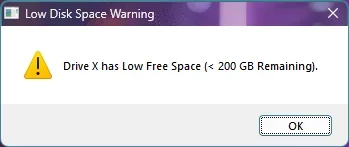
i've changed it for now to just produce a message box in the center of the screen that remains on top of all other windows and stays until acknowledged

1780462311561.webp

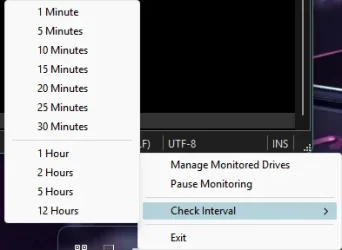
i also added an interval changing option to the tray menu. i tested 1 min and 5 mins but obviously not the hours.. should all work though. it is set to 1 minute by default.

1780462650558.webp

It would be of general use if you had a way to configure the trigger value. :-)
probably from a few long days, but im not tracking lol... what did you want me to add to it? change the disk size that it looks for?


*SCRIPT UPDATED*:
 
Last edited:

My Computer

System One

  • OS
    Windows 11 Pro
Can we have the option of changing to 100 gig, instead of 200 gig. Can I alter your source code?
 

My Computers

System One System Two

  • OS
    WIN 11 PRO
    Computer type
    PC/Desktop
    Manufacturer/Model
    Custom built - WIN 11 PRO 64-bit ,
    CPU
    Intel(R) Core(TM) i5-14400 2.50 Ghz,
    Motherboard
    ACER Z790 motherboard
    Memory
    32 Gigs
    Hard Drives
    256 gig M2 SSD boot HD, 3 internal HD's, 2 USB
  • Operating System
    Win 10 PRO
    Computer type
    PC/Desktop
    Manufacturer/Model
    CUSTOM
    CPU
    Haswell CPU 4790k @ 4.4GHz,
    Motherboard
    AsRock Z97 motherboard,
    Memory
    16 Gigs
    Hard Drives
    OS drive 250GB SSD,
It still is showing my backup HD as less than 200 gig even though it has 487 gig. Once I close the window, can we have it not pop up, since I acknowledged I received the message? And may not be able to get to it right away?
 

My Computers

System One System Two

  • OS
    WIN 11 PRO
    Computer type
    PC/Desktop
    Manufacturer/Model
    Custom built - WIN 11 PRO 64-bit ,
    CPU
    Intel(R) Core(TM) i5-14400 2.50 Ghz,
    Motherboard
    ACER Z790 motherboard
    Memory
    32 Gigs
    Hard Drives
    256 gig M2 SSD boot HD, 3 internal HD's, 2 USB
  • Operating System
    Win 10 PRO
    Computer type
    PC/Desktop
    Manufacturer/Model
    CUSTOM
    CPU
    Haswell CPU 4790k @ 4.4GHz,
    Motherboard
    AsRock Z97 motherboard,
    Memory
    16 Gigs
    Hard Drives
    OS drive 250GB SSD,
I can make it only notify once per drive but then if you close it you won’t get a notification again until you fully exit it from the tray icon and relaunch it (or log off, reboot, etc).

I can’t replicate the message showing up for drives not below 200gb. I have multiple mapped and it only shows for the one below the threshold…
 

My Computer

System One

  • OS
    Windows 11 Pro
>>I can make it only notify once per drive but then if you close it you won’t get a notification again until you fully exit it from the tray icon and relaunch it (or log off, reboot, etc).<<

that's fine

can i change the code to 100gb instaed of 200gb. This is a 14TB USB HD
 

My Computers

System One System Two

  • OS
    WIN 11 PRO
    Computer type
    PC/Desktop
    Manufacturer/Model
    Custom built - WIN 11 PRO 64-bit ,
    CPU
    Intel(R) Core(TM) i5-14400 2.50 Ghz,
    Motherboard
    ACER Z790 motherboard
    Memory
    32 Gigs
    Hard Drives
    256 gig M2 SSD boot HD, 3 internal HD's, 2 USB
  • Operating System
    Win 10 PRO
    Computer type
    PC/Desktop
    Manufacturer/Model
    CUSTOM
    CPU
    Haswell CPU 4790k @ 4.4GHz,
    Motherboard
    AsRock Z97 motherboard,
    Memory
    16 Gigs
    Hard Drives
    OS drive 250GB SSD,
>>I can make it only notify once per drive but then if you close it you won’t get a notification again until you fully exit it from the tray icon and relaunch it (or log off, reboot, etc).<<

that's fine

can i change the code to 100gb instaed of 200gb. This is a 14TB USB HD
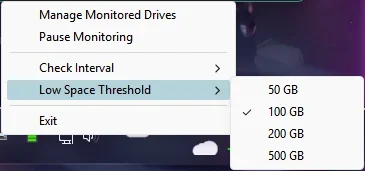
I can add a threshold tray menu so you can change from 50, 100, 200, 500gb
 

My Computer

System One

  • OS
    Windows 11 Pro
ok so:

1) added a threshold tray menu to check for low space at 50, 100, 200 or 500 GB

2) the default check time is now 5 minutes

3) the default threshold check is 200 GB

4) once a notification shows for a drive (example - E:\), it will only show ONCE until:
a) the drive goes above the low disk threshold limit and then dips back down below it
b) you exit and reopen the application
c) you log off/on or reboot the pc (which in turn applies b above)

1780502512023.webp


*SCRIPT UPDATED*:
 
Last edited:

My Computer

System One

  • OS
    Windows 11 Pro
@dacrone ; Doesn't the AHK command DriveSpaceFree, freeGB, %drive% output the freeGB variable in MegaBytes?
 

My Computer

System One

  • OS
    Win 11 25H2
    Computer type
    PC/Desktop
    Manufacturer/Model
    custom
    CPU
    intel i7-8700
    Motherboard
    Asus Z370 TUF Gaming
    Memory
    32Gb
    Graphics Card(s)
    Intel iGPU
    Sound Card
    Realtek
    Hard Drives
    Samsung
    PSU
    Corsair
    Cooling
    Fans
@dacrone ; Doesn't the AHK command DriveSpaceFree, freeGB, %drive% output the freeGB variable in MegaBytes?
:facepalm: nope, kilobytes. but the math in the check was wrong because of that! good catch, thanks. fixed the code above and reattached the fixed exe.
 

My Computer

System One

  • OS
    Windows 11 Pro
Back
Top Bottom