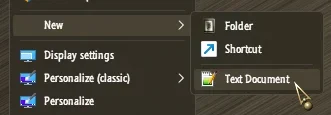
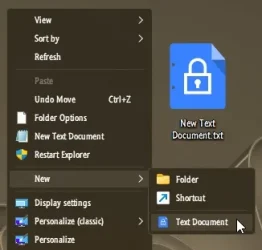
Need help for adding a create new txt option to right-click context "New"


And that will create a new document then instantly open it in Notepad++??

What’s the default Notepad++ file, it’s txt isn’t it?
Should never have removed the entry in the first place.
You can get it back. All you gotta do is install notepad back but I dont want it.
 

My Computer

System One

  • OS
    WIN11
    Computer type
    PC/Desktop
    Manufacturer/Model
    Custom
    CPU
    7900X
    Motherboard
    ASUS Rog Crosshair HERO x670E
    Memory
    32GB G-Skills Flare X5 6000mhz
    Graphics Card(s)
    4090 RTX
    Sound Card
    onboard
    Monitor(s) Displays
    LG-27GN950
    Screen Resolution
    4K
    PSU
    1300W
    Case
    Corsair 7000x
    Cooling
    H170i
    Antivirus
    NO Win Defender

My Computer

System One

  • OS
    WIN11
    Computer type
    PC/Desktop
    Manufacturer/Model
    Custom
    CPU
    7900X
    Motherboard
    ASUS Rog Crosshair HERO x670E
    Memory
    32GB G-Skills Flare X5 6000mhz
    Graphics Card(s)
    4090 RTX
    Sound Card
    onboard
    Monitor(s) Displays
    LG-27GN950
    Screen Resolution
    4K
    PSU
    1300W
    Case
    Corsair 7000x
    Cooling
    H170i
    Antivirus
    NO Win Defender
Last edited:

My Computers

System One System Two

  • OS
    Windows 11 Pro
    Computer type
    PC/Desktop
    Manufacturer/Model
    ASUS ROG Strix
  • Operating System
    Windows 11 Pro
    Computer type
    Laptop
    Manufacturer/Model
    ASUS VivoBook
You can do that without doing all the crap I posted about.
Just set Notepad++ as your default and run the reg script @Skeptic Mike posted.

View attachment 164626
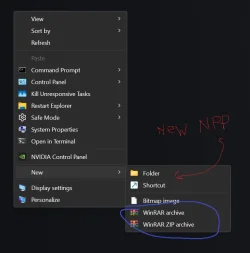
this is not happening without windows notepad installed. The moment you uninstall it, it's gone :dizzy:. Remember I only have Notepad++. Btw,I use winrar and wonder how they were able to add winrar entries in there. It should be the same thing they did?
 

Attachments

  • NewNPPShortcut.webp
    NewNPPShortcut.webp
    24.7 KB · Views: 1

My Computer

System One

  • OS
    WIN11
    Computer type
    PC/Desktop
    Manufacturer/Model
    Custom
    CPU
    7900X
    Motherboard
    ASUS Rog Crosshair HERO x670E
    Memory
    32GB G-Skills Flare X5 6000mhz
    Graphics Card(s)
    4090 RTX
    Sound Card
    onboard
    Monitor(s) Displays
    LG-27GN950
    Screen Resolution
    4K
    PSU
    1300W
    Case
    Corsair 7000x
    Cooling
    H170i
    Antivirus
    NO Win Defender
This is not happening without windows notepad installed. The moment you uninstall it, it's gone.
Okay, then you have to 'restore' Legacy Notepad:

Code:
Windows Registry Editor Version 5.00

[HKEY_CLASSES_ROOT\Applications\notepad.exe]
"NoOpenWith"=-

[-HKEY_CURRENT_USER\Software\Microsoft\Windows\CurrentVersion\App Paths\notepad.exe]

[HKEY_CLASSES_ROOT\txtfilelegacy\DefaultIcon]
@="imageres.dll,-102"

[HKEY_CLASSES_ROOT\txtfilelegacy\shell\open\command]
@="C:\\Windows\\System32\\notepad.exe \"%1\""

[HKEY_LOCAL_MACHINE\SOFTWARE\Microsoft\Windows NT\CurrentVersion\Image File Execution Options\notepad.exe]
"UseFilter"=dword:00000000

... then run @Skeptic Mike 's script, then set Notepad++ as your default.
 

My Computers

System One System Two

  • OS
    Windows 11 Pro
    Computer type
    PC/Desktop
    Manufacturer/Model
    ASUS ROG Strix
  • Operating System
    Windows 11 Pro
    Computer type
    Laptop
    Manufacturer/Model
    ASUS VivoBook
Okay, then you have to 'restore' Legacy Notepad:

Code:
Windows Registry Editor Version 5.00

[HKEY_CLASSES_ROOT\Applications\notepad.exe]
"NoOpenWith"=-

[-HKEY_CURRENT_USER\Software\Microsoft\Windows\CurrentVersion\App Paths\notepad.exe]

[HKEY_CLASSES_ROOT\txtfilelegacy\DefaultIcon]
@="imageres.dll,-102"

[HKEY_CLASSES_ROOT\txtfilelegacy\shell\open\command]
@="C:\\Windows\\System32\\notepad.exe \"%1\""

[HKEY_LOCAL_MACHINE\SOFTWARE\Microsoft\Windows NT\CurrentVersion\Image File Execution Options\notepad.exe]
"UseFilter"=dword:00000000

... then run @Skeptic Mike 's script, then set Notepad++ as your default.
Again I don't have legacy notepad neither do I want to restore it. Told you the moment you uninstall those it's gone. There is gotta be way to do it. Cuz look at the winrar. All winrar entries are added to 'new' upon installing it
 

My Computer

System One

  • OS
    WIN11
    Computer type
    PC/Desktop
    Manufacturer/Model
    Custom
    CPU
    7900X
    Motherboard
    ASUS Rog Crosshair HERO x670E
    Memory
    32GB G-Skills Flare X5 6000mhz
    Graphics Card(s)
    4090 RTX
    Sound Card
    onboard
    Monitor(s) Displays
    LG-27GN950
    Screen Resolution
    4K
    PSU
    1300W
    Case
    Corsair 7000x
    Cooling
    H170i
    Antivirus
    NO Win Defender
Again I don't have legacy notepad neither do I want to restore it. Told you the moment you uninstall those it's gone. There is gotta be way to do it. Cuz look at the winrar. All winrar entries are added to 'new' upon installing it
Okay..., you can try the following, if you want to, but, I'm warning you, you better be comfortable messing with the Registry, back everything up, document or take screenshots of existing, better yet, export the keys you're gonna mess with!!!

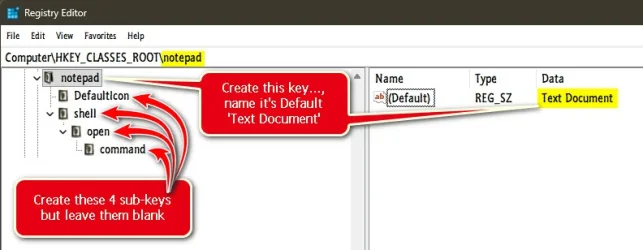
You're going to perform all the following under Computer\HKEY_CLASSES_ROOT :

Create a new key, name it notepad:
0008646.webp

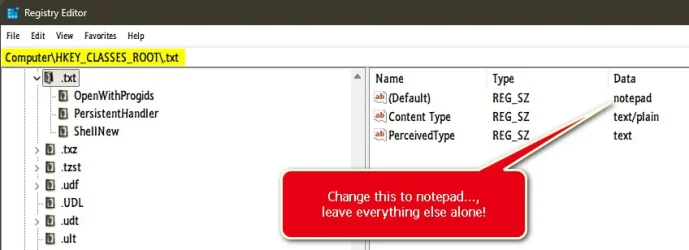
Go back to .txt and change the Default string to notepad:
0008654 - Copy.webp

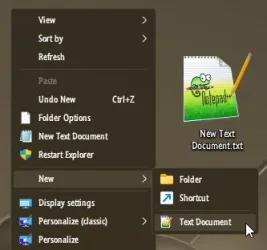
Make Notepad++ your default and you should be good to go.

0008652.gif

More caveats:
I have not witnessed any negative repercussions from these Registry writes but, use caution!
There is a possibility that if you do enable Legacy Notepad, from Optional Features, it could cause issues!
 
Last edited:

My Computers

System One System Two

  • OS
    Windows 11 Pro
    Computer type
    PC/Desktop
    Manufacturer/Model
    ASUS ROG Strix
  • Operating System
    Windows 11 Pro
    Computer type
    Laptop
    Manufacturer/Model
    ASUS VivoBook
Update:
It still works as intended above, even if you enable Legacy Notepad.
However, you can't change the default to Legacy Notepad unless you perform the full txtfilelegacy Registry hack.


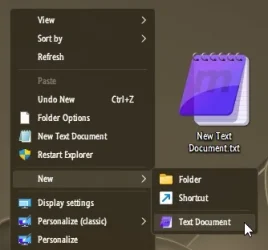
You can, however, change the default to others...

9601.webp 9600.webp 9602.webp
 
Last edited:

My Computers

System One System Two

  • OS
    Windows 11 Pro
    Computer type
    PC/Desktop
    Manufacturer/Model
    ASUS ROG Strix
  • Operating System
    Windows 11 Pro
    Computer type
    Laptop
    Manufacturer/Model
    ASUS VivoBook

My Computer

System One

  • OS
    WIN 11, WIN 10, WIN 8.1, WIN 7 U, WIN 7 PRO, WIN 7 HOME (32 Bit), LINUX MINT
    Computer type
    PC/Desktop
    Manufacturer/Model
    DIY, ASUS, and DELL
    CPU
    Intel i7 6900K and i9-7960X / AMD 3800X (8 core)
    Motherboard
    ASUS X99E-WS USB 3.1 and ASUS X299 SAGE
    Memory
    128 GB CORSAIR DOMINATOR PLATINUM (B DIE)
    Graphics Card(s)
    NVIDIA 1070 and RTX 3070
    Sound Card
    Crystal Sound (onboard)
    Monitor(s) Displays
    single Samsung 30" 4K and 8" aux monitor
    Screen Resolution
    4K and something equally attrocious. I'll be working on this.
    Hard Drives
    A, B, C, D, E, F, G, H, I, J, K, L, M, N, O, P, Q, R, S, T, U, V, W

    Ports X, Y, and Z are reserved for USB access and removable drives.

    Drive types consist of the following: Various mechanical hard drives bearing the brand names, Seagate, Toshiba, and Western Digital. Various NVMe drives bearing the brand names Kingston, Intel, Silicon Power, Crucial, Western Digital, and Team Group. Various SATA SSDs bearing various different brand names.

    RAID arrays included:

    LSI RAID 10 (WD Velociraptors) 1115.72 GB
    LSI RAID 10 (WD SSDS) 463.80 GB

    INTEL RAID 0 (KINGSTON HYPER X) System 447.14 GB
    INTEL RAID 1 TOSHIBA ENTERPRIZE class Data 2794.52 GB
    INTEL RAID 1 SEAGATE HYBRID 931.51 GB
    PSU
    SEVERAL. I prefer my Corsair Platinum HX1000i but I also like EVGA power supplies
    Case
    ThermalTake Level 10 GT (among others)
    Cooling
    Noctua is my favorite and I use it in my main. I also own various other coolers.
    Keyboard
    all kinds.
    Mouse
    all kinds
    Internet Speed
    360 mbps - 1 gbps (depending)
    Browser
    FIREFOX
    Antivirus
    KASPERSKY (no apologies)
    Other Info
    Gave Dell touch screen with Windows 11 to daughter and got me an OTVOC. Being a PC builder I own many desktop PCs as well. I am a father of five providing PCs, laptops, and tablets for all my family, most of which I have modified, rebuilt, or simply built from scratch. I do not own a cell phone, never have, never will.
We could follow the official instructions: Extending Shortcut Menus - Win32 apps

I tested this using Windows sandbox, which doesn't have any version of notepad installed. It does have an entry HKCR\.txt but that doesn't have a default value (ProgID). That’s required. And the ProgID needs to have a default value which is used as part of the name of the new file. Apparently you can add a string value FriendlyTypeName with the name of your choice instead.

With the ShellNew key under HKCR\.txt with the string value NullFile, it all works. (Windows Sandbox can now create new text files but still has no executable associated with .txt files.)

I checked the ItemName expanded string value in my previous suggestion. It points to a string supplied by notepad.exe which resolves to "New Text Document" in English Windows. I've no idea what it's meant to do, as omitting it makes no difference.

The option to use a Command value described in the documentation might be useful, but I couldn’t get it to work when I had a quick try. and I didn't find any examples of how to do it. Even if it did work, as @Edwin has pointed out, you'd have to think carefully about the options you chose, which would be affected by how you normally use NotePad++. I think there's some kind of discussion forum for NotePad++, perhaps you could ask there.
 

My Computers

System One System Two

  • OS
    Windows 11 25H2 Pro Build 26200
    Computer type
    PC/Desktop
    Manufacturer/Model
    MSI PRO ADL-U Cubi 5 (MS-B0A8)
    CPU
    i3-1215U
    Memory
    8GB
    Monitor(s) Displays
    Sony 43" 4k TV
    Screen Resolution
    3840x2160
    Hard Drives
    250GB NVMe M.2 PCIe Gen 3 SSD
    PSU
    External 65W
    Case
    Mini PC
    Browser
    FireFox
    Antivirus
    MS
  • Operating System
    Windows 11 Pro 25H2
    Computer type
    PC/Desktop
    Manufacturer/Model
    Dell Optiplex 3070 SFF
    CPU
    Intel i3-9100
    Memory
    16GB DDR4
    Monitor(s) Displays
    Dell S2721
    Screen Resolution
    3840 x 2160
    Hard Drives
    Samsung 500GB nvMe
    Case
    Dell small form factor
    Keyboard
    Cherry mechanical (Blue)
    Mouse
    Microsoft
    Antivirus
    MS Defender

My Computers

System One System Two

  • OS
    Windows 11 Pro
    Computer type
    PC/Desktop
    Manufacturer/Model
    ASUS ROG Strix
  • Operating System
    Windows 11 Pro
    Computer type
    Laptop
    Manufacturer/Model
    ASUS VivoBook
... you'd have to think carefully about the options you chose...
Yup! If you hack away like I did, you can create a really big mess in a hurry!
I basically emulated the keys from some other entry, one by one, til it worked!
And, that was in the ROOT, if there was another user on my machine, it would probably screw a lot of shi, stuff up!
 

My Computers

System One System Two

  • OS
    Windows 11 Pro
    Computer type
    PC/Desktop
    Manufacturer/Model
    ASUS ROG Strix
  • Operating System
    Windows 11 Pro
    Computer type
    Laptop
    Manufacturer/Model
    ASUS VivoBook

My Computers

System One System Two

  • OS
    Windows 11 Pro
    Computer type
    PC/Desktop
    Manufacturer/Model
    ASUS ROG Strix
  • Operating System
    Windows 11 Pro
    Computer type
    Laptop
    Manufacturer/Model
    ASUS VivoBook
Okay..., you can try the following, if you want to, but, I'm warning you, you better be comfortable messing with the Registry, back everything up, document or take screenshots of existing, better yet, export the keys you're gonna mess with!!!

You're going to perform all the following under Computer\HKEY_CLASSES_ROOT :

Create a new key, name it notepad:
View attachment 164717

Go back to .txt and change the Default string to notepad:
View attachment 164718

Make Notepad++ your default and you should be good to go.

View attachment 164719

More caveats:
I have not witnessed any negative repercussions from these Registry writes but, use caution!
There is a possibility that if you do enable Legacy Notepad, from Optional Features, it could cause issues!

Unfortunately, it didnt work. I was able to add those keys as suggested but I dont have ShellNew key somehow. what is in your ShewllNew key? Btw I dont have either legacy or windows nodepad. and Default .txt is notepad+
 

My Computer

System One

  • OS
    WIN11
    Computer type
    PC/Desktop
    Manufacturer/Model
    Custom
    CPU
    7900X
    Motherboard
    ASUS Rog Crosshair HERO x670E
    Memory
    32GB G-Skills Flare X5 6000mhz
    Graphics Card(s)
    4090 RTX
    Sound Card
    onboard
    Monitor(s) Displays
    LG-27GN950
    Screen Resolution
    4K
    PSU
    1300W
    Case
    Corsair 7000x
    Cooling
    H170i
    Antivirus
    NO Win Defender
It's all comin back to me now... :unsure:
I got it.
Just had to add the DefaultIcon sub-key, Computer\HKEY_CLASSES_ROOT\Applications\notepad++.exe\DefaultIcon
Nirsoft FilesTypeMan makes it easier (especially when people don't know much about the registry). also, to edit the New submenu...

Create:
HKEY_CLASSES_ROOT\.npp

Set (Default) to:
NotepadPP.File

New > Key:
HKEY_CLASSES_ROOT\NotepadPP.File\shell\open\command

Set (Default) to:
"C:\Program Files\Notepad++\notepad++.exe" "%1"

(use your path to your notepad++.exe in above)
 

My Computer

System One

  • OS
    Windows 11 Pro
Nirsoft FilesTypeMan makes it easier (especially when people don't know much about the registry). also, to edit the New submenu...

Create:
HKEY_CLASSES_ROOT\.npp

Set (Default) to:
NotepadPP.File

New > Key:
HKEY_CLASSES_ROOT\NotepadPP.File\shell\open\command

Set (Default) to:
"C:\Program Files\Notepad++\notepad++.exe" "%1"

(use your path to your notepad++.exe in above)
That didn't work.
 

My Computers

System One System Two

  • OS
    Windows 11 Pro
    Computer type
    PC/Desktop
    Manufacturer/Model
    ASUS ROG Strix
  • Operating System
    Windows 11 Pro
    Computer type
    Laptop
    Manufacturer/Model
    ASUS VivoBook
hmm. Worked on the 25h2 laptop I tested it on. I’ll check some stuff and post back
Post the reg file(s) themselves.
 

My Computers

System One System Two

  • OS
    Windows 11 Pro
    Computer type
    PC/Desktop
    Manufacturer/Model
    ASUS ROG Strix
  • Operating System
    Windows 11 Pro
    Computer type
    Laptop
    Manufacturer/Model
    ASUS VivoBook

Latest Support Threads

Back
Top Bottom