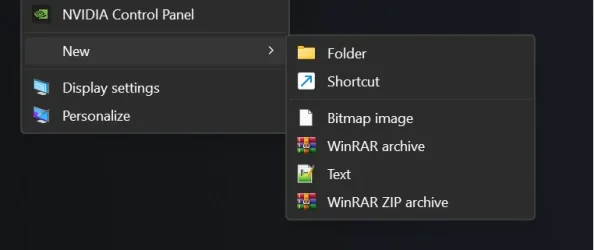
Need help for adding a create new txt option to right-click context "New"


Post the reg file(s) themselves.
Testing some stuff on that laptop with the NIC currently, so I’ll post the reg from there when I’m done with those tests. Here’s a pic from my mobile of that PC. Is this what people are wanting?

1772516750266.webp

Or did I misunderstand the thread and they just want to edit the default “Text Document” entry?
 

My Computer My Computer

At a glance

Windows 11 Pro
OS
Windows 11 Pro

My Computer My Computer

At a glance

WIN117900X32GB G-Skills Flare X5 6000mhz4090 RTX
OS
WIN11
Computer type
PC/Desktop
Manufacturer/Model
Custom
CPU
7900X
Motherboard
ASUS Rog Crosshair HERO x670E
Memory
32GB G-Skills Flare X5 6000mhz
Graphics Card(s)
4090 RTX
Sound Card
onboard
Monitor(s) Displays
LG-27GN950
Screen Resolution
4K
PSU
1300W
Case
Corsair 7000x
Cooling
H170i
Antivirus
NO Win Defender
Testing some stuff on that laptop with the NIC currently, so I’ll post the reg from there when I’m done with those tests. Here’s a pic from my mobile of that PC. Is this what people are wanting?

View attachment 164807

Or did I misunderstand the thread and they just want to edit the default “Text Document” entry?
yeah first it was just text file but it looks even better but what is .npp file?
 

My Computer My Computer

At a glance

WIN117900X32GB G-Skills Flare X5 6000mhz4090 RTX
OS
WIN11
Computer type
PC/Desktop
Manufacturer/Model
Custom
CPU
7900X
Motherboard
ASUS Rog Crosshair HERO x670E
Memory
32GB G-Skills Flare X5 6000mhz
Graphics Card(s)
4090 RTX
Sound Card
onboard
Monitor(s) Displays
LG-27GN950
Screen Resolution
4K
PSU
1300W
Case
Corsair 7000x
Cooling
H170i
Antivirus
NO Win Defender
yeah first it was just text file but it looks even better but what is .npp file?
I just added a new extension to that menu to show that you can. I take it you just wanted the default New > “Text Document” to default to NP++…
 

My Computer My Computer

At a glance

Windows 11 Pro
OS
Windows 11 Pro
I just added a new extension to that menu to show that you can. I take it you just wanted the default New > “Text Document” to default to NP++…
yeah that should work too. I got it. Selecting the default app for extension is a key.

There's a slight annoyance now. How do you place an entry wherever you want? for example, I want to bring it up before Bitmap Image
 

Attachments

  • 2.webp
    2.webp
    10.8 KB · Views: 1

My Computer My Computer

At a glance

WIN117900X32GB G-Skills Flare X5 6000mhz4090 RTX
OS
WIN11
Computer type
PC/Desktop
Manufacturer/Model
Custom
CPU
7900X
Motherboard
ASUS Rog Crosshair HERO x670E
Memory
32GB G-Skills Flare X5 6000mhz
Graphics Card(s)
4090 RTX
Sound Card
onboard
Monitor(s) Displays
LG-27GN950
Screen Resolution
4K
PSU
1300W
Case
Corsair 7000x
Cooling
H170i
Antivirus
NO Win Defender

My Computers My Computers

  • At a glance

    Windows 11 25H2 Pro Build 26200i3-1215U8GB
    OS
    Windows 11 25H2 Pro Build 26200
    Computer type
    PC/Desktop
    Manufacturer/Model
    MSI PRO ADL-U Cubi 5 (MS-B0A8)
    CPU
    i3-1215U
    Memory
    8GB
    Monitor(s) Displays
    Sony 43" 4k TV
    Screen Resolution
    3840x2160
    Hard Drives
    250GB NVMe M.2 PCIe Gen 3 SSD
    PSU
    External 65W
    Case
    Mini PC
    Browser
    FireFox
    Antivirus
    MS
  • At a glance

    Windows 11 Pro 25H2Intel i3-910016GB DDR4
    Operating System
    Windows 11 Pro 25H2
    Computer type
    PC/Desktop
    Manufacturer/Model
    Dell Optiplex 3070 SFF
    CPU
    Intel i3-9100
    Memory
    16GB DDR4
    Monitor(s) Displays
    Dell S2721
    Screen Resolution
    3840 x 2160
    Hard Drives
    Samsung 500GB nvMe
    Case
    Dell small form factor
    Keyboard
    Cherry mechanical (Blue)
    Mouse
    Microsoft
    Antivirus
    MS Defender

My Computers My Computers

  • At a glance

    Windows 11 Pro
    OS
    Windows 11 Pro
    Computer type
    PC/Desktop
    Manufacturer/Model
    ASUS ROG Strix
  • At a glance

    Windows 11 Pro
    Operating System
    Windows 11 Pro
    Computer type
    Laptop
    Manufacturer/Model
    ASUS VivoBook
  • ASUS VivoBook 'Lite' ~ Windows 11 Home

My Computer My Computer

At a glance

WIN117900X32GB G-Skills Flare X5 6000mhz4090 RTX
OS
WIN11
Computer type
PC/Desktop
Manufacturer/Model
Custom
CPU
7900X
Motherboard
ASUS Rog Crosshair HERO x670E
Memory
32GB G-Skills Flare X5 6000mhz
Graphics Card(s)
4090 RTX
Sound Card
onboard
Monitor(s) Displays
LG-27GN950
Screen Resolution
4K
PSU
1300W
Case
Corsair 7000x
Cooling
H170i
Antivirus
NO Win Defender

Latest Support Threads

Back
Top Bottom