Solved Need help with backing up laptop.


AdvancedNoob99

New member
Local time
10:36 PM
Posts
3
OS
Windows 11 / Ubuntu
I bought a used W11/W10 laptop online and want to make an image of it before booting it up so that I can return the laptop to its exact state. It was probably manufactured between 2019 and 2021. Removing and connecting the old hard drive to a separate W11 computer is no problem. What is a problem is that I'm not sure what software to use to create the image, I want to backup unrelated data on the same larger hard drive but I want to maintain a clear separation, and I think it has an OEM W11 Pro license I might decide later that I want to keep.

Why not boot it up? I don't have a real concern about viruses. I just don't want to deal with whatever state it arrived in.

The goal of the backup is to:
- Recover to this exact state if a fresh install of Windows 11 doesn't work out. (Preserve drivers, any OEM software, etc.) I care about currently stored data, not recovering deleted data.
- Store unrelated things on the same hard drive that I store the image on without commingling unrelated data. (I'm assuming the image will be messy rather than a single large file, maybe I'm wrong?)
- Get the OEM W11 activation key or activated status if I really want to later.

Concerns:
- I don't know if I need to save any BIOS/UEFI data? I don't know how that stuff relates to W11 activation, if at all.
- A backup that requires a password to use would be catastrophic. I can manage any issues presented by Secure Boot and Bitlocker if they appear. I'll be checking the laptops status with that stuff after the backup and before I wipe it.
- I really don't want to test this backup because I don't care for any data already on the machine, but if a backup's worth keeping then it's worth testing.

My future plans for this laptop are to install a cut down version of W11 with a local admin account and dual boot Ubuntu. I apologize for not providing the laptop's detailed specs, it's just that I'm looking for a general solution.

I'm under the weather right now, so I hope I've made myself clear. Please feel free to ask any clarifying questions. I'll be checking this thread at least once a day until I finish this. I'm very savvy and somewhat frustrated I haven't solved this via searching online yet. Thank you for your time.
 
Windows Build/Version
W11

My Computer My Computer

At a glance

Windows 11 / Ubuntu
OS
Windows 11 / Ubuntu
Computer type
Laptop
clonezilla maybe of help here.

after clonezilla has made to clone of your system then you can decide how to proceed.
best of luck Steve ..
 

My Computers My Computers

  • At a glance

    Debian 13 KDE .. Windows 11 HomeRyzen 7 5825u64GB DDR4 3200Ryzen 7 5825u
    OS
    Debian 13 KDE .. Windows 11 Home
    Computer type
    PC/Desktop
    Manufacturer/Model
    HP 24" AiO
    CPU
    Ryzen 7 5825u
    Motherboard
    HP
    Memory
    64GB DDR4 3200
    Graphics Card(s)
    Ryzen 7 5825u
    Sound Card
    RealTek
    Monitor(s) Displays
    24" HP AiO
    Screen Resolution
    1920 x 1080 @60 Hz
    Hard Drives
    1TB WD Blue SN580 M2 SSD Partitioned.
    2x 1TB USB HDD External Backup/Storage.
    PSU
    90W external power brick
    Case
    24" All in One
    Cooling
    Default Air Cooling
    Keyboard
    HP WiFi UK extended
    Mouse
    HP WiFi 3 Button
    Internet Speed
    1GB full fibre
    Browser
    Edge & Firefox
    Antivirus
    AVG Internet Security/Windows Defender
    Other Info
    Mainly Open Source Software
  • At a glance

    Ubuntu 22.04.5 LTSi5 7200u16GB DDR4Intel
    Operating System
    Ubuntu 22.04.5 LTS
    Computer type
    Laptop
    Manufacturer/Model
    Dell 13" Latitude 2017
    CPU
    i5 7200u
    Motherboard
    Dell
    Memory
    16GB DDR4
    Graphics card(s)
    Intel
    Sound Card
    Intel
    Monitor(s) Displays
    13" Dell Laptop
    Hard Drives
    250GB Crucial 2.5" SSD
    Mouse
    Generic WiFi 3 button
    Internet Speed
    WiFi only
    Browser
    Firefox
    Antivirus
    ClamAV TK
    Other Info
    Mainly Open Source Software
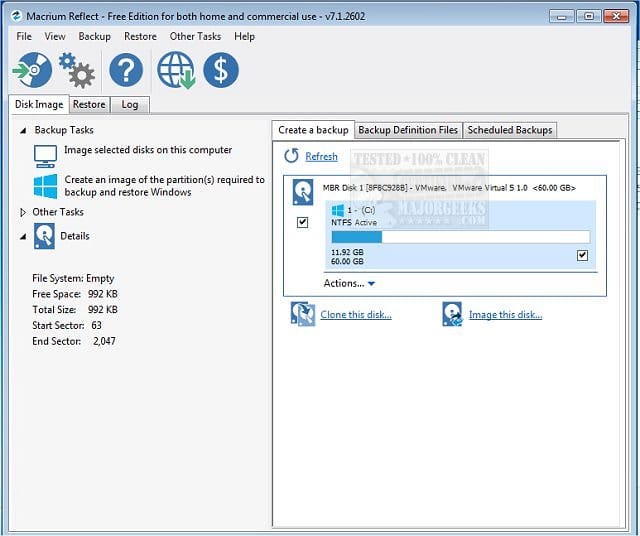
I use Macrium. There are other similar tools that would work.

An "image" is typically one single file. A big one. 10, 30, 100 gigabytes; roughly 2/3 the size of the occupied space in whatever partitions you intend to include in the image.

You choose which partitions to include: all, some, most, whatever.

The image file can be stored anywhere it will fit, EXCLUDING any partition which is itself included in the image file.

The image file would include everything needed to restore to the state the partitions were in at the moment the image was made. Effectively "everything", including any personal data the partitions might contain.
 

My Computer My Computer

At a glance

Windows 11 ProIntel 265KG Skill DDR5 2 x 16 kit 6000/36none
OS
Windows 11 Pro
Computer type
PC/Desktop
Manufacturer/Model
Fishmill Special
CPU
Intel 265K
Motherboard
MSI Pro Z890-A
Memory
G Skill DDR5 2 x 16 kit 6000/36
Graphics Card(s)
none
Sound Card
none
Monitor(s) Displays
Dell 2316H
Screen Resolution
1600 x 900
Hard Drives
WD SN770 NVME 500 GB boot; Intel 660p NVME 2 TB and WD Green 3 TB storage
PSU
Be Quiet 13M 750 ATX 3.1
Case
Lancool PC-K65
Cooling
Noctua U12S
Keyboard
Logitech K120 Wired
Mouse
Dell MS-116
Browser
Chrome
Antivirus
Microsoft Defender and Malwarebytes
I bought a used W11/W10 laptop online and want to make an image of it before booting it up


Before booting???


This link typically opens with a chat.
There you can ask if a backup image can be made without booting.


These require booting:


If the laptop manufacturer is DELL, HP or Lenovo then download their latest UEFI hardware diagnostics > run overnight while sleeping


Backup drivers:


Make free or pay backup images as needed:

(Acronis, Aoemi, EaseUS, Hasleo, Macrium, Paragon, etc.)

Macrium is widely used in Ten Forums.

Macrium Software | Your Image is Everything


Backup and Restore with Macrium Reflect
 

My Computer My Computer

At a glance

Windows 10Intel(R) Core(TM) i7-4800MQ CPU @ 2.70GHz16 GB Total: Manufacturer : Samsung MemoryTyp...NVIDIA Quadro K3100M; Intel(R) HD Graphics 4600
OS
Windows 10
Computer type
Laptop
Manufacturer/Model
HP
CPU
Intel(R) Core(TM) i7-4800MQ CPU @ 2.70GHz
Motherboard
Product : 190A Version : KBC Version 94.56
Memory
16 GB Total: Manufacturer : Samsung MemoryType : DDR3 FormFactor : SODIMM Capacity : 8GB Speed : 1600
Graphics Card(s)
NVIDIA Quadro K3100M; Intel(R) HD Graphics 4600
Sound Card
IDT High Definition Audio CODEC; PNP Device ID HDAUDIO\FUNC_01&VEN_111D&DEV_76E0
Hard Drives
Model Hitachi HTS727575A9E364
Antivirus
Microsoft Defender
Other Info
Mobile Workstation
If you don’t want to boot it up then you’ll need to use something like Macrium Reflect to make USB Rescue thumb drive. That rescue drive will be bootable so you'll need to plug into a USB port and when you turn on the laptop press whatever key is required to enter the BIOS menu and set USB post where the rescue drive is plugged into as the one time boot device. When the Rescue drive boots up you can then plug an external USB disk into another post and create an image backup of the laptop.
I realize that probably a lot to digest depending on your skill level but there are lots of members here who can walk you through this.
BTW, welcome to the forum.
 

My Computers My Computers

  • At a glance

    Windows 11 Pro10th Gen Intel(R) Core(TM) i7-10700, 2.90GHz32GB, 2x16GB, DDR4, 2933MhzNVIDIA(R) GeForce(R) RTX 2060 SUPER(TM) 8GB G...
    OS
    Windows 11 Pro
    Computer type
    PC/Desktop
    Manufacturer/Model
    Dell 8940 XPS
    CPU
    10th Gen Intel(R) Core(TM) i7-10700, 2.90GHz
    Motherboard
    Dell 0KV3RP (U3E1)
    Memory
    32GB, 2x16GB, DDR4, 2933Mhz
    Graphics Card(s)
    NVIDIA(R) GeForce(R) RTX 2060 SUPER(TM) 8GB GDDR6
    Sound Card
    Onboard, Realtek Codec, NVIDIA Hi Def Audio, Intel Display Audio
    Monitor(s) Displays
    Dell UltraSharp U3415W
    Screen Resolution
    3440x1440
    Hard Drives
    2TB M.2 PCIe NVMe SSD; 2TB Samsung SSD 860 EVO; 2TB Samsung SSD 860 EVO 2
    PSU
    500 W Dell
    Case
    Night Sky Bezel Chassis
    Cooling
    Dell
    Keyboard
    Logi Wireless
    Mouse
    Logi Wireless
    Internet Speed
    111 Mbps Download, 132 Mbps Upload
    Browser
    Edge, Chrome
    Antivirus
    Windows Defender, MalwareBytes
  • At a glance

    Windows 11 ProIntel 13900K Core I9 24 Core LGA 170032GB (2x16) Kingston Fury Beast 6000MHZ DDR5nVidia 4090 Founders Edition
    Operating System
    Windows 11 Pro
    Computer type
    PC/Desktop
    Manufacturer/Model
    Falcon Northwest Talon
    CPU
    Intel 13900K Core I9 24 Core LGA 1700
    Motherboard
    Asus ROG Z970 Maximus Hero
    Memory
    32GB (2x16) Kingston Fury Beast 6000MHZ DDR5
    Graphics card(s)
    nVidia 4090 Founders Edition
    Sound Card
    Motherboard
    Monitor(s) Displays
    Alienware 34” Curved OLED
    Screen Resolution
    4K
    Hard Drives
    SSD M.2 Kingston Renegade Fury 4 TB x 2; Western Digital Red Pro 8 TB SATA III
    PSU
    1000W ECGA Platinum Modular ATX
    Case
    Falcon NW Custom
    Cooling
    AIO Falcon NW 280mm Liquid Cooler
    Keyboard
    Logitech Pro Gamer
    Mouse
    Logitech G502
    Internet Speed
    111 Mbps Download, 132 Mbps Upload
    Browser
    Edge, Chrome
    Antivirus
    Windows Defender, MalwareBytes
    Other Info
    Noise Blocker Fans
SInce you know little about the computer, Knowing the specs of the machine and its model would be helpful so we can be sure the windows installation on the machine is not one for incompatible hardware.. Many used computers are being sold with Windows 11 running on incompatible hardware. It makes a big difference when trying to clean install. You have to do it differently.

Most any decent backup/imaging app can create an image offline using the application's rescue disk but you have to boot to the rescue media rather than Windows. You would have to install the application on another machine to create its boot disk. If it doesn't boot from the rescue media,, you might have to turn off secure boot in bios temporarily in the new machine.
That would give you a virgin copy of the drive. Hasleo Backup Suite is a free one some here use.

Also you can remove the drive. While you can install it into another machine as a secondary drive, it is best to use a usb drive enclosure or drive dock. (an enclosure is much cheaper, about $15.) Then you could image it from another machine. I have done that many times using Macrium which I have used for years.
While Macrium is no longer free, you can still get the old version of Macrium that will still work .You could install it and create a rescue boot disk from another machine, Again, turn off secure boot before booting from the rescue boot drive. Download Macrium Reflect FREE Edition - MajorGeeks
 

My Computers My Computers

  • At a glance

    Windows 11 Pro 25H2 26200.8655i9-10900 10 core 20 threads32 gbnone-Intel UHD Graphics 630
    OS
    Windows 11 Pro 25H2 26200.8655
    Computer type
    PC/Desktop
    Manufacturer/Model
    Dell Optiplex 7080
    CPU
    i9-10900 10 core 20 threads
    Motherboard
    DELL 0J37VM
    Memory
    32 gb
    Graphics Card(s)
    none-Intel UHD Graphics 630
    Sound Card
    Integrated Realtek
    Monitor(s) Displays
    Benq 27
    Screen Resolution
    2560x1440
    Hard Drives
    2x1tb Solidigm m.2 nvme /External drives 512gb Samsung m.2 sata+2tb Kingston m2.nvme
    PSU
    500w
    Case
    MT
    Cooling
    Dell Premium
    Keyboard
    Logitech wired
    Mouse
    Logitech wireless
    Internet Speed
    so slow I'm too embarrassed to tell
    Browser
    #1 Edge #2 Firefox
    Antivirus
    Defender+MWB Premium
  • At a glance

    Windows 11 Pro 24H2 26200.8457AMD Ryzen 7 6800U32 gbintegrated
    Operating System
    Windows 11 Pro 24H2 26200.8457
    Computer type
    PC/Desktop
    Manufacturer/Model
    Beelink Mini PC SER5
    CPU
    AMD Ryzen 7 6800U
    Memory
    32 gb
    Graphics card(s)
    integrated
    Sound Card
    integrated
    Monitor(s) Displays
    Benq 27
    Screen Resolution
    2560x1440
    Hard Drives
    1TB Crucial nvme
    Keyboard
    Logitech wired
    Mouse
    Logitech wireless
    Internet Speed
    still too embarrassed to tell
    Browser
    Firefox
    Antivirus
    Defender
    Other Info
    System 3 is non compliant Dell 9020 i7-4770/24gb ram Win11 PRO 26200.8457
To be honest, IMO if you don't want to boot it then the easiest thing is just take the hard drive out and put another one in, and install on that. The original hard drive is kind of your image. I can recommend clean installing Windows 25H2. I've done it a couple of times in the last couple of weeks and it all went fine.
 

My Computers My Computers

  • At a glance

    Windows 11 Home 25H2Core i5-1035G132gb
    OS
    Windows 11 Home 25H2
    Computer type
    Laptop
    Manufacturer/Model
    HP Pavilion 14-ce3606sa
    CPU
    Core i5-1035G1
    Memory
    32gb
    Hard Drives
    Samsung 870 evo sata ssd
    Cooling
    Could be better
    Internet Speed
    50 mbps Starlink
    Browser
    Firefox
    Other Info
    Originally came installed with a 500gb H10 Optane ssd
  • At a glance

    Windows 11 HomeIntel Core i5-1035G116gb
    Operating System
    Windows 11 Home
    Computer type
    Laptop
    Manufacturer/Model
    HP Pavilion ce3606sa
    CPU
    Intel Core i5-1035G1
    Memory
    16gb
    Hard Drives
    Hynix Gold P31 2TB
    Internet Speed
    200mbps Starlink
    Browser
    Firefox
    Antivirus
    Defender
Is backing up BIOS/UEFI data something I'd need to do? I understand that Secure Boot / BitLocker would need to be disabled, if enabled, in order to make an image. But beyond that is there any reason to be concerned?

I already have a USB 3.0 hard drive enclosure and will be using that to backup the data. I do have a spare USB drive available if booting from that is necessary.

I'm looking into how to use Clonezilla now. I will use that so long as I'm able to store unrelated data alongside the Clonezilla backup without causing issues with restoring from that backup. This is the first I've heard of Macrium. While I do appreciate the archived copy, I'll only try the current official offerings. (The free trial version seems like it will fit my needs and the one-time payment for home use isn't too bad.)

SInce you know little about the computer, Knowing the specs of the machine and its model would be helpful so we can be sure the windows installation on the machine is not one for incompatible hardware.. Many used computers are being sold with Windows 11 running on incompatible hardware. It makes a big difference when trying to clean install. You have to do it differently.

Most any decent backup/imaging app can create an image offline using the application's rescue disk but you have to boot to the rescue media rather than Windows. You would have to install the application on another machine to create its boot disk. If it doesn't boot from the rescue media,, you might have to turn off secure boot in bios temporarily in the new machine.
That would give you a virgin copy of the drive. Hasleo Backup Suite is a free one some here use.

Also you can remove the drive. While you can install it into another machine as a secondary drive, it is best to use a usb drive enclosure or drive dock. (an enclosure is much cheaper, about $15.) Then you could image it from another machine. I have done that many times using Macrium which I have used for years.
While Macrium is no longer free, you can still get the old version of Macrium that will still work .You could install it and create a rescue boot disk from another machine, Again, turn off secure boot before booting from the rescue boot drive. Download Macrium Reflect FREE Edition - MajorGeeks

There is a possibility that this laptop is incompatible with W11 for TPM 2.0 reasons, but I'm prepared for verifying that and getting around that if needed. My focus now is on performing a correct and complete backup of the machine that I can revert back to later if needed. Full stop.

To be honest, IMO if you don't want to boot it then the easiest thing is just take the hard drive out and put another one in, and install on that. The original hard drive is kind of your image. I can recommend clean installing Windows 25H2. I've done it a couple of times in the last couple of weeks and it all went fine.
That would work, but not for my situation. I want to store unrelated things on the same hard drive that I store the laptop image on without commingling unrelated data.
 

My Computer My Computer

At a glance

Windows 11 / Ubuntu
OS
Windows 11 / Ubuntu
Computer type
Laptop
Back up your OS and the said partitions to an external disk with any backup software.
 

My Computer My Computer

At a glance

Win 7,8.1,10,11, Mint, Kde Plasma, DebianIntel(R) Core(TM) i7-6500U CPU @ 2.50GHz16 GBIntel(R) HD Graphics 520/Nvidia GeForce 930M
OS
Win 7,8.1,10,11, Mint, Kde Plasma, Debian
Computer type
Laptop
Manufacturer/Model
Dell
CPU
Intel(R) Core(TM) i7-6500U CPU @ 2.50GHz
Memory
16 GB
Graphics Card(s)
Intel(R) HD Graphics 520/Nvidia GeForce 930M
Sound Card
Intel(R) Display Audio/RealtekAudio
Monitor(s) Displays
Generic Pnp Monitor
Screen Resolution
1366 X 768
Hard Drives
ST2000LM024-1EJ164
Keyboard
Eng (US)
Mouse
Sanwa Supply
Browser
Firefox
Antivirus
Avast One
Other Info
Too many laptops with different system specifications.
You can't have your cake and eat it: you either have to
(i) remove the drive to another PC or enclosure (and then clone it), or
(ii) start the laptop up, booting from a USB stick with imaging software already installed.

OK, I will correct myself: if you dont't want to start the laptop, you could do (ii), but image the drive instead of cloning. Then you can add this 'extra data' to the drive on which you created the image.
 

My Computers My Computers

  • At a glance

    W10Ryzen3-2200G16 GB Kingston HyperX DDR4Integrated
    OS
    W10
    Computer type
    PC/Desktop
    Manufacturer/Model
    Home brew
    CPU
    Ryzen3-2200G
    Motherboard
    GA-A320M-S2H
    Memory
    16 GB Kingston HyperX DDR4
    Graphics Card(s)
    Integrated
    Sound Card
    Integrated
    Monitor(s) Displays
    LG W2246
    Screen Resolution
    1920x1080
    Hard Drives
    Intel 760p 256GB NVMe M.2
    Seagate Barracuda 7200 1TB
    Gash Seagate ST31608
    PSU
    2006-vintage no-name
    Case
    Acer Aspire 2006
    Cooling
    Air (fan-assist)
    Keyboard
    HP SK-2885
    Mouse
    wireless
    Internet Speed
    32 mbps
    Browser
    FF latest
    Antivirus
    MS Defender
  • At a glance

    W10Ryzen 5 3500U8 GBon-board
    Operating System
    W10
    Computer type
    Laptop
    Manufacturer/Model
    HP 255 G8
    CPU
    Ryzen 5 3500U
    Memory
    8 GB
    Graphics card(s)
    on-board
    Monitor(s) Displays
    16"
    Screen Resolution
    1920x1080
    Hard Drives
    Samsung SSD 512GB Nvme
    Browser
    FF + Edge
    Antivirus
    MS Defender
Clonezilla ended up fitting my needs. Instead of removing the hard drive I went with booting into Clonezilla on the used laptop with a USB drive and making an image. My sincere thanks to everyone who responded.
 

My Computer My Computer

At a glance

Windows 11 / Ubuntu
OS
Windows 11 / Ubuntu
Computer type
Laptop
Clonezilla ended up fitting my needs. Instead of removing the hard drive I went with booting into Clonezilla on the used laptop with a USB drive and making an image. My sincere thanks to everyone who responded.


If you’re ever needing an alternative method, Hasleo is a good option:


My Computers My Computers

  • At a glance

    Windows 11 Pro 25H2 Build 26200.8655Intel(R) Core(TM) i7-4770K CPU @ 3.50GHz32.0 GB of I forget and the box is in storage.Gigabyte nVidia GeForce GTX 1660 Super OC 6GB
    OS
    Windows 11 Pro 25H2 Build 26200.8655
    Computer type
    PC/Desktop
    Manufacturer/Model
    Sin-built 2013
    CPU
    Intel(R) Core(TM) i7-4770K CPU @ 3.50GHz
    Motherboard
    ASUS ROG Maximus VI Formula
    Memory
    32.0 GB of I forget and the box is in storage.
    Graphics Card(s)
    Gigabyte nVidia GeForce GTX 1660 Super OC 6GB
    Sound Card
    ROG SupremeFX Formula 8-Channel High Definition Audio
    Monitor(s) Displays
    5 x LG 25MS500-B - 1 x 24MK430H-B - 1 x Wacom Pro 22" Touch Screen Tablet
    Screen Resolution
    All over the place
    Hard Drives
    Too many to list. OS on Samsung 1TB 870 QVO SATA
    PSU
    Silverstone 1500
    Case
    NZXT Phantom 820 Full-Tower Case
    Cooling
    Noctua NH-D15 Elite Class Dual Tower CPU Cooler / 6 x EziDIY 120mm / 2 x Corsair 140mm somethings / 1 x 140mm Thermaltake something / 2 x 200mm Corsair.
    Keyboard
    Corsair K95 / Logitech diNovo Edge Wireless
    Mouse
    Logitech: G402 / G502 / Mx Masters / Mx Air Cordless
    Internet Speed
    2000/500Mbps
    Browser
    All sorts
    Antivirus
    Kaspersky Premium
    Other Info
    ㅤㅤㅤㅤㅤㅤㅤㅤㅤㅤㅤㅤㅤㅤㅤㅤㅤㅤㅤㅤㅤㅤㅤㅤㅤㅤㅤㅤㅤㅤㅤㅤㅤㅤㅤㅤㅤㅤㅤㅤ⠀⠀⠀⠀⠀⠀⠀⠀⠀⠀
    TP-Link BE9300 WiFi 7 Bluetooth 5.4 (Archer TBE550E)
    TP-Link TX201 V1 2.5GB Lan

    Grandstream HT812 - VoIP
    ASUS DSL-AX82U - Mesh
    ASUS RT-AC68U - Mesh
    ASUS RT-BE88U Router

    Brother MFC-L2880DW Printer

    I’m on a horse.
  • At a glance

    Windows 11 Pro 25H2 Build 26200.8655 (Wifes)13th Generation Intel® Core™ i5-1340P Process...16GB LPDDR5-52001x Intel® Iris® Xe Graphics
    Operating System
    Windows 11 Pro 25H2 Build 26200.8655 (Wifes)
    Computer type
    Laptop
    Manufacturer/Model
    LENOVO Yoga 7 14IRL8 - Type 82YL
    CPU
    13th Generation Intel® Core™ i5-1340P Processor(Core™ i5-1340P)
    Memory
    16GB LPDDR5-5200
    Graphics card(s)
    1x Intel® Iris® Xe Graphics
    Sound Card
    Optimized with Dolby Atmos®
    Screen Resolution
    QHD 2880 x 1800 OLED
    Hard Drives
    M.2 512 GB SSD PCIe
    Mouse
    Logiteck MX Master 3S
    Internet Speed
    2000/500
    Antivirus
    Defender / Malwarebytes
    Other Info
    …still on a horse.


    Wireless Network: Wi-Fi 6E 2x2 AX; Bluetooth® 5.1 or above
    Ports: 1x 1 Novo button; 2 in 1 Audio Combo jack; Micro SD Card Reader; HDMI 1.4b; 2 x USB Type-C (TBT4)
    USB 3.2 Gen 2 DP 1.4a
    PD 3.0); 1 x USB 3.2 Gen1 Type A
    Camera
    1x 1080P FHD IR/RGB Hybrid with Privacy Shutter and Dual Array Microphone
    Graphics
    1x Intel® Iris® Xe Graphics
    Monitor
    14" WUXGA
    Form Factor
    Convertible Notebook
  • Windows 11 Pro 25H2 Build 26200.8655 (Wifes)

    Yoga 7 2-in-1 14IML9 - Type 83DJ

    Processor: Intel® Core™ Ultra 7 155H Processor(Core™ Ultra 7 155H)

    Memory: 32GB LPD5X-7467

    Hard Drive: 1 TB SSD PCIe

    Wireless Network: 1x Wi-Fi 6E 2x2 AX; Bluetooth® 5.1 or above

    Ports: 1 x HDMI 2.1 TMDS; 1 x Novo Button; 1 x Combo Audio Jack
    2 x USB-C (USB 4.0)
    1 x USB-A 3.2 Gen 1

    Camera: 1080P FHD IR Hybrid with Dual Microphone

    Graphics: Intel® Arc™ Graphics

    Monitor: 14" 2.8K

    ...Where's my horse?

Latest Support Threads

Back
Top Bottom