Need help with Microsoft Excel problem


LSF

New member
Local time
9:13 PM
Posts
24
OS
Window 11 Pro, v.10.0.26200
I’m running Windows 11 Pro, and Microsoft Office Excel 2003.

I’ve created an Excel spreadsheet where column A contains dates, which I space every other line (ex. A1, A3 .), and column 2 (ex. B2) shows the number of days elapsed between any 2 dates, using the formula =A3-A1. This has been working well for me until recently.

Now, after entering the dates in column 1, and applying the formula in column 2, I get “#VALUE!” in the column 2 cell. I can’t figure out what the problem is.
The column A cells are formatted as “Date 14-Mar-01)”, and the column B cells are formatted as “Number”.

I’d appreciate any help you can provide.
 

My Computer My Computer

At a glance

Window 11 Pro, v.10.0.26200AMD6431,862 MB
OS
Window 11 Pro, v.10.0.26200
Computer type
PC/Desktop
Manufacturer/Model
Custom Built,
CPU
AMD64
Motherboard
Gigabyte Technology/B650 GAMING X AX V2
Memory
31,862 MB
I get “#VALUE!” in the column 2 cell
OK, so that's the value of the cell but what is the formula in that cell?
I suggest you post a screenshot of the cell that also shows the other cells referred to.


Denis
 

My Computer My Computer

At a glance

Windows 11 Home x64 Version 25H2 Build 26200....
OS
Windows 11 Home x64 Version 25H2 Build 26200.9168
Hi, Denis.
I'm not sure what additional info you're asking for (I thought that I provided it all),, so I'll try again.

Assuming, for this example, that I start with a new Excel matrix.
In the first column (column A), on Row 1, I type a date (ex. March 20, 2025).
In the first column, on Row 2, I type a date (ex. April 20, 2025).
Both of these cells (A1 and A3) are formatted to accept a date in the format shown.

Now, in the 2nd column (column B), row 2, I type the formula (minus quotes), "=A3-A1".
When I leave the cell (or click enter), I would expect the cell B2 to show the number of days between cells A1 and A3.
Instead, the cell B2 reverts to “#VALUE!” (minus quotes). Note that cell B2 is formatted as a number cell.

My question: is the formula "=A3-A1" (minus quotes) incorrect, or is the cell format incorrect, or, moe importantly, what am I missing?

I hope this is enough information. Thanks for looking.
 

My Computer My Computer

At a glance

Window 11 Pro, v.10.0.26200AMD6431,862 MB
OS
Window 11 Pro, v.10.0.26200
Computer type
PC/Desktop
Manufacturer/Model
Custom Built,
CPU
AMD64
Motherboard
Gigabyte Technology/B650 GAMING X AX V2
Memory
31,862 MB
I'm not sure what additional info you're asking for
I asked to see a screenshot so I can see what's in the Formula bar entry for the cell in question.
I hope this is enough information
No, it's not - there are contradictions in your textual description of the situation that a screenshot will resolve.


Denis
 

My Computer My Computer

At a glance

Windows 11 Home x64 Version 25H2 Build 26200....
OS
Windows 11 Home x64 Version 25H2 Build 26200.9168
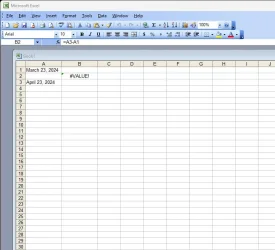
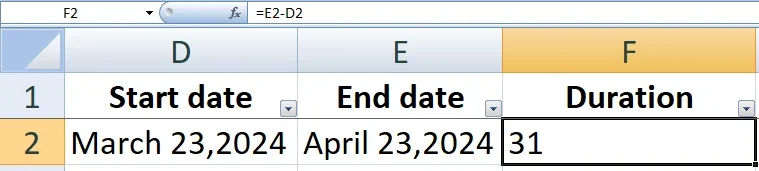
OK, I see what you want. I'm attaching screenshot of the file I just described.
Hope that helps. ThanksXcel Image.webp
 

My Computer My Computer

At a glance

Window 11 Pro, v.10.0.26200AMD6431,862 MB
OS
Window 11 Pro, v.10.0.26200
Computer type
PC/Desktop
Manufacturer/Model
Custom Built,
CPU
AMD64
Motherboard
Gigabyte Technology/B650 GAMING X AX V2
Memory
31,862 MB
Here dates are always left aligned and your dates are right aligned, as if the A column format is as text, not as date.
 

My Computer My Computer

At a glance

Windows 11 ProAPU A8 76004GB
OS
Windows 11 Pro
Computer type
PC/Desktop
Manufacturer/Model
MSI
CPU
APU A8 7600
Motherboard
MSI
Memory
4GB
If you want the dates to appear in that format you need to format cells mmmm dd, yyyy. Currently formatted as Text or General and you can't do calculations/formulae on that format
 

My Computers My Computers

  • At a glance

    Windows 11 2xH2 (latest update ... forever anal)Intel i5-124008GBNVIDIA GeForce GT730
    OS
    Windows 11 2xH2 (latest update ... forever anal)
    Computer type
    PC/Desktop
    Manufacturer/Model
    HP Slim S01
    CPU
    Intel i5-12400
    Memory
    8GB
    Graphics Card(s)
    NVIDIA GeForce GT730
    Sound Card
    OOBE
    Monitor(s) Displays
    Acer 32"
    Screen Resolution
    1920x1080
    Hard Drives
    512GB KIOXIA NVMe
    1TB SATA SSD
    PSU
    OOBE
    Case
    OOBE
    Cooling
    OOBE
    Keyboard
    BT
    Mouse
    BT
    Browser
    Brave FFox Chrome Opera
    Antivirus
    KIS
  • At a glance

    Windows 11 Pro 2xH2 (latest update ... 4ever ...i7-1165G7 @ 2.80GHzIntel Iris Xe Graphics
    Operating System
    Windows 11 Pro 2xH2 (latest update ... 4ever anal)
    Computer type
    Laptop
    Manufacturer/Model
    HP Pavillion 15
    CPU
    i7-1165G7 @ 2.80GHz
    Graphics card(s)
    Intel Iris Xe Graphics
    Hard Drives
    Samsung NVMe 512GB
    + numerous/multiple SSD Type C USB enclosures
    Internet Speed
    NBN FTTN 50
    Browser
    Brave
    Antivirus
    KIS
  • Like
Reactions: LSF
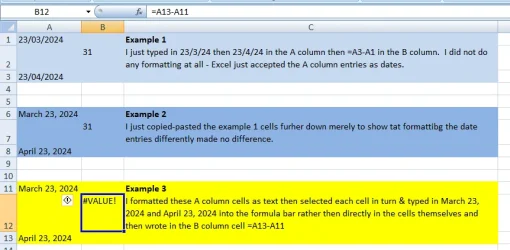
I've played around with test examples.
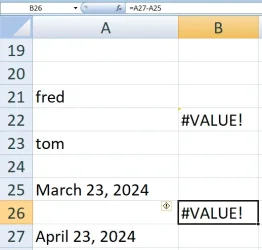
I could only reproduce your error by first formatting the cells as text and only then typing in March 23, 2024 and April 23, 2024 directly.
So it seems to me that you have formatted at least one of those column A cells as text.

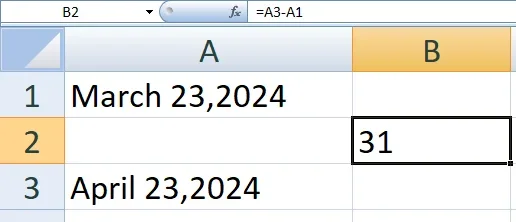
If, without first doing any formatting, I typed 23/3/24 and 23/4/24 [I'm a Brit] in the A column, it worked correctly.
[I then Custom formatted the date cells as mmmm dd, yyyy to get them looking the way yours did.]
[The particular date format chosen has no bearing on the problem. It is only formatting cells as text that causes the problem.]
date formatted.webp


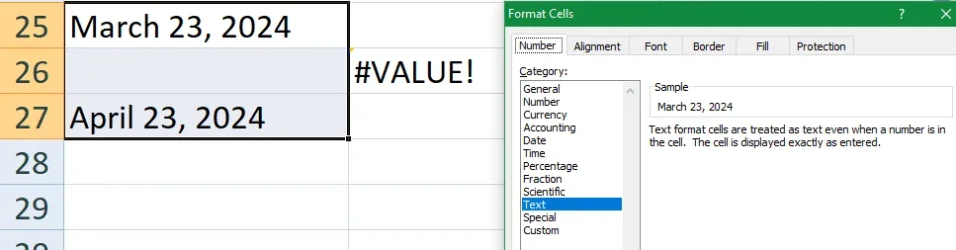
It was only after first formatting column A cells as text*** and only then typing March 23, 2024 and April 23, 2024 that I saw the error.
[*** Right-click, select Format cells.]
Error in value 3.webp

Text.webp


[Oh, and I did not have to change the default left alignments at any stage.]


Denis
 
Last edited:

My Computer My Computer

At a glance

Windows 11 Home x64 Version 25H2 Build 26200....
OS
Windows 11 Home x64 Version 25H2 Build 26200.9168
  • Like
Reactions: LSF
Microsoft Office Excel 2003.
Using such an old version is not helping things much because you'll have to find someone who knows how to get into (what menu steps) the cell format dialogue box to set the above suggested parameters

However, if it's of any help, in 365 it's Home menu > Format > Format cells > Custom > manually add the format mmmm dd, yyyy
 

My Computers My Computers

  • At a glance

    Windows 11 2xH2 (latest update ... forever anal)Intel i5-124008GBNVIDIA GeForce GT730
    OS
    Windows 11 2xH2 (latest update ... forever anal)
    Computer type
    PC/Desktop
    Manufacturer/Model
    HP Slim S01
    CPU
    Intel i5-12400
    Memory
    8GB
    Graphics Card(s)
    NVIDIA GeForce GT730
    Sound Card
    OOBE
    Monitor(s) Displays
    Acer 32"
    Screen Resolution
    1920x1080
    Hard Drives
    512GB KIOXIA NVMe
    1TB SATA SSD
    PSU
    OOBE
    Case
    OOBE
    Cooling
    OOBE
    Keyboard
    BT
    Mouse
    BT
    Browser
    Brave FFox Chrome Opera
    Antivirus
    KIS
  • At a glance

    Windows 11 Pro 2xH2 (latest update ... 4ever ...i7-1165G7 @ 2.80GHzIntel Iris Xe Graphics
    Operating System
    Windows 11 Pro 2xH2 (latest update ... 4ever anal)
    Computer type
    Laptop
    Manufacturer/Model
    HP Pavillion 15
    CPU
    i7-1165G7 @ 2.80GHz
    Graphics card(s)
    Intel Iris Xe Graphics
    Hard Drives
    Samsung NVMe 512GB
    + numerous/multiple SSD Type C USB enclosures
    Internet Speed
    NBN FTTN 50
    Browser
    Brave
    Antivirus
    KIS
  • Like
Reactions: LSF
I do have a more general comment to make that is not related to your current problem.

I believe that, if you rearrange the spreadsheet to avoid blank cells, you'll find it much easier to maintain and you'll be able to take advantage of Excel's excellent Filter, Freeze pane & scrolling capabilities [which I think existed in Excel 2003 even though they were not as refined as they later became].
e.g.
New layout, Filters.webp


All the best,
Denis
 

My Computer My Computer

At a glance

Windows 11 Home x64 Version 25H2 Build 26200....
OS
Windows 11 Home x64 Version 25H2 Build 26200.9168
Probably the error is also whether it's US bonkers date format or more sensible European one of dd/mm/yyyy or yyyy/mm/dd. The US system is a hodgepodge with no easily sorting algorithm etc. But again it depends on the base version of your Windows install whether it was UK / International English, a European language or a US version which will set the default date format.

Cheers
jimbo
 

My Computer My Computer

At a glance

Windows XP,11 Linux Fedora Rawhide pre-releas...2 X Intel i7
OS
Windows XP,11 Linux Fedora Rawhide pre-release 46
Computer type
PC/Desktop
CPU
2 X Intel i7
Screen Resolution
4KUHD X 2
  • Like
Reactions: LSF
Wow! That gives me a lot to think about.
Thank you all (Denis, Cipri, idgat) for taking the time to help me. Now, I'm off to test some of your suggestions (I really hope that I can reproduce Denis' results) but I'm learning a lot from all your comments.
I'll get back to let you know (one way or the other) how things went.
 

My Computer My Computer

At a glance

Window 11 Pro, v.10.0.26200AMD6431,862 MB
OS
Window 11 Pro, v.10.0.26200
Computer type
PC/Desktop
Manufacturer/Model
Custom Built,
CPU
AMD64
Motherboard
Gigabyte Technology/B650 GAMING X AX V2
Memory
31,862 MB
Denis, I attempted to replicate the formatting that you used to get the desired results, but had no success.
Would you please send me a copy of the exact file that worked for you, so that I can compare your formatting with what I've tried, and to verify that your edit works correctly on my machine?
Thank you.
 

My Computer My Computer

At a glance

Window 11 Pro, v.10.0.26200AMD6431,862 MB
OS
Window 11 Pro, v.10.0.26200
Computer type
PC/Desktop
Manufacturer/Model
Custom Built,
CPU
AMD64
Motherboard
Gigabyte Technology/B650 GAMING X AX V2
Memory
31,862 MB
Please give me a few minutes. I'll have to do it all again.
My recycle bin has retained all the screenshots I made from which I selected those I posted but the xlsx itself is not there so I cannot have saved it at all.


Denis
 

My Computer My Computer

At a glance

Windows 11 Home x64 Version 25H2 Build 26200....
OS
Windows 11 Home x64 Version 25H2 Build 26200.9168
Example attached in xls format [within a zip file] so you can read it in Excel 2003 [I used Excel 2007 to make the file].
LSF examples.webp

- I had to zip it up because the forum does not accept attached Excel files directly.
- The xls is as displayed above except that I corrected one spelling error after making the screenshot. I did not notice the two other spolling pistakes until after I had posted.

The funny symbol next to the #value! cell is the equivalent of the little green mark shown in your #value! cell's upper-left corner.
- You can click on it to get a helpful/unhelpful additional blurb about the fact that there is a problem.
- If I remember correctly, you could tell your Excel to display the same way as mine in this regard. I think it was in Excel options but it's twenty years since I played with Excel 2003.


All the best,
Denis
 

Attachments

Last edited:

My Computer My Computer

At a glance

Windows 11 Home x64 Version 25H2 Build 26200....
OS
Windows 11 Home x64 Version 25H2 Build 26200.9168
Opening with Excel 2007 the example attached I get the “#VALUE!” error but if I use the compatible Softmaker Planmaker I get 31, no error.
 

My Computer My Computer

At a glance

Windows 11 ProAPU A8 76004GB
OS
Windows 11 Pro
Computer type
PC/Desktop
Manufacturer/Model
MSI
CPU
APU A8 7600
Motherboard
MSI
Memory
4GB
Opening with Excel 2007 the example attached I get the “#VALUE!” error but if I use the compatible Softmaker Planmaker I get 31, no error.
And, in that other spreadsheet application, are the A11 & A13 cells still text or has it automatically recognised their content as dates & formatted the cells to suit?


Denis
 

My Computer My Computer

At a glance

Windows 11 Home x64 Version 25H2 Build 26200....
OS
Windows 11 Home x64 Version 25H2 Build 26200.9168
A11 & A13 cells are still text but Planmaker recognises their content as dates, it seems that there is no way to force Planmaker to treat a date as something different to a date.
 

My Computer My Computer

At a glance

Windows 11 ProAPU A8 76004GB
OS
Windows 11 Pro
Computer type
PC/Desktop
Manufacturer/Model
MSI
CPU
APU A8 7600
Motherboard
MSI
Memory
4GB
Thanks. Whilst I had heard of the Softmaker office suite, I haven't played with it or studied it.


Denis
 

My Computer My Computer

At a glance

Windows 11 Home x64 Version 25H2 Build 26200....
OS
Windows 11 Home x64 Version 25H2 Build 26200.9168
  • Like
Reactions: LSF
I like SoftMaker FreeOffice 2024 because it is more compatible with Excel than others free suites, and its footprint is only 430 Mb
 

My Computer My Computer

At a glance

Windows 11 ProAPU A8 76004GB
OS
Windows 11 Pro
Computer type
PC/Desktop
Manufacturer/Model
MSI
CPU
APU A8 7600
Motherboard
MSI
Memory
4GB
  • Like
Reactions: LSF

Latest Support Threads

Back
Top Bottom