Need help


slamdank

Member
Local time
4:30 PM
Posts
4
OS
Windows 11
Guys I seriously need help

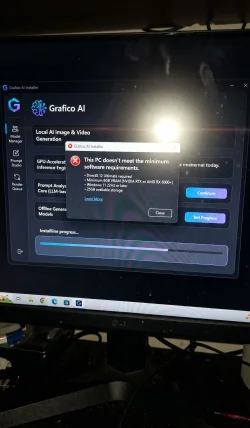
I’ve been using the Grafico tool (Grafico AI — Local Generative Image Engine) on my laptop to make AI videos and everything works fine there. But when I tried installing it on another PC, it suddenly says the computer “doesn’t meet the minimum software requirements.”

I honestly have no idea what that even means. Does it mean the Windows version is too old or what? I’m really confused.
 

Attachments
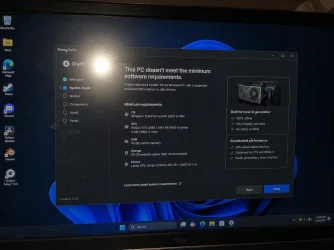
  • file_0000000089b871fd89110a64c6675869.webp
    file_0000000089b871fd89110a64c6675869.webp
    110.2 KB · Views: 2

My Computer

System One

  • OS
    Windows 11
    Computer type
    Laptop
Double check to make sure your other computer has all the stated requirements.
Example: Make sure you have at least 25 GB of SSD drive space
...and so on for the rest of the requirements.
 
Last edited:

My Computer

System One

  • OS
    Windows 11
    Computer type
    PC/Desktop
    Manufacturer/Model
    Custom Built
Welcome to the forum. It means just what it says. The device does not meet all the minimum hardware requirements to run the app.
You do not list the specs of the device you're trying to install it on so we can't tell you what the device is lacking. The notice in your screenshot is pretty self explanatory. It lists all the minimum hardware requirements. The device has to meet all of them.
 

My Computers

System One System Two

  • OS
    Windows 11 Pro 25H2
    Computer type
    PC/Desktop
    Manufacturer/Model
    Dell Optiplex 7080
    CPU
    i9-10900 10 core 20 threads
    Motherboard
    DELL 0J37VM
    Memory
    32 gb
    Graphics Card(s)
    none-Intel UHD Graphics 630
    Sound Card
    Integrated Realtek
    Monitor(s) Displays
    Benq 27
    Screen Resolution
    2560x1440
    Hard Drives
    2x1tb Solidigm m.2 nvme /External drives 512gb Samsung m.2 sata+2tb Kingston m2.nvme
    PSU
    500w
    Case
    MT
    Cooling
    Dell Premium
    Keyboard
    Logitech wired
    Mouse
    Logitech wireless
    Internet Speed
    so slow I'm too embarrassed to tell
    Browser
    #1 Edge #2 Firefox
    Antivirus
    Defender+MWB Premium
  • Operating System
    Windows 11 Pro 24H2 26200.8457
    Computer type
    PC/Desktop
    Manufacturer/Model
    Beelink Mini PC SER5
    CPU
    AMD Ryzen 7 6800U
    Memory
    32 gb
    Graphics card(s)
    integrated
    Sound Card
    integrated
    Monitor(s) Displays
    Benq 27
    Screen Resolution
    2560x1440
    Hard Drives
    1TB Crucial nvme
    Keyboard
    Logitech wired
    Mouse
    Logitech wireless
    Internet Speed
    still too embarrassed to tell
    Browser
    Firefox
    Antivirus
    Defender
    Other Info
    System 3 is non compliant Dell 9020 i7-4770/24gb ram Win11 PRO 26200.8457
Welcome to the forum. It means just what it says. The device does not meet all the minimum hardware requirements to run the app.
You do not list the specs of the device you're trying to install it on so we can't tell you what the device is lacking. The notice in your screenshot is pretty self explanatory. It lists all the minimum hardware requirements. The device has to meet all of them.
Yeah I saw the message, I was just confused because I’m not really good with this hardware stuff
I thought maybe it was something simple like Windows version or missing update. I’ll check the specs of the other PC and compare them with the requirements shown in the installer. Thanks for explaining.
 

My Computer

System One

  • OS
    Windows 11
    Computer type
    Laptop
Hey guys, beginner question here

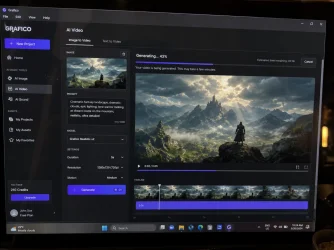
I recently started trying AI video generation and I’m honestly confused by all the different tools and settings. Right now I’m testing Grafico because it seemed easier for local generation on Windows.

Https://grafico.gt.tc

Does anyone know how to make AI videos look more cinematic and less “AI-ish”? Like smoother motion, better lighting, more realistic faces, etc.

Not sure if it’s about prompts, GPU settings, models, or something else.
 

Attachments

  • file_00000000547871fd854875e0bbb6abf7.webp
    file_00000000547871fd854875e0bbb6abf7.webp
    100.2 KB · Views: 2

My Computer

System One

  • OS
    Windows 11
    Computer type
    Laptop
I installed Grafico on my main PC and it runs perfectly. But when I tried installing it on another computer, I got a message saying the PC doesn’t meet the minimum requirements. Does anyone know a workaround or a way to get past this?

For reference, this is the version I’m using: (Grafico AI — Local Generative Image Engine)
 

Attachments

  • v2_watermarked-554f5ba6-b6ad-4bfe-8b56-5cf45f67c169.webp
    v2_watermarked-554f5ba6-b6ad-4bfe-8b56-5cf45f67c169.webp
    266.1 KB · Views: 1

My Computer

System One

  • OS
    Windows 11
    Computer type
    Laptop
What are the minimum requirements?
 

My Computer

System One

  • OS
    Windows 11 Pro @2N23
    Computer type
    Laptop
    Manufacturer/Model
    Dell
    CPU
    AMD Ryzen 7
    Memory
    16gb
    Hard Drives
    M2 2TB SSD
    Browser
    Edge
    Antivirus
    ioBit
Does anyone know how to make AI videos look more cinematic and less “AI-ish”? Like smoother motion, better lighting, more realistic faces, etc.

Just FYI this is an advice/help forum, not a tutorial service. Having said that, you may get some advice about sources that will guide you

Change youor thread forum heading to be a bit more informative of what you're seeking ... "Need help" is unlikely to get many responses
 

My Computers

System One System Two

  • OS
    Windows 11 2xH2 (latest update ... forever anal)
    Computer type
    PC/Desktop
    Manufacturer/Model
    HP Slim S01
    CPU
    Intel i5-12400
    Memory
    8GB
    Graphics Card(s)
    NVIDIA GeForce GT730
    Sound Card
    OOBE
    Monitor(s) Displays
    Acer 32"
    Screen Resolution
    1920x1080
    Hard Drives
    512GB KIOXIA NVMe
    1TB SATA SSD
    PSU
    OOBE
    Case
    OOBE
    Cooling
    OOBE
    Keyboard
    BT
    Mouse
    BT
    Browser
    Brave FFox Chrome Opera
    Antivirus
    KIS
  • Operating System
    Windows 11 Pro 2xH2 (latest update ... 4ever anal)
    Computer type
    Laptop
    Manufacturer/Model
    HP Pavillion 15
    CPU
    i7-1165G7 @ 2.80GHz
    Graphics card(s)
    Intel Iris Xe Graphics
    Hard Drives
    Samsung NVMe 512GB
    + numerous/multiple SSD Type C USB enclosures
    Internet Speed
    NBN FTTN 50
    Browser
    Brave
    Antivirus
    KIS

Latest Support Threads

Back
Top Bottom