Need New Computer to Run 11


For the OP, it sounds more like procrastination than panic. ;-)

Yes not in panic mode at all, just know that Windows 10 is close to end of life, and lacking support thereafter.
 

My Computer

System One

  • OS
    Windows 10
    Computer type
    PC/Desktop
    Manufacturer/Model
    Dell 7010
    CPU
    Intel(R) Core(TM) i5-3570 CPU @ 3.40GHz 3.40 GHz
    Memory
    8.00 GB (7.89 GB usable)
    Graphics Card(s)
    Intel(R) HD Graphics (32 MB)
    Hard Drives
    466 GB HDD SAMSUNG HE502HJ, 1.82 TB HDD WDC WD20EZRX-00D8PB0
Yes I noticed none of the new computers at the county where I work came with any kind of optical drive, just the hard drive.

It is a must based on a lot of the stuff we sell on eBay, those are CDs and or DVDs. I actually have a brand new Epson printer in the closet for printing CDs and DVDs just in case the one I got fails, and it cannot be replaced anymore.
If you don't need BluRay, it sounds like a <$30 external CD/DVD burner would serve.

The ones based on laptop drives aren't fast, but most take their power from the USB port, which is a major convenience.

If you bought a Dell with a built-in burner, it'd probably use laptop hardware, and might be no faster than a slim external.

My burner is an internal 5 1/4" BluRay burner in an external enclosure. Clunky. But the burner is one with old firmware, that permits it to play UHD BluRay movies, given the right software. (I don't do that, but I could if I wished to. ;-) )
 

My Computers

System One System Two

  • OS
    Windows 11 26200.8728
    Computer type
    PC/Desktop
    Manufacturer/Model
    homebuilt
    CPU
    Amd Threadripper 7970X
    Motherboard
    Gigabyte TRX50 Aero D Rev. 1.0
    Memory
    128GB (4 X 32) G.Skill DDR5 6400 (RDIMM)
    Graphics Card(s)
    Gigabyte RTX 4090 OC
    Sound Card
    none (USB to speakers), Realtek
    Monitor(s) Displays
    Innocn 32" OLED
    Screen Resolution
    3840 X 2160 @ 60Hz
    Hard Drives
    Crucial T700 2TB M.2 NVME SSD
    WD 4TB Blue SATA SSD
    Seagate 18TB IronWolf Pro
    PSU
    BeQuiet! Straight Power 12 1500W
    Case
    Lian Li 011 Dynamic Evo XL
    Cooling
    SilverStone Technology XE360-TR5, with 3 Phanteks T30 fans
    Keyboard
    Cherry KC 500 MX LP (mechanical)
    Mouse
    Logitech M500s (wired)
    Internet Speed
    2000/250 Mbps (down/up)
    Other Info
    xFinity gateway
  • Operating System
    windows 11 26200.8728
    Computer type
    PC/Desktop
    Manufacturer/Model
    homebuilt
    CPU
    Intel I9-13900K
    Motherboard
    Asus RoG Strix Z690-E
    Memory
    64GB G.Skill DDR5-6000
    Graphics card(s)
    Gigabyte RTX 3090 ti
    Sound Card
    built in Realtek
    Monitor(s) Displays
    Philips 27E1N8900 27" OLED
    Screen Resolution
    3840 X 2160 @60Hz
    Hard Drives
    WDC SN850 1TB
    8TB Seagate Ironwolf
    4TB Seagate Ironwolf
    PSU
    eVGA SuperNOVA 1300 GT
    Case
    Lian Li 011 Dynamic Evo
    Cooling
    Corsair iCUE H150i ELITE CAPELLIX Liquid CPU Cooler
    Keyboard
    Cherry Streaming (wired)
    Mouse
    Logitech M500s (wired)

My Computers

System One System Two

  • OS
    Win 11 Home ♦♦♦26200.8655 ♦♦♦♦♦♦♦25H2
    Computer type
    PC/Desktop
    Manufacturer/Model
    Built by Ghot® [May 2020]
    CPU
    AMD Ryzen 7 3700X
    Motherboard
    Asus Pro WS X570-ACE (BIOS 5302)
    Memory
    G.Skill (F4-3200C14D-16GTZKW)
    Graphics Card(s)
    EVGA RTX 2070 (08G-P4-2171-KR)
    Sound Card
    Realtek ALC1220P / ALC S1220A
    Monitor(s) Displays
    Dell U3011 30"
    Screen Resolution
    2560 x 1600
    Hard Drives
    2x Samsung 860 EVO 500GB,
    WD 4TB Black FZBX - SATA III,
    WD 8TB Black FZBX - SATA III,
    DRW-24B1ST CD/DVD Burner
    PSU
    PC Power & Cooling 750W Quad EPS12V
    Case
    Cooler Master ATCS 840 Tower
    Cooling
    CM Hyper 212 EVO (push/pull)
    Keyboard
    Ducky DK9008 Shine II Blue LED
    Mouse
    Logitech Optical M-100
    Internet Speed
    300/300
    Browser
    Firefox (latest)
    Antivirus
    Bitdefender Total Security
    Other Info
    Speakers: Klipsch Pro Media 2.1
  • Operating System
    Windows XP Pro 32bit w/SP3
    Computer type
    PC/Desktop
    Manufacturer/Model
    Built by Ghot® (not in use)
    CPU
    AMD Athlon 64 X2 5000+ (OC'd @ 3.2Ghz)
    Motherboard
    ASUS M2N32-SLI Deluxe Wireless Edition
    Memory
    TWIN2X2048-6400C4DHX (2 x 1GB, DDR2 800)
    Graphics card(s)
    EVGA 256-P2-N758-TR GeForce 8600GT SSC
    Sound Card
    Onboard
    Monitor(s) Displays
    ViewSonic G90FB Black 19" Professional (CRT)
    Screen Resolution
    up to 2048 x 1536
    Hard Drives
    WD 36GB 10,000rpm Raptor SATA
    Seagate 80GB 7200rpm SATA
    Lite-On LTR-52246S CD/RW
    Lite-On LH-18A1P CD/DVD Burner
    PSU
    PC Power & Cooling Silencer 750 Quad EPS12V
    Case
    Generic Beige case, 80mm fans
    Cooling
    ZALMAN 9500A 92mm CPU Cooler
    Keyboard
    Logitech Classic Keybooard 200
    Mouse
    Logitech Optical M-BT96a
    Internet Speed
    300/300
    Browser
    Firefox 3.x ??
    Antivirus
    Symantec (Norton)
    Other Info
    Still assembled, still runs. Haven't turned it on for 15 years?
If you don't need BluRay, it sounds like a <$30 external CD/DVD burner would serve.

The ones based on laptop drives aren't fast, but most take their power from the USB port, which is a major convenience.

If you bought a Dell with a built-in burner, it'd probably use laptop hardware, and might be no faster than a slim external.

My burner is an internal 5 1/4" BluRay burner in an external enclosure. Clunky. But the burner is one with old firmware, that permits it to play UHD BluRay movies, given the right software. (I don't do that, but I could if I wished to. ;-) )
You can buy an external Blu Ray burner (BD-R drive) that can also write to quad-layer (BDXL 128GB) disks, but beware, not all models can play 4K (aka UHD) Blu Ray movies! Make sure the one you buy does. For non UHD Blu Ray compliant PCs (Cyberlink PowerDVD refuses to play the movie), try a third-party player such as MPC-HC. To see if you are compliant, there is a special tool from Cyberlink.
 

My Computers

System One System Two

  • OS
    Windows 11 Pro 23H2 (5699), 25H2 (8655)
    Computer type
    Laptop
    Manufacturer/Model
    Acer Extensa 5630EZ
    CPU
    Mobile DualCore Intel Core 2 Duo T7250, 2000 MHz
    Motherboard
    Acer Extensa 5630
    Memory
    4GB
    Graphics Card(s)
    Mobile Intel(R) GMA 4500M (Mobile 4 series)
    Sound Card
    Realtek ALC268 @ Intel 82801IB ICH9 - High Definition Audio Controller
    Monitor(s) Displays
    1
    Screen Resolution
    1280x800
    Hard Drives
    Samsung SSD 850 EVO 250GB SATA Device (250 GB, SATA-III)
    Internet Speed
    VDSL 50 Mbps
    Browser
    MICROSOFT EDGE
    Antivirus
    WINDOWS DEFENDER
    Other Info
    Legacy MBR installation, no TPM, no Secure Boot, no WDDM 2.0 graphics drivers, no SSE4.2, cannot get more unsupported ;) This is only my test laptop. I had installed Windows 11 here before upgrading my main PC. For my main PC I use everyday see my 2nd system specs.
  • Operating System
    Windows 11 Pro v25H2 (build 26200.8655)
    Computer type
    PC/Desktop
    Manufacturer/Model
    Custom-built PC
    CPU
    Intel Core-i7 3770 3.40GHz s1155 (3rd generation)
    Motherboard
    Asus P8H61 s1155 ATX
    Memory
    2x Kingston Hyper-X Blu 8GB DDR3-1600
    Graphics card(s)
    GIGABYTE GeForce RTX 3050 WINDFORCE OC V2 6GB (GV-N3050WF2OCV2-6GD)
    Sound Card
    Realtek HD audio (ALC887)
    Monitor(s) Displays
    Sony Bravia KDL-19L4000 19" LCD TV via VGA
    Screen Resolution
    1440x900 32-bit 60Hz
    Hard Drives
    WD Blue SA510 2.5 1000GB SSD as system disk, Western Digital Caviar Purple 4TB SATA III (WD40PURZ) as second
    PSU
    Thermaltake Litepower RGB 550W Full Wired
    Case
    SUPERCASE MIDI-TOWER
    Cooling
    Deepcool Gamma Archer CPU cooler, 1x 8cm fan at the back
    Keyboard
    Mitsumi 101-key PS/2
    Mouse
    Sunnyline OptiEye PS/2
    Internet Speed
    100Mbps
    Browser
    Microsoft Edge, Mozilla Firefox
    Antivirus
    Microsoft Windows Defender
    Other Info
    Legacy BIOS (MBR) installation, no TPM, no Secure Boot, WDDM 3.0 graphics drivers, WEI score 7.4
You can buy an external Blu Ray burner (BD-R drive) that can also write to quad-layer (BDXL 128GB) disks, but beware, not all models can play 4K (aka UHD) Blu Ray movies! Make sure the one you buy does. For non UHD Blu Ray compliant PCs (Cyberlink PowerDVD refuses to play the movie), try a third-party player such as MPC-HC. To see if you are compliant, there is a special tool from Cyberlink.
Most of that may be dated.

A few years ago, there were few Blu Ray burners that could play UHD disks. I have an LG burner that can, but it required reverting to old firmware.

Cyberlink PowerDVD required a drive and PC that supported SGX instructions, but even they have dropped UHD.

There seems to be a hobby unto itself involved with MakeMKV, but I haven't paid attention to that for years.

I suspect that all this is far off "billrigsby's" needs. It's fun to display wide-ranging knowledge, but not always helpful.
 

My Computers

System One System Two

  • OS
    Windows 11 26200.8728
    Computer type
    PC/Desktop
    Manufacturer/Model
    homebuilt
    CPU
    Amd Threadripper 7970X
    Motherboard
    Gigabyte TRX50 Aero D Rev. 1.0
    Memory
    128GB (4 X 32) G.Skill DDR5 6400 (RDIMM)
    Graphics Card(s)
    Gigabyte RTX 4090 OC
    Sound Card
    none (USB to speakers), Realtek
    Monitor(s) Displays
    Innocn 32" OLED
    Screen Resolution
    3840 X 2160 @ 60Hz
    Hard Drives
    Crucial T700 2TB M.2 NVME SSD
    WD 4TB Blue SATA SSD
    Seagate 18TB IronWolf Pro
    PSU
    BeQuiet! Straight Power 12 1500W
    Case
    Lian Li 011 Dynamic Evo XL
    Cooling
    SilverStone Technology XE360-TR5, with 3 Phanteks T30 fans
    Keyboard
    Cherry KC 500 MX LP (mechanical)
    Mouse
    Logitech M500s (wired)
    Internet Speed
    2000/250 Mbps (down/up)
    Other Info
    xFinity gateway
  • Operating System
    windows 11 26200.8728
    Computer type
    PC/Desktop
    Manufacturer/Model
    homebuilt
    CPU
    Intel I9-13900K
    Motherboard
    Asus RoG Strix Z690-E
    Memory
    64GB G.Skill DDR5-6000
    Graphics card(s)
    Gigabyte RTX 3090 ti
    Sound Card
    built in Realtek
    Monitor(s) Displays
    Philips 27E1N8900 27" OLED
    Screen Resolution
    3840 X 2160 @60Hz
    Hard Drives
    WDC SN850 1TB
    8TB Seagate Ironwolf
    4TB Seagate Ironwolf
    PSU
    eVGA SuperNOVA 1300 GT
    Case
    Lian Li 011 Dynamic Evo
    Cooling
    Corsair iCUE H150i ELITE CAPELLIX Liquid CPU Cooler
    Keyboard
    Cherry Streaming (wired)
    Mouse
    Logitech M500s (wired)
I suspect that all this is far off "billrigsby's" needs. It's fun to display wide-ranging knowledge, but not always helpful.

LOL,
I would say a good 60% of the stuff that has been posted
"I have no idea what you're even talking about"!

My first computer was back in like 80 or 81, it was a Direct suitcase CP/M machine, Z80 based, 5.25 inch floppy disks running MS-DOS and at the time I was working at Zilog the maker of the Z80!
Having said that I've always just been a user, and do not know a lot about the inner workings of the machines.

But I appreciate a lot of the suggestions, I might have to up my price point a bit but that's fine.

I got time.
 

My Computer

System One

  • OS
    Windows 10
    Computer type
    PC/Desktop
    Manufacturer/Model
    Dell 7010
    CPU
    Intel(R) Core(TM) i5-3570 CPU @ 3.40GHz 3.40 GHz
    Memory
    8.00 GB (7.89 GB usable)
    Graphics Card(s)
    Intel(R) HD Graphics (32 MB)
    Hard Drives
    466 GB HDD SAMSUNG HE502HJ, 1.82 TB HDD WDC WD20EZRX-00D8PB0
Well now I have dated myself!
And Tuesday the 2nd is my last day, the third will be my first day of retirement!
 

My Computer

System One

  • OS
    Windows 10
    Computer type
    PC/Desktop
    Manufacturer/Model
    Dell 7010
    CPU
    Intel(R) Core(TM) i5-3570 CPU @ 3.40GHz 3.40 GHz
    Memory
    8.00 GB (7.89 GB usable)
    Graphics Card(s)
    Intel(R) HD Graphics (32 MB)
    Hard Drives
    466 GB HDD SAMSUNG HE502HJ, 1.82 TB HDD WDC WD20EZRX-00D8PB0
In finished computers, something is almost always wrong.
Either the RAM is a slow memory, or the drive is not the best, or the incompetent processor, or the power supply is not powerful enough.
Of course, everything is fine in the premium segment.
 

My Computer

System One

  • OS
    Microsoft Windows 11 Home
    Computer type
    PC/Desktop
    Manufacturer/Model
    MSI MS-7D98
    CPU
    Intel Core i5-13490F
    Motherboard
    MSI B760 GAMING PLUS WIFI
    Memory
    2 x 16 Patriot Memory (PDP Systems) PSD516G560081 6400MT (32-37-37-74); 1.35V)
    Graphics Card(s)
    GIGABYTE GeForce RTX 4070 WINDFORCE OC 12G (GV-N4070WF3OC-12GD)
    Sound Card
    Bluetooth Аудио
    Monitor(s) Displays
    INNOCN 15K1F
    Screen Resolution
    1920 x 1080
    Hard Drives
    WD_BLACK SN770 250GB
    KINGSTON SNV2S1000G (ELFK0S.6)
    PSU
    Thermaltake Toughpower GF3 1000W
    Case
    CG560 - DeepCool
    Cooling
    ID-COOLING SE-224-XTS / 2 x 140Mm Fan - rear and top; 3 x 120Mm - front
    Keyboard
    Corsair K70 RGB TKL
    Mouse
    Corsair KATAR PRO XT
    Internet Speed
    100 Mbps
    Browser
    Firefox
    Antivirus
    Microsoft Defender Antivirus
    Other Info
    https://www.userbenchmark.com/UserRun/66553205
Well now I have dated myself!
And Tuesday the 2nd is my last day, the third will be my first day of retirement!

I learned on a TRS-80 or a Trash 80 as they used to say.
 

My Computers

System One System Two

  • OS
    Windows11 Pro 26200.8655
    Computer type
    PC/Desktop
    Manufacturer/Model
    Dell Alienware Aurora R16
    CPU
    Intel Core i9 14900F (24 -Core, 68 MB Total Cache)
    Motherboard
    Dell Alienware
    Memory
    32GB DDR5
    Graphics Card(s)
    RTX 4080 Super w/581.95
    Sound Card
    Realtec
    Monitor(s) Displays
    Corsair XENEON 32QHD165
    Screen Resolution
    2560 X 1440
    Hard Drives
    1-2TB Samsung 990 Pro PCIe NVMe M2 SSD
    1-4TB Samsung 990 Pro PCIe NVMe M2 SSD
    PSU
    1000 Watt Platinum Dell
    Case
    Alienware
    Cooling
    Liquid Closed Loop
    Keyboard
    Corsair Strafe RGB
    Mouse
    Logitech MK270 Wireless
    Internet Speed
    100Gb's Down-20 Up
    Browser
    Firefox 152.0
    Antivirus
    Defender
    Other Info
    Very Quiet And Fast
    CyberPower UPS CP1500PFCLCD
  • Operating System
    PClinuxOS Mate (2025.7)
    Computer type
    PC/Desktop
    Manufacturer/Model
    Intel
    CPU
    13th Gen Inter(R) Core(TM) i3-1315U
    Motherboard
    Intel
    Memory
    64 GB DDR4 @3200 MHz.
    Graphics card(s)
    Internal
    Sound Card
    None
    Monitor(s) Displays
    Dell 2419HGCF
    Screen Resolution
    1920 X 1080
    Hard Drives
    SAMSUNG 980 PRO SSD 2TB, PCIe 4.0 M.2 2280
    PSU
    Chicony 30 Watt
    Case
    Small
    Keyboard
    Dell
    Mouse
    Razor
    Internet Speed
    1GB
    Browser
    Slimjet
I'm with the "do the unofficial Windows 11 upgrade" camp. Get another stick of ram so you have 16gb (assume it'll take 16gb?). It'll be fine. I'd use it till it fell apart :-) It also gives you time to get used to Windows 11 and decide if you need a new computer now or later.

It'll install fine I reckon. Just do a system image and then clean install Windows 11 (burning the usb stick in Rufus to bypass compatibility). It won't be that fast on 8gb ram but probably not much of a noticeable difference than Windows 10 on 8gb ram.
 

My Computers

System One System Two

  • OS
    Windows 11 Home 25H2
    Computer type
    Laptop
    Manufacturer/Model
    HP Pavilion 14-ce3606sa
    CPU
    Core i5-1035G1
    Memory
    32gb
    Hard Drives
    Samsung 870 evo sata ssd
    Cooling
    Could be better
    Internet Speed
    50 mbps Starlink
    Browser
    Firefox
    Other Info
    Originally came installed with a 500gb H10 Optane ssd
  • Operating System
    Windows 11 Home
    Computer type
    Laptop
    Manufacturer/Model
    HP Pavilion ce3606sa
    CPU
    Intel Core i5-1035G1
    Memory
    16gb
    Hard Drives
    Hynix Gold P31 2TB
    Internet Speed
    200mbps Starlink
    Browser
    Firefox
    Antivirus
    Defender
It also gives you time to get used to Windows 11 and decide if you need a new computer now or later.

Oh I'm used to it, the county has had it pretty much since it came out.
 

My Computer

System One

  • OS
    Windows 10
    Computer type
    PC/Desktop
    Manufacturer/Model
    Dell 7010
    CPU
    Intel(R) Core(TM) i5-3570 CPU @ 3.40GHz 3.40 GHz
    Memory
    8.00 GB (7.89 GB usable)
    Graphics Card(s)
    Intel(R) HD Graphics (32 MB)
    Hard Drives
    466 GB HDD SAMSUNG HE502HJ, 1.82 TB HDD WDC WD20EZRX-00D8PB0
I'm with the "do the unofficial Windows 11 upgrade" camp. Get another stick of ram so you have 16gb (assume it'll take 16gb?). It'll be fine. I'd use it till it fell apart :-) It also gives you time to get used to Windows 11 and decide if you need a new computer now or later.

It'll install fine I reckon. Just do a system image and then clean install Windows 11 (burning the usb stick in Rufus to bypass compatibility). It won't be that fast on 8gb ram but probably not much of a noticeable difference than Windows 10 on 8gb ram.

The list of RAM configurations for the Optiplex 7010 (3rd gen) is here: https://i.dell.com/sites/doccontent...ments/OptiPlex_7010_Technical_Guidebook_1.pdf

I wonder which 7010 "billrigsby" has?

A little online searching says that any of them can accept 8GB DIMMs. If the machine came with two 4GB ones, I'd suggest adding two 8GB ones. Take it all the way up to 24GB, full dual channel.

DDR3 is still available new, but expensive. (I presume it's mainly used for repair of old PCs.) IMHO, it'd make more sense to retire the old Optiplex than to put more money into it.
 

My Computers

System One System Two

  • OS
    Windows 11 26200.8728
    Computer type
    PC/Desktop
    Manufacturer/Model
    homebuilt
    CPU
    Amd Threadripper 7970X
    Motherboard
    Gigabyte TRX50 Aero D Rev. 1.0
    Memory
    128GB (4 X 32) G.Skill DDR5 6400 (RDIMM)
    Graphics Card(s)
    Gigabyte RTX 4090 OC
    Sound Card
    none (USB to speakers), Realtek
    Monitor(s) Displays
    Innocn 32" OLED
    Screen Resolution
    3840 X 2160 @ 60Hz
    Hard Drives
    Crucial T700 2TB M.2 NVME SSD
    WD 4TB Blue SATA SSD
    Seagate 18TB IronWolf Pro
    PSU
    BeQuiet! Straight Power 12 1500W
    Case
    Lian Li 011 Dynamic Evo XL
    Cooling
    SilverStone Technology XE360-TR5, with 3 Phanteks T30 fans
    Keyboard
    Cherry KC 500 MX LP (mechanical)
    Mouse
    Logitech M500s (wired)
    Internet Speed
    2000/250 Mbps (down/up)
    Other Info
    xFinity gateway
  • Operating System
    windows 11 26200.8728
    Computer type
    PC/Desktop
    Manufacturer/Model
    homebuilt
    CPU
    Intel I9-13900K
    Motherboard
    Asus RoG Strix Z690-E
    Memory
    64GB G.Skill DDR5-6000
    Graphics card(s)
    Gigabyte RTX 3090 ti
    Sound Card
    built in Realtek
    Monitor(s) Displays
    Philips 27E1N8900 27" OLED
    Screen Resolution
    3840 X 2160 @60Hz
    Hard Drives
    WDC SN850 1TB
    8TB Seagate Ironwolf
    4TB Seagate Ironwolf
    PSU
    eVGA SuperNOVA 1300 GT
    Case
    Lian Li 011 Dynamic Evo
    Cooling
    Corsair iCUE H150i ELITE CAPELLIX Liquid CPU Cooler
    Keyboard
    Cherry Streaming (wired)
    Mouse
    Logitech M500s (wired)
The list of RAM configurations for the Optiplex 7010 (3rd gen) is here: https://i.dell.com/sites/doccontent...ments/OptiPlex_7010_Technical_Guidebook_1.pdf

I wonder which 7010 "billrigsby" has?

Well I have no idea there, I do know when the county upgraded from Windows 7 to 10, that's when I bought it from them and they put 10 on it. So it has to be relatively dated.

I think I would rather just get a brand new 11 box, I'll swap this out for my backup Windows 7 box, and put that in the closet with all the old XP and XP Pro and whatever boxes that are in there, which I should probably just get rid of!

But as soon as you throw it away that's when you're going to need it at least that's how it goes with nuts and bolts in the garage!
 

My Computer

System One

  • OS
    Windows 10
    Computer type
    PC/Desktop
    Manufacturer/Model
    Dell 7010
    CPU
    Intel(R) Core(TM) i5-3570 CPU @ 3.40GHz 3.40 GHz
    Memory
    8.00 GB (7.89 GB usable)
    Graphics Card(s)
    Intel(R) HD Graphics (32 MB)
    Hard Drives
    466 GB HDD SAMSUNG HE502HJ, 1.82 TB HDD WDC WD20EZRX-00D8PB0
Well I have no idea there, I do know when the county upgraded from Windows 7 to 10, that's when I bought it from them and they put 10 on it. So it has to be relatively dated.

(snip)
The technical guidebook in post 32 shows the various 7010 models. They range from USFF (ultra small form factor) to mini tower. The USFF model has 2 DIMM slots. All of the others have 4.

Times change. I worked for a small company in the late 90s that configured a Dell (maybe an Optiplex GX1) for a demanding purpose. They max'd out the RAM: all the way up to 768MB. Windows NT4.
 

My Computers

System One System Two

  • OS
    Windows 11 26200.8728
    Computer type
    PC/Desktop
    Manufacturer/Model
    homebuilt
    CPU
    Amd Threadripper 7970X
    Motherboard
    Gigabyte TRX50 Aero D Rev. 1.0
    Memory
    128GB (4 X 32) G.Skill DDR5 6400 (RDIMM)
    Graphics Card(s)
    Gigabyte RTX 4090 OC
    Sound Card
    none (USB to speakers), Realtek
    Monitor(s) Displays
    Innocn 32" OLED
    Screen Resolution
    3840 X 2160 @ 60Hz
    Hard Drives
    Crucial T700 2TB M.2 NVME SSD
    WD 4TB Blue SATA SSD
    Seagate 18TB IronWolf Pro
    PSU
    BeQuiet! Straight Power 12 1500W
    Case
    Lian Li 011 Dynamic Evo XL
    Cooling
    SilverStone Technology XE360-TR5, with 3 Phanteks T30 fans
    Keyboard
    Cherry KC 500 MX LP (mechanical)
    Mouse
    Logitech M500s (wired)
    Internet Speed
    2000/250 Mbps (down/up)
    Other Info
    xFinity gateway
  • Operating System
    windows 11 26200.8728
    Computer type
    PC/Desktop
    Manufacturer/Model
    homebuilt
    CPU
    Intel I9-13900K
    Motherboard
    Asus RoG Strix Z690-E
    Memory
    64GB G.Skill DDR5-6000
    Graphics card(s)
    Gigabyte RTX 3090 ti
    Sound Card
    built in Realtek
    Monitor(s) Displays
    Philips 27E1N8900 27" OLED
    Screen Resolution
    3840 X 2160 @60Hz
    Hard Drives
    WDC SN850 1TB
    8TB Seagate Ironwolf
    4TB Seagate Ironwolf
    PSU
    eVGA SuperNOVA 1300 GT
    Case
    Lian Li 011 Dynamic Evo
    Cooling
    Corsair iCUE H150i ELITE CAPELLIX Liquid CPU Cooler
    Keyboard
    Cherry Streaming (wired)
    Mouse
    Logitech M500s (wired)
The list of RAM configurations for the Optiplex 7010 (3rd gen) is here: https://i.dell.com/sites/doccontent...ments/OptiPlex_7010_Technical_Guidebook_1.pdf

I wonder which 7010 "billrigsby" has?

A little online searching says that any of them can accept 8GB DIMMs. If the machine came with two 4GB ones, I'd suggest adding two 8GB ones. Take it all the way up to 24GB, full dual channel.

DDR3 is still available new, but expensive. (I presume it's mainly used for repair of old PCs.) IMHO, it'd make more sense to retire the old Optiplex than to put more money into it.
That's a good point.
 

My Computers

System One System Two

  • OS
    Windows 11 Home 25H2
    Computer type
    Laptop
    Manufacturer/Model
    HP Pavilion 14-ce3606sa
    CPU
    Core i5-1035G1
    Memory
    32gb
    Hard Drives
    Samsung 870 evo sata ssd
    Cooling
    Could be better
    Internet Speed
    50 mbps Starlink
    Browser
    Firefox
    Other Info
    Originally came installed with a 500gb H10 Optane ssd
  • Operating System
    Windows 11 Home
    Computer type
    Laptop
    Manufacturer/Model
    HP Pavilion ce3606sa
    CPU
    Intel Core i5-1035G1
    Memory
    16gb
    Hard Drives
    Hynix Gold P31 2TB
    Internet Speed
    200mbps Starlink
    Browser
    Firefox
    Antivirus
    Defender
The list of RAM configurations for the Optiplex 7010 (3rd gen) is here: https://i.dell.com/sites/doccontent...ments/OptiPlex_7010_Technical_Guidebook_1.pdf

I wonder which 7010 "billrigsby" has?

A little online searching says that any of them can accept 8GB DIMMs. If the machine came with two 4GB ones, I'd suggest adding two 8GB ones. Take it all the way up to 24GB, full dual channel.

DDR3 is still available new, but expensive. (I presume it's mainly used for repair of old PCs.) IMHO, it'd make more sense to retire the old Optiplex than to put more money into it.
If adding new RAM has a reasonable cost, I would do it and postpone buying a new computer by some years. Don't forget that buying new hardware equivalent or better than your current PC might cost more that you think. For example, I have a 3rd generation Intel Core-i7, but I cannot afford a new Core-i7 model, I will have to settle for an "inferior" Core-i3. No thanks, I would rather max out my current PC and keep it as long as I can. Therefore, I gradually replaced my previous Core-i3 with Core-i7, doubled RAM from 8GB to 16GB, replaced the mechanical HDD with SATA SSD and finally, my nVidia GTX 1050 Ti with nVidia RTX 3050. Yes, I know, having given all this money I would have bought a new computer, except I did that gradually over some years, not all at once.
 
Last edited:

My Computers

System One System Two

  • OS
    Windows 11 Pro 23H2 (5699), 25H2 (8655)
    Computer type
    Laptop
    Manufacturer/Model
    Acer Extensa 5630EZ
    CPU
    Mobile DualCore Intel Core 2 Duo T7250, 2000 MHz
    Motherboard
    Acer Extensa 5630
    Memory
    4GB
    Graphics Card(s)
    Mobile Intel(R) GMA 4500M (Mobile 4 series)
    Sound Card
    Realtek ALC268 @ Intel 82801IB ICH9 - High Definition Audio Controller
    Monitor(s) Displays
    1
    Screen Resolution
    1280x800
    Hard Drives
    Samsung SSD 850 EVO 250GB SATA Device (250 GB, SATA-III)
    Internet Speed
    VDSL 50 Mbps
    Browser
    MICROSOFT EDGE
    Antivirus
    WINDOWS DEFENDER
    Other Info
    Legacy MBR installation, no TPM, no Secure Boot, no WDDM 2.0 graphics drivers, no SSE4.2, cannot get more unsupported ;) This is only my test laptop. I had installed Windows 11 here before upgrading my main PC. For my main PC I use everyday see my 2nd system specs.
  • Operating System
    Windows 11 Pro v25H2 (build 26200.8655)
    Computer type
    PC/Desktop
    Manufacturer/Model
    Custom-built PC
    CPU
    Intel Core-i7 3770 3.40GHz s1155 (3rd generation)
    Motherboard
    Asus P8H61 s1155 ATX
    Memory
    2x Kingston Hyper-X Blu 8GB DDR3-1600
    Graphics card(s)
    GIGABYTE GeForce RTX 3050 WINDFORCE OC V2 6GB (GV-N3050WF2OCV2-6GD)
    Sound Card
    Realtek HD audio (ALC887)
    Monitor(s) Displays
    Sony Bravia KDL-19L4000 19" LCD TV via VGA
    Screen Resolution
    1440x900 32-bit 60Hz
    Hard Drives
    WD Blue SA510 2.5 1000GB SSD as system disk, Western Digital Caviar Purple 4TB SATA III (WD40PURZ) as second
    PSU
    Thermaltake Litepower RGB 550W Full Wired
    Case
    SUPERCASE MIDI-TOWER
    Cooling
    Deepcool Gamma Archer CPU cooler, 1x 8cm fan at the back
    Keyboard
    Mitsumi 101-key PS/2
    Mouse
    Sunnyline OptiEye PS/2
    Internet Speed
    100Mbps
    Browser
    Microsoft Edge, Mozilla Firefox
    Antivirus
    Microsoft Windows Defender
    Other Info
    Legacy BIOS (MBR) installation, no TPM, no Secure Boot, WDDM 3.0 graphics drivers, WEI score 7.4
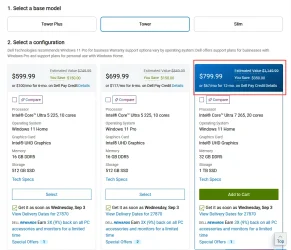
My current Dell 7010 is not upgradeable to windows 11.

Looking for recommendations for a good replacement.
What I have now is barely satisfactory for the graphics aspect of the usage.

Main Usage;
  • Home Business (eBay)
  • Graphics Work (Corel, Illustrator, Photoshop)
Current specifications;
  • Windows 10 Version 22H2 OS Build 19045.6216
  • Device Name DESKTOP-KUKR7NC
  • Processor Intel(R) Core(TM) i5-3570 CPU @ 3.40GHz 3.40 GHz
  • Installed RAM 8.00 GB (7.89 GB usable)
  • Storage 466 GB HDD SAMSUNG HE502HJ, 1.82 TB HDD WDC WD20EZRX-00D8PB0
  • Graphics Card Intel(R) HD Graphics (32 MB)
  • Device ID D13B77DB-7CC5-4466-B968-F27BE742A47C
  • Product ID 00330-54933-69651-AAOEM
  • System Type 64-bit operating system, x64-based processor


Thank You
You might just be surprised at what an extra 8GB of RAM and a discrete graphics card could do for your PC after installing Windows 11 via Rufus. I know some have already mentioned this but you do have a good CPU and unless you're doing really intensive work that requires state-of-the-art equipment purchasing a brand new replacement PC could be unnecessary.

Knowing what I know now about Windows 11 on older PCs and running Win 11 on "non-compatible" systems for going on two years I wouldn't let myself get coerced into purchasing a replacement desk top. You already have high end storage and a reliable CPU. IF your optical drive works so much the better. The thing about investing in a discrete graphics card is that it can be transferred to another unit in the future and should give you at least ten years of good use before it would need to be replaced in most cases. If your PC seems to be giving you lagging issues or seems to be running sluggish the problem is likely the fact that your PC is leaning too heavily on your CPU for graphics.

The choice is yours but if you really have your heart set on getting a new PC I have to say that Dell isn't a bad choice. They're known for good support and I have two Dell desktops in my house right now both running Windows 11 that are much older than your unit. The difference is that they have more memory and both use discrete graphic cards.

I hope this helps.
 

My Computer

System One

  • OS
    WIN 11, WIN 10, WIN 8.1, WIN 7 U, WIN 7 PRO, WIN 7 HOME (32 Bit), LINUX MINT
    Computer type
    PC/Desktop
    Manufacturer/Model
    DIY, ASUS, and DELL
    CPU
    Intel i7 6900K and i9-7960X / AMD 3800X (8 core)
    Motherboard
    ASUS X99E-WS USB 3.1 and ASUS X299 SAGE
    Memory
    128 GB CORSAIR DOMINATOR PLATINUM (B DIE)
    Graphics Card(s)
    NVIDIA 1070 and RTX 3070
    Sound Card
    Crystal Sound (onboard)
    Monitor(s) Displays
    single Samsung 30" 4K and 8" aux monitor
    Screen Resolution
    4K and something equally attrocious. I'll be working on this.
    Hard Drives
    A, B, C, D, E, F, G, H, I, J, K, L, M, N, O, P, Q, R, S, T, U, V, W

    Ports X, Y, and Z are reserved for USB access and removable drives.

    Drive types consist of the following: Various mechanical hard drives bearing the brand names, Seagate, Toshiba, and Western Digital. Various NVMe drives bearing the brand names Kingston, Intel, Silicon Power, Crucial, Western Digital, and Team Group. Various SATA SSDs bearing various different brand names.

    RAID arrays included:

    LSI RAID 10 (WD Velociraptors) 1115.72 GB
    LSI RAID 10 (WD SSDS) 463.80 GB

    INTEL RAID 0 (KINGSTON HYPER X) System 447.14 GB
    INTEL RAID 1 TOSHIBA ENTERPRIZE class Data 2794.52 GB
    INTEL RAID 1 SEAGATE HYBRID 931.51 GB
    PSU
    SEVERAL. I prefer my Corsair Platinum HX1000i but I also like EVGA power supplies
    Case
    ThermalTake Level 10 GT (among others)
    Cooling
    Noctua is my favorite and I use it in my main. I also own various other coolers.
    Keyboard
    all kinds.
    Mouse
    all kinds
    Internet Speed
    360 mbps - 1 gbps (depending)
    Browser
    FIREFOX
    Antivirus
    KASPERSKY (no apologies)
    Other Info
    Gave Dell touch screen with Windows 11 to daughter and got me an OTVOC. Being a PC builder I own many desktop PCs as well. I am a father of five providing PCs, laptops, and tablets for all my family, most of which I have modified, rebuilt, or simply built from scratch. I do not own a cell phone, never have, never will.
I see the OP has 3rd generation Core-i5, 8GB RAM, mechanical hard disk and onboard graphics card. He can improve it, I would first replace the hard disk with SSD and install a discrete graphics card. Even a mid-range one would make a huge difference to the onboard, especially if using hardware acceleration such as CUDA, as the SSD will make to the mechanical disk. It will feel like a new computer! Next step to at least double the RAM. Some time later he can also buy a used 3rd generation Intel Core-i7, but the discrete graphics card will make more noticeable difference.
 

My Computers

System One System Two

  • OS
    Windows 11 Pro 23H2 (5699), 25H2 (8655)
    Computer type
    Laptop
    Manufacturer/Model
    Acer Extensa 5630EZ
    CPU
    Mobile DualCore Intel Core 2 Duo T7250, 2000 MHz
    Motherboard
    Acer Extensa 5630
    Memory
    4GB
    Graphics Card(s)
    Mobile Intel(R) GMA 4500M (Mobile 4 series)
    Sound Card
    Realtek ALC268 @ Intel 82801IB ICH9 - High Definition Audio Controller
    Monitor(s) Displays
    1
    Screen Resolution
    1280x800
    Hard Drives
    Samsung SSD 850 EVO 250GB SATA Device (250 GB, SATA-III)
    Internet Speed
    VDSL 50 Mbps
    Browser
    MICROSOFT EDGE
    Antivirus
    WINDOWS DEFENDER
    Other Info
    Legacy MBR installation, no TPM, no Secure Boot, no WDDM 2.0 graphics drivers, no SSE4.2, cannot get more unsupported ;) This is only my test laptop. I had installed Windows 11 here before upgrading my main PC. For my main PC I use everyday see my 2nd system specs.
  • Operating System
    Windows 11 Pro v25H2 (build 26200.8655)
    Computer type
    PC/Desktop
    Manufacturer/Model
    Custom-built PC
    CPU
    Intel Core-i7 3770 3.40GHz s1155 (3rd generation)
    Motherboard
    Asus P8H61 s1155 ATX
    Memory
    2x Kingston Hyper-X Blu 8GB DDR3-1600
    Graphics card(s)
    GIGABYTE GeForce RTX 3050 WINDFORCE OC V2 6GB (GV-N3050WF2OCV2-6GD)
    Sound Card
    Realtek HD audio (ALC887)
    Monitor(s) Displays
    Sony Bravia KDL-19L4000 19" LCD TV via VGA
    Screen Resolution
    1440x900 32-bit 60Hz
    Hard Drives
    WD Blue SA510 2.5 1000GB SSD as system disk, Western Digital Caviar Purple 4TB SATA III (WD40PURZ) as second
    PSU
    Thermaltake Litepower RGB 550W Full Wired
    Case
    SUPERCASE MIDI-TOWER
    Cooling
    Deepcool Gamma Archer CPU cooler, 1x 8cm fan at the back
    Keyboard
    Mitsumi 101-key PS/2
    Mouse
    Sunnyline OptiEye PS/2
    Internet Speed
    100Mbps
    Browser
    Microsoft Edge, Mozilla Firefox
    Antivirus
    Microsoft Windows Defender
    Other Info
    Legacy BIOS (MBR) installation, no TPM, no Secure Boot, WDDM 3.0 graphics drivers, WEI score 7.4
according to the specs for that PC it has 4x dimm slots for RAM
the CPU maximum RAM capacity is 32GB. so the system can take
4x 8GB DDR3 1600 of ram which would be amply for Windows 11

as stated by @Scannerman using Rufus to make an installable ISO of Windows 11
would enable you to install Windows 11 24H2 and then be able to upgrade to 25H2 when it comes available

best of luck, Steve ..
 

My Computers

System One System Two

  • OS
    Debian 13 KDE .. Windows 11 Home
    Computer type
    PC/Desktop
    Manufacturer/Model
    HP 24" AiO
    CPU
    Ryzen 7 5825u
    Motherboard
    HP
    Memory
    64GB DDR4 3200
    Graphics Card(s)
    Ryzen 7 5825u
    Sound Card
    RealTek
    Monitor(s) Displays
    24" HP AiO
    Screen Resolution
    1920 x 1080 @60 Hz
    Hard Drives
    1TB WD Blue SN580 M2 SSD Partitioned.
    2x 1TB USB HDD External Backup/Storage.
    PSU
    90W external power brick
    Case
    24" All in One
    Cooling
    Default Air Cooling
    Keyboard
    HP WiFi UK extended
    Mouse
    HP WiFi 3 Button
    Internet Speed
    1GB full fibre
    Browser
    Edge & Firefox
    Antivirus
    AVG Internet Security/Windows Defender
    Other Info
    Mainly Open Source Software
  • Operating System
    Ubuntu 22.04.5 LTS
    Computer type
    Laptop
    Manufacturer/Model
    Dell 13" Latitude 2017
    CPU
    i5 7200u
    Motherboard
    Dell
    Memory
    16GB DDR4
    Graphics card(s)
    Intel
    Sound Card
    Intel
    Monitor(s) Displays
    13" Dell Laptop
    Hard Drives
    250GB Crucial 2.5" SSD
    Mouse
    Generic WiFi 3 button
    Internet Speed
    WiFi only
    Browser
    Firefox
    Antivirus
    ClamAV TK
    Other Info
    Mainly Open Source Software
according to the specs for that PC it has 4x dimm slots for RAM
the CPU maximum RAM capacity is 32GB. so the system can take
4x 8GB DDR3 1600 of ram which would be amply for Windows 11

as stated by @Scannerman using Rufus to make an installable ISO of Windows 11
would enable you to install Windows 11 24H2 and then be able to upgrade to 25H2 when it comes available

best of luck, Steve ..
If he cannot upgrade all the components, he can first add a discreet graphics card. It will make a huge difference for photo and video editing when hardware acceleration is used. For example, My Core-i3 could render 6-8 frames in HD per second (software rendering including crop/resize and other filters). My Core-i7 can do 10-15 and if I use nVidia CUDA hardware acceleration, my 1080 could to 150+ frames and my new 3050 can do over 300! Next I would replace the mechanical hard disk with a SATA SSD (more than 10 times faster than an average mechanical disk). Then I would maximize RAM. Then I would replace the Core-i5 with a Core-i7, although the difference will not be too high. It certainly was higher from my Core-i3 to Core-i7. I am not sure if a Xeon CPU would be faster because they don't have some multimedia instructions as the "consumer" models have.
 

My Computers

System One System Two

  • OS
    Windows 11 Pro 23H2 (5699), 25H2 (8655)
    Computer type
    Laptop
    Manufacturer/Model
    Acer Extensa 5630EZ
    CPU
    Mobile DualCore Intel Core 2 Duo T7250, 2000 MHz
    Motherboard
    Acer Extensa 5630
    Memory
    4GB
    Graphics Card(s)
    Mobile Intel(R) GMA 4500M (Mobile 4 series)
    Sound Card
    Realtek ALC268 @ Intel 82801IB ICH9 - High Definition Audio Controller
    Monitor(s) Displays
    1
    Screen Resolution
    1280x800
    Hard Drives
    Samsung SSD 850 EVO 250GB SATA Device (250 GB, SATA-III)
    Internet Speed
    VDSL 50 Mbps
    Browser
    MICROSOFT EDGE
    Antivirus
    WINDOWS DEFENDER
    Other Info
    Legacy MBR installation, no TPM, no Secure Boot, no WDDM 2.0 graphics drivers, no SSE4.2, cannot get more unsupported ;) This is only my test laptop. I had installed Windows 11 here before upgrading my main PC. For my main PC I use everyday see my 2nd system specs.
  • Operating System
    Windows 11 Pro v25H2 (build 26200.8655)
    Computer type
    PC/Desktop
    Manufacturer/Model
    Custom-built PC
    CPU
    Intel Core-i7 3770 3.40GHz s1155 (3rd generation)
    Motherboard
    Asus P8H61 s1155 ATX
    Memory
    2x Kingston Hyper-X Blu 8GB DDR3-1600
    Graphics card(s)
    GIGABYTE GeForce RTX 3050 WINDFORCE OC V2 6GB (GV-N3050WF2OCV2-6GD)
    Sound Card
    Realtek HD audio (ALC887)
    Monitor(s) Displays
    Sony Bravia KDL-19L4000 19" LCD TV via VGA
    Screen Resolution
    1440x900 32-bit 60Hz
    Hard Drives
    WD Blue SA510 2.5 1000GB SSD as system disk, Western Digital Caviar Purple 4TB SATA III (WD40PURZ) as second
    PSU
    Thermaltake Litepower RGB 550W Full Wired
    Case
    SUPERCASE MIDI-TOWER
    Cooling
    Deepcool Gamma Archer CPU cooler, 1x 8cm fan at the back
    Keyboard
    Mitsumi 101-key PS/2
    Mouse
    Sunnyline OptiEye PS/2
    Internet Speed
    100Mbps
    Browser
    Microsoft Edge, Mozilla Firefox
    Antivirus
    Microsoft Windows Defender
    Other Info
    Legacy BIOS (MBR) installation, no TPM, no Secure Boot, WDDM 3.0 graphics drivers, WEI score 7.4
Back
Top Bottom