Solved Need some basic backup advice


A system image will get everything.
 

My Computers My Computers

  • At a glance

    Win 11 Pro 25H2, Build 26200.8655Intel Core i5 1450064GB DDR4GeForce RTX 4060
    OS
    Win 11 Pro 25H2, Build 26200.8655
    Computer type
    PC/Desktop
    Manufacturer/Model
    Home Brew
    CPU
    Intel Core i5 14500
    Motherboard
    Gigabyte B760M G P WIFI
    Memory
    64GB DDR4
    Graphics Card(s)
    GeForce RTX 4060
    Sound Card
    Chipset Realtek
    Monitor(s) Displays
    LG 45" Ultragear, Acer 24" 1080p
    Screen Resolution
    5120x1440, 1920x1080
    Hard Drives
    Crucial P310 2TB 2280 PCIe Gen4 3D NAND NVMe M.2 SSD (O/S)
    Silicon Power 2TB US75 NVMe PCIe Gen4 M.2 2280 SSD (backup)
    Crucial BX500 2TB 3D NAND (2nd backup)
    Seagate 4TB Ironwolf, rotating HDD archive files
    External off-line backup Drives: 2 NVMe 4TB drives in external enclosures
    PSU
    Thermaltake Toughpower GF3 750W
    Case
    LIAN LI LANCOOL 216 E-ATX PC Case
    Cooling
    Lots of fans!
    Keyboard
    Microsoft Comfort Curve 2000
    Mouse
    Logitech G305
    Internet Speed
    Verizon FiOS 1GB
    Browser
    Firefox
    Antivirus
    Malware Bytes & Windows Defender Security
  • At a glance

    Win 11 Pro 25H2, Build 26200.8524Intel Core i5 1440032GB DDR5Intel 700 Embedded GPU
    Operating System
    Win 11 Pro 25H2, Build 26200.8524
    Computer type
    PC/Desktop
    Manufacturer/Model
    Home Brew
    CPU
    Intel Core i5 14400
    Motherboard
    Gigabyte B760M DS3H AX
    Memory
    32GB DDR5
    Graphics card(s)
    Intel 700 Embedded GPU
    Sound Card
    Realtek Embedded
    Monitor(s) Displays
    27" HP 1080p
    Screen Resolution
    1920x1080
    Hard Drives
    Crucial P310 2TB 2280 PCIe Gen4 eD NAND PCIe SSD
    Samsung EVO 990 2TB NVMe Gen4 SSD
    Samsung 2TB SATA SSD
    PSU
    Thermaltake Smart BM3 650W
    Case
    Okinos Micro ATX Case
    Cooling
    Fans
    Keyboard
    Microsoft Comfort Curve 2000
    Mouse
    Logitech G305
    Internet Speed
    Verizon FiOS 1GB
    Browser
    Firefox
    Antivirus
    Malware Bytes & Windows Defender Security
If you did a standard product install (and haven't redirected anything from the installation), your bookmarks/favorites will be on the OS drive (c:).

You can install a disk image on another computer but you will have hardware differences. These differences may need different driver software in order for the different devices to run successfully... and many times you will have licensing issues with some of your licensed software due to the hardware differences.
 

My Computer My Computer

At a glance

Windows 10, Linux MINT (V-guests 7, 11, ZorinOS)Intel Core i7-1070032gB (DDR4)Intel UHD Graphics 630
OS
Windows 10, Linux MINT (V-guests 7, 11, ZorinOS)
Computer type
PC/Desktop
Manufacturer/Model
HP Z2 G5 Workstation
CPU
Intel Core i7-10700
Motherboard
HP Model# 8751
Memory
32gB (DDR4)
Graphics Card(s)
Intel UHD Graphics 630
Sound Card
Realtek basic audio
Monitor(s) Displays
32" (Viewsonic) UHD
Screen Resolution
3840 x 2160
Hard Drives
2-NvME (mainboard), 1-NvME (PCIe), 1-SATA3 SSD
"would my browser bookmarks be part of a system image? Or do I back those up separately?"
Browser Bookmarks/Favourites are part of the system image. An Image contains everything.

What I do is occasionally export Bookmarks as an HTML file to a folder in My Documents. In turn that is manually uploaded to OneDrive. Also the My Documents folder is included in File History to a NAS box on a daily schedule.

"can I restore a disk image from one computer to a different computer?"

Not a good idea as the hardware and drivers maybe very different, thus very messy.
 

My Computer My Computer

At a glance

Windows 11
OS
Windows 11
"Would I mount the disk image onto a drive with Windows already on it? Or would I mount the disk image onto a bare metal drive? Is the disk image bootable? I'm still not quite clear about it."

You need to make a bootable drive which would normally be a USB flash drive. That will contain typically Windows PE and the Imaging App.
You boot up with that USB flash drive then access your image.
That image is then restored to a new Laptop drive, maybe the same drive or whatever.
You can also use my windows 11 install usb :-) To make that, if you don't have one already, you just go to the Microsoft download Windows 11 page and use the "Windows 11 Installation Assistant". You're not actually installing you're just making a usb stick. Two options though - either allow it to burn directly to a USB stick or (my preferred option) have it download the iso to computer, where you can keep it indefinitely, and make your own usb stick from the iso using a program called Rufus.
You then have Windows 11 on usb if you ever want to install it. I have a number of ISO's of different versions now, which can be useful if you ever want to go back a version, because the Windows Installation Assistant only ever gives you the latest version.

So you just boot the Windows 11 usb stick (noting you can also do this with a Windows 10 or even Windows 7 usb stick). But you don't actually install - when it gets to the install page you click (bottom left) "Repair" then troubleshoot - can't remember what comes next but you go through the menu options until you get to "restore a system image". At that point you plug in your external drive with the image (leaving the usb stick in as well), click on restore an image and it scans your external hard drive and finds the image, just click to restore it. When it's finished, it restarts and boots into your installed image.

However some imaging programs let you create a usb to restore. Eg if you use EaseUS for imaging it allows you to create a "rescue disk" which does the same thing - you boot from that and it allows you to find and restore a system image on an external hard drive.
 

My Computers My Computers

  • At a glance

    Windows 11 Home 25H2Core i5-1035G132gb
    OS
    Windows 11 Home 25H2
    Computer type
    Laptop
    Manufacturer/Model
    HP Pavilion 14-ce3606sa
    CPU
    Core i5-1035G1
    Memory
    32gb
    Hard Drives
    Samsung 870 evo sata ssd
    Cooling
    Could be better
    Internet Speed
    50 mbps Starlink
    Browser
    Firefox
    Other Info
    Originally came installed with a 500gb H10 Optane ssd
  • At a glance

    Windows 11 HomeIntel Core i5-1035G116gb
    Operating System
    Windows 11 Home
    Computer type
    Laptop
    Manufacturer/Model
    HP Pavilion ce3606sa
    CPU
    Intel Core i5-1035G1
    Memory
    16gb
    Hard Drives
    Hynix Gold P31 2TB
    Internet Speed
    200mbps Starlink
    Browser
    Firefox
    Antivirus
    Defender
"would my browser bookmarks be part of a system image? Or do I back those up separately?"

As others have said - they are still on your system image. However, if you're also thinking of doing a separate backup of just your files (eg copying and pasting all files and saving them to an external drive, then at the same time:

1) Export bookmarks - this creates an html file you can call bookmarks 16.7.2025 or whatever, and copy and paste that as well. If you click on and open that html file, all your bookmarks are listed in it, as clickable links.
2) I also screenshot my list of installed programs and save copies of those screenshots to the external drive with the copied files also - then you have an easy viewable record of what programs you had installed - if needed.

So two different types of backup

1) System images which includes everything on your drive and restores as it was when saved
2) File backups - which are just files saved to an exernal drive (where they can also be viewed) along with bookmark backups maybe.

For file backups I mainly rely on idrive as mentioned before - which backs up all files daily so they're always up to date. Which can complement having system images which you may not do daily. Although I do have most files backed up to external hard drive as well because some files never change really (eg my music and video folders rarely change and the list of programs rarely changes). So if updating that, I just copy documents, downloads, pictures and desktop, plus exported bookmarks.

I still do images but not as often as some do. If you have any image at all it is better than no image. The image itself will be fine, even if the files on the image are out of date - not updated. You can just reinstall the image, delete all the files, and re-download the files from idrive (or copy them back from an external drive, if it's up to date).

Some people do images daily though. Then that might be all you need. I still like copies of files as well though.

As regards external ssd's or hdd's. You had a great explanation as to the difference earlier. My non-scientific view is - an hdd is less likely to fail (unless you drop it). The couple of times I've used ssd's they didn't last long and just suddenly failed. Of the external hdd drives, I've found:

A number of transcend ones have died on me - not immediately, but more than other makes. I've had two Seagate ones that seem very fast and have been very reliable. I had one 4TB Western Digital one that failed very quickly (very annoying as it was expensive). So I tend to stick to 2TB Seagate drives.
 

My Computers My Computers

  • At a glance

    Windows 11 Home 25H2Core i5-1035G132gb
    OS
    Windows 11 Home 25H2
    Computer type
    Laptop
    Manufacturer/Model
    HP Pavilion 14-ce3606sa
    CPU
    Core i5-1035G1
    Memory
    32gb
    Hard Drives
    Samsung 870 evo sata ssd
    Cooling
    Could be better
    Internet Speed
    50 mbps Starlink
    Browser
    Firefox
    Other Info
    Originally came installed with a 500gb H10 Optane ssd
  • At a glance

    Windows 11 HomeIntel Core i5-1035G116gb
    Operating System
    Windows 11 Home
    Computer type
    Laptop
    Manufacturer/Model
    HP Pavilion ce3606sa
    CPU
    Intel Core i5-1035G1
    Memory
    16gb
    Hard Drives
    Hynix Gold P31 2TB
    Internet Speed
    200mbps Starlink
    Browser
    Firefox
    Antivirus
    Defender
"would my browser bookmarks be part of a system image? Or do I back those up separately?"

As others have said - they are still on your system image. However, if you're also thinking of doing a separate backup of just your files (eg copying and pasting all files and saving them to an external drive, then at the same time:

1) Export bookmarks - this creates an html file you can call bookmarks 16.7.2025 or whatever, and copy and paste that as well. If you click on and open that html file, all your bookmarks are listed in it, as clickable links.
2) I also screenshot my list of installed programs and save copies of those screenshots to the external drive with the copied files also - then you have an easy viewable record of what programs you had installed - if needed.

So two different types of backup

1) System images which includes everything on your drive and restores as it was when saved
2) File backups - which are just files saved to an exernal drive (where they can also be viewed) along with bookmark backups maybe.

For file backups I mainly rely on idrive as mentioned before - which backs up all files daily so they're always up to date. Which can complement having system images which you may not do daily. Although I do have most files backed up to external hard drive as well because some files never change really (eg my music and video folders rarely change and the list of programs rarely changes). So if updating that, I just copy documents, downloads, pictures and desktop, plus exported bookmarks.

I still do images but not as often as some do. If you have any image at all it is better than no image. The image itself will be fine, even if the files on the image are out of date - not updated. You can just reinstall the image, delete all the files, and re-download the files from idrive (or copy them back from an external drive, if it's up to date).

Some people do images daily though. Then that might be all you need. I still like copies of files as well though.

As regards external ssd's or hdd's. You had a great explanation as to the difference earlier. My non-scientific view is - an hdd is less likely to fail (unless you drop it). The couple of times I've used ssd's they didn't last long and just suddenly failed. Of the external hdd drives, I've found:

A number of transcend ones have died on me - not immediately, but more than other makes. I've had two Seagate ones that seem very fast and have been very reliable. I had one 4TB Western Digital one that failed very quickly (very annoying as it was expensive). So I tend to stick to 2TB Seagate drives.

Thanks Hazel.

That's what I am now thinking I should do. Store my disk images on an external HDD drive, with a smaller partition for all my individual files and folders from my directories, so I can access them quickly if needed, rather than extracting and restoring them from an image file. Then I will use syncing software to keep my PC and external drive synced and up to date together at all times. I'll also get a second HDD to put in another drive bay on my external multi-bay enclosure that I will copy my first drive to, and then rotate each one out to an off-site location.

I checked out iDrive and it looks like all what I need. It can back up disk images as well as sync files (it will keep 30 versions which is handy, though I'll probably never need that many). iDrive is also cheaper than Macrium / EaseUs / Aeomi etc. and has several pricing tiers, including free. It also has 24/7 phone support. The only thing I don't like is that iDrive's cloud servers are mostly located in the US and other Five-Eye countries, which makes me a bit nervous. But I think I will try iDrive and see how it goes, since it offers both disk image backup and file syncing.
 

My Computers My Computers

  • At a glance

    Windows 11 Pro. Version 25H2 (build 26200.7462)
    OS
    Windows 11 Pro. Version 25H2 (build 26200.7462)
    Computer type
    Laptop
    Manufacturer/Model
    Lenovo T16 AMD Gen 2
  • At a glance

    Windows 118GBonboard
    Operating System
    Windows 11
    Computer type
    PC/Desktop
    Manufacturer/Model
    Old HTPC custom build (2009)
    Memory
    8GB
    Graphics card(s)
    onboard
I didn't realise it could back up images. The plan I have just backs up files. I can login to the account online and view the files if needed, or download them to any laptop. It has changed my way of working slightly. In that I use the desktop more and delete no longer needed files from the desktop or file them in documents and run a manual backup. This means that any file that has ever been on the desktop is saved in idrive. So I occasionally go into the online account, delete all the desktop files, and then run another manual backup to put the current ones back in idrive. Not entirely necessary but if I ever did have to download everything I'd hate to have a mass of desktop files to sort out!

Hadn't thought about where it was based :-)
 

My Computers My Computers

  • At a glance

    Windows 11 Home 25H2Core i5-1035G132gb
    OS
    Windows 11 Home 25H2
    Computer type
    Laptop
    Manufacturer/Model
    HP Pavilion 14-ce3606sa
    CPU
    Core i5-1035G1
    Memory
    32gb
    Hard Drives
    Samsung 870 evo sata ssd
    Cooling
    Could be better
    Internet Speed
    50 mbps Starlink
    Browser
    Firefox
    Other Info
    Originally came installed with a 500gb H10 Optane ssd
  • At a glance

    Windows 11 HomeIntel Core i5-1035G116gb
    Operating System
    Windows 11 Home
    Computer type
    Laptop
    Manufacturer/Model
    HP Pavilion ce3606sa
    CPU
    Intel Core i5-1035G1
    Memory
    16gb
    Hard Drives
    Hynix Gold P31 2TB
    Internet Speed
    200mbps Starlink
    Browser
    Firefox
    Antivirus
    Defender
I am assuming this is a disk image feature (and not cloning)?


My Computers My Computers

  • At a glance

    Windows 11 Pro. Version 25H2 (build 26200.7462)
    OS
    Windows 11 Pro. Version 25H2 (build 26200.7462)
    Computer type
    Laptop
    Manufacturer/Model
    Lenovo T16 AMD Gen 2
  • At a glance

    Windows 118GBonboard
    Operating System
    Windows 11
    Computer type
    PC/Desktop
    Manufacturer/Model
    Old HTPC custom build (2009)
    Memory
    8GB
    Graphics card(s)
    onboard
I am assuming this is a disk image feature (and not cloning)?

It sounds like it - it says entire machine backup including operating system. That wasn't available when I took my plan out. They have a separate plan for cloning so this sounds like just what it is - a full back up image (noting it says you need bitlocker turned off, as you would need to to save and restore any image).

This is the file backup option


Clone backup seems to be a different option


My Computers My Computers

  • At a glance

    Windows 11 Home 25H2Core i5-1035G132gb
    OS
    Windows 11 Home 25H2
    Computer type
    Laptop
    Manufacturer/Model
    HP Pavilion 14-ce3606sa
    CPU
    Core i5-1035G1
    Memory
    32gb
    Hard Drives
    Samsung 870 evo sata ssd
    Cooling
    Could be better
    Internet Speed
    50 mbps Starlink
    Browser
    Firefox
    Other Info
    Originally came installed with a 500gb H10 Optane ssd
  • At a glance

    Windows 11 HomeIntel Core i5-1035G116gb
    Operating System
    Windows 11 Home
    Computer type
    Laptop
    Manufacturer/Model
    HP Pavilion ce3606sa
    CPU
    Intel Core i5-1035G1
    Memory
    16gb
    Hard Drives
    Hynix Gold P31 2TB
    Internet Speed
    200mbps Starlink
    Browser
    Firefox
    Antivirus
    Defender
Can't see the pricing for full machine back up though.

I have the idrive personal option on this page, which is just file backups (but from multiple devices).


My Computers My Computers

  • At a glance

    Windows 11 Home 25H2Core i5-1035G132gb
    OS
    Windows 11 Home 25H2
    Computer type
    Laptop
    Manufacturer/Model
    HP Pavilion 14-ce3606sa
    CPU
    Core i5-1035G1
    Memory
    32gb
    Hard Drives
    Samsung 870 evo sata ssd
    Cooling
    Could be better
    Internet Speed
    50 mbps Starlink
    Browser
    Firefox
    Other Info
    Originally came installed with a 500gb H10 Optane ssd
  • At a glance

    Windows 11 HomeIntel Core i5-1035G116gb
    Operating System
    Windows 11 Home
    Computer type
    Laptop
    Manufacturer/Model
    HP Pavilion ce3606sa
    CPU
    Intel Core i5-1035G1
    Memory
    16gb
    Hard Drives
    Hynix Gold P31 2TB
    Internet Speed
    200mbps Starlink
    Browser
    Firefox
    Antivirus
    Defender
The features listed to the left of the Personal Plan include disk clone -- but also says entire drive backup as an image file. So a bit confusing.,

Maybe you have that feature, or can get that feature if you want it by contacting them.
 

My Computers My Computers

  • At a glance

    Windows 11 Pro. Version 25H2 (build 26200.7462)
    OS
    Windows 11 Pro. Version 25H2 (build 26200.7462)
    Computer type
    Laptop
    Manufacturer/Model
    Lenovo T16 AMD Gen 2
  • At a glance

    Windows 118GBonboard
    Operating System
    Windows 11
    Computer type
    PC/Desktop
    Manufacturer/Model
    Old HTPC custom build (2009)
    Memory
    8GB
    Graphics card(s)
    onboard
I don't know unfortunately - and yes probably best to contact them and ask.
 

My Computers My Computers

  • At a glance

    Windows 11 Home 25H2Core i5-1035G132gb
    OS
    Windows 11 Home 25H2
    Computer type
    Laptop
    Manufacturer/Model
    HP Pavilion 14-ce3606sa
    CPU
    Core i5-1035G1
    Memory
    32gb
    Hard Drives
    Samsung 870 evo sata ssd
    Cooling
    Could be better
    Internet Speed
    50 mbps Starlink
    Browser
    Firefox
    Other Info
    Originally came installed with a 500gb H10 Optane ssd
  • At a glance

    Windows 11 HomeIntel Core i5-1035G116gb
    Operating System
    Windows 11 Home
    Computer type
    Laptop
    Manufacturer/Model
    HP Pavilion ce3606sa
    CPU
    Intel Core i5-1035G1
    Memory
    16gb
    Hard Drives
    Hynix Gold P31 2TB
    Internet Speed
    200mbps Starlink
    Browser
    Firefox
    Antivirus
    Defender
I try to keep the backup routine as simple as possible.

As primary desktop computer I have two internal M.2 2280 disks. Kingston Fury Renegade 1TB; OS installation + private data. Backup disk and storage; Kingston Fury Renegade 2TB.

I’m using a powershell script with Robocopy lines as a schedule task. For example;
Robocopy.exe C:\Drivers\ D:\Drivers\ /mir /LOG+: D:\Backup\drivers_backup_log.txt
It runs daily.
Backed up the schedule tasks as well.

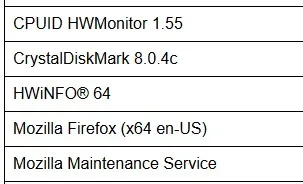
As for the installed programs I get them from the registry and export them to a structured html file with a powershell script in schedule tasks. In that way I can see which programs I had installed and can manually install those if I need to reinstall the OS. Runs as weekly schedule task with powershell.

programs.webp

As a offline disk I currently using a WD Elements Portable - 1TB. I manually copy data to that drive when I need to update. Just to have some data if both internal disks breaks down.
Maybe I will automate this with the serial number from the external disk, so I just have to connect it, but it’s still pretty old school.

For my powershell scripts I have another script that zips them and spread it on the other disk as well as on my Google drive storage. I’m using Google drive with 2TB storage (upgraded).
Think it very usable, primarily used for my pictures. Manually uploaded images and created albums and I can edit it from the mobile as well. It’s good for sorting and searching. All my pictures from my mobile syncs to my google drive storage also. I can also copy other data that I want backed up to google drive storage. I don’t know if I want all of my data at google but some of it at least. I use google chrome signed in and backed up data there.

My WD elements portable disk is an old 2,5” drive and it’s getting slow and I want som faster ssd disk (Kingston XS1000 2TB for example), I think I will upgrade soon. Maybe also change the usb drive to a NAS (Synology DiskStation DS124) when I got some good space for it.

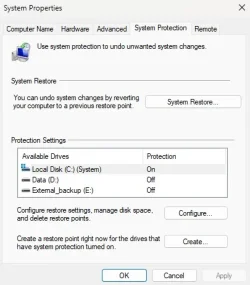
System restore in Windows 11 is activated but I have never used it.

system-recovery.webp

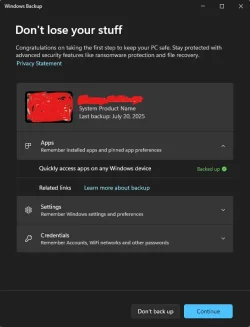
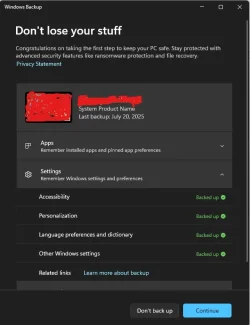
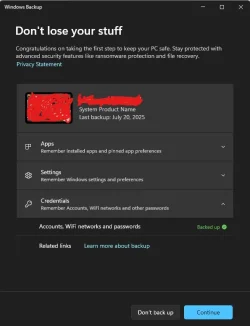
I noticed the built in backup feature in windows 11, I haven’t tried it before but it seems to backup apps, settings and credentials?

backup1.webp
backup2.webp
backup3.webp
 

My Computer My Computer

At a glance

Windows 11Intel Core i7-13700Corsair VENGEANCE DDR5 32GBMSI GeForce RTX 5070 12G VENTUS 2X OC
OS
Windows 11
Computer type
PC/Desktop
Manufacturer/Model
Asus
CPU
Intel Core i7-13700
Motherboard
ASUS TUF GAMING B760-PLUS WIFI
Memory
Corsair VENGEANCE DDR5 32GB
Graphics Card(s)
MSI GeForce RTX 5070 12G VENTUS 2X OC
Monitor(s) Displays
Samsung LS32AG504
Hard Drives
Kingston Fury Renegade M.2 2TB SSD
PSU
Corsair RM850X 2021 / 850W / 80+ Gold
Browser
Chrome
Antivirus
Defender

Latest Support Threads

Back
Top Bottom