Need To Share Folder Contents In Drive Connected To The Router, To Household


With Win11 heightened security, you will need to assign a credential to the drive using the router settings, then map the drive in each computer and create a credential in each computer that corresponds to that drives credentials.
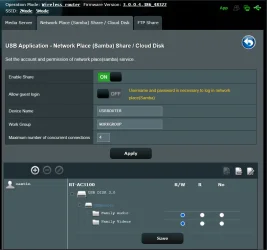
I read somewhere that I would need to create a profile for the USB "Server" to be able to have get USB accessible. I did that as shown in the attached image. When I click on the Networks in File Explorer, it sends me to log into my router, but it asks for the router's credentials not the USB Server's.
 

My Computers

System One System Two

  • OS
    Windows 11 Pro 64-bit / 24H2 / Build 26100.6584
    Computer type
    PC/Desktop
    Manufacturer/Model
    Dell XPS 8960
    CPU
    Intel(R) Core(TM) i7-13700, 16 Core(s)
    Motherboard
    Dell Inc. Base Board.
    Memory
    Total: 64.00 GB
    Graphics Card(s)
    NVIDIA GeForce RTX 4060 Ti
    Sound Card
    Realtek Audio & Integrated NVIDIA High Definition Audio
    Monitor(s) Displays
    Three Dell Monitors
    Screen Resolution
    1920 x 1080
    Hard Drives
    1TB ATA
    1TB ATA
    2TB ATA
    2TB ATA
    Keyboard
    Dell Keyboard
    Mouse
    Wireless Mouse
    Internet Speed
    935 Mbs (Down) 31 Mbs (Up)
    Browser
    Google Chrome. Firefox. Opera.
    Antivirus
    Windows Defender
    Other Info
    TP-Link Gigabit PCI Express Adapter (Ethernet 802.3)
    Sophos TAP Adapter Provider (Ethernet 802.3)
  • Operating System
    Microsoft Windows 11 Home 64-bit. 22631 Multiprocessor Free
    Computer type
    Laptop
    Manufacturer/Model
    Dell Inspiron 15-3530
    CPU
    13th Gen Intel(R) Core(TM) i7-1355U
    Motherboard
    Dell Inc. 0122F5
    Memory
    Total Memory: 16.00 GB Usable Memory: 15.69 GB
    Graphics card(s)
    Intel(R) Iris(R) Xe Graphics
    Sound Card
    (1) Intel® Smart Sound Technology for Bluetooth® Audio (2) Intel® Smart Sound Technology for USB Audio (3) Realtek Audio
    Monitor(s) Displays
    Integrated
    Screen Resolution
    1920 x 1080
    Hard Drives
    NVMe PC SN740 NVMe WD 512GB
    PSU
    Integrated
    Keyboard
    Integrated
    Mouse
    Integrated
    Internet Speed
    143 Mbs Down / 43 Mbs Up
    Browser
    Google Chrome . Firefox
    Antivirus
    Windows Defender
UPDATE

Dell Laptop
laptop (Windows 11 Home / v.24H2 / b.26100.6584)
Dell Desktop
- Windows 11 Pro / v.24H2 / b.26100.6584)

Windows File Sharing is Enabled on both the laptop and the desktop.

My ASUS RT-AC3100 router only supports NTSF, FAT & HFS.
I formatted the USB to NTFS.

ASUS Router
- Configuration of the ASUS on the laptop (Windows 11 Home / v.24H2 / b.26100.6584)
- Allowed Guest Login is On
In Windows Servers Center
- Allow Guest Login to ON
In Local Group Policy Editor
- Enabled Insecure Guest Login
Media Servers
- Cannot copy to connected USBRouter
Samba
- Created a Samba account and password
Restarted the PC

After configuration, I can access the connected USB on both the laptop and the desktop. However, I do not have permission into it. When I copy a file, the PASTE function is grayed out. Configuring the ASUS router in a Windows 11 Home computer should not be the issue, right?

I have not checked yet if the router connected USB drive can be accessed by Apple devices.
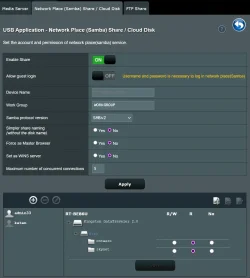
You need to set read/write permissions for users on the samba page on your Asus router, make sure you have a Dot set in the part that says R/W, R, or No...
(currently you have no permissions set) looking at your asus samba page

R/W will give full access, R is read only, No is no access do this for all users you add like so then click save...

Screenshot 2025-10-04 204600.webp
 

My Computer

System One

  • OS
    Windows 11
    Computer type
    PC/Desktop
    CPU
    Ryzen 9950X
    Motherboard
    Asus Crosshair X870E Hero
    Memory
    Gskill DDR5 8000
    Graphics Card(s)
    Msi Suprim X 4090
    Sound Card
    Realtek 4082
    Monitor(s) Displays
    Samsung Odyssey G9 Neo 57"
    Screen Resolution
    7680 x 2160p
    Hard Drives
    Intel Optane 118gb, Samsung 860 evo 2tb, Samsung 860 evo 1tb, Samsung 870 evo 4tb x2,Samsung 980 2tb,Lexar NM790 4tb, Adata SX8200 2tb x2
    PSU
    Corsair 1500w
    Case
    Cosair 7000x
    Cooling
    lots of water
    Keyboard
    Corsair Strafe RGB MKII
    Mouse
    Corsair Sabre
    Internet Speed
    crapola
    Browser
    Chrome
    Antivirus
    Miscrosoft Defender
Yes, you can either use the admin account (of the router) to login, or you can define a new account. Similarly when connecting to a shared folder from another computer you must specify a specific account on the HOST, not on the other computer, and connect. This is achieved by typing the remote computer network name or IP and then the user name, such as host_name\user_name in the user field.
 

My Computers

System One System Two

  • OS
    Windows 11 Pro 23H2 (5699), 25H2 (8457)
    Computer type
    Laptop
    Manufacturer/Model
    Acer Extensa 5630EZ
    CPU
    Mobile DualCore Intel Core 2 Duo T7250, 2000 MHz
    Motherboard
    Acer Extensa 5630
    Memory
    4GB
    Graphics Card(s)
    Mobile Intel(R) GMA 4500M (Mobile 4 series)
    Sound Card
    Realtek ALC268 @ Intel 82801IB ICH9 - High Definition Audio Controller
    Monitor(s) Displays
    1
    Screen Resolution
    1280x800
    Hard Drives
    Samsung SSD 850 EVO 250GB SATA Device (250 GB, SATA-III)
    Internet Speed
    VDSL 50 Mbps
    Browser
    MICROSOFT EDGE
    Antivirus
    WINDOWS DEFENDER
    Other Info
    Legacy MBR installation, no TPM, no Secure Boot, no WDDM 2.0 graphics drivers, no SSE4.2, cannot get more unsupported ;) This is only my test laptop. I had installed Windows 11 here before upgrading my main PC. For my main PC I use everyday see my 2nd system specs.
  • Operating System
    Windows 11 Pro v25H2 (build 26200.8457)
    Computer type
    PC/Desktop
    Manufacturer/Model
    Custom-built PC
    CPU
    Intel Core-i7 3770 3.40GHz s1155 (3rd generation)
    Motherboard
    Asus P8H61 s1155 ATX
    Memory
    2x Kingston Hyper-X Blu 8GB DDR3-1600
    Graphics card(s)
    GIGABYTE GeForce RTX 3050 WINDFORCE OC V2 6GB (GV-N3050WF2OCV2-6GD)
    Sound Card
    Realtek HD audio (ALC887)
    Monitor(s) Displays
    Sony Bravia KDL-19L4000 19" LCD TV via VGA
    Screen Resolution
    1440x900 32-bit 60Hz
    Hard Drives
    WD Blue SA510 2.5 1000GB SSD as system disk, Western Digital Caviar Purple 4TB SATA III (WD40PURZ) as second
    PSU
    Thermaltake Litepower RGB 550W Full Wired
    Case
    SUPERCASE MIDI-TOWER
    Cooling
    Deepcool Gamma Archer CPU cooler, 1x 8cm fan at the back
    Keyboard
    Mitsumi 101-key PS/2
    Mouse
    Sunnyline OptiEye PS/2
    Internet Speed
    100Mbps
    Browser
    Microsoft Edge, Mozilla Firefox
    Antivirus
    Microsoft Windows Defender
    Other Info
    Legacy BIOS (MBR) installation, no TPM, no Secure Boot, WDDM 3.0 graphics drivers, WEI score 7.4
Would be easier to just create a folder on my main PC and share that folder, or even stick a USB drive in one of the so many USB ports. The only thing would be that, the folder would not be able to be accessed when my PC is at sleep or shut off.

I think I should visit the ASUS forum and see what I can find.

Cheers y'all !!!
It is not necessary to share a specific folder. You can connect the USB disk and share the whole disk, so you can access all folders. I have also shared my BD-R drive so I can read CDs and DVDs from a remote computer without one. I can even use the shared drive to play movies if I map it to a drive letter!
 

My Computers

System One System Two

  • OS
    Windows 11 Pro 23H2 (5699), 25H2 (8457)
    Computer type
    Laptop
    Manufacturer/Model
    Acer Extensa 5630EZ
    CPU
    Mobile DualCore Intel Core 2 Duo T7250, 2000 MHz
    Motherboard
    Acer Extensa 5630
    Memory
    4GB
    Graphics Card(s)
    Mobile Intel(R) GMA 4500M (Mobile 4 series)
    Sound Card
    Realtek ALC268 @ Intel 82801IB ICH9 - High Definition Audio Controller
    Monitor(s) Displays
    1
    Screen Resolution
    1280x800
    Hard Drives
    Samsung SSD 850 EVO 250GB SATA Device (250 GB, SATA-III)
    Internet Speed
    VDSL 50 Mbps
    Browser
    MICROSOFT EDGE
    Antivirus
    WINDOWS DEFENDER
    Other Info
    Legacy MBR installation, no TPM, no Secure Boot, no WDDM 2.0 graphics drivers, no SSE4.2, cannot get more unsupported ;) This is only my test laptop. I had installed Windows 11 here before upgrading my main PC. For my main PC I use everyday see my 2nd system specs.
  • Operating System
    Windows 11 Pro v25H2 (build 26200.8457)
    Computer type
    PC/Desktop
    Manufacturer/Model
    Custom-built PC
    CPU
    Intel Core-i7 3770 3.40GHz s1155 (3rd generation)
    Motherboard
    Asus P8H61 s1155 ATX
    Memory
    2x Kingston Hyper-X Blu 8GB DDR3-1600
    Graphics card(s)
    GIGABYTE GeForce RTX 3050 WINDFORCE OC V2 6GB (GV-N3050WF2OCV2-6GD)
    Sound Card
    Realtek HD audio (ALC887)
    Monitor(s) Displays
    Sony Bravia KDL-19L4000 19" LCD TV via VGA
    Screen Resolution
    1440x900 32-bit 60Hz
    Hard Drives
    WD Blue SA510 2.5 1000GB SSD as system disk, Western Digital Caviar Purple 4TB SATA III (WD40PURZ) as second
    PSU
    Thermaltake Litepower RGB 550W Full Wired
    Case
    SUPERCASE MIDI-TOWER
    Cooling
    Deepcool Gamma Archer CPU cooler, 1x 8cm fan at the back
    Keyboard
    Mitsumi 101-key PS/2
    Mouse
    Sunnyline OptiEye PS/2
    Internet Speed
    100Mbps
    Browser
    Microsoft Edge, Mozilla Firefox
    Antivirus
    Microsoft Windows Defender
    Other Info
    Legacy BIOS (MBR) installation, no TPM, no Secure Boot, WDDM 3.0 graphics drivers, WEI score 7.4
You need to set read/write permissions for users on the samba page on your Asus router, make sure you have a Dot set in the part that says R/W, R, or No...
(currently you have no permissions set) looking at your asus samba page

R/W will give full access, R is read only, No is no access do this for all users you add like so then click save...

View attachment 147701
I was able to enable the R/W buttons. However, when I went back, the blue highlights were gone. I tried all I could to enable both again, the buttons remain blank. The enabled buttons don't stick, which means, permission is not granted.
 

Attachments

  • RouterUSB07.webp
    RouterUSB07.webp
    50.6 KB · Views: 2

My Computers

System One System Two

  • OS
    Windows 11 Pro 64-bit / 24H2 / Build 26100.6584
    Computer type
    PC/Desktop
    Manufacturer/Model
    Dell XPS 8960
    CPU
    Intel(R) Core(TM) i7-13700, 16 Core(s)
    Motherboard
    Dell Inc. Base Board.
    Memory
    Total: 64.00 GB
    Graphics Card(s)
    NVIDIA GeForce RTX 4060 Ti
    Sound Card
    Realtek Audio & Integrated NVIDIA High Definition Audio
    Monitor(s) Displays
    Three Dell Monitors
    Screen Resolution
    1920 x 1080
    Hard Drives
    1TB ATA
    1TB ATA
    2TB ATA
    2TB ATA
    Keyboard
    Dell Keyboard
    Mouse
    Wireless Mouse
    Internet Speed
    935 Mbs (Down) 31 Mbs (Up)
    Browser
    Google Chrome. Firefox. Opera.
    Antivirus
    Windows Defender
    Other Info
    TP-Link Gigabit PCI Express Adapter (Ethernet 802.3)
    Sophos TAP Adapter Provider (Ethernet 802.3)
  • Operating System
    Microsoft Windows 11 Home 64-bit. 22631 Multiprocessor Free
    Computer type
    Laptop
    Manufacturer/Model
    Dell Inspiron 15-3530
    CPU
    13th Gen Intel(R) Core(TM) i7-1355U
    Motherboard
    Dell Inc. 0122F5
    Memory
    Total Memory: 16.00 GB Usable Memory: 15.69 GB
    Graphics card(s)
    Intel(R) Iris(R) Xe Graphics
    Sound Card
    (1) Intel® Smart Sound Technology for Bluetooth® Audio (2) Intel® Smart Sound Technology for USB Audio (3) Realtek Audio
    Monitor(s) Displays
    Integrated
    Screen Resolution
    1920 x 1080
    Hard Drives
    NVMe PC SN740 NVMe WD 512GB
    PSU
    Integrated
    Keyboard
    Integrated
    Mouse
    Integrated
    Internet Speed
    143 Mbs Down / 43 Mbs Up
    Browser
    Google Chrome . Firefox
    Antivirus
    Windows Defender
I dont use samba on my router, Let me have a try on my asus rt-be86u and will get back to you
 

My Computer

System One

  • OS
    Windows 11
    Computer type
    PC/Desktop
    CPU
    Ryzen 9950X
    Motherboard
    Asus Crosshair X870E Hero
    Memory
    Gskill DDR5 8000
    Graphics Card(s)
    Msi Suprim X 4090
    Sound Card
    Realtek 4082
    Monitor(s) Displays
    Samsung Odyssey G9 Neo 57"
    Screen Resolution
    7680 x 2160p
    Hard Drives
    Intel Optane 118gb, Samsung 860 evo 2tb, Samsung 860 evo 1tb, Samsung 870 evo 4tb x2,Samsung 980 2tb,Lexar NM790 4tb, Adata SX8200 2tb x2
    PSU
    Corsair 1500w
    Case
    Cosair 7000x
    Cooling
    lots of water
    Keyboard
    Corsair Strafe RGB MKII
    Mouse
    Corsair Sabre
    Internet Speed
    crapola
    Browser
    Chrome
    Antivirus
    Miscrosoft Defender
working ok for me, but mind you I'm on Asuswrt-merlin, could you try removing the user and re-adding this and see if you can set and save the permissions...
 

Attachments

  • Screenshot 2025-10-05 101554.webp
    Screenshot 2025-10-05 101554.webp
    66.8 KB · Views: 1

My Computer

System One

  • OS
    Windows 11
    Computer type
    PC/Desktop
    CPU
    Ryzen 9950X
    Motherboard
    Asus Crosshair X870E Hero
    Memory
    Gskill DDR5 8000
    Graphics Card(s)
    Msi Suprim X 4090
    Sound Card
    Realtek 4082
    Monitor(s) Displays
    Samsung Odyssey G9 Neo 57"
    Screen Resolution
    7680 x 2160p
    Hard Drives
    Intel Optane 118gb, Samsung 860 evo 2tb, Samsung 860 evo 1tb, Samsung 870 evo 4tb x2,Samsung 980 2tb,Lexar NM790 4tb, Adata SX8200 2tb x2
    PSU
    Corsair 1500w
    Case
    Cosair 7000x
    Cooling
    lots of water
    Keyboard
    Corsair Strafe RGB MKII
    Mouse
    Corsair Sabre
    Internet Speed
    crapola
    Browser
    Chrome
    Antivirus
    Miscrosoft Defender

My Computer

System One

  • OS
    Windows XP,11 Linux Fedora Rawhide pre-release 45
    Computer type
    PC/Desktop
    CPU
    2 X Intel i7
    Screen Resolution
    4KUHD X 2
working ok for me, but mind you I'm on Asuswrt-merlin, could you try removing the user and re-adding this and see if you can set and save the permissions...
I removed the User profile and recreated a new one. With my User profile, I can only select either of the R/W, R, No.
The Router profile was able to grant permission, but when I logged back in to the router, the permission went away.

You are on "Asuswrt-merlin". I Googled to see it's an alternative firmware. Should I download and try it?
 

My Computers

System One System Two

  • OS
    Windows 11 Pro 64-bit / 24H2 / Build 26100.6584
    Computer type
    PC/Desktop
    Manufacturer/Model
    Dell XPS 8960
    CPU
    Intel(R) Core(TM) i7-13700, 16 Core(s)
    Motherboard
    Dell Inc. Base Board.
    Memory
    Total: 64.00 GB
    Graphics Card(s)
    NVIDIA GeForce RTX 4060 Ti
    Sound Card
    Realtek Audio & Integrated NVIDIA High Definition Audio
    Monitor(s) Displays
    Three Dell Monitors
    Screen Resolution
    1920 x 1080
    Hard Drives
    1TB ATA
    1TB ATA
    2TB ATA
    2TB ATA
    Keyboard
    Dell Keyboard
    Mouse
    Wireless Mouse
    Internet Speed
    935 Mbs (Down) 31 Mbs (Up)
    Browser
    Google Chrome. Firefox. Opera.
    Antivirus
    Windows Defender
    Other Info
    TP-Link Gigabit PCI Express Adapter (Ethernet 802.3)
    Sophos TAP Adapter Provider (Ethernet 802.3)
  • Operating System
    Microsoft Windows 11 Home 64-bit. 22631 Multiprocessor Free
    Computer type
    Laptop
    Manufacturer/Model
    Dell Inspiron 15-3530
    CPU
    13th Gen Intel(R) Core(TM) i7-1355U
    Motherboard
    Dell Inc. 0122F5
    Memory
    Total Memory: 16.00 GB Usable Memory: 15.69 GB
    Graphics card(s)
    Intel(R) Iris(R) Xe Graphics
    Sound Card
    (1) Intel® Smart Sound Technology for Bluetooth® Audio (2) Intel® Smart Sound Technology for USB Audio (3) Realtek Audio
    Monitor(s) Displays
    Integrated
    Screen Resolution
    1920 x 1080
    Hard Drives
    NVMe PC SN740 NVMe WD 512GB
    PSU
    Integrated
    Keyboard
    Integrated
    Mouse
    Integrated
    Internet Speed
    143 Mbs Down / 43 Mbs Up
    Browser
    Google Chrome . Firefox
    Antivirus
    Windows Defender
I removed the User profile and recreated a new one. With my User profile, I can only select either of the R/W, R, No.
The Router profile was able to grant permission, but when I logged back in to the router, the permission went away.

You are on "Asuswrt-merlin". I Googled to see it's an alternative firmware. Should I download and try it?
You could try it, you have nothing to loose as you can always flash back to the stock firmware,

However the only caveat is that the ac3100 is now end of life, so the last merlin firmware is from 17/11/24 ver 386.14.2

Regards
 

My Computer

System One

  • OS
    Windows 11
    Computer type
    PC/Desktop
    CPU
    Ryzen 9950X
    Motherboard
    Asus Crosshair X870E Hero
    Memory
    Gskill DDR5 8000
    Graphics Card(s)
    Msi Suprim X 4090
    Sound Card
    Realtek 4082
    Monitor(s) Displays
    Samsung Odyssey G9 Neo 57"
    Screen Resolution
    7680 x 2160p
    Hard Drives
    Intel Optane 118gb, Samsung 860 evo 2tb, Samsung 860 evo 1tb, Samsung 870 evo 4tb x2,Samsung 980 2tb,Lexar NM790 4tb, Adata SX8200 2tb x2
    PSU
    Corsair 1500w
    Case
    Cosair 7000x
    Cooling
    lots of water
    Keyboard
    Corsair Strafe RGB MKII
    Mouse
    Corsair Sabre
    Internet Speed
    crapola
    Browser
    Chrome
    Antivirus
    Miscrosoft Defender
Back
Top Bottom