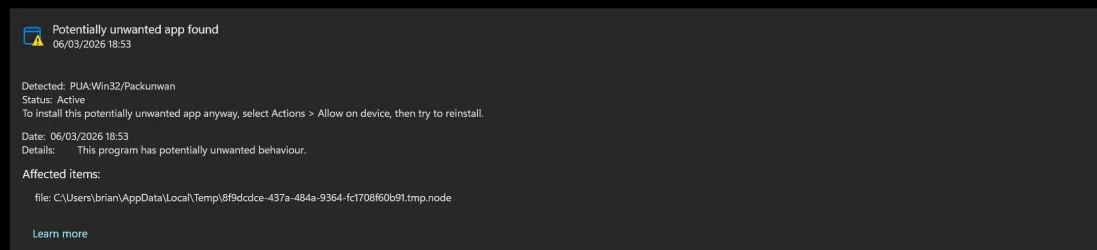
Nero Start - Defender showing a PUP when launching


BrianInEngland

Well-known member
Pro User
VIP
Local time
3:47 PM
Posts
3,098
OS
Windows 11 Pro 25H2 (RP channel)
I've used Nero software for years, and pay an annual sub for Nero 365.
Nero Start launcher app last updated on 10th Feb, but since today I've been getting a security warning when launching the app

A .NODE file is created in the user temp folders which Defender flags as a PUA/PUP

Doing a folder search the earliest one is dated 23rd Feb. The security warning only started today every time I launch Nero Start.

Launching Nero apps manually from their own shortcuts doesn't flag anything in Defender

Checked another PC, same problem.

Nero Start will launch and run even if I use Defender to remove the file
 

Attachments

  • Screenshot 2026-03-06 185334.webp
    Screenshot 2026-03-06 185334.webp
    20 KB · Views: 1
  • Screenshot 2026-03-06 185401.webp
    Screenshot 2026-03-06 185401.webp
    25.7 KB · Views: 1
  • Screenshot 2026-03-06 185748.webp
    Screenshot 2026-03-06 185748.webp
    19.6 KB · Views: 1

My Computer

System One

  • OS
    Windows 11 Pro 25H2 (RP channel)
    Computer type
    PC/Desktop
    Manufacturer/Model
    MSI
    CPU
    AMD Ryzen 7 9800X3D 8-core
    Motherboard
    MEG X870E Godlike
    Memory
    64GB Corsair Titanium 6000/CL30
    Graphics Card(s)
    MSI Suprim 5080 SOC
    Sound Card
    Soundblaster AE-9
    Monitor(s) Displays
    ASUS TUF Gaming VG289Q
    Screen Resolution
    3840x2160
    Hard Drives
    Samsung 9100 Pro 4TB (gen 5 x4, system drive/games)
    Samsung 990 Pro 2TB
    Samsung 980 Pro 2TB
    Samsung 870 Evo 4TB
    Samsung 870 Evo 2TB
    Samsung T9 4TB
    PSU
    Seasonic PX-2200
    Case
    Bequiet! Dark Base Pro 901
    Cooling
    Noctua NH-D15S Chromax black
    Keyboard
    Logitech G915 X (wired)
    Mouse
    Logitech G903 with PowerPlay charger
    Internet Speed
    900Mb/sec
    Browser
    Microsoft Edge
    Antivirus
    Windows Defender
I've used Nero software for years, and pay an annual sub for Nero 365.
Nero Start launcher app last updated on 10th Feb, but since today I've been getting a security warning when launching the app

A .NODE file is created in the user temp folders which Defender flags as a PUA/PUP

Doing a folder search the earliest one is dated 23rd Feb. The security warning only started today every time I launch Nero Start.

Launching Nero apps manually from their own shortcuts doesn't flag anything in Defender

Checked another PC, same problem.

Nero Start will launch and run even if I use Defender to remove the file


Use REVO to completely remove NERO, which is bloatware, and use this instead...


My Computers

System One System Two

  • OS
    Win 11 Home ♦♦♦26200.8457 ♦♦♦♦♦♦♦25H2
    Computer type
    PC/Desktop
    Manufacturer/Model
    Built by Ghot® [May 2020]
    CPU
    AMD Ryzen 7 3700X
    Motherboard
    Asus Pro WS X570-ACE (BIOS 5302)
    Memory
    G.Skill (F4-3200C14D-16GTZKW)
    Graphics Card(s)
    EVGA RTX 2070 (08G-P4-2171-KR)
    Sound Card
    Realtek ALC1220P / ALC S1220A
    Monitor(s) Displays
    Dell U3011 30"
    Screen Resolution
    2560 x 1600
    Hard Drives
    2x Samsung 860 EVO 500GB,
    WD 4TB Black FZBX - SATA III,
    WD 8TB Black FZBX - SATA III,
    DRW-24B1ST CD/DVD Burner
    PSU
    PC Power & Cooling 750W Quad EPS12V
    Case
    Cooler Master ATCS 840 Tower
    Cooling
    CM Hyper 212 EVO (push/pull)
    Keyboard
    Ducky DK9008 Shine II Blue LED
    Mouse
    Logitech Optical M-100
    Internet Speed
    300/300
    Browser
    Firefox (latest)
    Antivirus
    Bitdefender Total Security
    Other Info
    Speakers: Klipsch Pro Media 2.1
  • Operating System
    Windows XP Pro 32bit w/SP3
    Computer type
    PC/Desktop
    Manufacturer/Model
    Built by Ghot® (not in use)
    CPU
    AMD Athlon 64 X2 5000+ (OC'd @ 3.2Ghz)
    Motherboard
    ASUS M2N32-SLI Deluxe Wireless Edition
    Memory
    TWIN2X2048-6400C4DHX (2 x 1GB, DDR2 800)
    Graphics card(s)
    EVGA 256-P2-N758-TR GeForce 8600GT SSC
    Sound Card
    Onboard
    Monitor(s) Displays
    ViewSonic G90FB Black 19" Professional (CRT)
    Screen Resolution
    up to 2048 x 1536
    Hard Drives
    WD 36GB 10,000rpm Raptor SATA
    Seagate 80GB 7200rpm SATA
    Lite-On LTR-52246S CD/RW
    Lite-On LH-18A1P CD/DVD Burner
    PSU
    PC Power & Cooling Silencer 750 Quad EPS12V
    Case
    Generic Beige case, 80mm fans
    Cooling
    ZALMAN 9500A 92mm CPU Cooler
    Keyboard
    Logitech Classic Keybooard 200
    Mouse
    Logitech Optical M-BT96a
    Internet Speed
    300/300
    Browser
    Firefox 3.x ??
    Antivirus
    Symantec (Norton)
    Other Info
    Still assembled, still runs. Haven't turned it on for 15 years?
Reads like a Definition update as apposed to anything done by Nero.
Defender seems to be on the warpath, Winaero Tweaker also just got hit with warnings.

Make sure your Defender is updated with any definitions available. From what I understand, Windows checks every day.
Also, if it is defender, enough people will probably flag it for query.
 

My Computers

System One System Two

  • OS
    Windows 11 Pro 25H2 Build 26200.8524
    Computer type
    PC/Desktop
    Manufacturer/Model
    Sin-built 2013
    CPU
    Intel(R) Core(TM) i7-4770K CPU @ 3.50GHz
    Motherboard
    ASUS ROG Maximus VI Formula
    Memory
    32.0 GB of I forget and the box is in storage.
    Graphics Card(s)
    Gigabyte nVidia GeForce GTX 1660 Super OC 6GB
    Sound Card
    Onboard thingy
    Monitor(s) Displays
    5 x LG 25MS500-B - 1 x 24MK430H-B - 1 x Wacom Pro 22" Touch Screen Tablet
    Screen Resolution
    All over the place
    Hard Drives
    Too many to list.
    OS on Samsung 1TB 870 QVO SATA
    PSU
    Silverstone 1500
    Case
    NZXT Phantom 820 Full-Tower Case
    Cooling
    Noctua NH-D15 Elite Class Dual Tower CPU Cooler / 6 x EziDIY 120mm / 2 x Corsair 140mm somethings / 1 x 140mm Thermaltake something / 2 x 200mm Corsair.
    Keyboard
    Corsair K95 / Logitech diNovo Edge Wireless
    Mouse
    Logitech: G402 / G502 / Mx Masters / Mx Air Cordless
    Internet Speed
    2000/500Mbps
    Browser
    All sorts
    Antivirus
    Kaspersky Premium
    Other Info
    ㅤㅤㅤㅤㅤㅤㅤㅤㅤㅤㅤㅤㅤㅤㅤㅤㅤㅤㅤㅤㅤㅤㅤㅤㅤㅤㅤㅤㅤㅤㅤㅤㅤㅤㅤㅤㅤㅤㅤㅤ⠀⠀⠀⠀⠀⠀⠀⠀⠀⠀
    TP-Link BE9300 WiFi 7 Bluetooth 5.4 (Archer TBE550E)
    TP-Link TX201 V1 2.5GB Lan

    Grandstream HT812 - VoIP
    ASUS DSL-AX82U - Mesh
    ASUS RT-AC68U - Mesh
    ASUS RT-BE88U Router

    Brother MFC-L2880DW Printer

    I’m on a horse.
  • Operating System
    Windows 11 Pro 25H2 Build 26200.8524
    Computer type
    Laptop
    Manufacturer/Model
    LENOVO Yoga 7 14IRL8 - 7i EVO OLED 14" Touchscreen i5 12 Core 16GB/512GB
    CPU
    Intel Core 12th Gen i5-1240P Processor (1.7 - 4.4GHz)
    Memory
    16GB LPDDR5 RAM
    Graphics card(s)
    Intel Iris Xe Graphics Processor
    Sound Card
    Optimized with Dolby Atmos®
    Screen Resolution
    QHD 2880 x 1800 OLED
    Hard Drives
    M.2 512GB
    Antivirus
    Defender / Malwarebytes
    Other Info
    …still on a horse.
Does this shortcut open Nero to run as admin?
You might want to find the .exe location and right click, look for and set “Run As Administrator” just as a hail Mary.
 

My Computers

System One System Two

  • OS
    Windows 11 Pro 25H2 Build 26200.8524
    Computer type
    PC/Desktop
    Manufacturer/Model
    Sin-built 2013
    CPU
    Intel(R) Core(TM) i7-4770K CPU @ 3.50GHz
    Motherboard
    ASUS ROG Maximus VI Formula
    Memory
    32.0 GB of I forget and the box is in storage.
    Graphics Card(s)
    Gigabyte nVidia GeForce GTX 1660 Super OC 6GB
    Sound Card
    Onboard thingy
    Monitor(s) Displays
    5 x LG 25MS500-B - 1 x 24MK430H-B - 1 x Wacom Pro 22" Touch Screen Tablet
    Screen Resolution
    All over the place
    Hard Drives
    Too many to list.
    OS on Samsung 1TB 870 QVO SATA
    PSU
    Silverstone 1500
    Case
    NZXT Phantom 820 Full-Tower Case
    Cooling
    Noctua NH-D15 Elite Class Dual Tower CPU Cooler / 6 x EziDIY 120mm / 2 x Corsair 140mm somethings / 1 x 140mm Thermaltake something / 2 x 200mm Corsair.
    Keyboard
    Corsair K95 / Logitech diNovo Edge Wireless
    Mouse
    Logitech: G402 / G502 / Mx Masters / Mx Air Cordless
    Internet Speed
    2000/500Mbps
    Browser
    All sorts
    Antivirus
    Kaspersky Premium
    Other Info
    ㅤㅤㅤㅤㅤㅤㅤㅤㅤㅤㅤㅤㅤㅤㅤㅤㅤㅤㅤㅤㅤㅤㅤㅤㅤㅤㅤㅤㅤㅤㅤㅤㅤㅤㅤㅤㅤㅤㅤㅤ⠀⠀⠀⠀⠀⠀⠀⠀⠀⠀
    TP-Link BE9300 WiFi 7 Bluetooth 5.4 (Archer TBE550E)
    TP-Link TX201 V1 2.5GB Lan

    Grandstream HT812 - VoIP
    ASUS DSL-AX82U - Mesh
    ASUS RT-AC68U - Mesh
    ASUS RT-BE88U Router

    Brother MFC-L2880DW Printer

    I’m on a horse.
  • Operating System
    Windows 11 Pro 25H2 Build 26200.8524
    Computer type
    Laptop
    Manufacturer/Model
    LENOVO Yoga 7 14IRL8 - 7i EVO OLED 14" Touchscreen i5 12 Core 16GB/512GB
    CPU
    Intel Core 12th Gen i5-1240P Processor (1.7 - 4.4GHz)
    Memory
    16GB LPDDR5 RAM
    Graphics card(s)
    Intel Iris Xe Graphics Processor
    Sound Card
    Optimized with Dolby Atmos®
    Screen Resolution
    QHD 2880 x 1800 OLED
    Hard Drives
    M.2 512GB
    Antivirus
    Defender / Malwarebytes
    Other Info
    …still on a horse.
I won't be uninstalling as Nero doesn't just burn discs - I use other features of the software.

Looks like a Defender issue as it started yesterday.
All definitions are up to date
 

My Computer

System One

  • OS
    Windows 11 Pro 25H2 (RP channel)
    Computer type
    PC/Desktop
    Manufacturer/Model
    MSI
    CPU
    AMD Ryzen 7 9800X3D 8-core
    Motherboard
    MEG X870E Godlike
    Memory
    64GB Corsair Titanium 6000/CL30
    Graphics Card(s)
    MSI Suprim 5080 SOC
    Sound Card
    Soundblaster AE-9
    Monitor(s) Displays
    ASUS TUF Gaming VG289Q
    Screen Resolution
    3840x2160
    Hard Drives
    Samsung 9100 Pro 4TB (gen 5 x4, system drive/games)
    Samsung 990 Pro 2TB
    Samsung 980 Pro 2TB
    Samsung 870 Evo 4TB
    Samsung 870 Evo 2TB
    Samsung T9 4TB
    PSU
    Seasonic PX-2200
    Case
    Bequiet! Dark Base Pro 901
    Cooling
    Noctua NH-D15S Chromax black
    Keyboard
    Logitech G915 X (wired)
    Mouse
    Logitech G903 with PowerPlay charger
    Internet Speed
    900Mb/sec
    Browser
    Microsoft Edge
    Antivirus
    Windows Defender
I also use the NERO suite (although an older version than yours) and it’s not the first time an antivirus has notified me with a warning when using NERO START, which for those who don’t know it is like a startup menu that includes all the NERO applications. That’s why I always run each application from its individual shortcut.

Although I agree that NERO has often been distributed as bloatware, it has some utilities that are too good and that few people know about (the video editor and compressor is impressive, not to mention the classic burning program and all its functions).

I also think it could be a false positive from the Windows antivirus. In recent weeks it hasn’t stopped warning me about suspicions with software that isn’t exactly new. I suppose the antivirus detects behaviors that aren’t usual in current software.

In any case, taking advantage of the fact that you have a subscription with NERO, I would write to them and notify them about what happened to you. In the meantime, run each application through its individual shortcut.
 

My Computer

System One

  • OS
    Win 11 Pro 23H2
    Computer type
    PC/Desktop
    CPU
    13700K
    Motherboard
    MAG Z790 TOMAHAWK WIFI (7D91vHH - 0x12F)
    Memory
    32GB DDR5 Kingston Fury Renegade @6400
    Graphics Card(s)
    MSI GeForce RTX 4070 Ti Gaming X Slim White 12G
    Sound Card
    Creative Sound Blaster Z SE
    Monitor(s) Displays
    ASUS VA24DQ
    Hard Drives
    WD Black SN850X 2TB (main)
    SAMSUNG SSD 990 Pro 2TB
    WD Blue 1TB 7200rpm
    PSU
    Corsair RM1000x SHIFT
    Case
    DeepCool CH560 WH
    Cooling
    Noctua NH-D15S
    Keyboard
    Ducky One 3 Pro Nazca Line
    Mouse
    Logitech G403 HERO
I also use the NERO suite (although an older version than yours) and it’s not the first time an antivirus has notified me with a warning when using NERO START, which for those who don’t know it is like a startup menu that includes all the NERO applications. That’s why I always run each application from its individual shortcut.

Although I agree that NERO has often been distributed as bloatware, it has some utilities that are too good and that few people know about (the video editor and compressor is impressive, not to mention the classic burning program and all its functions).

I also think it could be a false positive from the Windows antivirus. In recent weeks it hasn’t stopped warning me about suspicions with software that isn’t exactly new. I suppose the antivirus detects behaviors that aren’t usual in current software.

In any case, taking advantage of the fact that you have a subscription with NERO, I would write to them and notify them about what happened to you. In the meantime, run each application through its individual shortcut.
Yes I use the image upscaler a lot, it's very good.
I only use Nero Start to check for updates
 

My Computer

System One

  • OS
    Windows 11 Pro 25H2 (RP channel)
    Computer type
    PC/Desktop
    Manufacturer/Model
    MSI
    CPU
    AMD Ryzen 7 9800X3D 8-core
    Motherboard
    MEG X870E Godlike
    Memory
    64GB Corsair Titanium 6000/CL30
    Graphics Card(s)
    MSI Suprim 5080 SOC
    Sound Card
    Soundblaster AE-9
    Monitor(s) Displays
    ASUS TUF Gaming VG289Q
    Screen Resolution
    3840x2160
    Hard Drives
    Samsung 9100 Pro 4TB (gen 5 x4, system drive/games)
    Samsung 990 Pro 2TB
    Samsung 980 Pro 2TB
    Samsung 870 Evo 4TB
    Samsung 870 Evo 2TB
    Samsung T9 4TB
    PSU
    Seasonic PX-2200
    Case
    Bequiet! Dark Base Pro 901
    Cooling
    Noctua NH-D15S Chromax black
    Keyboard
    Logitech G915 X (wired)
    Mouse
    Logitech G903 with PowerPlay charger
    Internet Speed
    900Mb/sec
    Browser
    Microsoft Edge
    Antivirus
    Windows Defender
Nero, just like Google, can display rotating ADs, it has zero control over them.
While most ADs are clean, some can be malicious, so Nero is definitely PUP.
I only use Nero Start to check for updates
You can use winget or winget GUI apps to check for updates.
 

My Computer

System One

  • OS
    Home26H2Can
    Computer type
    PC/Desktop
    CPU
    AMD Ryzen 5 8600G (07/24)
    Motherboard
    ASROCK B650M-HDV/M.2 (07/24) BIOS 4.21 AGESA ComboAM5 1.3.0.1 (04/26)
    Memory
    2x32GB Kingston FURY DDR5 5600 MHz CL36 @5200 CL36 (07/24)
    Graphics Card(s)
    ASROCK Radeon RX 6600 Challenger D 8G @48FPS (08/24)
    Sound Card
    Creative Sound BlasterX AE-5 Plus (05/24)
    Monitor(s) Displays
    24" Philips 24M1N3200ZS/00 (05/24)
    Screen Resolution
    1920×1080@165Hz via DP1.4
    Hard Drives
    Kingston KC3000 NVMe 2TB (05/24)
    ADATA XPG GAMMIX S11 Pro 512GB (07/19)
    PSU
    Seasonic Core GM 550 Gold (04/24)
    Case
    Fractal Design Define 7 Mini with 3x Noctua NF-P14s/12@555rpm (04/24)
    Cooling
    Noctua NH-U12S with Noctua NF-P12 (04/24)
    Keyboard
    HP Pavilion Wired Keyboard 300 (07/24) + Rabalux 76017 Parker (01/24)
    Mouse
    Logitech M330 Silent Plus (01/26)
    Internet Speed
    500/100 Mbps via RouterOS (05/21) & TCP Optimizer
    Browser
    Edge, Brave for YouTube, LibreWolf for FB
    Antivirus
    NextDNS blocking 1/3 Traffic
    Other Info
    Phone: Motorola Moto G86 (02/26)
    Backup: Hasleo Backup Suite (PreOS)
    Headphones: Sennheiser RS170 (09/10)
    Chair: Huzaro Force 4.4 Grey Mesh (05/24)
    Notifier: Xiaomi Mi Band 9 Milanese (10/24)
    FlexCore USB-C 3.2 Gen 1 (M) to LAN (F) (08/25)
Today it happened to me too, defender with definitions 1.445.422.0 detects Nero Start as a threat (PUA:Win32/Packunwan)
 

My Computer

System One

  • OS
    Microsoft Windows 11 Pro 25H2 build 26200.8037
    Computer type
    PC/Desktop
    CPU
    Intel i9 9900K
    Motherboard
    ASUS ROG Strix Z390-E gaming
    Memory
    64 Gb DDR4 (4x16 Gb) HyperX Predator RGB @3200 MHz Cl16
    Graphics Card(s)
    ASUS ROG Strix GeForce RTX 2070 Super 8G GDDR6
    Monitor(s) Displays
    1 - SAMSUNG LED U28E590D 4K 60Hz <----> 2 - SAMSUNG ODYSSEY LC27G75TQSUXEN 2K GSYNC 240 Hz
    Screen Resolution
    1 - 3840x2160 2 - 2560x1440
    Hard Drives
    raid 0:
    -) SAMSUNG SSD 1 TB Serie 970 EVO PLUS M. 2
    -) SAMSUNG SSD 1 TB Serie 970 EVO PLUS M. 2
    PSU
    ASUS ROG-THOR-850P
    Case
    ASUS ROG Strix Helios
    Cooling
    ASUS ROG RYUO 240
    Keyboard
    ASUS ROG Strix Flare Red
    Mouse
    ASUS ROG Pugio II
    Internet Speed
    FTTH 2,5 Giga
    Browser
    Microsoft Edge
Today it happened to me too, defender with definitions 1.445.422.0 detects Nero Start as a threat (PUA:Win32/Packunwan)
Seems to be a Defender issue more than anything.

I've raised a ticket with Nero support.
 

My Computer

System One

  • OS
    Windows 11 Pro 25H2 (RP channel)
    Computer type
    PC/Desktop
    Manufacturer/Model
    MSI
    CPU
    AMD Ryzen 7 9800X3D 8-core
    Motherboard
    MEG X870E Godlike
    Memory
    64GB Corsair Titanium 6000/CL30
    Graphics Card(s)
    MSI Suprim 5080 SOC
    Sound Card
    Soundblaster AE-9
    Monitor(s) Displays
    ASUS TUF Gaming VG289Q
    Screen Resolution
    3840x2160
    Hard Drives
    Samsung 9100 Pro 4TB (gen 5 x4, system drive/games)
    Samsung 990 Pro 2TB
    Samsung 980 Pro 2TB
    Samsung 870 Evo 4TB
    Samsung 870 Evo 2TB
    Samsung T9 4TB
    PSU
    Seasonic PX-2200
    Case
    Bequiet! Dark Base Pro 901
    Cooling
    Noctua NH-D15S Chromax black
    Keyboard
    Logitech G915 X (wired)
    Mouse
    Logitech G903 with PowerPlay charger
    Internet Speed
    900Mb/sec
    Browser
    Microsoft Edge
    Antivirus
    Windows Defender
Seems to be a Defender issue more than anything.

I've raised a ticket with Nero support.

I think the same as you... I also opened a ticket in Nero support
 

My Computer

System One

  • OS
    Microsoft Windows 11 Pro 25H2 build 26200.8037
    Computer type
    PC/Desktop
    CPU
    Intel i9 9900K
    Motherboard
    ASUS ROG Strix Z390-E gaming
    Memory
    64 Gb DDR4 (4x16 Gb) HyperX Predator RGB @3200 MHz Cl16
    Graphics Card(s)
    ASUS ROG Strix GeForce RTX 2070 Super 8G GDDR6
    Monitor(s) Displays
    1 - SAMSUNG LED U28E590D 4K 60Hz <----> 2 - SAMSUNG ODYSSEY LC27G75TQSUXEN 2K GSYNC 240 Hz
    Screen Resolution
    1 - 3840x2160 2 - 2560x1440
    Hard Drives
    raid 0:
    -) SAMSUNG SSD 1 TB Serie 970 EVO PLUS M. 2
    -) SAMSUNG SSD 1 TB Serie 970 EVO PLUS M. 2
    PSU
    ASUS ROG-THOR-850P
    Case
    ASUS ROG Strix Helios
    Cooling
    ASUS ROG RYUO 240
    Keyboard
    ASUS ROG Strix Flare Red
    Mouse
    ASUS ROG Pugio II
    Internet Speed
    FTTH 2,5 Giga
    Browser
    Microsoft Edge

My Computers

System One System Two

  • OS
    Win 11 Home ♦♦♦26200.8457 ♦♦♦♦♦♦♦25H2
    Computer type
    PC/Desktop
    Manufacturer/Model
    Built by Ghot® [May 2020]
    CPU
    AMD Ryzen 7 3700X
    Motherboard
    Asus Pro WS X570-ACE (BIOS 5302)
    Memory
    G.Skill (F4-3200C14D-16GTZKW)
    Graphics Card(s)
    EVGA RTX 2070 (08G-P4-2171-KR)
    Sound Card
    Realtek ALC1220P / ALC S1220A
    Monitor(s) Displays
    Dell U3011 30"
    Screen Resolution
    2560 x 1600
    Hard Drives
    2x Samsung 860 EVO 500GB,
    WD 4TB Black FZBX - SATA III,
    WD 8TB Black FZBX - SATA III,
    DRW-24B1ST CD/DVD Burner
    PSU
    PC Power & Cooling 750W Quad EPS12V
    Case
    Cooler Master ATCS 840 Tower
    Cooling
    CM Hyper 212 EVO (push/pull)
    Keyboard
    Ducky DK9008 Shine II Blue LED
    Mouse
    Logitech Optical M-100
    Internet Speed
    300/300
    Browser
    Firefox (latest)
    Antivirus
    Bitdefender Total Security
    Other Info
    Speakers: Klipsch Pro Media 2.1
  • Operating System
    Windows XP Pro 32bit w/SP3
    Computer type
    PC/Desktop
    Manufacturer/Model
    Built by Ghot® (not in use)
    CPU
    AMD Athlon 64 X2 5000+ (OC'd @ 3.2Ghz)
    Motherboard
    ASUS M2N32-SLI Deluxe Wireless Edition
    Memory
    TWIN2X2048-6400C4DHX (2 x 1GB, DDR2 800)
    Graphics card(s)
    EVGA 256-P2-N758-TR GeForce 8600GT SSC
    Sound Card
    Onboard
    Monitor(s) Displays
    ViewSonic G90FB Black 19" Professional (CRT)
    Screen Resolution
    up to 2048 x 1536
    Hard Drives
    WD 36GB 10,000rpm Raptor SATA
    Seagate 80GB 7200rpm SATA
    Lite-On LTR-52246S CD/RW
    Lite-On LH-18A1P CD/DVD Burner
    PSU
    PC Power & Cooling Silencer 750 Quad EPS12V
    Case
    Generic Beige case, 80mm fans
    Cooling
    ZALMAN 9500A 92mm CPU Cooler
    Keyboard
    Logitech Classic Keybooard 200
    Mouse
    Logitech Optical M-BT96a
    Internet Speed
    300/300
    Browser
    Firefox 3.x ??
    Antivirus
    Symantec (Norton)
    Other Info
    Still assembled, still runs. Haven't turned it on for 15 years?
Did you read about AnyBurn in post #2?
Yes but it doesn't do all that Nero does - it basically handles reading and writing of discs

Nero has an image upscaler which I use a lot, and other useful features
I just renewed my sub for Nero as well

Nero hasn't *just* been burning software for some years
 

My Computer

System One

  • OS
    Windows 11 Pro 25H2 (RP channel)
    Computer type
    PC/Desktop
    Manufacturer/Model
    MSI
    CPU
    AMD Ryzen 7 9800X3D 8-core
    Motherboard
    MEG X870E Godlike
    Memory
    64GB Corsair Titanium 6000/CL30
    Graphics Card(s)
    MSI Suprim 5080 SOC
    Sound Card
    Soundblaster AE-9
    Monitor(s) Displays
    ASUS TUF Gaming VG289Q
    Screen Resolution
    3840x2160
    Hard Drives
    Samsung 9100 Pro 4TB (gen 5 x4, system drive/games)
    Samsung 990 Pro 2TB
    Samsung 980 Pro 2TB
    Samsung 870 Evo 4TB
    Samsung 870 Evo 2TB
    Samsung T9 4TB
    PSU
    Seasonic PX-2200
    Case
    Bequiet! Dark Base Pro 901
    Cooling
    Noctua NH-D15S Chromax black
    Keyboard
    Logitech G915 X (wired)
    Mouse
    Logitech G903 with PowerPlay charger
    Internet Speed
    900Mb/sec
    Browser
    Microsoft Edge
    Antivirus
    Windows Defender
Nero, just like Google, can display rotating ADs, it has zero control over them.
While most ADs are clean, some can be malicious, so Nero is definitely PUP.

You can use winget or winget GUI apps to check for updates.
I would think the paid version which they have would not have ads. But if it does, there are multiple other utilities that I would think would be better.
 

My Computers

System One System Two

  • OS
    Windows 11 Pro
    Computer type
    PC/Desktop
    Manufacturer/Model
    Custom Built
    CPU
    Ryzen 7 5700 X3D
    Motherboard
    MSI MPG B550 GAMING PLUS
    Memory
    64 GB DDR4 3600mhz Gskill Ripjaws V
    Graphics Card(s)
    RTX 4070 Super , 12GB VRAM Asus EVO Overclock
    Monitor(s) Displays
    Gigabyte M27Q (rev. 2.0) 2560 x 1440 @ 170hz HDR
    Hard Drives
    2TB Samsung nvme ssd
    4TB Western Digital nvme ssd
    PSU
    CORSAIR RMx SHIFT Series™ RM750x 80 PLUS Gold Fully Modular ATX Power Supply
    Case
    CORSAIR 3500X ARGB Mid-Tower ATX PC Case – Black
    Cooling
    ID-COOLING FROSTFLOW X 240 CPU Water Cooler
    Keyboard
    Logitech G213
    Mouse
    Logitech G203
    Internet Speed
    1.2gbps Fiber 😎
  • Operating System
    Chrome OS
    Computer type
    Laptop
    Manufacturer/Model
    HP Chromebook
    CPU
    Intel Pentium Quad Core
    Memory
    4GB LPDDR4
    Monitor(s) Displays
    14 Inch HD SVA anti glare micro edge display
    Hard Drives
    64 GB emmc
I would think the paid version which they have would not have ads. But if it does, there are multiple other utilities that I would think would be better.
It doesn't have ads
 

My Computer

System One

  • OS
    Windows 11 Pro 25H2 (RP channel)
    Computer type
    PC/Desktop
    Manufacturer/Model
    MSI
    CPU
    AMD Ryzen 7 9800X3D 8-core
    Motherboard
    MEG X870E Godlike
    Memory
    64GB Corsair Titanium 6000/CL30
    Graphics Card(s)
    MSI Suprim 5080 SOC
    Sound Card
    Soundblaster AE-9
    Monitor(s) Displays
    ASUS TUF Gaming VG289Q
    Screen Resolution
    3840x2160
    Hard Drives
    Samsung 9100 Pro 4TB (gen 5 x4, system drive/games)
    Samsung 990 Pro 2TB
    Samsung 980 Pro 2TB
    Samsung 870 Evo 4TB
    Samsung 870 Evo 2TB
    Samsung T9 4TB
    PSU
    Seasonic PX-2200
    Case
    Bequiet! Dark Base Pro 901
    Cooling
    Noctua NH-D15S Chromax black
    Keyboard
    Logitech G915 X (wired)
    Mouse
    Logitech G903 with PowerPlay charger
    Internet Speed
    900Mb/sec
    Browser
    Microsoft Edge
    Antivirus
    Windows Defender

My Computer

System One

  • OS
    Microsoft Windows 11 Pro 25H2 build 26200.8037
    Computer type
    PC/Desktop
    CPU
    Intel i9 9900K
    Motherboard
    ASUS ROG Strix Z390-E gaming
    Memory
    64 Gb DDR4 (4x16 Gb) HyperX Predator RGB @3200 MHz Cl16
    Graphics Card(s)
    ASUS ROG Strix GeForce RTX 2070 Super 8G GDDR6
    Monitor(s) Displays
    1 - SAMSUNG LED U28E590D 4K 60Hz <----> 2 - SAMSUNG ODYSSEY LC27G75TQSUXEN 2K GSYNC 240 Hz
    Screen Resolution
    1 - 3840x2160 2 - 2560x1440
    Hard Drives
    raid 0:
    -) SAMSUNG SSD 1 TB Serie 970 EVO PLUS M. 2
    -) SAMSUNG SSD 1 TB Serie 970 EVO PLUS M. 2
    PSU
    ASUS ROG-THOR-850P
    Case
    ASUS ROG Strix Helios
    Cooling
    ASUS ROG RYUO 240
    Keyboard
    ASUS ROG Strix Flare Red
    Mouse
    ASUS ROG Pugio II
    Internet Speed
    FTTH 2,5 Giga
    Browser
    Microsoft Edge

My Computer

System One

  • OS
    Windows 11 Pro 25H2 (RP channel)
    Computer type
    PC/Desktop
    Manufacturer/Model
    MSI
    CPU
    AMD Ryzen 7 9800X3D 8-core
    Motherboard
    MEG X870E Godlike
    Memory
    64GB Corsair Titanium 6000/CL30
    Graphics Card(s)
    MSI Suprim 5080 SOC
    Sound Card
    Soundblaster AE-9
    Monitor(s) Displays
    ASUS TUF Gaming VG289Q
    Screen Resolution
    3840x2160
    Hard Drives
    Samsung 9100 Pro 4TB (gen 5 x4, system drive/games)
    Samsung 990 Pro 2TB
    Samsung 980 Pro 2TB
    Samsung 870 Evo 4TB
    Samsung 870 Evo 2TB
    Samsung T9 4TB
    PSU
    Seasonic PX-2200
    Case
    Bequiet! Dark Base Pro 901
    Cooling
    Noctua NH-D15S Chromax black
    Keyboard
    Logitech G915 X (wired)
    Mouse
    Logitech G903 with PowerPlay charger
    Internet Speed
    900Mb/sec
    Browser
    Microsoft Edge
    Antivirus
    Windows Defender
Still waiting

Support responded to you with two emails within a few hours today.

First Email
Hi ********,

We apologize for the inconvenience.
This issue is caused by a recent Windows 11 update that imposes stricter requirements for Node.js files generated during program execution. We're working on a fix and will release a new version soon.

In the meantime, if you've already launched Nero applications like Nero Burning ROM or Nero Video, you can still run them from the Windows Start menu.

We apologize again for the inconvenience.


Second Email
Hi **********,

Good news!
The new version is out. Simply download and install the latest Nero Core from https://www.nero.com/download.php?id=nerocore_full_installer, then launch Nero Start 28.5.61.0 and everything will work perfectly again!


... now I just have to try and see if it works :-)
 

My Computer

System One

  • OS
    Microsoft Windows 11 Pro 25H2 build 26200.8037
    Computer type
    PC/Desktop
    CPU
    Intel i9 9900K
    Motherboard
    ASUS ROG Strix Z390-E gaming
    Memory
    64 Gb DDR4 (4x16 Gb) HyperX Predator RGB @3200 MHz Cl16
    Graphics Card(s)
    ASUS ROG Strix GeForce RTX 2070 Super 8G GDDR6
    Monitor(s) Displays
    1 - SAMSUNG LED U28E590D 4K 60Hz <----> 2 - SAMSUNG ODYSSEY LC27G75TQSUXEN 2K GSYNC 240 Hz
    Screen Resolution
    1 - 3840x2160 2 - 2560x1440
    Hard Drives
    raid 0:
    -) SAMSUNG SSD 1 TB Serie 970 EVO PLUS M. 2
    -) SAMSUNG SSD 1 TB Serie 970 EVO PLUS M. 2
    PSU
    ASUS ROG-THOR-850P
    Case
    ASUS ROG Strix Helios
    Cooling
    ASUS ROG RYUO 240
    Keyboard
    ASUS ROG Strix Flare Red
    Mouse
    ASUS ROG Pugio II
    Internet Speed
    FTTH 2,5 Giga
    Browser
    Microsoft Edge
Support responded to you with two emails within a few hours today.

First Email
Hi ********,

We apologize for the inconvenience.
This issue is caused by a recent Windows 11 update that imposes stricter requirements for Node.js files generated during program execution. We're working on a fix and will release a new version soon.

In the meantime, if you've already launched Nero applications like Nero Burning ROM or Nero Video, you can still run them from the Windows Start menu.

We apologize again for the inconvenience.


Second Email
Hi **********,

Good news!
The new version is out. Simply download and install the latest Nero Core from https://www.nero.com/download.php?id=nerocore_full_installer, then launch Nero Start 28.5.61.0 and everything will work perfectly again!


... now I just have to try and see if it works :-)
I had the first email, I'm sure I'll have the other one when I check
 

My Computer

System One

  • OS
    Windows 11 Pro 25H2 (RP channel)
    Computer type
    PC/Desktop
    Manufacturer/Model
    MSI
    CPU
    AMD Ryzen 7 9800X3D 8-core
    Motherboard
    MEG X870E Godlike
    Memory
    64GB Corsair Titanium 6000/CL30
    Graphics Card(s)
    MSI Suprim 5080 SOC
    Sound Card
    Soundblaster AE-9
    Monitor(s) Displays
    ASUS TUF Gaming VG289Q
    Screen Resolution
    3840x2160
    Hard Drives
    Samsung 9100 Pro 4TB (gen 5 x4, system drive/games)
    Samsung 990 Pro 2TB
    Samsung 980 Pro 2TB
    Samsung 870 Evo 4TB
    Samsung 870 Evo 2TB
    Samsung T9 4TB
    PSU
    Seasonic PX-2200
    Case
    Bequiet! Dark Base Pro 901
    Cooling
    Noctua NH-D15S Chromax black
    Keyboard
    Logitech G915 X (wired)
    Mouse
    Logitech G903 with PowerPlay charger
    Internet Speed
    900Mb/sec
    Browser
    Microsoft Edge
    Antivirus
    Windows Defender

Latest Support Threads

Back
Top Bottom