Network folder in Explorer won't load


Asarin

New member
Local time
8:44 PM
Posts
7
OS
Windows 11
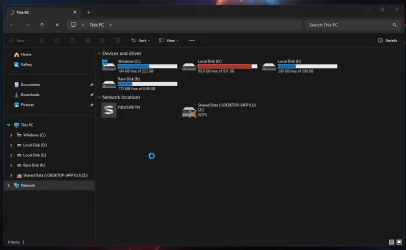
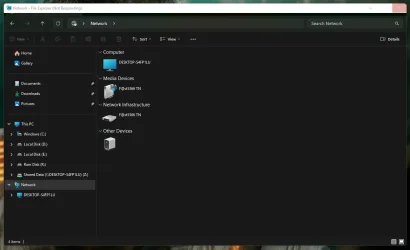
Clicking on the Network folder in Explorer just leads to the busy mouse cursor which never ends.
Screenshot 2026-04-25 193938.webp
Mapping and accessing a mapped drive works fine from the This PC view (computer is turned off in this screenshot).

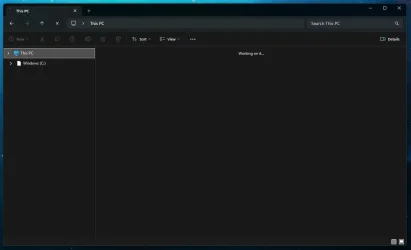
Sometimes trying to access the Network folder messes up Explorer when I open a new window.
Screenshot 2026-04-27 162300.webp
Need to restart Explorer through Task Manager to fix this.

Anyone know what's going on?
 
Windows Build/Version
Windows 11

My Computer My Computer

At a glance

Windows 11
OS
Windows 11
Disconnect from shares you have to see they're causing the problem or try re-mapping shares.
 

My Computer My Computer

At a glance

Windows 11AMD Ryzen 7 5700GMicron Technology DDR4-3200 16GBNVIDIA GeForce RTX 3060
OS
Windows 11
Computer type
PC/Desktop
Manufacturer/Model
HP Pavilion
CPU
AMD Ryzen 7 5700G
Motherboard
Erica6
Memory
Micron Technology DDR4-3200 16GB
Graphics Card(s)
NVIDIA GeForce RTX 3060
Sound Card
Realtek ALC671
Monitor(s) Displays
Samsung SyncMaster U28E590
Screen Resolution
3840 x 2160
Hard Drives
SAMSUNG MZVLQ1T0HALB-000H1
Disconnect from shares you have to see they're causing the problem or try re-mapping shares.
Disconnected the only folder I have mapped and tried accessing the Network folder but still no good.

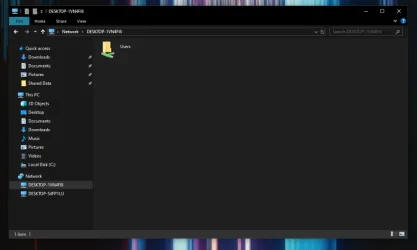
I can access this PC from the other one fine (Win 10), something is just stopping Explorer from viewing the Network folder on the Win 11 PC.
Screenshot 2026-04-27 171730.webp
 

My Computer My Computer

At a glance

Windows 11
OS
Windows 11
Any error message when try to access the share?
 

My Computer My Computer

At a glance

Windows 11AMD Ryzen 7 5700GMicron Technology DDR4-3200 16GBNVIDIA GeForce RTX 3060
OS
Windows 11
Computer type
PC/Desktop
Manufacturer/Model
HP Pavilion
CPU
AMD Ryzen 7 5700G
Motherboard
Erica6
Memory
Micron Technology DDR4-3200 16GB
Graphics Card(s)
NVIDIA GeForce RTX 3060
Sound Card
Realtek ALC671
Monitor(s) Displays
Samsung SyncMaster U28E590
Screen Resolution
3840 x 2160
Hard Drives
SAMSUNG MZVLQ1T0HALB-000H1
Same problem here, with all 3 computers. In file explorer the network icon is frozen when searching for the other computers in local network.
 

My Computers My Computers

  • At a glance

    W11Intel i732GbMSI GeForce GTX 1050 TI 4GT
    OS
    W11
    Computer type
    PC/Desktop
    Manufacturer/Model
    Custom build
    CPU
    Intel i7
    Motherboard
    Asus
    Memory
    32Gb
    Graphics Card(s)
    MSI GeForce GTX 1050 TI 4GT
    Monitor(s) Displays
    BenQ
    Hard Drives
    1 x Samsung SSD
    4 x External Seagate HDD
    Browser
    Chrome
    Antivirus
    Malwarebytes
  • At a glance

    Windows 11i5 1240p16GbIntel Iris
    Operating System
    Windows 11
    Computer type
    PC/Desktop
    Manufacturer/Model
    Lenovo ideacentre AIO 3 2441AP7
    CPU
    i5 1240p
    Motherboard
    Lenovo ideacentre AIO 3 2441AP7
    Memory
    16Gb
    Graphics card(s)
    Intel Iris
    Screen Resolution
    1920 - 1080
    Hard Drives
    Intel & Samsung
    Browser
    Chrome
    Antivirus
    Malwarebytes
This has been an on-going issue for some since 24h2 and seems to happen most when different versions of Windows are in the network.
This solution has worked for some folks.

Computers not seen in network map. Do this on all systems in network..

add "LanmanWorkstation" as an additional startup dependency for the "Function Discovery Resource Publication" (FDResPub) service, which seems to do the trick. To do this, you simply open an elevated command prompt (i.e. use the "run as administrator" right-click context menu option to start cmd.exe), then execute the following command:

sc config fdrespub depend= RpcSs/http/fdphost/LanmanWorkstation

Reboot each device after executing this command, and the devices should see each other more reliably in Network and File Manager. reference a fix for Function Discovery Resource Publication. (FDResPub service) - Microsoft Q&A

Make sure these services are set to automatic and running

DNS-Client – Server
Function Discovery Provider Host
Function Discovery Resource Publication
SSDP Discovery
UPNP Device Host
Windows Defender Firewall


If it still does not show in Network map you can use this workaround method to access the host computer.
  • Open File Explorer.
  • In the address bar, type the following: \\computername (replace "computername" with the name of the computer you're connecting to).
  • Press Enter.
  • Note: You can also use ip address in address bar but if you do assign your devices static ip addresses because they will not always be assigned the same ip address by the router.
  • Whichever of these methods allows you to get to the other machine, create a shortcut to it on desktop, and pin that shortcut to quick access. You can then delete the shortcut from desktop.

 

My Computers My Computers

  • At a glance

    Windows 11 Pro 25H2 26200.8875i9-10900 10 core 20 threads32 gbnone-Intel UHD Graphics 630
    OS
    Windows 11 Pro 25H2 26200.8875
    Computer type
    PC/Desktop
    Manufacturer/Model
    Dell Optiplex 7080
    CPU
    i9-10900 10 core 20 threads
    Motherboard
    DELL 0J37VM
    Memory
    32 gb
    Graphics Card(s)
    none-Intel UHD Graphics 630
    Sound Card
    Integrated Realtek
    Monitor(s) Displays
    Benq 27
    Screen Resolution
    2560x1440
    Hard Drives
    2x1tb Solidigm m.2 nvme /External drives 512gb Samsung m.2 sata+2tb Kingston m2.nvme
    PSU
    500w
    Case
    MT
    Cooling
    Dell Premium
    Keyboard
    Logitech wired
    Mouse
    Logitech wireless
    Internet Speed
    so slow I'm too embarrassed to tell
    Browser
    #1 Edge #2 Firefox
    Antivirus
    Defender+MWB Premium
  • At a glance

    Windows 11 Pro 24H2 26200.8875AMD Ryzen 7 6800U32 gbintegrated
    Operating System
    Windows 11 Pro 24H2 26200.8875
    Computer type
    PC/Desktop
    Manufacturer/Model
    Beelink Mini PC SER5
    CPU
    AMD Ryzen 7 6800U
    Memory
    32 gb
    Graphics card(s)
    integrated
    Sound Card
    integrated
    Monitor(s) Displays
    Benq 27
    Screen Resolution
    2560x1440
    Hard Drives
    1TB Crucial nvme
    Keyboard
    Logitech wired
    Mouse
    Logitech wireless
    Internet Speed
    still too embarrassed to tell
    Browser
    Firefox
    Antivirus
    Defender
    Other Info
    System 3 is non compliant Dell 9020 i7-4770/24gb ram Win11 PRO 26200.8875
sc config fdrespub depend= RpcSs/http/fdphost/LanmanWorkstation
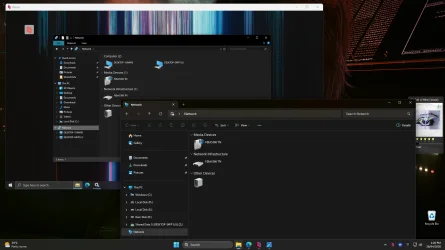
This has made the Win 11 Network folder load now, thanks! Unfortunately, it doesn't list any computers like Win 10 does.
Screenshot 2026-04-28 132622.webp
Edit: Just ran the command on the Win 10 PC and rebooted. The Win 10 PC is now listed as a computer in the Win 11 Network view. The Win 11 PC doesn't show itself in the list, but this is fine. Thanks again.
Edit 2: It seems the fix was only temporary. Explorer crashed and now it's giving me the endless busy mouse cursor again when it restarted.Screenshot 2026-04-28 142851.webpRebooted and it worked again but clicking on the Refresh icon in explorer is what causes the crash.
 
Last edited:

My Computer My Computer

At a glance

Windows 11
OS
Windows 11
If you need to undo the dependancy, you can issue the same command as above.
omitting /LanmanWorkstation from the end of the string.
 

My Computers My Computers

  • At a glance

    Windows 11 Pro 25H2 26200.8875i9-10900 10 core 20 threads32 gbnone-Intel UHD Graphics 630
    OS
    Windows 11 Pro 25H2 26200.8875
    Computer type
    PC/Desktop
    Manufacturer/Model
    Dell Optiplex 7080
    CPU
    i9-10900 10 core 20 threads
    Motherboard
    DELL 0J37VM
    Memory
    32 gb
    Graphics Card(s)
    none-Intel UHD Graphics 630
    Sound Card
    Integrated Realtek
    Monitor(s) Displays
    Benq 27
    Screen Resolution
    2560x1440
    Hard Drives
    2x1tb Solidigm m.2 nvme /External drives 512gb Samsung m.2 sata+2tb Kingston m2.nvme
    PSU
    500w
    Case
    MT
    Cooling
    Dell Premium
    Keyboard
    Logitech wired
    Mouse
    Logitech wireless
    Internet Speed
    so slow I'm too embarrassed to tell
    Browser
    #1 Edge #2 Firefox
    Antivirus
    Defender+MWB Premium
  • At a glance

    Windows 11 Pro 24H2 26200.8875AMD Ryzen 7 6800U32 gbintegrated
    Operating System
    Windows 11 Pro 24H2 26200.8875
    Computer type
    PC/Desktop
    Manufacturer/Model
    Beelink Mini PC SER5
    CPU
    AMD Ryzen 7 6800U
    Memory
    32 gb
    Graphics card(s)
    integrated
    Sound Card
    integrated
    Monitor(s) Displays
    Benq 27
    Screen Resolution
    2560x1440
    Hard Drives
    1TB Crucial nvme
    Keyboard
    Logitech wired
    Mouse
    Logitech wireless
    Internet Speed
    still too embarrassed to tell
    Browser
    Firefox
    Antivirus
    Defender
    Other Info
    System 3 is non compliant Dell 9020 i7-4770/24gb ram Win11 PRO 26200.8875
If you need to undo the dependancy, you can issue the same command as above.
omitting /LanmanWorkstation from the end of the string.
I think I'll leave it as is for now. It is working, I just have to avoid hitting the Refresh button when viewing the Network folder; it doesn't crash any other folder when pressed.
Edit: It seemed to be working except for the refresh crash, but it started giving me the busy cursor again and messing up Explorer. I've undone the service modification and unchecked the "Show Network" option in Explorer to hide it.
 
Last edited:

My Computer My Computer

At a glance

Windows 11
OS
Windows 11
TG, the May update solved my file explorer network button problems on all computers
 

My Computers My Computers

  • At a glance

    W11Intel i732GbMSI GeForce GTX 1050 TI 4GT
    OS
    W11
    Computer type
    PC/Desktop
    Manufacturer/Model
    Custom build
    CPU
    Intel i7
    Motherboard
    Asus
    Memory
    32Gb
    Graphics Card(s)
    MSI GeForce GTX 1050 TI 4GT
    Monitor(s) Displays
    BenQ
    Hard Drives
    1 x Samsung SSD
    4 x External Seagate HDD
    Browser
    Chrome
    Antivirus
    Malwarebytes
  • At a glance

    Windows 11i5 1240p16GbIntel Iris
    Operating System
    Windows 11
    Computer type
    PC/Desktop
    Manufacturer/Model
    Lenovo ideacentre AIO 3 2441AP7
    CPU
    i5 1240p
    Motherboard
    Lenovo ideacentre AIO 3 2441AP7
    Memory
    16Gb
    Graphics card(s)
    Intel Iris
    Screen Resolution
    1920 - 1080
    Hard Drives
    Intel & Samsung
    Browser
    Chrome
    Antivirus
    Malwarebytes
TG, the May update solved my file explorer network button problems on all computers
I just re-enabled the Network folder and tested it, and it seems to be working fine now. The Refresh button isn’t crashing Explorer, and there’s no constant busy mouse cursor so far.
 

My Computer My Computer

At a glance

Windows 11
OS
Windows 11
Back
Top Bottom