Solved New build still has G.Skill Ram Problem With XMP On?


NormAtHome

Well-known member
Member
Local time
10:44 PM
Posts
51
OS
Windows 11
Back in March of 2026 I built a new computer with an Asus Prime Z790 Max Gaming Wifi7 motherboard, Intel i5-14600K, G.SKILL Trident Z5 RGB Series DDR5 RAM (Intel XMP 3.0) 32GB (2x16GB) 6400MT/s CL32-39-39-102 1.40V (F5-6400J3239G16GA2-TZ5RK), Samsung 990 Pro 2tb SSD, Cooler Master N400 case, Pioneer DVR-S21WBK/PLUS DVD Burner, StarTech.com 3.5in Front Bay 22-in-1 USB 2.0 Internal Multi Media Memory Card Reader. This thread details the problems I had, which amounted to the fact the the computer would not boot normally while XMP was turned on and when forcibly rebooted you would get a message that the computer booted into safe mode and to go into the Bios and reset to defaults. So the memory which was 6400MT/s would only boot if XMP was off and autodetect set the speed to 4800MT/s. I opened a ticket with Asus and to date I have heard nothing from them. Brand New Build Gets Stuck With No Video

Now to todays problem, I'm building another brand new computer with an Asus Prime Z890M-Plus WIFI motherboard, Intel Core Ultra 5 250K Plus, the same G.Skill Trident Z5 RGB Series DDR5 RAM (Intel XMP 3.0) 32GB (2x16GB) Up to 6400MT/s* CL32-39-39-102 1.40V Desktop Computer Memory U-DIMM - Matte Black (F5-6400J3239G16GA2-TZ5RK), Samsung 990 Pro 1TB, Fractal Pop Mini case, Thermalright CPU cooler etc. Prior to setting XMP on I updated the Bios and ME Firmware to the latest non-Beta firmware: Version 3212 11.65 MB 2026/08/10. But as with the Z790 build from my other post as soon as I turn XMP on and the ram is preset to the XMP 6400/MTs settings from the ram the computer won't boot; same as before.

Now I got back into settings and turned off XMP and the ram went back to 4800MT/s along with all the other default ram settings and I'm able to install Widows 11 but saying "I'm a little angry" is like saying water is wet. This ram was $569.90, the same ram I bought in January for $479.99 and September 2025 and earlier I build more than 10 computers which I bought for $119.99 each and used all ASUS Z790 Prime Gaming WIFI7 Intel LGA 1700 ATX for those 10 plus computers and not a single one of those computers had a problem with this G.Skill ram with XMP turned on; all of them ran the ram at 6400/MTs with not a single problem. And yet the newer motherboards are craping out using XMP and Asus is not helping, is there anything else I can do?

Thanks!
 

My Computer My Computer

At a glance

Windows 11Intel 13-900K32gb Corsair Dominator Platinum DDR5Zotac 3090TI AMP Extreme Holo
OS
Windows 11
Computer type
PC/Desktop
Manufacturer/Model
Built Myself
CPU
Intel 13-900K
Motherboard
Asus ProArt Z790 Creator Wifi
Memory
32gb Corsair Dominator Platinum DDR5
Graphics Card(s)
Zotac 3090TI AMP Extreme Holo
Sound Card
Realtek S1220A 7.1 Surround Sound High Definition Audio CODEC
Monitor(s) Displays
Asus 4K 29inch and LG Ultra Wide
Screen Resolution
Asus 3840z2160 LG 3440x1440
@NormAtHome

I had the same problem on my current build, but it was AMD's DOCP instead of XMP. Same thing though.


Long story short, you need to manually set the RAM to the XMP settings shown on the SPD tab in CPU-Z...
The RAM frequency, timings and voltage.

 
Last edited:

My Computers My Computers

  • At a glance

    Win 11 Home ♦♦♦26300.9550 ♦♦♦♦♦♦♦26H2AMD Ryzen 7 3700XG.Skill (F4-3200C14D-16GTZKW)EVGA RTX 2070 (08G-P4-2171-KR)
    OS
    Win 11 Home ♦♦♦26300.9550 ♦♦♦♦♦♦♦26H2
    Computer type
    PC/Desktop
    Manufacturer/Model
    Built by Ghot® [May 2020]
    CPU
    AMD Ryzen 7 3700X
    Motherboard
    Asus Pro WS X570-ACE (BIOS 5302)
    Memory
    G.Skill (F4-3200C14D-16GTZKW)
    Graphics Card(s)
    EVGA RTX 2070 (08G-P4-2171-KR)
    Sound Card
    Realtek ALC1220P / ALC S1220A
    Monitor(s) Displays
    Dell U3011 30"
    Screen Resolution
    2560 x 1600
    Hard Drives
    2x Samsung 860 EVO 500GB,
    WD 4TB Black FZBX - SATA III,
    WD 8TB Black FZBX - SATA III,
    DRW-24B1ST CD/DVD Burner
    PSU
    PC Power & Cooling 750W Quad EPS12V
    Case
    Cooler Master ATCS 840 Tower
    Cooling
    CM Hyper 212 EVO (push/pull)
    Keyboard
    Ducky DK9008 Shine II Blue LED
    Mouse
    Logitech Optical M-100
    Internet Speed
    300/300
    Browser
    Firefox (latest)
    Antivirus
    Bitdefender Total Security
    Other Info
    Speakers: Klipsch Pro Media 2.1
  • At a glance

    Windows XP Pro 32bit w/SP3AMD Athlon 64 X2 5000+ (OC'd @ 3.2Ghz)TWIN2X2048-6400C4DHX (2 x 1GB, DDR2 800)EVGA 256-P2-N758-TR GeForce 8600GT SSC
    Operating System
    Windows XP Pro 32bit w/SP3
    Computer type
    PC/Desktop
    Manufacturer/Model
    Built by Ghot® (not in use)
    CPU
    AMD Athlon 64 X2 5000+ (OC'd @ 3.2Ghz)
    Motherboard
    ASUS M2N32-SLI Deluxe Wireless Edition
    Memory
    TWIN2X2048-6400C4DHX (2 x 1GB, DDR2 800)
    Graphics card(s)
    EVGA 256-P2-N758-TR GeForce 8600GT SSC
    Sound Card
    Onboard
    Monitor(s) Displays
    ViewSonic G90FB Black 19" Professional (CRT)
    Screen Resolution
    up to 2048 x 1536
    Hard Drives
    WD 36GB 10,000rpm Raptor SATA
    Seagate 80GB 7200rpm SATA
    Lite-On LTR-52246S CD/RW
    Lite-On LH-18A1P CD/DVD Burner
    PSU
    PC Power & Cooling Silencer 750 Quad EPS12V
    Case
    Generic Beige case, 80mm fans
    Cooling
    ZALMAN 9500A 92mm CPU Cooler
    Keyboard
    Logitech Classic Keybooard 200
    Mouse
    Logitech Optical M-BT96a
    Internet Speed
    300/300
    Browser
    Firefox 3.x ??
    Antivirus
    Symantec (Norton)
    Other Info
    Still assembled, still runs. Haven't turned it on for 15 years?
Bios up to date? IF not i'd suggest starting there and updating to the latest as it appears it has some memory fixes. Secondly would be testing another group of ram in the build. etc etc etc...
Version 3401
Beta Version
11.64 MB
2026/09/23
Support Link
 

My Computers My Computers

  • At a glance

    Windows 11 Enterprise x64 26300.9550AMD Ryzen 9 5950xHyper X Renegade 3600MHz 64GBXFX Quik 319 7700XT
    OS
    Windows 11 Enterprise x64 26300.9550
    Computer type
    PC/Desktop
    Manufacturer/Model
    Me
    CPU
    AMD Ryzen 9 5950x
    Motherboard
    ASUS ROG CROSSHAIR VIII FORMULA 5601 bios
    Memory
    Hyper X Renegade 3600MHz 64GB
    Graphics Card(s)
    XFX Quik 319 7700XT
    Sound Card
    Sound BlasterX AE-5
    Monitor(s) Displays
    ASUS ProArt 32'
    Screen Resolution
    3840x2160
    Hard Drives
    WD 2tb SN850x WD 4tb SN850x
    PSU
    ASUS Thor 1200w Platinum II
    Case
    Thermaltake F31
    Cooling
    ASUS ROG RYUYJIN III 360 ARGB Extreme
    Keyboard
    Logitech K750
    Mouse
    Logitech Trackball
  • At a glance

    Windows 11 Enterprise x64 26300.9550AMD Ryzen 9 5950xHyper X Predator 3600MHz 64GBXFX Quik 319 7700XT
    Operating System
    Windows 11 Enterprise x64 26300.9550
    Computer type
    PC/Desktop
    Manufacturer/Model
    Me
    CPU
    AMD Ryzen 9 5950x
    Motherboard
    ASUS ROG CROSSHAIR VIII FORMULA 5601 bios
    Memory
    Hyper X Predator 3600MHz 64GB
    Graphics card(s)
    XFX Quik 319 7700XT
    Sound Card
    Onboard
    Monitor(s) Displays
    ASUS ProArt 32'
    Screen Resolution
    3840x2160
    Hard Drives
    WD 2tb SN850x WD 4tb SN850x
    PSU
    ASUS Thor 1200w Platinum
Bios up to date? IF not i'd suggest starting there and updating to the latest as it appears it has some memory fixes. Secondly would be testing another group of ram in the build. etc etc etc...
Version 3401
Beta Version
11.64 MB
2026/09/23
Support Link
I did specifically mention "Prior to setting XMP on I updated the Bios and ME Firmware to the latest non-Beta firmware: Version 3212 11.65 MB 2026/08/10. But as with the Z790 build from my other post as soon as I turn XMP on and the ram is preset to the XMP 6400/MTs settings from the ram the computer won't boot; same as before." I'm not sure I'm comfortable going to 3401 as it's classified as Beta firmware.
 

My Computer My Computer

At a glance

Windows 11Intel 13-900K32gb Corsair Dominator Platinum DDR5Zotac 3090TI AMP Extreme Holo
OS
Windows 11
Computer type
PC/Desktop
Manufacturer/Model
Built Myself
CPU
Intel 13-900K
Motherboard
Asus ProArt Z790 Creator Wifi
Memory
32gb Corsair Dominator Platinum DDR5
Graphics Card(s)
Zotac 3090TI AMP Extreme Holo
Sound Card
Realtek S1220A 7.1 Surround Sound High Definition Audio CODEC
Monitor(s) Displays
Asus 4K 29inch and LG Ultra Wide
Screen Resolution
Asus 3840z2160 LG 3440x1440
@NormAtHome

I had the same problem on my current build, but it was AMD's DOCP instead of XMP. Same thing though.


Long story short, you need to manually set the RAM to the XMP settings shown on the SPD tab in CPU-Z...
The RAM frequency, timings and voltage.

A friend of mine who I was chatting with before just sent me this link: https://rog-forum.asus.com/t5/intel-800-series/z890m-does-not-boot-with-xmp/td-p/1052307 and I'm ashamed to say that this actually worked; move the ram from slots A1 & B1 to A2 & B2 then turn XMP on and it works as it should. I don't know that I would have ever thought of this because the ram in all those Z790 motherboards was all in slots A1 & B1.
 

My Computer My Computer

At a glance

Windows 11Intel 13-900K32gb Corsair Dominator Platinum DDR5Zotac 3090TI AMP Extreme Holo
OS
Windows 11
Computer type
PC/Desktop
Manufacturer/Model
Built Myself
CPU
Intel 13-900K
Motherboard
Asus ProArt Z790 Creator Wifi
Memory
32gb Corsair Dominator Platinum DDR5
Graphics Card(s)
Zotac 3090TI AMP Extreme Holo
Sound Card
Realtek S1220A 7.1 Surround Sound High Definition Audio CODEC
Monitor(s) Displays
Asus 4K 29inch and LG Ultra Wide
Screen Resolution
Asus 3840z2160 LG 3440x1440
I did specifically mention "Prior to setting XMP on I updated the Bios and ME Firmware to the latest non-Beta firmware: Version 3212 11.65 MB 2026/08/10. But as with the Z790 build from my other post as soon as I turn XMP on and the ram is preset to the XMP 6400/MTs settings from the ram the computer won't boot; same as before." I'm not sure I'm comfortable going to 3401 as it's classified as Beta firmware.


I've been on ASUS boards since the very early 2000's.
Stay away from the beta BIOSes.

Just disable XMP in the BIOS and manually set the RAM freq., timings and voltage to the XMP values on the SPD tab of CPU-Z.
 

My Computers My Computers

  • At a glance

    Win 11 Home ♦♦♦26300.9550 ♦♦♦♦♦♦♦26H2AMD Ryzen 7 3700XG.Skill (F4-3200C14D-16GTZKW)EVGA RTX 2070 (08G-P4-2171-KR)
    OS
    Win 11 Home ♦♦♦26300.9550 ♦♦♦♦♦♦♦26H2
    Computer type
    PC/Desktop
    Manufacturer/Model
    Built by Ghot® [May 2020]
    CPU
    AMD Ryzen 7 3700X
    Motherboard
    Asus Pro WS X570-ACE (BIOS 5302)
    Memory
    G.Skill (F4-3200C14D-16GTZKW)
    Graphics Card(s)
    EVGA RTX 2070 (08G-P4-2171-KR)
    Sound Card
    Realtek ALC1220P / ALC S1220A
    Monitor(s) Displays
    Dell U3011 30"
    Screen Resolution
    2560 x 1600
    Hard Drives
    2x Samsung 860 EVO 500GB,
    WD 4TB Black FZBX - SATA III,
    WD 8TB Black FZBX - SATA III,
    DRW-24B1ST CD/DVD Burner
    PSU
    PC Power & Cooling 750W Quad EPS12V
    Case
    Cooler Master ATCS 840 Tower
    Cooling
    CM Hyper 212 EVO (push/pull)
    Keyboard
    Ducky DK9008 Shine II Blue LED
    Mouse
    Logitech Optical M-100
    Internet Speed
    300/300
    Browser
    Firefox (latest)
    Antivirus
    Bitdefender Total Security
    Other Info
    Speakers: Klipsch Pro Media 2.1
  • At a glance

    Windows XP Pro 32bit w/SP3AMD Athlon 64 X2 5000+ (OC'd @ 3.2Ghz)TWIN2X2048-6400C4DHX (2 x 1GB, DDR2 800)EVGA 256-P2-N758-TR GeForce 8600GT SSC
    Operating System
    Windows XP Pro 32bit w/SP3
    Computer type
    PC/Desktop
    Manufacturer/Model
    Built by Ghot® (not in use)
    CPU
    AMD Athlon 64 X2 5000+ (OC'd @ 3.2Ghz)
    Motherboard
    ASUS M2N32-SLI Deluxe Wireless Edition
    Memory
    TWIN2X2048-6400C4DHX (2 x 1GB, DDR2 800)
    Graphics card(s)
    EVGA 256-P2-N758-TR GeForce 8600GT SSC
    Sound Card
    Onboard
    Monitor(s) Displays
    ViewSonic G90FB Black 19" Professional (CRT)
    Screen Resolution
    up to 2048 x 1536
    Hard Drives
    WD 36GB 10,000rpm Raptor SATA
    Seagate 80GB 7200rpm SATA
    Lite-On LTR-52246S CD/RW
    Lite-On LH-18A1P CD/DVD Burner
    PSU
    PC Power & Cooling Silencer 750 Quad EPS12V
    Case
    Generic Beige case, 80mm fans
    Cooling
    ZALMAN 9500A 92mm CPU Cooler
    Keyboard
    Logitech Classic Keybooard 200
    Mouse
    Logitech Optical M-BT96a
    Internet Speed
    300/300
    Browser
    Firefox 3.x ??
    Antivirus
    Symantec (Norton)
    Other Info
    Still assembled, still runs. Haven't turned it on for 15 years?
A friend of mine who I was chatting with before just sent me this link: https://rog-forum.asus.com/t5/intel-800-series/z890m-does-not-boot-with-xmp/td-p/1052307 and I'm ashamed to say that this actually worked; move the ram from slots A1 & B1 to A2 & B2 then turn XMP on and it works as it should. I don't know that I would have ever thought of this because the ram in all those Z790 motherboards was all in slots A1 & B1.

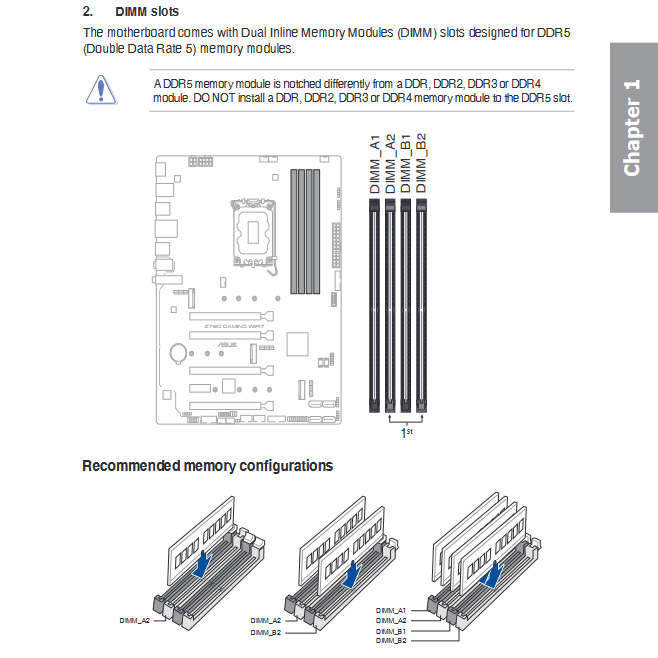
If you have just two sticks of RAM, they should always go into A2 and B2 slots. It is in the manuals.
 

My Computers My Computers

  • At a glance

    Windows 11 ProIntel Core i9 14900K 5800/4500 P/E96GB (2x48) G.skill Ripjaws 6800Asus ROG Strix 4070 Ti OC
    OS
    Windows 11 Pro
    Computer type
    PC/Desktop
    Manufacturer/Model
    DIY Photoshop/Audio/Game/tinker
    CPU
    Intel Core i9 14900K 5800/4500 P/E
    Motherboard
    Asus ROG Maximus Z790 Dark Hero
    Memory
    96GB (2x48) G.skill Ripjaws 6800
    Graphics Card(s)
    Asus ROG Strix 4070 Ti OC
    Sound Card
    B&W 606 S3 speakers; Audiolabs 7000a integrated amp; RSL 10S Mk2 sub
    Monitor(s) Displays
    Eizo CG2730 ColorEdge, ViewSonic VP2768
    Screen Resolution
    2560 x 1440 x 2
    Hard Drives
    nvme: 4TB WDC SN850X, 1TB SN850, 2TB SK-Hynix P41
    Spinners: Sabrent USB-C DS-SC5B 5-bay docking station, 6TB WDC Black, 6TB Ironwolf Pro 2x 2TB WDC Black
    PSU
    850W Seasonic Vertex PX-850
    Case
    FD North XL Mesh, Black Walnut
    Cooling
    EK Nucleus black 360 AIO w/Phanteks T30 fans; 2 Noctua NF-A14 Chromax ; T30 for memory
    Keyboard
    Keychron Q3 Max TKL w/GMK Redsuns Red Samuri keycaps
    Mouse
    Logitech G305 wireless gaming
    Internet Speed
    575 Mb/s down | 25 Mb/s up
    Browser
    Firefox
    Antivirus
    Defender, Macrium Reflect X
    Other Info
    Phangkey Amaterasu V2 Desk Mat
  • At a glance

    Apple M1
    Computer type
    Laptop
    Manufacturer/Model
    💻 Apple 13" Macbook Pro 2020 (m1)
    CPU
    Apple M1
    Screen Resolution
    2560x1600
    Browser
    Firefox
@NormAtHome

About 15-20 years ago all motherboard manufacturers started putting the RAM in the 2nd and 4th slots counting away from the CPU. This was to make room for the larger CPU air coolers.

I see your manual doesn't tell you that anymore... save this pic from my manual, back before they got cheap with their manuals...

Well, it isn't even in my manual.


Anyway here's a pic of your motherboard. With two sticks of RAM, they always go in the slots marked with the RED dots...
Doesn't matter what they label the slots. It's always the 2nd and the 4th slots counting away from the CPU.

Image1.webp


My post #2 above is only for a case where you have the RAM in the correct slots and XMP doesn't work. :-)
 

My Computers My Computers

  • At a glance

    Win 11 Home ♦♦♦26300.9550 ♦♦♦♦♦♦♦26H2AMD Ryzen 7 3700XG.Skill (F4-3200C14D-16GTZKW)EVGA RTX 2070 (08G-P4-2171-KR)
    OS
    Win 11 Home ♦♦♦26300.9550 ♦♦♦♦♦♦♦26H2
    Computer type
    PC/Desktop
    Manufacturer/Model
    Built by Ghot® [May 2020]
    CPU
    AMD Ryzen 7 3700X
    Motherboard
    Asus Pro WS X570-ACE (BIOS 5302)
    Memory
    G.Skill (F4-3200C14D-16GTZKW)
    Graphics Card(s)
    EVGA RTX 2070 (08G-P4-2171-KR)
    Sound Card
    Realtek ALC1220P / ALC S1220A
    Monitor(s) Displays
    Dell U3011 30"
    Screen Resolution
    2560 x 1600
    Hard Drives
    2x Samsung 860 EVO 500GB,
    WD 4TB Black FZBX - SATA III,
    WD 8TB Black FZBX - SATA III,
    DRW-24B1ST CD/DVD Burner
    PSU
    PC Power & Cooling 750W Quad EPS12V
    Case
    Cooler Master ATCS 840 Tower
    Cooling
    CM Hyper 212 EVO (push/pull)
    Keyboard
    Ducky DK9008 Shine II Blue LED
    Mouse
    Logitech Optical M-100
    Internet Speed
    300/300
    Browser
    Firefox (latest)
    Antivirus
    Bitdefender Total Security
    Other Info
    Speakers: Klipsch Pro Media 2.1
  • At a glance

    Windows XP Pro 32bit w/SP3AMD Athlon 64 X2 5000+ (OC'd @ 3.2Ghz)TWIN2X2048-6400C4DHX (2 x 1GB, DDR2 800)EVGA 256-P2-N758-TR GeForce 8600GT SSC
    Operating System
    Windows XP Pro 32bit w/SP3
    Computer type
    PC/Desktop
    Manufacturer/Model
    Built by Ghot® (not in use)
    CPU
    AMD Athlon 64 X2 5000+ (OC'd @ 3.2Ghz)
    Motherboard
    ASUS M2N32-SLI Deluxe Wireless Edition
    Memory
    TWIN2X2048-6400C4DHX (2 x 1GB, DDR2 800)
    Graphics card(s)
    EVGA 256-P2-N758-TR GeForce 8600GT SSC
    Sound Card
    Onboard
    Monitor(s) Displays
    ViewSonic G90FB Black 19" Professional (CRT)
    Screen Resolution
    up to 2048 x 1536
    Hard Drives
    WD 36GB 10,000rpm Raptor SATA
    Seagate 80GB 7200rpm SATA
    Lite-On LTR-52246S CD/RW
    Lite-On LH-18A1P CD/DVD Burner
    PSU
    PC Power & Cooling Silencer 750 Quad EPS12V
    Case
    Generic Beige case, 80mm fans
    Cooling
    ZALMAN 9500A 92mm CPU Cooler
    Keyboard
    Logitech Classic Keybooard 200
    Mouse
    Logitech Optical M-BT96a
    Internet Speed
    300/300
    Browser
    Firefox 3.x ??
    Antivirus
    Symantec (Norton)
    Other Info
    Still assembled, still runs. Haven't turned it on for 15 years?
I did specifically mention "Prior to setting XMP on I updated the Bios and ME Firmware to the latest non-Beta firmware: Version 3212 11.65 MB 2026/08/10. But as with the Z790 build from my other post as soon as I turn XMP on and the ram is preset to the XMP 6400/MTs settings from the ram the computer won't boot; same as before." I'm not sure I'm comfortable going to 3401 as it's classified as Beta firmware.
The memory you're attempting to run @6400, not on QVL list, GSKILL modules shown are only up to 6000...
 

My Computers My Computers

  • At a glance

    Windows 11 Enterprise x64 26300.9550AMD Ryzen 9 5950xHyper X Renegade 3600MHz 64GBXFX Quik 319 7700XT
    OS
    Windows 11 Enterprise x64 26300.9550
    Computer type
    PC/Desktop
    Manufacturer/Model
    Me
    CPU
    AMD Ryzen 9 5950x
    Motherboard
    ASUS ROG CROSSHAIR VIII FORMULA 5601 bios
    Memory
    Hyper X Renegade 3600MHz 64GB
    Graphics Card(s)
    XFX Quik 319 7700XT
    Sound Card
    Sound BlasterX AE-5
    Monitor(s) Displays
    ASUS ProArt 32'
    Screen Resolution
    3840x2160
    Hard Drives
    WD 2tb SN850x WD 4tb SN850x
    PSU
    ASUS Thor 1200w Platinum II
    Case
    Thermaltake F31
    Cooling
    ASUS ROG RYUYJIN III 360 ARGB Extreme
    Keyboard
    Logitech K750
    Mouse
    Logitech Trackball
  • At a glance

    Windows 11 Enterprise x64 26300.9550AMD Ryzen 9 5950xHyper X Predator 3600MHz 64GBXFX Quik 319 7700XT
    Operating System
    Windows 11 Enterprise x64 26300.9550
    Computer type
    PC/Desktop
    Manufacturer/Model
    Me
    CPU
    AMD Ryzen 9 5950x
    Motherboard
    ASUS ROG CROSSHAIR VIII FORMULA 5601 bios
    Memory
    Hyper X Predator 3600MHz 64GB
    Graphics card(s)
    XFX Quik 319 7700XT
    Sound Card
    Onboard
    Monitor(s) Displays
    ASUS ProArt 32'
    Screen Resolution
    3840x2160
    Hard Drives
    WD 2tb SN850x WD 4tb SN850x
    PSU
    ASUS Thor 1200w Platinum
If you have just two sticks of RAM, they should always go into A2 and B2 slots. It is in the manuals.
This Right Here! ;-)

It is in the manual, but you gotta pay attention/watch for it, or you'll miss it...From page 1-5 of the ASUS Z790 GAMING WIF MB Manual:

pUgtmXc.png


They do indicate '1st' for the 'DIMM_A2' & 'DIMM_B2' Slots, but that's all you get, so no real explanation and you basically need to rely on the info graphic.

ASUS used to put asterisks next to the 'DIMM_A2' & 'DIMM_B2' Slots in their MB Manuals, with NO explanation of course (at least as far back as the ,ASUS ROG Maximus XII Hero | Z490 MB), so you needed to catch/notice it in the info graphic. When I built my 'System Two' Gaming PC, I was looking for which specific slots I needed to use (I usually read such manuals) so I found it, but you DEFINITELY had to look for it!
 
Last edited:

My Computers My Computers

  • At a glance

    Windows 11 Pro 24H2 Linux Mint 22.2Intel® Core i7-10850H64 GB DDR4-3200MHzNVIDIA Quadro® T2000
    OS
    Windows 11 Pro 24H2 Linux Mint 22.2
    Computer type
    Laptop
    Manufacturer/Model
    Lenovo ThinkPad P1
    CPU
    Intel® Core i7-10850H
    Memory
    64 GB DDR4-3200MHz
    Graphics Card(s)
    NVIDIA Quadro® T2000
    Screen Resolution
    4K (3840x2160)
  • At a glance

    Windows 11 Pro 24H2Intel® Core I9-10850KG.Skill Trident Z 32GB CL16 DDR4-3600MHz | Sa...EVGA | NVIDIA GeForce RTX 3080 Ti FTW3 Ultra ...
    Operating System
    Windows 11 Pro 24H2
    Computer type
    PC/Desktop
    Manufacturer/Model
    NHRacecraft Custom Build
    CPU
    Intel® Core I9-10850K
    Motherboard
    ASUS ROG Maximus XII Hero | Z490
    Memory
    G.Skill Trident Z 32GB CL16 DDR4-3600MHz | Samsung B-Die
    Graphics card(s)
    EVGA | NVIDIA GeForce RTX 3080 Ti FTW3 Ultra Gaming
    Sound Card
    ROG SupremeFX S1220
    Monitor(s) Displays
    Samsung G6 G60SF 27" 500Hz OLED Gigabyte AORUS CV27Q-SA 27" HDR HP Development Z24q G3 24" IPS
    Screen Resolution
    2K QHD (2560x1440)
    Hard Drives
    Samsung 500GB 980 Pro M.2 PCIe 4.0 x4 NVMe
    Samsung 2TB 980 Pro M.2 PCIe 4.0 x4 NVMe
    Samsung 2TB 860 Pro 2.5" SATA III SSD
    Western Digital 4TB WD Black 3.5" SATA III HDD
    PSU
    Seasonic Prime PX-850 Platinum 850W
    Case
    Razer Tomahawk ATX Mid-Tower w/ Fractal Design Flex B-20 Vertical GPU
    Cooling
    NZXT Kraken Z53 Liquid AIO
    Keyboard
    IQUNIX Zonex 75 Custom
    Mouse
    Logitech G PRO X Superlight 2
    Internet Speed
    Fidium Fiber 2.2Gbps Symmetrical
    Browser
    Firefox ESR | Brave
    Antivirus
    Windows Defender
  • Lenovo ThinkPad P51 [Windows 11 Pro 24H2, Intel® Core i7-7820HQ, 64GB DDR4-2400MHz, NVIDIA Quadro® M2200]
    Lenovo ThinkStation P320 SFF [Windows 11 Pro 24H2, Intel® Xeon E3-1240v5, 40GB DDR4-2400MHz, NVIDIA Quadro® P1000]
    Lenovo ThinkPad X1 Carbon G3 [Windows 11 Pro 24H2, Intel® Core i7-5600U, 8GB DDR3L-1600MHz, Intel® HD 5500]
    Lenovo ThinkPad T450s [Windows 11 Pro 24H2, Intel® Core i7-5600U, 20GB DDR3L-1600MHz, Intel® HD 5500]
The memory you're attempting to run @6400, not on QVL list, GSKILL modules shown are only up to 6000...
Just because it's not on the QVL list doesn't mean it won't work, just that it hasn't been tested. I bought this G.Skill kit F5-6400J3239G16GA2-TZ5RK and this G.Skill kit which is a very close match is on the QVL list F5-6400J3239G16X2-TZ5RS and if you Google what's the difference between these kits this is what you get "The G.SKILL part numbers F5-6400J3239G16GA2-TZ5RK and F5-6400J3239G16X2-TZ5RS (assuming X2 refers to GX2 and S refers to the color variant) share identical hardware specifications, with the letter suffixes (GA2 vs GX2) indicating regional distribution or sales channels rather than performance differences." so there's no difference between these kits other than the color so my kit is actually on the QVL list.
 

My Computer My Computer

At a glance

Windows 11Intel 13-900K32gb Corsair Dominator Platinum DDR5Zotac 3090TI AMP Extreme Holo
OS
Windows 11
Computer type
PC/Desktop
Manufacturer/Model
Built Myself
CPU
Intel 13-900K
Motherboard
Asus ProArt Z790 Creator Wifi
Memory
32gb Corsair Dominator Platinum DDR5
Graphics Card(s)
Zotac 3090TI AMP Extreme Holo
Sound Card
Realtek S1220A 7.1 Surround Sound High Definition Audio CODEC
Monitor(s) Displays
Asus 4K 29inch and LG Ultra Wide
Screen Resolution
Asus 3840z2160 LG 3440x1440
GSkill also tests various RAM types on most motherboards.
They have a tool called: RAM Configurator
It usually has tested quite a bit more RAM motherboard combos, than is shown on the motherboard's QVL list.
Ofc, it only finds GSkill RAM.

 
Last edited:

My Computers My Computers

  • At a glance

    Win 11 Home ♦♦♦26300.9550 ♦♦♦♦♦♦♦26H2AMD Ryzen 7 3700XG.Skill (F4-3200C14D-16GTZKW)EVGA RTX 2070 (08G-P4-2171-KR)
    OS
    Win 11 Home ♦♦♦26300.9550 ♦♦♦♦♦♦♦26H2
    Computer type
    PC/Desktop
    Manufacturer/Model
    Built by Ghot® [May 2020]
    CPU
    AMD Ryzen 7 3700X
    Motherboard
    Asus Pro WS X570-ACE (BIOS 5302)
    Memory
    G.Skill (F4-3200C14D-16GTZKW)
    Graphics Card(s)
    EVGA RTX 2070 (08G-P4-2171-KR)
    Sound Card
    Realtek ALC1220P / ALC S1220A
    Monitor(s) Displays
    Dell U3011 30"
    Screen Resolution
    2560 x 1600
    Hard Drives
    2x Samsung 860 EVO 500GB,
    WD 4TB Black FZBX - SATA III,
    WD 8TB Black FZBX - SATA III,
    DRW-24B1ST CD/DVD Burner
    PSU
    PC Power & Cooling 750W Quad EPS12V
    Case
    Cooler Master ATCS 840 Tower
    Cooling
    CM Hyper 212 EVO (push/pull)
    Keyboard
    Ducky DK9008 Shine II Blue LED
    Mouse
    Logitech Optical M-100
    Internet Speed
    300/300
    Browser
    Firefox (latest)
    Antivirus
    Bitdefender Total Security
    Other Info
    Speakers: Klipsch Pro Media 2.1
  • At a glance

    Windows XP Pro 32bit w/SP3AMD Athlon 64 X2 5000+ (OC'd @ 3.2Ghz)TWIN2X2048-6400C4DHX (2 x 1GB, DDR2 800)EVGA 256-P2-N758-TR GeForce 8600GT SSC
    Operating System
    Windows XP Pro 32bit w/SP3
    Computer type
    PC/Desktop
    Manufacturer/Model
    Built by Ghot® (not in use)
    CPU
    AMD Athlon 64 X2 5000+ (OC'd @ 3.2Ghz)
    Motherboard
    ASUS M2N32-SLI Deluxe Wireless Edition
    Memory
    TWIN2X2048-6400C4DHX (2 x 1GB, DDR2 800)
    Graphics card(s)
    EVGA 256-P2-N758-TR GeForce 8600GT SSC
    Sound Card
    Onboard
    Monitor(s) Displays
    ViewSonic G90FB Black 19" Professional (CRT)
    Screen Resolution
    up to 2048 x 1536
    Hard Drives
    WD 36GB 10,000rpm Raptor SATA
    Seagate 80GB 7200rpm SATA
    Lite-On LTR-52246S CD/RW
    Lite-On LH-18A1P CD/DVD Burner
    PSU
    PC Power & Cooling Silencer 750 Quad EPS12V
    Case
    Generic Beige case, 80mm fans
    Cooling
    ZALMAN 9500A 92mm CPU Cooler
    Keyboard
    Logitech Classic Keybooard 200
    Mouse
    Logitech Optical M-BT96a
    Internet Speed
    300/300
    Browser
    Firefox 3.x ??
    Antivirus
    Symantec (Norton)
    Other Info
    Still assembled, still runs. Haven't turned it on for 15 years?
Just because it's not on the QVL list doesn't mean it won't work, just that it hasn't been tested. I bought this G.Skill kit F5-6400J3239G16GA2-TZ5RK and this G.Skill kit which is a very close match is on the QVL list F5-6400J3239G16X2-TZ5RS and if you Google what's the difference between these kits this is what you get "The G.SKILL part numbers F5-6400J3239G16GA2-TZ5RK and F5-6400J3239G16X2-TZ5RS (assuming X2 refers to GX2 and S refers to the color variant) share identical hardware specifications, with the letter suffixes (GA2 vs GX2) indicating regional distribution or sales channels rather than performance differences." so there's no difference between these kits other than the color so my kit is actually on the QVL list.
Not every board or memory will work together just because it worked "before" ... It could be a huge amount of things contributing to your issues with the Prime boards and this same memory. I've been building systems since the mid 90s. Quality control is not what it used to be.

Good Luck
 
Last edited:

My Computers My Computers

  • At a glance

    Windows 11 Enterprise x64 26300.9550AMD Ryzen 9 5950xHyper X Renegade 3600MHz 64GBXFX Quik 319 7700XT
    OS
    Windows 11 Enterprise x64 26300.9550
    Computer type
    PC/Desktop
    Manufacturer/Model
    Me
    CPU
    AMD Ryzen 9 5950x
    Motherboard
    ASUS ROG CROSSHAIR VIII FORMULA 5601 bios
    Memory
    Hyper X Renegade 3600MHz 64GB
    Graphics Card(s)
    XFX Quik 319 7700XT
    Sound Card
    Sound BlasterX AE-5
    Monitor(s) Displays
    ASUS ProArt 32'
    Screen Resolution
    3840x2160
    Hard Drives
    WD 2tb SN850x WD 4tb SN850x
    PSU
    ASUS Thor 1200w Platinum II
    Case
    Thermaltake F31
    Cooling
    ASUS ROG RYUYJIN III 360 ARGB Extreme
    Keyboard
    Logitech K750
    Mouse
    Logitech Trackball
  • At a glance

    Windows 11 Enterprise x64 26300.9550AMD Ryzen 9 5950xHyper X Predator 3600MHz 64GBXFX Quik 319 7700XT
    Operating System
    Windows 11 Enterprise x64 26300.9550
    Computer type
    PC/Desktop
    Manufacturer/Model
    Me
    CPU
    AMD Ryzen 9 5950x
    Motherboard
    ASUS ROG CROSSHAIR VIII FORMULA 5601 bios
    Memory
    Hyper X Predator 3600MHz 64GB
    Graphics card(s)
    XFX Quik 319 7700XT
    Sound Card
    Onboard
    Monitor(s) Displays
    ASUS ProArt 32'
    Screen Resolution
    3840x2160
    Hard Drives
    WD 2tb SN850x WD 4tb SN850x
    PSU
    ASUS Thor 1200w Platinum
GSkill also tests various RAM types on most motherboards.
They have a tool called: RAM Configurator
It usually has tested quite a bit more RAM motherboard combos, than is shown on the motherboard's QVL list.
Ofc, it only finds GSkill RAM.


^This. I am not confident g.skill tests their memory on every motherboard in their QVL list - they probably assume similar behavior across similar model boards. But if it is on their list, they will back it up.
 

My Computers My Computers

  • At a glance

    Windows 11 ProIntel Core i9 14900K 5800/4500 P/E96GB (2x48) G.skill Ripjaws 6800Asus ROG Strix 4070 Ti OC
    OS
    Windows 11 Pro
    Computer type
    PC/Desktop
    Manufacturer/Model
    DIY Photoshop/Audio/Game/tinker
    CPU
    Intel Core i9 14900K 5800/4500 P/E
    Motherboard
    Asus ROG Maximus Z790 Dark Hero
    Memory
    96GB (2x48) G.skill Ripjaws 6800
    Graphics Card(s)
    Asus ROG Strix 4070 Ti OC
    Sound Card
    B&W 606 S3 speakers; Audiolabs 7000a integrated amp; RSL 10S Mk2 sub
    Monitor(s) Displays
    Eizo CG2730 ColorEdge, ViewSonic VP2768
    Screen Resolution
    2560 x 1440 x 2
    Hard Drives
    nvme: 4TB WDC SN850X, 1TB SN850, 2TB SK-Hynix P41
    Spinners: Sabrent USB-C DS-SC5B 5-bay docking station, 6TB WDC Black, 6TB Ironwolf Pro 2x 2TB WDC Black
    PSU
    850W Seasonic Vertex PX-850
    Case
    FD North XL Mesh, Black Walnut
    Cooling
    EK Nucleus black 360 AIO w/Phanteks T30 fans; 2 Noctua NF-A14 Chromax ; T30 for memory
    Keyboard
    Keychron Q3 Max TKL w/GMK Redsuns Red Samuri keycaps
    Mouse
    Logitech G305 wireless gaming
    Internet Speed
    575 Mb/s down | 25 Mb/s up
    Browser
    Firefox
    Antivirus
    Defender, Macrium Reflect X
    Other Info
    Phangkey Amaterasu V2 Desk Mat
  • At a glance

    Apple M1
    Computer type
    Laptop
    Manufacturer/Model
    💻 Apple 13" Macbook Pro 2020 (m1)

    CPU
    Apple M1
    Screen Resolution
    2560x1600
    Browser
    Firefox

Latest Support Threads

Back
Top Bottom