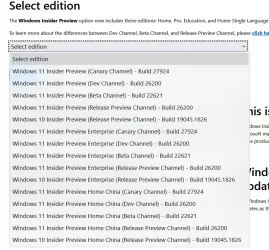
Solved New Insider .ISOs available


IanMosley

Windows Insider
Power User
VIP
Local time
1:16 PM
Posts
1,222
Location
UK
OS
Windows 11 Pro 25H2 (Build 26200.8524)
1.webp
EDIT

Used Windows11_InsiderPreview_Client_x64_en-gb_26200.iso to attempt a Repair Install - it got all the way to asking if I wanted to keep my files rather than just do a clean install of Windows

As I am already on .6584, it looks as (this) .iso is at
Build(26200.6584)

See post #2
 
Last edited:

My Computer

System One

  • OS
    Windows 11 Pro 25H2 (Build 26200.8524)
    Computer type
    PC/Desktop
    Manufacturer/Model
    Dell Pro Max Tower T2 FCT2250
    CPU
    Intel Core Ultra 9 285 5.6 GHz
    Motherboard
    64-bit operating system, x64-based processor
    Memory
    32.00 GB
    Graphics Card(s)
    Intel Integrated Graphics (128 MB)
    Sound Card
    Realtek Audio
    Monitor(s) Displays
    Dell P2714H Monitor
    Screen Resolution
    1920 x 1080
    Hard Drives
    1 x 512GB M.2 XG10d SED KIOXIA PCIe solid state drive (Internal)
    1 x 2TB Seagate ST2000DM008-2UB102 HDD (Internal)
    1 x 1TB Seagate STGX4000400 External HDD
    1 x 4TB Seagate STGX4000400 External HDD
    1 x 6TB WD Elements AE 2689 External HDD
    PSU
    500 Watts
    Cooling
    Air
    Keyboard
    Microsoft Wired Keyboard 600
    Mouse
    Microsoft USB Basic Optical Mouse v2.0
    Browser
    Firefox
    Antivirus
    Windows Defender + Malwarebytes Premium
    Other Info
    BaseBoard Manufacturer Dell Inc.
    BaseBoard Product 022RY57
    BaseBoard Version A01
I have done a fresh install on the VM. It's Build 26200.5074.
 

My Computer

System One

  • OS
    Windows 11, version 25H2 (26200)
    Computer type
    PC/Desktop
    CPU
    AMD Ryzen 9 9950X 16-Core Processor
    Motherboard
    ASRock B650M PG Riptide
    Memory
    DDR5-6000 (CL36) 64.0 GB
    Graphics Card(s)
    NVIDIA GeForce RTX 4090
    PSU
    1200W
    Case
    Phanteks Enthoo Pro 2
    Cooling
    Noctua NH-D12L


My Computers

System One System Two

  • OS
    Windows 11 Pro for Workstations
    Computer type
    PC/Desktop
    Manufacturer/Model
    Custom self build
    CPU
    Intel i7-8700K 5 GHz
    Motherboard
    ASUS ROG Maximus XI Formula Z390
    Memory
    64 GB (4x16GB) G.SKILL TridentZ RGB DDR4 3600 MHz (F4-3600C18D-32GTZR)
    Graphics Card(s)
    ASUS ROG-STRIX-GTX1080TI-O11G-GAMING (11GB GDDR5X)
    Sound Card
    Integrated Digital Audio (S/PDIF)
    Monitor(s) Displays
    2 x Samsung Odyssey G75 27"
    Screen Resolution
    2560x1440
    Hard Drives
    1TB Samsung 990 PRO M.2,
    4TB Samsung 990 PRO M.2,
    TerraMaster F8 SSD Plus NAS
    PSU
    Seasonic Prime Titanium 850W
    Case
    Thermaltake Core P3 wall mounted
    Cooling
    Corsair Hydro H115i
    Keyboard
    Amazon Basics Wired Full Keyboard MD005
    Mouse
    Logitech MX Master 4
    Internet Speed
    2 Gbps Download and 100 Mbps Upload
    Browser
    Chrome and Edge
    Antivirus
    Microsoft Defender
    Other Info
    Logitech Z625 speaker system,
    Logitech BRIO 4K Pro webcam,
    HP Color LaserJet Pro MFP M477fdn,
    CyberPower CP1500PFCLCD
    Galaxy S23 Plus phone
  • Operating System
    Windows 11 Pro
    Computer type
    Laptop
    Manufacturer/Model
    Surface Laptop 7 Copilot+ PC
    CPU
    Snapdragon X Elite (12 core) 3.42 GHz
    Memory
    16 GB LPDDR5x-7467 MHz
    Monitor(s) Displays
    15" HDR
    Screen Resolution
    2496 x 1664
    Hard Drives
    1 TB SSD
    Internet Speed
    Wi-Fi 7 and Bluetooth 5.4
    Browser
    Chrome and Edge
    Antivirus
    Microsoft Defender

I downloaded the ISO and discovered that it can only be used for clean installs. I mounted the iso and launched the setup to see if I could use it to do a repair, no such luck as there is no option to keep existing files and settings as the selection button is greyed out.
 

My Computer

System One

  • OS
    Windows 11
I downloaded the ISO and discovered that it can only be used for clean installs. I mounted the iso and launched the setup to see if I could use it to do a repair, no such luck as there is no option to keep existing files and settings as the selection button is greyed out.
Do you have the right language ISO for your PC?
An English International will only do a clean install on EN-US install for example
 

My Computer

System One

  • OS
    Windows 11 Pro 25H2 (RP channel)
    Computer type
    PC/Desktop
    Manufacturer/Model
    MSI
    CPU
    AMD Ryzen 7 9800X3D 8-core
    Motherboard
    MEG X870E Godlike
    Memory
    64GB Corsair Titanium 6000/CL30
    Graphics Card(s)
    MSI Suprim 5080 SOC
    Sound Card
    Soundblaster AE-9
    Monitor(s) Displays
    ASUS TUF Gaming VG289Q
    Screen Resolution
    3840x2160
    Hard Drives
    Samsung 9100 Pro 4TB (gen 5 x4, system drive/games)
    Samsung 990 Pro 2TB
    Samsung 980 Pro 2TB
    Samsung 870 Evo 4TB
    Samsung 870 Evo 2TB
    Samsung T9 4TB
    PSU
    Seasonic PX-2200
    Case
    Bequiet! Dark Base Pro 901
    Cooling
    Noctua NH-D15S Chromax black
    Keyboard
    Logitech G915 X (wired)
    Mouse
    Logitech G903 with PowerPlay charger
    Internet Speed
    900Mb/sec
    Browser
    Microsoft Edge
    Antivirus
    Windows Defender
I downloaded the ISO and discovered that it can only be used for clean installs. I mounted the iso and launched the setup to see if I could use it to do a repair, no such luck as there is no option to keep existing files and settings as the selection button is greyed out.
In order to perform a Repair Install / Update In Situ, ALL the following criteria MUST be met:-

You will only be able to perform a repair install of Windows 11 from within Windows 11. You will not be able to perform a repair install at boot or in Safe Mode.

The Windows 11 installation media (ISO or USB) must be the same edition, same version, and same or higher build as the currently installed Windows 11.


The Windows 11 installation media (ISO or USB) must be for the same language as your currently installed Windows 11.

Otherwise, you can't keep personal files and / or apps
 

My Computer

System One

  • OS
    Windows 11 Pro 25H2 (Build 26200.8524)
    Computer type
    PC/Desktop
    Manufacturer/Model
    Dell Pro Max Tower T2 FCT2250
    CPU
    Intel Core Ultra 9 285 5.6 GHz
    Motherboard
    64-bit operating system, x64-based processor
    Memory
    32.00 GB
    Graphics Card(s)
    Intel Integrated Graphics (128 MB)
    Sound Card
    Realtek Audio
    Monitor(s) Displays
    Dell P2714H Monitor
    Screen Resolution
    1920 x 1080
    Hard Drives
    1 x 512GB M.2 XG10d SED KIOXIA PCIe solid state drive (Internal)
    1 x 2TB Seagate ST2000DM008-2UB102 HDD (Internal)
    1 x 1TB Seagate STGX4000400 External HDD
    1 x 4TB Seagate STGX4000400 External HDD
    1 x 6TB WD Elements AE 2689 External HDD
    PSU
    500 Watts
    Cooling
    Air
    Keyboard
    Microsoft Wired Keyboard 600
    Mouse
    Microsoft USB Basic Optical Mouse v2.0
    Browser
    Firefox
    Antivirus
    Windows Defender + Malwarebytes Premium
    Other Info
    BaseBoard Manufacturer Dell Inc.
    BaseBoard Product 022RY57
    BaseBoard Version A01

If you have already installed 24H2, you do not need to reinstall Windows 11 25H2. Just install eKB. 25H2 and 24H2 using a shared servicing branch.

Even if you cleanly(or upgrade) install the Windows 11 25H2 ISO, you won't get most of the features. Besides manually importing the Enablement Package of features for Windows 11 24H2 and 25H2 registry keys to enable the 25H2 feature, all you have to do is wait for Microsoft.
 

My Computer

System One

  • OS
    Windows 11, version 25H2 (26200)
    Computer type
    PC/Desktop
    CPU
    AMD Ryzen 9 9950X 16-Core Processor
    Motherboard
    ASRock B650M PG Riptide
    Memory
    DDR5-6000 (CL36) 64.0 GB
    Graphics Card(s)
    NVIDIA GeForce RTX 4090
    PSU
    1200W
    Case
    Phanteks Enthoo Pro 2
    Cooling
    Noctua NH-D12L
Do you have the right language ISO for your PC?
An English International will only do a clean install on EN-US install for example
I verified the version installed by checking: dism /online /get-intl and it's en-us which matches the downloaded ISO. Oh well, not a big deal.
 

My Computer

System One

  • OS
    Windows 11

Latest Support Threads

Back
Top Bottom