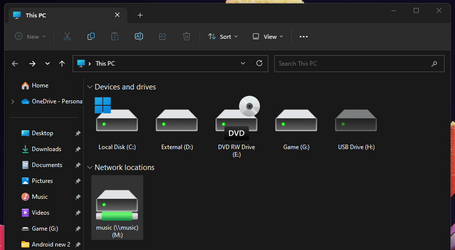
Solved New installed HD, has "Google drive" icon...


Brad1138

Well-known member
Local time
11:29 AM
Posts
19
OS
Win 11 Pro
I bought a new M.2 drive (1 TB WD_BLACK). After installing it, instead of the standard icon hard drives usually get, it got the Google Drive icon. If it's just an icon glitch, I'll just change it, but I want to make sure it isn't something more (I hate Google Drive).

Any idea what's up and why this happened?

Screenshot 2023-09-22 172830.png
 

My Computer My Computer

At a glance

Win 11 ProRyzen 5600XCORSAIR Vengeance LPX 32GB 3200Zotac 3060ti
OS
Win 11 Pro
Computer type
PC/Desktop
CPU
Ryzen 5600X
Motherboard
GIGABYTE B550 GAMING X V2
Memory
CORSAIR Vengeance LPX 32GB 3200
Graphics Card(s)
Zotac 3060ti
Monitor(s) Displays
LG 32" 165 Hz QHD
Screen Resolution
2560 x 1440
Hard Drives
Team Group MP33 M.2 2280 512GB, WD_BLACK 1TB M.2, Seagate 3TB External
PSU
EVGA SuperNOVA 650 G6, 80 Plus Gold 650W
Case
GAMEMAX Contac COC BG Black / Grey
Cooling
Cooler Master Hyper 212 RGB Black Edition
Keyboard
Dacoity B09TZWLFLY
Mouse
TECKNET Pro 2.4G
Internet Speed
400 Mbps (10Mbps up)
Browser
Chrome/FF
Just in case this is useful...

Screenshot 2023-09-22 174341.png
 

My Computer My Computer

At a glance

Win 11 ProRyzen 5600XCORSAIR Vengeance LPX 32GB 3200Zotac 3060ti
OS
Win 11 Pro
Computer type
PC/Desktop
CPU
Ryzen 5600X
Motherboard
GIGABYTE B550 GAMING X V2
Memory
CORSAIR Vengeance LPX 32GB 3200
Graphics Card(s)
Zotac 3060ti
Monitor(s) Displays
LG 32" 165 Hz QHD
Screen Resolution
2560 x 1440
Hard Drives
Team Group MP33 M.2 2280 512GB, WD_BLACK 1TB M.2, Seagate 3TB External
PSU
EVGA SuperNOVA 650 G6, 80 Plus Gold 650W
Case
GAMEMAX Contac COC BG Black / Grey
Cooling
Cooler Master Hyper 212 RGB Black Edition
Keyboard
Dacoity B09TZWLFLY
Mouse
TECKNET Pro 2.4G
Internet Speed
400 Mbps (10Mbps up)
Browser
Chrome/FF
Do you have files named .VolumeIcon.ico & Autorun.inf, under G:\ ?
 

My Computer My Computer

At a glance

Windows 7
OS
Windows 7
Now that is really weird. That is a custom icon and not included in shell icon folder. I know because I downloaded that same icon which I used when mapping my Google Drive to a drive letter. The only way that I can think of that the google drive icon got assigned to the drive is if someone assigned that particular icon. Is there a possibility that the new drive had been used before? It may well be one someone else returned.

In File Explorer click the 3 dots>select options>Folder options will pop up>click View tab>put a check by "Show hidden files, folder, drives>click apply.click OK

In file Explorer, open that drive. Do you see 2 files there? One named autorun.inf, the other an .ico file with the Google drive symbol beside it?

If so, someone has handled that drive before.
Let me know. I'm really interested.

If the 2 files are there, you can delete them which will remove the icon, but personally, if I bought a new drive and could prove it had been used before I would return it for a replacement.
 

My Computers My Computers

  • At a glance

    Windows 11 Pro 25H2 26200.8655i9-10900 10 core 20 threads32 gbnone-Intel UHD Graphics 630
    OS
    Windows 11 Pro 25H2 26200.8655
    Computer type
    PC/Desktop
    Manufacturer/Model
    Dell Optiplex 7080
    CPU
    i9-10900 10 core 20 threads
    Motherboard
    DELL 0J37VM
    Memory
    32 gb
    Graphics Card(s)
    none-Intel UHD Graphics 630
    Sound Card
    Integrated Realtek
    Monitor(s) Displays
    Benq 27
    Screen Resolution
    2560x1440
    Hard Drives
    2x1tb Solidigm m.2 nvme /External drives 512gb Samsung m.2 sata+2tb Kingston m2.nvme
    PSU
    500w
    Case
    MT
    Cooling
    Dell Premium
    Keyboard
    Logitech wired
    Mouse
    Logitech wireless
    Internet Speed
    so slow I'm too embarrassed to tell
    Browser
    #1 Edge #2 Firefox
    Antivirus
    Defender+MWB Premium
  • At a glance

    Windows 11 Pro 24H2 26200.8457AMD Ryzen 7 6800U32 gbintegrated
    Operating System
    Windows 11 Pro 24H2 26200.8457
    Computer type
    PC/Desktop
    Manufacturer/Model
    Beelink Mini PC SER5
    CPU
    AMD Ryzen 7 6800U
    Memory
    32 gb
    Graphics card(s)
    integrated
    Sound Card
    integrated
    Monitor(s) Displays
    Benq 27
    Screen Resolution
    2560x1440
    Hard Drives
    1TB Crucial nvme
    Keyboard
    Logitech wired
    Mouse
    Logitech wireless
    Internet Speed
    still too embarrassed to tell
    Browser
    Firefox
    Antivirus
    Defender
    Other Info
    System 3 is non compliant Dell 9020 i7-4770/24gb ram Win11 PRO 26200.8457
I also suspect the drive has been used & therefore isn’t new. Did the drive come in official packaging?
Was it purchased via a PC/general store or via a third party site (eBay, Amazon)?
 

My Computers My Computers

  • At a glance

    Windows 11 Pro 64bit6th Gen Intel Core i7-6700HQ Quad Core proces...16GB HyperX IMPACT 1600MHz SODIMM DDR3 (2 x 8GB)NVIDIA® GeForce® GTX 960M - 2.0GB DDR5 Video ...
    OS
    Windows 11 Pro 64bit
    Computer type
    Laptop
    Manufacturer/Model
    PC Specialist Optimus VII V17-960 Gaming Laptop.
    CPU
    6th Gen Intel Core i7-6700HQ Quad Core processor.
    Memory
    16GB HyperX IMPACT 1600MHz SODIMM DDR3 (2 x 8GB)
    Graphics Card(s)
    NVIDIA® GeForce® GTX 960M - 2.0GB DDR5 Video RAM - DirectX® 12
    Sound Card
    Intel 2 Channel High Def. Audio + SoundBlaster™ Cinema 2 & Realtek
    Monitor(s) Displays
    Optimus Series: 17.3" Matte Full HD IPS LED Widescreen (1920x1080)
    Screen Resolution
    Full HD IPS display (1920 x 1080).
    Hard Drives
    4TB SSD (internal).
    1x 1TB & 1x 5TB external HDDs.
    Cooling
    STANDARD THERMAL PASTE FOR SUFFICIENT COOLING
    Keyboard
    Logitech K800 wireless keyboard
    Mouse
    Logitech M705 wireless mouse
    Internet Speed
    Upto 100Mbps
    Browser
    Edge.
    Antivirus
    Windows Defender & MalwareBytes pro.
  • At a glance

    IOS 14.6
    Operating System
    IOS 14.6
    Computer type
    Tablet
    Manufacturer/Model
    Apple
Now that is really weird. That is a custom icon and not included in shell icon folder. I know because I downloaded that same icon which I used when mapping my Google Drive to a drive letter. The only way that I can think of that the google drive icon got assigned to the drive is if someone assigned that particular icon. Is there a possibility that the new drive had been used before? It may well be one someone else returned.

In File Explorer click the 3 dots>select options>Folder options will pop up>click View tab>put a check by "Show hidden files, folder, drives>click apply.click OK

In file Explorer, open that drive. Do you see 2 files there? One named autorun.inf, the other an .ico file with the Google drive symbol beside it?

If so, someone has handled that drive before.
Let me know. I'm really interested.

If the 2 files are there, you can delete them which will remove the icon, but personally, if I bought a new drive and could prove it had been used before I would return it for a replacement.
I also suspect the drive has been used & therefore isn’t new. Did the drive come in official packaging?
Was it purchased via a PC/general store or via a third party site (eBay, Amazon)?
Thanks,

I bought it from NewEgg, it came in sealed factory package. Western Digital BLACK SN850X NVMe M.2 2280 1TB PCI-Express 4.0 x4 Internal Solid State Drive (SSD) WDS100T2XHE - Newegg.com

There are no hidden files.

Crystal Disk Info shows it to be new.

Screenshot 2023-09-23 083227.png
 

My Computer My Computer

At a glance

Win 11 ProRyzen 5600XCORSAIR Vengeance LPX 32GB 3200Zotac 3060ti
OS
Win 11 Pro
Computer type
PC/Desktop
CPU
Ryzen 5600X
Motherboard
GIGABYTE B550 GAMING X V2
Memory
CORSAIR Vengeance LPX 32GB 3200
Graphics Card(s)
Zotac 3060ti
Monitor(s) Displays
LG 32" 165 Hz QHD
Screen Resolution
2560 x 1440
Hard Drives
Team Group MP33 M.2 2280 512GB, WD_BLACK 1TB M.2, Seagate 3TB External
PSU
EVGA SuperNOVA 650 G6, 80 Plus Gold 650W
Case
GAMEMAX Contac COC BG Black / Grey
Cooling
Cooler Master Hyper 212 RGB Black Edition
Keyboard
Dacoity B09TZWLFLY
Mouse
TECKNET Pro 2.4G
Internet Speed
400 Mbps (10Mbps up)
Browser
Chrome/FF

My Computer My Computer

At a glance

Win 11 ProRyzen 5600XCORSAIR Vengeance LPX 32GB 3200Zotac 3060ti
OS
Win 11 Pro
Computer type
PC/Desktop
CPU
Ryzen 5600X
Motherboard
GIGABYTE B550 GAMING X V2
Memory
CORSAIR Vengeance LPX 32GB 3200
Graphics Card(s)
Zotac 3060ti
Monitor(s) Displays
LG 32" 165 Hz QHD
Screen Resolution
2560 x 1440
Hard Drives
Team Group MP33 M.2 2280 512GB, WD_BLACK 1TB M.2, Seagate 3TB External
PSU
EVGA SuperNOVA 650 G6, 80 Plus Gold 650W
Case
GAMEMAX Contac COC BG Black / Grey
Cooling
Cooler Master Hyper 212 RGB Black Edition
Keyboard
Dacoity B09TZWLFLY
Mouse
TECKNET Pro 2.4G
Internet Speed
400 Mbps (10Mbps up)
Browser
Chrome/FF
Do you have Google Sync installed? Maybe it's assuming you want to backup a newly discovered drive, and has "claimed" it.
 

My Computer My Computer

At a glance

Windows 7
OS
Windows 7
Garlin,
How can we tell if we have Google Sync installed? Also, if we do, is there there a silent uninstall command? Thank You
 

My Computer My Computer

At a glance

Windows 11 Enterprise
OS
Windows 11 Enterprise
Computer type
PC/Desktop
Manufacturer/Model
WMI says "To be Filled By OEM"
Keyboard
Plastic
Mouse
I have not seen any lately
Internet Speed
Insert AIM ICON :)
Browser
The first one I find to double click on.
Antivirus
Sandbox
Do you have Google Sync installed? Maybe it's assuming you want to backup a newly discovered drive, and has "claimed" it.
I don't think so, only if it installed itself.

I just looked, "Google Drive" was installed the same day I installed the SSD... :unsure: (but no Sync)

When I launched "Google Drive", it fixed the icon and created a new drive with that icon. So it looks like it was Google messing things up.

I'll see if it stays fixed after a reboot.

*Correction to the OP, I "hate" Google backing up my stuff w/o my permission, not necessarily "Google Drive".Screenshot 2023-09-23 115516.png
 

My Computer My Computer

At a glance

Win 11 ProRyzen 5600XCORSAIR Vengeance LPX 32GB 3200Zotac 3060ti
OS
Win 11 Pro
Computer type
PC/Desktop
CPU
Ryzen 5600X
Motherboard
GIGABYTE B550 GAMING X V2
Memory
CORSAIR Vengeance LPX 32GB 3200
Graphics Card(s)
Zotac 3060ti
Monitor(s) Displays
LG 32" 165 Hz QHD
Screen Resolution
2560 x 1440
Hard Drives
Team Group MP33 M.2 2280 512GB, WD_BLACK 1TB M.2, Seagate 3TB External
PSU
EVGA SuperNOVA 650 G6, 80 Plus Gold 650W
Case
GAMEMAX Contac COC BG Black / Grey
Cooling
Cooler Master Hyper 212 RGB Black Edition
Keyboard
Dacoity B09TZWLFLY
Mouse
TECKNET Pro 2.4G
Internet Speed
400 Mbps (10Mbps up)
Browser
Chrome/FF
I installed Googlechromeenterprise64bit.msi only on a laptop and did not sign into google or sync. Two days later on the Start menu was "Chrome Apps". Each shortcut in the Chrome Apps folder points to chrome_proxy.exe. It auto downloaded the shortcuts it seems.
 

My Computer My Computer

At a glance

Windows 11 Enterprise
OS
Windows 11 Enterprise
Computer type
PC/Desktop
Manufacturer/Model
WMI says "To be Filled By OEM"
Keyboard
Plastic
Mouse
I have not seen any lately
Internet Speed
Insert AIM ICON :)
Browser
The first one I find to double click on.
Antivirus
Sandbox
After reboot :)

Screenshot 2023-09-23 121209.png

Thanks all
 

My Computer My Computer

At a glance

Win 11 ProRyzen 5600XCORSAIR Vengeance LPX 32GB 3200Zotac 3060ti
OS
Win 11 Pro
Computer type
PC/Desktop
CPU
Ryzen 5600X
Motherboard
GIGABYTE B550 GAMING X V2
Memory
CORSAIR Vengeance LPX 32GB 3200
Graphics Card(s)
Zotac 3060ti
Monitor(s) Displays
LG 32" 165 Hz QHD
Screen Resolution
2560 x 1440
Hard Drives
Team Group MP33 M.2 2280 512GB, WD_BLACK 1TB M.2, Seagate 3TB External
PSU
EVGA SuperNOVA 650 G6, 80 Plus Gold 650W
Case
GAMEMAX Contac COC BG Black / Grey
Cooling
Cooler Master Hyper 212 RGB Black Edition
Keyboard
Dacoity B09TZWLFLY
Mouse
TECKNET Pro 2.4G
Internet Speed
400 Mbps (10Mbps up)
Browser
Chrome/FF
Hi, Just to say I've had the same problem with a USB drive. Having read this thread, I started Google Drive, then renamed the rogue USB drive as "USB drive". For some reason, it was showing as "New Volume". After fiddling, it seems to be showing the right icon in both File Manager and Files
 

My Computer My Computer

At a glance

Windows 1112th Gen Intel Core i3-1210016 GbIntegrated Graphics 730
OS
Windows 11
Computer type
PC/Desktop
Manufacturer/Model
Mesh
CPU
12th Gen Intel Core i3-12100
Motherboard
Asus Prime H610M-D D4
Memory
16 Gb
Graphics Card(s)
Integrated Graphics 730

Latest Support Threads

Back
Top Bottom