New profanity filtering control and customization for captions in Microsoft Teams meetings


 Microsoft Teams Blog:


We’ve recently rolled out two features that enhance the captions experience in Microsoft Teams meetings. We’ve added the ability to toggle profanity filtering for Live Captions and Live Transcription, and support for customizing your captions experience.

Profanity filtering toggle

We’ve added a toggle that allows you to turn off the profanity filtering for live captions. This will allow you to view live captions and live transcription without any filtering or masking, displaying every word as-is. Filtering is on by default so if you want to turn it off, you’ll need to do so from the captions and transcription tab in your user settings. This is a user-level preference and is not controlled by the meeting organizer or your tenant admin.
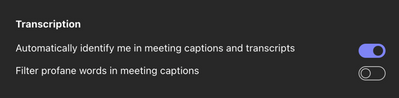
medium


Improvements to the caption experience

We've made some improvements to the captions experience that are focused on the ability to customize the positioning and presentation of captions in your meetings.

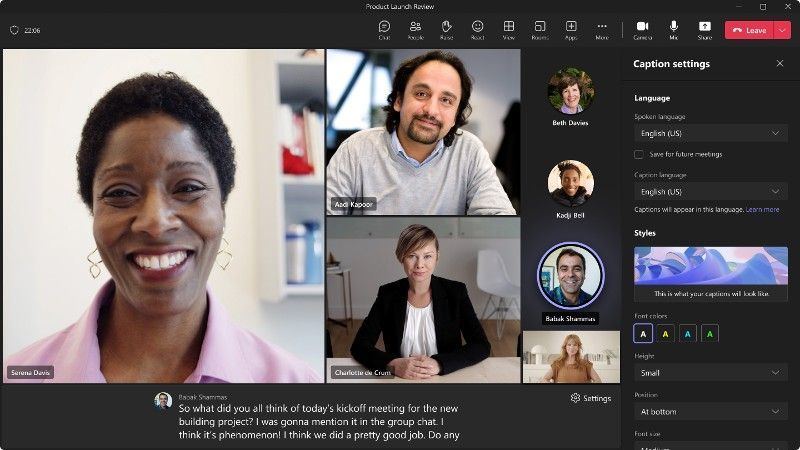
You’ll notice that the captions window on the bottom of the meeting window looks a little bit different. First, we’ve cleaned up the layout of the speaker attribution and the captions. The full speaker name is now displayed above the captions that they are associated with.

We have also increased the default number of lines displayed from 2 to 3 with the ability to expand the window to display additional lines.
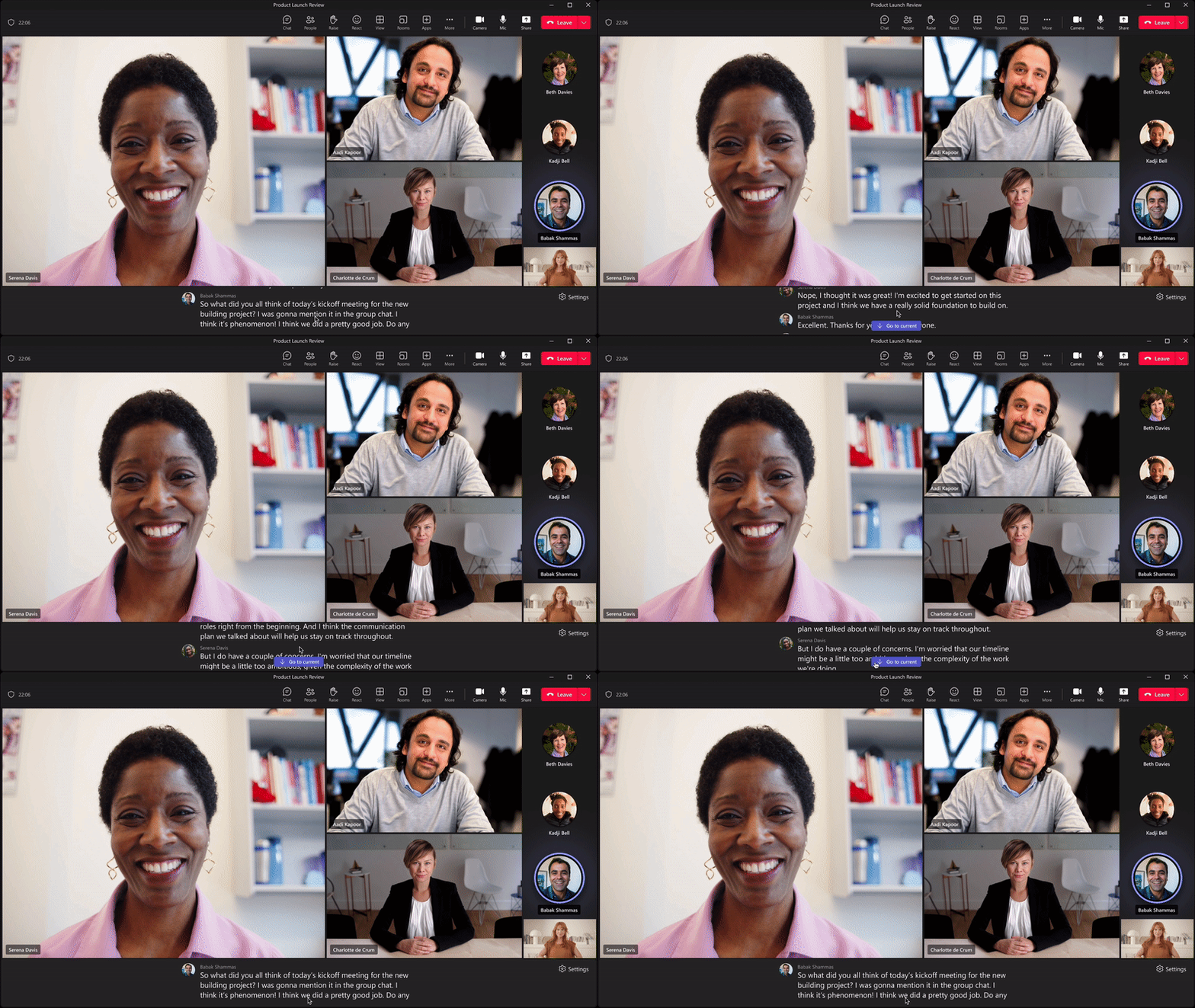
large


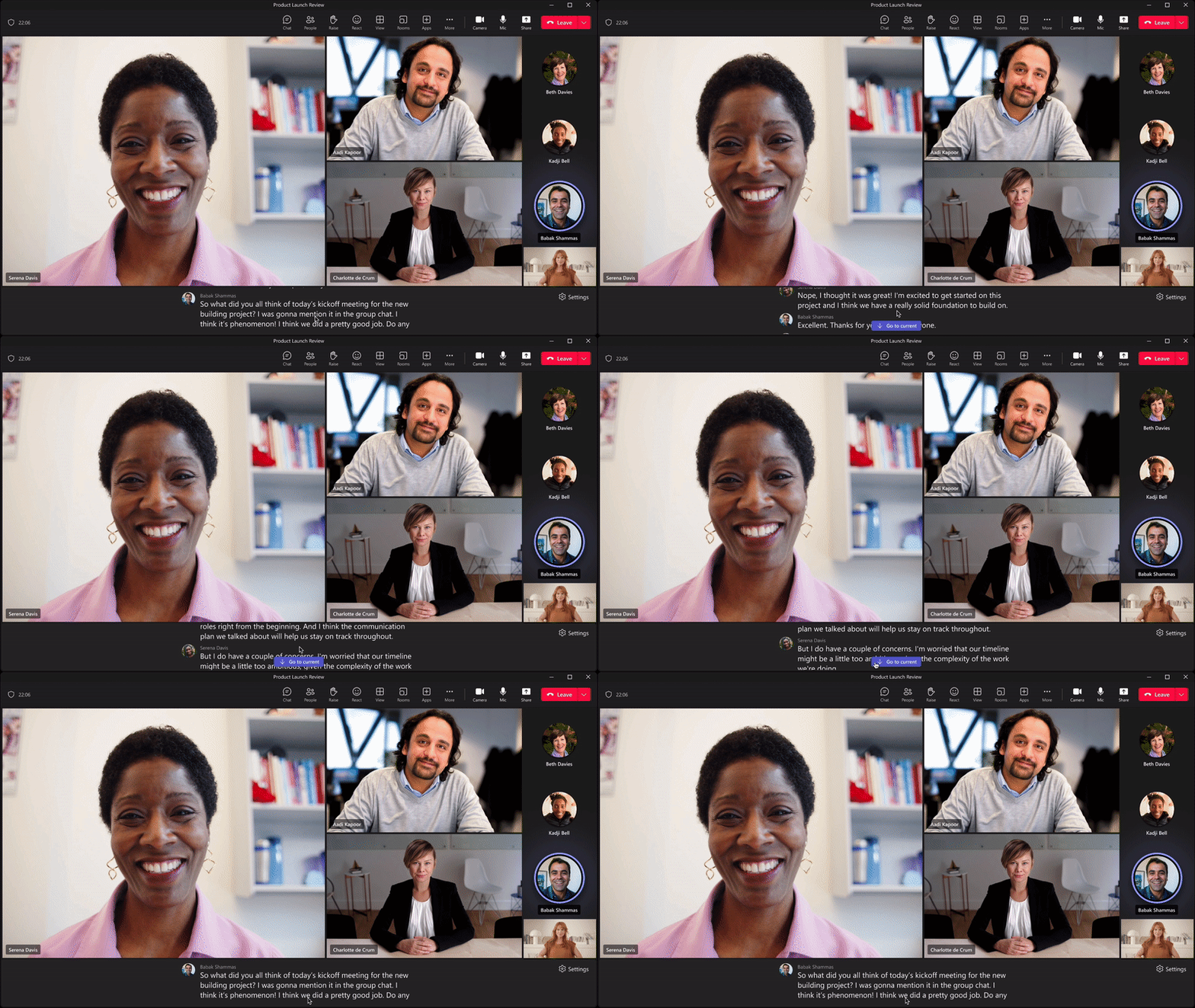
On the top right corner of the caption window, you’ll see a settings button. When you click on this, you will see the new captions settings pane displayed on the right side of the window. This has several different configuration options broken down into two different sections.
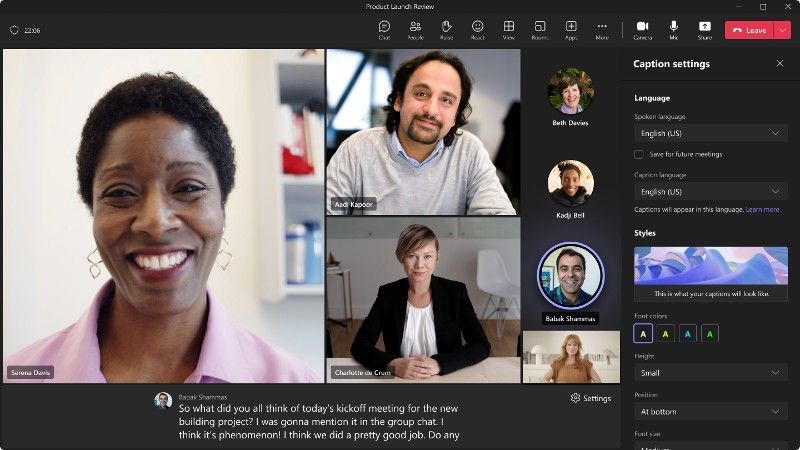
large


The languages section allows you to specify the current spoken language for the meeting. If you have a Teams Premium license, you will be able to specify the language that you would like for your live translations.


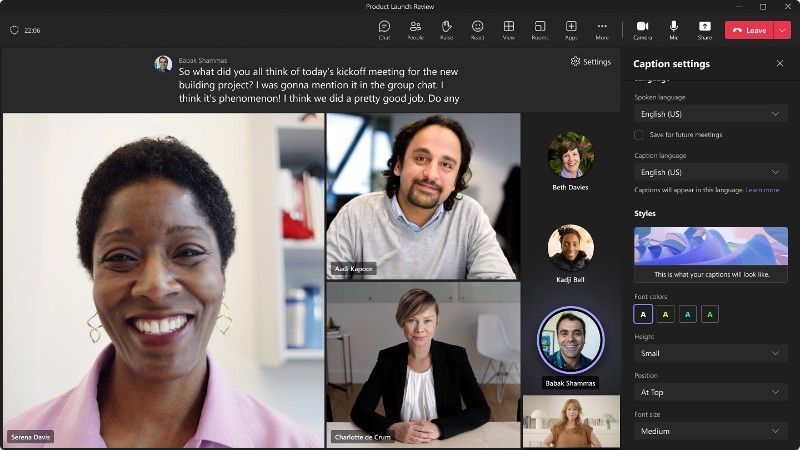
The styles section allows you to apply four different styles to your captions. You can change the font color, set the height of the caption panel, set the position of the panel, and/or change the font size.
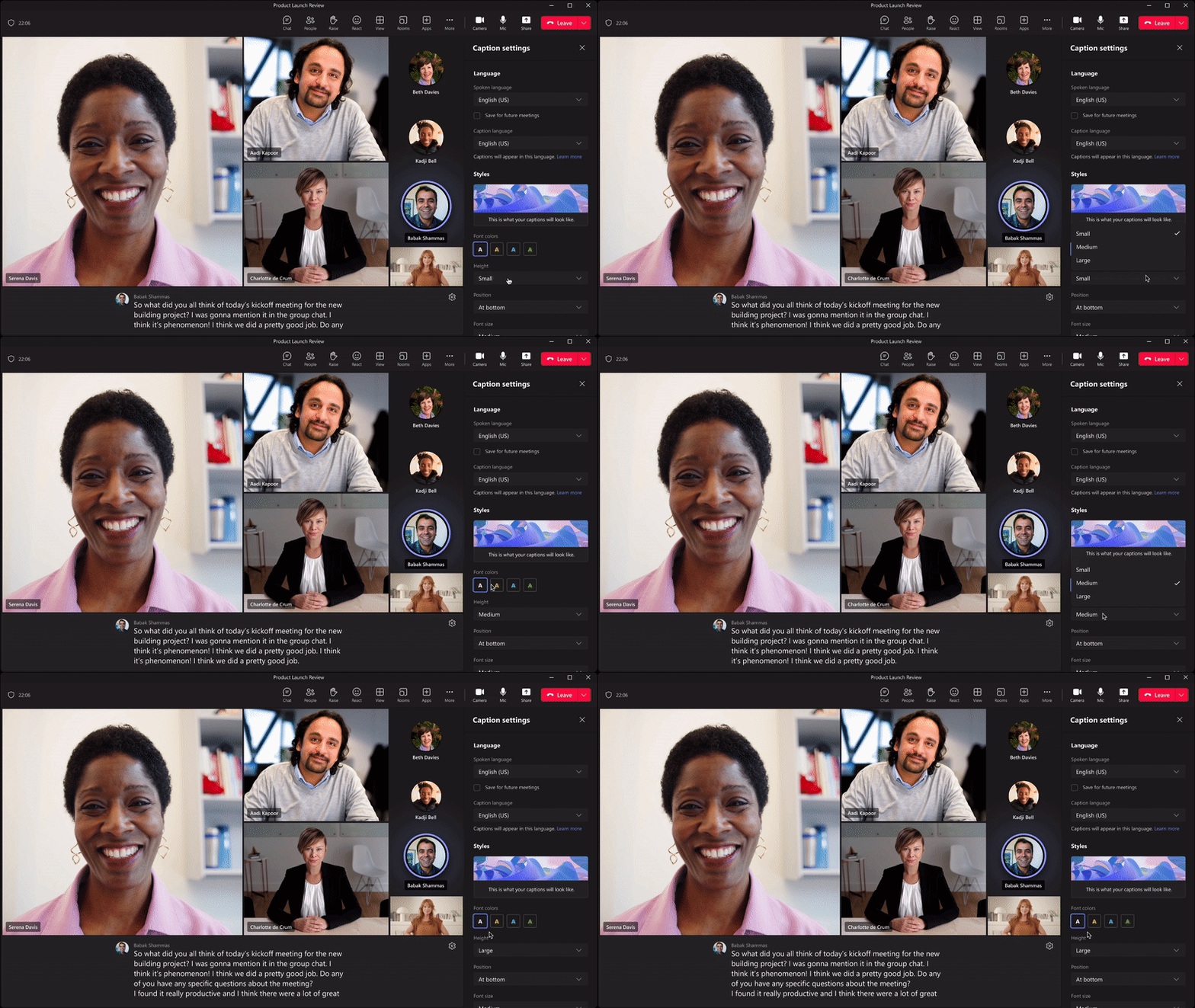
large


Depending on the chosen height and font sizes, you will be able to get up to an extra 3-4 lines of captions.

We have also added the ability to scroll up through the previous minute of captions that have been displayed in the captions panel. This comes in handy if you missed what was said or if you would like to quickly revisit what was said in the most recent captions.
large


Finally, the position of the caption panel can be configured to be on the bottom or the top of the meeting view, allowing you to customize your caption experience to what works best for you.
large


Availability

Both features are now available on the desktop and web clients for commercial and GCC customers.

Help us continue to improve

I’m really excited about the progress we’re making. We continue to be committed to creating a Teams meeting experience that is not just accessible, but delightful, for Deaf and hard of hearing participants. And for that, we need your input and engagement. The simplest way to provide feedback is via the Help menu within Teams itself. U.S. customers can also provide feedback and get assistance in ASL – on any Microsoft product, not just this one – through the Disability Answer Desk (DAD) via videophone at (+1 503-427-1234).


 Source:
 
Last edited:
Feck profanity bs.
 

My Computer My Computer

At a glance

Windows 11 Pro + Win11 Canary VM.I9 13th gen i9-13900H 2.60 GHZ16 GB solderedIntegrated Intel Iris XE
OS
Windows 11 Pro + Win11 Canary VM.
Computer type
Laptop
Manufacturer/Model
ASUS Zenbook 14
CPU
I9 13th gen i9-13900H 2.60 GHZ
Motherboard
Yep, Laptop has one.
Memory
16 GB soldered
Graphics Card(s)
Integrated Intel Iris XE
Sound Card
Realtek built in
Monitor(s) Displays
laptop OLED screen
Screen Resolution
2880x1800 touchscreen
Hard Drives
1 TB NVME SSD (only weakness is only one slot)
PSU
Internal + 65W thunderbolt USB4 charger
Case
Yep, got one
Cooling
Stella Artois (UK pint cans - 568 ml) - extra cost.
Keyboard
Built in UK keybd
Mouse
Bluetooth , wireless dongled, wired
Internet Speed
900 mbs (ethernet), wifi 6 typical 350-450 mb/s both up and down
Browser
Edge
Antivirus
Defender
Other Info
TPM 2.0, 2xUSB4 thunderbolt, 1xUsb3 (usb a), 1xUsb-c, hdmi out, 3.5 mm audio out/in combo, ASUS backlit trackpad (inc. switchable number pad)

Macrium Reflect Home V8
Office 365 Family (6 users each 1TB onedrive space)
Hyper-V (a vm runs almost as fast as my older laptop)
I'm sure the overly sensitive snowflakes using Teams will be forever in debt to MS. Guess it's good this old lady doesn't use Teams. Half of what I say would be bleeped out PDQ. At times, I have to slap duck tape over my fingers when commenting on this forum. :zany::ffs::devilish:
 

My Computers My Computers

  • At a glance

    Windows 11 Pro 25H2 26200.8655i9-10900 10 core 20 threads32 gbnone-Intel UHD Graphics 630
    OS
    Windows 11 Pro 25H2 26200.8655
    Computer type
    PC/Desktop
    Manufacturer/Model
    Dell Optiplex 7080
    CPU
    i9-10900 10 core 20 threads
    Motherboard
    DELL 0J37VM
    Memory
    32 gb
    Graphics Card(s)
    none-Intel UHD Graphics 630
    Sound Card
    Integrated Realtek
    Monitor(s) Displays
    Benq 27
    Screen Resolution
    2560x1440
    Hard Drives
    2x1tb Solidigm m.2 nvme /External drives 512gb Samsung m.2 sata+2tb Kingston m2.nvme
    PSU
    500w
    Case
    MT
    Cooling
    Dell Premium
    Keyboard
    Logitech wired
    Mouse
    Logitech wireless
    Internet Speed
    so slow I'm too embarrassed to tell
    Browser
    #1 Edge #2 Firefox
    Antivirus
    Defender+MWB Premium
  • At a glance

    Windows 11 Pro 24H2 26200.8457AMD Ryzen 7 6800U32 gbintegrated
    Operating System
    Windows 11 Pro 24H2 26200.8457
    Computer type
    PC/Desktop
    Manufacturer/Model
    Beelink Mini PC SER5
    CPU
    AMD Ryzen 7 6800U
    Memory
    32 gb
    Graphics card(s)
    integrated
    Sound Card
    integrated
    Monitor(s) Displays
    Benq 27
    Screen Resolution
    2560x1440
    Hard Drives
    1TB Crucial nvme
    Keyboard
    Logitech wired
    Mouse
    Logitech wireless
    Internet Speed
    still too embarrassed to tell
    Browser
    Firefox
    Antivirus
    Defender
    Other Info
    System 3 is non compliant Dell 9020 i7-4770/24gb ram Win11 PRO 26200.8457
I'll be the first in line to bloody well test that feckin hell out of it, too!

Thankfully, though, I'm the admin myself. So, yeah, about that setting - DISABLED!
 

My Computers My Computers

  • At a glance

    Windows 11 23H2 Current buildAMD Ryzen 9 3950X4 * 32 GB - Corsair Vengeance 3600 MHzEVGA GeForce RTX 3080 Ti XC3 ULTRA GAMING (12...
    OS
    Windows 11 23H2 Current build
    Computer type
    PC/Desktop
    Manufacturer/Model
    HomeBrew
    CPU
    AMD Ryzen 9 3950X
    Motherboard
    MSI MEG X570 GODLIKE
    Memory
    4 * 32 GB - Corsair Vengeance 3600 MHz
    Graphics Card(s)
    EVGA GeForce RTX 3080 Ti XC3 ULTRA GAMING (12G-P5-3955-KR)
    Sound Card
    Realtek® ALC1220 Codec
    Monitor(s) Displays
    2x Eve Spectrum ES07D03 4K Gaming Monitor (Matte) | Eve Spectrum ES07DC9 4K Gaming Monitor (Glossy)
    Screen Resolution
    3x 3840 x 2160
    Hard Drives
    3x Samsung 980 Pro NVMe PCIe 4 M.2 2 TB SSD (MZ-V8P2T0B/AM) } 3x Sabrent Rocket NVMe 4.0 1 TB SSD (USB)
    PSU
    PC Power & Cooling’s Silencer Series 1050 Watt, 80 Plus Platinum
    Case
    Fractal Design Define 7 XL Dark ATX Full Tower Case
    Cooling
    Arctic Liquid Freezer III 420 RGB + Air 3x 140mm case fans (pull front) + 1x 120 mm (push back) and 1 x 120 mm (pull bottom)
    Keyboard
    SteelSeries Apex Pro Wired Gaming Keyboard
    Mouse
    Logitech MX Master 3S | MX Master 3 for Business
    Internet Speed
    AT&T LightSpeed Gigabit Duplex Ftth
    Browser
    Nightly (default) + Firefox (stable), Chrome, Edge , Arc
    Antivirus
    Defender + MB 5 Beta
  • At a glance

    ChromeOS Flex Dev Channel (current)Intel(R) Core(TM) i5-6300U CPU @ 2.40GHz, 250...16 GBIntel(R) HD Graphics 520
    Operating System
    ChromeOS Flex Dev Channel (current)
    Computer type
    Laptop
    Manufacturer/Model
    Dell Latitude E5470
    CPU
    Intel(R) Core(TM) i5-6300U CPU @ 2.40GHz, 2501 Mhz, 2 Core(s), 4 Logical Processor(s)
    Motherboard
    Dell
    Memory
    16 GB
    Graphics card(s)
    Intel(R) HD Graphics 520
    Sound Card
    Intel(R) HD Graphics 520 + RealTek Audio
    Monitor(s) Displays
    Dell laptop display 15"
    Screen Resolution
    1920 * 1080
    Hard Drives
    Toshiba 128GB M.2 22300 drive
    INTEL Cherryville 520 Series SSDSC2CW180A 180 GB SATA III SSD
    PSU
    Dell
    Case
    Dell
    Cooling
    Dell
    Keyboard
    Dell
    Mouse
    Logitech MX Master 3S (shared w. Sys 1) | Dell TouchPad
    Internet Speed
    AT&T LightSpeed Gigabit Duplex Ftth
Back
Top Bottom