Microsoft 365 Insider Blog:
Hey, Microsoft 365 Insiders! My name is Jake Armstrong, and I’m a Product Manager on the Excel team. I’m excited to announce the availability of three new functions that use Regular Expressions to help parse text more easily: REGEXTEST, REGEXEXTRACT, and REGEXREPLACE.
NOTE: These are preview functions. Their signature and results may change substantially before being broadly released, based on your feedback. So, we do not recommend using these functions in important workbooks until they are generally available.
New Regular expression (Regex) functions in Excel
Regular expressions, or ‘regex’, are sequences of characters that define search patterns, commonly used for string searching and text parsing. They are incredibly versatile and are often used to check if a string contains a certain pattern, extract substrings that match the pattern, or replace substrings that match the pattern.The new regex functions we are introducing are:
- REGEXTEST: Checks if any part of supplied text matches a regex pattern.
- REGEXEXTRACT: Extracts one or more parts of supplied text that match a regex pattern.
- REGEXREPLACE: Searches for a regex pattern within supplied text and replaces it with different text.
REGEXTEST
REGEXTEST checks whether the pattern matches any part of the provided text, always returning TRUE or FALSE.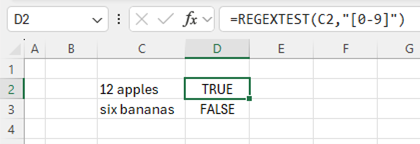
Checking whether the strings in column C contain numerical digits, using the regex pattern “[0-9]”
The full signature is: REGEXTEST(text, pattern, [case_sensitivity])
Learn more
REGEXEXTRACT
REGEXEXTRACT returns substrings of text that match the pattern provided. Depending on the return mode, it can return the first match, all matches, or each capture group from the first match.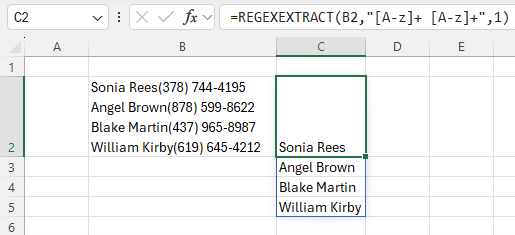
Extracting names from text using the pattern “[A-z]+ [A-z]+”, which matches two groups of alphabet characters separated by a space
The full signature is: REGEXEXTRACT(text, pattern, [return_mode], [case_sensitivity])
Learn more
REGEXREPLACE
REGEXREPLACE looks for substrings of text that match the pattern provided, and then replaces them with a replacement string.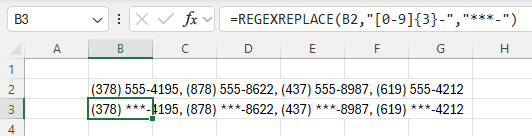
Replacing the first three digits of each phone number with ***, using the pattern “[0-9]{3}-”, which matches against three numerical digits followed by “-”
The full signature is: REGEXREPLACE(text, pattern, replacement, [occurrence], [case_sensitivity])
Learn more
Regex coming soon to XLOOKUP and XMATCH
We will also be introducing a way to use regex within XLOOKUP and XMATCH, via a new option for their ‘match mode’ arguments. The regex pattern will be supplied as the ‘lookup value’.This will be available for you to try in Beta soon, at which point we’ll update this blog post with more details.
Tips and tricks
- When writing regex patterns, you can use symbols called ‘tokens’ that match with a variety of characters. Here are some useful tokens to get you started:
- “[0-9]”: any numerical digit
- “[a-z]”: a character in the range of a to z
- “.”: any character
- “a”: the “a” character
- “a*”: zero or more “a”
- “a+”: one or more “a”
- Try asking Bing Copilot for regex patterns!
Availability
These functions are currently available to Beta Channel users running:- Windows: Version 2406 (Build 17715.20000) or later
- Mac: Version 16.86 (Build 24051422) or later
Don’t have it yet? It’s probably us, not you.
Features are released over some time to ensure things are working smoothly. We highlight features that you may not have because they’re slowly releasing to larger numbers of Insiders. Sometimes we remove elements to further improve them based on your feedback. Though this is rare, we also reserve the option to pull a feature entirely out of the product, even if you, as an Insider, have had the opportunity to try it.Feedback
We want to hear from you! Please click Help > Feedback to submit your thoughts about these new functions. Source:

New Regular expression (Regex) functions in Excel
Check out three new functions that use Regular Expressions to help parse text more easily: REGEXTEST, REGEXEXTRACT, and REGEXREPLACE!