Windows IT Pro Blog:
Editor's note 10.31.2025: We are actively listening to your feedback and planning further improvements. Thank you for helping us create a better user experience.
Windows updates play a vital role in keeping devices secure, performant, and up to date. To further enrich the user experience, we're introducing a simplified and standardized titling system for a range of updates.
This new format is designed primarily with the user in mind. Titles are more intuitive, consistent, and informative to help users quickly understand what updates they're receiving.
Enhanced clarity and consistency across update titles
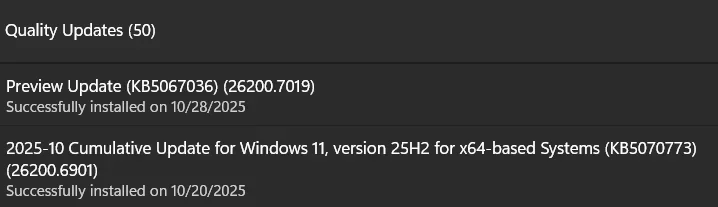
The updated titles follow a clear and predictable structure across multiple update types. Each title now refers to the update by a more user-friendly name. It also includes just the most relevant identifiers, such as KB number and build or version. What we omit are the unnecessary technical details like platform architecture or date prefixes.Here are examples of what the updated titles look like:
- Monthly or out-of-band security updates: Security Update (KB5034123) (26100.4747)
- Monthly preview non-security updates: Preview Update (KB5062660) (26100.4770)
- .NET Framework security updates: .NET Framework Security Update (KB5056579)
- .NET Framework non-security updates: .NET Framework Preview Update (KB5056579)
- Driver updates: Logitech Driver Update (123.331.1.0)
- AI component updates: Phi Silica AI Component Update (KB5064650) (1.2507.793.0)
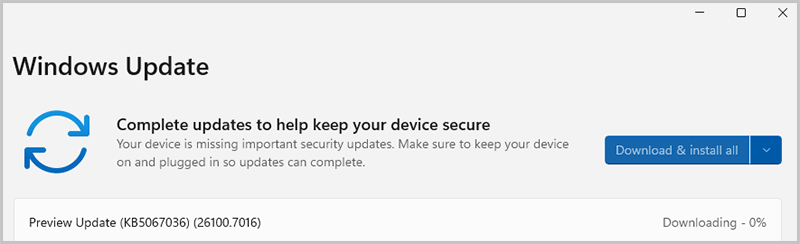
Screenshot of the Windows Update page showing that the Preview Update has begun to download.
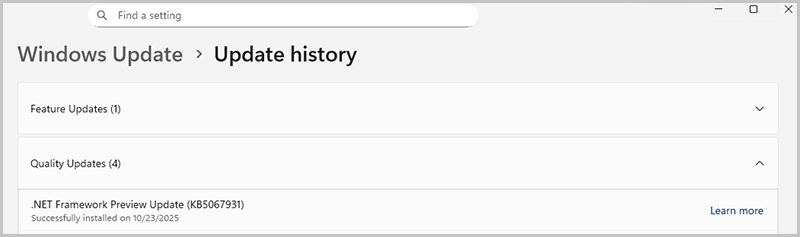
Screenshot of the Update history page indicating the .NET Framework Preview Update has been installed.
Scope and compatibility
This title simplification applies to:- Windows OS quality updates (monthly security and non-security preview updates)
- .NET Framework updates
- Driver updates
- AI component updates
- Visual Studio updates
- Settings > Windows Update
- Settings > Windows Update > Update history
- Windows release health
Small changes that make big differences
With this first large-scale improvement in update naming, we hope users at your organization can take advantage of several benefits:- Improved readability for users reviewing updates in Windows Settings or Update history.
- Predictable formatting for original equipment manufacturers (OEMs) and partners integrating with servicing tools.
1 Visual Studio update titles are now simplified across all channels as follows: Visual Studio 2022 Security Update (version).
Source:
Simplified Windows Update titles - Windows IT Pro Blog
Explore the new simplified and standardized title approach for updates in Windows Update.
 techcommunity.microsoft.com
Last edited: