new start menu


FIREMEDIC2700

Well-known member
Member
VIP
Local time
2:08 AM
Posts
214
Location
BIRMINGHAM, AL USA
OS
WINDOWS 11 WINDOWS 10
has anyone got the new start menu other than using vive tool.
I am on a unsupported machine and get all updates, previews , etc , .
also what seems to be all the latest improvements. just missing the new start menu and drag try i think .
 

My Computer My Computer

At a glance

WINDOWS 11 WINDOWS 10Intel(R) Core(TM) i7 -3770K CPU 3.50 GZ 3501 ...32.0 GB (31.9 GB usable)AMD RADEON TM R5240 INTELL HD GRAPHICS 4600 T...
OS
WINDOWS 11 WINDOWS 10
Computer type
PC/Desktop
Manufacturer/Model
HP H8 1360T
CPU
Intel(R) Core(TM) i7 -3770K CPU 3.50 GZ 3501 4 CORE
Motherboard
PEGATRON 2AD5
Memory
32.0 GB (31.9 GB usable)
Graphics Card(s)
AMD RADEON TM R5240 INTELL HD GRAPHICS 4600 TIGER 1+1 USB
Sound Card
AMD HD . IDT
Monitor(s) Displays
AOC WAL MART SPECIAL . HP 2311 IX IPS LED DELL 1708 FP
Screen Resolution
1920 X 1080 1600X900 1280X940
Hard Drives
1 FAXING S 100 512GB 1 KINGSTON 120 GB SSD 1 X12 SSD 512 GB
PSU
300 WATT HP
Case
FULL
Cooling
ON BOARD FAN
Keyboard
LOGITEC K 520 WIRELESS
Mouse
LOGITEC M 510 WIRELESS
Internet Speed
55 UP 11.2 DOWN
Browser
CHROME EDGE
Antivirus
WINDOWS SECUIRTY
Other Info
NON SUPPORTED HARDWARE FOR WINDOWS 11
I've got it for some time now on 2 unsupported machines.
 

My Computers My Computers

  • At a glance

    Win 11 Pro 25H2 26200.8457 / Linux Mint 22.3Ryzen 7 2700U Pro32GBiGPU Vega 10
    OS
    Win 11 Pro 25H2 26200.8457 / Linux Mint 22.3
    Computer type
    Laptop
    Manufacturer/Model
    Lenovo A485
    CPU
    Ryzen 7 2700U Pro
    Motherboard
    Lenovo (WiFi/BT module upgraded to Intel Wireless-AC-9260)
    Memory
    32GB
    Graphics Card(s)
    iGPU Vega 10
    Sound Card
    Realtek
    Monitor(s) Displays
    14" FHD (built-in) + 14" Lenovo Thinkvision M14t (touch+pen) + 32" Asus PB328
    Screen Resolution
    FHD + FHD + 1440p
    Hard Drives
    Intel 660p m.2 nVME PCIe3.0 x2 512GB
    PSU
    125W(Dock)/65W(Travel Adapter)
    Keyboard
    Thinkpad / Logitech MX Keys
    Mouse
    Logitech MX Master 2S
    Internet Speed
    1/1Gbit
    Browser
    Firefox
    Antivirus
    Windows Defender
    Other Info
    SecureBoot: Enabled
    TPM2.0: Enabled
    AMD-V: Enabled
  • At a glance

    Win 11 Pro 25H2 26200.8521(RP)i7-7700k @4.8GHz32GB 2x16GB 2133MHz CL15EVGA GTX1080Ti FTW 11GB
    Operating System
    Win 11 Pro 25H2 26200.8521(RP)
    Computer type
    PC/Desktop
    Manufacturer/Model
    Custom
    CPU
    i7-7700k @4.8GHz
    Motherboard
    Asus PRIME Z270-A
    Memory
    32GB 2x16GB 2133MHz CL15
    Graphics card(s)
    EVGA GTX1080Ti FTW 11GB
    Sound Card
    Integrated
    Monitor(s) Displays
    32" 10-bit Asus PB328Q
    Screen Resolution
    WQHD 2560x1440
    Hard Drives
    512GB ADATA SX8000NP NVMe PCIe Gen 3 x4
    PSU
    850W
    Case
    Fractal Design Define 7
    Cooling
    Noctua NH-D15 chromax.black
    Keyboard
    Logitech MX Keys
    Mouse
    Logitech MX Master 2S
    Internet Speed
    1/1Gbit
    Browser
    Firefox
    Antivirus
    Windows Defender
    Other Info
    AC WiFi Card
you can enable the new start menu using @Ghot registry file in post #4

best of luck Steve ..
 

My Computers My Computers

  • At a glance

    Debian 13 KDE .. Windows 11 HomeRyzen 7 5825u64GB DDR4 3200Ryzen 7 5825u
    OS
    Debian 13 KDE .. Windows 11 Home
    Computer type
    PC/Desktop
    Manufacturer/Model
    HP 24" AiO
    CPU
    Ryzen 7 5825u
    Motherboard
    HP
    Memory
    64GB DDR4 3200
    Graphics Card(s)
    Ryzen 7 5825u
    Sound Card
    RealTek
    Monitor(s) Displays
    24" HP AiO
    Screen Resolution
    1920 x 1080 @60 Hz
    Hard Drives
    1TB WD Blue SN580 M2 SSD Partitioned.
    2x 1TB USB HDD External Backup/Storage.
    PSU
    90W external power brick
    Case
    24" All in One
    Cooling
    Default Air Cooling
    Keyboard
    HP WiFi UK extended
    Mouse
    HP WiFi 3 Button
    Internet Speed
    1GB full fibre
    Browser
    Edge & Firefox
    Antivirus
    AVG Internet Security/Windows Defender
    Other Info
    Mainly Open Source Software
  • At a glance

    Ubuntu 22.04.5 LTSi5 7200u16GB DDR4Intel
    Operating System
    Ubuntu 22.04.5 LTS
    Computer type
    Laptop
    Manufacturer/Model
    Dell 13" Latitude 2017
    CPU
    i5 7200u
    Motherboard
    Dell
    Memory
    16GB DDR4
    Graphics card(s)
    Intel
    Sound Card
    Intel
    Monitor(s) Displays
    13" Dell Laptop
    Hard Drives
    250GB Crucial 2.5" SSD
    Mouse
    Generic WiFi 3 button
    Internet Speed
    WiFi only
    Browser
    Firefox
    Antivirus
    ClamAV TK
    Other Info
    Mainly Open Source Software
I did.. Liked it too, that was on my 12 gen i7 and 3070ti, it just appeared. Same motherboard, upgraded CPU, GPU and storage and did a clean install this was Janury 13th, still on the old start menu.. Thing is.. Old one is nice too :)
But originally it just appeared now I can't devide which I prefer.
 

My Computer My Computer

At a glance

11 ProI7 14700k2 X Corsair Vengeance DDR4 @ 3600 32 gb totalMSI RTX 5070ti Ventus 3x OC
OS
11 Pro

Computer type
PC/Desktop
CPU
I7 14700k
Motherboard
Gigabyte Z690 Aorus Elite
Memory
2 X Corsair Vengeance DDR4 @ 3600 32 gb total
Graphics Card(s)
MSI RTX 5070ti Ventus 3x OC
Sound Card
onboard
Monitor(s) Displays
Iiyama 27"
Screen Resolution
2560 x 1440
Hard Drives
4 TB OEM M.2
PSU
Corsair 850 watt modular
Case
Fractal Meshify 2
Cooling
AIO on CPU trinity on GPU
Keyboard
Logitech K780 wireless
Mouse
Steelseries Rival 3 wireless
Internet Speed
52gb
Browser
Edge Chrome
Antivirus
Kaspersky
I expect experiments on insider Builds, but why these inconsistent features settings on public Build?
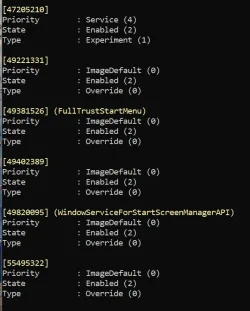
I have 5 machines with public Build 26200.7628, 4 of then have the new Start Menu, but the 5th one doesn't.
The feature id 47205210 is enabled on the 4 machines that have the new Start menu, but it is disabled on the 5th machine with the exact same build number. The other IDs showing below are enabled in the ImageDefault on all 5 machines, but 47205210 is still disabled on the 5th machine.
The same situation after updating to 26200.7705.
Why this inconsistent feature rollout on non-insider machines with the exact same public build?
I know I can enable the feature ID, but why is Microsoft so inconsistent? 😵‍💫🤣🤷‍♂️

1770342033156.webp

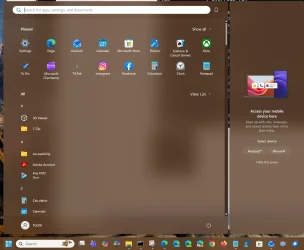
New Start menu on 4 machines:
1770342965433.webp
 

My Computer My Computer

At a glance

Windows 11 Pro 25H2Intel I9-9900K64GBNVIDIA RTX 2060
OS
Windows 11 Pro 25H2
Computer type
PC/Desktop
Manufacturer/Model
Dell XPS 8930
CPU
Intel I9-9900K
Memory
64GB
Graphics Card(s)
NVIDIA RTX 2060
Sound Card
NVIDIA High Definition Audio
Monitor(s) Displays
4k Samsung
Screen Resolution
3840 x 2160
Hard Drives
512GB NVMe, ADATA SU 800, 2TB HDD
Been done to death already ...

I do wish members would learn how to use the forum's search options ....
 

My Computers My Computers

  • At a glance

    Windows 11 2xH2 (latest update ... forever anal)Intel i5-124008GBNVIDIA GeForce GT730
    OS
    Windows 11 2xH2 (latest update ... forever anal)
    Computer type
    PC/Desktop
    Manufacturer/Model
    HP Slim S01
    CPU
    Intel i5-12400
    Memory
    8GB
    Graphics Card(s)
    NVIDIA GeForce GT730
    Sound Card
    OOBE
    Monitor(s) Displays
    Acer 32"
    Screen Resolution
    1920x1080
    Hard Drives
    512GB KIOXIA NVMe
    1TB SATA SSD
    PSU
    OOBE
    Case
    OOBE
    Cooling
    OOBE
    Keyboard
    BT
    Mouse
    BT
    Browser
    Brave FFox Chrome Opera
    Antivirus
    KIS
  • At a glance

    Windows 11 Pro 2xH2 (latest update ... 4ever ...i7-1165G7 @ 2.80GHzIntel Iris Xe Graphics
    Operating System
    Windows 11 Pro 2xH2 (latest update ... 4ever anal)
    Computer type
    Laptop
    Manufacturer/Model
    HP Pavillion 15
    CPU
    i7-1165G7 @ 2.80GHz
    Graphics card(s)
    Intel Iris Xe Graphics
    Hard Drives
    Samsung NVMe 512GB
    + numerous/multiple SSD Type C USB enclosures
    Internet Speed
    NBN FTTN 50
    Browser
    Brave
    Antivirus
    KIS
Been done to death already ...

I do wish members would learn how to use the forum's search options ....
Still inconsistent rollout. 🤣🤣🤷‍♂️
 

My Computer My Computer

At a glance

Windows 11 Pro 25H2Intel I9-9900K64GBNVIDIA RTX 2060
OS
Windows 11 Pro 25H2
Computer type
PC/Desktop
Manufacturer/Model
Dell XPS 8930
CPU
Intel I9-9900K
Memory
64GB
Graphics Card(s)
NVIDIA RTX 2060
Sound Card
NVIDIA High Definition Audio
Monitor(s) Displays
4k Samsung
Screen Resolution
3840 x 2160
Hard Drives
512GB NVMe, ADATA SU 800, 2TB HDD
Still inconsistent rollout. 🤣🤣🤷‍♂️
Still the same topic .... :mad:

And nothing inconsistent at all. Now been Microsoft standard practice for progressive rollouts of multiple different updates over the last few years. What's different for this one?
 

My Computers My Computers

  • At a glance

    Windows 11 2xH2 (latest update ... forever anal)Intel i5-124008GBNVIDIA GeForce GT730
    OS
    Windows 11 2xH2 (latest update ... forever anal)
    Computer type
    PC/Desktop
    Manufacturer/Model
    HP Slim S01
    CPU
    Intel i5-12400
    Memory
    8GB
    Graphics Card(s)
    NVIDIA GeForce GT730
    Sound Card
    OOBE
    Monitor(s) Displays
    Acer 32"
    Screen Resolution
    1920x1080
    Hard Drives
    512GB KIOXIA NVMe
    1TB SATA SSD
    PSU
    OOBE
    Case
    OOBE
    Cooling
    OOBE
    Keyboard
    BT
    Mouse
    BT
    Browser
    Brave FFox Chrome Opera
    Antivirus
    KIS
  • At a glance

    Windows 11 Pro 2xH2 (latest update ... 4ever ...i7-1165G7 @ 2.80GHzIntel Iris Xe Graphics
    Operating System
    Windows 11 Pro 2xH2 (latest update ... 4ever anal)
    Computer type
    Laptop
    Manufacturer/Model
    HP Pavillion 15
    CPU
    i7-1165G7 @ 2.80GHz
    Graphics card(s)
    Intel Iris Xe Graphics
    Hard Drives
    Samsung NVMe 512GB
    + numerous/multiple SSD Type C USB enclosures
    Internet Speed
    NBN FTTN 50
    Browser
    Brave
    Antivirus
    KIS
Still the same topic .... :mad:

And nothing inconsistent at all. Now been Microsoft standard practice for progressive rollouts of multiple different updates over the last few years. What's different for this one?
That may be fine for insiders, but not for public builds, just more confusion for no reason at all. 😵‍💫🤬🤷‍♂️
Typical MS B.S. 😝
Had that on 4 machine for several months, why disabled on the 5th one? All with the same build, really ridiculous. 🤬
 
Last edited:

My Computer My Computer

At a glance

Windows 11 Pro 25H2Intel I9-9900K64GBNVIDIA RTX 2060
OS
Windows 11 Pro 25H2
Computer type
PC/Desktop
Manufacturer/Model
Dell XPS 8930
CPU
Intel I9-9900K
Memory
64GB
Graphics Card(s)
NVIDIA RTX 2060
Sound Card
NVIDIA High Definition Audio
Monitor(s) Displays
4k Samsung
Screen Resolution
3840 x 2160
Hard Drives
512GB NVMe, ADATA SU 800, 2TB HDD
This debate needs more emoji.
 

My Computer My Computer

At a glance

Windows 11 Pro 25H212th Gen Core i7-1260P64 GB Micron PC4-25600Intel Iris Xe Graphics
OS
Windows 11 Pro 25H2
Computer type
PC/Desktop
Manufacturer/Model
Intel NUC12WSHi7
CPU
12th Gen Core i7-1260P
Motherboard
NUC12WSBi7
Memory
64 GB Micron PC4-25600
Graphics Card(s)
Intel Iris Xe Graphics
Sound Card
on-board Realtek HD Audio
Monitor(s) Displays
Dell U3219Q
Screen Resolution
3840 x 2160
Hard Drives
Samsung SSD 990 PRO 1TB
Crucial MX500 2 TB
Keyboard
CODE 104-Key mechanical with Cherry MX Clears
Antivirus
Microsoft Defender
My laptop got the new start menu a couple months ago. Not a fan, but I can deal with it. Meanwhile, my desktop sat there with the old start menu, until 2 days ago when the new one finally showed up. TA-DA!! (I'm not really that excited). :yawn:
 

My Computers My Computers

  • At a glance

    Windows 11 Pro 25H2i7-8565U16GBIntel UHD Graphics 620
    OS
    Windows 11 Pro 25H2
    Computer type
    Laptop
    Manufacturer/Model
    Lenovo T490 (2020 Hardware)
    CPU
    i7-8565U
    Motherboard
    20N20028US
    Memory
    16GB
    Graphics Card(s)
    Intel UHD Graphics 620
    Sound Card
    Realtec Audio
    Monitor(s) Displays
    ASUS VE248
    Screen Resolution
    1920 X 1080
    Hard Drives
    Samsung SSD 970 PRO 512GB NVMe
    Internet Speed
    Frontier fiber 1GB
    Browser
    Chrome, Firefox, Edge
    Antivirus
    Norton 360 Deluxe Plus
    Other Info
    Supported hardware, upgraded from Windows 10 Pro to Windows 11 Pro version 24H2 on 06/01/2025 using the Windows 11 ISO file. Used the enablement package to upgrade to version 25H2 on 10/07/2025. Secure boot enabled. Secure Boot CA 2023 updated.
  • At a glance

    Windows 11 Pro 25H2i7-4770 (with SSE4.2, and POPCNT)16GBIntel HD Graphics 4600
    Operating System
    Windows 11 Pro 25H2
    Computer type
    PC/Desktop
    Manufacturer/Model
    Lenovo ThinkCentre M83 (2014 Hardware)
    CPU
    i7-4770 (with SSE4.2, and POPCNT)
    Motherboard
    10AL000GUS
    Memory
    16GB
    Graphics card(s)
    Intel HD Graphics 4600
    Sound Card
    Realtec High Definition Audio
    Monitor(s) Displays
    ASUS VE248
    Screen Resolution
    1920 X 1080
    Hard Drives
    Samsung SSD 860 PRO 1TB SATA
    Internet Speed
    Frontier fiber 1GB
    Browser
    Chrome, Firefox, Edge
    Antivirus
    Norton 360 Deluxe Plus
    Other Info
    Unsupported hardware, upgraded from Windows 10 Pro (TPM 1.2 & unsupported CPU, but does have SSE4.2, and POPCNT) to Windows 11 Pro version 24H2 on 06/15/2025. Added Registry Key HKEY_LOCAL_MACHINE\SYSTEM\Setup\MoSetup – AllowUpgradesWithUnsupportedTPMOrCPU=1 to allow installation using the Windows 11 ISO file. Used the enablement package to upgrade to version 25H2 on 10/08/2025. Secure boot enabled. Secure Boot CA 2023 updated.
It is fine and does not bother me as long as it stays closed😂

The menu is HUGE. I find the categorisation useful though. If I only was able to easily customize what goes where...maybe then it would work for me.

For now I always open apps using quick search.
 

My Computers My Computers

  • At a glance

    Win 11 Pro 25H2 26200.8457 / Linux Mint 22.3Ryzen 7 2700U Pro32GBiGPU Vega 10
    OS
    Win 11 Pro 25H2 26200.8457 / Linux Mint 22.3
    Computer type
    Laptop
    Manufacturer/Model
    Lenovo A485
    CPU
    Ryzen 7 2700U Pro
    Motherboard
    Lenovo (WiFi/BT module upgraded to Intel Wireless-AC-9260)
    Memory
    32GB
    Graphics Card(s)
    iGPU Vega 10
    Sound Card
    Realtek
    Monitor(s) Displays
    14" FHD (built-in) + 14" Lenovo Thinkvision M14t (touch+pen) + 32" Asus PB328
    Screen Resolution
    FHD + FHD + 1440p
    Hard Drives
    Intel 660p m.2 nVME PCIe3.0 x2 512GB
    PSU
    125W(Dock)/65W(Travel Adapter)
    Keyboard
    Thinkpad / Logitech MX Keys
    Mouse
    Logitech MX Master 2S
    Internet Speed
    1/1Gbit
    Browser
    Firefox
    Antivirus
    Windows Defender
    Other Info
    SecureBoot: Enabled
    TPM2.0: Enabled
    AMD-V: Enabled
  • At a glance

    Win 11 Pro 25H2 26200.8521(RP)i7-7700k @4.8GHz32GB 2x16GB 2133MHz CL15EVGA GTX1080Ti FTW 11GB
    Operating System
    Win 11 Pro 25H2 26200.8521(RP)
    Computer type
    PC/Desktop
    Manufacturer/Model
    Custom
    CPU
    i7-7700k @4.8GHz
    Motherboard
    Asus PRIME Z270-A
    Memory
    32GB 2x16GB 2133MHz CL15
    Graphics card(s)
    EVGA GTX1080Ti FTW 11GB
    Sound Card
    Integrated
    Monitor(s) Displays
    32" 10-bit Asus PB328Q
    Screen Resolution
    WQHD 2560x1440
    Hard Drives
    512GB ADATA SX8000NP NVMe PCIe Gen 3 x4
    PSU
    850W
    Case
    Fractal Design Define 7
    Cooling
    Noctua NH-D15 chromax.black
    Keyboard
    Logitech MX Keys
    Mouse
    Logitech MX Master 2S
    Internet Speed
    1/1Gbit
    Browser
    Firefox
    Antivirus
    Windows Defender
    Other Info
    AC WiFi Card
It is fine and does not bother me as long as it stays closed😂
I have 99.9% of the apps I most frequently use on the task bar so I rarely have to go to the Start Menu. ;-)
 

My Computers My Computers

  • At a glance

    Windows 11 Pro 25H2i7-8565U16GBIntel UHD Graphics 620
    OS
    Windows 11 Pro 25H2
    Computer type
    Laptop
    Manufacturer/Model
    Lenovo T490 (2020 Hardware)
    CPU
    i7-8565U
    Motherboard
    20N20028US
    Memory
    16GB
    Graphics Card(s)
    Intel UHD Graphics 620
    Sound Card
    Realtec Audio
    Monitor(s) Displays
    ASUS VE248
    Screen Resolution
    1920 X 1080
    Hard Drives
    Samsung SSD 970 PRO 512GB NVMe
    Internet Speed
    Frontier fiber 1GB
    Browser
    Chrome, Firefox, Edge
    Antivirus
    Norton 360 Deluxe Plus
    Other Info
    Supported hardware, upgraded from Windows 10 Pro to Windows 11 Pro version 24H2 on 06/01/2025 using the Windows 11 ISO file. Used the enablement package to upgrade to version 25H2 on 10/07/2025. Secure boot enabled. Secure Boot CA 2023 updated.
  • At a glance

    Windows 11 Pro 25H2i7-4770 (with SSE4.2, and POPCNT)16GBIntel HD Graphics 4600
    Operating System
    Windows 11 Pro 25H2
    Computer type
    PC/Desktop
    Manufacturer/Model
    Lenovo ThinkCentre M83 (2014 Hardware)
    CPU
    i7-4770 (with SSE4.2, and POPCNT)
    Motherboard
    10AL000GUS
    Memory
    16GB
    Graphics card(s)
    Intel HD Graphics 4600
    Sound Card
    Realtec High Definition Audio
    Monitor(s) Displays
    ASUS VE248
    Screen Resolution
    1920 X 1080
    Hard Drives
    Samsung SSD 860 PRO 1TB SATA
    Internet Speed
    Frontier fiber 1GB
    Browser
    Chrome, Firefox, Edge
    Antivirus
    Norton 360 Deluxe Plus
    Other Info
    Unsupported hardware, upgraded from Windows 10 Pro (TPM 1.2 & unsupported CPU, but does have SSE4.2, and POPCNT) to Windows 11 Pro version 24H2 on 06/15/2025. Added Registry Key HKEY_LOCAL_MACHINE\SYSTEM\Setup\MoSetup – AllowUpgradesWithUnsupportedTPMOrCPU=1 to allow installation using the Windows 11 ISO file. Used the enablement package to upgrade to version 25H2 on 10/08/2025. Secure boot enabled. Secure Boot CA 2023 updated.
I have 99.9% of the apps I most frequently use on the task bar so I rarely have to go to the Start Menu. ;-)

That works too. Personally however, I dislike having non-open apps hovering in the taskbar. It gets too cluttered to my taste.
 

My Computers My Computers

  • At a glance

    Win 11 Pro 25H2 26200.8457 / Linux Mint 22.3Ryzen 7 2700U Pro32GBiGPU Vega 10
    OS
    Win 11 Pro 25H2 26200.8457 / Linux Mint 22.3
    Computer type
    Laptop
    Manufacturer/Model
    Lenovo A485
    CPU
    Ryzen 7 2700U Pro
    Motherboard
    Lenovo (WiFi/BT module upgraded to Intel Wireless-AC-9260)
    Memory
    32GB
    Graphics Card(s)
    iGPU Vega 10
    Sound Card
    Realtek
    Monitor(s) Displays
    14" FHD (built-in) + 14" Lenovo Thinkvision M14t (touch+pen) + 32" Asus PB328
    Screen Resolution
    FHD + FHD + 1440p
    Hard Drives
    Intel 660p m.2 nVME PCIe3.0 x2 512GB
    PSU
    125W(Dock)/65W(Travel Adapter)
    Keyboard
    Thinkpad / Logitech MX Keys
    Mouse
    Logitech MX Master 2S
    Internet Speed
    1/1Gbit
    Browser
    Firefox
    Antivirus
    Windows Defender
    Other Info
    SecureBoot: Enabled
    TPM2.0: Enabled
    AMD-V: Enabled
  • At a glance

    Win 11 Pro 25H2 26200.8521(RP)i7-7700k @4.8GHz32GB 2x16GB 2133MHz CL15EVGA GTX1080Ti FTW 11GB
    Operating System
    Win 11 Pro 25H2 26200.8521(RP)
    Computer type
    PC/Desktop
    Manufacturer/Model
    Custom
    CPU
    i7-7700k @4.8GHz
    Motherboard
    Asus PRIME Z270-A
    Memory
    32GB 2x16GB 2133MHz CL15
    Graphics card(s)
    EVGA GTX1080Ti FTW 11GB
    Sound Card
    Integrated
    Monitor(s) Displays
    32" 10-bit Asus PB328Q
    Screen Resolution
    WQHD 2560x1440
    Hard Drives
    512GB ADATA SX8000NP NVMe PCIe Gen 3 x4
    PSU
    850W
    Case
    Fractal Design Define 7
    Cooling
    Noctua NH-D15 chromax.black
    Keyboard
    Logitech MX Keys
    Mouse
    Logitech MX Master 2S
    Internet Speed
    1/1Gbit
    Browser
    Firefox
    Antivirus
    Windows Defender
    Other Info
    AC WiFi Card
I'm actually OK with the new Start, compared to the former version. I it set to "Show all" and "View: List" and that works for me, while primarily relying on task bar. (y)
 

My Computer My Computer

At a glance

Windows 11 Pro 25H2 26200.7840Intel Core i3-8145U16GB
OS
Windows 11 Pro 25H2 26200.7840
Computer type
Laptop
Manufacturer/Model
Lenovo IdeaPad L340
CPU
Intel Core i3-8145U
Memory
16GB
Hard Drives
500 GB M2 1 TB HDD
Internet Speed
400 MB
Browser
Chrome | Edge
Antivirus
Microsoft Defender | Block unknown executables | Various ASR rules enabled | Smart App Control
March 5th, 2026 (today), without warning or explanation, the new Start menu suddenly appeared after a reboot on my third computer, a Core™ i5-12600KF (3.70 GHz). My other two computers had this new Start menu a month earlier. Of course, the registry tweak worked to show the new menu, but I consciously chose not to force it and removed the tweak.
 

My Computers My Computers

  • At a glance

    Windows 11 ProIntel® Core™ i9-10940X - 14 CoresKingston HyperX Fury RGB 64GB DDR4-3200NVIDIA RTX 3060 Ti 8GB
    OS
    Windows 11 Pro
    Computer type
    PC/Desktop
    Manufacturer/Model
    Sharkoon SGC1 - RGB
    CPU
    Intel® Core™ i9-10940X - 14 Cores
    Motherboard
    Asus Prime X299-A II
    Memory
    Kingston HyperX Fury RGB 64GB DDR4-3200
    Graphics Card(s)
    NVIDIA RTX 3060 Ti 8GB
    Monitor(s) Displays
    LG Ultra HD
    Screen Resolution
    3840 x 2160
    Hard Drives
    SSD 4000GB Samsung 870 QVO SSD 500GB Crucial MX500 PSSD 2T Samsung T7 SCSI
    PSU
    850W Cooler Master
    Case
    Sharkoon SGC1 - RGB
    Cooling
    Cooler Master H412R
    Keyboard
    Corsair Vengeance-K70-RGB
    Mouse
    CONTUS Gaming Mouse
    Internet Speed
    1000/1000 (Mbps)
    Browser
    Chrome
    Antivirus
    Windows Defender
    Other Info
    CPU: Intel Core i9-10940X (Cascade Lake-X, L1)
    3300 MHz (33.00x100.0) @ 1183 MHz (12.00x98.6)
    Motherboard: ASUS PRIME X299-A II
    BIOS: 2001, 11/06/2024
    Chipset: Intel X299 (Kaby Lake)
    Memory: 65536 MBytes @ 1190 MHz, 17-17-17-39
    - 16384 MB PC25600 DDR4 SDRAM - Kingston KHX3200C16D4/16GX
    - 16384 MB PC25600 DDR4 SDRAM - Kingston KHX3200C16D4/16GX
    - 16384 MB PC25600 DDR4 SDRAM - Kingston KHX3200C16D4/16GX
    - 16384 MB PC25600 DDR4 SDRAM - Kingston KHX3200C16D4/16GX
    Graphics: NVIDIA GeForce RTX 3060 Ti
    NVIDIA GeForce RTX 3060 Ti, 8192 MB GDDR6 SDRAM
    Drive: CT500MX500SSD1, 488.4 GB, Serial ATA 6Gb/s @ 6Gb/s
    Drive: Samsung SSD 870 QVO 4TB, 3907.0 GB, Serial ATA 6Gb/s @ 6Gb/s
    Drive: Samsung SSD 860 QVO 4TB, 3907.0 GB, Serial ATA 6Gb/s @ 6Gb/s <-> USB
    Drive: Samsung SSD 860 EVO 4TB, 3907.0 GB, Serial ATA 6Gb/s @ 6Gb/s <-> USB
    Drive: Samsung Portable SSD T7, 1953.5 GB, NVMe
    Drive: Samsung Portable SSD T9, 3907.0 GB, NVMe
    Sound: Intel Kaby Lake - High Definition Audio / cAVS (Audio, Voice, Speech) [A0]
    Sound: NVIDIA GA104 - High Definition Audio Controller
    Network: Intel Ethernet Connection I219-V
    OS: Microsoft Windows 11 Professional (x64) Build 26200.8655 (25H2)


    MY THIRD DESKTOP SYSTEM
    ===================
    Computer: PCSpecialist Amd Trx50
    CPU: AMD Ryzen Threadripper 9980X (Shimada Peak, SHP-C1)
    3200 MHz (32.00x100.0) @ 2481 MHz (24.86x99.8)
    Motherboard: ASUS Pro WS TRX50-SAGE WIFI
    BIOS: 1203, 07/18/2025
    Chipset: AMD TRX50 (Promontory PROM21L.1)
    Memory: 262144 MBytes @ 3200 MHz, 52-52-52-103
    - 65536 MB PC51200 DDR5 SDRAM - Kingston 9965844-002.A01G
    - 65536 MB PC51200 DDR5 SDRAM - Kingston 9965844-002.A01G
    - 65536 MB PC51200 DDR5 SDRAM - Kingston 9965844-002.A01G
    - 65536 MB PC51200 DDR5 SDRAM - Kingston 9965844-002.A01G
    Graphics: Palit GeForce RTX 5080
    NVIDIA GeForce RTX 5080, 16303 MB GDDR7 SDRAM
    Drive: Samsung SSD 9100 PRO 4TB, 3907.0 GB, NVMe
    Drive: Corsair MP600 PRO NH, 7814.0 GB, NVMe
    Drive: CT2000T705SSD3, 1953.5 GB, NVMe
    Sound: NVIDIA GB203 - High Definition Audio Controller
    Sound: AMD Stones/Breithorn - HD Audio Controller (AZ)
    Network: Aquantia/Marvell AQC113 FastLinQ Edge 10Gbit Network Adapter
    Network: Intel Ethernet Controller I226-LM
    OS: Microsoft Windows 11 Professional (x64) Build 26200.8655 (25H2)
  • At a glance

    Windows 11 ProIntel® Core™ i5-12600KF - 10 CoresRAIDER GAMING 64GB DDR4-3200MSI GeForce RTX 4060 Ventus 2X Black 8G OC
    Operating System
    Windows 11 Pro
    Computer type
    PC/Desktop
    Manufacturer/Model
    MSI Intel
    CPU
    Intel® Core™ i5-12600KF - 10 Cores
    Motherboard
    MSI Pro B660M-G DDR4
    Memory
    RAIDER GAMING 64GB DDR4-3200
    Graphics card(s)
    MSI GeForce RTX 4060 Ventus 2X Black 8G OC
    Monitor(s) Displays
    Odyssey G70NC
    Screen Resolution
    3840 x 2160, 120 Hz - (HDR)
    Hard Drives
    MSI Spatium M371 500GB + 7x SSD 4TB
    PSU
    550 Watt MSI
    Case
    MSI MAG Forge 112R
    Cooling
    Watercooling MSI MAG CoreLiquid 240R V2 Black
    Internet Speed
    1000/1000 (Mbps)
    Browser
    Brave
    Antivirus
    Windows Defender
    Other Info
    Computer: MSI MS-7D45
    CPU: Intel Core i5-12600KF (Alder Lake-S 640, C0)
    3700 MHz (37.00x100.0) @ 798 MHz (8.00x99.8)
    Motherboard: MSI PRO B660M-G DDR4 (MS-7D45)
    BIOS: 1.O0, 08/07/2025
    Chipset: Intel B660 (Alder Lake-S PCH)
    Memory: 65536 MBytes @ 1596 MHz, 22-22-22-52
    - 32768 MB PC25600 DDR4 SDRAM - Crucial Technology CT32G4DFD832A.C16FF
    - 32768 MB PC25600 DDR4 SDRAM - Crucial Technology CT32G4DFD832A.C16FF
    Graphics: MSI RTX 4060 Ventus 2X Black OC
    NVIDIA GeForce RTX 4060, 8188 MB GDDR6 SDRAM
    Drive: MSI M371 500GB, 488.4 GB, NVMe
    Drive: Samsung SSD 870 QVO 8TB, 7814.0 GB, Serial ATA 6Gb/s @ 6Gb/s <-> USB
    Drive: Samsung SSD 870 QVO 8TB, 7814.0 GB, Serial ATA 6Gb/s @ 6Gb/s <-> USB
    Drive: Samsung Portable SSD T9, 3907.0 GB, NVMe
    Drive: Samsung Portable SSD T9, 3907.0 GB, NVMe
    Sound: Intel Alder Lake-S PCH - cAVS (Audio, Voice, Speech)
    Sound: NVIDIA AD106 - High Definition Audio Controller
    Network: RealTek Semiconductor RTL8125 Gaming 2.5GbE Family Ethernet Controller
    OS: Microsoft Windows 11 Professional (x64) Build 26200.8655 (25H2)
I don't like this new start menu. How do I reset it back to how it was?
 

My Computer My Computer

At a glance

Windows 11 Pro
OS
Windows 11 Pro
I have had the new Start menu on my main machine for about a month, but not on the other two one of which is a non-compatible; the other machine that has not gotten the new menu has the same motherboard and CPU as the main machine, but different and much older graphics card so there's that.
 

My Computers My Computers

  • At a glance

    Windows 11 Pro 25H2Core i7 10700K 3.8 GHzCorsair Vengeance LPX DDR4 128 GB 3000MHzAsus ProArt GeForce RTX 4070 Ti Super 16 GB
    OS
    Windows 11 Pro 25H2
    Computer type
    PC/Desktop
    Manufacturer/Model
    Wordsworth 10000
    CPU
    Core i7 10700K 3.8 GHz
    Motherboard
    Asus ROG Strix Z590-A Gaming Wifi
    Memory
    Corsair Vengeance LPX DDR4 128 GB 3000MHz
    Graphics Card(s)
    Asus ProArt GeForce RTX 4070 Ti Super 16 GB
    Sound Card
    Asus Xonar DSX
    Monitor(s) Displays
    HP 2709m
    Screen Resolution
    1920x1080
    Hard Drives
    Samsung 990 Pro M.2 SSD 2 TB; Samsung 990 Pro M.2 SSD 4 TB
    PSU
    Thermaltake Toughpower GF3 1350W
    Case
    Fractal Design Meshify 2
    Cooling
    CPU-Noctua NH D15 Chromax, GPU-Stock, Case-Noctua Chromax 3x140
    Keyboard
    Microsoft Natural Ergo 4000
    Mouse
    HP X500
    Internet Speed
    Cable
    Browser
    Vivaldi, MS Edge
    Antivirus
    Malwarebytes 5.2.4, Windows Defender
    Other Info
    Klipsch Promedia 5.1 THX
    Asus External Blu-Ray 16D1X-USB 3.0
  • At a glance

    Windows 11 Pro 25H2Core i7 6700K 4.0 GHzCorsair Vengeance LPX DDR4 32 GB 3000MHzAsus GeForce GTX 1050 Ti
    Operating System
    Windows 11 Pro 25H2
    Computer type
    PC/Desktop
    Manufacturer/Model
    Wordsworth 6000
    CPU
    Core i7 6700K 4.0 GHz
    Motherboard
    Asus Z170 Pro
    Memory
    Corsair Vengeance LPX DDR4 32 GB 3000MHz
    Graphics card(s)
    Asus GeForce GTX 1050 Ti
    Sound Card
    Asus Xonar SE
    Monitor(s) Displays
    HP X24ih
    Screen Resolution
    1920x1080
    Hard Drives
    Intel 760p M.2 SSD 500 GB; Intel 540 SSD 480 GB; Intel 335 SSD 240 GB
    PSU
    Thermaltake Toughpower GF1 750W
    Case
    Lian Li PC-B70
    Cooling
    CPU- Noctua NH-D15; GPU-Stock; Case-Noctua Chromax 2x140, 2x120
    Keyboard
    Microsoft Wireless Comfort 5050
    Mouse
    Microsoft Wireless Comfort 5050
    Internet Speed
    Cable
    Browser
    Vivaldi, MS Edge
    Antivirus
    Malwarebytes 4.4.3, Windows Defender
    Other Info
    HP bd 340
    HP bd 240
    Denon DRA-800H
    Klipsch RP-600M
    Klipsch R-100SW (2)

    System 3 Specs
    Windows 11 Pro 25H2
    Core i7 10700K 3.8 GHz
    Asus ROG Strix Z590-A Gaming Wifi
    Corsair Vengeance LPX DDR4 32 GB 3200MHz
    Asus Radeon RX560 Dual 4 GB
    Xonar SE
    Samsung 980 Pro M.2 SSD 1 TB (2)
    Thermaltake Toughpower GF3 850W
    Fractal Design Meshify 2
    CPU-Noctua NH D15 Chromax, GPU-Stock, Case-Noctua Chromax 2x140,1x120
I don't like this new start menu. How do I reset it back to how it was?

The new Start menu doesn't bother me, but you can still disable it if you don't like it.
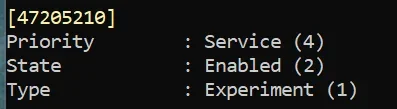
If you are familiar with vivetool you can check this ID, if it is enabled you can disable it and reboot.
That should bring back the old start menu.
For now, that new start menu is still controlled by this feature ID, but Microsoft may change that anytime they want to make the change permanent. 🤷‍♂️
1772737137365.webp
 

My Computer My Computer

At a glance

Windows 11 Pro 25H2Intel I9-9900K64GBNVIDIA RTX 2060
OS
Windows 11 Pro 25H2
Computer type
PC/Desktop
Manufacturer/Model
Dell XPS 8930
CPU
Intel I9-9900K
Memory
64GB
Graphics Card(s)
NVIDIA RTX 2060
Sound Card
NVIDIA High Definition Audio
Monitor(s) Displays
4k Samsung
Screen Resolution
3840 x 2160
Hard Drives
512GB NVMe, ADATA SU 800, 2TB HDD
As of today all three of my machines have the new Start menu, including the unsupported machine.
 

My Computers My Computers

  • At a glance

    Windows 11 Pro 25H2Core i7 10700K 3.8 GHzCorsair Vengeance LPX DDR4 128 GB 3000MHzAsus ProArt GeForce RTX 4070 Ti Super 16 GB
    OS
    Windows 11 Pro 25H2
    Computer type
    PC/Desktop
    Manufacturer/Model
    Wordsworth 10000
    CPU
    Core i7 10700K 3.8 GHz
    Motherboard
    Asus ROG Strix Z590-A Gaming Wifi
    Memory
    Corsair Vengeance LPX DDR4 128 GB 3000MHz
    Graphics Card(s)
    Asus ProArt GeForce RTX 4070 Ti Super 16 GB
    Sound Card
    Asus Xonar DSX
    Monitor(s) Displays
    HP 2709m
    Screen Resolution
    1920x1080
    Hard Drives
    Samsung 990 Pro M.2 SSD 2 TB; Samsung 990 Pro M.2 SSD 4 TB
    PSU
    Thermaltake Toughpower GF3 1350W
    Case
    Fractal Design Meshify 2
    Cooling
    CPU-Noctua NH D15 Chromax, GPU-Stock, Case-Noctua Chromax 3x140
    Keyboard
    Microsoft Natural Ergo 4000
    Mouse
    HP X500
    Internet Speed
    Cable
    Browser
    Vivaldi, MS Edge
    Antivirus
    Malwarebytes 5.2.4, Windows Defender
    Other Info
    Klipsch Promedia 5.1 THX
    Asus External Blu-Ray 16D1X-USB 3.0
  • At a glance

    Windows 11 Pro 25H2Core i7 6700K 4.0 GHzCorsair Vengeance LPX DDR4 32 GB 3000MHzAsus GeForce GTX 1050 Ti
    Operating System
    Windows 11 Pro 25H2
    Computer type
    PC/Desktop
    Manufacturer/Model
    Wordsworth 6000
    CPU
    Core i7 6700K 4.0 GHz
    Motherboard
    Asus Z170 Pro
    Memory
    Corsair Vengeance LPX DDR4 32 GB 3000MHz
    Graphics card(s)
    Asus GeForce GTX 1050 Ti
    Sound Card
    Asus Xonar SE
    Monitor(s) Displays
    HP X24ih
    Screen Resolution
    1920x1080
    Hard Drives
    Intel 760p M.2 SSD 500 GB; Intel 540 SSD 480 GB; Intel 335 SSD 240 GB
    PSU
    Thermaltake Toughpower GF1 750W
    Case
    Lian Li PC-B70
    Cooling
    CPU- Noctua NH-D15; GPU-Stock; Case-Noctua Chromax 2x140, 2x120
    Keyboard
    Microsoft Wireless Comfort 5050
    Mouse
    Microsoft Wireless Comfort 5050
    Internet Speed
    Cable
    Browser
    Vivaldi, MS Edge
    Antivirus
    Malwarebytes 4.4.3, Windows Defender
    Other Info
    HP bd 340
    HP bd 240
    Denon DRA-800H
    Klipsch RP-600M
    Klipsch R-100SW (2)

    System 3 Specs
    Windows 11 Pro 25H2
    Core i7 10700K 3.8 GHz
    Asus ROG Strix Z590-A Gaming Wifi
    Corsair Vengeance LPX DDR4 32 GB 3200MHz
    Asus Radeon RX560 Dual 4 GB
    Xonar SE
    Samsung 980 Pro M.2 SSD 1 TB (2)
    Thermaltake Toughpower GF3 850W
    Fractal Design Meshify 2
    CPU-Noctua NH D15 Chromax, GPU-Stock, Case-Noctua Chromax 2x140,1x120

Latest Support Threads

Back
Top Bottom