Insider New Updates for Snipping Tool and Notepad for Beta, Canary, Dev, and RP Windows Insiders


 Windows Blogs:

UPDATE 9/19: The below updates and new features for Snipping Tool and Notepad are now beginning to roll out to Windows Insiders in the Release Preview Channel.

UPDATE 9/7: The below updates and new features for Snipping Tool and Notepad are now beginning to roll out to Windows Insiders in the Beta Channel.

Hello Windows Insiders, we are rolling out updates for Snipping Tool and Notepad to Windows Insiders in the Canary and Dev channels on Windows 11.

Snipping Tool (version 11.2307.44.0)​

With this update to Snipping Tool, we are introducing the combined capture bar, making it easier to switch between capturing screenshots and screen recordings without having to open the app. Use the Print Screen or Win + Shift + S keyboard shortcuts to open the capture bar for snipping, where you will continue to find the familiar snipping modes or try the new Win + Shift + R keyboard shortcut to open the capture bar for recording.

Snipping Tool combined capture bar showing screenshot capture options.

We are also improving the screen recording experience based on your feedback by introducing support for optionally recording your PC audio and voice overs using a microphone. New app settings let you configure the default audio recording settings for new screen recordings, and if you have multiple recording devices, you can select your preferred recording device before you start recording.

Snipping Tool capture bar while recording showing new audio options.

FEEDBACK: Please file feedback in Feedback Hub (WIN + F) under Apps > Snipping Tool.

Notepad (version 11.2307.22.0)​

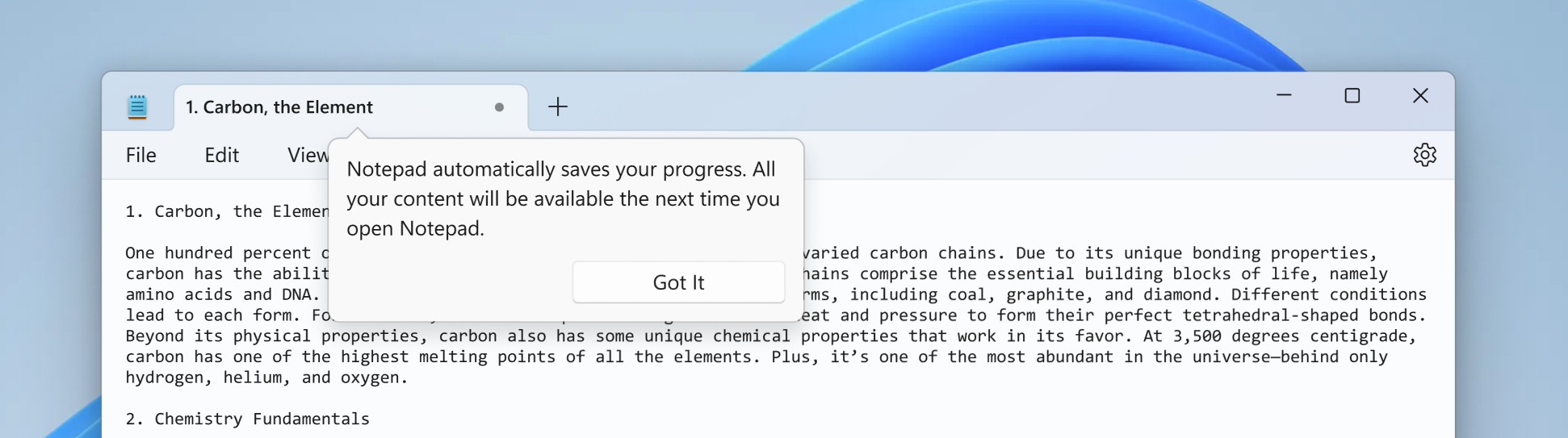
With this update, Notepad will start automatically saving your session state allowing you to close Notepad without any interrupting dialogs and then pick up where you left off when you return. Notepad will automatically restore previously open tabs as well as unsaved content and edits across those open tabs. Saved session state does not impact any of your files, though, and it is still your choice whether to save or discard unsaved changes to files anytime you close a tab. You can turn this feature off in app settings if you would prefer to have a fresh start every time you open Notepad.


Notepad with one open tab.

FEEDBACK: Please file feedback in Feedback Hub (WIN + F) under Apps > Notepad.

[PLEASE NOTE: We are beginning to roll these experiences out, so they may not be available to all Insiders in the Canary and Dev Channels just yet as we plan to monitor feedback and see how it lands before pushing it out to everyone.]

As always, we love getting feedback from the community and we will be looking out for your feedback on these updates!

Thanks,
Dave Grochocki, Principal Product Manager Lead – Windows Inbox Apps


 Source:

 
Last edited:

update.jpg
 

My Computers My Computers

  • At a glance

    Windows 11 Pro for WorkstationsIntel i7-8700K 5 GHz64 GB (4x16GB) G.SKILL TridentZ RGB DDR4 3600...ASUS ROG-STRIX-GTX1080TI-O11G-GAMING (11GB GD...
    OS
    Windows 11 Pro for Workstations
    Computer type
    PC/Desktop
    Manufacturer/Model
    Custom self build
    CPU
    Intel i7-8700K 5 GHz
    Motherboard
    ASUS ROG Maximus XI Formula Z390
    Memory
    64 GB (4x16GB) G.SKILL TridentZ RGB DDR4 3600 MHz (F4-3600C18D-32GTZR)
    Graphics Card(s)
    ASUS ROG-STRIX-GTX1080TI-O11G-GAMING (11GB GDDR5X)
    Sound Card
    Integrated Digital Audio (S/PDIF)
    Monitor(s) Displays
    2 x Samsung Odyssey G75 27"
    Screen Resolution
    2560x1440
    Hard Drives
    1TB Samsung 990 PRO M.2,
    4TB Samsung 990 PRO M.2,
    TerraMaster F8 SSD Plus NAS
    PSU
    Seasonic Prime Titanium 850W
    Case
    Thermaltake Core P3 wall mounted
    Cooling
    Corsair Hydro H115i
    Keyboard
    Amazon Basics Wired Full Keyboard MD005
    Mouse
    Logitech MX Master 4
    Internet Speed
    2 Gbps Download and 100 Mbps Upload
    Browser
    Chrome and Edge
    Antivirus
    Microsoft Defender
    Other Info
    Logitech Z625 speaker system,
    Logitech BRIO 4K Pro webcam,
    HP Color LaserJet Pro MFP M477fdn,
    CyberPower CP1500PFCLCD
    Galaxy S23 Plus phone
  • At a glance

    Windows 11 ProSnapdragon X Elite (12 core) 3.42 GHz16 GB LPDDR5x-7467 MHz
    Operating System
    Windows 11 Pro
    Computer type
    Laptop
    Manufacturer/Model
    Surface Laptop 7 Copilot+ PC
    CPU
    Snapdragon X Elite (12 core) 3.42 GHz
    Memory
    16 GB LPDDR5x-7467 MHz
    Monitor(s) Displays
    15" HDR
    Screen Resolution
    2496 x 1664
    Hard Drives
    1 TB SSD
    Internet Speed
    Wi-Fi 7 and Bluetooth 5.4
    Browser
    Chrome and Edge
    Antivirus
    Microsoft Defender
Source:

Something is fishy with this snipping tool update. If I set it as suggested in the blog, I cannot take a snapshot of the Snipping tool itself.
I have to set it back to ms-screenclip or I just get an empty translucid window.

From the blog:

We are aware of an issue where some users might unexpectedly see a pop-up dialog when taking a screenshot asking you to “Select an app to open this ‘ms-screenclip’ link”. If you encounter this dialog, please select “Snipping Tool”.


1693775642896.png

1693775686660.png
 

My Computer My Computer

At a glance

Windows 11 Pro 25H2Intel I9-9900K64GBNVIDIA RTX 2060
OS
Windows 11 Pro 25H2
Computer type
PC/Desktop
Manufacturer/Model
Dell XPS 8930
CPU
Intel I9-9900K
Memory
64GB
Graphics Card(s)
NVIDIA RTX 2060
Sound Card
NVIDIA High Definition Audio
Monitor(s) Displays
4k Samsung
Screen Resolution
3840 x 2160
Hard Drives
512GB NVMe, ADATA SU 800, 2TB HDD

My Computers My Computers

  • At a glance

    Windows 11 Pro for WorkstationsIntel i7-8700K 5 GHz64 GB (4x16GB) G.SKILL TridentZ RGB DDR4 3600...ASUS ROG-STRIX-GTX1080TI-O11G-GAMING (11GB GD...
    OS
    Windows 11 Pro for Workstations
    Computer type
    PC/Desktop
    Manufacturer/Model
    Custom self build
    CPU
    Intel i7-8700K 5 GHz
    Motherboard
    ASUS ROG Maximus XI Formula Z390
    Memory
    64 GB (4x16GB) G.SKILL TridentZ RGB DDR4 3600 MHz (F4-3600C18D-32GTZR)
    Graphics Card(s)
    ASUS ROG-STRIX-GTX1080TI-O11G-GAMING (11GB GDDR5X)
    Sound Card
    Integrated Digital Audio (S/PDIF)
    Monitor(s) Displays
    2 x Samsung Odyssey G75 27"
    Screen Resolution
    2560x1440
    Hard Drives
    1TB Samsung 990 PRO M.2,
    4TB Samsung 990 PRO M.2,
    TerraMaster F8 SSD Plus NAS
    PSU
    Seasonic Prime Titanium 850W
    Case
    Thermaltake Core P3 wall mounted
    Cooling
    Corsair Hydro H115i
    Keyboard
    Amazon Basics Wired Full Keyboard MD005
    Mouse
    Logitech MX Master 4
    Internet Speed
    2 Gbps Download and 100 Mbps Upload
    Browser
    Chrome and Edge
    Antivirus
    Microsoft Defender
    Other Info
    Logitech Z625 speaker system,
    Logitech BRIO 4K Pro webcam,
    HP Color LaserJet Pro MFP M477fdn,
    CyberPower CP1500PFCLCD
    Galaxy S23 Plus phone
  • At a glance

    Windows 11 ProSnapdragon X Elite (12 core) 3.42 GHz16 GB LPDDR5x-7467 MHz
    Operating System
    Windows 11 Pro
    Computer type
    Laptop
    Manufacturer/Model
    Surface Laptop 7 Copilot+ PC
    CPU
    Snapdragon X Elite (12 core) 3.42 GHz
    Memory
    16 GB LPDDR5x-7467 MHz
    Monitor(s) Displays
    15" HDR
    Screen Resolution
    2496 x 1664
    Hard Drives
    1 TB SSD
    Internet Speed
    Wi-Fi 7 and Bluetooth 5.4
    Browser
    Chrome and Edge
    Antivirus
    Microsoft Defender

My Computers My Computers

  • At a glance

    Windows 11 Pro 22631.3810/Windows 11 RP 24H2 VMIntel Celeron N4000 @ 1.10GHz Gemini Lake 14nm8GB RamIntel UHD Graphics 600 (Lenovo)
    OS
    Windows 11 Pro 22631.3810/Windows 11 RP 24H2 VM
    Computer type
    Laptop
    Manufacturer/Model
    Lenovo
    CPU
    Intel Celeron N4000 @ 1.10GHz Gemini Lake 14nm
    Motherboard
    LENOVO LNVNB161216 (U3E1)
    Memory
    8GB Ram
    Graphics Card(s)
    Intel UHD Graphics 600 (Lenovo)
    Sound Card
    Realtek High Definition Audio Intel Display Audio
    Monitor(s) Displays
    Generic PnP Monitor (1920x1080@60Hz)
    Screen Resolution
    1920x1080
    Hard Drives
    512GB Western Digital WDC PC SN530 SDBPMPZ-512G-1101 (Unknown (SSD))
    Keyboard
    Laptop Keyboard
    Mouse
    G5 Gaming Mouse
    Internet Speed
    50mbps/50mbps
    Browser
    Chrome/Edge
    Antivirus
    Microsoft Defender
  • At a glance

    Windows 11 RP 24H2 VMIntel Celeron N4000 @ 1.10GHz Gemini Lake 14nm8GB RamIntel UHD Graphics 600 (Lenovo)
    Operating System
    Windows 11 RP 24H2 VM
    Computer type
    Laptop
    Manufacturer/Model
    Lenovo
    CPU
    Intel Celeron N4000 @ 1.10GHz Gemini Lake 14nm
    Motherboard
    LENOVO LNVNB161216 (U3E1)
    Memory
    8GB Ram
    Graphics card(s)
    Intel UHD Graphics 600 (Lenovo)
    Sound Card
    Realtek High Definition Audio Intel Display Audio
    Monitor(s) Displays
    Generic PnP Monitor (1920x1080@60Hz)
    Screen Resolution
    1920x1080
    Keyboard
    Laptop Keyboard
    Mouse
    G5 Gaming Mouse
    Internet Speed
    50mbps/50mbps
    Browser
    Chrome/Edge
    Antivirus
    Microsoft Defender
These updates are beginning to roll out to Windows Insiders in the Beta Channel! Blog post updated. ^BLB

Same problem with Snipping Tool as already seen and reported on Dev and Canary. Cannot take a Snip of this if the Default setting for Screen Snipping is set to Snipping Tool as suggested by the original blog. Had to revert to Screen Snipping to take the second shot below. 😎🤷‍♂️
Also, when used for recording, I don't see the microphone as they show in the blog.

1694109213054.png

1694109524027.png
1694109419535.png
 

My Computer My Computer

At a glance

Windows 11 Pro 25H2Intel I9-9900K64GBNVIDIA RTX 2060
OS
Windows 11 Pro 25H2
Computer type
PC/Desktop
Manufacturer/Model
Dell XPS 8930
CPU
Intel I9-9900K
Memory
64GB
Graphics Card(s)
NVIDIA RTX 2060
Sound Card
NVIDIA High Definition Audio
Monitor(s) Displays
4k Samsung
Screen Resolution
3840 x 2160
Hard Drives
512GB NVMe, ADATA SU 800, 2TB HDD
Downloaded and installed fine:-

1694129685907.png
 

My Computer My Computer

At a glance

Windows 11Intel® Xeon® X5690 3.47GHz Six-CoreG.Skill PC3-12800 1600MHz 24GBNVIDIA GeForce GTX 1050
OS
Windows 11
Computer type
PC/Desktop
Manufacturer/Model
Asus/Custom Build
CPU
Intel® Xeon® X5690 3.47GHz Six-Core
Motherboard
Asus P6T Deluxe v2
Memory
G.Skill PC3-12800 1600MHz 24GB
Graphics Card(s)
NVIDIA GeForce GTX 1050
Sound Card
SoundMAX ADI AD2000B HD Audio
Monitor(s) Displays
Acer T232HL Touch Screen
Screen Resolution
1920 x 1080 @ 60Hz
Hard Drives
6 Crucial MX500 SSD 1TB each.
PSU
Thermaltake Toughpower Gold 850W
Case
Thermaltake Armor VA8000SWA
Cooling
Thermaltake Air Cooling System
Keyboard
Illuminated Multimedia LED Keyboard
Mouse
M16 Dual Mode Illuminated Mouse - Bluetooth / 2.4 GHz Mode
Internet Speed
800 Mbps
Browser
Edge / Opera / Vivaldi / Chrome / Firefox / Brave
Antivirus
Windows Defender Security
@JG Toy
i have just posted a new thread informing about Sniptool not having 4 options for screen recording but these options are available for screen shots.
me on windows 11 23H2 build 22631.2338.
 

My Computer My Computer

At a glance

window 10 version 22H2 (OS Build 19045.6466Intel Core i7 @2.80GHz 57 °C Sandy Bridge 32n...4.00GB Dual-Channel DDR3 @ 665MHz (9-9-9-24)Intel HD Graphics 3000
OS
window 10 version 22H2 (OS Build 19045.6466
Computer type
Laptop
Manufacturer/Model
Dell/E6400
CPU
Intel Core i7 @2.80GHz 57 °C Sandy Bridge 32nm Tech
Motherboard
Dell Inc. 0K0DNP (CPU 1)
Memory
4.00GB Dual-Channel DDR3 @ 665MHz (9-9-9-24)
Graphics Card(s)
Intel HD Graphics 3000
Sound Card
High Definition Audio Device
Monitor(s) Displays
single
Screen Resolution
1366x768 pixels
Hard Drives
WDC WD2500BPVT-75JJ5T0
Keyboard
Device Name Standard PS/2 Keyboard
Mouse
PS/2 Compatible Mouse
Internet Speed
10mb
Browser
ms edge
Antivirus
win defender
@JG Toy
i have just posted a new thread informing about Sniptool not having 4 options for screen recording but these options are available for screen shots.
me on windows 11 23H2 build 22631.2338.
I see what you are saying, good catch! Didn't saw that one before.
:thumbsup:
 

My Computer My Computer

At a glance

Windows 11Intel® Xeon® X5690 3.47GHz Six-CoreG.Skill PC3-12800 1600MHz 24GBNVIDIA GeForce GTX 1050
OS
Windows 11
Computer type
PC/Desktop
Manufacturer/Model
Asus/Custom Build
CPU
Intel® Xeon® X5690 3.47GHz Six-Core
Motherboard
Asus P6T Deluxe v2
Memory
G.Skill PC3-12800 1600MHz 24GB
Graphics Card(s)
NVIDIA GeForce GTX 1050
Sound Card
SoundMAX ADI AD2000B HD Audio
Monitor(s) Displays
Acer T232HL Touch Screen
Screen Resolution
1920 x 1080 @ 60Hz
Hard Drives
6 Crucial MX500 SSD 1TB each.
PSU
Thermaltake Toughpower Gold 850W
Case
Thermaltake Armor VA8000SWA
Cooling
Thermaltake Air Cooling System
Keyboard
Illuminated Multimedia LED Keyboard
Mouse
M16 Dual Mode Illuminated Mouse - Bluetooth / 2.4 GHz Mode
Internet Speed
800 Mbps
Browser
Edge / Opera / Vivaldi / Chrome / Firefox / Brave
Antivirus
Windows Defender Security
Screen recording with snipping has been pretty useless without recording audio.

Whilst many here will no doubt plug their favourite screen recording tool as being much more flexible, I think there is a market for a basic tool for s "quick and dirty" built in option.

However, I have yet to get this sound option even though my newly updated app is 11.2309.16.0 which is surely beyond 11.2307.44.0?
 

My Computer My Computer

At a glance

Windows 11 Pro + Win11 Canary VM.I9 13th gen i9-13900H 2.60 GHZ16 GB solderedIntegrated Intel Iris XE
OS
Windows 11 Pro + Win11 Canary VM.
Computer type
Laptop
Manufacturer/Model
ASUS Zenbook 14
CPU
I9 13th gen i9-13900H 2.60 GHZ
Motherboard
Yep, Laptop has one.
Memory
16 GB soldered
Graphics Card(s)
Integrated Intel Iris XE
Sound Card
Realtek built in
Monitor(s) Displays
laptop OLED screen
Screen Resolution
2880x1800 touchscreen
Hard Drives
1 TB NVME SSD (only weakness is only one slot)
PSU
Internal + 65W thunderbolt USB4 charger
Case
Yep, got one
Cooling
Stella Artois (UK pint cans - 568 ml) - extra cost.
Keyboard
Built in UK keybd
Mouse
Bluetooth , wireless dongled, wired
Internet Speed
900 mbs (ethernet), wifi 6 typical 350-450 mb/s both up and down
Browser
Edge
Antivirus
Defender
Other Info
TPM 2.0, 2xUSB4 thunderbolt, 1xUsb3 (usb a), 1xUsb-c, hdmi out, 3.5 mm audio out/in combo, ASUS backlit trackpad (inc. switchable number pad)

Macrium Reflect Home V8
Office 365 Family (6 users each 1TB onedrive space)
Hyper-V (a vm runs almost as fast as my older laptop)
Revisiting this as:

Windows 11 build 22621.2428 with latest updates (but not on any Insiders Preview channel) now has both the new Snipping Tool (had it for a while) but also the newest Notepad.

Snipping tool includes the option to capture audio input from the mic.

Screenshot 2023-10-18 134916.png

Notepad now includes the option to auto-save content and re-open it when Notepad is run again.

Screenshot 2023-10-18 134933.png

@Brink - were these already announced for RTM release?
 

My Computers My Computers

  • At a glance

    Windows 11 23H2 Current buildAMD Ryzen 9 3950X4 * 32 GB - Corsair Vengeance 3600 MHzEVGA GeForce RTX 3080 Ti XC3 ULTRA GAMING (12...
    OS
    Windows 11 23H2 Current build
    Computer type
    PC/Desktop
    Manufacturer/Model
    HomeBrew
    CPU
    AMD Ryzen 9 3950X
    Motherboard
    MSI MEG X570 GODLIKE
    Memory
    4 * 32 GB - Corsair Vengeance 3600 MHz
    Graphics Card(s)
    EVGA GeForce RTX 3080 Ti XC3 ULTRA GAMING (12G-P5-3955-KR)
    Sound Card
    Realtek® ALC1220 Codec
    Monitor(s) Displays
    2x Eve Spectrum ES07D03 4K Gaming Monitor (Matte) | Eve Spectrum ES07DC9 4K Gaming Monitor (Glossy)
    Screen Resolution
    3x 3840 x 2160
    Hard Drives
    3x Samsung 980 Pro NVMe PCIe 4 M.2 2 TB SSD (MZ-V8P2T0B/AM) } 3x Sabrent Rocket NVMe 4.0 1 TB SSD (USB)
    PSU
    PC Power & Cooling’s Silencer Series 1050 Watt, 80 Plus Platinum
    Case
    Fractal Design Define 7 XL Dark ATX Full Tower Case
    Cooling
    Arctic Liquid Freezer III 420 RGB + Air 3x 140mm case fans (pull front) + 1x 120 mm (push back) and 1 x 120 mm (pull bottom)
    Keyboard
    SteelSeries Apex Pro Wired Gaming Keyboard
    Mouse
    Logitech MX Master 3S | MX Master 3 for Business
    Internet Speed
    AT&T LightSpeed Gigabit Duplex Ftth
    Browser
    Nightly (default) + Firefox (stable), Chrome, Edge , Arc
    Antivirus
    Defender + MB 5 Beta
  • At a glance

    ChromeOS Flex Dev Channel (current)Intel(R) Core(TM) i5-6300U CPU @ 2.40GHz, 250...16 GBIntel(R) HD Graphics 520
    Operating System
    ChromeOS Flex Dev Channel (current)
    Computer type
    Laptop
    Manufacturer/Model
    Dell Latitude E5470
    CPU
    Intel(R) Core(TM) i5-6300U CPU @ 2.40GHz, 2501 Mhz, 2 Core(s), 4 Logical Processor(s)
    Motherboard
    Dell
    Memory
    16 GB
    Graphics card(s)
    Intel(R) HD Graphics 520
    Sound Card
    Intel(R) HD Graphics 520 + RealTek Audio
    Monitor(s) Displays
    Dell laptop display 15"
    Screen Resolution
    1920 * 1080
    Hard Drives
    Toshiba 128GB M.2 22300 drive
    INTEL Cherryville 520 Series SSDSC2CW180A 180 GB SATA III SSD
    PSU
    Dell
    Case
    Dell
    Cooling
    Dell
    Keyboard
    Dell
    Mouse
    Logitech MX Master 3S (shared w. Sys 1) | Dell TouchPad
    Internet Speed
    AT&T LightSpeed Gigabit Duplex Ftth
Revisiting this as:

Windows 11 build 22621.2428 with latest updates (but not on any Insiders Preview channel) now has both the new Snipping Tool (had it for a while) but also the newest Notepad.

Snipping tool includes the option to capture audio input from the mic.

Notepad now includes the option to auto-save content and re-open it when Notepad is run again.


@Brink - were these already announced for RTM release?

I have Notepad below, but I need one for the Snipping Tool audio settings. :alien:


My Computers My Computers

  • At a glance

    Windows 11 Pro for WorkstationsIntel i7-8700K 5 GHz64 GB (4x16GB) G.SKILL TridentZ RGB DDR4 3600...ASUS ROG-STRIX-GTX1080TI-O11G-GAMING (11GB GD...
    OS
    Windows 11 Pro for Workstations
    Computer type
    PC/Desktop
    Manufacturer/Model
    Custom self build
    CPU
    Intel i7-8700K 5 GHz
    Motherboard
    ASUS ROG Maximus XI Formula Z390
    Memory
    64 GB (4x16GB) G.SKILL TridentZ RGB DDR4 3600 MHz (F4-3600C18D-32GTZR)
    Graphics Card(s)
    ASUS ROG-STRIX-GTX1080TI-O11G-GAMING (11GB GDDR5X)
    Sound Card
    Integrated Digital Audio (S/PDIF)
    Monitor(s) Displays
    2 x Samsung Odyssey G75 27"
    Screen Resolution
    2560x1440
    Hard Drives
    1TB Samsung 990 PRO M.2,
    4TB Samsung 990 PRO M.2,
    TerraMaster F8 SSD Plus NAS
    PSU
    Seasonic Prime Titanium 850W
    Case
    Thermaltake Core P3 wall mounted
    Cooling
    Corsair Hydro H115i
    Keyboard
    Amazon Basics Wired Full Keyboard MD005
    Mouse
    Logitech MX Master 4
    Internet Speed
    2 Gbps Download and 100 Mbps Upload
    Browser
    Chrome and Edge
    Antivirus
    Microsoft Defender
    Other Info
    Logitech Z625 speaker system,
    Logitech BRIO 4K Pro webcam,
    HP Color LaserJet Pro MFP M477fdn,
    CyberPower CP1500PFCLCD
    Galaxy S23 Plus phone
  • At a glance

    Windows 11 ProSnapdragon X Elite (12 core) 3.42 GHz16 GB LPDDR5x-7467 MHz
    Operating System
    Windows 11 Pro
    Computer type
    Laptop
    Manufacturer/Model
    Surface Laptop 7 Copilot+ PC
    CPU
    Snapdragon X Elite (12 core) 3.42 GHz
    Memory
    16 GB LPDDR5x-7467 MHz
    Monitor(s) Displays
    15" HDR
    Screen Resolution
    2496 x 1664
    Hard Drives
    1 TB SSD
    Internet Speed
    Wi-Fi 7 and Bluetooth 5.4
    Browser
    Chrome and Edge
    Antivirus
    Microsoft Defender
Capturing the menus and taskbar (rectangular UI) doesn't work any more (in "Window" mode)! It was very helpful for me. They ruined it again.

s1.png

g.gif
 

My Computer My Computer

At a glance

Win 11 Enterprisei7
OS
Win 11 Enterprise
Computer type
Laptop
CPU
i7
Hard Drives
SSD
Working for me just fine, but I have the PRTSCRN shortcut enabled.

Screenshot 2023-10-19 100610.png
 

My Computers My Computers

  • At a glance

    Windows 11 23H2 Current buildAMD Ryzen 9 3950X4 * 32 GB - Corsair Vengeance 3600 MHzEVGA GeForce RTX 3080 Ti XC3 ULTRA GAMING (12...
    OS
    Windows 11 23H2 Current build
    Computer type
    PC/Desktop
    Manufacturer/Model
    HomeBrew
    CPU
    AMD Ryzen 9 3950X
    Motherboard
    MSI MEG X570 GODLIKE
    Memory
    4 * 32 GB - Corsair Vengeance 3600 MHz
    Graphics Card(s)
    EVGA GeForce RTX 3080 Ti XC3 ULTRA GAMING (12G-P5-3955-KR)
    Sound Card
    Realtek® ALC1220 Codec
    Monitor(s) Displays
    2x Eve Spectrum ES07D03 4K Gaming Monitor (Matte) | Eve Spectrum ES07DC9 4K Gaming Monitor (Glossy)
    Screen Resolution
    3x 3840 x 2160
    Hard Drives
    3x Samsung 980 Pro NVMe PCIe 4 M.2 2 TB SSD (MZ-V8P2T0B/AM) } 3x Sabrent Rocket NVMe 4.0 1 TB SSD (USB)
    PSU
    PC Power & Cooling’s Silencer Series 1050 Watt, 80 Plus Platinum
    Case
    Fractal Design Define 7 XL Dark ATX Full Tower Case
    Cooling
    Arctic Liquid Freezer III 420 RGB + Air 3x 140mm case fans (pull front) + 1x 120 mm (push back) and 1 x 120 mm (pull bottom)
    Keyboard
    SteelSeries Apex Pro Wired Gaming Keyboard
    Mouse
    Logitech MX Master 3S | MX Master 3 for Business
    Internet Speed
    AT&T LightSpeed Gigabit Duplex Ftth
    Browser
    Nightly (default) + Firefox (stable), Chrome, Edge , Arc
    Antivirus
    Defender + MB 5 Beta
  • At a glance

    ChromeOS Flex Dev Channel (current)Intel(R) Core(TM) i5-6300U CPU @ 2.40GHz, 250...16 GBIntel(R) HD Graphics 520
    Operating System
    ChromeOS Flex Dev Channel (current)
    Computer type
    Laptop
    Manufacturer/Model
    Dell Latitude E5470
    CPU
    Intel(R) Core(TM) i5-6300U CPU @ 2.40GHz, 2501 Mhz, 2 Core(s), 4 Logical Processor(s)
    Motherboard
    Dell
    Memory
    16 GB
    Graphics card(s)
    Intel(R) HD Graphics 520
    Sound Card
    Intel(R) HD Graphics 520 + RealTek Audio
    Monitor(s) Displays
    Dell laptop display 15"
    Screen Resolution
    1920 * 1080
    Hard Drives
    Toshiba 128GB M.2 22300 drive
    INTEL Cherryville 520 Series SSDSC2CW180A 180 GB SATA III SSD
    PSU
    Dell
    Case
    Dell
    Cooling
    Dell
    Keyboard
    Dell
    Mouse
    Logitech MX Master 3S (shared w. Sys 1) | Dell TouchPad
    Internet Speed
    AT&T LightSpeed Gigabit Duplex Ftth
Thanks. Your Snipping Tool version?
 

My Computer My Computer

At a glance

Win 11 Enterprisei7
OS
Win 11 Enterprise
Computer type
Laptop
CPU
i7
Hard Drives
SSD
First screenshot in post #11 above.
 

My Computers My Computers

  • At a glance

    Windows 11 23H2 Current buildAMD Ryzen 9 3950X4 * 32 GB - Corsair Vengeance 3600 MHzEVGA GeForce RTX 3080 Ti XC3 ULTRA GAMING (12...
    OS
    Windows 11 23H2 Current build
    Computer type
    PC/Desktop
    Manufacturer/Model
    HomeBrew
    CPU
    AMD Ryzen 9 3950X
    Motherboard
    MSI MEG X570 GODLIKE
    Memory
    4 * 32 GB - Corsair Vengeance 3600 MHz
    Graphics Card(s)
    EVGA GeForce RTX 3080 Ti XC3 ULTRA GAMING (12G-P5-3955-KR)
    Sound Card
    Realtek® ALC1220 Codec
    Monitor(s) Displays
    2x Eve Spectrum ES07D03 4K Gaming Monitor (Matte) | Eve Spectrum ES07DC9 4K Gaming Monitor (Glossy)
    Screen Resolution
    3x 3840 x 2160
    Hard Drives
    3x Samsung 980 Pro NVMe PCIe 4 M.2 2 TB SSD (MZ-V8P2T0B/AM) } 3x Sabrent Rocket NVMe 4.0 1 TB SSD (USB)
    PSU
    PC Power & Cooling’s Silencer Series 1050 Watt, 80 Plus Platinum
    Case
    Fractal Design Define 7 XL Dark ATX Full Tower Case
    Cooling
    Arctic Liquid Freezer III 420 RGB + Air 3x 140mm case fans (pull front) + 1x 120 mm (push back) and 1 x 120 mm (pull bottom)
    Keyboard
    SteelSeries Apex Pro Wired Gaming Keyboard
    Mouse
    Logitech MX Master 3S | MX Master 3 for Business
    Internet Speed
    AT&T LightSpeed Gigabit Duplex Ftth
    Browser
    Nightly (default) + Firefox (stable), Chrome, Edge , Arc
    Antivirus
    Defender + MB 5 Beta
  • At a glance

    ChromeOS Flex Dev Channel (current)Intel(R) Core(TM) i5-6300U CPU @ 2.40GHz, 250...16 GBIntel(R) HD Graphics 520
    Operating System
    ChromeOS Flex Dev Channel (current)
    Computer type
    Laptop
    Manufacturer/Model
    Dell Latitude E5470
    CPU
    Intel(R) Core(TM) i5-6300U CPU @ 2.40GHz, 2501 Mhz, 2 Core(s), 4 Logical Processor(s)
    Motherboard
    Dell
    Memory
    16 GB
    Graphics card(s)
    Intel(R) HD Graphics 520
    Sound Card
    Intel(R) HD Graphics 520 + RealTek Audio
    Monitor(s) Displays
    Dell laptop display 15"
    Screen Resolution
    1920 * 1080
    Hard Drives
    Toshiba 128GB M.2 22300 drive
    INTEL Cherryville 520 Series SSDSC2CW180A 180 GB SATA III SSD
    PSU
    Dell
    Case
    Dell
    Cooling
    Dell
    Keyboard
    Dell
    Mouse
    Logitech MX Master 3S (shared w. Sys 1) | Dell TouchPad
    Internet Speed
    AT&T LightSpeed Gigabit Duplex Ftth
Same version here.
 

My Computer My Computer

At a glance

Win 11 Enterprisei7
OS
Win 11 Enterprise
Computer type
Laptop
CPU
i7
Hard Drives
SSD
What if an app's menus go under the Snipping Tool's capture bar? I came across a similar scenario and faced difficulty in accessing the app menu while capturing the screen. Displaying a capture bar at the top of the screen while recording is nonsense. It could be better if the capture bar is minimised to the tray instead.

s1.png
 

My Computer My Computer

At a glance

Win 11 Enterprisei7
OS
Win 11 Enterprise
Computer type
Laptop
CPU
i7
Hard Drives
SSD
I downloaded Snipping Tool, AGAIN!
It is sooo not good!

I give up hoping and praying that MS would develop an amazing app! 🤷‍♂️
They're even in the process of screwing up Office, which is probably their only redeeming effort! :nope:
 
Last edited:

My Computers My Computers

  • At a glance

    Windows 11 Pro
    OS
    Windows 11 Pro
    Computer type
    PC/Desktop
    Manufacturer/Model
    ASUS ROG Strix
  • At a glance

    Windows 11 Pro
    Operating System
    Windows 11 Pro
    Computer type
    Laptop
    Manufacturer/Model
    ASUS VivoBook
  • ASUS VivoBook 'Lite' ~ Windows 11 Home
I like Snipping Tool due to its simple UI, record in x264 MP4 format/30 FPS, and smooth performance. It seems like MS only provides the basic features (of the apps) and leaves the rest to the users to figure out.

I posted my complaints on Twitter (Microsoft account). Many others also upvoted in agreement. The following changes would greatly improve the Snipping Tool's functionality:

1. Disabling the start recording counter.
2. Adding a size input box to the border, allowing for more accurate specification of the recording region.

s1.png

3. Minimizing the capture bar in the systray.

g.gif
 

My Computer My Computer

At a glance

Win 11 Enterprisei7
OS
Win 11 Enterprise
Computer type
Laptop
CPU
i7
Hard Drives
SSD

Latest Support Threads

Back
Top Bottom