Insider New Updates for Snipping Tool and Notepad for Beta, Canary, Dev, and RP Windows Insiders


 Windows Blogs:

UPDATE 9/19: The below updates and new features for Snipping Tool and Notepad are now beginning to roll out to Windows Insiders in the Release Preview Channel.

UPDATE 9/7: The below updates and new features for Snipping Tool and Notepad are now beginning to roll out to Windows Insiders in the Beta Channel.

Hello Windows Insiders, we are rolling out updates for Snipping Tool and Notepad to Windows Insiders in the Canary and Dev channels on Windows 11.

Snipping Tool (version 11.2307.44.0)​

With this update to Snipping Tool, we are introducing the combined capture bar, making it easier to switch between capturing screenshots and screen recordings without having to open the app. Use the Print Screen or Win + Shift + S keyboard shortcuts to open the capture bar for snipping, where you will continue to find the familiar snipping modes or try the new Win + Shift + R keyboard shortcut to open the capture bar for recording.

Snipping Tool combined capture bar showing screenshot capture options.

We are also improving the screen recording experience based on your feedback by introducing support for optionally recording your PC audio and voice overs using a microphone. New app settings let you configure the default audio recording settings for new screen recordings, and if you have multiple recording devices, you can select your preferred recording device before you start recording.

Snipping Tool capture bar while recording showing new audio options.

FEEDBACK: Please file feedback in Feedback Hub (WIN + F) under Apps > Snipping Tool.

Notepad (version 11.2307.22.0)​

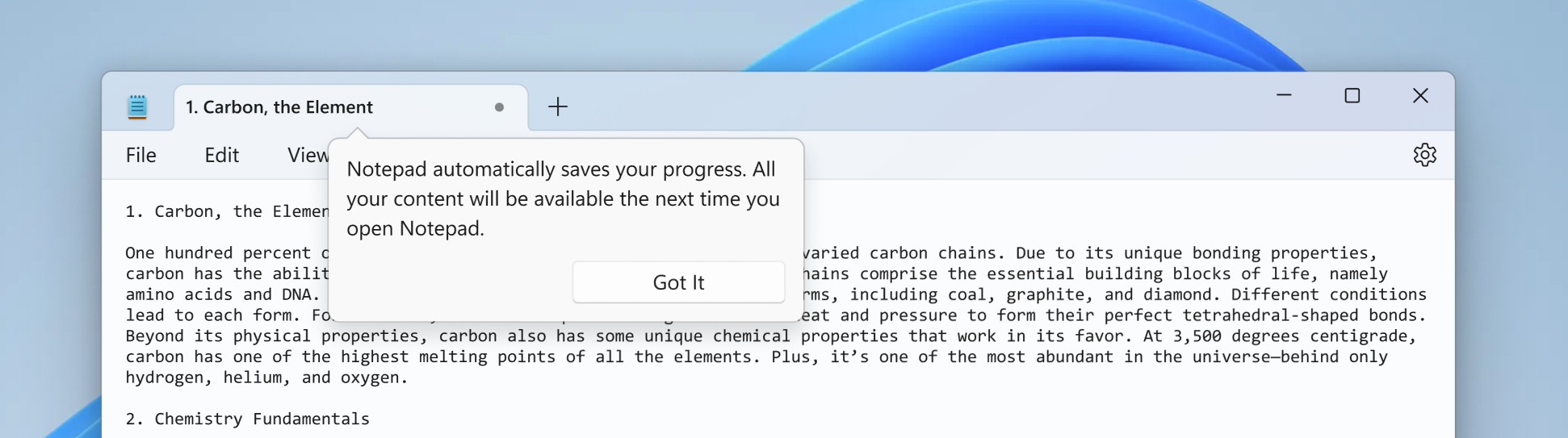
With this update, Notepad will start automatically saving your session state allowing you to close Notepad without any interrupting dialogs and then pick up where you left off when you return. Notepad will automatically restore previously open tabs as well as unsaved content and edits across those open tabs. Saved session state does not impact any of your files, though, and it is still your choice whether to save or discard unsaved changes to files anytime you close a tab. You can turn this feature off in app settings if you would prefer to have a fresh start every time you open Notepad.


Notepad with one open tab.

FEEDBACK: Please file feedback in Feedback Hub (WIN + F) under Apps > Notepad.

[PLEASE NOTE: We are beginning to roll these experiences out, so they may not be available to all Insiders in the Canary and Dev Channels just yet as we plan to monitor feedback and see how it lands before pushing it out to everyone.]

As always, we love getting feedback from the community and we will be looking out for your feedback on these updates!

Thanks,
Dave Grochocki, Principal Product Manager Lead – Windows Inbox Apps


 Source:

 
Last edited:
Interestingly enough, it also seems that if you assign a manual KB shortcut to the app shortcut, it also disables the Win + SHIFT + S shortcut. PrtScrn seems to work, still though.
I attempted to capture a screenshot of your wallpaper with Window mode enabled. Thanks to the new AI (OCR) feature of the Snipping Tool, even your baby Godzilla's window can be detected. What an incredible app!

s4.png

s5.png
 

My Computer My Computer

At a glance

Win 11 Enterprisei7
OS
Win 11 Enterprise
Computer type
Laptop
CPU
i7
Hard Drives
SSD
Thanks, John. Unfortunately, creating a shortcut key forces me to put a shortcut on the desktop and that's the last thing that I want to do :-). I know that I am being picky. It was more a curiosity to make sure I am not missing something obvious.

Store the shortcut elsewhere?
 

My Computers My Computers

  • At a glance

    Windows 11 23H2 Current buildAMD Ryzen 9 3950X4 * 32 GB - Corsair Vengeance 3600 MHzEVGA GeForce RTX 3080 Ti XC3 ULTRA GAMING (12...
    OS
    Windows 11 23H2 Current build
    Computer type
    PC/Desktop
    Manufacturer/Model
    HomeBrew
    CPU
    AMD Ryzen 9 3950X
    Motherboard
    MSI MEG X570 GODLIKE
    Memory
    4 * 32 GB - Corsair Vengeance 3600 MHz
    Graphics Card(s)
    EVGA GeForce RTX 3080 Ti XC3 ULTRA GAMING (12G-P5-3955-KR)
    Sound Card
    Realtek® ALC1220 Codec
    Monitor(s) Displays
    2x Eve Spectrum ES07D03 4K Gaming Monitor (Matte) | Eve Spectrum ES07DC9 4K Gaming Monitor (Glossy)
    Screen Resolution
    3x 3840 x 2160
    Hard Drives
    3x Samsung 980 Pro NVMe PCIe 4 M.2 2 TB SSD (MZ-V8P2T0B/AM) } 3x Sabrent Rocket NVMe 4.0 1 TB SSD (USB)
    PSU
    PC Power & Cooling’s Silencer Series 1050 Watt, 80 Plus Platinum
    Case
    Fractal Design Define 7 XL Dark ATX Full Tower Case
    Cooling
    Arctic Liquid Freezer III 420 RGB + Air 3x 140mm case fans (pull front) + 1x 120 mm (push back) and 1 x 120 mm (pull bottom)
    Keyboard
    SteelSeries Apex Pro Wired Gaming Keyboard
    Mouse
    Logitech MX Master 3S | MX Master 3 for Business
    Internet Speed
    AT&T LightSpeed Gigabit Duplex Ftth
    Browser
    Nightly (default) + Firefox (stable), Chrome, Edge , Arc
    Antivirus
    Defender + MB 5 Beta
  • At a glance

    ChromeOS Flex Dev Channel (current)Intel(R) Core(TM) i5-6300U CPU @ 2.40GHz, 250...16 GBIntel(R) HD Graphics 520
    Operating System
    ChromeOS Flex Dev Channel (current)
    Computer type
    Laptop
    Manufacturer/Model
    Dell Latitude E5470
    CPU
    Intel(R) Core(TM) i5-6300U CPU @ 2.40GHz, 2501 Mhz, 2 Core(s), 4 Logical Processor(s)
    Motherboard
    Dell
    Memory
    16 GB
    Graphics card(s)
    Intel(R) HD Graphics 520
    Sound Card
    Intel(R) HD Graphics 520 + RealTek Audio
    Monitor(s) Displays
    Dell laptop display 15"
    Screen Resolution
    1920 * 1080
    Hard Drives
    Toshiba 128GB M.2 22300 drive
    INTEL Cherryville 520 Series SSDSC2CW180A 180 GB SATA III SSD
    PSU
    Dell
    Case
    Dell
    Cooling
    Dell
    Keyboard
    Dell
    Mouse
    Logitech MX Master 3S (shared w. Sys 1) | Dell TouchPad
    Internet Speed
    AT&T LightSpeed Gigabit Duplex Ftth
It works for you (Window mode for Taskbar). Snipping Tool version?

Screenshot 2023-11-18 142711.png

It doesn't work for you (Window mode for the menus)!

No one said only the menu.

3 second delay, window mode, app opened by typing snipping in start. Direct screenshot of only context menu via Window mode.

Screenshot 2023-11-18 142830.png

Everything that someone says is not working seems to be working just fine for me.
 

My Computers My Computers

  • At a glance

    Windows 11 23H2 Current buildAMD Ryzen 9 3950X4 * 32 GB - Corsair Vengeance 3600 MHzEVGA GeForce RTX 3080 Ti XC3 ULTRA GAMING (12...
    OS
    Windows 11 23H2 Current build
    Computer type
    PC/Desktop
    Manufacturer/Model
    HomeBrew
    CPU
    AMD Ryzen 9 3950X
    Motherboard
    MSI MEG X570 GODLIKE
    Memory
    4 * 32 GB - Corsair Vengeance 3600 MHz
    Graphics Card(s)
    EVGA GeForce RTX 3080 Ti XC3 ULTRA GAMING (12G-P5-3955-KR)
    Sound Card
    Realtek® ALC1220 Codec
    Monitor(s) Displays
    2x Eve Spectrum ES07D03 4K Gaming Monitor (Matte) | Eve Spectrum ES07DC9 4K Gaming Monitor (Glossy)
    Screen Resolution
    3x 3840 x 2160
    Hard Drives
    3x Samsung 980 Pro NVMe PCIe 4 M.2 2 TB SSD (MZ-V8P2T0B/AM) } 3x Sabrent Rocket NVMe 4.0 1 TB SSD (USB)
    PSU
    PC Power & Cooling’s Silencer Series 1050 Watt, 80 Plus Platinum
    Case
    Fractal Design Define 7 XL Dark ATX Full Tower Case
    Cooling
    Arctic Liquid Freezer III 420 RGB + Air 3x 140mm case fans (pull front) + 1x 120 mm (push back) and 1 x 120 mm (pull bottom)
    Keyboard
    SteelSeries Apex Pro Wired Gaming Keyboard
    Mouse
    Logitech MX Master 3S | MX Master 3 for Business
    Internet Speed
    AT&T LightSpeed Gigabit Duplex Ftth
    Browser
    Nightly (default) + Firefox (stable), Chrome, Edge , Arc
    Antivirus
    Defender + MB 5 Beta
  • At a glance

    ChromeOS Flex Dev Channel (current)Intel(R) Core(TM) i5-6300U CPU @ 2.40GHz, 250...16 GBIntel(R) HD Graphics 520
    Operating System
    ChromeOS Flex Dev Channel (current)
    Computer type
    Laptop
    Manufacturer/Model
    Dell Latitude E5470
    CPU
    Intel(R) Core(TM) i5-6300U CPU @ 2.40GHz, 2501 Mhz, 2 Core(s), 4 Logical Processor(s)
    Motherboard
    Dell
    Memory
    16 GB
    Graphics card(s)
    Intel(R) HD Graphics 520
    Sound Card
    Intel(R) HD Graphics 520 + RealTek Audio
    Monitor(s) Displays
    Dell laptop display 15"
    Screen Resolution
    1920 * 1080
    Hard Drives
    Toshiba 128GB M.2 22300 drive
    INTEL Cherryville 520 Series SSDSC2CW180A 180 GB SATA III SSD
    PSU
    Dell
    Case
    Dell
    Cooling
    Dell
    Keyboard
    Dell
    Mouse
    Logitech MX Master 3S (shared w. Sys 1) | Dell TouchPad
    Internet Speed
    AT&T LightSpeed Gigabit Duplex Ftth
Store the shortcut elsewhere?
Maybe I'm wrong, but I was under the impression that in order for a shortcut key to work, the shortcut must reside on the desktop.

EDIT: Confirmed. Shortcut keys assigned do not work if shortcut is placed elsewhere.
 
Last edited:

My Computers My Computers

  • At a glance

    Win11 Pro 25H2 (RTM+)Intel i7-14650HX32 GBNo GPU - Built-in Intel Graphics
    OS
    Win11 Pro 25H2 (RTM+)
    Computer type
    PC/Desktop
    Manufacturer/Model
    Acemagic
    CPU
    Intel i7-14650HX
    Memory
    32 GB
    Graphics Card(s)
    No GPU - Built-in Intel Graphics
    Sound Card
    Integrated
    Monitor(s) Displays
    Varies as machine will often be moved to locations with different monitors
    Screen Resolution
    Varies
    Hard Drives
    1 x 1TB Gen 4 NVMe SSD
    PSU
    120W Power Brick
    Keyboard
    Corsair K70 Max RGB Magnetic Keyboard
    Mouse
    Logitech MX Master 3
    Internet Speed
    1Gb Up / 1 Gb Down
    Browser
    Edge
    Antivirus
    Windows Defender
  • At a glance

    Win11 Pro 25H2 (RTM+)Intel i7-1255U16 GBIntel Iris Xe Graphics
    Operating System
    Win11 Pro 25H2 (RTM+)
    Computer type
    Laptop
    Manufacturer/Model
    Lenovo ThinkBook 13x Gen 2
    CPU
    Intel i7-1255U
    Memory
    16 GB
    Graphics card(s)
    Intel Iris Xe Graphics
    Sound Card
    Realtek® ALC3306-CG codec
    Monitor(s) Displays
    13.3-inch IPS Display
    Screen Resolution
    WQXGA (2560 x 1600)
    Hard Drives
    2 TB 4 x 4 NVMe SSD
    PSU
    USB-C / Thunderbolt 4 Power / Charging
    Keyboard
    Backlit, spill resistant keyboard
    Mouse
    Buttonless Glass Precision Touchpad
    Internet Speed
    1Gb Up / 1Gb Down
    Browser
    Edge
    Antivirus
    Windows Defender
    Other Info
    WiFi 6e / Bluetooth 5.1 / Facial Recognition / Fingerprint Sensor / ToF (Time of Flight) Human Presence Sensor
Windows mode with Windows Desktop context menu (which reverts to Desktop mode):
Do you call it Window mode?!!

I said it doesn't work cause you said you triggered Window mode, and then it took a Fullscreen screenshot.

BTW, your Snipping Tool version is for October, and this version seems to work right (Window mode for Taskbar and menus).

s2.png
 

My Computer My Computer

At a glance

Win 11 Enterprisei7
OS
Win 11 Enterprise
Computer type
Laptop
CPU
i7
Hard Drives
SSD
Joodis Preece!
Why does MS make things so fecking complicated!?!?!? 🤷‍♂️

PrtScrn>auto-detect>capture!

0005681.gif
 

My Computers My Computers

  • At a glance

    Windows 11 Pro
    OS
    Windows 11 Pro
    Computer type
    PC/Desktop
    Manufacturer/Model
    ASUS ROG Strix
  • At a glance

    Windows 11 Pro
    Operating System
    Windows 11 Pro
    Computer type
    Laptop
    Manufacturer/Model
    ASUS VivoBook
  • ASUS VivoBook 'Lite' ~ Windows 11 Home
ST (Snipping Tool) also captures menus, submenus, and the Taskbar in "Window" mode by pressing Ctrl+Shift+S/PrtScr. This feature has been disabled in the previous two versions. However, the menu capturing is now available again in the latest version. But the Taskbar capturing in "Window" mode is still not functional.
 

My Computer My Computer

At a glance

Win 11 Enterprisei7
OS
Win 11 Enterprise
Computer type
Laptop
CPU
i7
Hard Drives
SSD
I hope this upgrade is optional and not forced on everybody. Once the bugs are fixed then I may consider upgdating it.
 

My Computers My Computers

  • At a glance

    Windows 11 Pro 25H2 build: (26200.7623)32GB
    OS
    Windows 11 Pro 25H2 build: (26200.7623)
    Computer type
    Laptop
    Manufacturer/Model
    Microsoft Surface Pro
    Memory
    32GB
  • At a glance

    Microsoft 25H2 ProIntel Core Ultra 764GBIntel Integrated Graphics
    Operating System
    Microsoft 25H2 Pro
    Computer type
    Laptop
    Manufacturer/Model
    Dell Pro 14 - PC14250
    CPU
    Intel Core Ultra 7
    Memory
    64GB
    Graphics card(s)
    Intel Integrated Graphics
    Hard Drives
    Micron 1TB SSD
Do you call it Window mode?!!

I said it doesn't work cause you said you triggered Window mode, and then it took a Fullscreen screenshot.

BTW, your Snipping Tool version is for October, and this version seems to work right (Window mode for Taskbar and menus).

View attachment 78327

That was window mode capturing the taskbar. Perhaps you could verify what you mean by window mode. Because it is working perfectly fine for me.

If you set it to window mode, which automatically captures apps, and it is focused on the desktop, it captures the desktop as the window.

What I've shown is how I've always used Snipping Tool. Nothing has changed on my end.
 

My Computers My Computers

  • At a glance

    Windows 11 23H2 Current buildAMD Ryzen 9 3950X4 * 32 GB - Corsair Vengeance 3600 MHzEVGA GeForce RTX 3080 Ti XC3 ULTRA GAMING (12...
    OS
    Windows 11 23H2 Current build
    Computer type
    PC/Desktop
    Manufacturer/Model
    HomeBrew
    CPU
    AMD Ryzen 9 3950X
    Motherboard
    MSI MEG X570 GODLIKE
    Memory
    4 * 32 GB - Corsair Vengeance 3600 MHz
    Graphics Card(s)
    EVGA GeForce RTX 3080 Ti XC3 ULTRA GAMING (12G-P5-3955-KR)
    Sound Card
    Realtek® ALC1220 Codec
    Monitor(s) Displays
    2x Eve Spectrum ES07D03 4K Gaming Monitor (Matte) | Eve Spectrum ES07DC9 4K Gaming Monitor (Glossy)
    Screen Resolution
    3x 3840 x 2160
    Hard Drives
    3x Samsung 980 Pro NVMe PCIe 4 M.2 2 TB SSD (MZ-V8P2T0B/AM) } 3x Sabrent Rocket NVMe 4.0 1 TB SSD (USB)
    PSU
    PC Power & Cooling’s Silencer Series 1050 Watt, 80 Plus Platinum
    Case
    Fractal Design Define 7 XL Dark ATX Full Tower Case
    Cooling
    Arctic Liquid Freezer III 420 RGB + Air 3x 140mm case fans (pull front) + 1x 120 mm (push back) and 1 x 120 mm (pull bottom)
    Keyboard
    SteelSeries Apex Pro Wired Gaming Keyboard
    Mouse
    Logitech MX Master 3S | MX Master 3 for Business
    Internet Speed
    AT&T LightSpeed Gigabit Duplex Ftth
    Browser
    Nightly (default) + Firefox (stable), Chrome, Edge , Arc
    Antivirus
    Defender + MB 5 Beta
  • At a glance

    ChromeOS Flex Dev Channel (current)Intel(R) Core(TM) i5-6300U CPU @ 2.40GHz, 250...16 GBIntel(R) HD Graphics 520
    Operating System
    ChromeOS Flex Dev Channel (current)
    Computer type
    Laptop
    Manufacturer/Model
    Dell Latitude E5470
    CPU
    Intel(R) Core(TM) i5-6300U CPU @ 2.40GHz, 2501 Mhz, 2 Core(s), 4 Logical Processor(s)
    Motherboard
    Dell
    Memory
    16 GB
    Graphics card(s)
    Intel(R) HD Graphics 520
    Sound Card
    Intel(R) HD Graphics 520 + RealTek Audio
    Monitor(s) Displays
    Dell laptop display 15"
    Screen Resolution
    1920 * 1080
    Hard Drives
    Toshiba 128GB M.2 22300 drive
    INTEL Cherryville 520 Series SSDSC2CW180A 180 GB SATA III SSD
    PSU
    Dell
    Case
    Dell
    Cooling
    Dell
    Keyboard
    Dell
    Mouse
    Logitech MX Master 3S (shared w. Sys 1) | Dell TouchPad
    Internet Speed
    AT&T LightSpeed Gigabit Duplex Ftth
What I've shown is how I've always used Snipping Tool. Nothing has changed on my end.
OK, it works for you! 🙆🏻‍♀️


Informative (AFAIK!): For those who want to know what "Window" mode means! "Window" mode captures all rectangular elements of the UI, like menus/sub-menus, Taskbar, apps' windows or just the Desktop's frame (not full-screen frame). If you activate the "Window" mode while the context menu appears on your Desktop, Snipping Tool allows you to capture screenshots of the context menu, Taskbar, the Desktop frame, or the whole Desktop frame (full screen) as individual elements.

g.gif

If anybody knows better than this, please explain to shed light on my foggy night!

My Snipping Tool (11.2310.54.0) recognizes none of those (Desktop elements/sections) in "Window" mode! I had no problem with previous versions.
 

My Computer My Computer

At a glance

Win 11 Enterprisei7
OS
Win 11 Enterprise
Computer type
Laptop
CPU
i7
Hard Drives
SSD
Which is what I said. It works for me.

Have you tried uninstalling and then reinstalling it by powershell?
 

My Computers My Computers

  • At a glance

    Windows 11 23H2 Current buildAMD Ryzen 9 3950X4 * 32 GB - Corsair Vengeance 3600 MHzEVGA GeForce RTX 3080 Ti XC3 ULTRA GAMING (12...
    OS
    Windows 11 23H2 Current build
    Computer type
    PC/Desktop
    Manufacturer/Model
    HomeBrew
    CPU
    AMD Ryzen 9 3950X
    Motherboard
    MSI MEG X570 GODLIKE
    Memory
    4 * 32 GB - Corsair Vengeance 3600 MHz
    Graphics Card(s)
    EVGA GeForce RTX 3080 Ti XC3 ULTRA GAMING (12G-P5-3955-KR)
    Sound Card
    Realtek® ALC1220 Codec
    Monitor(s) Displays
    2x Eve Spectrum ES07D03 4K Gaming Monitor (Matte) | Eve Spectrum ES07DC9 4K Gaming Monitor (Glossy)
    Screen Resolution
    3x 3840 x 2160
    Hard Drives
    3x Samsung 980 Pro NVMe PCIe 4 M.2 2 TB SSD (MZ-V8P2T0B/AM) } 3x Sabrent Rocket NVMe 4.0 1 TB SSD (USB)
    PSU
    PC Power & Cooling’s Silencer Series 1050 Watt, 80 Plus Platinum
    Case
    Fractal Design Define 7 XL Dark ATX Full Tower Case
    Cooling
    Arctic Liquid Freezer III 420 RGB + Air 3x 140mm case fans (pull front) + 1x 120 mm (push back) and 1 x 120 mm (pull bottom)
    Keyboard
    SteelSeries Apex Pro Wired Gaming Keyboard
    Mouse
    Logitech MX Master 3S | MX Master 3 for Business
    Internet Speed
    AT&T LightSpeed Gigabit Duplex Ftth
    Browser
    Nightly (default) + Firefox (stable), Chrome, Edge , Arc
    Antivirus
    Defender + MB 5 Beta
  • At a glance

    ChromeOS Flex Dev Channel (current)Intel(R) Core(TM) i5-6300U CPU @ 2.40GHz, 250...16 GBIntel(R) HD Graphics 520
    Operating System
    ChromeOS Flex Dev Channel (current)
    Computer type
    Laptop
    Manufacturer/Model
    Dell Latitude E5470
    CPU
    Intel(R) Core(TM) i5-6300U CPU @ 2.40GHz, 2501 Mhz, 2 Core(s), 4 Logical Processor(s)
    Motherboard
    Dell
    Memory
    16 GB
    Graphics card(s)
    Intel(R) HD Graphics 520
    Sound Card
    Intel(R) HD Graphics 520 + RealTek Audio
    Monitor(s) Displays
    Dell laptop display 15"
    Screen Resolution
    1920 * 1080
    Hard Drives
    Toshiba 128GB M.2 22300 drive
    INTEL Cherryville 520 Series SSDSC2CW180A 180 GB SATA III SSD
    PSU
    Dell
    Case
    Dell
    Cooling
    Dell
    Keyboard
    Dell
    Mouse
    Logitech MX Master 3S (shared w. Sys 1) | Dell TouchPad
    Internet Speed
    AT&T LightSpeed Gigabit Duplex Ftth
Two times, not with Powershell but the Geek uninstaller. Also, I did "Reset" on the "Installed apps" page.

After uninstalling and rebooting, I pressed Win+Shift+S to see what happened, and the Snipping Tool appeared (with no video recording feature)! I searched all C and Start Menu but didn't find the Snipping Tool. This native version works, but after installing the app, it doesn't work for the Taskbar and menus (in window mode).
 

My Computer My Computer

At a glance

Win 11 Enterprisei7
OS
Win 11 Enterprise
Computer type
Laptop
CPU
i7
Hard Drives
SSD
Dear all,

My Windows 11 has the build 22631.2715 and the Snipping Tool still does not have the option to record audio:

1701041045184.png

I'm pretty sure this version already allows the recording of audio as per the comments I saw in this thread and since my personal laptop and my mom's laptop already have the Snipping Tool with this exact build number with the options to record system audio or microphone audio.

Any help? Are you aware of this issue?
 

My Computer My Computer

At a glance

Windows 11Ryzen 9 5950X64GB DDR4RTX 3080ti
OS
Windows 11
Computer type
PC/Desktop
CPU
Ryzen 9 5950X
Motherboard
Asus B550-F
Memory
64GB DDR4
Graphics Card(s)
RTX 3080ti
@Goncalo_P
Audio recording has been added since version (Snipping Tool) 11.2307.44.0. Do you have audio drivers installed? Do you have it enabled?

Try to reset/repair the Snipping Tool:

s1.png
 

My Computer My Computer

At a glance

Win 11 Enterprisei7
OS
Win 11 Enterprise
Computer type
Laptop
CPU
i7
Hard Drives
SSD
@Goncalo_P
Audio recording has been added since version (Snipping Tool) 11.2307.44.0. Do you have audio drivers installed? Do you have it enabled?

Try to reset/repair the Snipping Tool:

View attachment 79129

Already reseted, repaired it, DFC, DISM and these are my audio inputs:

1701111537229.png

Already tried enabling all of them, to no avail.
 

My Computer My Computer

At a glance

Windows 11Ryzen 9 5950X64GB DDR4RTX 3080ti
OS
Windows 11
Computer type
PC/Desktop
CPU
Ryzen 9 5950X
Motherboard
Asus B550-F
Memory
64GB DDR4
Graphics Card(s)
RTX 3080ti
Check if your volume is not mute while recording! Turn these on and see if it works:

s1.png
 

My Computer My Computer

At a glance

Win 11 Enterprisei7
OS
Win 11 Enterprise
Computer type
Laptop
CPU
i7
Hard Drives
SSD

My Computer My Computer

At a glance

Windows 11Ryzen 9 5950X64GB DDR4RTX 3080ti
OS
Windows 11
Computer type
PC/Desktop
CPU
Ryzen 9 5950X
Motherboard
Asus B550-F
Memory
64GB DDR4
Graphics Card(s)
RTX 3080ti
Me... if I were you...

g1.gif
 

My Computer My Computer

At a glance

Win 11 Enterprisei7
OS
Win 11 Enterprise
Computer type
Laptop
CPU
i7
Hard Drives
SSD

My Computer My Computer

At a glance

Windows 11Ryzen 9 5950X64GB DDR4RTX 3080ti
OS
Windows 11
Computer type
PC/Desktop
CPU
Ryzen 9 5950X
Motherboard
Asus B550-F
Memory
64GB DDR4
Graphics Card(s)
RTX 3080ti
I don't know what's wrong with ST (Snipping Tool). Mine doesn't capture winodws (rectangular UIs) in Window mode! I downgraded to the stable version (October) but it doesn't work. DISM, SFC, uninstall ST with Geek and PowerShell! Nothing worked. It was a real cream bread (which I love) for me, but they made it a dark-brown bread for me. It's Microsoft routine, no worries! Severe instability disorder :woozy: .
 

My Computer My Computer

At a glance

Win 11 Enterprisei7
OS
Win 11 Enterprise
Computer type
Laptop
CPU
i7
Hard Drives
SSD
Back
Top Bottom