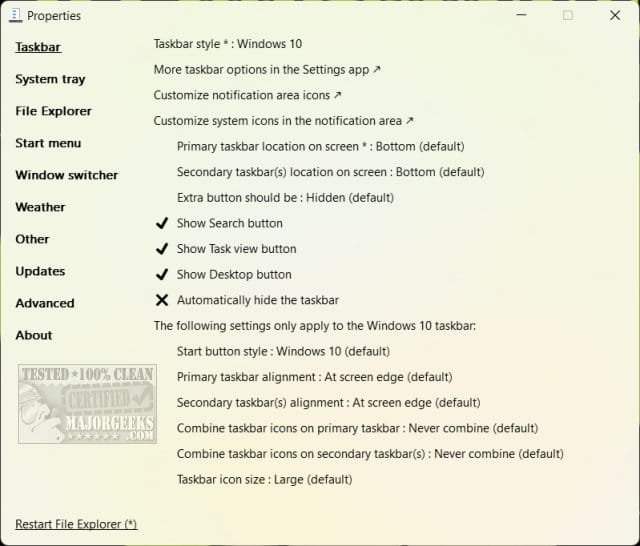
New Version of ExplorerPatcher


I just got pushed the 26200.8655 update and it broke my Explorer Patcher, but this pre-release appears to have it working again!
I updated to 25H2 26200.8655 yesterday and have ExplorerPatcher 26100.8457.70.1 (latest official release) and it seems to be working fine. What problem do you see?
 

My Computers My Computers

  • At a glance

    Win11 25H2 26200.7623Intel XEON W-2245 8c/16t128GB DDR4-2933 ECCNvidia Quadro K4200
    OS
    Win11 25H2 26200.7623
    Computer type
    PC/Desktop
    Manufacturer/Model
    Lenovo P520
    CPU
    Intel XEON W-2245 8c/16t
    Memory
    128GB DDR4-2933 ECC
    Graphics Card(s)
    Nvidia Quadro K4200
    Sound Card
    Bultin
    Monitor(s) Displays
    LCD 24in
    Screen Resolution
    1920x1200
    Hard Drives
    1TB SSD system, 16TB data 3.5in HDD, 16TB backup 3.5in HDD
    PSU
    900W
    Cooling
    Air
    Internet Speed
    1Gb
    Browser
    Firefox & Chrome
    Antivirus
    MalwareBytes
  • At a glance

    Win10 22H2Intel Core i7-3520m16GBintegrated CPU graphics
    Operating System
    Win10 22H2
    Computer type
    Laptop
    Manufacturer/Model
    Lenovo T530
    CPU
    Intel Core i7-3520m
    Memory
    16GB
    Graphics card(s)
    integrated CPU graphics
    Hard Drives
    1TB SSD
    Internet Speed
    1Gb
    Browser
    Fiefox & Chrome
    Antivirus
    Malwarebytes
Windows Security disabled Explorer Patcher 70.2 as a Trojan. False positive and restored EP since Windows Defender should stop flagging me about non-existent threats.
 

My Computers My Computers

  • At a glance

    Windows 11 Education For 25H2Intel® Core i7 5500u8 GBIntel HD Family Graphics 5500 AMD Firepro 4150M
    OS
    Windows 11 Education For 25H2
    Computer type
    Laptop
    Manufacturer/Model
    HP ZBook G2
    CPU
    Intel® Core i7 5500u
    Motherboard
    HP
    Memory
    8 GB
    Graphics Card(s)
    Intel HD Family Graphics 5500 AMD Firepro 4150M
    Sound Card
    Realtek High Audio
    Hard Drives
    1 TB SSD
    Mouse
    HP USB Mouse
    Antivirus
    Windows Defender
  • At a glance

    Windows 11 Pro For Workstations 25H2Xeon 1535m v632 GBAMD Quadro Pro 4100
    Operating System
    Windows 11 Pro For Workstations 25H2
    Computer type
    Laptop
    Manufacturer/Model
    HP Zbook G4
    CPU
    Xeon 1535m v6
    Motherboard
    HP
    Memory
    32 GB
    Graphics card(s)
    AMD Quadro Pro 4100
    Sound Card
    Bang and Olufson Audio
    Hard Drives
    1TB SSD
    Mouse
    HP USB Mouse
    Antivirus
    Windows Defender
EP 70.2 re-implemented support for the Windows 10 mode Microsoft removed in 8674. Details:

Introduced a re-implemented 10 Start menu tile layout engine that was removed in 26xxx.8474. (688514f)
  • Note that the restoration is partial. Tiles can overlap when pinned via the Pin to Start option (doesn't happen when dragging items from apps list to the pinned area), this can be worked around by restarting StartMenuExperienceHost.exe or explorer.exe as a whole to repair the layout.
  • Stay tuned on #4960 and the official Discord server for updates.
 

My Computers My Computers

  • At a glance

    Windows 11 Education For 25H2Intel® Core i7 5500u8 GBIntel HD Family Graphics 5500 AMD Firepro 4150M
    OS
    Windows 11 Education For 25H2
    Computer type
    Laptop
    Manufacturer/Model
    HP ZBook G2
    CPU
    Intel® Core i7 5500u
    Motherboard
    HP
    Memory
    8 GB
    Graphics Card(s)
    Intel HD Family Graphics 5500 AMD Firepro 4150M
    Sound Card
    Realtek High Audio
    Hard Drives
    1 TB SSD
    Mouse
    HP USB Mouse
    Antivirus
    Windows Defender
  • At a glance

    Windows 11 Pro For Workstations 25H2Xeon 1535m v632 GBAMD Quadro Pro 4100
    Operating System
    Windows 11 Pro For Workstations 25H2
    Computer type
    Laptop
    Manufacturer/Model
    HP Zbook G4
    CPU
    Xeon 1535m v6
    Motherboard
    HP
    Memory
    32 GB
    Graphics card(s)
    AMD Quadro Pro 4100
    Sound Card
    Bang and Olufson Audio
    Hard Drives
    1TB SSD
    Mouse
    HP USB Mouse
    Antivirus
    Windows Defender
REMINDER: Always make sure you upgrade Explorer Patcher after installing Windows updates. Today my father called me because his laptop was stuck in a File Explorer crashing loop. I killed (End Task) File Explorer process from Task Manager and then loaded (New Task) Microsoft Edge (MSEDGE) so I could download latest Explorer Patcher version and install it. Once I installed latest version File Explorer worked properly and my father could finally use his laptop.

So if you encounter a File Explorer crashing loop, the solution is to install latest Explorer Patcher. Even if it is the same version, it might be corrupt (unsuccessful upgrade) and cause issues. Just download it again and reinstall to repair.
 

My Computers My Computers

  • At a glance

    Windows 11 Pro 23H2 (5699), 25H2 (8655)Mobile DualCore Intel Core 2 Duo T7250, 2000 MHz4GBMobile Intel(R) GMA 4500M (Mobile 4 series)
    OS
    Windows 11 Pro 23H2 (5699), 25H2 (8655)
    Computer type
    Laptop
    Manufacturer/Model
    Acer Extensa 5630EZ
    CPU
    Mobile DualCore Intel Core 2 Duo T7250, 2000 MHz
    Motherboard
    Acer Extensa 5630
    Memory
    4GB
    Graphics Card(s)
    Mobile Intel(R) GMA 4500M (Mobile 4 series)
    Sound Card
    Realtek ALC268 @ Intel 82801IB ICH9 - High Definition Audio Controller
    Monitor(s) Displays
    1
    Screen Resolution
    1280x800
    Hard Drives
    Samsung SSD 850 EVO 250GB SATA Device (250 GB, SATA-III)
    Internet Speed
    VDSL 50 Mbps
    Browser
    MICROSOFT EDGE
    Antivirus
    WINDOWS DEFENDER
    Other Info
    Legacy MBR installation, no TPM, no Secure Boot, no WDDM 2.0 graphics drivers, no SSE4.2, cannot get more unsupported ;) This is only my test laptop. I had installed Windows 11 here before upgrading my main PC. For my main PC I use everyday see my 2nd system specs.
  • At a glance

    Windows 11 Pro v25H2 (build 26200.8655)Intel Core-i7 3770 3.40GHz s1155 (3rd generat...2x Kingston Hyper-X Blu 8GB DDR3-1600GIGABYTE GeForce RTX 3050 WINDFORCE OC V2 6GB...
    Operating System
    Windows 11 Pro v25H2 (build 26200.8655)
    Computer type
    PC/Desktop
    Manufacturer/Model
    Custom-built PC
    CPU
    Intel Core-i7 3770 3.40GHz s1155 (3rd generation)
    Motherboard
    Asus P8H61 s1155 ATX
    Memory
    2x Kingston Hyper-X Blu 8GB DDR3-1600
    Graphics card(s)
    GIGABYTE GeForce RTX 3050 WINDFORCE OC V2 6GB (GV-N3050WF2OCV2-6GD)
    Sound Card
    Realtek HD audio (ALC887)
    Monitor(s) Displays
    Sony Bravia KDL-19L4000 19" LCD TV via VGA
    Screen Resolution
    1440x900 32-bit 60Hz
    Hard Drives
    WD Blue SA510 2.5 1000GB SSD as system disk, Western Digital Caviar Purple 4TB SATA III (WD40PURZ) as second
    PSU
    Thermaltake Litepower RGB 550W Full Wired
    Case
    SUPERCASE MIDI-TOWER
    Cooling
    Deepcool Gamma Archer CPU cooler, 1x 8cm fan at the back
    Keyboard
    Mitsumi 101-key PS/2
    Mouse
    Sunnyline OptiEye PS/2
    Internet Speed
    100Mbps
    Browser
    Microsoft Edge, Mozilla Firefox
    Antivirus
    Microsoft Windows Defender
    Other Info
    Legacy BIOS (MBR) installation, no TPM, no Secure Boot, WDDM 3.0 graphics drivers, WEI score 7.4

Latest Support Threads

Back
Top Bottom