New win 11 installation with ExplorerPatcher does not allow pinning cmd.exe to Start


@UpdatesMess

At present we have no idea if this is an effect of explorerpatcher.

Have you yet tried Pin to Start in Safe Mode?

You could of course uninstall explorerpatcher to see if there's any change and eliminate it as possible cause.
I did uninstall EP and also did an InPlaceRepair of Win 11, and was able to pin all these item to start. So it is probably a problem I am having with EP. But others seem to have done this successfully, so I don't know what I am doing wrong/differently.
 

My Computer My Computer

At a glance

windows 11 25h2 ProIntel(R) Core(TM) Ultra 7 355 (2.30 GHz)32gbIntel Graphics
OS
windows 11 25h2 Pro
Computer type
Laptop
Manufacturer/Model
LG electronics
CPU
Intel(R) Core(TM) Ultra 7 355 (2.30 GHz)
Motherboard
LG Electronics 17Z90U Fab1
Memory
32gb
Graphics Card(s)
Intel Graphics
While trying to explore this on my own, I came across a posting for a location of Pin to Start items (How to Backup and restore Start Menu Pinned Items in Windows 11 ),
%LocalAppData%\Packages\Microsoft.Windows.StartMenuExperienceHost_cw5n1h2txyewy\LocalState

and I went there. According to the post, I should have had a Start.bin file, and I only had a start2.bin file. I don't know if that can cause the problem.
 

My Computer My Computer

At a glance

windows 11 25h2 ProIntel(R) Core(TM) Ultra 7 355 (2.30 GHz)32gbIntel Graphics
OS
windows 11 25h2 Pro
Computer type
Laptop
Manufacturer/Model
LG electronics
CPU
Intel(R) Core(TM) Ultra 7 355 (2.30 GHz)
Motherboard
LG Electronics 17Z90U Fab1
Memory
32gb
Graphics Card(s)
Intel Graphics
I did uninstall EP and also did an InPlaceRepair of Win 11, and was able to pin all these item to start. So it is probably a problem I am having with EP. But others seem to have done this successfully, so I don't know what I am doing wrong/differently.
Now that's useful to know. I've attached my explorerpatcher settings which you can import into it to try that if you wish.
 

Attachments

My Computer My Computer

At a glance

Windows 11 Proi7-8650U16GBIntel UHD 620
OS
Windows 11 Pro
Computer type
Laptop
Manufacturer/Model
Lenovo t480s
CPU
i7-8650U
Memory
16GB
Graphics Card(s)
Intel UHD 620
Screen Resolution
1920x1080
Hard Drives
C SN810 SDCPNRY-512G-1006
Browser
Edge, Firefox
Antivirus
Defender
. I run Explorer Patcher with Windows 10 taskbar style but also Open Shell with Windows 7 start menu, if that makes any difference.

I don't know if that can be the difference. EP only has Win 10 and Win 11 options in both TaskBar and Start menu.
 

My Computer My Computer

At a glance

windows 11 25h2 ProIntel(R) Core(TM) Ultra 7 355 (2.30 GHz)32gbIntel Graphics
OS
windows 11 25h2 Pro
Computer type
Laptop
Manufacturer/Model
LG electronics
CPU
Intel(R) Core(TM) Ultra 7 355 (2.30 GHz)
Motherboard
LG Electronics 17Z90U Fab1
Memory
32gb
Graphics Card(s)
Intel Graphics
I also can see a Pin to Start if I enter "Con" in Start,
View attachment 175792

and when I click on it, it says that it is pinned, but there is no such pin when I look at Start. I even tried to Restart File Explorer to see if it made a difference, but it did not.
I am using Win 10 start menu from EP.
I think it pins the Control Panel on the original Windows 11 start menu, not that of Explorer Patcher or Open Shell.
 

My Computers My Computers

  • At a glance

    Windows 11 Pro 23H2 (5699), 25H2 (8655)Mobile DualCore Intel Core 2 Duo T7250, 2000 MHz4GBMobile Intel(R) GMA 4500M (Mobile 4 series)
    OS
    Windows 11 Pro 23H2 (5699), 25H2 (8655)
    Computer type
    Laptop
    Manufacturer/Model
    Acer Extensa 5630EZ
    CPU
    Mobile DualCore Intel Core 2 Duo T7250, 2000 MHz
    Motherboard
    Acer Extensa 5630
    Memory
    4GB
    Graphics Card(s)
    Mobile Intel(R) GMA 4500M (Mobile 4 series)
    Sound Card
    Realtek ALC268 @ Intel 82801IB ICH9 - High Definition Audio Controller
    Monitor(s) Displays
    1
    Screen Resolution
    1280x800
    Hard Drives
    Samsung SSD 850 EVO 250GB SATA Device (250 GB, SATA-III)
    Internet Speed
    VDSL 50 Mbps
    Browser
    MICROSOFT EDGE
    Antivirus
    WINDOWS DEFENDER
    Other Info
    Legacy MBR installation, no TPM, no Secure Boot, no WDDM 2.0 graphics drivers, no SSE4.2, cannot get more unsupported ;) This is only my test laptop. I had installed Windows 11 here before upgrading my main PC. For my main PC I use everyday see my 2nd system specs.
  • At a glance

    Windows 11 Pro v25H2 (build 26200.8655)Intel Core-i7 3770 3.40GHz s1155 (3rd generat...2x Kingston Hyper-X Blu 8GB DDR3-1600GIGABYTE GeForce RTX 3050 WINDFORCE OC V2 6GB...
    Operating System
    Windows 11 Pro v25H2 (build 26200.8655)
    Computer type
    PC/Desktop
    Manufacturer/Model
    Custom-built PC
    CPU
    Intel Core-i7 3770 3.40GHz s1155 (3rd generation)
    Motherboard
    Asus P8H61 s1155 ATX
    Memory
    2x Kingston Hyper-X Blu 8GB DDR3-1600
    Graphics card(s)
    GIGABYTE GeForce RTX 3050 WINDFORCE OC V2 6GB (GV-N3050WF2OCV2-6GD)
    Sound Card
    Realtek HD audio (ALC887)
    Monitor(s) Displays
    Sony Bravia KDL-19L4000 19" LCD TV via VGA
    Screen Resolution
    1440x900 32-bit 60Hz
    Hard Drives
    WD Blue SA510 2.5 1000GB SSD as system disk, Western Digital Caviar Purple 4TB SATA III (WD40PURZ) as second
    PSU
    Thermaltake Litepower RGB 550W Full Wired
    Case
    SUPERCASE MIDI-TOWER
    Cooling
    Deepcool Gamma Archer CPU cooler, 1x 8cm fan at the back
    Keyboard
    Mitsumi 101-key PS/2
    Mouse
    Sunnyline OptiEye PS/2
    Internet Speed
    100Mbps
    Browser
    Microsoft Edge, Mozilla Firefox
    Antivirus
    Microsoft Windows Defender
    Other Info
    Legacy BIOS (MBR) installation, no TPM, no Secure Boot, WDDM 3.0 graphics drivers, WEI score 7.4
Now that's useful to know. I've attached my explorerpatcher settings which you can import into it to try that if you wish.
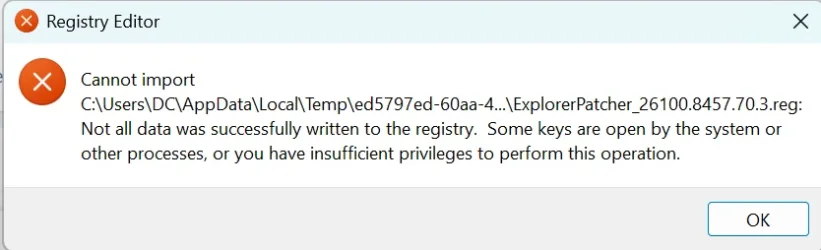
I did import your settings, thanks for sending them. When I did so, I got this message:

Screenshot 2026-07-02 110218.webp
When I then clicked on Start, I first got this:

Screenshot 2026-07-02 110318.webp

I think I then opened and closed FileExplore, as I am now getting what I had when I had uninstalled EP, i.e., all the icons are pinned to start, but it is Win 11 style.
Screenshot 2026-07-02 111057.webp

However, it may be good enough for me, and I will see if I can amend it to also show a list of all items, i.e., the left panel of the Win 10 Start Menu.
 

My Computer My Computer

At a glance

windows 11 25h2 ProIntel(R) Core(TM) Ultra 7 355 (2.30 GHz)32gbIntel Graphics
OS
windows 11 25h2 Pro
Computer type
Laptop
Manufacturer/Model
LG electronics
CPU
Intel(R) Core(TM) Ultra 7 355 (2.30 GHz)
Motherboard
LG Electronics 17Z90U Fab1
Memory
32gb
Graphics Card(s)
Intel Graphics
I think it pins the Control Panel on the original Windows 11 start menu, not that of Explorer Patcher or Open Shell.
I think you are right. From my last post to dalchina, this is what my Start looks like, and it has all the pinned icons:

Screenshot 2026-07-02 111057.webp
Have you then found a way to show all the items in a vertical list also?
 

My Computer My Computer

At a glance

windows 11 25h2 ProIntel(R) Core(TM) Ultra 7 355 (2.30 GHz)32gbIntel Graphics
OS
windows 11 25h2 Pro
Computer type
Laptop
Manufacturer/Model
LG electronics
CPU
Intel(R) Core(TM) Ultra 7 355 (2.30 GHz)
Motherboard
LG Electronics 17Z90U Fab1
Memory
32gb
Graphics Card(s)
Intel Graphics
I think I may have answered my own question....there is a "List" option, and that provides something that looks a lot like the Win 10 Start, except that the Pinned items are on top. I guess I will just have to retrain my aging muscle memory to get used to that!!!!;-)
I'll see if the other things I want are also there in this installation, i.e., QuickLaunch.
 

My Computer My Computer

At a glance

windows 11 25h2 ProIntel(R) Core(TM) Ultra 7 355 (2.30 GHz)32gbIntel Graphics
OS
windows 11 25h2 Pro
Computer type
Laptop
Manufacturer/Model
LG electronics
CPU
Intel(R) Core(TM) Ultra 7 355 (2.30 GHz)
Motherboard
LG Electronics 17Z90U Fab1
Memory
32gb
Graphics Card(s)
Intel Graphics
I am used to Windows 7 start menu style, so since Windows 8 I use Open Shell (formerly Classic Shell) to get it back.
 

My Computers My Computers

  • At a glance

    Windows 11 Pro 23H2 (5699), 25H2 (8655)Mobile DualCore Intel Core 2 Duo T7250, 2000 MHz4GBMobile Intel(R) GMA 4500M (Mobile 4 series)
    OS
    Windows 11 Pro 23H2 (5699), 25H2 (8655)
    Computer type
    Laptop
    Manufacturer/Model
    Acer Extensa 5630EZ
    CPU
    Mobile DualCore Intel Core 2 Duo T7250, 2000 MHz
    Motherboard
    Acer Extensa 5630
    Memory
    4GB
    Graphics Card(s)
    Mobile Intel(R) GMA 4500M (Mobile 4 series)
    Sound Card
    Realtek ALC268 @ Intel 82801IB ICH9 - High Definition Audio Controller
    Monitor(s) Displays
    1
    Screen Resolution
    1280x800
    Hard Drives
    Samsung SSD 850 EVO 250GB SATA Device (250 GB, SATA-III)
    Internet Speed
    VDSL 50 Mbps
    Browser
    MICROSOFT EDGE
    Antivirus
    WINDOWS DEFENDER
    Other Info
    Legacy MBR installation, no TPM, no Secure Boot, no WDDM 2.0 graphics drivers, no SSE4.2, cannot get more unsupported ;) This is only my test laptop. I had installed Windows 11 here before upgrading my main PC. For my main PC I use everyday see my 2nd system specs.
  • At a glance

    Windows 11 Pro v25H2 (build 26200.8655)Intel Core-i7 3770 3.40GHz s1155 (3rd generat...2x Kingston Hyper-X Blu 8GB DDR3-1600GIGABYTE GeForce RTX 3050 WINDFORCE OC V2 6GB...
    Operating System
    Windows 11 Pro v25H2 (build 26200.8655)
    Computer type
    PC/Desktop
    Manufacturer/Model
    Custom-built PC
    CPU
    Intel Core-i7 3770 3.40GHz s1155 (3rd generation)
    Motherboard
    Asus P8H61 s1155 ATX
    Memory
    2x Kingston Hyper-X Blu 8GB DDR3-1600
    Graphics card(s)
    GIGABYTE GeForce RTX 3050 WINDFORCE OC V2 6GB (GV-N3050WF2OCV2-6GD)
    Sound Card
    Realtek HD audio (ALC887)
    Monitor(s) Displays
    Sony Bravia KDL-19L4000 19" LCD TV via VGA
    Screen Resolution
    1440x900 32-bit 60Hz
    Hard Drives
    WD Blue SA510 2.5 1000GB SSD as system disk, Western Digital Caviar Purple 4TB SATA III (WD40PURZ) as second
    PSU
    Thermaltake Litepower RGB 550W Full Wired
    Case
    SUPERCASE MIDI-TOWER
    Cooling
    Deepcool Gamma Archer CPU cooler, 1x 8cm fan at the back
    Keyboard
    Mitsumi 101-key PS/2
    Mouse
    Sunnyline OptiEye PS/2
    Internet Speed
    100Mbps
    Browser
    Microsoft Edge, Mozilla Firefox
    Antivirus
    Microsoft Windows Defender
    Other Info
    Legacy BIOS (MBR) installation, no TPM, no Secure Boot, WDDM 3.0 graphics drivers, WEI score 7.4
I am used to Windows 7 start menu style, so since Windows 8 I use Open Shell (formerly Classic Shell) to get it back.
I apologize if I have asked this before, but I take it you haven't encountered a problem with using both. I'm going to first see if just EP works for me, but just in case I want to try both.
 

My Computer My Computer

At a glance

windows 11 25h2 ProIntel(R) Core(TM) Ultra 7 355 (2.30 GHz)32gbIntel Graphics
OS
windows 11 25h2 Pro
Computer type
Laptop
Manufacturer/Model
LG electronics
CPU
Intel(R) Core(TM) Ultra 7 355 (2.30 GHz)
Motherboard
LG Electronics 17Z90U Fab1
Memory
32gb
Graphics Card(s)
Intel Graphics
There were only two minor bugs once. One bug was that the search icon/box disappeared when there was a resolution change, such as when gaming. This has now changed that the search icon is moved a little to the left when resolution changes. To fix it I do a small change in Explorer Patcher, such as toggle task view icon on/off. The other bug is that when I click on the search icon/box the custom light blue color I have set in Open Shell is changed to the default Windows 11 blue accent color which on Taskbar appears much darker and looks ugly. This was fixed in the past, but after updating to latest Explorer Patcher version is back. Hopefully it will be fixed again in some newer version of Explorer Patcher. Again to restore my custom color I have to do a small change in Explorer Patcher such as toggle the task view icon on/off. Nothing major. Of course after updating Windows you must also update Explorer Patcher because a very old version of Explorer Patcher on a new build can cause File Explorer get stuck in a load/crash loop. If you ever see that, don't panic. Just terminate explorer.exe in Task Manager, details and then click on New task and execute msedge to load Microsoft Edge from where you can download latest Explorer Patcher version and install it.
 

My Computers My Computers

  • At a glance

    Windows 11 Pro 23H2 (5699), 25H2 (8655)Mobile DualCore Intel Core 2 Duo T7250, 2000 MHz4GBMobile Intel(R) GMA 4500M (Mobile 4 series)
    OS
    Windows 11 Pro 23H2 (5699), 25H2 (8655)
    Computer type
    Laptop
    Manufacturer/Model
    Acer Extensa 5630EZ
    CPU
    Mobile DualCore Intel Core 2 Duo T7250, 2000 MHz
    Motherboard
    Acer Extensa 5630
    Memory
    4GB
    Graphics Card(s)
    Mobile Intel(R) GMA 4500M (Mobile 4 series)
    Sound Card
    Realtek ALC268 @ Intel 82801IB ICH9 - High Definition Audio Controller
    Monitor(s) Displays
    1
    Screen Resolution
    1280x800
    Hard Drives
    Samsung SSD 850 EVO 250GB SATA Device (250 GB, SATA-III)
    Internet Speed
    VDSL 50 Mbps
    Browser
    MICROSOFT EDGE
    Antivirus
    WINDOWS DEFENDER
    Other Info
    Legacy MBR installation, no TPM, no Secure Boot, no WDDM 2.0 graphics drivers, no SSE4.2, cannot get more unsupported ;) This is only my test laptop. I had installed Windows 11 here before upgrading my main PC. For my main PC I use everyday see my 2nd system specs.
  • At a glance

    Windows 11 Pro v25H2 (build 26200.8655)Intel Core-i7 3770 3.40GHz s1155 (3rd generat...2x Kingston Hyper-X Blu 8GB DDR3-1600GIGABYTE GeForce RTX 3050 WINDFORCE OC V2 6GB...
    Operating System
    Windows 11 Pro v25H2 (build 26200.8655)
    Computer type
    PC/Desktop
    Manufacturer/Model
    Custom-built PC
    CPU
    Intel Core-i7 3770 3.40GHz s1155 (3rd generation)
    Motherboard
    Asus P8H61 s1155 ATX
    Memory
    2x Kingston Hyper-X Blu 8GB DDR3-1600
    Graphics card(s)
    GIGABYTE GeForce RTX 3050 WINDFORCE OC V2 6GB (GV-N3050WF2OCV2-6GD)
    Sound Card
    Realtek HD audio (ALC887)
    Monitor(s) Displays
    Sony Bravia KDL-19L4000 19" LCD TV via VGA
    Screen Resolution
    1440x900 32-bit 60Hz
    Hard Drives
    WD Blue SA510 2.5 1000GB SSD as system disk, Western Digital Caviar Purple 4TB SATA III (WD40PURZ) as second
    PSU
    Thermaltake Litepower RGB 550W Full Wired
    Case
    SUPERCASE MIDI-TOWER
    Cooling
    Deepcool Gamma Archer CPU cooler, 1x 8cm fan at the back
    Keyboard
    Mitsumi 101-key PS/2
    Mouse
    Sunnyline OptiEye PS/2
    Internet Speed
    100Mbps
    Browser
    Microsoft Edge, Mozilla Firefox
    Antivirus
    Microsoft Windows Defender
    Other Info
    Legacy BIOS (MBR) installation, no TPM, no Secure Boot, WDDM 3.0 graphics drivers, WEI score 7.4
There were only two minor bugs once. One bug was that the search icon/box disappeared when there was a resolution change, such as when gaming. This has now changed that the search icon is moved a little to the left when resolution changes. To fix it I do a small change in Explorer Patcher, such as toggle task view icon on/off. The other bug is that when I click on the search icon/box the custom light blue color I have set in Open Shell is changed to the default Windows 11 blue accent color which on Taskbar appears much darker and looks ugly. This was fixed in the past, but after updating to latest Explorer Patcher version is back. Hopefully it will be fixed again in some newer version of Explorer Patcher. Again to restore my custom color I have to do a small change in Explorer Patcher such as toggle the task view icon on/off. Nothing major. Of course after updating Windows you must also update Explorer Patcher because a very old version of Explorer Patcher on a new build can cause File Explorer get stuck in a load/crash loop. If you ever see that, don't panic. Just terminate explorer.exe in Task Manager, details and then click on New task and execute msedge to load Microsoft Edge from where you can download latest Explorer Patcher version and install it.
I cut and pasted this into the EP folder for future use.
 

My Computer My Computer

At a glance

windows 11 25h2 ProIntel(R) Core(TM) Ultra 7 355 (2.30 GHz)32gbIntel Graphics
OS
windows 11 25h2 Pro
Computer type
Laptop
Manufacturer/Model
LG electronics
CPU
Intel(R) Core(TM) Ultra 7 355 (2.30 GHz)
Motherboard
LG Electronics 17Z90U Fab1
Memory
32gb
Graphics Card(s)
Intel Graphics
I do this too. When I find some workaround, I copy-paste to Notepad and save it for reference. No way I can remember all that good advice I find on this forum and elsewhere.
 

My Computers My Computers

  • At a glance

    Windows 11 Pro 23H2 (5699), 25H2 (8655)Mobile DualCore Intel Core 2 Duo T7250, 2000 MHz4GBMobile Intel(R) GMA 4500M (Mobile 4 series)
    OS
    Windows 11 Pro 23H2 (5699), 25H2 (8655)
    Computer type
    Laptop
    Manufacturer/Model
    Acer Extensa 5630EZ
    CPU
    Mobile DualCore Intel Core 2 Duo T7250, 2000 MHz
    Motherboard
    Acer Extensa 5630
    Memory
    4GB
    Graphics Card(s)
    Mobile Intel(R) GMA 4500M (Mobile 4 series)
    Sound Card
    Realtek ALC268 @ Intel 82801IB ICH9 - High Definition Audio Controller
    Monitor(s) Displays
    1
    Screen Resolution
    1280x800
    Hard Drives
    Samsung SSD 850 EVO 250GB SATA Device (250 GB, SATA-III)
    Internet Speed
    VDSL 50 Mbps
    Browser
    MICROSOFT EDGE
    Antivirus
    WINDOWS DEFENDER
    Other Info
    Legacy MBR installation, no TPM, no Secure Boot, no WDDM 2.0 graphics drivers, no SSE4.2, cannot get more unsupported ;) This is only my test laptop. I had installed Windows 11 here before upgrading my main PC. For my main PC I use everyday see my 2nd system specs.
  • At a glance

    Windows 11 Pro v25H2 (build 26200.8655)Intel Core-i7 3770 3.40GHz s1155 (3rd generat...2x Kingston Hyper-X Blu 8GB DDR3-1600GIGABYTE GeForce RTX 3050 WINDFORCE OC V2 6GB...
    Operating System
    Windows 11 Pro v25H2 (build 26200.8655)
    Computer type
    PC/Desktop
    Manufacturer/Model
    Custom-built PC
    CPU
    Intel Core-i7 3770 3.40GHz s1155 (3rd generation)
    Motherboard
    Asus P8H61 s1155 ATX
    Memory
    2x Kingston Hyper-X Blu 8GB DDR3-1600
    Graphics card(s)
    GIGABYTE GeForce RTX 3050 WINDFORCE OC V2 6GB (GV-N3050WF2OCV2-6GD)
    Sound Card
    Realtek HD audio (ALC887)
    Monitor(s) Displays
    Sony Bravia KDL-19L4000 19" LCD TV via VGA
    Screen Resolution
    1440x900 32-bit 60Hz
    Hard Drives
    WD Blue SA510 2.5 1000GB SSD as system disk, Western Digital Caviar Purple 4TB SATA III (WD40PURZ) as second
    PSU
    Thermaltake Litepower RGB 550W Full Wired
    Case
    SUPERCASE MIDI-TOWER
    Cooling
    Deepcool Gamma Archer CPU cooler, 1x 8cm fan at the back
    Keyboard
    Mitsumi 101-key PS/2
    Mouse
    Sunnyline OptiEye PS/2
    Internet Speed
    100Mbps
    Browser
    Microsoft Edge, Mozilla Firefox
    Antivirus
    Microsoft Windows Defender
    Other Info
    Legacy BIOS (MBR) installation, no TPM, no Secure Boot, WDDM 3.0 graphics drivers, WEI score 7.4
I do this too. When I find some workaround, I copy-paste to Notepad and save it for reference. No way I can remember all that good advice I find on this forum and elsewhere.
"Remember"! What's "remember". I've forgotten what that is. To quote Paul Simon, "It's sleeping in my memory"!
 

My Computer My Computer

At a glance

windows 11 25h2 ProIntel(R) Core(TM) Ultra 7 355 (2.30 GHz)32gbIntel Graphics
OS
windows 11 25h2 Pro
Computer type
Laptop
Manufacturer/Model
LG electronics
CPU
Intel(R) Core(TM) Ultra 7 355 (2.30 GHz)
Motherboard
LG Electronics 17Z90U Fab1
Memory
32gb
Graphics Card(s)
Intel Graphics

Latest Support Threads

Back
Top Bottom