Night mode during the daytime


Bushido

Member
Local time
1:58 PM
Posts
5
OS
Windows 11
How to adjust the night mode so that the difference with daily light would be minimal?
The end result would be to decrease straining my eyes by a red filter in bright daylight.
 

My Computer

System One

  • OS
    Windows 11
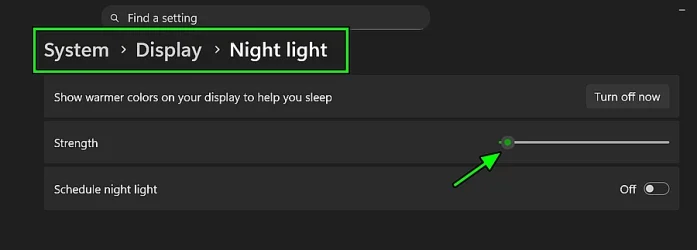
By changing the following setting (from System > Display > Night Light) - moving the slider - will set the strength of the red shift:

hjgh.webp
 

My Computer

System One

  • OS
    WinDOS 25H2
    Computer type
    Laptop
    CPU
    Intel & AMD
    Memory
    SO-DIMM SK Hynix 15.8 GB Dual-Channel DDR4-2666 (2 x 8 GB) 1329MHz (19-19-19-43)
    Graphics Card(s)
    nVidia RTX 2060 6GB Mobile GPU (TU106M)
    Sound Card
    Onbord Realtek ALC1220
    Screen Resolution
    1920 x 1080
    Hard Drives
    1x Samsung PM981 NVMe PCIe M.2 512GB / 1x Seagate Expansion ST1000LM035 1TB
just turn night light on, set it to your required strength
and disable schedule.

that's the way i have mine set up and its on 24/7
best of luck, Steve ..
 

My Computers

System One System Two

  • OS
    Debian Trixie KDE Windows 11 Home
    Computer type
    PC/Desktop
    Manufacturer/Model
    HP 24" AiO
    CPU
    Ryzen 7 5825u
    Motherboard
    HP
    Memory
    64GB DDR4 3200
    Graphics Card(s)
    Ryzen 7 5825u
    Sound Card
    RealTek
    Monitor(s) Displays
    24" HP AiO
    Screen Resolution
    1920 x 1080 @60 Hz
    Hard Drives
    1TB WD Blue SN580 M2 SSD Partitioned.
    2x 1TB USB HDD External Backup/Storage.
    PSU
    90W external power brick
    Case
    24" All in One
    Cooling
    Default Air Cooling
    Keyboard
    HP WiFi UK extended
    Mouse
    HP WiFi 3 Button
    Internet Speed
    1GB full fibre
    Browser
    Edge & Firefox
    Antivirus
    AVG Internet Security/Windows Defender
    Other Info
    Mainly Open Source Software
  • Operating System
    Ubuntu 22.04.5 LTS
    Computer type
    Laptop
    Manufacturer/Model
    Dell 13" Latitude 2017
    CPU
    i5 7200u
    Motherboard
    Dell
    Memory
    16GB DDR4
    Graphics card(s)
    Intel
    Sound Card
    Intel
    Monitor(s) Displays
    13" Dell Laptop
    Hard Drives
    250GB Crucial 2.5" SSD
    Mouse
    Generic WiFi 3 button
    Internet Speed
    WiFi only
    Browser
    Firefox
    Antivirus
    ClamAV TK
    Other Info
    Mainly Open Source Software
My required strength would be the one that matches the strength of sun ray from the sun via window.
Would it be 50% or 60%? Will I become more sleepy if 60% during day?
 

My Computer

System One

  • OS
    Windows 11
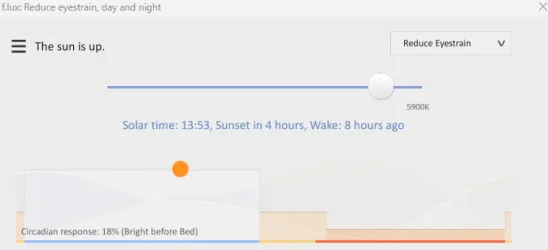
Tho, for a long time (long before this windows feature was introduced - copying similar apps/features - which became popular for reducing eyestrain and better sleep) - f.lux was and still is - the best free up for this purpose. Windows Night Light - is rather basic in this regard, no room for comparison.


Here's how it works and what it looks like in practice:


My Computer

System One

  • OS
    WinDOS 25H2
    Computer type
    Laptop
    CPU
    Intel & AMD
    Memory
    SO-DIMM SK Hynix 15.8 GB Dual-Channel DDR4-2666 (2 x 8 GB) 1329MHz (19-19-19-43)
    Graphics Card(s)
    nVidia RTX 2060 6GB Mobile GPU (TU106M)
    Sound Card
    Onbord Realtek ALC1220
    Screen Resolution
    1920 x 1080
    Hard Drives
    1x Samsung PM981 NVMe PCIe M.2 512GB / 1x Seagate Expansion ST1000LM035 1TB
"My required strength would be the one that matches the strength of sun ray from the sun via window."

Colour temperature of daylight is roughly in the range of 4500 to 6500 K.

So set your screen to say 6500 K, and switch off the scheduled Night Light feature.
Most monitors have a menu to set the colour temperature, 6500 K is probably the default.

"My required strength would be the one that matches the strength of sun ray from the sun via window."
That is zero on the Strength Slider, same as Off.
 

My Computer

System One

  • OS
    Windows 11
"My required strength would be the one that matches the strength of sun ray from the sun via window."

Colour temperature of daylight is roughly in the range of 4500 to 6500 K.

So set your screen to say 6500 K, and switch off the scheduled Night Light feature.
Most monitors have a menu to set the colour temperature, 6500 K is probably the default.

"My required strength would be the one that matches the strength of sun ray from the sun via window."
That is zero on the Strength Slider, same as Off.
1759406324534.webp
What about this?
 

My Computer

System One

  • OS
    Windows 11
Back
Top Bottom