On my ASUS laptop device (Win 11 Home 26H2, Build 26300.9457) I see a brightness slider so I can adjust the screen brightness. Photo 1.
On my GMKtec desktop device with a Benq monitor (Win 11 Pro 26H2, Build 26300.9457) there is no brightness slider so I am unable to adjust the screen brightness. Photo 2.
Does anyone know how do I get the brightness slider to appear in the GMKtec display settings?
GMKtec: -
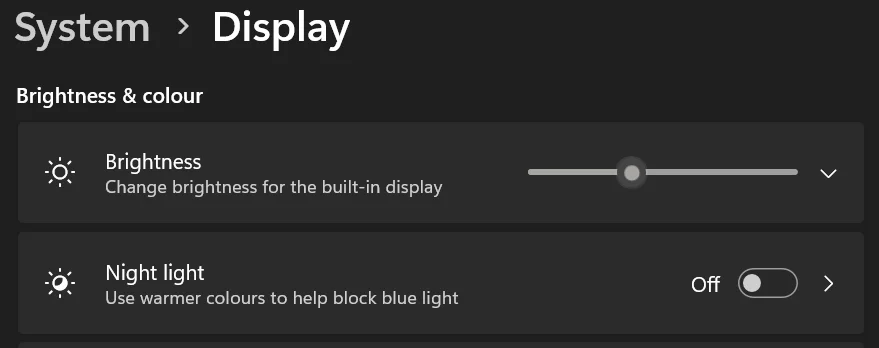
ASUS: -
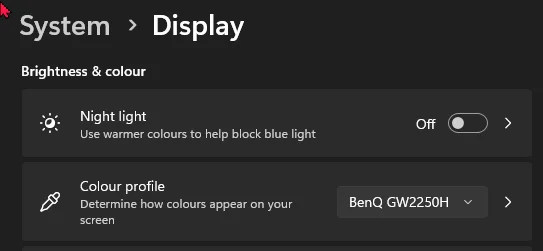
On my GMKtec desktop device with a Benq monitor (Win 11 Pro 26H2, Build 26300.9457) there is no brightness slider so I am unable to adjust the screen brightness. Photo 2.
Does anyone know how do I get the brightness slider to appear in the GMKtec display settings?
GMKtec: -
ASUS: -
My Computers
-
At a glance
Windows 11 ProAMD Ryzen 9 8945HS32GB DDR5 SO-DIMMIntegrated AMD Radeon 780M (4.00 GHz)- OS
- Windows 11 Pro
- Computer type
- PC/Desktop
- Manufacturer/Model
- GMKtec K11
- CPU
- AMD Ryzen 9 8945HS
- Memory
- 32GB DDR5 SO-DIMM
- Graphics Card(s)
- Integrated AMD Radeon 780M (4.00 GHz)
- Monitor(s) Displays
- Benq 2250HM
- Screen Resolution
- 1920 x 1080
- Hard Drives
- 1 TB PCIe 4.0 NVMe M.2 SSD
- Antivirus
- Bit Defender Total Security
-
At a glance
Windows 11 HomeIntel® Core™ Ultra 7 - 255H processor16 GB LPDDR5 SDRAMIntel Arc 140T onboard graphics- Operating System
- Windows 11 Home
- Computer type
- Laptop
- Manufacturer/Model
- ASUS Zenbook 14 OLED 14" Laptop - UX3405CA-QL192W
- CPU
- Intel® Core™ Ultra 7 - 255H processor
- Memory
- 16 GB LPDDR5 SDRAM
- Graphics card(s)
- Intel Arc 140T onboard graphics
- Screen Resolution
- 1920 x 1200 (16:10 WUXGA resolution) OLED Touchscreen
- Hard Drives
- 1TB SSD
- Antivirus
- Bit Defender Total Security