
No connectivity at my new house on W11, but W10 works, and....


riffwraith

Well-known member
Member
Local time
10:47 AM
Posts
105
OS
W10
Hi everyone. I will try to make this as simple as possible.

I have two residences in CT - Comcast for both. I am having a strange issue with connecting to the internet with my W11 laptop in ONE of my homes.

My W10 laptop works in house #1, and my W11 laptop works in house #1
My W10 laptop works in house #2, but my W11 laptop does not work in house #2

I came to this conclusion: 1) websites don't load, and 2) hovering my mouse over the network icon in the taskbar yields "no internet access"

In house #1, I have a cable modem, and a Linksys router, with both computers plugged into router ports.

In house #2, there is no router; I am plugging both laptops directly into the cable modem w/a Cat5 cable (same one).

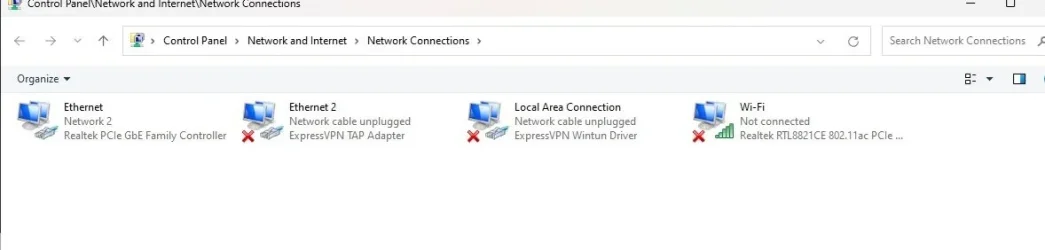
This is what I see on my W11 laptop in BOTH homes.
net1.webp

I called Comcast when my W11 laptop was plugged in, and the tech said he cant help me diagnose computer problems, that I should call HP. I am not going to bother. I have a much better shot here. :) Funny thing is, he sees the computer on his end; that's how he new it was an HP.

Any ideas on where I can look?

Thanks in advance.
 

My Computer My Computer

At a glance

W10
OS
W10
Maybe try adding a router?
 

My Computers My Computers

  • At a glance

    Windows 11 Home 25H2Core i5-1035G132gb
    OS
    Windows 11 Home 25H2
    Computer type
    Laptop
    Manufacturer/Model
    HP Pavilion 14-ce3606sa
    CPU
    Core i5-1035G1
    Memory
    32gb
    Hard Drives
    Samsung 870 evo sata ssd
    Cooling
    Could be better
    Internet Speed
    50 mbps Starlink
    Browser
    Firefox
    Other Info
    Originally came installed with a 500gb H10 Optane ssd
  • At a glance

    Windows 11 HomeIntel Core i5-1035G116gb
    Operating System
    Windows 11 Home
    Computer type
    Laptop
    Manufacturer/Model
    HP Pavilion ce3606sa
    CPU
    Intel Core i5-1035G1
    Memory
    16gb
    Hard Drives
    Hynix Gold P31 2TB
    Internet Speed
    200mbps Starlink
    Browser
    Firefox
    Antivirus
    Defender
Try this.
Attached is @FreeBooter .bat file which resets network components. RIGHT click on the .bat file and select run as administrator. Restart.
 

Attachments

My Computers My Computers

  • At a glance

    Windows 11 Pro 25H2 26200.8875i9-10900 10 core 20 threads32 gbnone-Intel UHD Graphics 630
    OS
    Windows 11 Pro 25H2 26200.8875
    Computer type
    PC/Desktop
    Manufacturer/Model
    Dell Optiplex 7080
    CPU
    i9-10900 10 core 20 threads
    Motherboard
    DELL 0J37VM
    Memory
    32 gb
    Graphics Card(s)
    none-Intel UHD Graphics 630
    Sound Card
    Integrated Realtek
    Monitor(s) Displays
    Benq 27
    Screen Resolution
    2560x1440
    Hard Drives
    2x1tb Solidigm m.2 nvme /External drives 512gb Samsung m.2 sata+2tb Kingston m2.nvme
    PSU
    500w
    Case
    MT
    Cooling
    Dell Premium
    Keyboard
    Logitech wired
    Mouse
    Logitech wireless
    Internet Speed
    so slow I'm too embarrassed to tell
    Browser
    #1 Edge #2 Firefox
    Antivirus
    Defender+MWB Premium
  • At a glance

    Windows 11 Pro 24H2 26200.8875AMD Ryzen 7 6800U32 gbintegrated
    Operating System
    Windows 11 Pro 24H2 26200.8875
    Computer type
    PC/Desktop
    Manufacturer/Model
    Beelink Mini PC SER5
    CPU
    AMD Ryzen 7 6800U
    Memory
    32 gb
    Graphics card(s)
    integrated
    Sound Card
    integrated
    Monitor(s) Displays
    Benq 27
    Screen Resolution
    2560x1440
    Hard Drives
    1TB Crucial nvme
    Keyboard
    Logitech wired
    Mouse
    Logitech wireless
    Internet Speed
    still too embarrassed to tell
    Browser
    Firefox
    Antivirus
    Defender
    Other Info
    System 3 is non compliant Dell 9020 i7-4770/24gb ram Win11 PRO 26200.8875
My W10 laptop works in house #1, and my W11 laptop works in house #1
My W10 laptop works in house #2, but my W11 laptop does not work in house #2

In what way does your internet connection differ between the two houses?
What equipment sits between your computers and the internet?


Denis
 

My Computer My Computer

At a glance

Windows 11 Home x64 Version 25H2 Build 26200....
OS
Windows 11 Home x64 Version 25H2 Build 26200.8037
Is the Win 11 box getting a valid IP from the Comcast gateway? If so, try manually adding a primary DNS 8.8.8.8 and secondary 8.8.4.4 in the Ethernet (Network 2) connection. Test again to troubleshoot.
 

My Computer My Computer

At a glance

Windows 11
OS
Windows 11
Computer type
PC/Desktop
Thx. So, I got the router from house #1, and now both computers are working. Why is the router required for my W11 laptop. but not my W10 laptop?
 

My Computer My Computer

At a glance

W10
OS
W10
I would start by resetting the network properties, possibly uninstalling the ExpressVPN adapters then rebooting. Also make sure TCP/IPv4 properties for ethernet and lan adapters are set to automatic.
 

My Computer My Computer

At a glance

11 Pro 25H2i7-10750H16GB Samsung DDR4 3200Intel + Nvidia RTX3060 Laptop
OS
11 Pro 25H2
Computer type
Laptop
Manufacturer/Model
MSI
CPU
i7-10750H
Motherboard
MSI MS-17F5
Memory
16GB Samsung DDR4 3200
Graphics Card(s)
Intel + Nvidia RTX3060 Laptop
Sound Card
Realtek
Monitor(s) Displays
Samsung 24" Curved (HDMI)
Screen Resolution
1920x1080
Hard Drives
Sabrent Rocket Gen3 1Tb Smasung EVO 870 1TB
Antivirus
Bitdefender
Thx. So, I got the router from house #1, and now both computers are working. Why is the router required for my W11 laptop. but not my W10 laptop?
My instinct was to add a router but I'm not technical enough to explain! Except you would be picking up wifi "processed" via the router, which maybe the computer would recognise better.
 

My Computers My Computers

  • At a glance

    Windows 11 Home 25H2Core i5-1035G132gb
    OS
    Windows 11 Home 25H2
    Computer type
    Laptop
    Manufacturer/Model
    HP Pavilion 14-ce3606sa
    CPU
    Core i5-1035G1
    Memory
    32gb
    Hard Drives
    Samsung 870 evo sata ssd
    Cooling
    Could be better
    Internet Speed
    50 mbps Starlink
    Browser
    Firefox
    Other Info
    Originally came installed with a 500gb H10 Optane ssd
  • At a glance

    Windows 11 HomeIntel Core i5-1035G116gb
    Operating System
    Windows 11 Home
    Computer type
    Laptop
    Manufacturer/Model
    HP Pavilion ce3606sa
    CPU
    Intel Core i5-1035G1
    Memory
    16gb
    Hard Drives
    Hynix Gold P31 2TB
    Internet Speed
    200mbps Starlink
    Browser
    Firefox
    Antivirus
    Defender
I would start by resetting the network properties, possibly uninstalling the ExpressVPN adapters then rebooting. Also make sure TCP/IPv4 properties for ethernet and lan adapters are set to automatic.
Problem is already solved, but ty.
 

My Computer My Computer

At a glance

W10
OS
W10
My instinct was to add a router but I'm not technical enough to explain! Except you would be picking up wifi "processed" via the router, which maybe the computer would recognise better.
Not sure about the wi-fi ... it's turned off here.
 

My Computer My Computer

At a glance

W10
OS
W10
It sounds like the Windows 11 laptop has either a static IP address that's valid for the router's network but not valid for the 2nd house's cable modem, or it's set to use the router's IP address as a gateway or DNS, and that obviously doesn't work if the router is missing. Running ipconfig /all on the Windows 11 machine would tell us more.
 

My Computer My Computer

At a glance

Windows 11 Enterprise 25H2 [rev. 8893]
OS
Windows 11 Enterprise 25H2 [rev. 8893]
Hi everyone. I will try to make this as simple as possible.

I have two residences in CT - Comcast for both. I am having a strange issue with connecting to the internet with my W11 laptop in ONE of my homes.

My W10 laptop works in house #1, and my W11 laptop works in house #1
My W10 laptop works in house #2, but my W11 laptop does not work in house #2

I came to this conclusion: 1) websites don't load, and 2) hovering my mouse over the network icon in the taskbar yields "no internet access"

In house #1, I have a cable modem, and a Linksys router, with both computers plugged into router ports.

In house #2, there is no router; I am plugging both laptops directly into the cable modem w/a Cat5 cable (same one).

This is what I see on my W11 laptop in BOTH homes.

View attachment 163624

I called Comcast when my W11 laptop was plugged in, and the tech said he cant help me diagnose computer problems, that I should call HP. I am not going to bother. I have a much better shot here. :) Funny thing is, he sees the computer on his end; that's how he new it was an HP.

Any ideas on where I can look?

Thanks in advance.
Hi everyone. I will try to make this as simple as possible.

I have two residences in CT - Comcast for both. I am having a strange issue with connecting to the internet with my W11 laptop in ONE of my homes.

My W10 laptop works in house #1, and my W11 laptop works in house #1
My W10 laptop works in house #2, but my W11 laptop does not work in house #2

I came to this conclusion: 1) websites don't load, and 2) hovering my mouse over the network icon in the taskbar yields "no internet access"

In house #1, I have a cable modem, and a Linksys router, with both computers plugged into router ports.

In house #2, there is no router; I am plugging both laptops directly into the cable modem w/a Cat5 cable (same one).

This is what I see on my W11 laptop in BOTH homes.

View attachment 163624

I called Comcast when my W11 laptop was plugged in, and the tech said he cant help me diagnose computer problems, that I should call HP. I am not going to bother. I have a much better shot here. :) Funny thing is, he sees the computer on his end; that's how he new it was an HP.

Any ideas on where I can look?

Thanks in advance.
I'm not sure what you mean by "plugging both laptops into the cable modem with the same cable", but I don't think CAT5 cables are hot-swappable, which means you have to plug them in before bootup.

Ben
 

My Computers My Computers

  • At a glance

    Windows 10 HomeIntel Core 2 Duo [email protected] GHz2 GB
    OS
    Windows 10 Home
    Computer type
    Laptop
    Manufacturer/Model
    HP Elitebook 2530p
    CPU
    Intel Core 2 Duo [email protected] GHz
    Memory
    2 GB
  • At a glance

    Windows 11 HomeIntel Core 2 Duo E75004 GB
    Operating System
    Windows 11 Home
    Computer type
    PC/Desktop
    Manufacturer/Model
    Dell Optiplex 330
    CPU
    Intel Core 2 Duo E7500
    Memory
    4 GB
I'm not sure what you mean by "plugging both laptops into the cable modem with the same cable", but I don't think CAT5 cables are hot-swappable, which means you have to plug them in before bootup.

Ben
You can plug and unplug Ethernet cables all day long if it tickles your fancy. The network adapter will sense the cable's presence.
 

My Computer My Computer

At a glance

Windows 11 Enterprise 25H2 [rev. 8893]
OS
Windows 11 Enterprise 25H2 [rev. 8893]
I would start by resetting the network properties, possibly uninstalling the ExpressVPN adapters then rebooting. Also make sure TCP/IPv4 properties for ethernet and lan adapters are set to automatic.
Thx. So, I got the router from house #1, and now both computers are working. Why is the router required for my W11 laptop. but not my W10 laptop?
I was going by your latest comment.
 

My Computer My Computer

At a glance

11 Pro 25H2i7-10750H16GB Samsung DDR4 3200Intel + Nvidia RTX3060 Laptop
OS
11 Pro 25H2
Computer type
Laptop
Manufacturer/Model
MSI
CPU
i7-10750H
Motherboard
MSI MS-17F5
Memory
16GB Samsung DDR4 3200
Graphics Card(s)
Intel + Nvidia RTX3060 Laptop
Sound Card
Realtek
Monitor(s) Displays
Samsung 24" Curved (HDMI)
Screen Resolution
1920x1080
Hard Drives
Sabrent Rocket Gen3 1Tb Smasung EVO 870 1TB
Antivirus
Bitdefender
Hi everyone. I will try to make this as simple as possible.

I have two residences in CT - Comcast for both. I am having a strange issue with connecting to the internet with my W11 laptop in ONE of my homes.

My W10 laptop works in house #1, and my W11 laptop works in house #1
My W10 laptop works in house #2, but my W11 laptop does not work in house #2
My advice would be, if you haven't already, is to clone or make Restore points, but more important, IMO, a full image of your hard drive in case your attempted fixes end up creating a situation where Windows will no longer boot fully. Even after fixing this problem, I would make sure I have a backup. I just posted about losing Internet connection after the 25H2 update. I tried almost everything--that I researched and knew about at the time--and couldn't resolve it. Eventually, my attempts to fix created a situation where Windows 11 Pro will not fully boot. So, I have to try to fix the boot problem to try to save it.
 

My Computer My Computer

At a glance

Windows 11 Pro 64i9-14900KF32GBNVIDIA 4070
OS
Windows 11 Pro 64
Computer type
PC/Desktop
CPU
i9-14900KF
Motherboard
ASUS PRIME Z790
Memory
32GB
Graphics Card(s)
NVIDIA 4070
Screen Resolution
4K
Cooling
Water
Mouse
Razer
Other Info
I have had no problem with the i9-14900KF processor, which has been subject to a lot of criticism due to failure. I run consistently between 23-30 degrees Celsius. The first thing I did after buying my computer was to update BIOS. I don't game, so I don't stress the i9 very much. I use my computer for office work. The i9 does a good job with multi-tasking.

Latest Support Threads

Back
Top Bottom




