
No connectivity at my new house on W11, but W10 works, and....


riffwraith

Well-known member
Member
Local time
4:34 AM
Posts
100
OS
W10
Hi everyone. I will try to make this as simple as possible.

I have two residences in CT - Comcast for both. I am having a strange issue with connecting to the internet with my W11 laptop in ONE of my homes.

My W10 laptop works in house #1, and my W11 laptop works in house #1
My W10 laptop works in house #2, but my W11 laptop does not work in house #2

I came to this conclusion: 1) websites don't load, and 2) hovering my mouse over the network icon in the taskbar yields "no internet access"

In house #1, I have a cable modem, and a Linksys router, with both computers plugged into router ports.

In house #2, there is no router; I am plugging both laptops directly into the cable modem w/a Cat5 cable (same one).

This is what I see on my W11 laptop in BOTH homes.
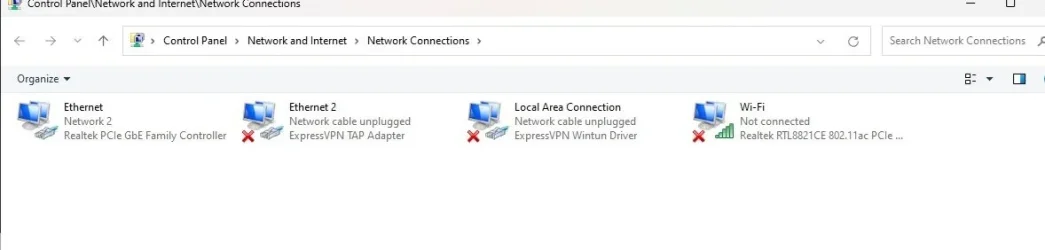
net1.webp

I called Comcast when my W11 laptop was plugged in, and the tech said he cant help me diagnose computer problems, that I should call HP. I am not going to bother. I have a much better shot here. :) Funny thing is, he sees the computer on his end; that's how he new it was an HP.

Any ideas on where I can look?

Thanks in advance.
 

My Computer

System One

  • OS
    W10
Maybe try adding a router?
 

My Computers

System One System Two

  • OS
    Windows 11 Home 25H2
    Computer type
    Laptop
    Manufacturer/Model
    HP Pavilion 14-ce3606sa
    CPU
    Core i5-1035G1
    Memory
    32gb
    Hard Drives
    Samsung 870 evo sata ssd
    Cooling
    Could be better
    Internet Speed
    50 mbps Starlink
    Browser
    Firefox
    Other Info
    Originally came installed with a 500gb H10 Optane ssd
  • Operating System
    Windows 11 Home
    Computer type
    Laptop
    Manufacturer/Model
    HP Pavilion ce3606sa
    CPU
    Intel Core i5-1035G1
    Memory
    16gb
    Hard Drives
    Hynix Gold P31 2TB
    Internet Speed
    200mbps Starlink
    Browser
    Firefox
    Antivirus
    Defender
Try this.
Attached is @FreeBooter .bat file which resets network components. RIGHT click on the .bat file and select run as administrator. Restart.
 

Attachments

My Computers

System One System Two

  • OS
    Windows 11 Pro 25H2
    Computer type
    PC/Desktop
    Manufacturer/Model
    Dell Optiplex 7080
    CPU
    i9-10900 10 core 20 threads
    Motherboard
    DELL 0J37VM
    Memory
    32 gb
    Graphics Card(s)
    none-Intel UHD Graphics 630
    Sound Card
    Integrated Realtek
    Monitor(s) Displays
    Benq 27
    Screen Resolution
    2560x1440
    Hard Drives
    2x1tb Solidigm m.2 nvme /External drives 512gb Samsung m.2 sata+2tb Kingston m2.nvme
    PSU
    500w
    Case
    MT
    Cooling
    Dell Premium
    Keyboard
    Logitech wired
    Mouse
    Logitech wireless
    Internet Speed
    so slow I'm too embarrassed to tell
    Browser
    #1 Edge #2 Firefox
    Antivirus
    Defender+MWB Premium
  • Operating System
    Windows 11 Pro 24H2 26200.8457
    Computer type
    PC/Desktop
    Manufacturer/Model
    Beelink Mini PC SER5
    CPU
    AMD Ryzen 7 6800U
    Memory
    32 gb
    Graphics card(s)
    integrated
    Sound Card
    integrated
    Monitor(s) Displays
    Benq 27
    Screen Resolution
    2560x1440
    Hard Drives
    1TB Crucial nvme
    Keyboard
    Logitech wired
    Mouse
    Logitech wireless
    Internet Speed
    still too embarrassed to tell
    Browser
    Firefox
    Antivirus
    Defender
    Other Info
    System 3 is non compliant Dell 9020 i7-4770/24gb ram Win11 PRO 26200.8457
My W10 laptop works in house #1, and my W11 laptop works in house #1
My W10 laptop works in house #2, but my W11 laptop does not work in house #2

In what way does your internet connection differ between the two houses?
What equipment sits between your computers and the internet?


Denis
 

My Computer

System One

  • OS
    Windows 11 Home x64 Version 25H2 Build 26200.8037
Is the Win 11 box getting a valid IP from the Comcast gateway? If so, try manually adding a primary DNS 8.8.8.8 and secondary 8.8.4.4 in the Ethernet (Network 2) connection. Test again to troubleshoot.
 

My Computer

System One

  • OS
    Windows 11
    Computer type
    PC/Desktop
Thx. So, I got the router from house #1, and now both computers are working. Why is the router required for my W11 laptop. but not my W10 laptop?
 

My Computer

System One

  • OS
    W10
I would start by resetting the network properties, possibly uninstalling the ExpressVPN adapters then rebooting. Also make sure TCP/IPv4 properties for ethernet and lan adapters are set to automatic.
 

My Computer

System One

  • OS
    11 Pro 25H2
    Computer type
    Laptop
    Manufacturer/Model
    MSI
    CPU
    i7-10750H
    Motherboard
    MSI MS-17F5
    Memory
    16GB Samsung DDR4 3200
    Graphics Card(s)
    Intel + Nvidia RTX3060 Laptop
    Sound Card
    Realtek
    Monitor(s) Displays
    Samsung 24" Curved (HDMI)
    Screen Resolution
    1920x1080
    Hard Drives
    Sabrent Rocket Gen3 1Tb Smasung EVO 870 1TB
    Antivirus
    Bitdefender
Thx. So, I got the router from house #1, and now both computers are working. Why is the router required for my W11 laptop. but not my W10 laptop?
My instinct was to add a router but I'm not technical enough to explain! Except you would be picking up wifi "processed" via the router, which maybe the computer would recognise better.
 

My Computers

System One System Two

  • OS
    Windows 11 Home 25H2
    Computer type
    Laptop
    Manufacturer/Model
    HP Pavilion 14-ce3606sa
    CPU
    Core i5-1035G1
    Memory
    32gb
    Hard Drives
    Samsung 870 evo sata ssd
    Cooling
    Could be better
    Internet Speed
    50 mbps Starlink
    Browser
    Firefox
    Other Info
    Originally came installed with a 500gb H10 Optane ssd
  • Operating System
    Windows 11 Home
    Computer type
    Laptop
    Manufacturer/Model
    HP Pavilion ce3606sa
    CPU
    Intel Core i5-1035G1
    Memory
    16gb
    Hard Drives
    Hynix Gold P31 2TB
    Internet Speed
    200mbps Starlink
    Browser
    Firefox
    Antivirus
    Defender
I would start by resetting the network properties, possibly uninstalling the ExpressVPN adapters then rebooting. Also make sure TCP/IPv4 properties for ethernet and lan adapters are set to automatic.
Problem is already solved, but ty.
 

My Computer

System One

  • OS
    W10
My instinct was to add a router but I'm not technical enough to explain! Except you would be picking up wifi "processed" via the router, which maybe the computer would recognise better.
Not sure about the wi-fi ... it's turned off here.
 

My Computer

System One

  • OS
    W10
It sounds like the Windows 11 laptop has either a static IP address that's valid for the router's network but not valid for the 2nd house's cable modem, or it's set to use the router's IP address as a gateway or DNS, and that obviously doesn't work if the router is missing. Running ipconfig /all on the Windows 11 machine would tell us more.
 

My Computer

System One

  • OS
    Windows 11 Pro 25H2
    Computer type
    PC/Desktop
    Manufacturer/Model
    Intel NUC12WSHi7
    CPU
    12th Gen Core i7-1260P
    Motherboard
    NUC12WSBi7
    Memory
    64 GB Micron PC4-25600
    Graphics Card(s)
    Intel Iris Xe Graphics
    Sound Card
    on-board Realtek HD Audio
    Monitor(s) Displays
    Dell U3219Q
    Screen Resolution
    3840 x 2160
    Hard Drives
    Samsung SSD 990 PRO 1TB
    Crucial MX500 2 TB
    Antivirus
    Microsoft Defender
Hi everyone. I will try to make this as simple as possible.

I have two residences in CT - Comcast for both. I am having a strange issue with connecting to the internet with my W11 laptop in ONE of my homes.

My W10 laptop works in house #1, and my W11 laptop works in house #1
My W10 laptop works in house #2, but my W11 laptop does not work in house #2

I came to this conclusion: 1) websites don't load, and 2) hovering my mouse over the network icon in the taskbar yields "no internet access"

In house #1, I have a cable modem, and a Linksys router, with both computers plugged into router ports.

In house #2, there is no router; I am plugging both laptops directly into the cable modem w/a Cat5 cable (same one).

This is what I see on my W11 laptop in BOTH homes.

View attachment 163624

I called Comcast when my W11 laptop was plugged in, and the tech said he cant help me diagnose computer problems, that I should call HP. I am not going to bother. I have a much better shot here. :) Funny thing is, he sees the computer on his end; that's how he new it was an HP.

Any ideas on where I can look?

Thanks in advance.
Hi everyone. I will try to make this as simple as possible.

I have two residences in CT - Comcast for both. I am having a strange issue with connecting to the internet with my W11 laptop in ONE of my homes.

My W10 laptop works in house #1, and my W11 laptop works in house #1
My W10 laptop works in house #2, but my W11 laptop does not work in house #2

I came to this conclusion: 1) websites don't load, and 2) hovering my mouse over the network icon in the taskbar yields "no internet access"

In house #1, I have a cable modem, and a Linksys router, with both computers plugged into router ports.

In house #2, there is no router; I am plugging both laptops directly into the cable modem w/a Cat5 cable (same one).

This is what I see on my W11 laptop in BOTH homes.

View attachment 163624

I called Comcast when my W11 laptop was plugged in, and the tech said he cant help me diagnose computer problems, that I should call HP. I am not going to bother. I have a much better shot here. :) Funny thing is, he sees the computer on his end; that's how he new it was an HP.

Any ideas on where I can look?

Thanks in advance.
I'm not sure what you mean by "plugging both laptops into the cable modem with the same cable", but I don't think CAT5 cables are hot-swappable, which means you have to plug them in before bootup.

Ben
 

My Computer

System One

  • OS
    Windows 10 Home
    Computer type
    Laptop
    Manufacturer/Model
    HP Elitebook 2530p
    CPU
    Intel Core 2 Duo [email protected] GHz
    Memory
    2 GB
I'm not sure what you mean by "plugging both laptops into the cable modem with the same cable", but I don't think CAT5 cables are hot-swappable, which means you have to plug them in before bootup.

Ben
You can plug and unplug Ethernet cables all day long if it tickles your fancy. The network adapter will sense the cable's presence.
 

My Computer

System One

  • OS
    Windows 11 Pro 25H2
    Computer type
    PC/Desktop
    Manufacturer/Model
    Intel NUC12WSHi7
    CPU
    12th Gen Core i7-1260P
    Motherboard
    NUC12WSBi7
    Memory
    64 GB Micron PC4-25600
    Graphics Card(s)
    Intel Iris Xe Graphics
    Sound Card
    on-board Realtek HD Audio
    Monitor(s) Displays
    Dell U3219Q
    Screen Resolution
    3840 x 2160
    Hard Drives
    Samsung SSD 990 PRO 1TB
    Crucial MX500 2 TB
    Antivirus
    Microsoft Defender
I would start by resetting the network properties, possibly uninstalling the ExpressVPN adapters then rebooting. Also make sure TCP/IPv4 properties for ethernet and lan adapters are set to automatic.
Thx. So, I got the router from house #1, and now both computers are working. Why is the router required for my W11 laptop. but not my W10 laptop?
I was going by your latest comment.
 

My Computer

System One

  • OS
    11 Pro 25H2
    Computer type
    Laptop
    Manufacturer/Model
    MSI
    CPU
    i7-10750H
    Motherboard
    MSI MS-17F5
    Memory
    16GB Samsung DDR4 3200
    Graphics Card(s)
    Intel + Nvidia RTX3060 Laptop
    Sound Card
    Realtek
    Monitor(s) Displays
    Samsung 24" Curved (HDMI)
    Screen Resolution
    1920x1080
    Hard Drives
    Sabrent Rocket Gen3 1Tb Smasung EVO 870 1TB
    Antivirus
    Bitdefender
Hi everyone. I will try to make this as simple as possible.

I have two residences in CT - Comcast for both. I am having a strange issue with connecting to the internet with my W11 laptop in ONE of my homes.

My W10 laptop works in house #1, and my W11 laptop works in house #1
My W10 laptop works in house #2, but my W11 laptop does not work in house #2
My advice would be, if you haven't already, is to clone or make Restore points, but more important, IMO, a full image of your hard drive in case your attempted fixes end up creating a situation where Windows will no longer boot fully. Even after fixing this problem, I would make sure I have a backup. I just posted about losing Internet connection after the 25H2 update. I tried almost everything--that I researched and knew about at the time--and couldn't resolve it. Eventually, my attempts to fix created a situation where Windows 11 Pro will not fully boot. So, I have to try to fix the boot problem to try to save it.
 

My Computer

System One

  • OS
    Windows 11 Pro 64
    Computer type
    PC/Desktop
    CPU
    i9-14900KF
    Motherboard
    ASUS PRIME Z790
    Memory
    32GB
    Graphics Card(s)
    NVIDIA 4070
    Screen Resolution
    4K
    Cooling
    Water
    Mouse
    Razer
    Other Info
    I have had no problem with the i9-14900KF processor, which has been subject to a lot of criticism due to failure. I run consistently between 23-30 degrees Celsius. The first thing I did after buying my computer was to update BIOS. I don't game, so I don't stress the i9 very much. I use my computer for office work. The i9 does a good job with multi-tasking.

Latest Support Threads

Back
Top Bottom




