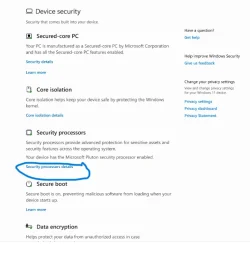
No more TPM info and reset in Windows Security Center.


Cameraman1955

Active member
Member
Local time
10:02 PM
Posts
71
OS
Windows 11 Pro 25H2 26200.7019
I discovered that in Windows Security Center it is no longer possible to read the TPM information and reset the TPM. Do you see this too?

Schermafbeelding 2025-10-15 122335.webp
 

My Computer

System One

  • OS
    Windows 11 Pro 25H2 26200.7019
    Computer type
    PC/Desktop
    Manufacturer/Model
    Self built midi tower
    CPU
    Intel Core i7-8700K
    Motherboard
    Gigabyte Z390GX
    Memory
    Corsair 32GB 4x DDR4-2998 / PC4-23900 DDR4 SDRAM UDIMM
    Graphics Card(s)
    AMD RX570
    Sound Card
    Sound Blaster Z
    Monitor(s) Displays
    2x IIyama Prolite X2380HS
    Screen Resolution
    1920x1080
    Hard Drives
    Samsung SSD 970 EVO Plus NVMe 1TB
    Samsung SSD 970 EVO Plus NVMe 500GB
    PSU
    Seasonic 550W
    Cooling
    Noctua fans
    Keyboard
    Logitech G213
    Mouse
    Logitech Marble Mouse
    Browser
    Chrome
    Antivirus
    Norton
    Other Info
    Video/Audio editting machine
Type tpm.msc into start menu to open

TPM management console.​


My Computer

System One

  • OS
    Windows 11
    Computer type
    PC/Desktop
    Manufacturer/Model
    HP Pavilion
    CPU
    AMD Ryzen 7 5700G
    Motherboard
    Erica6
    Memory
    Micron Technology DDR4-3200 16GB
    Graphics Card(s)
    NVIDIA GeForce RTX 3060
    Sound Card
    Realtek ALC671
    Monitor(s) Displays
    Samsung SyncMaster U28E590
    Screen Resolution
    3840 x 2160
    Hard Drives
    SAMSUNG MZVLQ1T0HALB-000H1
Type tpm.msc into start menu to open

TPM management console.​

So its normal you don't see the TPM info in Windows Security Center anymore ?
 

My Computer

System One

  • OS
    Windows 11 Pro 25H2 26200.7019
    Computer type
    PC/Desktop
    Manufacturer/Model
    Self built midi tower
    CPU
    Intel Core i7-8700K
    Motherboard
    Gigabyte Z390GX
    Memory
    Corsair 32GB 4x DDR4-2998 / PC4-23900 DDR4 SDRAM UDIMM
    Graphics Card(s)
    AMD RX570
    Sound Card
    Sound Blaster Z
    Monitor(s) Displays
    2x IIyama Prolite X2380HS
    Screen Resolution
    1920x1080
    Hard Drives
    Samsung SSD 970 EVO Plus NVMe 1TB
    Samsung SSD 970 EVO Plus NVMe 500GB
    PSU
    Seasonic 550W
    Cooling
    Noctua fans
    Keyboard
    Logitech G213
    Mouse
    Logitech Marble Mouse
    Browser
    Chrome
    Antivirus
    Norton
    Other Info
    Video/Audio editting machine

Tell you the true i never notice the information before at Windows Security Center so i would not know.
 

My Computer

System One

  • OS
    Windows 11
    Computer type
    PC/Desktop
    Manufacturer/Model
    HP Pavilion
    CPU
    AMD Ryzen 7 5700G
    Motherboard
    Erica6
    Memory
    Micron Technology DDR4-3200 16GB
    Graphics Card(s)
    NVIDIA GeForce RTX 3060
    Sound Card
    Realtek ALC671
    Monitor(s) Displays
    Samsung SyncMaster U28E590
    Screen Resolution
    3840 x 2160
    Hard Drives
    SAMSUNG MZVLQ1T0HALB-000H1
Yes I think its updated in 25H2, this was the old version.
Schermafbeelding 2025-10-15 131909.webp
 

My Computer

System One

  • OS
    Windows 11 Pro 25H2 26200.7019
    Computer type
    PC/Desktop
    Manufacturer/Model
    Self built midi tower
    CPU
    Intel Core i7-8700K
    Motherboard
    Gigabyte Z390GX
    Memory
    Corsair 32GB 4x DDR4-2998 / PC4-23900 DDR4 SDRAM UDIMM
    Graphics Card(s)
    AMD RX570
    Sound Card
    Sound Blaster Z
    Monitor(s) Displays
    2x IIyama Prolite X2380HS
    Screen Resolution
    1920x1080
    Hard Drives
    Samsung SSD 970 EVO Plus NVMe 1TB
    Samsung SSD 970 EVO Plus NVMe 500GB
    PSU
    Seasonic 550W
    Cooling
    Noctua fans
    Keyboard
    Logitech G213
    Mouse
    Logitech Marble Mouse
    Browser
    Chrome
    Antivirus
    Norton
    Other Info
    Video/Audio editting machine

Windows Security Application 1000.29429.0.1000 introduced this bug. I reported it to MS via feedback last month.

In Search if you type Security Processor you can find the correct window to display the TPM info in the app.

Alternatives are TPM.MSC and using Command Prompt or Terminal typing Get-TPM

The app itself has display bugs for TPM going back years. This just happens to be a new one.
 

My Computer

System One

  • OS
    Windows 11 Home 25H2 26200.6901
    Computer type
    PC/Desktop
    Manufacturer/Model
    Custom
    CPU
    AMD 9800X3D
    Motherboard
    MSI B850 Gaming Plus Wifi
    Memory
    Patriot Viper
    Graphics Card(s)
    EVGA GeForce RTX 3070 Ti FTW3 ULTRA GAMING
    Sound Card
    Realtek 7.1 Surround Sound High Definition Audio CODEC (Built-in w/ Motherboard)
    Monitor(s) Displays
    ACER XG270HU
    Screen Resolution
    2560x1440 144hz
    Hard Drives
    Samsung 980 PRO NVMe M.2 PCI-E x4 SSD, 1TB for OS/Apps
    Western Digital Blue Series 3D NAND SATA III 2.5in Solid State Drive, 2TB (Games)
    PSU
    Corsair RM White Series RM850 80+ Gold Modular ATX Power Supply, 850W
    Case
    NXZT H9 Flow
    Cooling
    Be Quiet Light Loop 360
    Keyboard
    Razer Cynosa V2
    Mouse
    Razer Naga Trinity
    Internet Speed
    Cable 934Mbps download 50Mbps Upload
    Browser
    Edge/Chrome
    Antivirus
    Windows Antivirus/Defender. Bitdefender when not Troubleshooting
Windows Security Application 1000.29429.0.1000 introduced this bug. I reported it to MS via feedback last month.

In Search if you type "Security Processor" you can find the correct window to display the TPM info in the app.
Thank you, I did a clean install 25H2 and discover this, some more things are happening like the wrong language problem with this app, we have to wait for an update.
 

My Computer

System One

  • OS
    Windows 11 Pro 25H2 26200.7019
    Computer type
    PC/Desktop
    Manufacturer/Model
    Self built midi tower
    CPU
    Intel Core i7-8700K
    Motherboard
    Gigabyte Z390GX
    Memory
    Corsair 32GB 4x DDR4-2998 / PC4-23900 DDR4 SDRAM UDIMM
    Graphics Card(s)
    AMD RX570
    Sound Card
    Sound Blaster Z
    Monitor(s) Displays
    2x IIyama Prolite X2380HS
    Screen Resolution
    1920x1080
    Hard Drives
    Samsung SSD 970 EVO Plus NVMe 1TB
    Samsung SSD 970 EVO Plus NVMe 500GB
    PSU
    Seasonic 550W
    Cooling
    Noctua fans
    Keyboard
    Logitech G213
    Mouse
    Logitech Marble Mouse
    Browser
    Chrome
    Antivirus
    Norton
    Other Info
    Video/Audio editting machine

Thank you, I did a clean install and discover this.

When you reinstalled it probably downloaded the new app version as it was released on Oct 14. In September I had to have "Get latest updates" in Windows Updates on to get the new version.
 

My Computer

System One

  • OS
    Windows 11 Home 25H2 26200.6901
    Computer type
    PC/Desktop
    Manufacturer/Model
    Custom
    CPU
    AMD 9800X3D
    Motherboard
    MSI B850 Gaming Plus Wifi
    Memory
    Patriot Viper
    Graphics Card(s)
    EVGA GeForce RTX 3070 Ti FTW3 ULTRA GAMING
    Sound Card
    Realtek 7.1 Surround Sound High Definition Audio CODEC (Built-in w/ Motherboard)
    Monitor(s) Displays
    ACER XG270HU
    Screen Resolution
    2560x1440 144hz
    Hard Drives
    Samsung 980 PRO NVMe M.2 PCI-E x4 SSD, 1TB for OS/Apps
    Western Digital Blue Series 3D NAND SATA III 2.5in Solid State Drive, 2TB (Games)
    PSU
    Corsair RM White Series RM850 80+ Gold Modular ATX Power Supply, 850W
    Case
    NXZT H9 Flow
    Cooling
    Be Quiet Light Loop 360
    Keyboard
    Razer Cynosa V2
    Mouse
    Razer Naga Trinity
    Internet Speed
    Cable 934Mbps download 50Mbps Upload
    Browser
    Edge/Chrome
    Antivirus
    Windows Antivirus/Defender. Bitdefender when not Troubleshooting
Thank you, I did a clean install 25H2 and discover this, some more things are happening like the wrong language problem with this app, we have to wait for an update.

Double check your language and region settings. Mine reset to US English rather than Canada English. I had to first switch to US English, sign out then sign back in and set it to Canada English then remove the US English pack. Also look at the copy setting and Administrative settings are set to your primary language of choice.
 

My Computer

System One

  • OS
    Windows 11 Home 25H2 26200.6901
    Computer type
    PC/Desktop
    Manufacturer/Model
    Custom
    CPU
    AMD 9800X3D
    Motherboard
    MSI B850 Gaming Plus Wifi
    Memory
    Patriot Viper
    Graphics Card(s)
    EVGA GeForce RTX 3070 Ti FTW3 ULTRA GAMING
    Sound Card
    Realtek 7.1 Surround Sound High Definition Audio CODEC (Built-in w/ Motherboard)
    Monitor(s) Displays
    ACER XG270HU
    Screen Resolution
    2560x1440 144hz
    Hard Drives
    Samsung 980 PRO NVMe M.2 PCI-E x4 SSD, 1TB for OS/Apps
    Western Digital Blue Series 3D NAND SATA III 2.5in Solid State Drive, 2TB (Games)
    PSU
    Corsair RM White Series RM850 80+ Gold Modular ATX Power Supply, 850W
    Case
    NXZT H9 Flow
    Cooling
    Be Quiet Light Loop 360
    Keyboard
    Razer Cynosa V2
    Mouse
    Razer Naga Trinity
    Internet Speed
    Cable 934Mbps download 50Mbps Upload
    Browser
    Edge/Chrome
    Antivirus
    Windows Antivirus/Defender. Bitdefender when not Troubleshooting
Double check your language and region settings. Mine reset to US English rather than Canada English. I had to first switch to US English, sign out then sign back in and set it to Canada English then remove the US English pack. Also look at the copy setting and Administrative settings are set to your primary language of choice.
I did a dutch 25H2 installation and the WSC was english but after a few minutes I get the right dutch version when I was online again.
 

My Computer

System One

  • OS
    Windows 11 Pro 25H2 26200.7019
    Computer type
    PC/Desktop
    Manufacturer/Model
    Self built midi tower
    CPU
    Intel Core i7-8700K
    Motherboard
    Gigabyte Z390GX
    Memory
    Corsair 32GB 4x DDR4-2998 / PC4-23900 DDR4 SDRAM UDIMM
    Graphics Card(s)
    AMD RX570
    Sound Card
    Sound Blaster Z
    Monitor(s) Displays
    2x IIyama Prolite X2380HS
    Screen Resolution
    1920x1080
    Hard Drives
    Samsung SSD 970 EVO Plus NVMe 1TB
    Samsung SSD 970 EVO Plus NVMe 500GB
    PSU
    Seasonic 550W
    Cooling
    Noctua fans
    Keyboard
    Logitech G213
    Mouse
    Logitech Marble Mouse
    Browser
    Chrome
    Antivirus
    Norton
    Other Info
    Video/Audio editting machine

I noticed this today. I had an extra long resume from hib and in the event viewer there was an event 30 TPM 'Reset and/or resume count do not match expected values after hibernate/resume.' I have seen this once before on a newish MSI build.

To be sure I went to Device Security to find it's now alternating between just missing the extra info link under Security Processors, and, more seriously, completely missing the Security Processors entry and with a status of 'Standard hardware security not supported.' instead of the usual 'Your device meets the requirements for enhanced hardware security.'.

In all cases tpm.msc indicates OK, and everything else seems to show no issue

This new unwelcome glitch adds to my normal ones
In Settings -> Accounts the subscription end date takes weeks to update after adding to a sub such as 365 and I'm still wating for the Game Pass date to update even though everywhere else is correct
In the Account online under Devices one PC has disappeared after a BIOS update - although this issue has been seen by others starting months ago
 

My Computer

System One

  • OS
    Windows 11
MS accounts via the website have had issues tracking PCs for over a year. I talked to MS support via phone back in June about this. It is a problem on MS' end of things. The in OS account info about other PCs is directly from MS servers but as the website side of things are bugged there is nothing users can do beside wait it out.
 

My Computer

System One

  • OS
    Windows 11 Home 25H2 26200.6901
    Computer type
    PC/Desktop
    Manufacturer/Model
    Custom
    CPU
    AMD 9800X3D
    Motherboard
    MSI B850 Gaming Plus Wifi
    Memory
    Patriot Viper
    Graphics Card(s)
    EVGA GeForce RTX 3070 Ti FTW3 ULTRA GAMING
    Sound Card
    Realtek 7.1 Surround Sound High Definition Audio CODEC (Built-in w/ Motherboard)
    Monitor(s) Displays
    ACER XG270HU
    Screen Resolution
    2560x1440 144hz
    Hard Drives
    Samsung 980 PRO NVMe M.2 PCI-E x4 SSD, 1TB for OS/Apps
    Western Digital Blue Series 3D NAND SATA III 2.5in Solid State Drive, 2TB (Games)
    PSU
    Corsair RM White Series RM850 80+ Gold Modular ATX Power Supply, 850W
    Case
    NXZT H9 Flow
    Cooling
    Be Quiet Light Loop 360
    Keyboard
    Razer Cynosa V2
    Mouse
    Razer Naga Trinity
    Internet Speed
    Cable 934Mbps download 50Mbps Upload
    Browser
    Edge/Chrome
    Antivirus
    Windows Antivirus/Defender. Bitdefender when not Troubleshooting
I'm getting the same in my Device Security systems settings screen.

But I can type "Security Processor" in the SEARCH bar and open the Security Processor details settings screen, so it's still there just not linked from the Device Security screen anymore.

I wonder if it's intended or just another bug.
 

My Computers

System One System Two

  • OS
    Windows 11 Pro
    Computer type
    PC/Desktop
    Manufacturer/Model
    DIY
    CPU
    Ryzen 7 5800X
    Motherboard
    Gigabyte B550M Aorus Pro
    Memory
    GSkill 3200, 2x8GB
    Graphics Card(s)
    MSI RX 6800 XT Gaming Z
    Sound Card
    on-board Realtek
    Monitor(s) Displays
    MSI 180hz
    Screen Resolution
    1440p
    Hard Drives
    Samsung 980 Pro, Samsung 870 Evo, generic PCIe NVME, WD 1TB 2.5" laptop spinner
    PSU
    Corsair RM 650
    Case
    mATX
    Cooling
    BeQuiet 240mm AIO and a bunch of case fans
    Keyboard
    one that clacks softly
    Mouse
    logitech
    Internet Speed
    bunches of bps
    Browser
    Firefox
    Antivirus
    Windows' own
  • Operating System
    Win11 Pro
    Computer type
    PC/Desktop
    Manufacturer/Model
    DIY
    CPU
    Ryzen 7 1700
    Motherboard
    GA-AB350M G-3
    Memory
    16GB DDR4
    Graphics card(s)
    RX-480
    Sound Card
    In-Built Realtek
    Monitor(s) Displays
    Samsung
    Screen Resolution
    1440p
    Hard Drives
    NVME/SSD's
    PSU
    Thermaltake BX1 550W
    Case
    Some junky thing
    Cooling
    ThermalTake Assassin(?)
    Browser
    FF/Edge
    Antivirus
    Whatever Windows does
    Other Info
    Secure Boot enabled updated to 2023 CA keys, TPM2.0 enabled with system drive Bitlocker'd.

Latest Support Threads

Back
Top Bottom