
Solved No option for "Monitor 1, 2" only "Desktop 1, 2" Etc.


Jakesparrow

Member
Local time
10:12 AM
Posts
3
OS
Windows 11
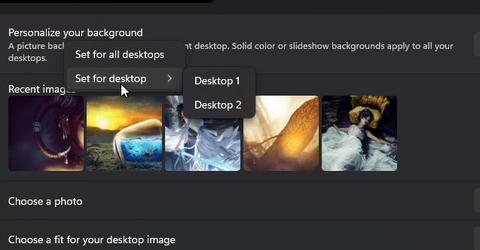
I am trying to set a custom wallpaper for each of my monitors, and all the internet is telling me to pick a picture from the "Recent Images" in the Personalization>Background section of the settings, right click it and choose "Monitor 1" or "Monitor 2". However, I am only getting the option for "Desktop 1" and "Desktop 2".
1667646638760.png
This does not change the wall paper for the monitors.
 

My Computer My Computer

At a glance

Windows 11i9 12900KDDR5 64GBGeforce RTX 3060
OS
Windows 11
Computer type
PC/Desktop
Manufacturer/Model
Asus
CPU
i9 12900K
Motherboard
Asus Prime Z690-A
Memory
DDR5 64GB
Graphics Card(s)
Geforce RTX 3060
This does not change the wall paper for the monitors.
Close all additional Virtual Desktops first, then set wallpapers, then go back to the setup you had.
 

My Computers My Computers

  • At a glance

    Windows 11 Pro
    OS
    Windows 11 Pro
    Computer type
    PC/Desktop
    Manufacturer/Model
    ASUS ROG Strix
  • At a glance

    Windows 11 Pro
    Operating System
    Windows 11 Pro
    Computer type
    Laptop
    Manufacturer/Model
    ASUS VivoBook
  • ASUS VivoBook 'Lite' ~ Windows 11 Home
Close all additional Virtual Desktops first, then set wallpapers, then go back to the setup you had.
Hey Edwin,

I am unaware of any "Virtual Desktops" that I have. I closed most of the running programs I have open, and just restarted my PC to be sure. Is there somewhere I should look?
 

My Computer My Computer

At a glance

Windows 11i9 12900KDDR5 64GBGeforce RTX 3060
OS
Windows 11
Computer type
PC/Desktop
Manufacturer/Model
Asus
CPU
i9 12900K
Motherboard
Asus Prime Z690-A
Memory
DDR5 64GB
Graphics Card(s)
Geforce RTX 3060

My Computers My Computers

  • At a glance

    Windows 11 Pro
    OS
    Windows 11 Pro
    Computer type
    PC/Desktop
    Manufacturer/Model
    ASUS ROG Strix
  • At a glance

    Windows 11 Pro
    Operating System
    Windows 11 Pro
    Computer type
    Laptop
    Manufacturer/Model
    ASUS VivoBook
  • ASUS VivoBook 'Lite' ~ Windows 11 Home

My Computer My Computer

At a glance

Windows 11i9 12900KDDR5 64GBGeforce RTX 3060
OS
Windows 11
Computer type
PC/Desktop
Manufacturer/Model
Asus
CPU
i9 12900K
Motherboard
Asus Prime Z690-A
Memory
DDR5 64GB
Graphics Card(s)
Geforce RTX 3060

My Computers My Computers

  • At a glance

    Windows 11 Pro
    OS
    Windows 11 Pro
    Computer type
    PC/Desktop
    Manufacturer/Model
    ASUS ROG Strix
  • At a glance

    Windows 11 Pro
    Operating System
    Windows 11 Pro
    Computer type
    Laptop
    Manufacturer/Model
    ASUS VivoBook
  • ASUS VivoBook 'Lite' ~ Windows 11 Home

Latest Support Threads

Back
Top Bottom





