- Local time
- 11:21 AM
- Posts
- 14
- OS
- Windows 11 Education 25H2
Hello! I need help with an error in my freshly installed Windows 11. Quite often, after waking the computer from sleep mode and then logging in, I can't see program shortcuts on the taskbar! I have the latest N-Vidia graphics card drivers, so I don't know what could be causing this? Thanks for all the advice.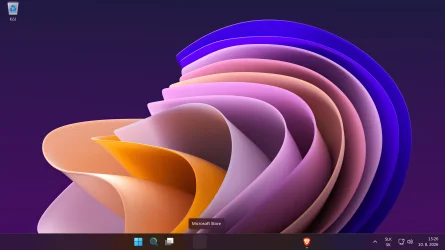
My Computer
At a glance
Windows 11 Education 25H2Typ procesora QuadCore AMD Ryzen 5 3400G, 370...16GBNVIDIA GeForce GTX 1050
- OS
- Windows 11 Education 25H2
- Computer type
- PC/Desktop
- Manufacturer/Model
- Micro-Star International Co., Ltd./MS-7A39
- CPU
- Typ procesora QuadCore AMD Ryzen 5 3400G, 3700 MHz
- Motherboard
- MSI B350M Gaming Pro
- Memory
- 16GB
- Graphics Card(s)
- NVIDIA GeForce GTX 1050
- Sound Card
- Realtek ALC887
- Monitor(s) Displays
- TV Panasonic 4K
- Screen Resolution
- 3 840 x 2 160
- Hard Drives
- WDC WD10EUCX-63YZ1Y0 (WD-WMC0S0152424) [931 GB] DATA & WDC WDS250G2B0B-00YS70 (173503433845) [232 GB] Systém
- Keyboard
- Dell
- Mouse
- Dell
- Internet Speed
- 40Mb
- Browser
- Brave
- Antivirus
- Eset Smart Security Premium