

- Local time
- 6:18 AM
- Posts
- 228
- OS
- Windroid 11 Pro / Win 10 Pro
I'm trying out NordVPN and using thier program.
I turned on split tunneling and set it to "Type: Enable VPN for selected apps". Then added a few browsers to the list.
I opened a browser I added and one I didn't and confirmed on ipleak they returned different ips. This would be good, no need to turn vpn on and off, I can just leave it on.
Then I went to mux a video file with MKVToolnix. When I opened the program I got a popup that an update was available. But I have that program blocked in the firewall. I block everything I don't specifically need or want to have network access.
I started checking, other programs I have blocked in the firewall could now access the internet too.
I turned off the split tunneling and my firewall is working as expected again.
I've contacted NordVPN support, I've yet to recieve an intelligent reply, only form letters so far. I've also sent them a link to this post.
Note: I use the built in firewall and the stand alone version of Windows Firewall Control.
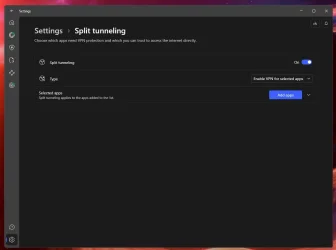
I turned on split tunneling and set it to "Type: Enable VPN for selected apps". Then added a few browsers to the list.
I opened a browser I added and one I didn't and confirmed on ipleak they returned different ips. This would be good, no need to turn vpn on and off, I can just leave it on.
Then I went to mux a video file with MKVToolnix. When I opened the program I got a popup that an update was available. But I have that program blocked in the firewall. I block everything I don't specifically need or want to have network access.
I started checking, other programs I have blocked in the firewall could now access the internet too.
I turned off the split tunneling and my firewall is working as expected again.
I've contacted NordVPN support, I've yet to recieve an intelligent reply, only form letters so far. I've also sent them a link to this post.
Note: I use the built in firewall and the stand alone version of Windows Firewall Control.
My Computers
-
At a glance
Windroid 11 Pro / Win 10 ProIntel Core i9-14900K Raptor Lake Refreshed 6....32GB (2x16) GSKILL Trident Z5 RGB Series (Int...MSI Gaming GeForce RTX 4070 12GB- OS
- Windroid 11 Pro / Win 10 Pro
- Computer type
- PC/Desktop
- Manufacturer/Model
- MSI
- CPU
- Intel Core i9-14900K Raptor Lake Refreshed 6.0 GHZ
- Motherboard
- MSI MAG Z790 Tomahawk WiFi
- Memory
- 32GB (2x16) GSKILL Trident Z5 RGB Series (Intel XMP 3.0) DDR5 RAM 6700MT/s
- Graphics Card(s)
- MSI Gaming GeForce RTX 4070 12GB
- Sound Card
- Onboard Realtek® ALC4080 Codec
- Monitor(s) Displays
- Monitor #1 Samsung Odyssey G50A WQHD G-Sync HDR10 Monitor #2 HP LA1911
- Screen Resolution
- 2560x1440 and 1280x1024
- Hard Drives
- Samsung 980 PRO SSD 1TB PCIe 4.0 NVMe Gen 4 Gaming M.2 (145GB Win11/100GB Win10/685GB More Games)
Crucial CT2000MX500SSD1 2TB (Games)
Western Digital Blue WD60EZAZ 6TB (Data/Backup)
Western Digital Blue WD60EZAZ 6TB (Media)
Western Digital Blue WD80EAAZ 8TB (Storage)
- PSU
- Rosewill Hive-750S
- Case
- Cooler Master Elite 430 Mid Tower
- Cooling
- Cooler Master ML240L V2 Liquid CPU cooler + 3x120mm in + Isolated PSU Standard upward flow
- Keyboard
- Microsoft Natural Elite White PS/2 (with usb adapter)
- Mouse
- Microsoft D67-00001 Trackball Optical Mouse (rebuilt with ceramic bearings)
- Internet Speed
- 450Mb/s hard wired
- Browser
- FF, Mullvad, Tor
- Antivirus
- Win Def
- Other Info
- Razer Tartarus V2 Gaming Keypad
Logitech Z-906 5.1 THX 500w (Original 8" Sub with Polk Audio satellites)
-
At a glance
Windows 11 ProIntel Core i9-14900K Raptor Lake Refreshed 6....32GB (2x16) GSKILL Trident Z5 RGB Series (Int...MSI Gaming GeForce RTX 3060Ti 8GB- Operating System
- Windows 11 Pro
- Computer type
- PC/Desktop
- Manufacturer/Model
- MSI
- CPU
- Intel Core i9-14900K Raptor Lake Refreshed 6.0 GHz FCLGA1700 (Gen 14)
- Motherboard
- MSI MAG Z790 Tomahawk WiFi
- Memory
- 32GB (2x16) GSKILL Trident Z5 RGB Series (Intel XMP 3.0) DDR5 RAM 6700MT/s
- Graphics card(s)
- MSI Gaming GeForce RTX 3060Ti 8GB
- Sound Card
- Onboard Realtek® ALC4080 Codec
- Monitor(s) Displays
- Monitor #1 Samsung Odyssey G50A WQHD G-Sync HDR10 Monitor #2 Samsung TU7000 55" TV
- Screen Resolution
- 2560x1440 and 3840x2160
- Hard Drives
- Samsung 980 PRO SSD 1TB PCIe 4.0 NVMe Gen 4 Gaming M.2 (System)
Samsung 980 PRO SSD 2TB PCIe 4.0 NVMe Gen 4 Gaming M.2 (Games)
Crucial CT1000MX500SSD1 1TB (More Games)
WD Green WD20EZRX 2TB (Data/Backup)
WD Blue WD60EZAZ 6TB (Media)
- PSU
- Rosewill Hive-750S
- Case
- Cooler Master N400 NSE-400-KKN2 Mid-Tower
- Cooling
- Cooler Master ML240L V2 Liquid CPU cooler + 3x120mm in + 2x120mm + Isolated PSU Reverse flow front exhaust
- Keyboard
- Logitech MK345 Wireless
- Mouse
- MSI G20 Elite and Logitech MK345 Wireless
- Internet Speed
- 450Mb/s hard wired
- Browser
- FF
- Antivirus
- Win Def
- Other Info
- Razer Tartarus Gaming Keypad
MSI GC30 Gaming Controller (Xbox style)






