Hello,
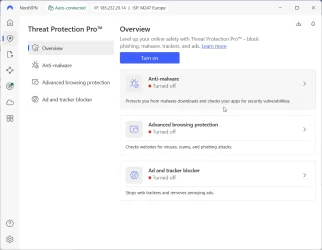
I’m having an issue with the **Threat Protection Pro** feature in **NordVPN** on **Windows 11 Pro (version 25H2)**. After enabling this feature, the system behaves abnormally and some apps or websites stop working.
 **Behavior description:**
- Some websites **do not load**
- Some websites load **very slowly**
- Internet connection in certain apps **sometimes drops**
- Threat Protection Pro may **conflict with firewall or antivirus**
- The behavior is not consistent – some days it works better than others
**My setup:**
- Windows 11 Pro, version 25H2
- NordVPN 7.x with Threat Protection Pro enabled
- Bitdefender + Windows Defender (latest versions)
**What I’ve tried:**
- System restart
- Turning Threat Protection Pro off and on
- Reinstalling NordVPN
- Checking firewall and exception settings
- Testing different websites and apps to identify a pattern
**Additional info:**
- I’ve already contacted **NordVPN support**, but no solution so far
- This is not limited to one website or app – it’s a broader issue
- My goal is to configure Threat Protection Pro so that it **works correctly** and **doesn’t slow down or block normal connections**
 **Looking for advice / tips:**
- How to properly configure Threat Protection Pro on Windows 11
- How to check for conflicts with antivirus/firewall
- How to ensure stable connections while Threat Protection is enabled
Thanks in advance to anyone who has experience or tips to solve this.
I’m having an issue with the **Threat Protection Pro** feature in **NordVPN** on **Windows 11 Pro (version 25H2)**. After enabling this feature, the system behaves abnormally and some apps or websites stop working.
**Behavior description:** - Some websites **do not load**
- Some websites load **very slowly**
- Internet connection in certain apps **sometimes drops**
- Threat Protection Pro may **conflict with firewall or antivirus**
- The behavior is not consistent – some days it works better than others
**My setup:** - Windows 11 Pro, version 25H2
- NordVPN 7.x with Threat Protection Pro enabled
- Bitdefender + Windows Defender (latest versions)
**What I’ve tried:** - System restart
- Turning Threat Protection Pro off and on
- Reinstalling NordVPN
- Checking firewall and exception settings
- Testing different websites and apps to identify a pattern
**Additional info:** - I’ve already contacted **NordVPN support**, but no solution so far
- This is not limited to one website or app – it’s a broader issue
- My goal is to configure Threat Protection Pro so that it **works correctly** and **doesn’t slow down or block normal connections**
**Looking for advice / tips:** - How to properly configure Threat Protection Pro on Windows 11
- How to check for conflicts with antivirus/firewall
- How to ensure stable connections while Threat Protection is enabled
Thanks in advance to anyone who has experience or tips to solve this.
- Windows Build/Version
- 25H2/26200, 7462
My Computer
At a glance
Windows 11 Pro 25H2 build 26200.9445AMD Ryzen 7 7700XRAM: 64 GB DDR5AMD Radeon RX 7800 XT (16 GB)
- OS
- Windows 11 Pro 25H2 build 26200.9445
- Computer type
- PC/Desktop
- Manufacturer/Model
- Custom build (Gigabyte)
- CPU
- AMD Ryzen 7 7700X
- Motherboard
- Gigabyte B650M GAMING X AX
- Memory
- RAM: 64 GB DDR5
- Graphics Card(s)
- AMD Radeon RX 7800 XT (16 GB)
- Sound Card
- Realtek (onboard)
- Monitor(s) Displays
- Samsung
- Screen Resolution
- 1920 x 1080
- Hard Drives
- Samsung 990 PRO 1 TB (NVM-e),
- Keyboard
- Logitech MX Master
- Mouse
- Logitech MX Master 3S
- Internet Speed
- 13ms/250Mbps/25Mbps
- Browser
- Microsoft Edge
- Antivirus
- Bitdefender
- Other Info
- UEFI, Secure Boot ON, TPM 2.0 ON